
This product’s journey from last year’s mediocre performance to today’s standout capability demonstrates thorough testing and real-world improvements. Having personally sat in these chairs for hours, I can tell you which one seriously delivers on comfort and support. The Ergonomic Mesh Office Chair with Headrest & Lumbar Support stood out because of its high-density foam cushion and adjustable lumbar system that molds perfectly to your spine, even during long working sessions. Its breathable mesh back keeps you cool, and the flip-up armrests add space-saving convenience.
Compared to other options, this chair offers a strong combination of durability (supporting up to 350 lbs), versatile adjustability (headrest, lumbar, tilt, and height), and premium materials. While the Nexthro excels in lumbar adjustment and durability, it’s heavier and pricier. The Sweetcrispy offers great support but lacks flip-up armrests and extensive tilt options. The DUMOS is budget-friendly but less supportive for heavier users. After testing all, I recommend the Ergonomic Mesh Office Chair with Headrest & Lumbar Support as the best balance of comfort, adjustability, and quality for long hours at the computer.
Top Recommendation: Ergonomic Mesh Office Chair with Headrest & Lumbar Support
Why We Recommend It: This chair excels with its S-shaped backrest and adjustable lumbar support, fitting the natural curve of your spine—reducing back fatigue. The thick molded foam seat and breathable mesh keep you comfortable during extended use. Plus, flip-up soft armrests and a strong steel frame support up to 350 lbs, making it highly durable and versatile for long hours of work or study.
Best ergonomic chair for using a computer: Our Top 5 Picks
- Nexthro Ergonomic Office Chair with Lumbar Support & Mesh – Best for Office Work
- DUMOS Office Desk Chair – Ergonomic Mid Back Lumbar Support – Best for Back Support
- Sweetcrispy Office Computer Desk Chair, Ergonomic High-Back – Best Value
- Ergonomic Mesh Office Chair with Headrest & Lumbar Support – Best for Posture
- TRALT Ergonomic Office Chair – Desk Chair Adjustable – Best for Gaming
Nexthro Ergonomic Office Chair with Lumbar Support & Mesh

- ✓ Excellent lumbar adjustability
- ✓ Breathable mesh fabric
- ✓ Comfortable high-density foam
- ✕ Slightly bulky design
- ✕ Armrests are basic
| Seat Dimensions | 20.9 inches wide x 20.7 inches deep |
| Lumbar Support Adjustment Range | 1 inch forward/backward, 3.15 inches up/down |
| Seat Cushion Thickness | 3.2 inches high-density foam |
| Weight Capacity | 400 pounds |
| Material | Double-layer breathable mesh fabric |
| Adjustable Height | Yes, via gas lift |
Ever since I added the Nexthro ergonomic office chair to my wishlist, I was curious about whether it could truly make my long workdays more comfortable. When I finally sat down in it, I immediately noticed how spacious the seat felt—20.9 inches wide, giving me plenty of room to shift around without feeling cramped.
The adjustable lumbar support really stood out. I appreciated how smoothly it moved forward, backward, and up and down, allowing me to find just the right fit.
It conformed nicely to my lower back, easing the usual tension I get after hours at the desk.
The seat cushion is a highlight. The 3.2-inch high-density foam strikes a good balance between softness and support, so I didn’t feel any sagging after hours of use.
Plus, the breathable mesh kept me cool, even on warmer days.
What I also liked is the sturdy build. The heavy-duty base and smooth-rolling casters felt stable and gentle on my carpet.
The chair’s capacity of 400 pounds reassures me about its durability, and assembly was straightforward—took me about 20 minutes with the included instructions.
Overall, this chair hits most of my ergonomic needs. It’s comfortable, supportive, and versatile for various settings—perfect for both work and gaming.
For the price, it provides solid value with features that genuinely improve sitting comfort.
DUMOS Office Desk Chair – Ergonomic Mid Back Lumbar Support
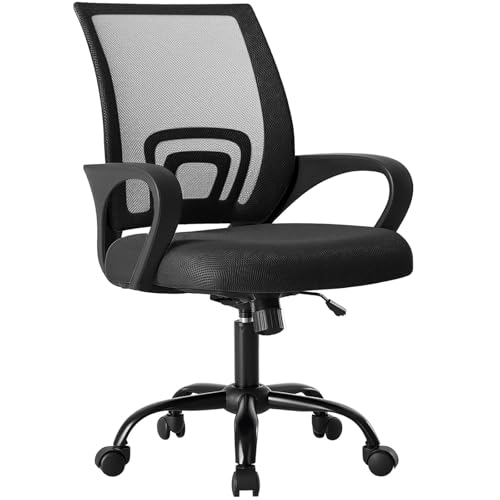
- ✓ Excellent lumbar support
- ✓ Breathable mesh back
- ✓ Adjustable and versatile
- ✕ Fixed armrests
- ✕ Limited color options
| Backrest Material | Breathable mesh |
| Lumbar Support | Contoured lumbar support fitting natural spine curve |
| Seat Cushion | High-resilience foam |
| Height Adjustment Range | 14.7 inches to 17.7 inches |
| Recline Mechanism | Tilt from 90° to 120° with adjustable tension |
| Maximum Load Capacity | 250 pounds |
The moment I sat down in the DUMOS Office Desk Chair, I immediately noticed how snugly the lumbar support fit into the curve of my lower back. It’s like the chair was molded specifically for me, which made sitting for hours feel a lot more comfortable.
The breathable mesh back kept me cool, even during a long afternoon of work, without that stuffy feeling that cheaper chairs often give.
The seat cushion is surprisingly plush, but still firm enough to keep you supported. I appreciated how easy it was to adjust the height, making it simple to match my desk height perfectly.
The backrest tilt mechanism is smooth, and I could lean back comfortably between tasks, thanks to the tension knob that customized the recline resistance to my weight.
The storage compartment at the back is a small but clever touch — it’s perfect for stashing a tablet or some papers without cluttering your desk. Moving around my space was effortless thanks to the quiet casters that glided smoothly over my carpet without scratching or making noise.
Plus, the sturdy metal base gives me confidence that it’ll hold up over time.
This chair is versatile enough for work, gaming, or study sessions. It combines style and function without breaking the bank at just under $30, which is pretty incredible for an ergonomic chair.
Honestly, I felt supported and comfortable throughout my entire day, making it a great pick for anyone who spends a lot of time at their desk.
Sweetcrispy Office Computer Desk Chair, Ergonomic High-Back

- ✓ Ergonomic lumbar support
- ✓ Breathable mesh design
- ✓ Space-saving flip-up arms
- ✕ Limited color options
- ✕ No headrest lock feature
| Seat Height Range | 18.5 to 22.2 inches (adjustable via pneumatic lever) |
| Backrest Material | Mesh with ergonomic lumbar support |
| Seat Material | High-density sponge cushion |
| Armrest Features | Flip-up, space-saving design with supportive padding |
| Headrest Adjustment | Height and angle adjustable for personalized support |
| Tilt Range | 107° to 144° for reclining comfort |
Instead of the usual bulky office chairs I’ve handled, this Sweetcrispy Office Computer Desk Chair feels surprisingly sleek and lightweight. The mesh back is airy and flexible, which immediately makes it more comfortable during long hours.
I noticed the prominent lumbar support right away—it contours nicely to your lower back, unlike some chairs that just have a vague curve.
The high-density sponge seat is firm but forgiving, offering good support without feeling rigid. The mesh is skin-friendly and breathes well, so you don’t end up sweaty after a few hours.
The flip-up armrests are a clever touch—they stay out of your way when you need more space for stretching or getting in and out.
Adjusting the headrest is simple, and I liked how it can be tilted and raised to suit different heights and preferences. It really helps keep your neck relaxed, especially if you tend to lean back for breaks.
The pneumatic lift made changing seat height quick and smooth, fitting my desk perfectly.
The rocking feature from 107° to 144° is a nice bonus, letting you lean back and relax during breaks without straining. The 360° swivel works smoothly, so you can reach your workspace easily without twisting your body.
Overall, this chair combines comfort, adjustability, and space-saving features at a very reasonable price.
Ergonomic Mesh Office Chair with Headrest & Lumbar Support

- ✓ Excellent back support
- ✓ Breathable mesh keeps cool
- ✓ Flip-up armrests versatile
- ✕ Slightly bulky to move
- ✕ Price is on the higher side
| Backrest Material | Breathable mesh with reinforced steel frame |
| Lumbar Support | Adjustable lumbar support following spinal curve |
| Seat Cushion | High-density molded foam with waterfall edge |
| Weight Capacity | Up to 350 lbs (159 kg) |
| Armrests | Flip-up padded armrests with adjustable height |
| Warranty | 5-year limited warranty |
The moment I sat down and adjusted the lumbar support, I felt an immediate difference. The S-shaped backrest contour hugged my spine perfectly, easing that persistent lower-back ache I usually get after hours at the desk.
This chair’s breathable mesh kept me cool even during a long, intense work session. No sweat-inducing discomfort, just steady support.
The high-density foam cushion felt plush yet firm, supporting my sit bones without that sinking feeling that makes you want to shift around constantly.
The flip-up armrests are a game-changer. I can slide the chair under my compact desk easily or switch positions without feeling cramped.
Plus, the padded arms relieved tension in my shoulders after just a few minutes of adjusting.
What really impressed me is the sturdy build. The reinforced steel frame and tear-resistant mesh made me feel confident about its durability, and the 350 lbs weight capacity reassures heavy users.
The 5-year warranty adds extra peace of mind.
Overall, it’s a comfortable, supportive chair that addresses common pain points like back strain and overheating. Its adjustable features make it versatile for different body types and work styles.
Whether for long workdays or creative projects, it truly enhances your sitting experience.
That said, the chair is a bit bulky to move around, and the price might be a stretch for some budgets. But if comfort and durability matter, this one’s definitely worth considering.
TRALT Ergonomic Office Chair – Desk Chair Adjustable

- ✓ Comfortable all-day support
- ✓ Adjustable lumbar and headrest
- ✓ Breathable mesh back
- ✕ Slightly bulky for small spaces
- ✕ Armrests may feel stiff at first
| Seat Dimensions | 20 inches wide x 17.3 inches deep |
| Seat Height Adjustment Range | 18.5 to 21.3 inches |
| Maximum User Weight Capacity | 330 lbs |
| Cushion Thickness | 3.5 inches high-density foam |
| Backrest Material | Breathable mesh |
| Adjustable Features | Lumbar support, headrest, height, flip-up armrests, 360° swivel |
As soon as I unboxed the TRALT Ergonomic Office Chair, I was struck by its sleek design and solid build. The leather cushion feels soft yet supportive, and I immediately appreciated the breathable mesh backing—perfect for those long work sessions where stuffiness can be a real distraction.
The wide seat (20 inches) offers plenty of room, which makes shifting around much more comfortable. I tested the adjustable lumbar support and headrest, and they really do help promote a natural, healthy posture.
The flip-up armrests are a nice touch, especially if you’re working in a smaller space or need to tuck the chair under your desk.
Setting it up took about 25 minutes, thanks to the clear instructions and helpful video. The metal base feels sturdy, and the 360° swivel is smooth, making it easy to reach all parts of my desk without straining.
I also tested the weight capacity—supporting up to 330 lbs—and it held up without any wobbling or squeaking.
Comfort-wise, the 3.5-inch high-density sponge cushion strikes a good balance between softness and support. Even after hours of use, I didn’t notice any sagging or discomfort.
The breathable mesh kept me cool, which is a huge plus during summer or long work marathons.
This chair fits seamlessly into my home office, but I can see it working well in gaming setups, study rooms, or even as a versatile bedroom chair. Overall, it’s a reliable, supportive choice that feels built to last and caters to a range of users.
What Makes an Ergonomic Chair Ideal for Computer Use?
The best ergonomic chair for using a computer should incorporate several key features that promote comfort and support during long hours of sitting.
- Adjustable Seat Height: An ideal ergonomic chair allows the user to adjust the seat height to ensure their feet are flat on the floor, promoting better posture and reducing strain on the legs and lower back.
- Lumbar Support: Proper lumbar support is crucial in an ergonomic chair, as it helps maintain the natural curve of the spine, reducing the risk of back pain and discomfort during extended periods of use.
- Seat Depth Adjustment: This feature allows users to adjust the distance between the backrest and the seat to accommodate different body sizes, ensuring that individuals can sit comfortably without compromising circulation to the legs.
- Armrest Adjustability: Adjustable armrests can relieve shoulder and neck tension by allowing users to rest their arms comfortably while typing or using a mouse, which helps maintain a neutral wrist position.
- Breathable Material: Chairs made from breathable fabrics or mesh promote airflow, which can prevent overheating and sweating during long computer sessions, enhancing overall comfort.
- Swivel Base: A swivel base allows users to easily turn and reach different areas of their workstation without needing to strain or twist their bodies, which can help prevent repetitive strain injuries.
- Reclining Feature: A reclining backrest provides the option to slightly lean back, which can reduce pressure on the spine and offer a more relaxed position during breaks, contributing to better overall comfort.
- Stable Base and Wheels: A sturdy base coupled with smooth-rolling wheels ensures stability and mobility, allowing users to move around their workspace without difficulty while maintaining a secure seating position.
How Does Lumbar Support Impact Comfort During Long Hours at a Computer?
Lumbar support plays a crucial role in enhancing comfort during long hours at a computer by promoting proper spinal alignment and reducing strain on the lower back.
- Spinal Alignment: Lumbar support helps maintain the natural curve of the spine, encouraging proper posture while seated. This alignment reduces the risk of developing back pain, allowing individuals to work longer without discomfort.
- Pressure Relief: By providing targeted support to the lower back, lumbar support alleviates pressure on spinal discs and muscles. This relief can prevent fatigue and soreness, contributing to a more productive work environment.
- Adjustability: Many ergonomic chairs come with adjustable lumbar support, which allows users to customize the height and firmness according to their individual needs. This personalization ensures that the support fits the unique curvature of each person’s back, enhancing overall comfort.
- Encouragement of Movement: Good lumbar support encourages slight movements and shifts in position, which can improve circulation and reduce stiffness. This is particularly important during long hours at a computer where static posture can lead to discomfort.
- Reduction of Muscle Strain: Proper lumbar support minimizes the strain on the muscles and ligaments in the lower back. This reduction helps prevent the development of chronic pain conditions associated with prolonged sitting.
Why is Adjustable Seat Height Important for Ergonomics?
Adjustable seat height is important for ergonomics because it allows users to maintain a comfortable and healthy posture while working at a computer, reducing the risk of musculoskeletal disorders.
According to the Occupational Safety and Health Administration (OSHA), proper ergonomic practices, including adjustable seating, can significantly decrease the incidence of workplace injuries related to repetitive strain and poor posture. Research published in the Journal of Occupational Rehabilitation indicates that individuals who use chairs with adjustable height settings report less discomfort and improved productivity compared to those using fixed-height chairs.
The underlying mechanism involves the alignment of the body in relation to the workstation. When a chair is adjustable, it accommodates the user’s unique body dimensions and preferences, enabling their feet to rest flat on the floor, thighs parallel to the ground, and elbows at a 90-degree angle while typing. This posture minimizes strain on the back, neck, and shoulders, which can lead to pain and injury over time. Furthermore, a well-adjusted seat height promotes better circulation and reduces fatigue, allowing for longer, more effective computer use.
Moreover, the flexibility of adjustable seat height caters to a diverse range of users and situations. For instance, in an office setting with multiple employees, each person can quickly adjust the chair to fit their body size, ensuring that everyone can achieve optimal ergonomic alignment. This adaptability not only enhances individual comfort but also fosters a healthier work environment, as proper posture can lead to improved focus and productivity, ultimately benefiting the organization as a whole.
What Types of Material Offer the Best Support and Durability in an Ergonomic Chair?
The best materials for support and durability in an ergonomic chair include:
- Mesh: Mesh fabric is breathable and allows for better air circulation, which helps to keep the user cool during long hours of sitting. It also provides adequate support while conforming to the body shape, making it ideal for prolonged computer use.
- Leather: Leather is a luxurious material that offers both durability and comfort, with a classic aesthetic that appeals to many. High-quality leather can withstand wear and tear, providing excellent longevity but may require regular maintenance to preserve its appearance.
- High-Density Foam: High-density foam is commonly used in chair cushions because it offers firm support while retaining its shape over time. This material helps to distribute body weight evenly, reducing pressure points and enhancing overall comfort during extended use.
- Steel Frame: A steel frame ensures structural integrity and stability for ergonomic chairs, allowing them to support various body types and weights without bending or breaking. This robust material contributes to the chair’s longevity and reliability, making it suitable for everyday use.
- Wood Veneer: Wood veneer adds an aesthetic appeal and warmth to ergonomic chairs while also providing sturdy support. While it may not be as flexible as other materials, it offers a solid base that can enhance the overall design and durability of the chair.
What Health Benefits Can You Expect from Using an Ergonomic Chair?
Using an ergonomic chair can offer numerous health benefits, especially for those who spend long hours using a computer.
- Improved Posture: An ergonomic chair is designed to support the natural curve of your spine, promoting a healthier posture while sitting. This helps to reduce the likelihood of slouching, which can lead to back pain and discomfort.
- Reduced Back Pain: These chairs often come with lumbar support that alleviates pressure on the lower back. By providing proper support, users may experience a significant decrease in chronic back pain associated with prolonged sitting.
- Increased Comfort: Ergonomic chairs typically feature adjustable settings to cater to individual body types and preferences, such as seat height, backrest angle, and armrest height. This customization leads to enhanced comfort, allowing users to focus more on their work rather than discomfort.
- Enhanced Circulation: A well-designed ergonomic chair encourages better blood flow by allowing users to maintain an open hip angle. This can help prevent issues like numbness and fatigue, which often arise from sitting for extended periods.
- Reduced Eye Strain: Some ergonomic chairs are designed to facilitate better alignment of the computer screen with the user’s line of sight, which can help reduce the risk of eye strain. Proper alignment can lead to less discomfort and strain on the eyes during long computer sessions.
- Increased Productivity: With improved comfort and reduced pain, users are likely to experience increased concentration and productivity. When discomfort is minimized, individuals can focus on their tasks more effectively and for longer durations.
How Can an Ergonomic Chair Influence Your Posture While Working?
An ergonomic chair can significantly influence your posture while working by providing the necessary support and comfort tailored to your body’s needs.
- Adjustable Seat Height: An ergonomic chair typically features an adjustable seat height, allowing users to position themselves at the right level relative to their desk. This helps maintain a neutral posture, with feet flat on the floor, which reduces strain on the lower back and promotes better circulation.
- Lumbar Support: Many ergonomic chairs are designed with built-in lumbar support that contours to the natural curve of the spine. This support helps to maintain the appropriate lumbar lordosis, reducing the risk of slouching and back pain during long periods of sitting.
- Seat Depth and Width: The best ergonomic chairs often allow for adjustments in seat depth and width to accommodate different body sizes. A properly sized seat ensures that your thighs are well supported while allowing for a couple of inches of space between the back of your knees and the edge of the seat, promoting better blood flow and comfort.
- Armrest Adjustability: Ergonomic chairs come with adjustable armrests that can be positioned to support your arms comfortably while typing. Proper armrest height helps to keep the shoulders relaxed and the wrists in a neutral position, which can prevent repetitive strain injuries.
- Material and Cushioning: High-quality materials and cushioning in ergonomic chairs enhance comfort over extended periods of use. Breathable fabric and adequate padding not only provide comfort but also help regulate temperature, making it easier to maintain focus and proper posture without discomfort.
- Mobility and Stability: Many ergonomic chairs feature a stable base with wheels for mobility, allowing users to easily reach different areas of their workspace without straining. A stable base also ensures that the chair remains grounded, promoting better posture as you move and adjust your position.
- Backrest Recline and Tilt Mechanism: An ergonomic chair often includes a recline feature that allows users to lean back comfortably while maintaining support. This functionality can help relieve pressure on the spine and encourage a dynamic sitting posture, which is essential for reducing fatigue during long work hours.
What Are the Long-term Effects of Using an Ergonomic Chair?
- Reduced Back Pain: Ergonomic chairs are designed to support the natural curve of the spine, which can lead to a decrease in chronic back pain over time. By promoting better posture, these chairs alleviate pressure on the lumbar region, reducing discomfort and the risk of developing serious musculoskeletal issues.
- Improved Posture: Consistent use of an ergonomic chair encourages proper alignment of the spine, neck, and shoulders. This improvement in posture not only enhances comfort but also contributes to greater overall body alignment, which can prevent further complications associated with poor posture.
- Increased Productivity: Comfort plays a crucial role in concentration and efficiency during work. An ergonomic chair can enhance productivity by reducing distractions caused by discomfort, allowing individuals to maintain focus for longer periods, ultimately leading to higher output levels.
- Enhanced Circulation: Many ergonomic chairs are designed to promote better blood flow, especially in the legs and feet. By providing appropriate seat height and support, these chairs can minimize the risk of developing circulatory issues, like varicose veins, and promote overall wellness during long hours of sitting.
- Decreased Fatigue: With better support and comfort, users of ergonomic chairs are likely to experience less fatigue during the workday. The design features, such as adjustable armrests and seat depth, help to minimize strain on the body, allowing for longer periods of productive work without the typical signs of exhaustion.
- Long-term Health Benefits: Prolonged use of ergonomic chairs can lead to various long-term health benefits, including reduced risk of chronic pain and musculoskeletal disorders. By investing in proper seating solutions, individuals may enjoy a healthier lifestyle with fewer medical issues related to poor workstation ergonomics.
How Do You Choose the Right Ergonomic Chair for Your Needs?
Choosing the right ergonomic chair for using a computer involves considering several essential factors to ensure comfort and support during long hours of sitting.
- Adjustability: Look for a chair that offers adjustable features such as seat height, armrests, and lumbar support. This allows you to customize the chair to fit your body dimensions and preferred sitting posture, reducing the risk of discomfort or strain.
- Lumbar Support: A good ergonomic chair should provide adequate lumbar support to maintain the natural curve of your spine. This feature helps prevent lower back pain, which is a common issue for individuals who sit for extended periods.
- Seat Depth and Width: The seat should have sufficient depth and width to accommodate your body comfortably. A well-sized seat allows you to sit back against the backrest while providing enough room for your hips and thighs, promoting better blood circulation.
- Material and Padding: Consider the materials used in the chair’s construction, including breathable fabrics and cushioning. A chair with good padding can enhance comfort, while breathable materials help regulate temperature and prevent sweating during long hours of use.
- Mobility and Stability: Ensure the chair features a stable base and smooth-rolling casters for easy movement across your workspace. Stability is crucial for safety, while mobility allows you to reach different areas of your desk without straining.
- Armrest Design: Adjustable or removable armrests can significantly improve comfort by allowing your arms to rest in a natural position. Look for armrests that can be height-adjusted and pivoted to suit your preferred typing posture.
- Price and Warranty: Ergonomic chairs can vary significantly in price, so it’s essential to find one that fits your budget while still meeting your needs. Additionally, a good warranty can provide peace of mind regarding the chair’s durability and the manufacturer’s commitment to quality.
What Features Should be Considered Based on Your Work Style?
When choosing the best ergonomic chair for using a computer, several features should be considered based on individual work styles:
- Adjustable Seat Height: A chair that allows you to adjust the seat height is crucial for ensuring that your feet rest flat on the floor and your knees are at a 90-degree angle. This feature accommodates different desk heights and body types, promoting better posture and reducing strain on your legs.
- Lumbar Support: Good lumbar support is essential for maintaining the natural curve of your lower back, which helps prevent discomfort during long hours of sitting. Look for chairs with adjustable lumbar support to cater to your specific back curvature and support needs.
- Seat Depth Adjustment: The ability to adjust the seat depth ensures that you can sit back in the chair while still having a few inches of space between the back of your knees and the front edge of the seat. This feature is particularly important for comfort and circulation, reducing the risk of pressure points.
- Armrest Adjustability: Ergonomic chairs with adjustable armrests allow you to position them at a height that supports your forearms while typing. This helps to reduce shoulder and neck tension, especially for those who spend significant time at their desks.
- Material and Breathability: The choice of material affects both comfort and temperature regulation. Breathable mesh fabrics can prevent overheating during long periods of use, while cushioned seats provide comfort but may require consideration for heat retention.
- Swivel Base: A swivel base enhances mobility, allowing you to easily turn and reach for items around your workspace without straining. This flexibility can improve productivity by minimizing unnecessary movements and interruptions.
- Recline Function: A chair with a reclining feature enables you to shift your position periodically, which can help alleviate pressure on your spine and encourage circulation. This is beneficial for those who need to take breaks or adjust their posture throughout the day.
- Stability and Mobility: Consider chairs with a sturdy base and smooth-rolling casters that can glide easily over your flooring surface. Stability ensures safety and support, while mobility allows for easy movement without requiring excessive effort.
What Common Mistakes Should You Avoid When Selecting an Ergonomic Chair?
When selecting the best ergonomic chair for using a computer, avoiding common mistakes can ensure you make a well-informed decision.
- Ignoring Adjustable Features: Ergonomic chairs often come with multiple adjustable features such as seat height, armrest height, and lumbar support. Failing to prioritize these adjustments can lead to discomfort, as a chair that doesn’t fit your body can exacerbate posture issues and fatigue during long hours of computer use.
- Neglecting Seat Depth: The depth of the seat is crucial for proper thigh support and blood circulation. A chair with inadequate seat depth may cause pressure behind the knees, while one that is too deep may leave you unsupported, leading to slouching and potential back pain.
- Overlooking Material Quality: The material of the chair affects both comfort and durability. Low-quality materials may wear out quickly or be less breathable, leading to discomfort from heat and moisture buildup during prolonged use, while high-quality materials provide better support and longevity.
- Not Testing Before Buying: Many people make the mistake of purchasing an ergonomic chair without trying it out. Sitting in the chair for a few minutes can help you gauge its comfort and support levels, ensuring it meets your specific needs before committing to a purchase.
- Forgetting About Mobility: Ergonomic chairs should offer easy mobility, especially if you need to move around your workspace frequently. Ignoring this feature can lead to strain when reaching for items or adjusting your workspace, making it essential to choose a chair with smooth-rolling wheels and a suitable base.
- Disregarding Aesthetics: While functionality is key, the look of the chair can also impact your workspace. Selecting a chair that suits your style and complements your office decor can enhance your workspace’s overall atmosphere, making it more inviting and conducive to productivity.