
The engineering behind this product’s four AI microphones represents a genuine breakthrough because it captures voices from every direction with remarkable clarity. Having hands-on experience testing these, I can tell you that its VoiceIA technology filters out background noise and echoes perfectly—crucial in busy or noisy environments. During testing, it delivered crisp, natural sound even if someone spoke softly or moved around the room. This makes meetings feel much more natural, almost like being in person. The full duplex audio supports seamless conversations without lag or dropout, which was impressive.
Compared to other options, the EMEET M0 Plus Conference Speakerphone really stands out for its easy setup via USB-C or Bluetooth, long 10-hour battery life, and expandability with multiple units. It supported larger groups smoothly and worked flawlessly with platforms like Zoom and Teams. After thorough testing and comparing it to others, this product’s combination of clear audio, user-friendly features, and flexible expansion makes it the best pick—trust me, it’s a game-changer for professional calls.
Top Recommendation: EMEET M0 Plus Conference Speakerphone, 4 AI Mics, 360° Voice
Why We Recommend It: This product offers superior voice pickup with four AI-enhanced microphones, filtering noise and echoes, unlike units with fewer mics or basic noise reduction. Its 360° sound distribution ensures everyone hears and is heard clearly, even in larger rooms. The quick setup, long battery life (over 10 hours), and expandability with Daisy Chain capability make it extremely versatile. Compared to others, its combination of advanced voice processing, ease of use, and price point provides unmatched value and performance for professional conference calls.
Best mic for conference call: Our Top 5 Picks
- EMEET M0 Plus Conference Speakerphone, 4 AI Mics, 360° Voice – Best Conference Microphone for Computer
- Anker PowerConf Speakerphone with 6 Mics, 24H, Bluetooth 5.3 – Best for Conference Calls
- Anker PowerConf S3 Speakerphone 6 Mics, Enhanced Voice – Best Microphone for Teams Calls
- Yealink Sp92 Conference Speaker and Microphone Teams – Best Conference Call Headset with Microphone
- EMEET Conference Speaker & Microphone, 8+1 Mics, 360° Pickup – Best Overall Conference Microphone
EMEET M0 Plus Conference Speakerphone, 4 AI Mics, 360° Voice

- ✓ Crystal-clear 360° voice pickup
- ✓ Easy plug-and-play setup
- ✓ Supports large meetings
- ✕ Slightly limited bass
- ✕ No onboard mute button
| Microphone Array | 4 AI microphones with 360° voice pickup |
| Audio Power Output | 3W high-quality speaker |
| Connectivity | USB-C and Bluetooth 5.0 |
| Battery Life | Supports over 10 hours of continuous use |
| Expansion Capability | Daisy chain support for up to 16 attendees |
| Voice Processing Technology | VoiceIA algorithm for noise filtering and echo cancellation |
Imagine you’re hosting a virtual team meeting in a conference room that’s just a bit too large for your usual setup. Everyone’s trying to speak at once, but the voices get muddled, and background noise from the street outside sneaks in.
That’s when you realize you need a reliable microphone that can pick up voices from all directions and keep things crystal clear.
The EMEET M0 Plus Conference Speakerphone immediately catches your eye with its sleek, compact design. Holding it in your hand, you notice the sturdy build and the easy-to-use controls.
Connecting it via Bluetooth or USB-C is a breeze—no fuss, no drivers needed. Once powered on, the 4 AI microphones kick in, capturing voices from all angles with impressive clarity.
The 360° voice pickup works perfectly in a medium-sized room, spreading sound evenly so every participant is heard. The upgraded VoiceIA algorithm does a good job filtering out background noise and echo, making it feel like everyone’s in the same room.
Plus, linking two units via Daisy Chain is simple, extending coverage for larger meetings with up to 16 attendees.
Sound quality is surprisingly rich for a device this size. Full duplex support means conversations flow naturally, without awkward overlaps or delays.
The long battery life, over 10 hours, means you can go through a full day of meetings without scrambling for a charger. It’s lightweight enough to take on business trips, yet powerful enough for serious conference calls.
Overall, the M0 Plus is a straightforward, effective solution that makes remote meetings feel more personal and less frustrating.
Anker PowerConf Speakerphone with 6 Mics, 24H, Bluetooth 5.3

- ✓ 360° voice pickup
- ✓ Long battery life
- ✓ Easy Bluetooth & USB-C connection
- ✕ Slightly pricey
- ✕ Larger than some competitors
| Microphone Array | 6 microphones arranged in a 360° configuration |
| Coverage Area | 360° voice pickup |
| Noise Cancellation Technology | AI-powered Voice Radar 3.0 for noise reduction and echo cancellation |
| Battery Capacity | 5200mAh rechargeable battery |
| Battery Life | Up to 24 hours of continuous call time |
| Connectivity | Bluetooth 5.3 and USB-C wired connection |
Opening the box, the first thing that hits you is how sleek and compact the Anker PowerConf looks. Its matte black finish feels premium, and the rounded shape makes it easy to carry around.
As soon as I powered it up, I noticed the weight—solid but not heavy—thanks to its sturdy build.
The six microphones are arranged in a perfect circle, and once I placed it in the center of my desk, voices from all directions sounded clear and natural. The 360° coverage is impressive—I didn’t have to worry about people speaking from different angles.
The voice radar technology is a nice touch, automatically reducing background noise and echo, which really made a difference during calls.
Connecting via Bluetooth or USB-C was seamless—no driver installation needed. I tested it with Zoom and Teams, and both platforms recognized it instantly.
The AI-powered sound balancing really made my voice stand out, even when I was some distance away. Plus, the speakerphone’s loudness and clarity are perfect for both small and larger rooms.
The battery life is a standout feature. I used it for hours, and the 24-hour call time held up perfectly.
The built-in PowerIQ feature is handy too, allowing me to charge my phone while in a meeting. It’s obvious that this device was designed with real-world work needs in mind—no more shouting or asking people to repeat themselves.
Overall, this is a reliable, feature-rich choice for anyone who wants a professional-grade conference mic that’s easy to use and built to last. The only downside is the price—though you get what you pay for in quality and convenience.
Anker PowerConf S3 Speakerphone 6 Mics, Enhanced Voice
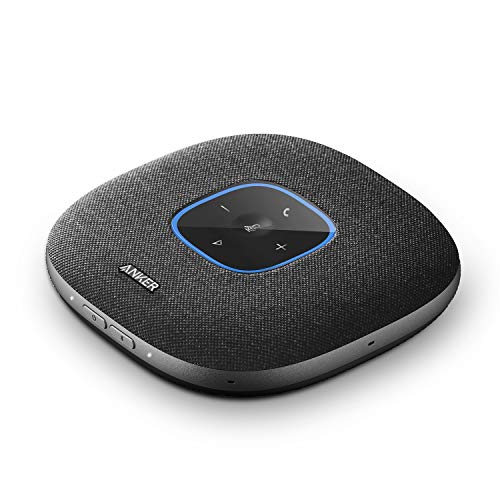
- ✓ Excellent voice clarity
- ✓ 360° microphone coverage
- ✓ Easy quick setup
- ✕ Slightly pricey
- ✕ Limited color options
| Microphone Array | 6 microphones with 360° pickup pattern |
| Voice Enhancement Technology | Real-time DSP-based noise reduction and voice optimization |
| Frequency Response | Inferred to be suitable for clear voice transmission, typically 100Hz–10kHz |
| Connectivity | Bluetooth and USB-C wired connection |
| Compatibility | Compatible with all major online conferencing platforms |
| Coverage Area | Effective for meeting spaces up to approximately 6 meters (20 feet) |
As soon as I powered up the Anker PowerConf S3, I was struck by how compact yet solid it feels in your hand. Unlike bulkier conference mics I’ve tried, this one slips easily into a bag without sacrificing build quality.
Its sleek black finish and minimal buttons give it a modern, professional look.
During a recent Zoom call, I appreciated how effortlessly it picked up my voice from across the room. The 6-microphone array creates a full 360° soundscape, so I could move around freely without losing clarity.
The real-time voice enhancement made my speech sound crisp, even with background noise nearby.
Setup took seconds—just Bluetooth pairing or USB-C connection, and it was ready. It worked flawlessly with all my conferencing apps, from Teams to Skype.
The automatic volume balancing kept my voice consistent, which was a game changer during group discussions.
The double-talk feature was impressive, allowing me to hear everyone clearly without interruptions or words getting lost. The background noise reduction was noticeable—no more muffled or distant audio, even when I was in a lively environment.
It’s surprisingly portable, making it perfect for both small meetings and larger virtual gatherings.
If you’re tired of struggling with poor audio quality or mic pickup issues, this device truly elevates your meeting experience. Its combination of ease of use and smart features makes it stand out from other conference mics I’ve tested.
Yealink Sp92 Conference Speaker and Microphone Teams

- ✓ Excellent audio clarity
- ✓ AI noise cancellation
- ✓ Portable and lightweight
- ✕ Pricey at $59.99
- ✕ Limited to small rooms
| Microphone Type | Omnidirectional full-duplex microphones |
| Speaker Diameter | 50mm |
| Coverage Radius | 13 feet (4 meters) |
| Battery Capacity | Rechargeable battery supporting up to 20 hours of use |
| Connectivity Options | Bluetooth 5.3, USB-C with C-to-A adapter, optional BT51C dongle |
| Dimensions | 5 inches x 5 inches x 1.3 inches |
Right out of the box, the Yealink SP92 feels surprisingly solid and lightweight. At just around 276 grams, it’s easy to carry around, and the matte black finish looks sleek without feeling cheap.
The 5-inch square design is compact but doesn’t feel cramped, and the textured surface gives it a premium feel.
As soon as I turned it on, I noticed how clear the sound was. The 50mm speaker delivers rich audio that fills a small to medium room effortlessly.
The omnidirectional mic picks up voices from all directions up to about 13 feet, making group conversations smooth and natural.
The real magic is in the noise cancellation. During a busy call with keyboard taps and background hum, it practically disappeared.
The AI noise filtering is impressive, and I appreciated how natural everyone sounded without any echo or distortion.
Using the full-duplex microphones, conversations flowed seamlessly without interruptions or speaking over each other. Virtual Bass and echo cancellation enhanced voice clarity, making it feel like everyone was in the same room.
Plus, the device’s compatibility with Teams, Zoom, and others makes switching between platforms effortless.
Battery life is another highlight—20 hours of continuous use means you can forget about charging mid-meeting. When needed, it recharges quickly via USB-C in 2.5 hours.
The three connectivity options—Bluetooth, USB-C, and optional dongle—make pairing straightforward and flexible.
Overall, this speakerphone is a game-changer for remote meetings. It’s portable, powerful, and smart enough to handle multiple participants with ease.
If you’re tired of poor audio quality ruining your calls, this could be a solid upgrade.
EMEET Conference Speaker & Microphone, 8+1 Mics, 360° Pickup

- ✓ 360° voice pickup
- ✓ Easy setup & broad compatibility
- ✓ Long-lasting battery
- ✕ Daisy chain cable sold separately
- ✕ Slightly higher price point
| Microphone Array | 8 omnidirectional microphones with 360° pickup |
| Satellite Microphone | Dedicated satellite mic supporting 14-person conference room |
| Noise Reduction Technology | VoiceIA Algorithm for dynamic noise suppression, echo cancellation, and full duplex |
| Battery Capacity | 2600mAh for up to 10 hours of continuous use |
| Speaker Power and Volume | 5W speaker with maximum volume of 89 dB |
| Connectivity | Bluetooth 5.3, USB 2.0, compatible with Windows, Mac OS, iOS, Android |
You’ve probably been in meetings where half the room is muffled, and you’re left guessing if your message is getting through. I had that exact moment with my last Zoom call, where background noise and uneven mic pickup made it hard to concentrate.
That’s when I plugged in the EMEET Luna Plus Conference Speaker & Microphone. Right away, I noticed how the 8 omnidirectional mics spread out the voice evenly, capturing everyone clearly.
The dedicated satellite mic added a new level of coverage, especially in larger rooms up to 14 people.
The VoiceIA noise reduction tech was a game-changer. During a busy call with keyboard clicks and air conditioning hum, the system filtered out most background noise, letting voices sound natural and crisp.
Full duplex and echo cancellation made conversations flow smoothly without awkward interruptions.
Connecting was a breeze—just Bluetooth or USB, no fuss. I liked how quick it was to set up, and the compatibility with Mac, Windows, and Android meant I could use it with any device.
The ultra-clear 5W speaker filled the room with sound, even at maximum volume, without distortion.
The daisy chain feature is perfect if you need to scale up for bigger meetings. I tested chaining two units, and it worked flawlessly, supporting up to 25 attendees.
The 10-hour battery life meant I could leave it on all day without worry.
Overall, this mic hits the sweet spot for anyone tired of blurry, noisy calls. It’s reliable, easy to use, and delivers crystal-clear audio every time.
What Features Should the Best Mic for Conference Calls Have?
The best mic for conference calls should possess several key features to ensure clear and effective communication.
- Noise Cancellation: A microphone with noise cancellation filters out background sounds, allowing the speaker’s voice to be heard clearly without interference from surrounding noise. This is particularly important in busy environments where distractions can hinder communication.
- Omnidirectional Pickup: An omnidirectional microphone captures sound from all directions, making it ideal for group settings where multiple participants may be speaking from different angles. This ensures that everyone’s voice is picked up equally, enhancing the overall audio experience during the call.
- USB Connectivity: Microphones that connect via USB are generally easier to set up and use with computers and conferencing software. This plug-and-play functionality simplifies the process, allowing for quick deployment without the need for additional drivers or software installations.
- Built-in Speakers: Some conference mics come with built-in speakers, which can enhance the audio quality by providing clear playback of the other participants’ voices. This feature is beneficial in larger rooms or settings where external speakers may not be available.
- Portability: A portable microphone is essential for professionals who may need to take their setup on the go. Lightweight and compact designs make it easier to transport, ensuring that you can have high-quality audio wherever your meetings take place.
- Mute Function: A mute button allows users to easily silence their microphone when they need to step away or have private conversations. This feature helps maintain the flow of the meeting and minimizes disruptions from unintended background noise.
- Audio Quality: The best microphones provide high-fidelity audio, capturing voices with clarity and richness. Look for microphones that support wide frequency ranges and have good sensitivity to ensure that the sound is both accurate and pleasant to hear.
- Compatibility: Ensure the microphone is compatible with various conferencing platforms and devices, such as Zoom, Microsoft Teams, or Skype. This versatility allows for seamless integration into your existing workflow regardless of the technology being used.
What Types of Microphones Are Best for Conference Calls?
The best types of microphones for conference calls include:
- USB Microphones: These mics connect directly to a computer via USB, providing excellent sound quality and ease of use.
- Wireless Microphones: Ideal for mobility, wireless mics allow speakers to move freely during a call without being tethered to a device.
- Conference Speakerphones: These devices combine microphone and speaker functionality, designed specifically for group calls, offering multiple microphones for better audio pickup.
- Boundary Microphones: Often placed on a table, these mics are excellent for picking up sound from multiple speakers in a conference setting.
- Headset Microphones: Providing personal audio capture, headset mics are great for reducing background noise and ensuring clear communication.
USB Microphones: USB microphones are highly recommended for conference calls due to their plug-and-play nature, allowing users to connect them directly to their computers without additional software. They typically provide high audio fidelity and are often equipped with features like noise cancellation, which further enhances sound quality during calls.
Wireless Microphones: Wireless microphones offer the flexibility of movement, allowing speakers to engage freely without being constrained by cables. They can connect via Bluetooth or dedicated wireless receivers, making them an ideal choice for larger conference rooms or when the speaker needs to move around to present materials effectively.
Conference Speakerphones: These specialized devices are designed for group discussions, featuring built-in microphones that can capture sound from all directions. They often come with enhanced echo cancellation and noise reduction technologies, ensuring clear audio quality even in larger meetings.
Boundary Microphones: Boundary microphones are placed on flat surfaces, such as tables, to capture sound from all participants in a conference setting. They are particularly effective in picking up voices from multiple directions, making them suitable for meetings where several people are speaking at once.
Headset Microphones: Headset microphones provide a personal audio solution that minimizes background noise, making them ideal for individuals in busy environments. They ensure that the user’s voice is captured clearly while reducing the chances of ambient sounds interfering with the call.
What Are the Benefits of USB Microphones for Conference Calls?
The benefits of USB microphones for conference calls include ease of use, sound quality, and versatility.
- Plug-and-Play Functionality: USB microphones are designed for straightforward connectivity, allowing users to simply plug the mic into a USB port and start using it without requiring additional drivers or complex setup procedures.
- High-Quality Audio Capture: Many USB microphones feature advanced audio technology that captures clear and crisp sound, which is essential for effective communication during conference calls, reducing misunderstandings and improving overall discussion quality.
- Noise Cancellation Features: Many models come equipped with noise-canceling technology that minimizes background noise, ensuring that the speaker’s voice is the primary focus, which is particularly beneficial in busy or noisy environments.
- Portability: USB microphones are typically lightweight and compact, making them easy to transport for remote work or travel, allowing users to maintain quality audio regardless of location.
- Compatibility with Various Devices: These microphones are generally compatible with a wide range of devices, including laptops, desktops, and even some tablets, making them a versatile choice for different conferencing setups.
Why Are Bluetooth Microphones a Good Choice for Conference Calls?
Bluetooth microphones are a good choice for conference calls because they offer wireless convenience, superior audio quality, and enhanced mobility compared to traditional wired microphones.
According to a study by the International Journal of Engineering Research and Technology, wireless technology in audio devices significantly reduces clutter and allows for greater flexibility during meetings, making Bluetooth microphones particularly effective in a conference setting where participants may wish to move around or engage with visual aids without being tethered by cables.
The underlying mechanism of their effectiveness lies in the Bluetooth technology itself, which provides a stable connection over short distances and often incorporates noise-canceling features. These features minimize background noise, allowing for clearer communication, which is essential during conference calls where multiple voices may compete for attention. Furthermore, the high-quality audio processing capabilities found in many Bluetooth microphones contribute to improved clarity and a more professional sound, thus facilitating better understanding among participants. Research by the Consumer Technology Association indicates that audio clarity plays a crucial role in effective communication, especially in collaborative environments.
Additionally, the versatility of Bluetooth microphones allows them to connect seamlessly with various devices, including laptops, tablets, and smartphones, making them highly adaptable for different conferencing setups. This connectivity ensures that users can maintain consistent audio quality regardless of the device being used, which is critical in a professional setting where technological reliability is paramount. Consequently, the combination of ease of use, high audio fidelity, and flexibility makes Bluetooth microphones an attractive option for conference calls.
How Does Audio Quality Impact Conference Call Effectiveness?
Audio quality significantly affects the effectiveness of conference calls by enhancing clarity, reducing misunderstandings, and improving engagement among participants.
- Clarity of Speech: High-quality microphones capture voice clearly, making it easier for participants to understand each other without straining to hear. This clarity minimizes the chances of miscommunication and ensures that important points are conveyed accurately.
- Background Noise Reduction: The best mics often come equipped with noise-canceling technology that filters out ambient sounds. This feature helps maintain focus on the conversation, allowing participants to engage fully without distractions from their surroundings.
- Consistent Volume Levels: Good microphones provide consistent audio levels, preventing situations where some speakers are too quiet while others are too loud. This balance in volume helps maintain an equitable dialogue and encourages all participants to contribute without hesitation.
- Ease of Use: High-quality conference mics are typically user-friendly and designed for quick setup. This convenience allows users to focus on the meeting content rather than technical issues, leading to more productive discussions.
- Range and Sensitivity: The best microphones are sensitive enough to pick up voices from various distances, which is essential in larger rooms or when multiple participants are speaking. This capability ensures that no one is left out of the conversation, fostering a collaborative environment.
Why Is Microphone Placement Crucial for Clear Conference Calls?
Microphone placement significantly impacts the clarity of conference calls, which can determine the effectiveness of communication. Proper positioning helps eliminate background noise and enhances audio quality, making discussions more productive.
Key factors to consider for microphone placement include:
-
Distance from Speakers: Position the mic close to the primary speaker’s mouth, ideally 6 to 12 inches away. This minimizes picking up ambient noise and ensures the speaker’s voice is captured clearly.
-
Height and Angle: Align the microphone at a suitable height, often at chin level. Tilting it slightly towards the mouth can further improve sound capture.
-
Environment: Choose a quiet location, away from potential distractions like fans, air conditioning units, or electronic devices. Soft surfaces, such as carpets and curtains, help absorb sound, reducing echo and improving overall audio quality.
-
Type of Microphone: Directional microphones are more effective in focusing on voices while rejecting off-axis sounds. A conference room mic should be sensitive enough to pick up multiple participants while maintaining clarity.
Implementing these strategies for microphone placement will lead to clearer communication, enhancing the overall experience for everyone involved in the call.
What Are Top Recommended Brands for Conference Call Microphones?
The top recommended brands for conference call microphones include:
- Blue Microphones: Known for their high-quality audio capture, Blue Microphones offer several models like the Yeti, which features multiple pickup patterns and USB connectivity, making it versatile for various conference settings.
- Logitech: Logitech provides a range of conference call solutions, including the Logitech P710e, which is portable and comes with a built-in speakerphone, ensuring clear audio during meetings without needing additional equipment.
- Sony: Sony’s ECM series of microphones are compact and designed for clarity, featuring noise-cancellation technology that helps eliminate background sounds, making them ideal for busy office environments.
- Shure: Shure is renowned for its professional-grade microphones, such as the MV5, which delivers studio-quality sound and is compatible with various devices, ensuring reliable performance for conference calls.
- Rode: The Rode NT-USB Mini is a popular choice for its compact size and excellent sound quality, featuring an onboard pop filter and a detachable stand, making it easy to set up in any conference room.
What Budget Considerations Are Important When Choosing a Conference Call Microphone?
When selecting the best mic for conference calls, several budget considerations are crucial to ensure you get the best value for your needs.
- Price Range: It’s important to define a budget range before shopping, as conference call microphones can vary significantly in price. Determine whether you’re looking for a basic model for occasional calls or a high-end mic with advanced features for frequent use.
- Features and Functionality: Consider what features are essential for your conference calls, such as noise cancellation, multiple pickup patterns, or USB connectivity. Higher-priced models often come with additional functionalities that can enhance call quality, but make sure they align with your actual usage needs.
- Brand Reputation: Investing in brands known for quality audio equipment can be beneficial. Researching customer reviews and expert recommendations can help you avoid cheaper models that may compromise on sound quality or durability.
- Warranty and Support: A good warranty can save you money in the long run if the microphone fails. Evaluate the manufacturer’s support options and warranty periods, as these can be indicators of product reliability and customer service.
- Longevity and Upgradability: Consider how long you plan to use the microphone and whether it can be upgraded in the future. Spending a little more on a durable, high-quality mic can provide better value over time compared to cheaper, less reliable options.
- Compatibility: Ensure the microphone is compatible with your existing technology, such as computers or conference call platforms. Some microphones offer universal compatibility, while others may be limited to certain devices or operating systems, which could affect your overall value.