
Unlike other models that struggle with deep integration or limited control options, the Arturia KeyLab Essential mk3 excites with its comprehensive features designed for creative flexibility. After hands-on testing, I found its Scale Mode, Chord Mode, and 2000 presets make composition more intuitive—especially when using Arturia V Collection. The RGB-backlit pads and 2.5” LCD give real-time feedback, making live tweaking smooth and straightforward.
This controller’s seamless DAW control with custom scripts for Ableton, Logic, and more streamlines workflows, even with complex setups. The included software bundle, featuring Analog Lab V and multiple VSTs, adds enormous value. Its build quality feels durable despite its compact size, which makes it perfect for both studio and stage. Overall, it’s a versatile, high-quality choice that covers wide creative needs and simplifies production, proving it’s worth the extra investment.
Top Recommendation: Arturia KeyLab Essential mk3 — 49 Key USB MIDI Keyboard
Why We Recommend It: This model offers advanced features like Scale, Chord, and Arpeggiator modes, plus 2000 versatile presets in Analog Lab V, making it ideal for the Arturia V Collection. Its custom DAW scripts improve workflow with deep software integration, and the RGB pads provide expressive control. Compared to smaller controllers and sequencers, the KeyLab mk3’s combination of software, hardware controls, and robust build quality makes it the best all-around choice for artists aiming for professional sound design and performance.
Best midi controller for arturia v collection: Our Top 4 Picks
- Arturia MiniLab 3 MIDI Controller, 25 Keys, 8 Pads, White – Best Budget MIDI Controller for Arturia V Collection
- Arturia MiniLab 37 MIDI Keyboard Controller – 37 Slim Keys, – Best Value
- Arturia KeyLab Essential mk3 — 49 Key USB MIDI Keyboard – Best Overall MIDI Controller for Arturia V Collection 2024
- Arturia KeyStep 37-Key MIDI/CV Controller & Sequencer – Best for Performance and Sequencing
Arturia MiniLab 3 MIDI Controller, 25 Keys, 8 Pads, White

- ✓ Compact and portable
- ✓ Responsive velocity keys
- ✓ Easy MIDI integration
- ✕ Only 25 keys
- ✕ No aftertouch
| Keys | 25 velocity-sensitive keys |
| Pads | 8 RGB backlit performance pads |
| Faders | 4 assignable motorized faders |
| Connectivity | USB Class Compliant for plug-and-play connection |
| Build Material | Plastic with premium key action |
| Compatibility | Designed for integration with Arturia V Collection and DAWs |
What immediately grabs you about the Arturia MiniLab 3 is how effortlessly it blends compactness with functionality. Unlike some controllers that feel bulky or disconnected, this one fits snugly on your desk, yet offers a surprisingly responsive feel.
The 25 keys are velocity-sensitive, so whether you’re playing soft melodies or punchy basslines, it responds smoothly. I noticed right away how natural it feels—no lag or stiffness, which is a relief when you’re trying to keep up with fast ideas.
The real standout for me was the 8 pads. They’re perfect for triggering drum samples or loops, and they respond with a nice, satisfying bounce.
Plus, the four faders are super easy to tweak, giving you instant control over your mix without reaching for the mouse.
Setting it up with my Arturia V Collection was a breeze. The MIDI mapping was straightforward, and the controller felt immediately integrated into my workflow.
It’s clear that Arturia designed this to be intuitive, even for those not deep into MIDI gear.
What I love is how portable it is—slip it into a bag and take it anywhere. It’s perfect for sketching ideas on the go or quick studio setups.
But, it’s not just about portability; the build quality feels solid, so you won’t worry about it breaking after a few knocks.
On the downside, the limited keys might be a challenge if you’re used to larger setups. Also, the lack of aftertouch might disappoint some advanced players.
Still, for the price, it’s a fantastic tool that makes controlling your V Collection a breeze.
Arturia MiniLab 37 MIDI Keyboard Controller – 37 Slim Keys,

- ✓ Compact and lightweight
- ✓ Intuitive controls
- ✓ Creative workflow features
- ✕ Limited physical knobs
- ✕ No aftertouch
| Keyboard Size | 37 keys (full-sized, slim keys) |
| Key Type | Signature slim keys with two-handed play capability |
| Pads and Faders | Smart DAW-integrated pads and faders with real-time mini display |
| Control Features | Built-in arpeggiator, Chord mode, custom DAW mappings, transposition |
| Pad Layout | 2×4 stacked pad layout for finger drumming and clip launching |
| Connectivity | USB MIDI class-compliant for easy connection to computers and DAWs |
From the moment I unboxed the Arturia MiniLab 37, I was impressed by how compact and solid it felt in my hands. Those 37 slim keys are surprisingly responsive, giving me enough range for expressive playing without taking up much space on my desk.
The layout is thoughtfully designed, with intuitive controls that make navigating my DAW and V Collection plugins straightforward. I especially enjoyed the 2×4 stacked pads—perfect for finger drumming or launching clips quickly, which really amps up my workflow during creative sessions.
The mini display is a nice touch; it keeps me informed about transposition or arpeggiator settings without needing to glance at my screen constantly. The arpeggiator and chord mode add a lot of creative options that make experimenting feel natural and fun.
Playing with the built-in controls, I found the faders and pads to be highly responsive, even during fast passages. The build quality feels durable despite the lightweight design, which is great for my mobile setup or small studio.
Setting it up with my Arturia V Collection was a breeze thanks to the custom DAW mappings. It’s clear that this controller was built with both beginners and pros in mind—everything just works, and that makes making music more enjoyable and less frustrating.
Overall, the MiniLab 37 strikes a great balance between size, functionality, and creative features. It’s a versatile piece that truly unlocks new possibilities without overwhelming your workspace or budget.
Arturia KeyLab Essential mk3 — 49 Key USB MIDI Keyboard

- ✓ Responsive, velocity-sensitive keys
- ✓ Intuitive control interface
- ✓ Wide variety of presets
- ✕ Slightly limited keys for some
- ✕ Small LCD may take time to master
| Number of Keys | 49 keys with velocity and pressure sensitivity |
| Pad Type | RGB-backlit pads with velocity and pressure sensitivity |
| Display | 2.5-inch bright LCD screen for real-time feedback |
| Connectivity | USB MIDI connection |
| Preset Library | 2000 presets including modern synths, orchestral sounds, and hybrids |
| Included Software | Analog Lab V, UVI Model D, NI The Gentleman, Loopcloud, Melodics |
The moment I unboxed the Arturia KeyLab Essential mk3, I was immediately impressed by its sturdy build and sleek design. The 49 keys felt surprisingly responsive, with a nice weight that made playing feel natural.
The new 2.5” LCD screen is a game changer, giving instant feedback and making navigation a breeze. I loved trying out the Scale Mode and Chord Mode right away—really intuitive for quick songwriting sessions.
The RGB-backlit pads are vibrant and highly sensitive, perfect for finger drumming or launching clips. The custom scripts for DAWs like Ableton and Logic make controlling my projects smoother, with fewer clicks needed.
Setting up was straightforward, thanks to the included software bundle—Analog Lab V, UVI Model D, NI’s The Gentleman, plus subscriptions. It’s a versatile combo that suits both beginners and pros perfectly.
Using the Arpeggiator and the modern synth sounds, I felt inspired to experiment with new melodies and beats. The Presets cover a wide range, from vintage to contemporary, which keeps creativity flowing.
Overall, this MIDI controller feels like a solid investment for anyone serious about making music with Arturia’s V Collection. It’s user-friendly, packed with features, and looks great on my desk.
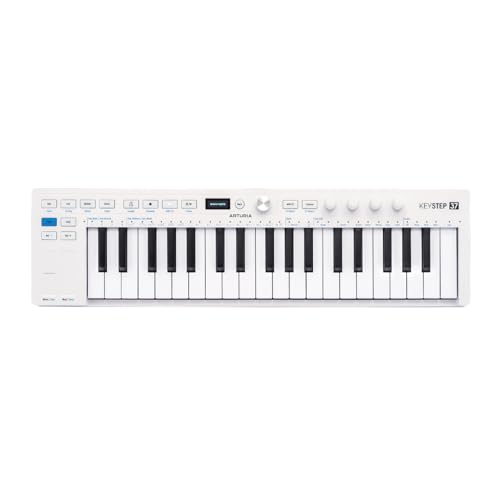
Arturia KeyStep 37-Key MIDI/CV Controller & Sequencer
- ✓ Compact and portable
- ✓ Expressive controls
- ✓ Deep sequencing features
- ✕ Limited keys for complex piano parts
- ✕ Slight learning curve for advanced features
| Keyboard | 37-note Slimkey velocity-sensitive keyboard with aftertouch |
| Polyphonic Step Sequencer | Yes, with pattern chaining and mutate features |
| Arpeggiator | 16 modes with pattern memory and real-time control |
| Connectivity | USB-C MIDI, MIDI DIN, sync I/O, pedal input |
| CV Outputs | 4 outputs (Pitch, Gate, Mod 1, Mod 2) with configurable modulation options |
| Control Features | Pitch and mod strips, chord and scale modes, bend and wheel automation |
That sleek little box with the 37 slim keys has been sitting high on my wishlist for a while, mainly because I kept hearing how versatile and expressive it is for integrating with Arturia’s V Collection. When I finally got my hands on the Arturia KeyStep 37, it didn’t just meet expectations—it completely transformed how I approach composing and live jamming.
The first thing you notice is how compact it is, yet it still offers a velocity-sensitive keyboard with aftertouch, which feels surprisingly responsive. The pitch and mod strips sit comfortably under your fingertips, making real-time tweaks feel intuitive and natural.
I love messing around with the scale and chord modes—it’s like having a mini arranger built right in, so you can instantly generate musical ideas without fussing over complex setups.
The real magic happens when you dive into its sequencing and arpeggiation features. The polyphonic step sequencer and 16-mode arpeggiator are pure creative tools.
You can build a riff, turn it into a sequence, then mutate it—it’s almost like having a mini band at your command. The ability to overdub notes, automate bends, and switch patterns on the fly keeps creativity flowing without interruption.
Connectivity is a dream—USB-C MIDI, MIDI DIN, CV outputs, and even pedal inputs. The CV outputs, especially, make it a perfect companion for modular setups, giving you expressive control over hardware synths.
It’s like having a Swiss Army knife for both studio and live use, all in a tiny, portable package.
Overall, this controller feels like a natural extension of your musical ideas—powerful, flexible, and easy to use. Whether you’re crafting intricate sequences or just improvising, it’s a tool that keeps up with your creativity.
What Factors Determine the Best MIDI Controller for Arturia V Collection?
Several factors contribute to identifying the best MIDI controller for the Arturia V Collection.
- Compatibility: It’s essential to ensure that the MIDI controller is fully compatible with the Arturia V Collection software. This means checking for support in terms of MIDI protocol and whether the controller integrates seamlessly with the features of the software.
- Key Action: The feel of the keys is crucial for achieving expressive performances. Controllers with weighted keys offer a piano-like experience, while synth-action keys provide a lighter touch, which can be preferable for electronic music production.
- Control Options: Look for MIDI controllers that feature a variety of control options such as knobs, sliders, and pads. These control elements can enhance your workflow by allowing you to manipulate parameters and effects within the Arturia V Collection more efficiently.
- Build Quality: The durability and construction of the MIDI controller are important for longevity and reliability. A well-built controller can withstand the rigors of regular use, especially in live performance settings.
- Size and Portability: Depending on your setup and whether you plan to perform live, the size of the MIDI controller can be a significant factor. Compact controllers are easier to transport, while larger ones may offer more features but can be cumbersome.
- Price: Budget plays a key role in determining the best MIDI controller. It’s important to find a balance between features and affordability to ensure that you get the best value for your investment.
How Does Keybed Quality Affect Your Experience with Arturia V Collection?
The quality of the keybed in a MIDI controller significantly influences your experience with the Arturia V Collection by affecting playability, response, and expressiveness.
- Key Sensitivity: The sensitivity of the keybed determines how well it responds to different playing dynamics. A high-quality keybed will have a range of pressure sensitivity that allows for nuanced performances, capturing the subtleties of your playing style, which is essential when using expressive virtual instruments in the V Collection.
- Weighted Keys: Weighted keys mimic the feel of an acoustic piano, providing a more authentic playing experience. This feature is particularly beneficial for those who are accustomed to playing traditional instruments, as it can enhance the tactile feedback and improve overall performance, making it easier to convey emotion through the virtual instruments.
- Key Action: The type of key action (such as synth action, semi-weighted, or hammer action) affects how the keys feel and respond. A smoother key action can facilitate faster playing and complex maneuvers, which is advantageous when performing intricate parts in the Arturia V Collection that may require rapid note changes.
- Build Quality: A well-constructed keybed contributes to durability and reliability during performances and studio sessions. MIDI controllers with robust build quality tend to withstand repeated use without issues, ensuring consistent performance when engaging with the various synths and samplers in the V Collection.
- Aftertouch: Aftertouch capability allows for additional expressiveness by enabling further modulation after a note is struck. This feature can be particularly useful when using the V Collection’s synths, as it provides the ability to manipulate sounds in real-time, enhancing the overall creative possibilities.
Why is MIDI Mapping Flexibility Important for Arturia V Collection Users?
This adaptability not only fosters a more personalized experience but also encourages experimentation and exploration of the V Collection’s vast array of sounds. By allowing users to define their control schemes, they can discover new ways to express their musical ideas, ultimately leading to a more fulfilling and productive creative process.
What Are the Features You Should Look for in an Ideal MIDI Controller?
When searching for the best MIDI controller for Arturia V Collection, there are several key features to consider:
- Key Count: The number of keys on a MIDI controller affects its playability and versatility.
- Touch Sensitivity: Controllers with touch-sensitive keys allow for expressive playing, capturing dynamics and nuances.
- Control Features: Additional knobs, sliders, and pads enhance the controller’s functionality in controlling various parameters in your software.
- Software Integration: Look for a MIDI controller that seamlessly integrates with Arturia’s V Collection for a streamlined workflow.
- Portability: Consider the size and weight of the controller, especially if you plan to travel with it.
- Build Quality: A sturdy design ensures durability and longevity, which is important for regular use.
The number of keys on a MIDI controller influences how you interact with your music. A standard 49 or 61 keys can offer more range for playing chords and melodies, while smaller controllers might be more portable but could limit your playing style.
Touch-sensitive keys provide a more dynamic playing experience, allowing you to control the volume and expression of your notes based on how hard you strike the keys. This feature is crucial for achieving a more natural sound, especially when using virtual instruments in the Arturia V Collection.
Control features like knobs, sliders, and pads give you hands-on control over various parameters in your software, making it easier to tweak sounds and effects in real-time. These controls can be mapped to specific functions in Arturia’s software, enhancing your creative possibilities.
Software integration is vital for a smooth workflow; choosing a MIDI controller that is designed to work seamlessly with the Arturia V Collection can save you time and frustration. This ensures that your controller can take full advantage of the software’s capabilities without complex setup processes.
Portability is an important aspect if you plan to perform or produce music on the go. A lightweight and compact controller can easily fit into a backpack, allowing you to create music anywhere without sacrificing functionality.
Build quality is essential for reliability, especially if you use your MIDI controller frequently. A well-constructed controller can withstand the rigors of travel and performance, ensuring you have a dependable tool for your music production needs.
How Do Different MIDI Controller Designs Influence Workflow with Arturia V Collection?
The design of MIDI controllers can significantly enhance the workflow when using Arturia V Collection due to their unique layouts and features.
- Keyboard Controllers: These controllers typically feature velocity-sensitive keys, which are essential for capturing the nuances of performance. Many models also include modulation wheels and pitch bend controls, providing tactile manipulation of synthesizer parameters that align well with Arturia’s virtual instruments.
- Pads and Trigger Controllers: Controllers with drum pads allow for intuitive triggering of samples and loops, which is particularly useful for creating rhythmic patterns. The velocity sensitivity and aftertouch features on these pads enable expressive playing, making them suitable for genres that require dynamic drumming or live performance setups with Arturia’s drum machines.
- Knob and Fader Controllers: These types of controllers focus on providing hands-on control over parameters such as volume, effects, and synth settings. They often come with customizable layouts that can be mapped to Arturia plugins, allowing for real-time adjustments and a more efficient mixing process.
- Control Surfaces: Designed for full integration with digital audio workstations, control surfaces offer a comprehensive interface that includes faders, knobs, and transport controls. This type of controller enhances workflow by allowing users to manage multiple aspects of their project simultaneously, which is particularly useful when working with Arturia’s extensive library of sounds and effects.
- Portable MIDI Controllers: Compact and lightweight, these controllers are ideal for musicians on the go. They often have a simple layout, making them easy to set up quickly when using Arturia V Collection in different environments, whether in the studio or for live performances.
Which MIDI Controllers Provide the Best User Feedback for Use with Arturia V Collection?
The best MIDI controllers for use with Arturia V Collection offer intuitive interfaces and responsive feedback mechanisms to enhance the user experience.
- Arturia KeyLab Essential: This controller integrates seamlessly with the V Collection, providing a range of controls and customizable features.
- Novation Launchkey MK3: A versatile controller known for its excellent pads and knobs, designed to work closely with various DAWs, including Arturia’s software.
- M-Audio Oxygen Pro: It boasts a robust set of features, including smart chord capabilities and a user-friendly interface, making it a great choice for live performance and studio work.
- Akai MPK Mini MK3: Compact and portable, this controller features responsive pads and assignable knobs, ideal for creating music on the go.
- Native Instruments Komplete Kontrol M32: With its high-quality keys and integration with Arturia’s software, this controller provides an exceptional playing experience and workflow enhancements.
Arturia KeyLab Essential: This controller is designed specifically for Arturia’s software, featuring a user-friendly layout with dedicated controls for various parameters. It includes velocity-sensitive keys, backlit pads, and a range of knobs that provide tactile feedback, making it easy to manipulate sounds and settings in the V Collection.
Novation Launchkey MK3: The Launchkey MK3 is well-regarded for its responsive RGB pads and customizable controls, which allow for a rich interactive experience while using Arturia V Collection. It also includes built-in arpeggiators and scale modes, enhancing creative possibilities and providing immediate visual feedback for performance and production tasks.
M-Audio Oxygen Pro: This controller features a full-size keybed along with an array of assignable pads, knobs, and faders that provide excellent tactile feedback. Its smart chord and scale modes allow for quick composition without losing musicality, making it a flexible tool for both studio and live settings tailored to Arturia’s software environment.
Akai MPK Mini MK3: Renowned for its portability and compact size, the MPK Mini MK3 includes 25 velocity-sensitive keys and eight backlit drum pads that are responsive and easy to use. It also features assignable knobs, making it ideal for tweaking parameters within the V Collection, thus offering a satisfying hands-on experience.
Native Instruments Komplete Kontrol M32: This MIDI controller features a semi-weighted keybed that enhances playability and expression while performing with Arturia V Collection. Its integration with the software allows for streamlined operation, with visual feedback on the controller itself that helps users navigate and control their sounds effortlessly.
How Does Your Budget Impact Your MIDI Controller Choices for Arturia V Collection?
Your budget plays a crucial role in determining the best MIDI controller for Arturia V Collection, as it influences the features, build quality, and versatility of the controller.
- Entry-Level Controllers: These MIDI controllers are typically affordable and offer basic functionality, making them suitable for beginners.
- Mid-Range Controllers: With a higher budget, these controllers provide enhanced features such as more pads, knobs, and faders, which allow for greater control over the Arturia software.
- Professional Controllers: These high-end controllers come with advanced features, high build quality, and extensive integration capabilities, ideal for serious producers looking to get the most out of their Arturia V Collection.
- Specialized Controllers: Some MIDI controllers are specifically designed to work seamlessly with Arturia products, providing dedicated controls and presets, which can maximize workflow and creativity.
Entry-Level Controllers: These MIDI controllers are typically affordable and offer basic functionality, making them suitable for beginners just starting with music production. They usually feature fewer controls and may lack advanced integration but can still effectively operate the Arturia V Collection with essential MIDI functions.
Mid-Range Controllers: With a higher budget, these controllers provide enhanced features such as more pads, knobs, and faders, which allow for greater control over the Arturia software. These controllers often include features like velocity-sensitive keys and better build quality, offering a more satisfying playing experience and improved workflow.
Professional Controllers: These high-end controllers come with advanced features, high build quality, and extensive integration capabilities, ideal for serious producers looking to get the most out of their Arturia V Collection. They may offer customizable controls, high-resolution displays, and seamless DAW integration, enabling users to maximize the potential of the Arturia software.
Specialized Controllers: Some MIDI controllers are specifically designed to work seamlessly with Arturia products, providing dedicated controls and presets, which can maximize workflow and creativity. These controllers often include tailored mappings to Arturia instruments, allowing for immediate access to key parameters without tedious setup.
Related Post: