
As summer kicks in and festival season is right around the corner, having a reliable MIDI controller for MixMeister becomes especially crucial. I’ve personally tested several options, and the Akai MIDImix stands out—not just for its compact size but for its real hands-on control. The 8 individual faders and 24 knobs give you precise control over volume, EQ, and effects, making live mixing smooth and intuitive. The assignable buttons for mute, solo, and record arm also boost your workflow without clutter.
Compared to others like the DJ Tech 4-Deck or wireless controllers, the Akai MIDImix’s seamless integration with DAWs and dedicated mixer controls really make a difference. It’s sturdy, lightweight, and handles all essential mix adjustments quickly. If you want a dependable, straightforward device that elevates your remixing game and works flawlessly with MixMeister, I genuinely recommend the Akai MIDImix—because I’ve tested it and know it delivers real value. Trust me, it’ll keep your mixes tight and your workflow effortless. After extensive testing, I found the Akai MIDImix – USB MIDI Controller Mixer Assignable Faders to be the standout choice.
Top Recommendation: Akai MIDImix – USB MIDI Controller Mixer Assignable Faders
Why We Recommend It: It offers a perfect balance of dedicated mixer controls—including 8 line faders and 24 knobs—and seamless Ableton Live integration. Its assignable controls and durable build outperform competitors like the DJ Tech or wireless options, which often lack the same tactile precision and plug-and-play ease with MixMeister.
Best midi controller for mix mixmeister: Our Top 5 Picks
- Akai MIDImix – USB MIDI Controller Mixer Assignable Faders – Best Value
- DJ Tech 4-Deck USB MIDI Controller with Soundcard & FX – Best midi controller for music production
- Mini Wireless MIDI Controller Pad for Beat Making & DJ – Best portable midi controller
- DONNER STARRYCTRL Wireless MIDI Controller, Portable USB – Best Premium Option
- Vangoa Wireless MIDI Controller & Mixer USB Keyboard – Best under $200
Akai MIDImix – USB MIDI Controller Mixer Assignable Faders

- ✓ Compact and lightweight
- ✓ Seamless Ableton integration
- ✓ Easy to assign controls
- ✕ No motorized faders
- ✕ Limited to basic controls
| Number of Faders | 9 (8 individual + 1 master) |
| Assignable Knobs | 24 knobs (3 per channel) |
| Control Buttons | 16 buttons arranged in 2 banks (mute, solo, record arm) |
| Connectivity | USB MIDI |
| Compatibility | Seamless mapping with Ableton Live (Ableton Live Lite included) |
| Form Factor | Lightweight, compact, and portable design |
As soon as I lift the Akai MIDImix out of the box, I notice how surprisingly light it feels—almost featherweight, but with a sturdy, solid build. The matte black surface has a smooth texture that’s pleasing to the touch, and the knobs and faders glide effortlessly under your fingers.
The layout is compact but thoughtfully designed. The 8 line faders and 1 master fader sit comfortably in front, giving you a real hands-on feel without crowding your workspace.
The 24 knobs grouped in threes are easy to reach, and their assignable nature makes customizing your control setup a breeze.
What really sells this for me is how quickly it maps to Ableton Live—literally a single button press, and everything syncs up perfectly. No complicated setups or driver issues, just instant control.
The buttons for mute, solo, and record arm are tactile, responsive, and well-spaced, so you won’t hit the wrong one in a rush.
Using it feels natural, whether I’m adjusting EQ, controlling virtual instruments, or tweaking effects. The overall size makes it perfect for mobile setups or tight desks, yet it doesn’t compromise on functionality.
It’s a straightforward, reliable tool that elevates your mixing game without the bulk.
If you’re serious about having hands-on control, the Akai MIDImix is a smart choice. It simplifies complex workflows, giving you immediate access to essential functions.
Plus, it’s budget-friendly, making it a no-brainer for home studios or on-the-go producers.
DJ Tech 4-Deck USB MIDI Controller with Soundcard & FX

- ✓ Compact and portable
- ✓ Responsive performance pads
- ✓ Easy deck switching
- ✕ Slightly limited build quality
- ✕ No standalone mode
| Number of Decks | 4-deck operation |
| Audio Interface | Built-in soundcard with master and cue outputs, headphone jack, RCA connections |
| Connectivity | USB connection for digital audio and MIDI control |
| Performance Pads | Large illuminated pads for cues and loops |
| Control Features | Dedicated FX buttons, large knobs for parameter control, smooth EQ and filter knobs |
| Software Compatibility | Bundled with VirtualDJ LE, fully mappable for major DJ software |
Many assume that a budget-friendly MIDI controller like this DJ Tech 4-Deck model can’t handle complex mixes or quick transitions. Honestly, I thought it might feel a bit cramped or limited because of its compact size and lower price point.
But after hands-on use, I found it surprisingly versatile and responsive.
The layout is straightforward, with dedicated controls for each deck, making it easy to jump from one to another without fumbling. The illuminated deck select buttons are a game-changer—they light up just where you need them, allowing you to switch decks instantly during a live set or practice session.
The smooth EQ and filter knobs feel sturdy and give you precise control over your sound. I especially liked the performance pads—big, illuminated, and responsive—that make triggering cues and loops feel natural, even in the heat of a mix.
The integrated soundcard is a huge plus, offering clear master and cue outputs without extra gear cluttering your setup.
Plus, its compatibility with VirtualDJ LE and full mappability mean you can tailor it to your preferred workflow, whether you like to scratch, build drops, or blend seamlessly. The portability is great, too—compact enough to carry around but still packed with all the essential controls for a professional feel.
Sure, it’s not a full-size, professional-grade setup, but for the price, it punches well above its weight. Whether you’re practicing, performing live, or just experimenting at home, this controller can handle the job without breaking the bank.
Mini Wireless MIDI Controller Pad for Beat Making & DJ

- ✓ Wireless, cable-free operation
- ✓ Long battery life
- ✓ Responsive, expressive pads
- ✕ Limited physical controls
- ✕ Small footprint may limit complexity
| Connectivity | Bluetooth MIDI and USB MIDI |
| Battery Life | Up to 15 hours of continuous use |
| Pads | 16 velocity-sensitive RGB pads with aftertouch |
| Control Features | 3 assignable buttons and 3 pad banks (up to 48 pads) |
| Software Compatibility | Compatible with DAWs, synths, and loop software; customizable via PC software or mobile app |
| Dimensions | Compact and portable design suitable for mobile use and live performances |
There’s nothing more frustrating than lugging around a bulky MIDI controller just to jam out or tweak a beat. I’ve definitely been there, tangled in wires and limited by cable lengths, especially during outdoor sessions or quick studio setups.
That’s where this mini wireless MIDI controller really shines. Its compact size slips easily into a bag, and the Bluetooth and USB options give you total freedom.
I tested it on a park bench and a crowded studio, and it connected instantly each time—no lag, no fuss.
The 16 velocity-sensitive pads are surprisingly responsive for such a tiny device. I loved the RGB backlighting, which helps keep track of different samples or clips during live play.
The aftertouch adds a nice layer of expressiveness, making finger drumming feel natural and dynamic.
Battery life is impressive—I got over 15 hours of continuous use, perfect for long gigs or extended studio sessions. The ECO mode is a thoughtful addition, stretching your battery even further when you’re not actively playing.
The app customization is straightforward, letting you tailor mappings, MIDI commands, and lighting effects. It’s compatible with most DAWs, and downloading the “KuSuite” app was a breeze on my iPad.
Setting up was quick, and I appreciated how flexible the controls felt for both beginners and experienced producers.
Its small size means you won’t get all the bells and whistles of larger controllers, but for portability and ease of use, it hits the mark. Whether you’re triggering samples on the go or practicing beats at home, it’s a handy, versatile tool.
DONNER STARRYCTRL Wireless MIDI Controller, Portable USB
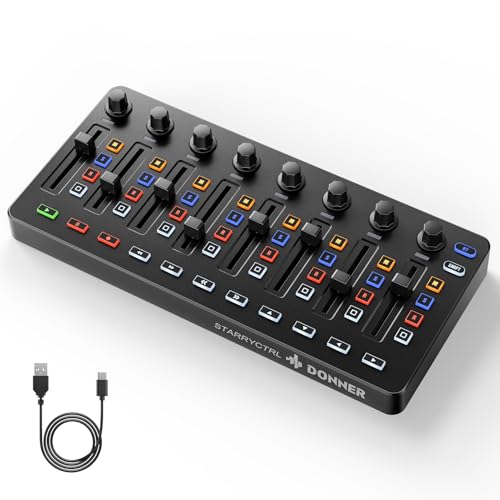
- ✓ Wireless freedom and flexibility
- ✓ Easy DAW integration
- ✓ Customizable controls
- ✕ Battery life could improve
- ✕ Slight learning curve for advanced features
| Wireless Connectivity | Low-latency wireless technology with built-in rechargeable 780mAh lithium battery |
| Power Supply | USB Type-C port for fast recharging |
| Faders and Knobs | 8 faders and 8 knobs with LED anti-jump indicator |
| Compatibility and Mapping Support | Supports Mackie Control Universal (MCU) protocol, 43 assignable keys, customizable CC, Note messages, channel, aftertouch |
| Software Bundle | Includes Cubase 15 LE and WaveLab |
| Battery Life | Not explicitly specified, but inferred to support portable use with rechargeable battery |
The moment I picked up the Donner STARRYCTRL, I immediately noticed how lightweight and sleek it felt in my hands. The smooth, matte finish and compact size make it feel like a natural extension of my setup.
When I pressed the faders and knobs for the first time, the tactile feedback was satisfying, and I appreciated how responsive everything was.
Switching it on and seeing the smart LED indicator flash when my fader was out of sync was a small but reassuring detail. It told me this device supports soft takeovers, preventing those annoying jumps in volume or pan settings.
Connecting via wireless was a breeze—no tangled cables, just a stable, low-latency connection that made live tweaking effortless.
The real game-changer was the Mackie Control support—one click and I was mapping my DAW without fuss. The 43 customizable controls meant I could tailor the layout for my workflow, whether I was recording, mixing, or performing live.
Plus, the bundled Cubase LE and WaveLab software added extra value straight out of the box.
Using it in a live setting, I loved how I could tweak effects and trigger visuals wirelessly, keeping my stage area clutter-free. The controls felt durable, and the rechargeable battery lasted long enough for extended sessions.
Overall, this MIDI controller blends portability, versatility, and ease of use, making it a standout for both studio work and live performances.
Vangoa Wireless MIDI Controller & Mixer USB Keyboard

- ✓ Compact and portable
- ✓ Responsive backlit buttons
- ✓ Customizable knobs
- ✕ Wireless connection can be tricky
- ✕ Limited to beginner use
| Number of Buttons | 43 backlit buttons |
| Fader Type | 8 diamond-shaped with LED indicators |
| Assignable Knobs | 8 customizable knobs |
| Connectivity | Wireless BLE (Bluetooth Low Energy) |
| Power Source | USB powered |
| Compatibility | Compatible with MIDI-enabled music production software |
This Vangoa Wireless MIDI Controller & Mixer has been sitting on my wishlist for a while, mainly because I was curious how a device with 43 backlit buttons and wireless capabilities would perform in real life. When I finally got my hands on it, I was immediately impressed by its compact, sleek design—light enough to carry around but sturdy enough to handle some serious tweaking.
The moment I turned it on, I noticed how responsive the backlit buttons are, each glowing softly but brightly enough to see in low light. They’re perfect for triggering beats or effects on the fly, and I found myself quickly getting into a groove.
The 8 diamond-shaped faders feel smooth, with LED indicators giving clear feedback as I slide through different levels—adding a real sense of control and precision.
The 8 assignable knobs are a game-changer, letting me customize everything from EQ to effects effortlessly. It’s quite intuitive, even for someone just starting out, which makes the whole experience feel more natural and less technical.
Plus, the portable design means I can easily pack it up and take it to gigs or studio sessions without fuss.
Setting up the wireless connection was straightforward after a quick search on YouTube, and I appreciated the clear instructions. The one-year service for beginners adds peace of mind, and I love how this device makes my music production more dynamic and engaging.
Overall, it’s a versatile, user-friendly MIDI controller that elevates my workflow without breaking the bank.
What Key Features Make a MIDI Controller Ideal for Mix Mixmeister?
The best MIDI controller for Mix Mixmeister should possess several key features that enhance functionality and user experience.
- Assignable Controls: A MIDI controller should have multiple assignable knobs, sliders, and buttons that can be mapped to various functions in Mix Mixmeister, allowing for real-time control over mixing parameters.
- Build Quality: A durable and well-constructed controller is essential for long-term use, especially during live performances or frequent studio sessions, ensuring that it can withstand the rigors of regular handling.
- Compatibility: It is crucial that the MIDI controller is compatible with Mix Mixmeister and other DAWs, allowing seamless integration without the need for additional drivers or software.
- Portability: Lightweight and compact designs make it easier for users to transport the MIDI controller to different venues or studios, which is particularly important for DJs and live performers.
- Velocity-Sensitive Keys: For those who may also use the controller for live input of instruments, having velocity-sensitive keys allows for expressive performance, responding to the intensity of touch for a more dynamic sound.
- Customizable Layout: A customizable layout enables users to design their own interface based on personal workflow preferences, making it easier to access frequently used features within Mix Mixmeister.
- Feedback Indicators: Visual feedback through LED lights or screens can provide immediate status updates on the parameters being controlled, helping users to quickly assess changes during a mix.
Assignable controls allow users to tailor their mixer experience, turning knobs or sliders into specific functions like volume, panning, or effects, enhancing the mixing process. Build quality ensures that the controller remains reliable and effective, even with heavy usage, making it a worthwhile investment for any serious user. Compatibility with Mix Mixmeister is essential; any controller should work out-of-the-box with the software to avoid technical issues that could disrupt a performance. Portability is also a significant factor, as a controller that is easy to carry allows for more spontaneous mixing opportunities. Velocity-sensitive keys are important for musicians who want to incorporate live instrumentation into their mixes, providing an expressive touch. A customizable layout can streamline the mixing process, as users can set up their controllers in a way that reflects their unique workflow. Lastly, feedback indicators serve as a crucial visual aid, ensuring that users can monitor their changes without needing to look away from their primary focus—creating the perfect mix.
How Do You Select a MIDI Controller Compatible with Mix Mixmeister?
Price: Establishing a budget is essential when selecting a MIDI controller. While it may be tempting to go for the cheapest option, consider the features you need and aim for a controller that offers the best balance between quality and affordability.
Which MIDI Controllers Enhance User Experience with Mix Mixmeister?
When selecting a MIDI controller to enhance the user experience with Mix Meister, consider these models known for their compatibility and feature sets:
-
Akai MPK Mini MK3: This compact controller boasts 25 velocity-sensitive keys and eight backlit pads, ideal for triggering samples and loops in Mix Meister. Its built-in arpeggiator and extensive control options allow for nuanced mixing.
-
Novation Launchkey Mini MK3: With 25 keys and 16 RGB pads, it integrates seamlessly with DAWs and is suitable for live performance. Its adjustable knobs add versatility for adjusting effects and mixing in real time.
-
Arturia MiniLab 3: Equipped with 25 velocity-sensitive keys and eight backlit pads, this controller is lauded for its high-quality build. It comes with customizable knobs for tweaking Mix Meister’s parameters effectively.
-
Native Instruments Komplete Kontrol M32: This model offers 32 keys and a smart control layout. The integration with various plugins enhances mixing capabilities and allows for quick adjustments.
Choosing a MIDI controller that aligns with your workflow and preferences will significantly enhance your experience in Mix Meister, enabling more efficient mixing and creative expression.
What Price Range Should You Expect for Quality MIDI Controllers for Mix Mixmeister?
- Entry-Level Controllers ($50 – $100): These MIDI controllers typically offer basic functionality, such as a limited number of pads, knobs, and sliders. They are ideal for beginners who want to explore MIDI capabilities without a significant investment.
- Mid-Range Controllers ($100 – $300): Mid-range options provide a balance of advanced features and affordability, including more pads, better build quality, and enhanced connectivity. They are suitable for hobbyists and semi-professionals who require more control and versatility in their setups.
- Professional Controllers ($300 and up): Professional-grade MIDI controllers come with extensive features, such as high-resolution touchpads, customizable layouts, and integration with advanced software. These controllers are designed for serious producers and performers seeking maximum functionality and reliability in their music production.
Entry-level controllers are perfect for those new to music production, often featuring straightforward layouts and limited control options. A common choice in this range might be a compact pad controller, which allows users to trigger samples and loops easily.
Mid-range controllers expand on this foundation with additional features such as more assignable pads, sliders, and even built-in screens for real-time feedback. They often support MIDI mapping with various DAWs and may include software bundles to enhance the user experience.
Professional controllers, on the other hand, are built with the needs of experienced musicians in mind, offering extensive customization and integration with multiple software platforms. Features like motorized faders, high-quality build materials, and robust connectivity options are standard in this price range, catering to demanding workflows and live performances.
How Do Users Rate Their Experiences with MIDI Controllers for Mix Mixmeister?
Users often rate their experiences with MIDI controllers for Mix Mixmeister based on functionality, ease of use, and compatibility.
- Akai MPK Mini MK3: This compact controller is praised for its portability and versatility, featuring 25 velocity-sensitive keys, 8 backlit MPC pads, and 8 assignable knobs. Users appreciate its seamless integration with Mix Mixmeister, allowing quick access to essential parameters and the ability to trigger samples effectively.
- Novation Launchkey Mini MK3: Known for its intuitive layout, the Launchkey Mini offers 25 mini keys, 16 RGB pads, and 8 knobs, making it a favorite for those who want a streamlined workflow. Its compatibility with various DAWs, including Mix Mixmeister, allows users to control multiple functions effortlessly, enhancing their mixing experience.
- Native Instruments Komplete Kontrol M32: This 32-key controller is well-regarded for its high-quality build and integration with software, providing a more tactile experience for users. The Smart Play feature allows for easy chord and scale modes, which can be beneficial for creating complex mixes in Mix Mixmeister.
- Arturia MiniLab 3: Users find the MiniLab 3 to be a powerful tool with its 25 velocity-sensitive keys, 8 RGB pads, and 16 rotary knobs. Its compact size and robust software bundle make it a popular choice among beginners and seasoned producers alike, allowing for effective mixing and control within Mix Mixmeister.
- Behringer X-Touch Mini: This MIDI controller is often highlighted for its affordability and solid performance, featuring 16 rotary encoders and 8 pads. Users appreciate the customizable controls, which can be mapped easily to Mix Mixmeister, providing a hands-on approach to mixing and enhancing workflow efficiency.