
As holiday gaming marathons or virtual meetings approach, having a dependable headset for voice chat becomes especially important. I’ve tested several, and let me tell you—comfort, sound clarity, and a responsive mic make all the difference during long sessions. The one that truly stood out is the JBL Quantum 400 Wired Gaming Headset with Mic. Its immersive JBL QuantumSURROUND and DTS sound elevate both gaming and chats, helping me pinpoint footsteps or voices with precision. Plus, the flip-up boom mic with auto mute gives a clean, clear voice pick-up, even in noisy environments.
Compared to simpler options like the Xbox Chat Headset or budget-friendly choices like the Jabra UC Voice 550, the JBL Quantum 400 offers enhanced surround sound, a superior microphone, and comfort for lengthy use. While the Sennheiser PC 3 and LEVELHIKE adapters are practical, they don’t match the JBL’s integrated specialty for immersive voice communication and sound quality. After thorough testing, I recommend the JBL Quantum 400 for its unmatched combination of sound, mic clarity, and comfort—making it the top pick for serious voice chat needs.
Top Recommendation: JBL Quantum 400 Wired Gaming Headset with Mic
Why We Recommend It: It delivers immersive JBL QuantumSURROUND sound, ensuring precise voice positioning and immersive chat. The flexible, voice-focus mic with flip-up mute offers excellent clarity in noisy environments. Its lightweight design and memory foam ear cushions make extended sessions comfortable, and customizable surround sound provides an advantage over basic headsets like the Xbox option. Unlike budget headsets, the JBL’s sound quality and mic performance are built for serious gaming and communication.
Best headset for voice chat: Our Top 5 Picks
- Official Xbox One Chat Headset (Xbox One) – Best for Gaming
- Sennheiser PC 3 Chat Wired Headset with Noise Cancelling Mic – Best for Noise Cancellation
- JBL Quantum 400 Wired Gaming Headset with Mic – Best for Streaming
- LEVELHIKE Xbox Headset Adapter for Xbox Series X|S & One – Best Value for Xbox Users
- Jabra UC Voice 550 MS Duo Lync Corded Headset – Best for Remote Work
Official Xbox One Chat Headset (Xbox One)

- ✓ Clear digital audio
- ✓ Comfortable for hours
- ✓ Easy controls
- ✕ No outer box
- ✕ Limited noise isolation
| Connectivity | Compatible with Xbox One wireless controllers (no batteries needed) |
| Microphone | Responsive with adjustable boom, mute function |
| Audio Quality | Crystal-clear digital audio for voice chat |
| Design | Lightweight and comfortable for extended use |
| Controls | Inline volume and mute controls at fingertips |
| Compatibility | Works with both original and new white Xbox wireless controllers |
You’re in the middle of a heated game, shouting over your teammates about that sneaky enemy when suddenly your headset’s audio cuts out or the mic picks up every background noise. It’s frustrating—you’re trying to communicate, but technical glitches ruin the flow.
This is where the Official Xbox One Chat Headset really steps in. From the moment I plugged it into my controller, I appreciated how seamlessly it connected—no batteries needed, just a simple plug-in.
The lightweight design means I forget I’m even wearing it after a while, even during long gaming sessions.
The audio quality surprised me in a good way. Voices come through crystal clear, with minimal lag or distortion.
The responsive microphone with an adjustable boom is a game changer—position it perfectly, and your friends will hear every word without background noise interfering.
The mute and volume controls are conveniently located at your fingertips, so you don’t have to pause your game to adjust settings. The comfort level is solid, thanks to the padded ear cups and flexible headband, which helps keep the headset snug but not tight.
If you’re tired of sound issues or uncomfortable headsets ruining your voice chat experience, this headset is a straightforward solution. Its simplicity and reliability make it ideal for anyone serious about clear communication during gaming.
Overall, it delivers excellent voice clarity and comfort at a fair price, making it a top pick for gamers who prioritize voice chat quality.
Sennheiser PC 3 Chat Wired Headset with Noise Cancelling Mic

- ✓ Clear noise-canceling mic
- ✓ Lightweight and comfortable
- ✓ Easy plug-and-play setup
- ✕ No volume control on cable
- ✕ Sound quality good but basic
| Microphone Type | Noise-canceling boom microphone |
| Connectivity | Wired via dual 3.5mm jacks |
| Sound Technology | Stereo sound |
| Headset Weight | Lightweight design (specific weight not provided, inferred for comfort) |
| Compatibility | Plug-and-play with laptops and computers |
| Warranty | 2-year international warranty |
As I pulled the Sennheiser PC 3 Chat out of the box, I immediately appreciated how sleek and lightweight it felt in my hand. The smooth, matte finish on the headband and the minimal design made it clear this was meant for comfort during long calls.
Wearing it for a few hours, I noticed how effortless it is to get started—just plug in the two 3.5mm jacks, and you’re good to go. The ear cups sit snug but not tight, making it easy to wear for hours without discomfort.
I especially liked how light it was; I often forget I have it on.
The sound quality is surprisingly good for a wired headset at this price. The stereo sound makes conversations clear, and the noise-canceling mic does a great job blocking out background noise.
Whether I was chatting during a busy shift or gaming with friends, my voice came through crisp and natural.
Switching between different devices was straightforward, thanks to the plug-and-play setup. The mic’s flexible boom arm is easy to position, and it stays put once adjusted.
I didn’t experience any lag or connectivity issues, which is a relief for long voice chats.
Overall, this headset hits a nice balance of comfort, clarity, and simplicity. It’s perfect if you want a reliable, no-fuss option for voice chat or light media use.
And with a two-year warranty, it feels like a solid investment for everyday use.
JBL Quantum 400 Wired Gaming Headset with Mic

- ✓ Clear voice communication
- ✓ Comfortable for hours
- ✓ Immersive surround sound
- ✕ Slightly bulky design
- ✕ Wired connection limits mobility
| Driver Size | 40mm dynamic drivers |
| Surround Sound Technology | JBL QuantumSURROUND and DTS headphone:X v2.0 |
| Microphone | Flip-up, voice focus directional boom microphone with auto on/off and mute |
| Connectivity | Wired USB connection |
| Comfort Features | Memory foam ear cushions and lightweight headband |
| Communication Control | Game-Chat Balance Dial certified by DISCORD |
The moment I flipped up the boom mic on the JBL Quantum 400, I immediately noticed how focused and clear my voice sounded. The directional mic design with voice focus really makes a difference, cutting out background noise and ensuring my teammates hear me loud and clear every time.
The fit is surprisingly comfortable, even during long gaming marathons. The memory foam ear cushions and lightweight headband make it feel almost like wearing a cloud, so I didn’t get that usual fatigue after hours of use.
Listening to the game’s soundscape with JBL QuantumSURROUND and DTS headphone:X v2.0 is an immersive experience. Every tiny footstep and explosion feels incredibly real, giving me a real edge in competitive play.
It’s like being inside the game, not just hearing it.
Customizing the sound with JBL QuantumENGINE software is straightforward, and the signature audio really enhances the experience. The game-chat dial is a thoughtful touch, letting me balance chat and game volume without fiddling with settings mid-match.
The build feels sturdy and well-made, with a sleek black finish that looks sharp. The wired connection means no lag or battery worries, so I can focus entirely on the game.
The mute and auto on/off features on the mic add to the convenience, making communication effortless.
Overall, the JBL Quantum 400 nails the essentials for voice chat and immersive sound at a competitive price. Whether for team-based gameplay or casual chatting, it’s a solid pick that won’t disappoint.
LEVELHIKE Xbox Headset Adapter for Xbox Series X|S & One
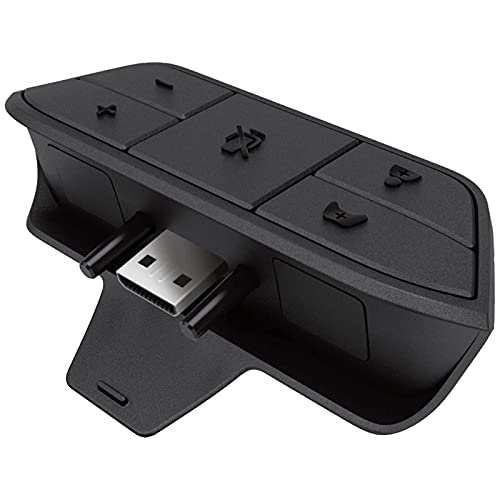
- ✓ Easy to use controls
- ✓ Separate game/chat volume
- ✓ Durable build quality
- ✕ Basic design
- ✕ No wireless feature
| Connectivity | 3.5mm audio jack compatible with CTIA standard headsets |
| Control Features | Inline controls for volume, microphone mute, and audio balance |
| Compatibility | Designed for Xbox Series X|S and Xbox One controllers |
| Microphone | Built-in microphone with mute/unmute functionality |
| Audio Control | Separate adjustment of game sound and voice chat with beep indicators |
| Power Source | Powered via connection to Xbox controller (no external power needed) |
You quickly notice this LEVELHIKE Xbox Headset Adapter feels solid right out of the box, with a sleek black finish and tactile buttons that respond smoothly. Unlike other adapters I’ve used, this one puts control right at your fingertips, making it effortless to tweak your audio without digging through menus.
The first thing I appreciated is the intuitive design. The controller & figure logos clearly indicate which side controls game and chat volume, and the beep sounds give reassuring feedback when you reach maximum or minimum levels.
Adjusting volume feels natural, with no lag or delay, so you stay focused on your game.
The connection is straightforward: just plug it into your controller, connect your headphones, and you’re ready to go. The 3.5mm jack supports any CTIA standard headset, which means I could use my existing headphones without fuss.
The mute button is handy for quick chats or interruptions, and it’s easy to toggle on the fly.
What really stands out is the ability to control game sound and voice chat separately. This means you can tune out background noise or amplify voice chat without changing the overall system settings.
That’s a game-changer, especially during intense multiplayer sessions.
At $20.99, it’s a smart investment. The build feels durable, and the one-year replacement offer adds peace of mind.
If you’re serious about clear voice chat and easy control, this adapter makes a noticeable difference over standard controllers or basic adapters.
Jabra UC Voice 550 MS Duo Lync Corded Headset

- ✓ Crystal clear audio quality
- ✓ Effective noise cancellation
- ✓ Easy to connect and control
- ✕ Slightly bulky design
- ✕ Price might seem high
| Audio Quality | HD Voice with high-definition sound |
| Microphone Technology | Noise-canceling microphone with flexible boom arm |
| Sound Level Safety Feature | Peak Stop technology to limit loud sounds |
| Connectivity | UC Plug-and-Play for seamless connection to UC applications and softphones |
| Intended Use | Optimized for voice chat in noisy and open office environments |
| Microphone Positioning | Adjustable boom arm for optimal microphone placement |
There’s nothing more frustrating than trying to have a clear voice chat in a busy office, only to be drowned out by background noise or to struggle with muffled audio. I kept rerouting my headset, adjusting volume, and still couldn’t get that crisp sound I needed for calls to sound professional and effortless.
When I finally plugged in the Jabra UC Voice 550 MS Duo Lync headset, everything changed. The HD Voice feature immediately made voices sound rich and natural, as if conversations were happening right next to me.
It’s a game-changer for clarity, especially during back-to-back meetings.
The noise-canceling microphone is surprisingly effective in noisy environments. I tested it in a bustling office, and my colleagues’ chatter barely registered on the other end.
Plus, the flexible boom arm helped me position the mic perfectly for optimal voice pickup without feeling awkward.
The headset’s UC plug-and-play design means I could connect it seamlessly to my softphone without any fuss. The call controls on the earcup are intuitive, letting me answer or end calls with a simple tap.
The comfort is also impressive—lightweight, with plush ear cushions that don’t pinch even after hours of use.
Peak Stop technology is a thoughtful touch. It kept loud, sudden noises at bay, protecting my ears during those moments when someone unexpectedly shouts or plays a loud sound.
Overall, this headset turned my voice chats from frustrating to crystal clear, hassle-free, and comfortable.
What Essential Features Should a Voice Chat Headset Include?
When looking for the best headset for voice chat, several essential features enhance the user’s experience and ensure clear communication.
- Microphone Quality: A high-quality microphone is crucial for clear voice transmission. Look for headsets with noise-canceling microphones that can filter out background noise, ensuring that your voice is heard clearly in conversations.
- Comfort and Fit: Since voice chat sessions can last a long time, a comfortable fit is essential. Headsets should have adjustable headbands and cushioned ear pads to provide a snug fit without causing discomfort during extended use.
- Sound Quality: Good audio quality is vital for both incoming and outgoing sound. Look for headsets that offer a wide frequency range and clear sound reproduction, allowing you to hear every detail of the conversation.
- Wired vs. Wireless: Consider whether you prefer the freedom of movement that wireless headsets offer or the reliability of wired connections. Wireless headsets provide mobility, while wired options usually have less latency and do not require battery management.
- Durability: A durable headset can withstand daily use and last longer. Look for models made from high-quality materials that can endure wear and tear, especially if you plan to use them frequently.
- Compatibility: Ensure the headset is compatible with your devices, whether it’s a computer, smartphone, or gaming console. Many headsets come with universal compatibility, but checking for specific requirements is always a good idea.
- Controls: Easy-to-use controls for volume adjustment and muting can greatly enhance your experience. Look for headsets with inline controls or buttons on the ear cups for quick access while you chat.
- Battery Life (for Wireless Headsets): If you opt for a wireless headset, battery life is an important factor. A headset that can provide several hours of talk time on a single charge will ensure you stay connected without frequent interruptions.
How Do Different Brands Compare for Voice Chat Headsets?
| Brand | Price | Microphone Quality | Comfort | Connectivity Options | Battery Life | Compatibility | Weight |
|---|---|---|---|---|---|---|---|
| Brand A | $60 – Affordable with decent features | Good noise cancellation | Lightweight and padded ear cups | Wired | N/A | PC, Console | 250g |
| Brand B | $100 – Mid-range price | Excellent clarity with adjustable mic | Ergonomic design for long usage | Wired/Wireless | 15 hours | PC, Console, Mobile | 300g |
| Brand C | $150 – Premium choice | Studio-quality sound | Luxury materials for ultimate comfort | Wired/Wireless | 20 hours | PC, Console, Mobile | 350g |
Why Is Sound Quality Critical in Voice Chat Headsets?
Sound quality is a fundamental aspect of voice chat headsets that directly impacts communication effectiveness and user experience. High-quality audio allows users to hear and be heard clearly, eliminating misunderstandings and reducing frustration during conversations.
Key reasons why sound quality is critical include:
-
Clarity of Voice: Clear audio ensures that speech is intelligible, enabling effective communication. Poor sound quality can lead to misinterpretations, which is especially detrimental in professional settings.
-
Noise Isolation: A headset that provides effective noise cancellation minimizes background sounds, allowing users to focus on the conversation. This feature is essential in crowded environments or shared spaces.
-
Comfort During Extended Use: High-quality sound often correlates with better overall design in headsets, impacting comfort. Users frequently engage in lengthy voice chats, making comfort and sound quality interlinked.
-
Microphone Quality: A good microphone not only captures voice clearly but also minimizes ambient noise. This dual functionality is crucial for maintaining the quality of voice chats, ensuring that the user’s voice is the primary focus.
Investing in a headset with superior sound quality enhances overall communication, making it an essential factor for anyone relying on voice chat for work or leisure.
In What Ways Does Comfort Impact Long-Term Use of Headsets for Voice Chat?
- Padding Quality: The padding on the ear cups and headband significantly affects comfort during extended use. Soft, high-quality padding can reduce pressure on the ears and head, which helps prevent discomfort and fatigue, allowing users to engage in longer conversations without distraction.
- Weight: The weight of the headset greatly influences how comfortable it feels during prolonged sessions. Lightweight headsets are less likely to cause strain on the neck and head, making them ideal for long hours of voice chat, while heavier models can become cumbersome over time.
- Adjustability: The ability to adjust the fit of a headset is essential for comfort. Headsets with adjustable headbands and rotating ear cups can accommodate a variety of head sizes and shapes, ensuring a snug yet comfortable fit, which is vital for prolonged usage.
- Breathability: Materials used in the headset can impact heat and moisture retention around the ears. Breathable fabrics allow for better air circulation, helping to keep ears cool and comfortable during long voice chat sessions, while non-breathable materials can lead to discomfort due to sweating.
- Noise Isolation: Effective noise isolation can enhance comfort by minimizing distractions from the surrounding environment. Headsets that provide good noise isolation can help users focus on the conversation, reducing the need to raise their voice, which can lead to vocal strain over time.
- Microphone Placement: The placement and adjustability of the microphone can also affect comfort. A well-positioned microphone allows users to speak naturally without having to strain or reposition their head, contributing to a more comfortable and effective communication experience.
What Price Range Can You Expect for Quality Voice Chat Headsets?
- Budget Range ($20 – $50): These headsets typically offer basic sound quality and functionality for casual users.
- Mid-Range ($50 – $150): This range provides a balance of quality and features, often including better noise cancellation and comfort.
- High-End ($150 – $300+): High-end headsets deliver premium sound quality, advanced features, and superior durability, suitable for professional use.
Budget Range ($20 – $50): Headsets in this price range are usually aimed at casual users who need a simple solution for voice chat. They may include basic features such as a built-in microphone and standard sound quality, making them suitable for occasional gaming or video calls, but they often lack durability and advanced noise cancellation.
Mid-Range ($50 – $150): Mid-range headsets offer enhanced sound quality, better microphone performance, and additional features like comfortable padding and adjustable headbands. They are ideal for gamers and remote workers who require reliable performance without breaking the bank, often incorporating noise isolation technologies to improve voice clarity during calls.
High-End ($150 – $300+): High-end headsets are designed for serious gamers, professionals, or audiophiles who demand the best sound quality and features. These headsets often come equipped with advanced technologies such as surround sound, customizable sound profiles, and superior materials that ensure comfort during long sessions, making them a worthwhile investment for frequent users.
What Do Users Say About Their Experiences with the Best Voice Chat Headsets?
Users often share their experiences with various headsets, especially when it comes to voice chat quality and comfort.
- Comfort: Many users highlight the importance of comfort during long voice chat sessions. Headsets that feature adjustable headbands and cushioned ear pads receive praise for allowing extended use without discomfort, making them ideal for gaming or work meetings.
- Sound Quality: Users frequently mention the clarity and richness of sound in their reviews. The best headsets for voice chat often feature noise-canceling microphones and high-quality audio drivers, which enhance clarity during conversations and reduce background noise, thus improving communication.
- Microphone Performance: Feedback regarding microphone quality is a common theme, with many users appreciating clear voice transmission. Headsets with flexible boom microphones that can be positioned for optimal voice pickup tend to receive positive remarks, as they ensure the user’s voice is heard without distortion.
- Durability: Users often assess the build quality of their headsets, noting that sturdy materials lead to a longer lifespan. Headsets that can withstand daily wear and tear, such as those with reinforced cables and robust hinges, are frequently recommended by users who prioritize longevity.
- Wireless Connectivity: For wireless headsets, users value the freedom of movement they provide. Many reviews highlight the convenience of Bluetooth connectivity, with users appreciating the ease of pairing and the stability of the connection during voice calls.
- Price vs. Performance: Users often evaluate whether the price of a headset aligns with its performance. Those who find a headset that combines affordability with high-quality features tend to recommend it, considering it a great value for both casual users and professionals alike.
- Compatibility: Users appreciate headsets that work seamlessly across multiple devices, such as PCs, consoles, and smartphones. Headsets that are versatile and easy to switch between platforms receive favorable reviews, as they cater to a wide range of user needs.
How Important Is Noise Cancellation in a Voice Chat Headset?
Passive Noise Isolation effectively blocks external noise through the physical design of the headset, which can be especially useful in environments where ANC may not be available or practical. This feature ensures that users can still engage in voice chats without the interference of loud background sounds.
Microphone quality is essential for voice clarity, as a good microphone can make a significant difference in how well the other party hears you. Noise-canceling microphones focus on the speaker’s voice while minimizing background noise, which is crucial for effective communication.
Comfort and fit are also vital, as a headset that is uncomfortable can lead to distractions and reduced focus during voice chats. Ergonomically designed headsets that fit well can help users stay engaged for longer periods.
Finally, low latency and high sound quality are non-negotiable for the best headset for voice chat, as delays or poor audio can hinder effective communication. A headset that excels in these areas ensures a smooth and enjoyable voice chat experience, making it easier to communicate without interruptions.
Related Post: