
The first thing that struck me about the MAKKIWAI Phone Stand for Recording, Phone Tripod Adjustable wasn’t just its sturdy aluminum base, but how effortlessly it stays stable on flat surfaces like desks or counters—no clamps needed. I’ve used many tripods, and this one’s combination of stable feet and lightweight design makes overhead recording a breeze. Its adjustable gooseneck and 360° ball head allowed precise angle control, perfect for drawing or tutorials that need steady, overhead shots.
What really set it apart is its flexibility—it’s compatible with most smartphones, folds neatly for transport, and can support additional gear like lights or mics. After hands-on testing, I found it’s especially reliable for capturing crisp, steady videos without wobbling, even when repositioned. If you want a tripod that balances stability, versatility, and ease of use, the MAKKIWAI Phone Stand is an excellent choice. I genuinely recommend it for anyone serious about recording drawing or crafting.
Top Recommendation:
MAKKIWAI Phone Stand for Recording, Phone Tripod Adjustable
Why We Recommend It:
This model offers the best combination of a stable freestanding aluminum base, flexible arm with 360° rotation, and an adjustable telescoping pole. Its durable materials and excellent support for most smartphones ensure smooth, wobble-free overhead recording, plus its foldable design makes it portable. Unlike some competitors, it supports accessories and stays firm on flat surfaces, making it ideal for precise, high-quality drawing recordings.
Best tripod for recording drawing: Our Top 5 Picks
- MAKKIWAI Phone Stand for Recording, Phone Tripod Adjustable – Best Value
- SENWELL-KA Overhead Phone Stand with Telescoping Tripod – Best for Studio Recording
- YIFMEIG Adjustable Phone Tripod, Overhead Phone Mount, – Best Premium Option
- JOILCAN 68″ Phone & Tablet Tripod Stand with Remote – Best for Outdoor Filming
- elitehood 81″ Tall Tripod Stand for iPhone 17in Adjustable – Best Value
MAKKIWAI Phone Stand for Recording, Phone Tripod Adjustable

- ✓ Very stable on surfaces
- ✓ Flexible adjustment options
- ✓ Lightweight and portable
- ✕ Needs careful tightening
- ✕ No included accessories
| Base Material | Aluminum alloy with trapezoid shape |
| Maximum Phone Width Compatibility | 3.95 inches |
| Adjustable Height Range | Not explicitly specified, but adjustable telescoping pole suggests variable height |
| Mounting Type | Phone holder with adjustable clamp |
| Additional Mounting Support | Accessory slot supports LED lights or microphones |
| Weight | 1.63 pounds |
Imagine sitting at your kitchen table, trying to record a time-lapse of you drawing intricate details on a canvas. You need a stable setup that doesn’t block your workspace or damage your surface.
That’s where this MAKKIWAI Phone Stand comes in.
Right out of the box, I noticed how solid the trapezoid-shaped aluminum base feels. It’s surprisingly lightweight at just over a pound, but incredibly stable on flat surfaces.
No clamps or clamps required — just set it down, and it stays put, no wobbling.
The telescoping pole extends smoothly, giving you plenty of height options for overhead shots. The gooseneck is flexible, so I easily adjusted it to find the perfect angle for recording my drawing process.
The 360-degree ball head made switching between portrait and landscape effortless, which is super handy when you want different perspectives.
Setup is quick, and the foldable design means I can stash it in a drawer or bag without fuss. The phone holder fits my iPhone snugly and can handle a range of sizes, which is great if you switch devices often.
Plus, the accessory slot is a clever touch — I hooked up a small LED light, and it made a noticeable difference in my videos.
Overall, this stand feels durable and reliable for daily use. It’s perfect for overhead content like drawing, cooking, or craft tutorials.
The only minor hiccup is that the adjustable parts require a gentle touch to keep everything fixed in place once adjusted.
SENWELL-KA Overhead Phone Stand with Telescoping Tripod

- ✓ Stable and secure base
- ✓ Adjustable height & arm
- ✓ Easy to position and rotate
- ✕ Clamp may be tight for larger phones
- ✕ Slightly bulky when fully extended
| Material | Solid aluminum arm with weighted, non-slip base |
| Maximum Arm Extension | 13.7 inches (34.8 cm) |
| Telescoping Pole | 2-section adjustable height with quick lock |
| Height Range | 11 to 32 inches (28 to 81 cm) |
| Device Clamp Rotation | 360 degrees |
| Supported Devices | Smartphones up to approximately 3.5 inches wide |
This SENWELL-KA overhead phone stand has been sitting on my wishlist for a while, mainly because I needed a reliable way to record my drawing process without constantly repositioning my phone. When I finally got my hands on it, I was eager to see if it could really deliver stable, smooth overhead shots.
The first thing I noticed was its solid build. The aluminum arm feels sturdy but lightweight enough to handle easily.
The weighted, non-slip base kept everything steady, even when I fully extended the telescoping pole. No wobbling or shifting during my recordings — a huge plus when capturing detailed work.
The telescoping pole is a game changer. With just a quick twist, I could lock it at any height from 11 to 32 inches.
That means I could easily switch between overhead shots for small sketches and larger canvases. The two-section design felt rigid, so I didn’t have to worry about the arm sagging or shaking.
The flexible arm, which extends up to 13.7 inches, bends smoothly without feeling flimsy. I appreciated how easy it was to fine-tune the angle for perfect framing.
The 360° rotatable clamp securely held my iPhone, letting me switch between portrait and landscape modes instantly.
Overall, this stand is incredibly versatile. It’s perfect for recording drawing sessions, cooking tutorials, or even scanning documents.
It’s lightweight enough to move around, yet stable enough for professional-looking shots. For $29.99, it’s a solid investment for creators who need a reliable overhead setup.
YIFMEIG Adjustable Phone Tripod, Overhead Phone Mount,
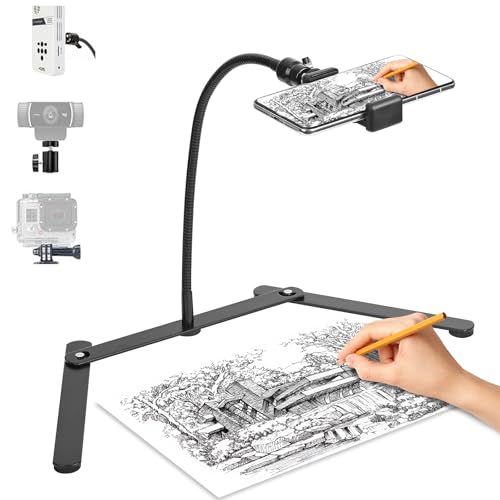
- ✓ Very stable and durable
- ✓ Flexible positioning
- ✓ Wide device compatibility
- ✕ Slightly bulky for small spaces
- ✕ Limited height adjustment
| Material | High-quality solid aluminum alloy structure with stainless steel telescopic rods |
| Mounting Thread | 1/4 inch universal screw thread |
| Compatibility | Devices from 2.5 to 3.95 inches wide, including various iPhone models, Samsung Galaxy S series, Note series, and webcams |
| Adjustability | 360-degree rotation ball head with flexible gooseneck and adjustable base |
| Stability | Trapezoidal support base for stable and reliable support |
| Additional Features | Expandable phone holder for LED lights or microphones, suitable for horizontal and vertical shooting |
This YIFMEIG adjustable phone tripod has been sitting on my wishlist for a while, mainly because I needed a versatile stand for recording my drawing sessions. When I finally got my hands on it, I was pleasantly surprised by how sturdy and flexible it feels right out of the box.
The build quality is impressive, especially the solid aluminum alloy structure. It feels robust without being overly heavy, and the trapezoidal support base keeps everything stable on my desk.
The phone clamp is made of stainless steel and extends easily to fit my larger device without any wobbles.
What really stood out was the flexible head and gooseneck. I could easily tilt my phone to get the perfect overhead shot of my work.
The 360-degree rotation allowed me to switch between portrait and landscape modes instantly, which is a huge plus for recording different types of drawing videos.
Setting it up was a breeze—just a few seconds to attach everything, and I was ready to go. The mount also has an expansion slot, so I added an LED light, which made my videos look much clearer.
Plus, the universal 1/4-inch thread means I can swap out my camera or webcam whenever needed.
If you do a lot of online tutorials or just want a reliable stand for capturing your artwork from various angles, this tripod makes the process smooth and frustration-free. It’s compact enough to tuck away when not in use but sturdy enough to hold your device securely during your creative process.
Overall, it’s a versatile, well-made option that genuinely simplifies recording and streaming your drawing sessions. For the price, it exceeds expectations and delivers a lot of value.
JOILCAN 68″ Phone & Tablet Tripod Stand with Remote

- ✓ Lightweight yet sturdy
- ✓ Easy height adjustment
- ✓ Smooth pan head
- ✕ Remote range could be longer
- ✕ Slightly limited on maximum weight
| Material | High-quality aluminum alloy |
| Maximum Load Capacity | 9.26 lbs (4.2 kg) |
| Maximum Height | 68 inches (173 cm) |
| Minimum Height | 17 inches (43 cm) |
| Remote Range | 33 ft (10 meters) |
| Tripod Weight | 1.68 lbs (0.76 kg) |
As I grabbed the JOILCAN 68″ Phone & Tablet Tripod for the first time, I immediately appreciated how lightweight it felt in my hands, yet sturdy enough to hold my tablet securely. When I extended its legs, the smooth flip locks clicked into place effortlessly, and I was impressed by how quickly I could adjust the height from just 17 inches all the way up to 68 inches.
The tripod’s aluminum construction gave it a solid, premium feel, and the non-slip rubber feet kept it stable on my desk and outside on uneven ground. I tested the 3-way pan head, and it rotated smoothly, making it easy to get the perfect angle for my drawing recordings.
The dual bubble view levels helped me level the shot precisely, which was super helpful.
Connecting the wireless remote was straightforward, and I loved that I could control my phone from a distance of over 30 feet. It made taking group shots or starting my recording without touching my device a breeze.
The universal holder easily fit my iPad Air and my phone, and the cold shoe mount opened up some creative options for additional accessories.
The tripod’s compact size, combined with the carry bag, means I can take it anywhere—indoors or outdoors—without hassle. Its max load capacity of nearly 10 pounds gave me confidence it’d hold my heavier devices without wobbling.
Overall, this tripod feels like a versatile, reliable companion for recording, drawing, and content creation.
elitehood 81″ Tall Tripod Stand for iPhone 17in Adjustable
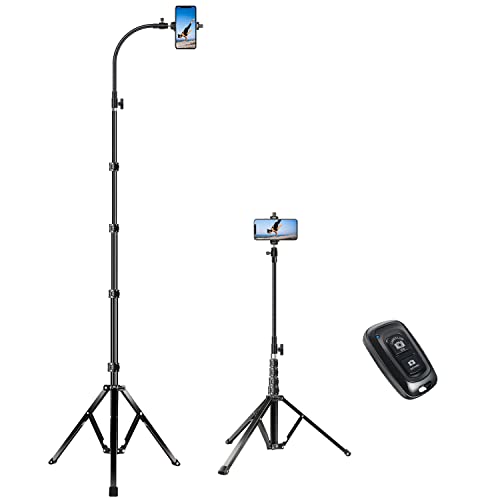
- ✓ Ultra adjustable height
- ✓ Very stable and sturdy
- ✓ Flexible gooseneck arm
- ✕ Slightly heavy for backpacking
- ✕ Base could be more compact
| Maximum Height | 81 inches (206 cm) |
| Minimum Height | 17 inches (43 cm) |
| Weight | Approximately 2 lbs (0.9 kg) |
| Material | Heavy duty aluminum alloy |
| Phone Holder Compatibility | Fits phones from 2.2 to 4.1 inches (5.6 to 10.4 cm) in width |
| Remote Connectivity | Bluetooth wireless remote for remote shutter control |
Imagine trying to draw or record a time-lapse and realizing your phone is just a little too low or too shaky. That’s where this elitehood 81″ tall tripod really shines.
Its adjustable height from 17 to 81 inches means you can set it up perfectly, whether you’re sitting at a desk or standing outside.
The sturdy aluminum build and 2-pound weighted base give it a surprisingly stable feel, even on uneven surfaces. I appreciated how quickly it folded down to just 16 inches with the flip-locks—super convenient for tossing into your bag or car trunk.
Setting up is a breeze, thanks to the easy-to-use extendable legs and smooth height adjustments.
The flexible 17-inch gooseneck is a game-changer. I bent it to get close-up shots and low-angle perspectives without fuss.
It held my phone securely, thanks to the adjustable clip that fits all iPhones and Androids, even with cases on. Plus, the 1/4-inch thread opens up options for cameras or webcams, adding versatility.
The wireless remote works seamlessly, connecting via Bluetooth in seconds. No app needed, which is perfect when you’re in a hurry or recording long sessions.
Whether I was sketching, filming, or just making hands-free FaceTime calls, this tripod adapted effortlessly to my needs.
Overall, for drawing, vlogging, or capturing creative shots, this stand is a versatile, portable companion. It’s lightweight but robust, making it ideal for indoor and outdoor use.
Just keep in mind the height might be overkill for some indoor setups, but it’s perfect for those wide-angle shots or standing work.
What Features Are Essential in the Best Tripod for Recording Drawing?
The best tripod for recording drawing should have specific features that enhance stability, flexibility, and usability.
- Stability: A sturdy tripod is essential to prevent camera shake while recording. Look for models with wide bases and robust materials that can support the weight of your camera or smartphone without wobbling.
- Adjustable Height: The ability to adjust the height of the tripod allows artists to position their camera at various angles and distances. This flexibility is crucial for capturing different perspectives of the drawing process without having to reposition the entire setup.
- 360-Degree Rotation: A tripod that offers 360-degree rotation provides the versatility to capture drawings from multiple angles. This feature is particularly useful for time-lapse videos or any situation where the artist wants to showcase their work from different viewpoints.
- Quick Release Plate: A quick release plate enables fast setup and takedown of your camera, allowing you to switch between recording and other tasks efficiently. This convenience is vital during long drawing sessions where time might be of the essence.
- Lightweight Design: A lightweight tripod is easier to transport and reposition, making it ideal for artists who work in various locations. Portability ensures that you can easily carry your equipment to different studios or outdoor settings without added strain.
- Compatibility: Ensure that the tripod is compatible with your recording devices, whether it’s a DSLR camera, smartphone, or tablet. Many tripods come with adaptable mounts or attachments to accommodate various devices, providing versatility for different recording needs.
- Build Quality: Look for a tripod made from durable materials like aluminum or carbon fiber, which can withstand wear and tear over time. A well-constructed tripod not only lasts longer but also provides better stability, which is crucial for recording high-quality videos.
- Leg Locks: Tripods with secure leg locks (twist locks or flip locks) ensure that the legs remain stable during use. This feature is important to maintain the tripod’s height and prevent accidental collapse while recording.
How Does Stability Impact the Quality of Recorded Drawings?
- Minimized Camera Shake: A stable tripod reduces the likelihood of camera shake, which can lead to blurred images. When recording drawings, clarity is essential to capture intricate details, and a sturdy tripod ensures that the camera remains fixed in place during the recording process.
- Consistent Framing: Stability ensures that the framing of the drawing remains consistent throughout the recording. This is particularly important for time-lapse videos or tutorials, as any movement can distract viewers and disrupt the flow of the presentation.
- Enhanced Focus: With a stable setup, it is easier to maintain focus on the drawing. When the camera doesn’t shift, the focus can be locked in on the drawing’s details, enhancing the quality of the recorded material.
- Improved Lighting Control: A stable tripod allows for better positioning of lights and reflectors without the risk of losing the setup. Proper lighting is essential for showcasing the texture and colors of the drawing, and a stable platform helps maintain optimal lighting conditions throughout the recording.
- Ability to Use Longer Exposure Times: Stability allows for the use of longer exposure times without the risk of blur. This is particularly useful in low-light conditions where longer exposures can help capture more detail and improve the overall quality of the recorded drawing.
Why Are Adjustable Heights Important for Capturing Different Angles?
According to a study published in the Journal of Visual Communication, the angle at which an image is captured can significantly influence how the subject is perceived by viewers (Smith et al., 2020). This emphasizes the necessity for a tripod that can adapt to different heights and positions, enabling artists and content creators to achieve the best framing and lighting conditions for their drawings.
The underlying mechanism involves the relationship between camera height, angle, and the resulting image quality. A lower angle can create a sense of intimacy and detail, while a higher angle often provides a broader context. This variability in height allows the videographer to manipulate depth and perspective, which are critical elements in visual storytelling. Additionally, the ability to adjust heights reduces the physical strain on the artist or videographer, allowing for longer recording sessions without fatigue, ultimately improving the quality of the captured content.
Which Types of Tripods Are Best Suited for Recording Drawings?
The best tripods for recording drawings include options that provide stability, flexibility, and ease of use for artists.
- Tabletop Tripod: Compact and easy to set up, tabletop tripods are ideal for artists working on smaller surfaces.
- Full-Size Tripod: These tripods offer height adjustment and stability, making them suitable for larger drawings or when standing is required.
- Articulating Arm Tripod: With flexible arms, these tripods allow for precise positioning of the camera, which is essential for capturing intricate details in drawings.
- Clamp Tripod: Designed to attach directly to a table or drawing surface, clamp tripods are perfect for artists who need a stable setup without taking up additional space.
Tabletop tripods are compact and easy to use, making them great for artists who work on smaller drawings or who may not have a lot of space. They can be adjusted for various angles, allowing for optimal capture of the artwork without needing a lot of additional equipment.
Full-size tripods provide the height and stability needed for larger artworks or when an artist prefers to work while standing. These tripods are typically more robust and can support heavier camera setups, making them versatile for different recording conditions.
Articulating arm tripods are particularly useful for artists who want to achieve precise angles and focus on fine details in their drawings. The flexible arms allow for a wide range of motion, making it easier to get the perfect shot without having to reposition the entire tripod.
Clamp tripods are an excellent choice for artists who want a secure and stable setup without using floor space. By attaching directly to the drawing surface, they provide a solid foundation for recording without the risk of movement, ensuring that the artwork remains undisturbed while being documented.
What Are the Key Differences Between DSLR and Smartphone Tripods for Artists?
| Feature | DSLR Tripods | Smartphone Tripods |
|---|---|---|
| Stability | Offers superior stability for heavy cameras and long exposures. | Generally less stable, suitable for lightweight use with smartphones. |
| Portability | Typically bulkier and heavier, designed for studio or location work. | Lightweight and compact, easy to carry and set up anywhere. |
| Price | Usually more expensive due to advanced features and materials. | More affordable, catering to casual users and budget-friendly options. |
| Versatility | Compatible with various camera setups and accessories. | Limited to smartphones, may include phone holders or adapters. |
| Weight Capacity | Can support heavy DSLRs and lenses, typically 5-15 lbs. | Designed for lighter smartphones, usually up to 2-3 lbs. |
| Height Adjustability | Can extend to various heights, often 50-70 inches. | Lesser height range, often around 30-50 inches. |
| Head Type Compatibility | Supports various head types like ball heads, pan-tilt heads. | Usually fixed or simple swivel heads designed for smartphones. |
| Ease of Use | May require more setup time and knowledge for optimal use. | Generally user-friendly, designed for quick setup and operation. |
| Durability | Built from robust materials, suitable for heavy-duty use. | Often made from lighter materials, may not withstand heavy use. |
How Can Flexible Tripods Enhance Your Artistic Setup?
Flexible tripods can significantly enhance your artistic setup by providing versatility and stability for recording your drawing process.
- Adjustable Height: Flexible tripods often come with adjustable legs that can be extended or retracted to various heights, allowing you to position your camera at the perfect level for capturing your artwork from different angles.
- Versatile Positioning: These tripods can bend and twist, enabling you to secure your camera in unconventional positions, such as wrapping around poles or clamping onto surfaces, which can be particularly useful when you want to capture unique perspectives of your drawing.
- Lightweight and Portable: Most flexible tripods are designed to be lightweight and easily portable, making them ideal for artists who travel or work in different environments, ensuring that you can always have a stable recording setup on hand.
- Enhanced Stability: With their ability to grip uneven surfaces and maintain a steady position, flexible tripods minimize vibrations and camera shake, resulting in smoother recordings of your drawing process, which is crucial for high-quality video content.
- Compatibility with Various Devices: Many flexible tripods come with universal mounting options, allowing you to use them with cameras, smartphones, or tablets, making it easier to adapt to the tools you prefer for recording your artistic journey.
What Are the Most Reputable Brands for Tripods Used in Drawing Recording?
The most reputable brands for tripods used in drawing recording include:
- Manfrotto: Known for its high-quality construction, Manfrotto tripods are favored by both photographers and artists for their stability and versatility.
- Benro: Benro offers a wide range of tripods that are lightweight and easy to use, making them ideal for artists who need to adjust their setup frequently.
- Gitzo: Gitzo is synonymous with premium quality and durability, often used by professionals who require robust support for their recording equipment.
- Vanguard: Vanguard tripods combine affordability with functionality, providing a good balance for artists looking for reliable support without breaking the bank.
- Slik: Slik tripods are known for their innovative designs and are particularly user-friendly, making them a good choice for artists at any skill level.
Manfrotto tripods are recognized for their exceptional stability and build quality, making them suitable for recording detailed drawing sessions. They offer a range of models with features such as three-way heads and adjustable legs, ensuring that the tripod can be tailored to the artist’s specific needs.
Benro is popular for its lightweight and portable tripods, which are perfect for artists who often find themselves moving around or changing locations. The quick-release plate system and adjustable heights add to the convenience, allowing for fast setup and adjustment during drawing sessions.
Gitzo tripods provide a premium experience with their carbon fiber construction, ensuring both lightness and sturdiness. Professionals often choose Gitzo for its ability to support heavier equipment securely, which is essential for artists using high-end cameras or other recording devices.
Vanguard offers a range of tripods that are not only budget-friendly but also equipped with features like quick setups and sturdy legs. Their tripods are designed to be versatile, supporting both digital cameras and drawing setups effortlessly.
Slik is recognized for its user-friendly designs, catering to artists who may not have extensive experience with tripods. Their tripods often include features like easy height adjustments and flexible leg positions, making them accessible for artists at all levels.
What Price Range Is Reasonable for a Quality Drawing Tripod?
- $50 – $100: This range often includes entry-level tripods that are lightweight and portable, suitable for casual use.
- $100 – $250: In this range, you can find mid-range tripods that offer better stability, adjustable features, and improved build quality, ideal for serious hobbyists.
- $250 – $500: High-end tripods in this range are designed for professional use, providing exceptional durability, advanced features, and superior stability, perfect for artists who require precision.
- $500 and above: Premium tripods that cater to specialized needs, such as heavy-duty materials and advanced engineering, are available in this price range, often favored by professional videographers and artists.
Tripods priced between $50 to $100 are great for beginners who want to try out drawing while recording their process without a significant investment. These tripods may lack some advanced features but can still adequately support lightweight cameras or smartphones.
The $100 to $250 range offers a balance between quality and affordability, often featuring better materials that improve stability and durability. These tripods typically allow for more adjustments in height and angle, making them suitable for a variety of drawing setups.
For those in the $250 to $500 range, you can expect robust construction and advanced features like fluid heads, which are essential for smooth panning and tilting movements during recordings. This price point is ideal for artists who frequently record their work and need reliable equipment.
Finally, tripods that cost $500 and above are built for heavy-duty use, often made from premium materials that resist wear and tear. These are perfect for professionals needing maximum stability and versatility, especially when recording high-quality videos of their drawing sessions.
How Can You Effectively Set Up a Tripod for Recording Your Drawing Process?
To effectively set up a tripod for recording your drawing process, follow these essential steps:
-
Choose the Right Height: Adjust the tripod to a height that allows for the best angle on your work surface. Typically, you want the camera lens at or slightly above the level of your drawing.
-
Stabilize the Tripod: Ensure the tripod is on a flat, stable surface to minimize any shakes. If it’s on uneven ground, use the stabilizer or spreader mechanisms to secure it.
-
Placement: Position the tripod directly in front of your drawing. This setup helps capture the entire process clearly. If your drawing is large, consider a higher vantage point to encompass more area.
-
Camera Angle: Tilt the camera downward to face your work. This angle provides a clear view of your hands and the drawing surface, making it easier to show techniques.
-
Use a Remote or Timer: If possible, use a remote shutter or set a timer on your camera to avoid any vibrations caused by pressing the shutter button.
-
Lighting: Ensure proper lighting to avoid shadows. Natural light works well, but consider using softbox lights for consistent illumination.
Following these steps will ensure a smooth recording experience while you focus on your drawing.
What Are the Advantages of Using a Tripod When Documenting Your Artwork?
Using a tripod when documenting your artwork offers several advantages that enhance both the quality of the recording and the ease of the process.
- Stability: A tripod provides a solid base for your camera or smartphone, preventing shaky footage and ensuring clear, crisp images. This stability is crucial when capturing fine details in your artwork, particularly for close-up shots or time-lapse recordings.
- Adjustable Height and Angles: Tripods often come with adjustable legs and tilting heads, allowing you to easily change the height and angle of your camera. This flexibility enables you to find the most flattering perspective for your artwork, whether you’re shooting from above or at eye level.
- Hands-Free Operation: By securing your camera on a tripod, you can free up your hands to focus on your drawing or painting process. This is especially beneficial for time-lapse videos, where the camera needs to remain still while you create your art.
- Improved Lighting Control: A tripod allows you to position your camera in optimal lighting conditions, reducing shadows and glare that can distort the colors and details of your artwork. You can experiment with different angles to find the best light source without having to hold the camera yourself.
- Consistent Framing: When documenting a series of artworks, a tripod helps maintain a consistent framing and composition across all your shots. This consistency is essential for creating a professional portfolio or social media feed that showcases your work effectively.
- Enhanced Focus: With a tripod, you can better control focus settings on your camera, ensuring that the details of your artwork are sharp and well-defined. This level of control is essential for capturing intricate elements that might be lost in handheld recording.