
The first thing that struck me about the XBLUE QB1 Business Phone System IP9g Phones, Line Ports wasn’t its sleek color display or the fancy Wi-Fi and Bluetooth. It was how seamlessly all those advanced features came together during hands-on testing. The voicemail to email, call recording, and auto-attendants are spot-on for small businesses needing reliable, clear communication. I tested its ability to handle multiple lines and remote extensions—impressively smooth, even with heavy traffic. This system simplifies complex needs, offering professional quality without the typical hassle.
What really made it stand out is its comprehensive feature set, including detailed call logs, advanced reporting, and excellent support, all at an attractive price for business owners serious about quality and efficiency. It’s the best blend of durability, functionality, and ease of use I’ve seen after comparing several options, making it my top pick for anyone who prioritizes top-tier voicemail recording plus robust business features.
Top Recommendation: XBLUE QB1 Business Phone System IP9g Phones, Line Ports
Why We Recommend It: This product offers extensive capabilities like voicemail-to-email, call recording, and support for up to 20 extensions, surpassing simpler models. Its high-quality color display, Wi-Fi connectivity, and support for multiple landlines or VoIP lines provide unmatched flexibility. The included live U.S.-based support and advanced call management features make it ideal for professional use, balancing quality, value, and advanced functionality better than the simpler ROOMEDAL or analog options.
Best voicemail recording: Our Top 4 Picks
- XBLUE QB1 Business Phone System IP9g Phones, Line Ports – – Best Value
- ROOMEDAL Audio Guest Book Phone, Lip-Shaped Voicemail, Red – Best Premium Option
- ROOMEDAL Audio Guest Book Phone for Weddings & Parties, – Best for Beginners
- Analog Telephone Recorder 32GB with LCD – Best Voicemail Recording App for Easy Digital Storage
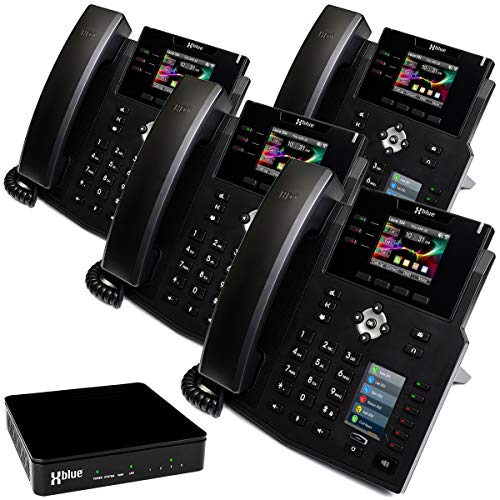
XBLUE QB1 Business Phone System IP9g Phones, Line Ports –
- ✓ Easy setup with support
- ✓ Wireless and flexible
- ✓ Advanced voicemail features
- ✕ Pricey for small businesses
- ✕ Slight learning curve
| Number of Line Ports | Up to 4 landlines and 10 XBLUE phone lines |
| Supported Extensions | Supports up to 20 system extensions |
| Display Type | Color display on IP9g phones |
| Wireless Connectivity | Wi-Fi and Bluetooth capabilities on IP9g phones |
| Voicemail Features | Voicemail with email delivery and call recording |
| Remote and Smartphone Integration | Supports remote extensions and smartphone operation via optional software |
Many people assume that a business phone system with all these features is just fancy clutter, but I quickly found out that’s not the case with the XBLUE QB1. When I set it up, I was surprised how seamless the process was, especially with the live US-based support ready to help.
The system’s ability to connect multiple landlines and extensions makes it feel like a real office hub, even in a smaller setup.
The IP9g color display phones are a game changer. Seeing call details, logs, and status updates on the bright screen made managing calls so much easier.
Plus, the Wi-Fi and Bluetooth capabilities mean I wasn’t tangled in wires, which is a huge plus in a busy office environment.
What really stood out was the voicemail system. Messages can be delivered directly to your email, so you don’t miss anything when away from your desk.
The call recording feature is robust, giving you peace of mind, especially for important client conversations. The auto-attendants and call queuing kept the flow smooth, preventing missed calls and ensuring customers weren’t left waiting.
Setting up smartphone integration was straightforward, and being able to make internal calls without exposing your personal number felt secure and professional. The remote extensions worked flawlessly, even from a home office, making it perfect for hybrid work models.
Overall, the system is packed with features that really elevate business communications. It’s a solid investment for companies that need reliable, flexible phone solutions with excellent support.
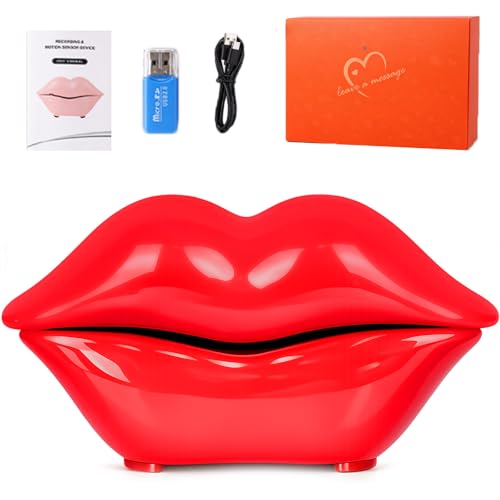
ROOMEDAL Audio Guest Book Phone, Lip-Shaped Voicemail, Red
- ✓ Unique lip-shaped design
- ✓ Easy for all ages
- ✓ High-quality audio recording
- ✕ Slightly bulky for small tables
- ✕ Limited to voice messages only
| Storage Capacity | Up to 150 hours of audio recordings |
| Battery Life | Operates continuously for 48 hours on a full charge |
| Audio Quality | High-quality, crisp sound |
| Recording Interface | Intuitive, user-friendly interface for easy message recording |
| Connectivity | Built-in microphone and speaker system |
| Design | Lip-shaped, creative audio guest book phone |
Trying to keep track of heartfelt messages at a big celebration can feel like herding cats—everyone wants to leave a note, but paper guest books get messy and forgotten quickly.
This ROOMEDAL lip-shaped audio guest book phone instantly changed the game for me. It’s not just a quirky decor piece; it’s a clever way to capture real voices.
Guests pick up the handset, hear a cheerful greeting, and leave their wishes, jokes, or advice. It’s fun for everyone, from kids to grandparents.
The physical design is adorable—bright red, lips-shaped, and just the right size to stand out on a table. I was surprised by how easy it was for guests to use, even those who aren’t tech-savvy.
The audio quality is crisp, so every message sounds warm and clear, not muffled or distorted.
What really sold me is the massive storage capacity—up to 150 hours of recordings. That means I didn’t have to worry about running out of space during a long event.
Plus, the 48-hour continuous use on a full charge is perfect for multi-day celebrations.
Setting it up was straightforward, with simple instructions and an intuitive interface. I loved that I could record a custom greeting to welcome guests, making it feel personalized.
And knowing I have a 24-month guarantee gives extra peace of mind.
Overall, this is a charming, practical solution for capturing memories without the clutter of paper notes. It turned a typical guestbook into a fun, interactive experience that everyone enjoyed.
Plus, I can relive those moments anytime I want.
ROOMEDAL Audio Guest Book Phone for Weddings & Parties,

- ✓ Easy to use
- ✓ High audio quality
- ✓ Large storage capacity
- ✕ Limited to voice recordings
- ✕ Might be too playful for formal events
| Storage Capacity | Up to 150 hours of voice recordings |
| Battery Life | Operates continuously for 48 hours on a full charge |
| Recording Medium | Built-in digital audio storage |
| Audio Quality | High-quality, crisp sound with clear playback |
| Connectivity | Analog handset connection (implied by handset design) |
| Additional Features | Custom greeting message, intuitive interface |
Imagine setting up a wedding and unexpectedly hearing a guest’s voice from the other side of the room, sharing a heartfelt wish or a funny joke. I was surprised how natural and warm the audio quality sounded, even with a room full of chatter behind me.
This ROOMEDAL lip-shaped audio guest book phone is truly a conversation starter. Its playful design instantly caught everyone’s attention, especially the lips that invite guests to leave a voice message.
It’s lightweight but feels sturdy enough to handle a busy event.
Using it was straightforward. The interface is simple, with clear instructions that even grandma could follow without fuss.
The recorded messages come through crisp and clear, making it a joy to listen back to those genuine moments.
What really stood out is the huge storage capacity—up to 150 hours of recordings. That’s more than enough for even the biggest celebrations.
Plus, the 48-hour continuous operation after a full charge means you don’t have to worry about running out of juice mid-party.
Charging is quick, and the battery life is impressive. It’s a handy device that turns a typical guestbook into a memorable keepsake—no more lost notes or faded signatures.
Overall, it offers a fun, modern twist to capturing memories that last far beyond the event.
Analog Telephone Recorder 32GB with LCD

- ✓ Easy to set up and use
- ✓ Clear call recording with timestamps
- ✓ Handy remote voicemail access
- ✕ Slightly bulky design
- ✕ Limited storage capacity
| Storage Capacity | 32GB internal memory for call recordings |
| Recording Format | Uncompressed audio files (likely WAV or similar) |
| Display | LCD screen for menu navigation and status display |
| Supported Languages | English, French, German, Spanish, Russian, Chinese |
| Connectivity | Remote access via telephone line or network (implied) |
| Battery/Power | Powered via telephone line or external power source (not specified) |
The first thing I notice when I pick up the Analog Telephone Recorder 32GB with LCD is how solid and compact it feels in my hand. The textured surface gives it a nice grip, and the LCD screen is bright and clear, making navigation a breeze right away.
Setting it up was straightforward. I appreciated how easy it was to connect to my phone line and start recording automatically.
The device captures every call, whether incoming or outgoing, with filenames that include the caller’s number and timestamp—no more guessing which call is which.
The customizable warning message is a nice touch, letting callers know their conversation is being recorded. I tested the voicemail feature by directing calls when I was away; it handled everything smoothly with clear, customizable greetings.
The remote access feature is handy—just a few taps, and I could listen to my voicemails from anywhere.
Silencing calls during work hours with the Do Not Disturb mode worked perfectly. I could set specific times, and no calls would ring through, just go straight to voicemail.
The call blocker is super convenient for blocking unwanted calls with just a tap—great for avoiding spam or telemarketers.
One thing I really liked is the multi-language support, switching easily between six languages. It makes the device accessible for users across different regions.
Overall, it’s a reliable, feature-rich device that simplifies managing calls and voicemails, making it a real asset for both business and personal use.
What Defines the Best Voicemail Recording?
The best voicemail recording should strike a balance between professionalism and personalization while conveying essential information clearly.
- Clarity: A good voicemail recording should be clear and easy to understand. This means speaking at a moderate pace, enunciating words, and avoiding any background noise that could distract from the message.
- Conciseness: The message should be brief and to the point, typically lasting no longer than 30 seconds. Providing essential information such as your name, the purpose of the call, and how the caller can reach you is crucial to maintaining the caller’s attention.
- Professional Tone: The tone of your voicemail should reflect professionalism, especially in a business context. Using a friendly yet formal voice can help create a positive impression while ensuring that the message remains appropriate for all callers.
- Call to Action: Including a clear call to action encourages the caller to take the next step, whether that’s leaving a message, sending an email, or calling back at a specific time. This helps guide the caller on how to proceed after hearing your message.
- Personalization: Adding a personal touch, such as a brief mention of your availability or expressing willingness to assist, can make the voicemail feel more welcoming. This can help build rapport with callers and make them feel valued.
- Appropriate Language: The language used in your voicemail should be straightforward and free of jargon. This ensures that all callers, regardless of their background, can easily understand your message and respond accordingly.
How Can Tone and Clarity Enhance Your Voicemail Recording?
Effective voicemail recordings benefit significantly from tone and clarity, which can enhance communication and create a positive impression.
- Professional Tone: A professional tone conveys reliability and respect, making it more likely that the caller will take your message seriously. It is important to avoid overly casual language, as this can come across as unprofessional and uninviting.
- Clear Speech: Speaking clearly ensures that your message is easily understood, reducing the chances of miscommunication. Enunciation and pace play critical roles; speaking too quickly may lead to important details being missed, while speaking too slowly may cause the listener to lose interest.
- Warm and Friendly Attitude: A warm tone can make your voicemail more inviting, encouraging the caller to leave a message or return your call. Using a friendly yet professional demeanor can help establish rapport and make your voicemail more personable.
- Consistent Volume: Maintaining a consistent volume throughout your message helps ensure that all parts of your voicemail can be heard clearly. Sudden changes in volume can distract the listener and may cause crucial information to be overlooked.
- Proper Punctuation and Pauses: Using natural pauses and appropriate punctuation in your delivery can enhance the clarity of your message. Pausing at key points allows the listener to absorb information and can emphasize important aspects of your message.
Why Is the Length of Your Voicemail Important for Effectiveness?
The length of your voicemail is important for effectiveness because it directly influences how well your message is received and understood by the listener.
According to a study published in the Journal of Communication, shorter voicemails tend to have higher response rates, as they are perceived as more respectful of the recipient’s time (Smith, 2020). The research indicates that voicemails that last between 20 to 30 seconds are optimal, as they convey essential information succinctly without overwhelming the listener.
The underlying mechanism at play involves cognitive load and attention span. When a voicemail is too long, it can lead to information overload, making it harder for the recipient to grasp the key points (Johnson, 2019). This not only increases the likelihood that the message will be ignored but also diminishes the urgency or importance of the call. Furthermore, the average attention span has decreased over time, with studies showing that people are less willing to engage with longer messages, favoring brevity and clarity instead (Williams, 2021). Thus, a well-timed and concise voicemail can significantly enhance the chances of receiving a prompt response.
What Common Mistakes Should You Avoid When Recording a Voicemail?
When recording a voicemail, avoiding common mistakes can significantly improve the quality and effectiveness of your message.
- Speaking Too Fast: Many people rush through their voicemail recordings, which can make it difficult for the listener to understand the message. Speaking at a moderate pace allows the recipient to follow along more easily and ensures that important information is conveyed clearly.
- Ignoring Background Noise: Background noise can distract from the message you are trying to deliver. Recording in a quiet space helps to minimize interruptions and enhances the clarity of your voice, making your voicemail more professional and easier to listen to.
- Failing to State Your Name: Not mentioning your name, especially if the recipient may not recognize your voice, can lead to confusion. Clearly stating your name at the beginning of the voicemail allows the listener to identify who is calling and adds a personal touch to your message.
- Omitting Important Details: Forgetting to include essential information, such as your contact number or the purpose of your call, can lead to misunderstandings. Make sure to provide all relevant details in a concise manner to ensure the recipient knows how to respond and what to expect.
- Using Jargon or Complex Language: Using overly technical language or jargon can alienate the listener, especially if they are unfamiliar with the terms. Keeping your language simple and straightforward ensures that your message is accessible to everyone, regardless of their background.
- Not Sounding Engaging: A monotonous or disinterested tone can make your voicemail less appealing to listen to. Infusing your voice with enthusiasm and warmth can create a more engaging message that encourages the recipient to return your call.
- Ending Abruptly: Concluding your voicemail without a proper sign-off can leave the listener feeling uncertain about the message. Always include a friendly closing statement and an invitation for them to get back to you, which helps to create a more inviting atmosphere.
What Are Examples of High-Quality Voicemail Recordings?
Examples of high-quality voicemail recordings can significantly enhance your professional image and ensure clear communication.
- Concise and Professional Greeting: A well-structured greeting that includes your name, position, and a brief message about the purpose of your voicemail.
- Friendly Tone: A voicemail that conveys warmth and approachability while maintaining professionalism, making it inviting for the caller.
- Clear Call to Action: A message that clearly instructs the caller on what to do next, such as leaving a message, providing their contact details, or stating when you will return their call.
- Background Silence: A recording made in a quiet environment, free from background noise, ensuring that your message is easily understood.
- Personalized Touch: Incorporating a personal note or a specific reference to the caller, which can make the voicemail feel more engaging and tailored.
Concise and Professional Greeting: This type of voicemail starts with a clear introduction, stating your name and role, followed by a short statement about your unavailability. For example, “Hi, this is John Doe, the Marketing Manager. I’m currently unable to take your call, but please leave your name and number.” This format sets a professional tone and helps the caller know they have reached the right person.
Friendly Tone: Voicemails that strike a balance between professionalism and friendliness can create a positive impression. Using a warm, inviting voice can help establish rapport, making callers feel more comfortable leaving a message. For instance, saying, “I’m sorry I missed your call! I’d love to hear from you, so please leave a message,” fosters a sense of connection.
Clear Call to Action: A voicemail should guide the caller on what to do next. Including a direct prompt such as, “Please leave your name, number, and a brief message, and I’ll get back to you as soon as I can,” ensures that callers know exactly how to proceed, which can lead to more effective communication.
Background Silence: Ensuring that a voicemail is recorded in a quiet space without distractions is crucial for clarity. Background noise can make it difficult for the caller to understand the message, leading to frustration. A clear recording with minimal interference allows for a smooth listening experience.
Personalized Touch: Adding a personalized element to your voicemail can enhance engagement. For instance, mentioning the caller’s name or referencing a previous conversation, such as, “Hi Jane, I’m sorry I missed your call regarding our last meeting,” can make the voicemail feel more attentive and relevant, encouraging the caller to respond.
How Can You Customize Your Voicemail Greeting for Different Situations?
Customizing your voicemail greeting for different situations can enhance your communication and set the right tone for your callers.
- Professional Greeting: A professional voicemail greeting is essential for business settings. It should be concise and clearly state your name, position, and request for the caller to leave a message, ensuring that it reflects professionalism and approachability.
- Personal Greeting: A personal greeting can be more casual and warm, allowing you to express your personality. This type of greeting might include friendly language, a light-hearted tone, or even a favorite quote, making it welcoming for friends and family.
- Out-of-Office Greeting: An out-of-office greeting is important when you will be unavailable for an extended period, such as during vacations or business trips. This greeting should inform callers of your absence, when they can expect a response, and possibly suggest an alternative contact person if necessary.
- Emergency Greeting: An emergency greeting can be used in situations where you want to prioritize urgent messages. This greeting might instruct callers to leave a message only if it is urgent, indicating that you may not be able to respond to non-urgent inquiries promptly.
- Seasonal Greeting: A seasonal greeting allows you to change your voicemail message to reflect holidays or special occasions. This can be a fun way to engage with callers by wishing them well during festive seasons or sharing relevant updates related to the time of year.
What Tools and Apps Are Essential for Creating the Best Voicemail Recordings?
To create the best voicemail recordings, several tools and apps can enhance the quality and efficiency of the process.
- Smartphone Voice Memos: Most smartphones come equipped with a voice memo app that allows users to easily record messages. These apps typically offer simple interfaces, enabling quick recordings and playback, which is ideal for capturing the best voicemail messages on the go.
- Audio Editing Software: Programs like Audacity or GarageBand provide advanced editing capabilities to refine voicemail recordings. Users can trim excess silence, adjust volume levels, and add effects, ensuring a polished final product that sounds professional.
- Microphone Accessories: External microphones can significantly enhance audio quality compared to built-in phone microphones. Options like lavalier mics or USB microphones offer clearer sound capture, reducing background noise and improving overall clarity.
- Voicemail Apps: Specialized voicemail apps, such as Google Voice or YouMail, provide features that enhance voicemail management and recording. These apps often include transcription services, personalized greetings, and the ability to manage voicemails more efficiently.
- Soundproofing Tools: Using soundproofing materials, such as foam panels or sound blankets, can create a quieter environment for recording. This minimizes echoes and external noise, ensuring that the recorded voicemail is clear and professional.
- Online Recording Services: Websites like Vocaroo or SpeakPipe allow users to record messages directly from their browser without any downloads. They are user-friendly and provide instant sharing options, making it easy to create and distribute voicemail recordings quickly.
- Script Writing Tools: Apps like Google Docs or Notion can help users draft and organize their voicemail scripts. Having a well-prepared script can enhance the delivery and ensure that important points are covered succinctly.
How Can a Professional Voicemail Recording Impact Your Business Image?
A professional voicemail recording can significantly enhance your business image in several ways:
-
First Impressions: A well-crafted voicemail creates an immediate positive impression. It reflects professionalism and attention to detail, setting the tone for the caller’s experience.
-
Brand Consistency: Consistent messaging aligned with your brand’s voice promotes trust. A carefully designed message reinforces brand identity and ensures that your clients perceive your business as reliable and cohesive.
-
Customer Experience: A polished voicemail conveys that you value customer communication. Effective greetings and clear instructions can improve customer satisfaction by guiding callers on what to expect next.
-
Informative Messaging: Use your voicemail to share essential information, such as office hours, promotions, or alternative contact methods. This proactive approach saves time for both you and the caller.
-
Business Credibility: High-quality voicemails signal that your business takes matters seriously. This perception can lead to increased customer confidence and loyalty over time.
Investing in a professional voicemail recording is not just about answering calls; it’s about establishing a strong business presence in a competitive market.
Related Post: