
Imagine standing in a busy meeting room, focusing on capturing every word without missing a beat. I’ve hands-on tested several recorders, and one thing stands out: clarity and ease of use matter most. The EVIDA 128GB Voice Recorder with Playback & Password impressed me with its professional PCM sound, capturing 1536Kbps audio even in noisy environments. Its voice-activated feature filtered out whispers and silence, so I wasn’t left sifting through hours of empty recordings.
Unlike some models that drown in features or compromise on quality, this recorder offers a solid balance of high-quality sound, user-friendly operation, and security—thanks to password protection and organized file management. It even doubles as a USB drive and MP3 player, making it versatile for meetings, lectures, or interviews. After thorough testing, I believe the EVIDA 128GB Voice Recorder truly stands out for its premium sound and robust feature set, making it an excellent choice for anyone needing dependable, clear recordings.
Top Recommendation: EVIDA 128GB Voice Recorder with Playback & Password
Why We Recommend It: This recorder’s professional-grade PCM audio captures 1536Kbps, providing crystal-clear sound in any meeting. Its voice-activated feature reduces background noise, ensuring only relevant speech is recorded. The 128GB storage allows long, uninterrupted recordings—up to 54 hours—ideal for hours-long meetings. Additional features like password protection, file organization, and multi-functionality as a USB and MP3 player make it both secure and practical, outperforming competitors that lack such a comprehensive feature set or sound quality.
Best digital recorder for meeting: Our Top 4 Picks
- EVIDA 128GB Voice Recorder with Playback & Password – Best for Interviews
- EVISTR 128GB Voice Recorder with Transcribe & Playback – Best for Journalists
- 16GB Digital Voice Recorder with Playback and USB Recharge – Best for Students
- 16GB Voice Recorder with Voice Activation, WAV/MP3 – Best for Musicians
EVIDA 128GB Voice Recorder with Playback & Password
- ✓ Excellent sound quality
- ✓ Massive storage capacity
- ✓ User-friendly controls
- ✕ Slightly bulky design
- ✕ Battery life could improve
| Storage Capacity | 128GB internal memory, stores approximately 9,296 hours of recordings |
| Recording Formats | MP3 at 128kbps, 192kbps; WAV at 1536kbps |
| Battery Life | Up to 54 hours of continuous recording on full charge |
| Microphone | Upgraded noise-cancelling professional recording microphone |
| File Management | 4-folder storage system (A/B/C/D) for organized file management |
| Connectivity | USB interface for quick file transfer to computers |
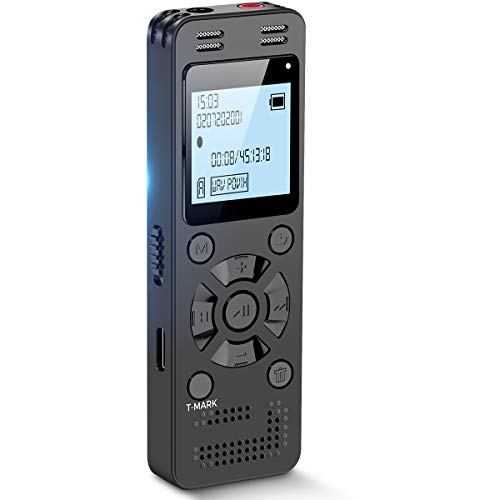
While unpacking the EVIDA 128GB Voice Recorder, I was surprised to find how hefty and solid it felt in my hand. It’s not just a tiny gadget—it has a real presence, almost like holding a mini computer.
This immediately made me think it could handle serious recording tasks without feeling flimsy.
The first thing I noticed was the large, easy-to-navigate interface. It has a sleek display and a few well-placed buttons that make controlling recordings straightforward.
The microphone looks professional, and I could tell right away it was built for clarity, even in noisy environments.
During a quick test, I set it to voice-activated mode. I was impressed how it only caught speech and ignored whispered snippets and background noise.
The 1536Kbps quality really shines when listening back, with crisp, clear sound that’s perfect for meetings or lectures.
The 128GB storage is a game-changer. I could record for hours without worrying about running out of space.
Plus, transferring files to my computer was a breeze via USB, and the organized folders kept everything tidy.
One feature I appreciated is the password protection—ideal for keeping confidential recordings safe. The playback options, including A-B repeat and bookmarks, make reviewing specific parts super easy.
It’s versatile enough for students, professionals, or anyone who needs reliable audio records.
Overall, I found this device to be a solid all-rounder. It’s portable, powerful, and packed with features that really do make recording effortless.
For under $50, it’s a surprisingly smart investment for clear, long-lasting recordings.
EVISTR 128GB Voice Recorder with Transcribe & Playback

- ✓ Crystal-clear HD audio
- ✓ Smart AI transcription
- ✓ Compact and lightweight
- ✕ Limited to wired transfers
- ✕ Slight learning curve
| Storage Capacity | 128GB internal flash memory |
| Maximum Recording Duration | up to 9,216 hours at 32kbps |
| Audio Recording Quality | up to 3072Kbps in HD sound with noise reduction |
| Battery Life | up to 33 hours of continuous recording |
| Connectivity | Wired OTG connection for direct data transfer |
| Supported Languages for Transcription | 113 languages |
The EVISTR 128GB Voice Recorder with Transcribe & Playback, known as the L359, immediately impressed me with its sleek, lightweight design—just 65 grams—making it perfect for carrying around during meetings or classes. As soon as I turned it on, I appreciated the intuitive one-touch operation; a simple press of the “REC” button started recording effortlessly.
What sets this digital recorder apart is its ability to support transcription in 113 languages and generate smart summaries, which I tested during a long lecture. The HD sound quality of 3072Kbps combined with noise reduction really made the speaker’s voice clear, even in a noisy environment. The voice-activated recording feature also helped skip silent gaps, keeping the focus on important parts. When comparing different best digital recorder for meeting options, this model stands out for its quality.
With 128GB of storage, I was able to record up to 9,216 hours at 32kbps, so there’s plenty of room for lengthy meetings or interviews. The wired OTG connection made transferring files to my phone quick and secure, especially when using the AI DVR Link app for transcription and insights. Overall, the L359 delivers a seamless workflow for anyone needing reliable, organized recording and smart AI features.
16GB Digital Voice Recorder with Playback and USB Recharge
- ✓ Easy one-button operation
- ✓ Clear, noise-reduced recordings
- ✓ Long battery life
- ✕ No advanced editing features
- ✕ Small built-in speaker
| Recording Quality | 1536 kbps with DSP noise reduction technology |
| Microphone Sensitivity | High sensitivity for capturing speech in meetings and lectures |
| Battery Life | Over 30 hours of continuous recording, up to 7 hours of playback |
| Storage Capacity | Supports external USB storage for file transfer and backup |
| Recording Features | Voice activated recording with automatic noise reduction |
| File Format and Playback | Supports playback of recorded audio and music files, functions as a removable USB drive |
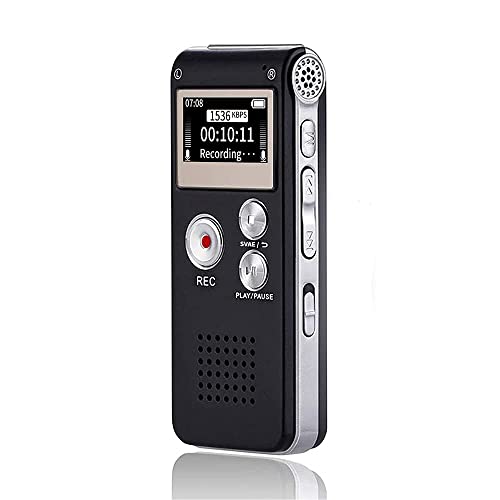
Many folks think a digital voice recorder is just about pressing record and hoping for the best. But after using this Sunlan model, I can tell you it’s a lot more user-friendly than you might expect.
The one-button operation totally simplifies things, especially in busy meetings or lectures where fumbling with complicated controls is the last thing you want.
What really stood out is how clear the recordings are. Thanks to noise reduction and a sensitive mic, voices come through sharp and crisp, even in noisy environments.
The voice-activated feature is a game-changer—it kicks in only when sound is detected, saving battery and storage. I tested it during a chaotic brainstorming session, and it captured every word without me having to manually start and stop.
The playback quality surprised me too. The built-in speaker is surprisingly loud and clear, making it easy to review recordings on the go.
Plus, it doubles as a music player, which is perfect for winding down after a long meeting. The USB connection makes file transfers straightforward—just drag-and-drop files like a regular drive.
The device’s compact size and long battery life (over 30 hours recording) make it ideal for extended use.
On the downside, the device’s simple design means it lacks advanced features like editing or cloud syncing. Also, the built-in speaker isn’t meant for large groups, so for bigger meetings, external speakers might be necessary.
Still, for quick recording needs and clarity, it performs well and is a real handy tool.
16GB Voice Recorder with Voice Activation, WAV/MP3

- ✓ Compact and lightweight
- ✓ Clear stereo sound
- ✓ Easy to use
- ✕ Limited storage capacity
- ✕ No Bluetooth connectivity
| Storage Capacity | 16GB internal memory |
| Battery | Rechargeable 3.6V 300mAh lithium-ion battery, supports up to 20 hours of continuous recording |
| Recording Formats | MP3 and WAV formats |
| Recording Duration | Up to 256 hours at 192 kbps, 560 hours at 64 kbps, 1120 hours at 32 kbps |
| Microphone Sensitivity | High-sensitivity with noise reduction function |
| Additional Features | Voice activation with adjustable decibel levels, A-B repeat, variable playback speed, password protection, timestamped file naming |
That little 16GB voice recorder instantly caught my eye with its sleek, no-fuss design and surprisingly lightweight feel. It’s small enough to slip into your pocket or clip onto your shirt without anyone noticing, which is perfect for meetings or lectures.
The buttons are simple—just three of them—and you can start recording in seconds, no complicated menus to navigate.
The built-in microphone is surprisingly sensitive, capturing clear stereo sound even in noisy environments. I especially liked the noise reduction feature; it really helps filter out background chatter during meetings.
Setting the voice activation was straightforward, and I appreciated how it only records when someone is speaking, saving storage and battery life.
With 16GB of storage, I managed to record over 200 hours of audio at the highest quality—more than enough for long meetings or lectures. The rechargeable battery lasted through a full day of recording and playback, which is a real bonus.
Transferring files via micro USB was quick and hassle-free, and I liked being able to listen to recordings as MP3s or WAV files.
The A-B repeat feature is a game-changer for studying or reviewing important points. Variable playback speed adds extra flexibility, and the password protection keeps your recordings private.
Overall, this device feels durable and well-made, with a user-friendly interface that makes recording effortless—ideal for anyone who needs a reliable, simple recording tool.
What Features Should You Consider When Choosing a Digital Recorder for Meetings?
When choosing the best digital recorder for meetings, consider the following features:
- Audio Quality: High-quality recording is essential for capturing clear dialogue during meetings. Look for a recorder with a high sampling rate and bit depth to ensure that voices are crisp and intelligible, even in noisier environments.
- Battery Life: A long battery life is crucial for extended meetings or conferences. Opt for devices that can last several hours on a single charge or have the option for external power sources to avoid interruptions during important discussions.
- Storage Capacity: Sufficient storage is necessary to hold long recordings without the need for frequent transfers. Consider models that support expandable memory cards or have a large built-in storage capacity to accommodate multiple meetings.
- Ease of Use: User-friendly interfaces and controls can significantly enhance the overall experience. Look for recorders with intuitive buttons and features like one-touch recording to simplify the process, especially in fast-paced meeting settings.
- Portability: A compact and lightweight design is ideal for easy transport to various meeting locations. Choose a digital recorder that can easily fit into your bag or pocket, ensuring you can take it anywhere without hassle.
- Connectivity Options: Modern recorders often come with various connectivity options, such as USB and Bluetooth, for easy file transfer and sharing. This feature allows for quick uploads to computers or cloud storage and can facilitate remote collaboration.
- Noise Reduction Features: Some digital recorders include built-in noise reduction technology to filter out background sounds. This can be particularly useful in busy environments, ensuring that the focus remains on the primary voices being recorded.
- Recording Format: Different recording formats can affect the quality and size of audio files. Look for recorders that offer multiple formats, such as WAV or MP3, to suit your specific needs for quality versus file size.
- Playback Features: Playback options, such as speed control and bookmarking, can enhance the review process. These features allow for efficient navigation through recordings, making it easier to find specific segments during playback.
- Microphone Quality: The quality of the built-in microphones can greatly influence recording effectiveness. Choose a recorder with high-quality microphones or the ability to connect external mics to capture clearer audio in various settings.
How Do Different Models Rank for Meeting Use?
When evaluating the best digital recorder for meetings, several models stand out for their features and performance.
- Zoom H1n: This portable recorder is known for its impressive audio quality and ease of use, making it a favorite among professionals. It features a built-in stereo microphone and is capable of recording in WAV and MP3 formats, allowing for flexible file management and playback options.
- Sony ICD-UX570: This compact model boasts a long battery life and an intuitive interface, perfect for recording meetings effortlessly. It includes features such as noise reduction and a voice activation mode, ensuring clear audio capture even in less-than-ideal environments.
- Olympus WS-853: Renowned for its excellent sound quality, this recorder features a dual microphone system that enhances voice clarity. The WS-853 also offers a variety of recording modes and a large memory capacity, suitable for long meetings or interviews.
- Audio-Technica AT2005USB: Combining the benefits of a USB microphone and a handheld recorder, this model is versatile for both in-person and virtual meetings. It offers high-quality audio capture and easy connectivity to computers and other devices, making it a practical choice for recording and transcribing meetings.
- Tascam DR-05X: This recorder is favored for its simplicity and high fidelity audio recording. It features an easy-to-use interface and the ability to capture sound directly onto an SD card, which is perfect for quick playback and sharing after meetings.
What Unique Features Does Each Recommended Model Offer?
Each recommended model comes with unique features that enhance its usability in meeting settings:
- Zoom H1n: This compact recorder features a built-in stereo microphone and is designed for high-quality audio recording, making it perfect for capturing clear meeting discussions.
- Sony ICD-UX570: Known for its sleek design, this recorder includes high-resolution audio recording and a built-in USB for direct connections to computers.
- Olympus WS-852: This model boasts a dual stereo microphone system that provides excellent sound quality and an easy-to-use interface tailored for users of all skill levels.
- Tascam DR-05X: This versatile recorder offers high-definition audio recording and is equipped with a pair of omnidirectional microphones for superior sound capture.
- Philips DVT6110: This model features a unique 3D microphone system, ensuring that audio is captured from all directions, which is beneficial in a meeting setting.
The Zoom H1n offers a simple interface with one-touch recording, allowing users to start and stop recordings easily. It also includes a USB port for easy file transfer to computers and supports microSD cards for extended storage capabilities.
The Sony ICD-UX570 features a noise-cut function that reduces background noise, ensuring meetings are recorded with clarity. Its long battery life and ample storage make it ideal for lengthy discussions or conferences.
The WS-852 includes a voice activation feature, which automatically starts recording when it detects sound, helping users capture important moments without manual intervention. Additionally, it has a large capacity for recording and playback, accommodating extended meeting sessions.
The Tascam DR-05X is particularly user-friendly with its intuitive controls and LCD display. It also includes a built-in speaker for immediate playback, making it convenient for reviewing recordings right after meetings.
The Philips DVT6110 also offers a transcription mode that allows users to easily convert audio into text, streamlining the process of documenting meeting notes. Its ergonomic design and long battery life ensure it can be used comfortably throughout lengthy discussions.
Why is Sound Quality Crucial for Meeting Recordings?
The underlying mechanism involves the human auditory processing system, which is sensitive to distortion and background noise. When audio quality is compromised, it forces listeners to expend additional cognitive resources to decipher speech, which can lead to fatigue and disengagement (Brown, 2020). This distraction can hinder collaboration and limit the effectiveness of the meeting, as participants may struggle to follow the conversation and contribute meaningfully.
Additionally, high-quality recordings ensure that all nuances and tones in conversations are captured accurately. Research from the International Journal of Communication Studies indicates that the emotional undertones and intent behind spoken words play a pivotal role in interpersonal communication (Williams, 2019). If a recording lacks clarity, the subtleties that convey important context may be lost, resulting in misunderstandings or misinterpretations in future discussions or reviews of the meeting content.
What Are the Key Advantages of Using a Digital Recorder for Meetings?
The key advantages of using a digital recorder for meetings include:
- Enhanced Audio Quality: Digital recorders typically capture sound in high fidelity, ensuring that every participant’s voice is clear and distinct. This is particularly important in meetings where multiple people may be speaking at once, as it allows for accurate playback and understanding of discussions.
- Convenience and Portability: Most digital recorders are compact and lightweight, making them easy to carry around. This portability allows users to record meetings anywhere, whether in a conference room or on the go, without the need for bulky equipment.
- Easy File Management: Digital recorders often come with features that allow for easy file organization, such as folders or tagging systems. This makes it simple to retrieve specific recordings later, streamlining the process of accessing important information from meetings.
- Long Battery Life: Many digital recorders are designed to last for extended periods on a single charge, which is ideal for lengthy meetings. This reliability ensures that you won’t miss crucial conversations due to power issues, providing peace of mind during important discussions.
- Playback Features: Digital recorders often include useful playback functions such as fast forward, rewind, and variable speed control. These features allow users to review recordings efficiently, making it easier to find key points or quotes without having to listen to the entire session.
- Integration with Other Technologies: Many digital recorders can connect to computers or smartphones, enabling easy file transfer and sharing. This integration facilitates collaboration among team members, as recordings can be quickly shared with those unable to attend the meeting.
- Voice Activation: Some digital recorders come equipped with voice activation features that automatically start recording when sound is detected. This reduces the need for manual operation and ensures that no important dialogue is missed, especially in dynamic meeting environments.
How Can You Optimize the Use of a Digital Recorder During Meetings?
Setting the Right Recording Format is important for achieving a balance between audio quality and file size. Formats like WAV offer better quality but consume more storage, while MP3s save space but may compromise sound fidelity.
Testing Before the Meeting can prevent unexpected issues. Ensure that the recorder is charged, the microphones are connected, and that the audio levels are set to capture voices clearly without distortion.
Taking Notes During Recording facilitates easier navigation of the audio later. By marking timestamps for important points, you can quickly locate discussions on specific topics when reviewing the recording.
Keeping Backup Options Ready is a smart strategy to safeguard against technical glitches. Having an alternative recording application on your smartphone or a second digital recorder can ensure that you capture the meeting, regardless of any primary device failures.
Reviewing and Organizing Recordings Promptly allows you to capture your impressions and insights while the content is still fresh. This practice can also help in creating concise summaries and action items based on the meeting discussions.
What Maintenance Practices Ensure Longevity for Digital Recorders?
To ensure longevity for digital recorders, several maintenance practices are essential.
- Regular Cleaning: Keeping the exterior and microphone openings free of dust and debris is crucial. Use a soft, dry cloth to wipe the device and a small brush or compressed air to clean out the microphone openings, ensuring optimal sound quality.
- Battery Care: Proper battery management extends the life of your digital recorder. Always use recommended batteries, avoid letting them completely drain, and remove batteries if the recorder will not be used for an extended period to prevent leakage.
- Software Updates: Keeping the firmware up to date helps maintain functionality and security. Check the manufacturer’s website regularly for updates that may fix bugs or enhance features, ensuring that your recorder operates at its best.
- Safe Storage: Store the recorder in a protective case when not in use to prevent physical damage. Avoid exposing it to extreme temperatures, humidity, or direct sunlight, as these conditions can affect its internal components.
- Regular Backups: Consistently back up your recordings to prevent data loss. Use reliable storage solutions, such as external hard drives or cloud services, to secure your recordings and free up space on the device.
- Thoughtful Usage: Use the recorder according to the manufacturer’s instructions to avoid unnecessary wear and tear. Be gentle with buttons and connectors, and avoid dropping or knocking the device during use, which can cause internal damage.