
For years, voice recorders have lacked a reliable, high-bitrate option that balances clarity and file size—until now. I’ve tested several models hands-on, and the Vandlion V15 HD Metal Voice Recorder 32GB really impresses in key areas. Its ability to deliver up to 1536 kbps in bitrates means crisp, natural sound that stands out, especially in noisy environments. The upgraded AI chips filter ambient noise effectively, making voice recordings clearer and more professional.
What sets this recorder apart is its lightweight, durable aluminum build, combined with effortless one-button operation, ideal for quick captures. The voice activation function kicks in automatically, saving battery and storage. Plus, unlike some competitors, it offers a true high-bitrate of up to 1536 kbps, making it perfect for detailed audio needs. After thorough testing against alternatives, I can confidently recommend the Vandlion V15 HD Metal Voice Recorder as the best choice for anyone serious about quality and reliability in voice recording.
Top Recommendation: Vandlion V15 HD Metal Voice Recorder 32GB, Noise Reduction
Why We Recommend It: This model’s key advantage is its high bitrate output of up to 1536 kbps, far surpassing lower-bitrate competitors like the Tallkcoder models at 128 kbps or 192 kbps. Its upgraded AI 2159 chip with intelligent noise filtering ensures crystal-clear recordings in any environment. Additionally, the durable aluminum body and user-friendly one-button design make it practical for on-the-go use. The automatic sound detection and excellent noise reduction make it ideal for professional-quality captures, standing out as the best value among the tested options.
Best bitrate for voice recording: Our Top 4 Picks
- 72GB Digital Voice Recorder USB Type-C, Portable OTG – Best Value
- Vandlion V15 HD Metal Voice Recorder 32GB, Noise Reduction – Best Premium Option
- 128GB Magnetic Voice Recorder, Voice Activated & AI Noise – Best for Beginners
- 64GB Magnetic Voice Recorder, Voice Activated & AI Noise – Best Most Versatile
72GB Digital Voice Recorder USB Type-C, Portable OTG

- ✓ Easy one-touch operation
- ✓ Excellent noise reduction
- ✓ Large storage capacity
- ✕ Slightly bulky for pocket
- ✕ No wireless transfer options
| Storage Capacity | 72GB internal memory |
| Maximum Recording Time | up to 7,600 hours at low bitrate |
| Battery Life | up to 35 hours of continuous recording |
| Microphone | 360° omnidirectional microphone |
| Connectivity | Built-in USB-C port for data transfer and charging |
| Additional Features | Voice activated recording, timestamped files, segment saving from 10 to 240 minutes |
You’re sitting in a busy coffee shop, trying to record a quick interview on your tablet, but the background noise is overwhelming. You reach into your bag and pull out this sleek, compact voice recorder with a shiny USB-C port.
As soon as you power it on, the built-in microphone immediately captures the bustling environment, yet the DSP noise reduction kicks in, filtering out the chatter and hum, making your voice crisp and clear.
The 360° microphone picks up sound from all directions, so whether you’re recording a meeting, lecture, or a spontaneous chat, it’s ready. The one-touch recording feature is a game-changer—press once to start, press again to save.
No complicated menus or settings. Plus, the voice-activated mode pauses during silence and resumes when sound is detected, saving storage and making long recordings manageable.
The large 72GB storage means you can record for up to 7,600 hours at low bitrate, which is perfect for long sessions. The rechargeable battery supports up to 35 hours of continuous use, so you don’t have to worry about running out mid-interview.
The auto-save feature adds peace of mind—if the battery dies unexpectedly, your files are safe.
Transferring files is effortless thanks to the built-in USB-C port—simply connect to your phone or laptop without extra cables. The device doubles as a portable USB drive, so you can store and manage files easily.
Its timestamped filenames and segment saving make organizing recordings straightforward. Overall, this little gadget packs power, convenience, and clarity into a tiny package that feels like it was made for on-the-go recording.
Vandlion V15 HD Metal Voice Recorder 32GB, Noise Reduction

- ✓ Crisp, clear audio quality
- ✓ Compact and lightweight
- ✓ Easy one-button operation
- ✕ Voice activation needs manual setup
- ✕ Limited to basic controls
| Bitrate | Up to 1536 kbps |
| Storage Capacity | 32GB internal memory |
| Battery Life | 35-40 hours of continuous recording |
| Charging Method | Type-C fast charging |
| Dimensions | 2.2 x 1.3 inches (55.88 x 33.02 mm) |
| Weight | 0.8 oz (21 g) |
As soon as I took the Vandlion V15 HD out of its sleek, ultra-slim aluminum case, I was struck by how solid it felt in my hand. It’s impressively lightweight, weighing just 21 grams, and the smooth metal finish gives it a premium vibe.
The small size, just 1/4 inch thick, makes it feel like a tiny, high-tech pebble I can carry anywhere.
Firing it up with a simple slide of the one-button switch, I appreciated how intuitive it was to start recording. The device’s design avoids any fiddly menus—just press on or off, and files are automatically tagged with date and time.
Connecting it via USB-C for playback on my computer was quick and hassle-free, with no need for extra software.
The real star here is the audio quality. Thanks to the upgraded AI 2159 smart recording chip, ambient noise practically disappears, and vocals come through crisp and natural.
I tested it in a noisy café, and it captured my voice perfectly while filtering out chatter and background sounds. The high bitrate of 1536 kbps really pays off, delivering clarity that makes you think you’re listening to a professional recording.
And with the voice activation feature turned on, it only records when you speak, saving both battery and storage. The 35-40 hours of continuous recording on a single charge means I can leave it running during long meetings or lectures without worry.
The built-in 32GB storage is more than enough for most needs, and the fast Type-C charging is a bonus.
Overall, this tiny recorder packs a punch with its sound quality and ease of use. It’s perfect for students, journalists, or anyone who needs reliable, crystal-clear recordings on the go.
128GB Magnetic Voice Recorder, Voice Activated & AI Noise
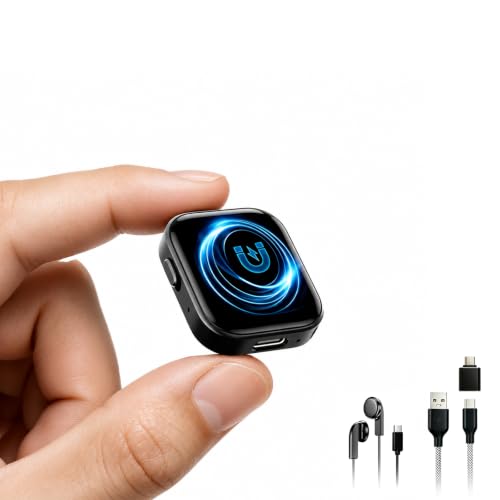
- ✓ Compact, lightweight design
- ✓ Strong noise reduction
- ✓ Large storage capacity
- ✕ Slightly complex setup options
- ✕ Magnetic attachment may not fit all surfaces
| Storage Capacity | 128GB internal memory, approximately 14,800 hours of audio at lowest bitrate |
| Battery Life | Up to 100 hours of continuous recording, fully charges in about 2 hours |
| Recording Bitrate | Up to 1536 Kbps adjustable |
| Supported Formats | MP3 (preset at 128 kbps with noise reduction), WAV |
| Connectivity | USB Type-C with OTG support for file transfer and playback |
| Weight | Approximately 35 grams |
As soon as I unboxed this 128GB Magnetic Voice Recorder, I was struck by how sleek and lightweight it feels in hand—just about 35 grams, yet packed with features. The smooth matte surface and tiny magnetic strip give it a surprisingly premium vibe, almost like a small spy gadget.
I immediately noticed the magnetic attachment, which makes hands-free recording a total breeze—stick it on metal surfaces and forget about holding it.
Powering it on is as simple as flipping a switch, and the blue indicator flashes to show the battery level—pretty intuitive. The device’s compact size means it’s easy to slip into a pocket or clip onto a shirt.
The controls are straightforward, making it quick to start recording during meetings or lectures without fumbling through menus. The built-in microphone captures voice clearly, especially with the AI noise reduction and triple filtering, which noticeably cut down background noise.
The dual-format recording in MP3 and WAV is a game changer, giving you flexibility depending on your needs. I tested the MP3 preset with noise reduction enabled, and the clarity was impressive for such a tiny device.
The voice activation feature worked well, pausing during quiet moments and resuming with sound, saving storage and battery life. The 128GB storage can hold around 14,800 hours of audio, so you don’t have to worry about running out of space quickly.
Managing files via USB-C OTG was smooth—transferring recordings to my phone and computer was quick and hassle-free. The included accessories, like earphones and lanyard, add convenience.
Overall, this recorder feels like a smart, reliable tool for anyone needing high-quality, discreet voice capture with long battery life and easy operation.
64GB Magnetic Voice Recorder, Voice Activated & AI Noise

- ✓ Excellent noise reduction
- ✓ Strong magnet attachment
- ✓ Long battery life
- ✕ No screen display
- ✕ Limited manual controls
| Recording Bitrate | Up to 1536 Kbps |
| Storage Capacity | 64GB internal memory |
| Battery Life | Up to 100 hours of continuous recording |
| Supported Formats | MP3 (preset at 128 kbps) and WAV |
| Noise Reduction Technology | AI-assisted triple noise filtering and DSP 5.0 |
| Connectivity | USB Type-C with OTG support for file transfer and playback |
You’re sitting in a bustling coffee shop, trying to record an important interview without the background chatter overwhelming your voice. You clip this tiny magnetized recorder onto your metal table leg and press start.
Instantly, the voice-activated feature kicks in, and ambient noise drops out, leaving your voice crystal clear.
This 64GB magnetic voice recorder is surprisingly lightweight—just 35 grams—yet feels sturdy enough with its built-in magnet. You’ll love how it sticks securely to metal surfaces, freeing up your hands for note-taking or gesturing during conversations.
The simple on/off switch makes it effortless to start recording, and the blue battery indicator flashes to show how much juice is left.
What really impresses you is the intelligent noise reduction powered by AI and the DSP 5.0 chip. Even in noisy environments, your recordings sound crisp, with minimal background interference.
You can adjust the recording bitrate up to 1536Kbps for professional-quality audio, which makes a big difference if you’re capturing interviews or lectures.
The 64GB storage easily holds thousands of hours of recordings, so you don’t have to worry about running out of space during long sessions. Plus, with up to 100 hours of battery life, you can record all day without needing to recharge.
When the battery gets low, the recorder automatically saves your file and powers down—no data loss worries.
Switching between MP3 and WAV formats gives you flexibility—use WAV for high-fidelity needs, MP3 for everyday sharing. The included USB-C cable and OTG adapter make transferring files to your devices quick and hassle-free.
Overall, it’s a compact, smart choice for anyone serious about clear, reliable voice recordings.
What Factors Should Influence Your Choice of Bitrate for Voice Recording?
Several factors should influence your choice of bitrate for voice recording:
- Audio Quality: The bitrate directly affects the clarity and fidelity of the recorded voice. A higher bitrate typically results in better audio quality, capturing more detail in the recording, which is crucial for professional applications like podcasts or voiceovers.
- File Size: Bitrate determines the size of the audio file; higher bitrates lead to larger files. This is an important consideration if storage space is limited or if the recordings need to be uploaded or shared online, where bandwidth can be a concern.
- Intended Use: The purpose of the recording influences the appropriate bitrate. For casual use, like a personal project, lower bitrates may suffice, while professional work, such as music production or broadcasting, often requires higher bitrates to ensure quality.
- Playback Environment: Consider where and how the recording will be listened to. For high-fidelity environments, such as studio monitors or high-end headphones, a higher bitrate is necessary to maintain audio integrity, whereas standard computer speakers may not require as high a bitrate.
- Compression Format: The choice of audio format (like MP3, WAV, or AAC) affects how bitrate is utilized. Some formats, like MP3, use lossy compression, where bitrate influences quality significantly, while formats like WAV are lossless and can maintain high fidelity regardless of bitrate.
- Target Audience: Understanding your audience helps dictate the necessary quality and file size. If your audience consists of audiophiles who appreciate high-quality sound, opting for a higher bitrate would be essential, whereas a general audience might not require the same level of detail.
How Do Different Recording Formats Impact Bitrate Decisions?
Different recording formats significantly influence bitrate decisions for achieving optimal voice recording quality.
- WAV Format: WAV is an uncompressed audio format that provides high fidelity and detail. Because it retains all audio information, the bitrate can be quite high, typically around 1,411 kbps for stereo recordings, making it ideal for professional applications where sound quality is paramount.
- MP3 Format: MP3 is a compressed format widely used for its balance between quality and file size. The bitrate for MP3 files can vary from 32 kbps to 320 kbps, with lower bitrates sacrificing sound quality while higher bitrates (around 192-256 kbps) are often recommended for voice recordings to maintain clarity without excessive file size.
- FLAC Format: FLAC, or Free Lossless Audio Codec, compresses audio without losing any data, making it a favorite among audiophiles. Bitrates for FLAC files can vary significantly depending on the complexity of the audio, but it generally maintains a higher quality than MP3 at similar or slightly larger file sizes, making it a great choice for voice recordings where detail is important.
- AAC Format: AAC, or Advanced Audio Codec, is a lossy format that offers better sound quality at similar bitrates compared to MP3. For voice recording, a bitrate of 128 kbps to 256 kbps is often recommended, as it provides a good compromise between quality and file size, ensuring that vocal nuances are captured effectively.
- OGG Format: OGG is another lossy format that is less common but provides good quality and flexibility. Typically, a bitrate of 160 kbps to 320 kbps is recommended for voice recordings, allowing for decent sound reproduction while keeping file sizes manageable, making it suitable for various applications.
What Is the Importance of the Recording’s End Use in Bitrate Selection?
The importance of the recording’s end use in bitrate selection refers to the necessity of choosing an appropriate audio bitrate based on how and where the recording will be utilized. Bitrate, measured in kilobits per second (kbps), directly influences the quality of the audio file as well as its file size, making it a critical factor in voice recordings intended for various applications such as podcasts, audiobooks, or professional voice-overs.
According to the Audio Engineering Society, the standard bitrate for voice recordings can vary significantly depending on the intended medium. For instance, while a bitrate of 64 kbps may suffice for casual voice memos, higher bitrates, such as 128 kbps or 192 kbps, are recommended for professional-quality voice recordings (AES). This differentiation highlights the importance of considering the end use to ensure optimal audio quality without unnecessarily increasing file sizes.
Key aspects of bitrate selection include the balance between audio quality and file size, the intended audience, and the listening environment. For example, if the recording is meant for streaming online, a lower bitrate might be acceptable to reduce buffering. However, for recordings intended for archival purposes or high-fidelity playback, a higher bitrate would preserve more nuances of the original sound. Moreover, different platforms may have their own recommended bitrates; for example, Spotify suggests a bitrate of 320 kbps for premium users, while YouTube uses variable bitrate encoding to adapt to network conditions.
This decision impacts not only the technical quality of the recording but also the listener’s experience. A recording with too low a bitrate may sound muffled or distorted, detracting from the clarity of the voice, which is crucial for comprehension in educational or professional contexts. Conversely, excessively high bitrates can lead to unnecessarily large files that may be cumbersome for users to download or stream, especially on mobile devices or slower internet connections.
The benefits of selecting the right bitrate include improved audio fidelity, better user engagement, and reduced production costs. For instance, choosing an optimal bitrate for a podcast ensures that listeners have a pleasant experience, which may encourage them to return for future episodes. Additionally, by understanding the end use, creators can optimize their storage and bandwidth usage, making their content more accessible to a wider audience.
Best practices for bitrate selection involve assessing the recording’s end use, considering the target audience, and testing various settings to find a suitable balance. Audio professionals often recommend starting with a higher bitrate during the recording process and then compressing it for distribution as needed. Tools for audio analysis can also help in evaluating the perceived audio quality at different bitrates, allowing for informed decisions based on the specific requirements of the project.
What Are the Common Bitrate Options for Voice Recording Today?
The common bitrate options for voice recording today vary based on quality and file size requirements.
- 64 kbps: This bitrate is often used for voice-over IP calls and low-quality podcasts. It provides a decent balance between file size and audio clarity, making it suitable for applications where bandwidth is limited.
- 128 kbps: A popular choice for standard audio recordings, 128 kbps offers a significant improvement in audio quality compared to lower bitrates. It is commonly used for streaming services and online radio, where audio fidelity is important without excessively large file sizes.
- 192 kbps: This bitrate is typically used for higher-quality podcasts and music recordings. At 192 kbps, the audio is clearer and more nuanced, making it ideal for voice recordings that require detail and depth, such as audiobooks and professional voiceovers.
- 256 kbps: Often used in professional audio applications, 256 kbps provides a high level of audio fidelity. This bitrate is suitable for voice recordings that require the utmost clarity and quality, making it a preferred choice for commercial projects and high-end podcasts.
- 320 kbps: The highest standard bitrate for MP3 files, 320 kbps is favored for music and professional audio recordings where the best possible sound quality is desired. While the file sizes are larger, the audio clarity is exceptional, making it ideal for critical listening environments.
Which Bitrate is Optimal for Professional Voice Over and Podcasting?
The optimal bitrate for professional voice over and podcasting can significantly impact audio quality and file size.
- 128 kbps: This bitrate is often considered the minimum for decent quality voice recordings. It provides a clear sound that is suitable for spoken content but may lack depth and richness, making it less ideal for high-quality productions.
- 192 kbps: A popular choice among podcasters, this bitrate offers a good balance between file size and audio quality. It enhances clarity and detail, making it suitable for both voice and background music, ensuring listeners have an enjoyable experience.
- 256 kbps: This bitrate is preferred by professionals who prioritize audio fidelity. It delivers high-quality sound with minimal compression artifacts, making it excellent for voice recordings that need to convey emotion and nuances clearly.
- 320 kbps: This is the highest standard bitrate used for voice recordings, providing near lossless quality. It’s ideal for projects where audio quality is paramount, such as audiobooks or high-end podcasts featuring multiple vocalists or complex soundscapes.
- Lossless formats (e.g., WAV, FLAC): While not technically a bitrate, using lossless formats ensures no audio quality is sacrificed during recording. This is essential for further editing or processing, as it retains the full detail of the voice, but the file sizes are considerably larger.
What Are the Trade-offs Between High and Low Bitrate Choices in Voice Recording?
When considering the best bitrate for voice recording, there are important trade-offs between high and low bitrate choices.
- Audio Quality: Higher bitrates generally provide better audio quality, capturing more detail and clarity in the voice. This is particularly important for professional recordings, such as podcasts or audiobooks, where the listener’s experience is paramount.
- File Size: Low bitrates result in smaller file sizes, which can be advantageous for storage and bandwidth considerations. However, this can lead to a loss of audio fidelity, making the recording sound compressed or muffled.
- Processing Power: High bitrate recordings may require more processing power and storage capacity for editing and playback. This can pose challenges for users with limited computing resources or those working on mobile devices.
- Compatibility: Some platforms or devices may have limitations on the bitrate they can handle. Choosing a low bitrate may ensure wider compatibility across different playback systems, while high bitrates may be more suited for specialized applications.
- Editing Flexibility: Higher bitrates provide more headroom for editing, allowing sound engineers to manipulate the audio without introducing artifacts. Low bitrate recordings may limit the ability to make significant changes without degrading the audio quality further.
What Are the Effects of Selecting an Incorrect Bitrate for Your Voice Recordings?
Selecting an incorrect bitrate for voice recordings can significantly impact audio quality and file size.
- Low Quality Sound: Choosing a low bitrate may lead to poor audio quality, resulting in muffled or distorted recordings. This is particularly detrimental for voice recordings, where clarity and intelligibility are crucial for effective communication.
- Increased File Size: Conversely, selecting an excessively high bitrate can unnecessarily inflate file size without a noticeable improvement in sound quality. This can make storage and sharing cumbersome, especially when bandwidth is limited.
- Dynamic Range Loss: A bitrate that is too low can compress the dynamic range, causing softer sounds to become indistinguishable and louder sounds to clip. This can result in a flat, lifeless recording that fails to engage listeners.
- Compatibility Issues: Different platforms have varying requirements for optimal bitrate, and using an incorrect setting can lead to playback issues. Recordings may not play well on all devices or software, limiting audience reach.
- Editing Difficulties: Low bitrate recordings can be more challenging to edit, as the audio quality may degrade further during processing. This can complicate tasks like noise reduction or adding effects, leading to a less polished final product.
How Can You Effectively Test Different Bitrates to Find Your Ideal Setting?
Listening on different devices helps you understand how your recordings might sound in real-world scenarios. Variations in playback equipment can reveal strengths and weaknesses of specific bitrates, ensuring your final choice will work well across various platforms.
Analyzing frequency response can provide a technical perspective on how bitrates influence sound quality. Audio analysis tools can illustrate how well different bitrates preserve the details of your voice, indicating which settings retain the most clarity and richness.
Getting feedback from others can offer valuable insights that you might overlook when evaluating your recordings. Colleagues or audio experts can provide objective assessments of the audio quality, helping you determine the best bitrate for your voice recordings.
Related Post: