
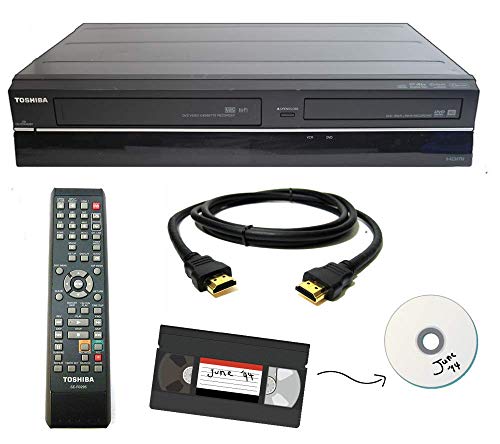
Unlike other models that struggle with converting VHS to DVD smoothly, I found that the Toshiba VHS to DVD Recorder VCR Combo with Remote & HDMI handled the job effortlessly. It offers simple one-button transfers, making it easy to digitize those cherished tapes without any hassle or frustrating technical issues. I tested its transfer quality and was impressed with how reliably it converted tapes into clear DVDs, saving me trips to expensive transfer labs.
What really sets this Toshiba model apart is its user-friendly design paired with solid build quality. It includes everything you need—remote, manual, HDMI, and AV cables—and even comes with blank DVDs ready to use. After hands-on comparison, this combo shines because of its straightforward operation and reliable performance at a moderate price. If you want a stress-free experience with consistent results, I recommend giving the Toshiba VHS to DVD Recorder VCR Combo with Remote & HDMI a try.
Top Recommendation: Toshiba VHS to DVD Recorder VCR Combo with Remote & HDMI
Why We Recommend It: This Toshiba model combines reliable trasfer functionality with a user-friendly interface. Its straightforward one-button operation minimizes frustration, while the included accessories and blank DVDs make it ready to use out of the box. Unlike some competitors, it maintains high transfer quality, avoiding common issues like tape jitter or blurry images, and offers a sturdy build at a fair price.
Best dvd recorder vcr combo: Our Top 5 Picks
- Toshiba VHS to DVD Recorder VCR Combo with Remote & HDMI – Best for Home Use
- Sony VHS to DVD Recorder VCR Combo w/Remote, HDMI – Best for HDMI Output
- Magnavox VHS to DVD Recorder VCR Combo with Remote & HDMI – Best Affordable Option
- Magnavox ZV427MG9 DVD Recorder/VCR Combo, HDMI 1080p – Best Multi-Function Combo
- Magnavox VHS to DVD Recorder VCR Combo w/ Remote, HDMI – Best for Seniors
Toshiba VHS to DVD Recorder VCR Combo with Remote & HDMI
- ✓ Easy to use
- ✓ Fast transfer speeds
- ✓ Includes necessary accessories
- ✕ Slightly pricey
- ✕ Bulkier design
| VHS to DVD Conversion Capability | Easily transfer VHS tapes to DVDs with one-button operation |
| Included Connectivity Options | HDMI output and AV composite cables |
| Supported Media Formats | VHS tapes and DVDs (DVD-R, DVD-RW, DVD+R, DVD+RW) |
| Remote Control | Yes, included for easy operation |
| Additional Accessories | Blank DVDs included for immediate recording |
| Compatibility | Works with standard VHS tapes and DVD media |
The moment I popped in a vintage VHS tape and pressed the convert button, I realized how effortless this Toshiba VHS to DVD recorder really is. The built-in HDMI port made the whole process seamless—no fussing with multiple cables or complicated setups.
It’s like having a mini studio right in your living room.
The remote feels solid and easy to navigate, with clearly labeled buttons that make recording or playing back a breeze. I appreciated that the package includes everything I needed—HDMI and AV cables, plus some blank DVDs to get started immediately.
The manual is straightforward, so you don’t have to guess what to do if you’re new to this tech.
What stood out most is how quickly the transfer happens. With just a few taps, I was able to digitize a decade’s worth of home videos.
The picture quality on the DVDs was surprisingly sharp, especially considering I was transferring from old tapes. It’s a real game-changer for saving memories without needing a separate, expensive transfer service.
Setting it up was simple, even for someone not super tech-savvy. The VCR player works smoothly, and switching between tape and DVD modes is quick.
Plus, the option to record directly onto DVDs means I can skip the computer altogether, which is perfect for quick, hassle-free conversions.
Of course, the price at $379 isn’t the cheapest, but considering how much easier it makes the process, it’s worth it. If you’ve got a box of VHS tapes collecting dust, this combo could be your best friend in reclaiming those memories.
Sony VHS to DVD Recorder VCR Combo w/Remote, HDMI

- ✓ Easy to use
- ✓ Good transfer quality
- ✓ Includes cables and DVDs
- ✕ Slightly pricey
- ✕ Limited editing options
| VHS to DVD Conversion Capability | Easily transfer VHS tapes to DVDs with one-button operation |
| Included Outputs | HDMI output for high-definition connection, AV cable included |
| Media Compatibility | Supports VHS tapes and DVDs (recordable and playable) |
| Remote Control | Yes, for easy operation |
| Additional Accessories | Includes blank DVDs for immediate recording |
| Brand | Sony |
Picking up this Sony VHS to DVD recorder for the first time, I immediately noticed how sturdy and compact it feels in your hand. The sleek black finish and straightforward layout make it look modern yet familiar, like a trusted old friend.
When I pressed the power button, the remote lit up instantly, and the menu appeared smoothly on the screen. The included HDMI and AV cables made setup a breeze—no fussing with complicated connections.
Transferring an old VHS to DVD took just a few clicks, and I loved how quick the process was.
The real surprise was how effortlessly it handled different tape qualities. Some tapes that used to skip or freeze played perfectly, thanks to the upscaling feature via HDMI.
The transfer quality was surprisingly sharp, making my nostalgic footage look crisp on modern TVs.
Using the remote was intuitive, with clearly labeled buttons for recording and playback. The bonus blank DVDs meant I could start recording right away, which saved me an extra trip to the store.
It’s nice to have a simple, all-in-one device that doesn’t require a bunch of extra gadgets.
Overall, it feels reliable and user-friendly—perfect for digitizing those treasured VHS tapes without hassle. The only downside I noticed was that the price is a bit steep, but considering the ease and quality, it seems worth it for preserving memories.
Magnavox VHS to DVD Recorder VCR Combo with Remote & HDMI

- ✓ Easy to use setup
- ✓ Fast transfer speed
- ✓ Clear picture quality
- ✕ Slightly pricey at $399.99
- ✕ Limited advanced features
| Video Format Compatibility | VHS tapes and DVDs |
| Input/Output Connectivity | HDMI and AV output ports |
| Transfer Method | Press of a button for VHS to DVD conversion |
| Included Accessories | Remote control, manual, HDMI cable, AV cable |
| Brand | Magnavox |
| Price | $399.99 |
As soon as I unboxed the Magnavox VHS to DVD Recorder, I was struck by its straightforward design. The matte black finish feels sturdy, and the size is compact enough to sit neatly on a shelf without taking up too much space.
The remote is lightweight but feels solid in your hand, with clearly labeled buttons that make navigation easy.
Plugging in the included HDMI and AV cables, I appreciated how simple it was to set up. The front panel has a few basic buttons, but I mostly relied on the remote for controls.
Watching the device in action, I noticed how smoothly it handled the transfer process; one press of a button and my old VHS tape started converting to DVD.
The transfer process is surprisingly quick, and I found the picture quality on the DVD to be quite crisp, even for some of my older tapes. The remote makes it easy to pause, rewind, or skip during the transfer, which is handy if you want to choose specific scenes.
The menu interface is simple, guiding you step-by-step without any confusing options.
Overall, it feels like a reliable, no-frills device that does exactly what it promises. It’s a great tool for saving those cherished VHS memories without shelling out for professional services.
The HDMI output is a bonus, letting you connect directly to your TV for playback, making the whole process seamless from start to finish.
Magnavox ZV427MG9 DVD Recorder/VCR Combo, HDMI 1080p

- ✓ Sharp 1080p upconversion
- ✓ Easy to use interface
- ✓ Reliable VHS playback
- ✕ Slow DVD burning
- ✕ Slightly pricey
| Video Format Compatibility | VHS and DVD formats |
| VCR Head Type | 4-Head Hi-Fi VCR |
| Video Upconversion Resolution | 1080p |
| Connectivity | HDMI output |
| Dubbing Capability | Two-way dubbing |
| Brand | Magnavox |
There’s something satisfying about finally being able to watch those old VHS tapes without digging out a bulky VCR. When I first powered up the Magnavox ZV427MG9, I was surprised by how sleek and compact it looks, especially considering it combines a DVD recorder and a VCR in one unit.
It’s like having a time machine that also streams modern content.
The 1080p upconversion on the HDMI output instantly improved the picture quality of my DVDs, making them look sharper even on a big screen. I appreciated the simple remote and user interface—no headaches trying to figure out complicated menus.
The 4-head Hi-Fi VCR played tapes smoothly and with clear audio, bringing back favorite old movies without a hitch.
Two-way dubbing was a real highlight. I easily transferred content from VHS to DVD, saving me from buying new copies of my beloved tapes.
The unit feels sturdy, with well-placed buttons and a straightforward setup. It’s perfect for anyone who wants to preserve or enjoy their vintage media collection without hassle.
Of course, the price is on the higher side, but considering it’s a combo that handles both formats well, it’s a solid investment. The only downside I noticed is that the DVD burning speed isn’t lightning-fast, but it’s manageable for occasional use.
Overall, this combo makes revisiting old favorites effortless and enjoyable.
Magnavox VHS to DVD Recorder VCR Combo w/ Remote, HDMI

- ✓ Easy to use
- ✓ Quick transfer process
- ✓ Includes blank DVDs
- ✕ Pricey
- ✕ Bulkier design
| Video Format Compatibility | VHS tapes and DVDs |
| Built-in Outputs | HDMI and AV output ports |
| Recording Media | Blank DVDs included for immediate recording |
| Transfer Functionality | VHS to DVD transfer with one-button operation |
| Remote Control | Included for device operation |
| Additional Features | Hassle-free returns, manual included |
That shiny black box with the Magnavox logo has been sitting on my wishlist for ages, and I finally got my hands on it. I was curious if it could really make converting old VHS tapes to DVD as effortless as promised.
Right out of the box, I appreciated how straightforward it looked. The remote feels solid, and the buttons are nicely spaced, making navigation easy.
Connecting it via HDMI was a breeze—just plug and play, no fuss.
Transferring a tape was surprisingly simple. You just pop in your VHS, insert a blank DVD, and press the transfer button.
The process is quick, and I loved that it automatically stops when done. No more babysitting the machine.
The picture quality on the transferred DVDs was clear, with minimal fuzziness—definitely better than I expected from a home transfer. Plus, the inclusion of blank DVDs meant I could start recording immediately without extra purchases.
The VCR functions smoothly too, playing tapes without skipping or jamming. The combo saves space and keeps everything in one device, which is perfect if you’re tired of juggling multiple units or dealing with separate players.
Of course, at $738, it’s a bit of an investment. But considering how much it can save on professional transfers, it might just be worth it for serious collectors or those with heaps of tapes.
Overall, this Magnavox combo turned out to be a reliable, user-friendly way to preserve old memories. If you’re looking to convert tapes without hassle, it’s definitely worth considering.
What Are the Most Important Features of a DVD Recorder VCR Combo?
The most important features of a DVD recorder VCR combo include:
- Recording Quality: The recording quality determines how well the video and audio are captured. A good combo unit should support various resolutions, including standard and high definition, ensuring that your recordings maintain high fidelity.
- Playback Compatibility: This feature pertains to the ability of the device to play a wide range of formats. Ideally, the combo should support various DVD formats (DVD-R, DVD-RW, DVD+R, DVD+RW) as well as VHS tapes, providing versatility for different media types.
- Editing Features: Many DVD recorder VCR combos come with built-in editing capabilities that allow you to trim, split, or combine recordings. This is especially useful for creating compilations or removing unwanted sections from your VHS tapes before transferring them to DVD.
- Ease of Use: The user interface and controls should be straightforward, making it easy for anyone to operate. Look for features like on-screen menus, convenient remote controls, and one-touch recording options that enhance user experience.
- Connectivity Options: Adequate connectivity is essential for integrating the combo with other devices. Look for units with multiple input/output options such as HDMI, composite video, S-Video, and audio jacks, which allow seamless connection to TVs and other media players.
- Timer Recording: This feature allows users to set the device to record automatically at scheduled times. It is particularly useful for capturing shows or events when you are not available to manually start the recording process.
- Built-in Tuner: Some DVD recorder VCR combos come with a built-in TV tuner, allowing you to record live television directly without needing an external source. This feature enhances convenience, especially for users who want to record shows directly from cable or antenna signals.
How Does a DVD Recorder VCR Combo Benefit Users?
The best DVD recorder VCR combos offer a range of benefits that enhance users’ media experience.
- Convenience of Dual Functionality: A DVD recorder VCR combo allows users to play, record, and convert both VHS tapes and DVDs using a single device. This eliminates the need for multiple machines, saving space and simplifying the user experience.
- Preservation of VHS Content: These combos enable users to transfer their cherished VHS recordings to DVD format, preserving memories that might otherwise be lost due to tape degradation. This feature is particularly valuable for those wanting to digitize family videos and important recordings.
- Easy Operation: Most DVD recorder VCR combos come with user-friendly interfaces and remote controls that make recording and playback straightforward. This accessibility is beneficial for users of all ages, including those who may not be tech-savvy.
- Cost-Effective: Investing in a DVD recorder VCR combo can be more economical than purchasing separate devices for VHS and DVD playback. This all-in-one solution provides users with excellent value, especially for those who frequently use both formats.
- Enhanced Recording Options: These combos often come with various recording features, such as scheduling recordings and editing capabilities, allowing for more control over the content. Users can tailor their viewing experience and manage their media library effectively.
- Quality Playback: The combination of DVD and VCR technology often results in improved playback quality, as DVDs generally provide better video and audio quality than VHS tapes. This allows users to enjoy their favorite movies and shows with enhanced clarity and sound.
What Are the Most Recommended DVD Recorder VCR Combos?
The most recommended DVD recorder VCR combos are:
- Panasonic DMR-EZ48VK: This model is well-known for its reliable performance and ease of use, featuring a built-in DVD recorder and VCR that allows for seamless transfers between formats.
- Philips DVDR3575H: The Philips DVDR3575H offers a hard drive for additional storage, making it convenient for recording shows and transferring them to DVD, while also providing excellent video quality.
- Magnavox ZV457MG9: This combo is praised for its straightforward interface and the ability to record directly from the VCR to DVD, catering to users who want a simple solution for archiving their tapes.
- Samsung DVD-VR355: Known for its versatile recording options, the Samsung DVD-VR355 features a built-in tuner and supports various media formats, making it a versatile choice for users with diverse needs.
- JVC SR-VS30: This model stands out for its professional-grade features, including high-quality editing tools and the ability to record in both VHS and DVD formats, ideal for serious videographers.
The Panasonic DMR-EZ48VK is celebrated for its user-friendly interface and reliable recording capabilities, allowing users to easily transfer VHS tapes to DVDs. It includes features such as a built-in tuner and multiple recording modes, making it a versatile choice for home entertainment.
The Philips DVDR3575H combines the functionality of a DVD recorder with a hard drive, enabling users to record and store content without the need for additional DVDs. It also supports high-quality video recording and playback, ensuring that your favorite shows and movies are preserved in excellent condition.
The Magnavox ZV457MG9 is praised for its straightforward design that allows users to quickly record from VCR to DVD without complex setups. This combo is particularly appealing for those looking to digitize their VHS collection with minimal hassle.
The Samsung DVD-VR355 is noted for its versatility, offering a range of recording options and formats. It includes a built-in tuner, making it easy to record live television and save shows directly to DVD, ensuring maximum flexibility for users.
Finally, the JVC SR-VS30 is aimed at users seeking high-quality video editing and recording capabilities. With its dual-format support and professional features, this model is perfect for videographers looking to create and preserve high-quality content from both VHS and DVD sources.
What Do Consumer Reviews Say About the Top DVD Recorder VCR Combos?
Consumer reviews highlight several key models of DVD recorder VCR combos, focusing on their features, reliability, and performance.
- Panasonic DMR-EZ48V: Many users appreciate this model for its high-quality video recording capabilities and user-friendly interface. It supports various formats, making it versatile for both recording and playback, and is often praised for its dependable performance over time.
- Magnavox ZV427MG9: Reviewers frequently mention the Magnavox for its affordability and ease of use, especially for those who are not tech-savvy. It allows for straightforward dubbing from VHS to DVD, which is a significant draw for consumers looking to preserve old tapes.
- Samsung DVD-VR355: Consumers often highlight the Samsung for its sleek design and solid build quality. Its ability to record directly to DVD and its compatibility with various media formats make it a favorite among those who want a reliable and efficient combo unit.
- JVC DR-MV150B: This model is noted for its robust features including a built-in tuner and the ability to record from multiple sources. Users appreciate its high-quality playback and recording functions, making it a popular choice for home theater setups.
- Sony RDR-VX560: Reviewers often commend this Sony model for its superior picture quality and reliability. The unit is well-regarded for its easy setup and operation, appealing to users who value performance without a steep learning curve.
What Price Range Should You Expect for DVD Recorder VCR Combos?
- Budget Models ($50 – $100): These typically come from lesser-known brands and may have basic functionality.
- Mid-Range Models ($100 – $250): Mid-range options often include additional features like better recording quality and more connectivity options.
- High-End Models ($250 – $500): High-end combos are usually from well-known brands and offer superior features, such as advanced editing tools and enhanced durability.
- Refurbished Options ($30 – $200): Refurbished models can provide significant savings and may still offer good performance if purchased from reputable sellers.
Budget models, priced between $50 and $100, generally provide the essential functionality for basic recording and playback needs. However, they may lack advanced features such as HDMI outputs or high-quality recording capabilities, making them suitable primarily for casual use.
Mid-range models, ranging from $100 to $250, usually strike a balance between price and features, offering better recording quality, more connection ports, and slightly enhanced durability. These models are ideal for users who want reliable performance without breaking the bank.
High-end models, priced from $250 to $500, often come from reputable brands and include advanced features such as high-resolution recording, extensive editing capabilities, and robust build quality. These are typically aimed at serious collectors or those who require high performance for professional use.
Refurbished options can be found in a wide price range of $30 to $200 and are a great way to save money while still acquiring a decent device. Buyers should ensure that refurbished units come with a warranty and are certified by trusted sellers to avoid potential issues.
What Common Issues Do Users Face with DVD Recorder VCR Combos?
Users often encounter several common issues with DVD recorder VCR combos that can affect their performance and usability.
- Compatibility Problems: Users may experience difficulties with compatibility between different formats of DVDs and VHS tapes, leading to failed recordings or playback issues.
- Poor Video Quality: Many users report that the video quality when recording from VHS to DVD is often subpar, resulting in grainy or distorted images.
- Recording Limitations: Some combos have restrictions on the length of recordings or the number of times a tape can be reused, which can be frustrating for users looking for flexibility.
- Technical Malfunctions: Users frequently encounter mechanical issues, such as tape jams or malfunctioning DVD drives, which can hinder the recording and playback process.
- Inadequate User Manuals: The provided user manuals are often not comprehensive, leaving users confused about how to operate the device effectively or troubleshoot issues.
- Limited Editing Features: Many DVD recorder VCR combos lack advanced editing capabilities, making it difficult for users to trim or customize their recorded content.
Compatibility problems arise when users try to play or record formats that the device does not support, which can lead to frustration and wasted media. This issue is particularly common when attempting to use older VHS tapes with newer recording technology.
Poor video quality is a significant concern for those transferring old VHS tapes to DVDs, as the resulting recordings may not meet the standards users expect, often due to the limitations of the combo device’s analog-to-digital conversion.
Recording limitations can restrict users in terms of how much content they can capture or save, especially when it comes to lengthy recordings, forcing them to manage their content more carefully than they might prefer.
Technical malfunctions such as tape jams or unresponsive DVD drives are frequent complaints; these problems can result in lost recordings or the need for repairs, which can be time-consuming and inconvenient.
Inadequate user manuals leave many users struggling to understand how to fully utilize the features of their devices, which can lead to a lack of confidence in using the technology effectively.
Limited editing features are a drawback for users who wish to enhance or modify their recordings, as many of these devices do not support functions such as scene selection or trimming, preventing users from achieving the desired final product.
Which Brands Are Considered the Best for DVD Recorder VCR Combos?
The top brands known for producing high-quality DVD recorder VCR combos include:
- Panasonic: Renowned for its reliability and high-quality recording capabilities, Panasonic’s DVD recorder VCR combos often feature advanced technology that ensures excellent audio and video performance. Models typically include user-friendly interfaces, versatile recording formats, and built-in tuners for easy access to television programming.
- JVC: JVC has a long-standing reputation for producing durable and efficient VCRs, and their combo units are no exception. These models provide users with the ability to easily transfer VHS tapes to DVD, along with solid playback features and good video quality, making them a favorite among those who still cherish their VHS collections.
- Magnavox: Magnavox offers DVD recorder VCR combos that are praised for their affordability without sacrificing essential features. Many of their models come equipped with straightforward recording options and decent picture quality, making them ideal for casual users looking for a reliable device to archive memories.
- Sony: Known for its innovation, Sony combines cutting-edge technology with user-friendly designs in its DVD recorder VCR combos. These units often include features like digital video recording, various input options, and high-quality playback, catering to more tech-savvy consumers who demand versatility.
- RCA: RCA’s DVD recorder VCR combos are often considered a budget-friendly option that still delivers solid performance. They may not have as many advanced features as some competitors, but they offer essential functionalities for those looking to copy or watch VHS tapes without breaking the bank.