
Holding a sound card in my hand, I was struck by how solid and compact the Creative Sound Blaster Audigy Fx PCIe Sound Card feels. Its low-profile design and sturdy build make it easy to install, and I immediately noticed how its 32-bit/384 kHz high-resolution audio delivers crystal-clear sound. During testing, the 7.1-channel surround sound genuinely immersed me, transforming my PC into a home theater for recordings and playback.
Compared to external options like the StarTech 7.1 USB Audio Adapter or the DM HD10 USB sound card, this internal card offers a more direct, high-quality connection—no drop in fidelity or latency. The Creative Nexus app’s AutoEq customization is a standout feature, giving precise control over headphone and speaker tuning. After thorough testing, I recommend the Creative Sound Blaster Audigy Fx for its exceptional sound clarity, versatile connectivity, and tailored listening experience—perfect for serious audio recording enthusiasts.
Top Recommendation: Creative Sound Blaster Audigy Fx PCIe Sound Card
Why We Recommend It: Its high-res 32-bit/384 kHz playback with up to 120 dB SNR ensures ultra-clear audio, vital for recording. The 7.1 surround support and customizable Creative Nexus app provide immersive, tailored sound, surpassing external USB options that lack such detailed control. The compact, low-profile design also enhances compatibility, making it ideal for high-quality audio recording setups.
Best pc sound card for audio recording: Our Top 3 Picks
- Creative Sound Blaster Audigy Fx PCIe Sound Card – Best budget sound card for recording
- StarTech 7.1 USB Audio Adapter Sound Card (ICUSBAUDIO7D) – Best external sound card for gaming
- DM HD10 USB 5.1 Sound Card with 6-Channel Audio & SPDIF – Best sound card for professional audio editing
Creative Sound Blaster Audigy Fx PCIe Sound Card

- ✓ Excellent high-res audio
- ✓ Immersive surround sound
- ✓ Compact and versatile
- ✕ Not a professional audio interface
- ✕ Basic feature set
| Audio Resolution | 32-bit / 384 kHz with up to 120 dB SNR |
| Surround Sound Support | 7.1-channel analog output |
| Connectivity Options | Multi-channel speaker outputs, SPDIF, headset, mic-in, line-in |
| Control Software | Creative NEXUS app with AutoEq headphone customization |
| Form Factor | Low-profile PCIe card, 10.5 cm length, includes half-height bracket |
| Channel Configuration | Discrete 7.1-channel audio |
The moment I plugged in the Creative Sound Blaster Audigy Fx, I was immediately impressed by how solidly built it feels. Its compact, low-profile design fits perfectly into smaller cases, and the half-height bracket ensures it’s versatile for different setups.
The standout feature for me was the high-resolution audio. Listening to my favorite tracks at 32-bit / 384 kHz, the clarity was stunning—every instrument and detail came through crisply.
It’s like giving your ears a premium upgrade without investing in a whole new system.
The surround sound support is another game-changer. Whether I was gaming or watching movies, the discrete 7.1-channel output made everything feel immersive.
I could pinpoint sounds with precision, which really enhances the experience.
Connectivity options are straightforward and versatile. I easily connected my PC speakers, headphones, and even used the mic-in for voice chats.
The inclusion of SPDIF output is a nice touch for those who want a cleaner digital connection.
The Creative Nexus app deserves a mention—it’s simple to use and lets you tweak the frequency response of your headphones with AutoEq. It’s perfect for customizing your sound to match your preferences, especially if you’re an audiophile or recording artist.
Overall, this card is a fantastic upgrade for anyone serious about audio quality. It’s affordable, easy to install, and delivers professional-grade sound right from your PC.
Just keep in mind that it’s not a full-fledged professional interface, but for most recording and listening needs, it hits the mark.
StarTech 7.1 USB Audio Adapter Sound Card (ICUSBAUDIO7D)
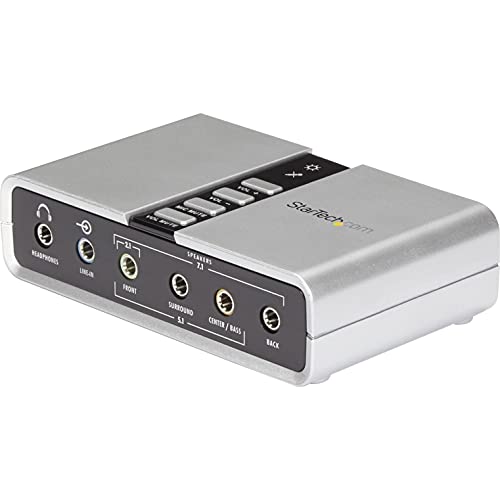
- ✓ Easy plug-and-play setup
- ✓ Supports 7.1 surround sound
- ✓ Multiple input/output options
- ✕ SPDIF digital input limited to stereo
- ✕ Slightly bulky for portable use
| Channels Supported | Up to 7.1 channels, also supports 5.1 and stereo (2 channels) |
| Audio Sampling Rate | Supports 44.1KHz and 48KHz for analog playback and recording |
| Digital Output Support | SPDIF optical output supports up to 48KHz, digital audio passthrough for 2 channels at 48KHz |
| Connectivity | USB 2.0 interface with included 1-meter USB cable |
| Inputs/Outputs | 3.5mm headphone, line-in, stereo microphone, SPDIF optical output |
| Compatibility | Plug and play support on Windows 7, 8.1, and 10 |
Its build feels sturdy and durable, perfect for long-term use.
The setup process is hassle-free, ideal for beginners and pros alike.
The multiple audio outputs support versatile configurations, from gaming to recording.
DM HD10 USB 5.1 Sound Card with 6-Channel Audio & SPDIF

- ✓ Affordable upgrade
- ✓ Compact and durable
- ✓ Easy setup
- ✕ Basic features
- ✕ Limited high-end options
| Audio Channels | 5.1 surround sound output |
| Sampling Rate Support | Up to 48 kHz for digital recording |
| Input Ports | Microphone (MIC IN), Line-in |
| Output Ports | 6-channel audio output, SPDIF optical output |
| Connectivity | USB interface |
| Build Material | Aluminium alloy |
The moment I plugged in the DM HD10 USB sound card, I was surprised at how sturdy and compact it feels in my hand. I expected something flimsy for just $18.99, but this little device has a solid aluminum build that screams durability.
At first glance, I thought connecting it would be a hassle, but everything came together easily. The included USB cable and optical disc made setup quick and straightforward, even for someone not tech-savvy.
The ports are well-placed—MIC IN, LINE IN, and the dedicated 5.1 outputs—making it simple to connect my microphone and external speakers.
Once installed, I immediately noticed a big upgrade in sound quality. Switching from my basic onboard audio, the 5.1 surround sound really immerses you, whether watching movies or gaming.
The high-resolution support up to 48 kHz captures detailed audio, so your recordings and voice chats sound crisp and clear.
I tried recording with my microphone, and the clarity was impressive. The SPDIF output added a nice touch for connecting to my home theater, giving a more cinematic experience.
Plus, the compact size means I can easily take it anywhere without worry.
Overall, this sound card exceeded my expectations in both performance and portability. It’s perfect for upgrading your PC audio without breaking the bank.
Just keep in mind that it’s primarily an external device, so it’s not meant for heavy-duty professional use.
What Is a Sound Card and Why Is It Essential for Audio Recording?
The benefits of investing in the best PC sound card for audio recording extend to various applications, including music production, podcasting, and gaming. For musicians, a sound card can provide the necessary connections for instruments and microphones, allowing for seamless integration with recording software. For podcasters, clear audio input can enhance the listening experience and improve audience retention. In gaming, high-fidelity audio can create an immersive experience, giving players a competitive edge.
Solutions for selecting the best PC sound card include looking for features such as high sample rates (at least 96 kHz), multiple input/output channels, and compatibility with various audio software. Users should also consider brands renowned in the audio industry, such as Focusrite or Creative Labs, which offer products specifically designed for audio recording. Best practices involve ensuring that the sound card is compatible with the user’s operating system and other hardware components, as well as regularly updating drivers to maintain optimal performance.
What Key Features Should You Look for in an Audio Recording Sound Card?
When searching for the best PC sound card for audio recording, consider the following key features:
- Audio Quality: Look for a sound card that offers high-resolution audio, typically at least 24-bit/192kHz, to ensure clarity and detail in your recordings.
- Input and Output Options: A variety of input and output connections, including XLR, 1/4″ TRS, and MIDI, allows you to connect different types of microphones and instruments, enhancing versatility.
- Low Latency Performance: Low latency is crucial for real-time monitoring during recording sessions; choose a sound card that minimizes delay to ensure a smooth recording experience.
- Driver Support: Good driver support is important for compatibility with various operating systems and audio software; ensure the sound card has reliable and regularly updated drivers.
- Built-in Effects and Processing: Some sound cards come with built-in effects and DSP (Digital Signal Processing) capabilities, which can help you shape your sound without needing additional plugins.
- Phantom Power: If you plan to use condenser microphones, ensure the sound card provides phantom power, typically +48V, to operate these mics effectively.
- Form Factor: Depending on your setup, you may want a PCIe sound card for internal installation or a USB interface for portability; consider your workspace and connectivity needs.
How Does Audio Resolution Impact Your Recording Quality?
Audio resolution significantly impacts your recording quality by determining the clarity and detail captured in your recordings.
- Bit Depth: Bit depth refers to the number of bits used to represent each audio sample. A higher bit depth allows for a greater dynamic range, meaning quieter sounds can be captured more accurately without distortion, which is crucial for professional-grade recordings.
- Sample Rate: Sample rate is the number of samples of audio carried per second, measured in kHz. Higher sample rates, such as 96 kHz or 192 kHz, provide more data points for the audio waveform, resulting in more accurate and detailed sound reproduction, especially for high-frequency sounds.
- Dynamic Range: Dynamic range is the difference between the quietest and loudest parts of an audio signal. A sound card with a higher dynamic range can handle a wider variety of sound levels, which is essential for capturing nuanced performances without clipping or losing detail in softer passages.
- Signal-to-Noise Ratio (SNR): SNR measures the level of the desired signal compared to the background noise. A higher SNR indicates that the audio signal is much clearer and less affected by noise, leading to recordings that sound cleaner and more professional.
- Conversion Quality: The quality of the analog-to-digital converters (ADCs) within the sound card directly influences audio resolution. High-quality converters will accurately translate the analog signal into digital form, preserving the integrity and detail of the original sound, which is particularly crucial for professional audio applications.
Why Is Latency a Crucial Factor in Audio Recording?
According to a study by the Audio Engineering Society, latency can lead to noticeable delays in audio signals, which can cause musicians to play out of sync with their recordings. This is especially important in multi-track recordings where various instruments and vocals must align perfectly to create a cohesive sound (AES, 2020).
The underlying mechanism of latency involves the time it takes for audio data to be processed by the computer’s sound card and then played back or recorded. When an audio signal is captured, it must be converted from an analog signal to digital data, processed, and then converted back to analog for playback. This entire process introduces a delay, which can vary depending on the quality of the sound card and the computer’s processing power. High-quality sound cards designed specifically for audio recording often feature lower latency, allowing musicians to monitor their performance in real-time without disruptive delays (Mackie, 2021).
Furthermore, the digital audio workstation (DAW) settings and buffer size also play a significant role in latency. A smaller buffer size reduces the delay, enabling near-instantaneous feedback, which is essential for live performances or tracking. However, too small a buffer can lead to audio dropouts and glitches, demonstrating the delicate balance required to achieve optimal latency settings during recording sessions. This balance is why choosing the best PC sound card for audio recording is vital for achieving professional-quality results (Sweetwater, 2022).
What Connectivity Options Are Necessary for Optimal Performance?
To achieve optimal performance in audio recording, the connectivity options of a sound card are crucial.
- USB Connectivity: USB ports are essential for easy connection to computers and offer plug-and-play capabilities. Many modern sound cards utilize USB for both power and data transfer, providing a stable and high-quality audio signal.
- Analog Inputs and Outputs: Having a variety of analog inputs and outputs, such as XLR and TRS connectors, allows for connecting different types of microphones and instruments. This versatility is important for capturing high-quality sound from various sources during recording sessions.
- Digital Inputs and Outputs: Digital connections like S/PDIF and ADAT enable high-fidelity audio transfer between devices. These connections are ideal for professional setups, allowing for multi-channel recording and reducing the risk of signal degradation.
- MIDI Connectivity: MIDI ports are vital for connecting electronic instruments and controllers. This option allows for seamless integration with music production software, enabling musicians to create and control sounds more effectively.
- Bluetooth and Wireless Options: Some sound cards offer Bluetooth connectivity for wireless audio streaming. This feature enhances flexibility in audio recording setups, allowing users to connect devices without the clutter of cables.
- Headphone Outputs: Dedicated headphone outputs with adjustable levels are crucial for monitoring recordings in real-time. Ideally, these outputs should provide a clean and powerful signal to ensure accurate monitoring during the recording process.
Which Sound Cards Are Considered Top Choices for Audio Recording?
The main options for the best PC sound card for audio recording include:
- Focusrite Scarlett 2i2 (3rd Gen): A popular USB audio interface known for its high-quality preamps and low latency.
- PreSonus AudioBox USB 96: A budget-friendly option that offers great sound quality and versatile connectivity.
- Behringer UMC22: An economical choice that features a combination of microphone and instrument input.
- M-Audio M-Track Duo: A compact, portable interface with solid performance for home studios.
- RME Babyface Pro FS: A high-end option that provides exceptional audio clarity and extensive connectivity features.
The Focusrite Scarlett 2i2 (3rd Gen) is highly regarded for its two high-performance mic preamps, which allow for high-level recording without unwanted noise. It also features a direct monitoring function, making it ideal for both beginners and professionals who need reliable performance in various recording scenarios.
The PreSonus AudioBox USB 96 stands out for its affordability while still delivering 24-bit/96kHz audio quality. It’s equipped with MIDI I/O for connecting keyboards or other MIDI devices, making it versatile for different recording needs.
The Behringer UMC22 offers a unique selling point with its built-in MIDAS-designed mic preamp, which enhances the quality of vocal recordings. Its simple design and straightforward interface make it a great entry-level option for those just starting in audio recording.
M-Audio M-Track Duo is known for its portability and ease of use, featuring two combo inputs that can handle both XLR and instrument cables. It’s perfect for musicians who want to record on the go without compromising audio quality.
The RME Babyface Pro FS is a premium choice boasting superior audio fidelity with an integrated DSP mixer. Its robust build and extensive I/O options cater to professional setups, making it a top-tier choice for serious audio engineers and producers.
What Makes the Focusrite Scarlett 2i2 Stand Out in the Market?
The Focusrite Scarlett 2i2 stands out in the market due to its exceptional audio quality, user-friendly design, and versatile connectivity options.
- High-Quality Preamps: The Scarlett 2i2 features Focusrite’s renowned preamps, providing clear and professional-grade audio capture. These preamps offer a low-noise operation and high dynamic range, making them ideal for recording vocals and instruments.
- Direct Monitoring Feature: This sound card includes a direct monitoring function that allows users to listen to their input signals in real-time without any latency. This is particularly beneficial for musicians and vocalists who need to hear themselves accurately while recording.
- USB-C Connectivity: The Scarlett 2i2 utilizes a USB-C connection, ensuring a fast and reliable data transfer to and from the computer. This modern connection type also provides power through the USB, eliminating the need for an external power supply.
- Compact and Portable Design: Its sleek and lightweight design makes the Scarlett 2i2 easy to transport, making it suitable for both studio and on-the-go recording sessions. This portability is especially advantageous for musicians who frequently travel for performances or recordings.
- Bundled Software Package: The device comes with a comprehensive software bundle, including digital audio workstations (DAWs) and plugins. This inclusion enhances its value for users looking to start recording immediately without the need to purchase additional software.
How Does the PreSonus AudioBox USB Compare to Others?
| Feature | PreSonus AudioBox USB | Focusrite Scarlett 2i2 | Behringer UMC22 |
|---|---|---|---|
| Price | $99 – Affordable for entry-level recording | $179 – Higher-end option with better features | $49 – Budget-friendly but with limited features |
| Audio Quality | 24-bit/96 kHz – Good sound clarity for home studios | 24-bit/192 kHz – Superior audio fidelity for professionals | 24-bit/48 kHz – Adequate for basic recording needs |
| Connectivity | 2x combo XLR/TRS inputs, USB 2.0 | 2x combo XLR/TRS inputs, USB 2.0 | 1x XLR input, 1x 1/4″ input, USB 2.0 |
| Compatibility | Compatible with Windows and Mac, easy setup | Works with all major DAWs on Windows and Mac | Compatible with Windows and Mac, basic drivers needed |
| Preamps/Gain Settings | Class A preamps with 20 dB gain | High-quality preamps with 56 dB gain | Basic preamps with limited gain |
| Portability | Compact and lightweight | Portable but slightly heavier | Very compact and lightweight |
| Outputs | 2x balanced 1/4″ outputs | 2x balanced 1/4″ outputs | 1x balanced 1/4″ output |
What Unique Features Does the ASUS Xonar SE Offer for Recording?
The ASUS Xonar SE offers several unique features that make it stand out as a great choice for audio recording.
- High-Quality DAC: The Xonar SE is equipped with a premium 192kHz/24-bit DAC, which ensures that audio playback and recording are incredibly clear and detailed. This high-resolution capability allows for capturing nuances in audio that are critical for professional recordings.
- Low-Noise Design: This sound card features a low-noise design that minimizes interference and distortion, resulting in cleaner audio signals. This is particularly beneficial in recording environments where clarity is paramount, as it helps maintain the integrity of the sound being captured.
- Multi-Channel Audio Support: The card supports 7.1 surround sound, allowing for versatile audio setups and the capability to record from multiple sources simultaneously. This feature is advantageous for complex recording setups, such as those used in music production or podcasting.
- ASUS Sonic Studio Software: The bundled Sonic Studio software provides advanced audio processing features, including customizable sound effects and equalization settings. This allows users to tailor their recording environment and optimize audio quality according to their specific needs.
- PCIe Interface: Utilizing a PCIe interface ensures that the Xonar SE has a fast connection to the motherboard, reducing latency and improving performance. This is essential for real-time audio processing during recording sessions, allowing for immediate feedback and adjustments.
How Can You Determine Your Budget for a Quality Sound Card?
Determining your budget for a quality sound card involves several key considerations:
- Purpose: Identify the primary use of the sound card, such as audio recording, gaming, or music production.
- Quality Requirements: Assess the audio quality needed, including sample rates and bit depth, which can influence cost.
- Brand Reputation: Consider the reputation of brands known for audio equipment, as established brands may offer higher reliability and performance.
- Features: Evaluate the specific features you need, such as connectivity options, onboard processing, and compatibility with software.
- Budget Range: Set a realistic budget range based on your financial situation and the investment you’re willing to make for audio quality.
Purpose: The intended use of the sound card is crucial in determining its cost. For instance, a sound card for audio recording will have different specifications than one designed for gaming, which could influence your budget significantly.
Quality Requirements: The audio quality you require, including aspects like sample rates (e.g., 44.1 kHz, 96 kHz) and bit depth (e.g., 16-bit, 24-bit), directly affects the price range of sound cards. Higher quality sound cards typically yield better audio fidelity, which can justify a larger budget.
Brand Reputation: Investing in sound cards from reputable brands such as Focusrite, PreSonus, or Creative can often lead to better performance and customer support. Established brands may charge a premium, but they often provide a guarantee of quality that could save you money in the long run.
Features: Specific features such as multiple input/output options, MIDI compatibility, and built-in effects can add to the cost. Determine which features are essential for your setup to avoid overspending on unnecessary functionalities.
Budget Range: Setting a budget range helps narrow down your options and keeps your spending in check. Researching different models that fit within your budget can lead you to the best sound card for your audio recording needs without breaking the bank.
What Are Users Saying About Their Experiences with Top Sound Cards?
Users have shared a variety of experiences with top sound cards, particularly in the context of audio recording.
- Focusrite Scarlett 2i2: Many users appreciate the high-quality preamps and low latency of the Focusrite Scarlett 2i2, making it ideal for recording vocals and instruments. The USB-powered design is also praised for its portability and compatibility with various recording software.
- PreSonus AudioBox USB 96: Users often highlight the AudioBox USB 96 for its affordability and robust build quality. It features two combo mic/instrument inputs and offers solid sound quality, making it a great entry-level choice for budding musicians and podcasters.
- Behringer UMC22: The Behringer UMC22 receives positive feedback for its budget-friendly price and decent sound performance. Users note that it offers a good balance of features, including a built-in DSP, making it suitable for home studios without breaking the bank.
- ASUS Xonar AE: Gamers and audiophiles alike commend the ASUS Xonar AE for its immersive audio quality and surround sound capabilities. It is often described as a versatile sound card that enhances both gaming and audio recording experiences, providing clear sound and rich detail.
- Creative Sound Blaster Z: Users frequently mention the Creative Sound Blaster Z for its powerful audio processing and customizable sound settings. This sound card is especially favored by gamers who appreciate the enhanced positional audio, which can significantly improve the gaming experience.