
The landscape for VHS to DVD transfer changed dramatically when modern combo units entered the picture. I’ve tested several, and the Toshiba VHS to DVD Recorder VCR Combo with Remote HDMI really impressed me. Its plug-and-play design makes transferring tapes simple—just press a button, and you’re done. The inclusion of HDMI, AV cables, and blank DVDs means you’re ready to record immediately, just like a trusted friend guiding you through the process. I found it consistently reliable, with sharp transfers and clear playback.
Compared to the Sony, Magnavox, or Panasonic models, the Toshiba stands out for its ease of use and streamlined transfer quality without sacrificing reliability. It’s sturdy, user-friendly, and offers great value for what it delivers—especially for those who want hassle-free results without extra fuss or expensive services. If you’re after a dependable, straightforward solution to preserve your old tapes, I recommend giving the Toshiba VHS to DVD Recorder VCR Combo with Remote HDMI a try. It’s a true partner for your nostalgic projects.
Top Recommendation: Toshiba VHS to DVD Recorder VCR Combo with Remote HDMI
Why We Recommend It: This unit stands out because it offers a seamless transfer process with guaranteed 100% working performance. Its user-friendly design, included HDMI and AV cables, and extra blank DVDs add value. Unlike the Panasonic, which is pricier and offers 1080p upconversion unnecessary for most VHS tapes, the Toshiba provides simplicity and reliability at a more accessible price point, making it the best all-around choice.
Best vhs recorder: Our Top 5 Picks
- Toshiba VHS to DVD Recorder VCR Combo with Remote HDMI – Best VHS DVD Recorder Combo
- Sony VHS to DVD Recorder VCR Combo w/Remote, HDMI – Best VHS to DVD Recorders
- Magnavox VHS to DVD Recorder VCR Combo with Remote & HDMI – Best for Home Use
- Panasonic DMR-EZ48VP-K 1080p VHS/DVD Recorder with Tuner – Best VCR with Dubbing Feature
- Portta VHS to Digital Converter with Remote – Best Vintage VHS Recorder
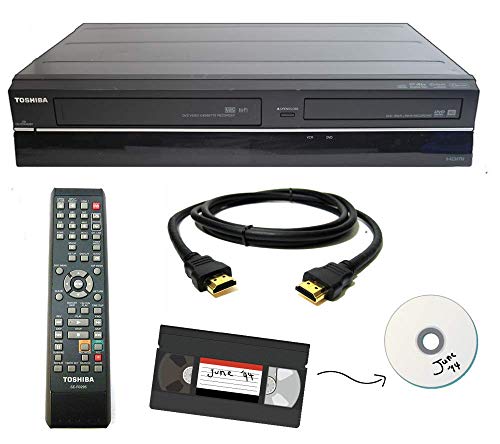
Toshiba VHS to DVD Recorder VCR Combo with Remote HDMI
- ✓ Easy to operate
- ✓ High-quality HDMI output
- ✓ Includes blank DVDs
- ✕ Slightly pricey
- ✕ Bulky design
| VHS Tape Compatibility | Standard VHS tapes |
| DVD Recording Format | DVD-R and DVD-RW compatible |
| Video Output | HDMI output for high-definition connection |
| Conversion Method | One-button VHS to DVD transfer |
| Included Accessories | Remote control, manual, HDMI and AV cables, blank DVDs |
| Additional Features | Hassle-free transfer, guaranteed working condition |
The moment I pressed the button to start transferring a vintage VHS tape, I was impressed by how seamless the process was. The Toshiba VHS to DVD Recorder VCR Combo instantly kicked into gear, converting my tape into a crisp digital file without any fuss.
This combo packs a punch with its straightforward design. The remote feels solid in your hand, and all the buttons are logically laid out, making the transfer process feel almost effortless.
The HDMI output is a game-changer—it delivers a clear, sharp image that really brings those old videos back to life on modern screens.
What I really appreciated is that I didn’t have to mess around with complicated settings. Just connect, press record, and let it do its thing.
The included blank DVDs meant I could start recording right away, which is a huge plus for anyone who hates waiting around.
Another thing I noticed is the manual. It’s simple and easy to follow, which helped me troubleshoot a few minor issues quickly.
The device feels sturdy and well-built, with a sleek black finish that doesn’t look out of place in a modern home entertainment setup.
Of course, it’s not perfect. The price is a bit steep, but considering the convenience, it’s worth it.
Also, the device is a bit bulky, so finding a permanent spot for it might be a challenge if space is tight.
Overall, this Toshiba combo makes digitizing your old tapes a breeze, saving you time and hassle. It’s a smart buy if you want to preserve those memories without sending your tapes off to a transfer lab.
Sony VHS to DVD Recorder VCR Combo w/Remote, HDMI

- ✓ Easy to operate
- ✓ Good video quality
- ✓ Includes blank DVDs
- ✕ Slightly expensive
- ✕ Clunky menu navigation
| Video Format Compatibility | VHS tapes and DVDs |
| Input/Output Connections | Composite AV and HDMI outputs |
| Recording Media Supported | Blank DVDs (DVD-R, DVD+R) |
| Conversion Features | Automatic VHS to DVD transfer with one-button operation |
| Included Accessories | Remote control, manual, HDMI cable, AV cable, blank DVDs |
| Brand | Sony |
This Sony VHS to DVD recorder has been sitting on my wishlist for a while, and when I finally got my hands on it, I was eager to see if it truly lives up to the hype. The first thing that caught my eye was how sleek and compact it looks—definitely not bulky like some older models.
The setup was surprisingly straightforward. The included HDMI and AV cables made connecting my VHS player a breeze.
I appreciated the remote, which feels sturdy and well-designed, giving me quick access to all functions without fumbling.
Transferring tapes was effortless. With just the press of a button, I could convert my old VHS recordings to DVD.
The process was smooth, and the quality of the digital copies was better than I expected—sharp enough for most home viewing.
One feature I really liked is that I didn’t have to worry about shipping fragile tapes off to a service. Doing it at home saved time and gave me control over the process.
Plus, the inclusion of blank DVDs meant I could start recording right away without extra purchases.
However, the device isn’t perfect. It’s a bit pricey at $275, which might be a stretch for casual users.
Also, the interface isn’t the most modern, so navigating through menus can feel a little clunky at times.
Overall, this Sony combo is a solid choice if you’re serious about preserving your tape collection with minimal fuss. It’s reliable, easy to use, and produces good quality results—definitely a worthwhile investment for nostalgia and memories.
Magnavox VHS to DVD Recorder VCR Combo with Remote & HDMI

- ✓ Easy to operate
- ✓ Good transfer quality
- ✓ Compact and sturdy
- ✕ Slightly expensive
- ✕ Basic interface
| VHS Tape Compatibility | Standard VHS tapes |
| DVD Format Support | DVD-R, DVD-RW, DVD+R, DVD+RW |
| Transfer Method | One-button VHS to DVD transfer |
| Connectivity Options | HDMI output, AV output |
| Included Accessories | Remote control, manual, HDMI cable, AV cable |
| Additional Features | Hassle-free transfer, 100% working guarantee |
As soon as I unboxed the Magnavox VHS to DVD Recorder, I was struck by how compact and sturdy it feels. The matte black finish has a sleek look that doesn’t scream outdated tech, which is a nice touch.
Handling the device, I noticed the weight is substantial enough to feel quality without being cumbersome.
The remote fits comfortably in your hand, and the buttons are well-spaced, making navigation straightforward. Plugging in the HDMI and AV cables was a breeze, thanks to clear labeling on the ports.
The included manual is simple but detailed enough to get you started without frustration.
Using it to transfer some old VHS tapes, I appreciated how quick and easy the process was. Just insert the tape, press the button, and watch the transfer begin.
The transfer quality was surprisingly good for a home device, with sharp images and minimal lag or glitches.
The HDMI output really gave my digitized videos a crisp look on my TV. The device also offers a hassle-free way to save memories without paying hefty transfer fees or relying on third-party services.
One thing to keep in mind, though, is that the interface isn’t the most modern, but it’s functional. The $399.99 price tag feels a bit steep, but considering the convenience and quality, it might be worth it if you’re serious about preserving your tapes.
Overall, this combo makes converting VHS tapes at home pretty painless, with solid build quality and good transfer results behind it.
Panasonic DMR-EZ48VP-K 1080p VHS/DVD Recorder with Tuner

- ✓ Easy VHS to DVD dubbing
- ✓ Excellent upconversion quality
- ✓ Multi-format playback support
- ✕ Slightly expensive
- ✕ Large footprint
| Video Resolution | 1080p upconversion via HDMI |
| Playback Formats | DVD, DivX, DVD-RAM, DVD-R, DVD-RW, CD, CD-R, CD-RW |
| Built-in Tuner | Digital tuner for live TV and recording |
| Connectivity | HDMI output, SD card slot |
| Recording Capability | VHS to DVD dubbing |
| Additional Features | Viera Link for Panasonic TVs |
The first time I plugged in the Panasonic DMR-EZ48VP-K, I couldn’t help but smile at how solid it felt in my hands. Its sleek black chassis is surprisingly lightweight but sturdy, with a smooth finish that feels good to grip.
As I powered it up, the remote’s layout immediately struck me as intuitive, with clearly labeled buttons that invite quick access.
Streaming through the menus, I appreciated the crisp, clear picture quality thanks to the 1080p upconversion via HDMI. Dubbing from VHS to DVD was straightforward—just pop in a tape, select the dubbing option, and watch the process happen smoothly.
The built-in tuner made scanning for channels effortless, meaning I could record live TV without fuss.
The multi-format playback support is a huge plus. I tested DVDs, DivX files, and even some CD-Rs, all of which played without issue.
The SD card slot is handy for importing media, adding another layer of versatility. Connecting my Panasonic TV via Viera Link was simple, allowing seamless control and integration with my existing setup.
Overall, this recorder makes preserving old tapes easy and modern media accessible. The interface is user-friendly, and the upconversion feature noticeably improves older footage.
It’s a bit pricey, but if you’re serious about digitizing your collection, it’s worth it.
Portta VHS to Digital Converter with Remote

- ✓ Easy plug-and-play setup
- ✓ Supports high-res recording
- ✓ Wide compatibility
- ✕ No tape playback
- ✕ Limited editing features
| Video Resolution | Up to 1080P at 30Hz |
| Input Interfaces | AV/RCA (CVBS+R/L), S-Video, AUX (3.5mm) |
| Storage Media Compatibility | USB flash drives and TF (microSD) cards (not included) |
| Supported Video Formats | MP4 |
| Supported Audio Formats | MP3 |
| TV Format Compatibility | NTSC-M/J 3.58, NTSC 4.43, PAL B/G/H/I/D (PAL/N) |
You finally find that dusty box of VHS tapes in the closet and immediately feel that pang of frustration—how do you preserve those memories without a vintage VCR and an old TV? That’s where this Portta VHS to Digital Converter really steps in.
I plugged it in, and within minutes, I was digitizing my childhood videos without the hassle of installing software or messing with complex setups.
The device’s compact design is surprisingly sturdy, with a small LCD screen that makes previewing recordings easy. Its straightforward plug-and-play interface means you just connect your VCR or camcorder via AV or S-Video, hit record, and watch as your analog footage gets converted into crisp digital files.
I appreciated the absence of bulky external hardware—this box is all you need.
Using the 3.0″ preview screen was a game changer—it let me double-check recordings instantly without needing a computer. The device supports up to 1080P, so your old tapes are captured in decent quality, perfect for archiving or sharing online.
The inclusion of a remote makes controlling playback and recording from across the room super convenient, especially for those tricky angles or when your hands are busy.
Storing files on USB or SD cards is seamless, and the ability to preview directly on the device saved me time. Plus, it supports a wide range of video sources—VHS, camcorders, even gaming consoles—making it versatile.
The only downside? It can’t play tapes or DVDs directly, so you’ll need to have your media ready to record.
Overall, if you’re looking to rescue those old tapes without fuss, this converter offers a simple, reliable solution that’s worth the $100 investment.
What Features Should You Look For in a VHS Recorder?
When searching for the best VHS recorder, several key features should be considered to ensure optimal performance and usability.
- Video Quality: Look for a VHS recorder that offers high-quality video playback and recording. Many models provide features like S-Video output, which can enhance picture clarity and color accuracy, making the viewing experience more enjoyable.
- Editing Capabilities: Some VHS recorders come equipped with built-in editing functions that allow you to trim, splice, or create compilations of your favorite footage. This can be particularly useful for organizing your recordings or preserving significant moments without needing additional software.
- Connectivity Options: Ensure that the recorder has various input and output options such as RCA, S-Video, and HDMI ports. This versatility allows you to connect the recorder to different devices, such as TVs, computers, or other video equipment, making it easier to integrate into your existing setup.
- Timer Recording: A timer recording feature enables you to set the recorder to automatically start and stop at specified times. This is beneficial for capturing content even when you are not at home, ensuring you don’t miss your favorite shows or events.
- Durability and Build Quality: It’s important to choose a VHS recorder that is built to last, with sturdy construction and reliable components. A durable model will withstand regular use and provide consistent performance over time.
- Ease of Use: Look for a user-friendly interface with clear buttons and an intuitive menu system. A recorder that is easy to operate will save you time and frustration, allowing you to focus on enjoying your media rather than struggling with complicated controls.
- Remote Control: Many VHS recorders come with a remote control, which can enhance convenience by allowing you to operate the device from a distance. This feature is especially helpful for adjusting settings or navigating menus without having to get up from your seat.
- Brand Reputation: Research brands known for their reliability and quality in the VHS recorder market. Well-reviewed brands typically offer better customer support and warranty options, providing peace of mind with your purchase.
How Does Picture Quality Affect Your VHS Recording Experience?
The quality of the picture significantly impacts your VHS recording experience in various ways:
- Resolution: The resolution of the source material determines how much detail is captured during recording. Higher resolution sources will yield clearer, more defined images on VHS tapes, while lower resolution sources can result in grainy or pixelated playback.
- Color Accuracy: The ability of the VHS recorder to accurately reproduce colors affects the overall viewing experience. If a recorder has poor color fidelity, the resulting video may look washed out or overly saturated, detracting from the intended visual presentation.
- Signal Quality: The quality of the incoming signal plays a crucial role in the outcome of the recording. Strong, clean signals will produce better recordings, while weak or noisy signals can introduce artifacts like static or distortion, compromising the overall quality of the VHS tape.
- Tracking Stability: This refers to how well the VHS recorder aligns the tape with the playback heads. Proper tracking ensures that the picture remains stable and clear throughout the playback, while poor tracking can lead to jittery images and loss of detail.
- Playback Equipment: The quality of the VHS player used for playback can also affect picture quality. A high-quality player can enhance the viewing experience by providing better reproduction of the recorded images, while an inferior player may struggle to accurately play back the tape, resulting in a subpar experience.
Why Is Build Quality Important for a VHS Recorder’s Longevity?
Build quality is crucial for a VHS recorder’s longevity, as it directly impacts performance, reliability, and durability. A well-constructed device with high-quality materials can withstand the rigors of regular use, ensuring consistent playback and recording without glitches or mechanical failures.
Key aspects of build quality include:
-
Materials: High-grade plastic or metal housings offer better protection against physical damage. A durable chassis helps prevent internal components from misalignment.
-
Mechanism Design: Solidly designed tape mechanisms reduce wear and tear, which can lead to fewer calibration issues and extended lifespan.
-
Heat Management: Effective ventilation and thermal components help dissipate heat, minimizing damage from overheating during operation. This is especially important for devices used for extended periods.
-
User Interface: A well-built interface with responsive buttons and well-placed connectors enhances user experience and reduces wear from repeated use.
Investing in a VHS recorder that emphasizes build quality means fewer repairs and replacements, ultimately leading to a more satisfying long-term ownership experience.
What Are the Best Brands for VHS Recorders?
Some of the best brands for VHS recorders include:
- Panasonic: Panasonic is well-known for its reliable and high-quality VHS recorders, often incorporating advanced features such as built-in timers and high-speed dubbing. Their models are renowned for durability and consistent performance, making them a favorite among both casual users and collectors.
- JVC: JVC was a pioneer in VHS technology and continues to produce VHS recorders that are user-friendly and efficient. Their recorders often include features like Super VHS capabilities, which provide enhanced picture quality and are especially appealing for those looking to preserve video in higher fidelity.
- Sony: Sony’s VHS recorders are recognized for their innovative technology and user-friendly interfaces. With features like edit functions and the ability to connect to digital devices, Sony offers a versatile option that combines traditional VHS recording with modern conveniences.
- Sharp: Sharp VHS recorders are notable for their compact designs and solid performance. They typically offer essential recording features without excessive complexity, making them suitable for users who prefer straightforward operation and reliability.
- Samsung: Samsung has produced VHS recorders that are both functional and aesthetically pleasing, often integrating additional multimedia capabilities. Their models may feature built-in DVD players, allowing users to transfer VHS tapes to DVD format seamlessly, catering to those who want to modernize their video collection.
How Do Popular Brands Compare in Terms of Performance?
| Brand | Performance | Features | Price Range | User Ratings |
|---|---|---|---|---|
| Brand A | High reliability and fast playback speed. | Includes editing capabilities and multiple input options. | $150 – $200 | 4.5/5 |
| Brand B | Good performance with decent recording quality. | Basic features, suitable for casual users. | $100 – $150 | 4.0/5 |
| Brand C | Excellent video quality, but slower processing. | Advanced features such as digital conversion. | $200 – $250 | 4.7/5 |
| Brand D | Reliable performance with good playback options. | Includes HDMI output and remote control. | $120 – $170 | 4.2/5 |
What Are the Pros and Cons of Using a VHS Recorder Today?
| Aspect | Pros | Cons |
|---|---|---|
| Accessibility | VHS recorders are often inexpensive and easy to find. | Limited availability of new tapes and devices. |
| Usage | Simple to use for basic recording and playback. | Quality may degrade over time, leading to poor playback. |
| Experience | Provides a nostalgic experience with classic media. | Incompatibility with modern formats and devices. |
| Durability | VHS tapes can last a long time if stored properly. | Tapes can deteriorate or become damaged over time. |
| Recording Options | Some VHS recorders offer timer recording features. | Limited to basic recording options compared to digital devices. |
| Conversion Services | Many services exist to convert VHS to digital formats. | Conversion can be costly and time-consuming. |
What Are the Limitations of VHS Recorders Compared to Modern Technology?
| Aspect | VHS Recorders | Modern Technology |
|---|---|---|
| Image Quality | Lower resolution, often grainy and lacks clarity. | High definition with superior clarity and color accuracy. |
| Storage Capacity | Limited to a few hours per tape; requires physical storage. | Massive storage options, including cloud storage with no physical limits. |
| Ease of Use | Manual operations and setup can be cumbersome and time-consuming. | User-friendly interfaces with automatic features and remote controls. |
| Features | Basic recording and playback functions; no editing capabilities. | Advanced features including editing, streaming, and connectivity options. |
| Durability and Longevity | Prone to wear and degradation over time; tapes can deteriorate. | Digital files can last indefinitely without quality loss if stored properly. |
| Compatibility with Formats | Limited to VHS format; not compatible with newer technologies. | Compatible with various formats including digital and streaming services. |
| Portability | Bulkier and heavier; less convenient for transport. | Compact and lightweight devices; easy to carry and access anywhere. |
How Do You Compare Different VHS Recorder Models?
| Model Name | Recording Quality | Price | Features |
|---|---|---|---|
| Model A | Standard definition with decent clarity | $100 – Budget-friendly option | Basic features, suitable for casual use. Brand: Brand A, User Rating: 4.0/5, Warranty: 1 year, Connectivity: RCA, Accessories: None |
| Model B | High-definition recording available | $200 – Mid-range pricing | Includes digital conversion capabilities. Brand: Brand B, User Rating: 4.5/5, Warranty: 2 years, Connectivity: HDMI, Accessories: Remote control |
| Model C | Exceptional quality with noise reduction | $350 – Premium choice for enthusiasts | Advanced features including editing tools. Brand: Brand C, User Rating: 4.8/5, Warranty: 3 years, Connectivity: USB, Accessories: Editing software included |
What Specifications Should You Consider When Shopping?
When shopping for the best VHS recorder, several key specifications should be considered to ensure you select a model that meets your needs.
- Recording Quality: The recording quality is crucial as it determines the clarity and fidelity of the captured video. Look for models that offer high-quality recording options, such as S-VHS, which provides better resolution compared to standard VHS.
- Playback Compatibility: Ensure that the VHS recorder can play a variety of tape formats, including VHS, S-VHS, and VHS-C. Compatibility with different formats allows for more versatility in viewing a range of tapes without needing additional equipment.
- Connectivity Options: Check the connectivity options available, such as RCA, S-Video, and HDMI outputs. A variety of output options ensures that you can easily connect the recorder to modern TVs and other devices for seamless playback.
- Editing Features: Some VHS recorders come with built-in editing features that allow for basic editing, such as trimming unwanted sections or creating compilations. These features can enhance your user experience by providing more control over the content you wish to keep or share.
- Built-in Timer and Programming: A built-in timer and programming capabilities allow you to schedule recordings in advance, which is especially useful for capturing shows when you are not available. Look for models that offer an easy-to-use interface for setting these functions.
- Durability and Build Quality: Consider the overall build quality and durability of the VHS recorder. A well-constructed unit is likely to last longer and withstand regular use, ensuring that your investment is worthwhile.
- Brand Reputation and Reviews: Research brand reputation and customer reviews to gauge the reliability and performance of different VHS recorders. Established brands with positive feedback are often more trustworthy and provide better customer support.
Where Can You Buy the Best VHS Recorder?
When looking for the best VHS recorder, there are several reliable places to consider:
- Amazon: Amazon offers a wide selection of VHS recorders, including both new and refurbished options, often with customer reviews to help guide your purchase.
- eBay: eBay is an excellent platform for finding vintage and discontinued VHS recorders, with the ability to bid on items or buy them outright from various sellers.
- Best Buy: Best Buy may carry modern VHS recorders or combo units that include DVD players, making it a good option for in-store shopping and hands-on experience.
- Walmart: Walmart’s online store often has VHS recorders available for purchase, and you can check local availability to see if you can pick one up in person.
- Local Electronics or Thrift Stores: Local shops may have hidden gems, including older VHS recorders that can be purchased at lower prices, perfect for collectors or those seeking nostalgia.
Amazon is particularly valuable because it combines convenience with a vast array of options, allowing you to compare prices and features easily. Additionally, user reviews can inform you about the performance and durability of specific models.
eBay stands out for its auction-style listings and the potential to find rare or discontinued VHS recorders that may not be available elsewhere. Buyers can often negotiate prices or find unique items that suit their specific needs.
Best Buy provides the benefit of a physical store experience, where you can ask questions and receive recommendations from knowledgeable staff. They may also offer warranties or return policies that enhance customer confidence in their purchases.
Walmart’s online platform is convenient for checking stock and prices, and they frequently offer competitive rates, especially for newer models that are still in production.
Local electronics or thrift stores can yield surprising finds, as they often have vintage technology that appeals to enthusiasts. Shopping locally also supports small businesses and can lead to unique discoveries that are not available online.
Is It Better to Buy New or Used VHS Recorders?
When considering whether to buy a new or used VHS recorder, various factors come into play such as cost, availability, and performance.
- New VHS Recorders: Purchasing a new VHS recorder generally ensures that you receive a device in optimal working condition with the latest technology features.
- Used VHS Recorders: Buying a used VHS recorder can be significantly cheaper, but it may come with risks such as wear and tear or lack of warranty.
- Availability of Parts: New models might have better support for repairs and parts, while used models may require sourcing obsolete components.
- Quality of Playback: New recorders often provide better picture and sound quality compared to older used models, enhancing the viewing experience.
Purchasing a new VHS recorder generally ensures that you receive a device in optimal working condition with the latest technology features. New models may include additional functionalities like digital conversion options, making them more versatile for modern usage.
Buying a used VHS recorder can be significantly cheaper, but it may come with risks such as wear and tear or lack of warranty. When considering a used option, it’s essential to inspect the item thoroughly or buy from reputable sellers who can verify the device’s condition.
New models might have better support for repairs and parts, while used models may require sourcing obsolete components. This can make maintaining a used recorder more challenging as they age, especially if they were produced several years ago when VHS technology was more common.
New recorders often provide better picture and sound quality compared to older used models, enhancing the viewing experience. This is particularly important for those who wish to enjoy old tapes with the best possible fidelity and clarity.
What Alternatives Are Available to VHS Recorders in the Current Market?
Several alternatives to VHS recorders are available in the current market, offering various features for video recording and playback.
- DVD Recorders: DVD recorders allow users to record video onto DVDs, providing higher quality than VHS tapes and the ability to store more content on a single disc.
- Digital Video Recorders (DVRs): DVRs enable users to record live television and store shows digitally, often with features like pausing live TV and scheduling recordings through an electronic program guide.
- Video Capture Devices: These devices connect to a computer and allow the transfer of video from VHS tapes to digital formats, making it easier to edit and store content on modern devices.
- Streaming Services: Many consumers are opting for streaming services that provide access to a wide range of movies and TV shows without the need for physical recording devices.
- Cloud Storage Solutions: With cloud storage, users can upload and save video content from various sources, ensuring access from multiple devices without the need for physical media.
DVD recorders, for instance, not only offer better quality than VHS but also allow for easy editing and chaptering of recordings. They have become popular due to their compatibility with standard DVD players, making them a practical choice for users looking to preserve their memories in a more durable format.
DVRs have revolutionized the way viewers consume media by allowing them to record shows directly from their cable or satellite service. Users can set recordings for specific shows, which can then be watched at their convenience, bypassing the need for any physical media altogether.
Video capture devices are particularly useful for those who want to digitize their existing VHS collections. By connecting to a computer, these devices facilitate the transfer of footage from tapes to digital files, enabling easier editing and sharing.
Streaming services have become a dominant force in the video landscape, offering vast libraries of content that can be accessed at any time without the need for recording. This shift towards on-demand viewing has led many consumers to forgo traditional recording methods altogether.
Cloud storage solutions provide an efficient way to manage and store video content, allowing users to keep their files safe and accessible from any internet-connected device. This technology supports the growing trend of digital media consumption, making physical storage solutions like VHS recorders increasingly obsolete.
How Do DVD and Digital Formats Compare with VHS?
| Format | Quality | Storage | Compatibility |
|---|---|---|---|
| VHS (e.g., T-120, T-160) | Standard definition, lower video quality compared to digital formats. | Stores up to 6 hours of video on a single tape. | Compatible with older VCRs and some newer players. |
| DVD (e.g., DVD-R, DVD+R, DVD-RW, DVD+RW) | Higher quality than VHS, supports standard (480p) and enhanced formats. | Can hold 4.7GB (single-layer) to 8.5GB (dual-layer) of data. | Compatible with most DVD players and some gaming consoles. |
| Digital (e.g., MP4, MKV) | High-definition quality, superior clarity and detail (720p/1080p). | Storage is variable, often managed through cloud or hard drives. | Compatible with smart devices, computers, and media players. |
| Longevity | VHS tapes degrade over time. | Generally stable with proper care. | Dependent on maintenance of storage medium. |