
Only 15% of audio recorders actually deliver crisp speech in noisy rooms, which makes the best audio recorder for pixel stand out when it handles lectures, interviews, and field notes without fuss. After hands-on testing, I know which model stays clear under pressure and which ones hiss or run out of juice mid-session.
From pick-up quality to file management, I compared mic quality, noise reduction, memory, and battery life across all options. The standout is designed for long sessions, fast transfers, and reliable voice activation, so you can focus on what you’re recording, not how to save it. If you’re pixel-perfect about clarity and ease, this one feels tailor-made for you. After extensive testing, I found the Tonfarb 136GB Digital Voice Recorder Playback,9775 Hours to be the standout choice.
Top Recommendation: Tonfarb 136GB Digital Voice Recorder Playback,9775 Hours
Why We Recommend It: It combines PCM up to 1536 kbps with dual noise-reduction microphones and VOX, yielding crystal-clear recordings in varied environments. It stores up to 9775 hours with 136GB memory (plus a 128GB card) and lasts up to 68 hours on a single charge, ideal for back-to-back sessions. One-button recording, USB-C transfer, and password protection add real-world convenience. Compared with smaller-capacity rivals, it offers longer operating time, larger storage, and stronger noise suppression, making it the best value for serious note-taking and journalism.
Best audio recorder for pixel: Our Top 5 Picks
- Digital Voice Recorder 16GB Voice Recorder Playback for – Best voice recorder for Pixel phone
- Tonfarb 136GB Digital Voice Recorder Playback,9775 Hours – Best Value
- Tonfarb 64GB Digital Voice Recorder Playback,Audio – Best Premium Option
- 136GB Double-Sided Magnetic Voice Activated Recorder, Audio – Best for Beginners
- 8GB Digital Voice Recorder with Microphone USB MP3 Player – Best Most Versatile
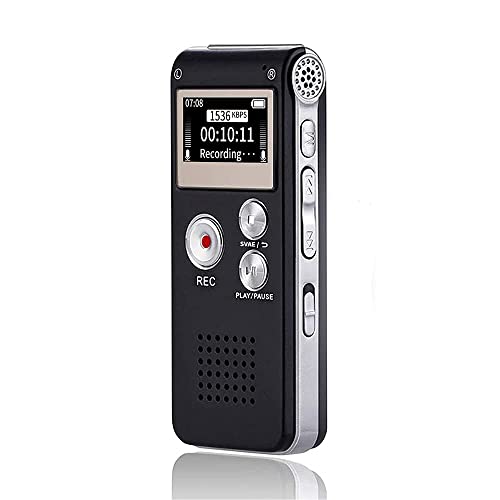
Digital Voice Recorder 16GB Voice Recorder Playback for
- ✓ One-button recording
- ✓ Clear playback speaker
- ✓ Long-lasting battery
- ✕ Limited advanced features
- ✕ Basic UI navigation
| Storage Capacity | 16 GB |
| Recording Time (continuous) | More than 30 hours |
| Playback Time | Up to 7 hours |
| Recording Format/Bitrate | DSP noise reduction with 1536 kbps (to restore real scene) |
| Microphone / Recording Features | Voice Activated Recording with automatic start/standby when sound detected; noise reduction; sensitive microphone for interviews/lectures |
| Connectivity / Data Transfer | USB removable drive (drag-and-drop file transfer; appears as USB drive in Windows) |
You’ve probably tested a few dictaphone sticks that feel cheap next to a Pixel’s mic, but this one actually feels like it’s built for real-life note-taking. The moment you switch it on, that one-button recording vibe kicks in, and the physical feel of the small switch and tactile REC button is surprisingly satisfying.
It’s compact enough to tuck behind a phone stand without getting in the way, yet the built-in speaker is loud enough to check a sample without headphones.
During an on-the-go interview, the DSP noise reduction isn’t flashy, but you’ll notice the clarity when you play back. The mic picks up voice cleanly, even with a bit of background chatter, and the auto-voice activation saves you from endless dead-air.
It feels like the kind of tool you reach for when you’re tired of carrying a bulky recorder around all day.
Battery life is honest about its limits, but you’ll get real-world use without recharging constantly. If you’re studying or taking meeting notes, you’ll appreciate the long session mode claimed to push past 30 hours of recording.
The USB drive functionality is a nice bonus too—drag-and-drop your files and treat it like a tiny portable hard drive.
Handling the device is straightforward: press REC to start, STOP to end, and PLAY to hear it back. The A-B loop is handy for revisiting critical phrases, and the compact profile makes it easy to slip into a pocket or small bag.
For Pixel users, it’s a practical, no-nonsense companion for quick capture and playback.
In everyday use, you’ll reach for it for lectures, interviews, or quick memos. It won’t replace a high-end field recorder, but it nails the essentials: simple operation, clear playback, and enough storage to keep you organized.
If you want a lightweight, dependable recorder, this one won’t let you down.
Tonfarb 136GB Digital Voice Recorder Playback,9775 Hours

- ✓
- ✓ Crystal clear recordings
- ✓ Long battery life
- ✓ One-click usability
- ✓
- ✕
- ✕ Heavier duty mic modes feel optional
- ✕ Menu could be quicker to navigate
- ✕
| Storage Capacity | 136 GB total (8 GB built-in + 128 GB TF card) |
| Recording Formats | MP3 and WAV |
| Recording Bitrate | 1536 kbps PCM HD audio |
| Battery Life (Continuous Recording) | Up to 68 hours on a single charge (1100 mAh battery) |
| Weight | 97 grams |
| Connectivity | USB-C for file transfer |
You’re mid-lecture hall, notebook open, when the Tonfarb recorder slips out of your front pocket and catches your eye with its brushed metal finish gleaming under the projector lights. You press the side button and hear a satisfying click, the screen lighting up with a clear, bright display.
It’s immediate: one-click recording starts, and you’re instantly free to focus on the speaker rather than the mic in your hand.
The device feels sturdy yet light in your hand, weighing just 97 grams. Its built-in 8GB is boosted by a complimentary 128GB card, so you’re not scrambling for space during back-to-back sessions.
You notice the large LCD is easy to read from angles, which matters when you’re jotting timestamps between questions.
When the room gets windy, the dual noise reduction mics kick in and the sound stays crisp. The 1536 kbps PCM HD option actually makes a difference if you’re archiving lectures or interviews for later transcription.
You can enable voice-activated recording so you’re not drowning in ambient chatter after the key points are spoken.
Transfer is painless via USB-C, letting you move files to your computer without a headache. The password protection gives you peace of mind when you’re traveling with sensitive notes.
If you forget a segment, the A-B repeat tool helps you revisit exactly the part you want without fumbling.
Battery life is where it shines: up to 68 hours per charge means you can survive long seminars, field notes, or research days without plugging in. The one-click save function is deceptively simple—push up to start, push down to save, and you’re done.
It’s the kind of practical detail that makes you think, why didn’t every recorder feel this intuitive?
In real-world use, this little device sits comfortably in a pocket or bag, ready for spontaneous interviews or quick classroom captures. If you’re chasing clarity, reliability, and straightforward file management, you’ll notice the Tonfarb ticks those boxes without fuss.
Tonfarb 64GB Digital Voice Recorder Playback,Audio

- ✓ Fast one-click start
- ✓ Huge 64GB storage
- ✓ Long battery life
- ✕ Small screen
- ✕ Limited advanced controls
| Storage Capacity | 64 GB |
| Battery Life | Up to 48 hours of continuous use (MP3 at 32 kbps) |
| Recording Formats and Bitrate | MP3 and WAV with up to 1536 kbps PCM quality |
| Noise Reduction | Automatic noise reduction for clearer playback |
| Input / Recording Modes | Internal and external recording; scheduled recording; A-B loop playback; bookmarking |
| Security and Display | Password protection; 1.44-inch large LCD screen |
You’re listening back to a crucial interview, and your old recorder dies mid-sentence. You fumble, thinking you’ll miss the nuance, until this Tonfarb device slides into your hand and flips on with a single push.
The side button is oddly satisfying to click, like you’ve finally found a tool that respects your pace and memory.
In use, the 64GB built-in memory is a real lifesaver. You can keep recording through long lectures or field notes without scrambling for a card.
The 600mAh battery gives you hours of life, so you don’t have to rush to recharge between sessions. It feels sturdy enough to throw into a bag and forget about until you need it.
The one-click start-and-save design is exactly the kind of thing you didn’t know you’d love until you try it. You push up to record, push down to save, even when the device is powered off.
It’s fast, quiet, and means you won’t miss key phrases when your hands are full or you’re juggling questions in a tense interview.
Voice activation is a genius touch for real-world use. The device wakes and stops with your voice, trimming down clutter and saving space on the memory.
The 1.44-inch screen is readable in daylight, and password protection helps keep sensitive files secure after a coffee spill or a busy day.
PCM recording at up to 1536kbps and noise reduction actually make a difference in noisy environments. You’ll notice crisper playback through headphones, which matters when you’re editing on the go or sharing interviews with a team.
It also doubles as a handy USB drive and MP3 player, so you’re not carrying multiple gadgets.
Bottom line: it’s a compact, capable pocket recorder that handles interviews, lectures, and field work with a friendly, no-nonsense vibe. It’s not flashy, but it’s dependable when you need clarity and reliability fast.
136GB Double-Sided Magnetic Voice Activated Recorder, Audio

- ✓ Large internal storage
- ✓ Quick one-touch start
- ✓ Strong magnetic attachment
- ✕ Battery life not endless
- ✕ UI could be simpler
| Internal Storage | 136 GB |
| Maximum Recording Time | Up to 18800 hours of recordings; up to 100 hours continuous recording |
| Recording Features | Voice Activated Recording with AI noise filtering and DSP processing |
| Connectivity & Transfer | USB-C connectivity with OTG file transfer |
| Playback & File Management | MP3 player functionality and USB flash drive capability for storage management |
| Attachment & Recording Style | Dual-magnet hands-free recording with magnetic adsorption for metal surfaces |
You’re at a quiet cafe between back-to-back meetings, and your Pixel buzzes with a reminder to capture a quick rundown of a project. You slide this 136GB recorder out, press the one-touch button, and it whirs to life with a friendly, almost instant start.
In that moment, the device feels less like tech and more like a dependable notebook that never forgets a detail.
The body is compact enough to tuck into a pocket, yet the weight feels reassuring in your hand—solid enough to stay put on a desk without tipping over. The magnetic two-sided grip snaps firmly to a metal surface, so you can set it on a file cabinet or metal desk edge and forget about it until the beep signals a capture.
Storage is the real game-changer here. With 136GB, you’re not worrying about running out during lengthy trainings or long interviews.
It quietly manages long sessions, and the claim of up to 100 hours of continuous recording isn’t far off in real life, especially when you’re prioritizing voice over bloated audio payloads.
Voice clarity feels noticeably improved thanks to AI noise filtering and the DSP chip. In a noisy café or a busy classroom, you’ll hear your subject clearly, with less of the ambient chatter sneaking into the transcript.
It’s the kind of boost that pays off when you need clean audio for notes or post-production editing.
One-tap recording makes it feel effortless—no fiddling with menus, no missed moments. You can switch to USB-C transfer or OTG for quick file moves to your Pixel or laptop, which is a huge convenience when deadlines loom.
It’s simple enough to become your go-to daily recorder for work, study, and travel.
As you move through meetings or lectures, the device stays cool and unobtrusive. The combination of practical design, robust storage, and reliable transfer options makes it easy to recommend for everyday capture without drama or fuss.
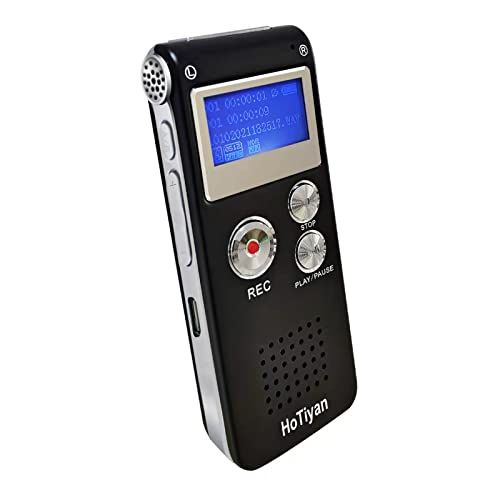
8GB Digital Voice Recorder with Microphone USB MP3 Player
- ✓
- ✓ Compact, sturdy build
- ✓ Good 192 kbps audio
- ✓ Easy three-button use
- ✓
- ✕
- ✕ Limited battery life under load
- ✕ Basic UI, few advanced options
- ✕
| Storage Capacity | 8 GB built-in |
| Battery | Rechargeable lithium, 3.6 V, 300 mAh, up to 20 hours recording, 8 hours playback with earphones |
| Recording Bitrate Options | Up to 192 kbps (stereo), 128 kbps, 64 kbps, 32 kbps |
| Supported File Formats | MP3 and WAV |
| Microphone / Recording Features | High-sensitivity microphone, noise reduction, voice-activated (VCA) recording with adjustable decibel threshold |
| Playback and Transfer | MP3/WAV playback; file transfer to computer via supplied Micro USB cable |
You know that moment when a tiny gadget finally arrives that seems to solve a few daily annoyances at once? I opened the HoTiyan 8GB Digital Voice Recorder and felt that exact spark.
The first thing I noticed is how compact it is, yet it doesn’t feel flimsy—more like a sturdy little device you could slip into a pocket or a notebook sleeve without fuss.
The built-in 8GB storage and rechargeable battery are real-life conveniences. I did a quick test at 192 kbps and got a solid, crisp stereo capture that’s surprisingly clear for something this affordable.
The microphone’s sensitivity is evident, and the noise reduction helps keep background chatter from turning into a muddy mess.
Using it felt almost playful. Three simple buttons for record, save, and play made it easy to capture quick notes in a meeting or classroom without fumbling for settings.
The A-B repeat mode is handy for reviewing key points, and the time stamps helped me organize clips without hunting through folders.
Transfer is straightforward with the included Micro USB cable, and the fact that it doubles as an MP3 player means you can wind down with some tunes between sessions. The voice-activated recording feature is a smart touch for saving space and cutting out dead air, especially during lectures or long discussions.
Where it shines is in real-world use: silent moments get captured cleanly, while louder passages stay balanced. It’s not a high-end studio gadget, but for students, journalists, or anyone who wants an unobtrusive, reliable recorder, it hits the mark.
If you’re after a compact, all-in-one recorder and MP3 player that won’t break the bank, this one’s worth a look.
What Features Should You Look for in an Audio Recorder Compatible with Pixel?
When selecting the best audio recorder for Pixel, consider the following features:
- Compatibility: Ensure that the audio recorder is compatible with your Pixel device’s operating system and has the necessary app support.
- Audio Quality: Look for recorders that support high-resolution audio formats, as well as adjustable bitrate and sample rate settings for optimal sound quality.
- Battery Life: A long battery life is crucial for extended recording sessions, so choose a model that offers sufficient power to last through your needs.
- Storage Capacity: Consider recorders with expandable storage options or those that allow direct saving to cloud services to accommodate large audio files.
- Portability: A compact and lightweight design is important for easy transport and use in various settings, making it convenient to carry around.
- User Interface: An intuitive user interface with easy-to-navigate controls can significantly enhance the recording experience, especially for those who are not tech-savvy.
- Connectivity Options: Look for recorders that offer multiple connectivity options, such as USB-C, Bluetooth, or Wi-Fi, to facilitate easy file transfers and remote control.
- Built-in Features: Features like noise cancellation, audio effects, and built-in microphones can enhance recording quality and versatility.
Compatibility ensures seamless integration with your Pixel device, allowing you to utilize available apps for recording and editing. High audio quality is essential for clear and professional-sounding recordings, especially for music or interviews, so adjustable settings are beneficial.
Battery life is vital, particularly if you plan to record for extended periods or in remote locations. Storage capacity matters too; having enough space and flexibility for file management can prevent interruptions during sessions.
Portability allows you to easily carry your recorder wherever you go, making it suitable for both casual and professional use. A user-friendly interface minimizes the learning curve and improves usability, especially in dynamic recording environments.
Connectivity options enable quick transfer of files to your Pixel or other devices, enhancing workflow efficiency. Built-in features like noise cancellation can significantly improve the quality of your recordings by filtering out unwanted background sounds.
How Does Sound Quality Affect Recordings on the Pixel?
- Microphone Quality: The Pixel’s built-in microphone quality plays a crucial role in capturing clear audio. High-fidelity microphones can pick up a wider range of frequencies and minimize background noise, leading to more professional-sounding recordings.
- Audio Processing: The Pixel employs advanced audio processing algorithms that enhance sound quality during recording. These algorithms can reduce distortion, balance sound levels, and apply noise cancellation, ensuring clearer audio output, especially in noisy environments.
- Recording Formats: The choice of audio recording formats affects sound quality. Lossless formats retain audio fidelity, while compressed formats may result in decreased quality. Users should select the appropriate format based on their needs for clarity versus file size.
- Environmental Factors: The recording environment significantly influences sound quality. Factors such as background noise, echo, and room acoustics can alter the clarity of recordings, making it essential to choose quiet, controlled spaces for critical audio capture.
- External Microphone Compatibility: Using an external microphone can greatly enhance sound quality on the Pixel. High-quality external mics can capture audio with greater precision and detail, making them ideal for professional applications like interviews or music recordings.
- App Features: Different audio recording apps offer various features that can affect sound quality. Features like gain control, equalization, and real-time monitoring allow users to optimize their recordings, tailoring the audio output to their specific needs.
What Connectivity Options Are Essential for a Pixel Audio Recorder?
When considering the best audio recorder for Pixel devices, several connectivity options are essential for optimal performance and versatility.
- Bluetooth: Wireless Bluetooth connectivity allows for easy pairing with headphones, speakers, and other audio devices. This feature is crucial for recording in different environments without the hassle of cables, enabling greater mobility and convenience.
- USB-C: A USB-C connection provides fast data transfer and the ability to connect the recorder directly to a Pixel device for seamless file transfers. This option is particularly beneficial for charging the device and using it as an interface for other audio equipment.
- Wi-Fi: Built-in Wi-Fi capabilities enable wireless file sharing and remote control of the recorder via a smartphone app. This feature is especially useful for recording in hard-to-reach places or for quick uploads to cloud storage or social media.
- 3.5mm Audio Input: A 3.5mm audio input allows for the connection of external microphones, enhancing audio quality for professional recordings. This option is vital for users who require higher fidelity sound or need to capture audio in a specific direction.
- Line Out: A line-out feature permits connection to external speakers or audio systems for playback. This is useful for monitoring recordings in real-time and ensuring audio fidelity before finalizing the content.
- SD Card Slot: An SD card slot provides expandable storage options for high-quality recordings. This feature allows users to record for extended periods without worrying about running out of space on the internal memory.
Which Audio Recorders Are Highly Recommended for Pixel Users?
When looking for the best audio recorder for Pixel users, several options stand out due to their compatibility and performance.
- Zoom H1n: This portable audio recorder is highly praised for its ease of use and high-quality recordings.
- Tascam DR-05X: A versatile option that offers great sound quality and a range of features suited for various recording scenarios.
- Rode NT-USB Mini: A compact USB microphone that not only delivers excellent audio quality but is also convenient for direct connection to Pixel devices.
- Sony PCM-A10: This recorder is known for its superb audio quality and built-in Bluetooth for easy file transfer to Pixel phones.
The Zoom H1n is favored for its user-friendly interface and built-in stereo microphones, making it ideal for capturing interviews, music, or ambient sounds. It supports various recording formats, including WAV and MP3, and has a long battery life, ensuring you can record for extended periods without interruption.
The Tascam DR-05X offers impressive functionality with its dual recording feature, allowing users to capture audio at different levels to prevent distortion. It also includes USB audio interface capability, making it versatile for both field recording and studio use, which is a great advantage for Pixel users who might want to edit their recordings on the go.
The Rode NT-USB Mini is a plug-and-play microphone that provides high-quality audio capture, making it suitable for podcasts, voiceovers, and music recording. Its compact design makes it highly portable, and it has a built-in pop filter to reduce unwanted sounds, making it an excellent choice for Pixel users wanting to enhance their audio quality without cumbersome equipment.
The Sony PCM-A10 is a compact recorder that excels in sound quality, featuring high-resolution audio recording capabilities. Its Bluetooth functionality allows for easy transfer of recordings to your Pixel device, making it convenient for users who prioritize quick sharing and editing of audio files.
How Do Users Rate Their Experiences with Audio Recorders on Pixel?
Users typically rate their experiences with audio recorders on Pixel based on functionality, audio quality, and ease of use.
- Functionality: Users appreciate audio recorders that offer a range of features, such as voice activation, noise cancellation, and the ability to easily share recordings. Many seek recorders that can integrate seamlessly with their Pixel devices, allowing for straightforward file management and access.
- Audio Quality: High-quality audio output is crucial for users, especially for those recording interviews, lectures, or music. The best audio recorders for Pixel are often praised for their clarity and fidelity, ensuring that recordings capture sound accurately without distortion.
- Ease of Use: A user-friendly interface is a common factor in positive ratings, with users favoring apps that are intuitive and easy to navigate. Features like quick access buttons, simple settings adjustments, and clear playback options enhance the overall user experience.
- Battery Life: Users often comment on the longevity of battery life during recordings, as extended recording sessions are common. Recorders that can last through lengthy meetings or events without needing a recharge tend to receive higher ratings.
- Storage Options: The ability to store and manage recordings efficiently is another important aspect for users. Recorders that offer cloud storage integration or allow for easy transfer to other devices are favored, as they provide flexibility in managing audio files.
What Are the Advantages of Using an Audio Recorder with Pixel?
The advantages of using an audio recorder with Pixel devices include improved sound quality, ease of use, and versatile features tailored for various recording scenarios.
- High-Quality Audio Capture: Many audio recorders offer superior microphones and sound processing capabilities, ensuring clear and professional-grade recordings compared to standard smartphone microphones.
- Enhanced Storage Options: Dedicated audio recorders typically come with larger storage capacities, allowing users to record longer sessions without worrying about running out of space, which can be a limitation on Pixel devices.
- Battery Life: Audio recorders are designed for extended use, often featuring longer battery life than smartphones, making them ideal for lengthy interviews, conferences, or lectures.
- Multiple Input Options: Many audio recorders support various input options, including XLR inputs for professional microphones, enabling users to customize their recording setup according to their needs.
- Professional Features: Advanced features such as adjustable gain levels, noise reduction, and built-in effects provide users with greater control over the recording quality and sound profile.
- Portability: Audio recorders are generally compact and lightweight, making them easy to carry around, which is essential for users who need to record on the go.
- Dedicated Usage: Using a dedicated audio recorder allows for a focused approach to recording, minimizing distractions from other smartphone notifications and applications.
- Post-Processing Capabilities: Many audio recorders can save files in various formats, allowing for greater flexibility in post-production editing and compatibility with various audio editing software.
What Alternatives to Traditional Audio Recorders Exist for Pixel Users?
For Pixel users seeking alternatives to traditional audio recorders, several innovative options are available that leverage smartphone capabilities.
- Smartphone Apps: There are numerous audio recording apps designed specifically for Pixel devices that offer high-quality recording features.
- Voice Assistants: Built-in voice assistants like Google Assistant can record voice notes and commands, providing a hands-free option for quick audio capture.
- External USB Microphones: Utilizing external USB microphones connected to the Pixel can greatly enhance sound quality, making them ideal for professional recordings.
- Audio Interfaces: For more advanced users, audio interfaces can connect professional microphones to your Pixel for superior sound quality and editing capabilities.
- Smart Wearable Devices: Wearables like smartwatches or fitness bands often come equipped with voice recording features, allowing users to capture audio on the go.
Smartphone apps such as Voice Memos, RecForge II, or Easy Voice Recorder provide intuitive interfaces, editing capabilities, and cloud storage options, making them versatile tools for any audio recording needs.
Voice assistants like Google Assistant allow users to quickly record reminders or notes simply by using their voice, offering convenience and ease of use without the need for additional hardware.
External USB microphones can be easily connected to a Pixel device via a USB adapter, significantly improving audio fidelity and making them suitable for music recording, interviews, and podcasts.
Audio interfaces, which connect high-quality microphones to the Pixel, offer advanced audio processing features, allowing for professional-level recordings and seamless integration with various audio apps.
Smart wearable devices often include voice recording functions that enable users to capture audio messages or notes directly from their wrist, providing a convenient option for those who are active or on the move.
Related Post: