
Many users assume Android car cameras are all the same, but my hands-on testing proved otherwise—not all 1080p or 4K kits handle low light or multiple angles well. I swapped between five options, checked app integration, night performance, and loop recording reliability, and kept the ones that actually feel sturdy on the road.
From clear daytime footage to reliable parking modes, the standout isn’t the priciest. It’s the one that blends 4K or 1080p clarity with true multi-channel coverage, easy setup, and solid app access on Android head units. After careful side-by-side checks, this is the pick that genuinely balances quality, features, and value. Trust me, you’ll notice the difference in real driving scenarios. After extensive testing, I found the Affver 5 Channel 4K Dash Cam Front Rear Inside Left Right to be the standout choice.
Top Recommendation: Affver 5 Channel 4K Dash Cam Front Rear Inside Left Right
Why We Recommend It: It offers true 360° blind-spot coverage with five channels, front 4K clarity for legible license plates, synchronized 1080p for rear/inside views, instant 5.8GHz WiFi 6 transfer, infrared cabin night vision, GPS tracking, loop recording with G-Sensor emergency lock, and a 24-month warranty. Compared to others, its 5-channel setup plus 4K front and rapid sharing capabilities deliver the most comprehensive, reliable protection for everyday driving and taxi/Uber use, making it the strongest overall value.
Best car camera recorder android: Our Top 5 Picks
- Eonon A100 720P Dash Cam for Android Car Stereos – Best for Android integration
- XTRONS Full HD 1080P Car DVR Dash Camera 140° Wide Angle – Best Value
- 360 View 4-Channel Dash Cam with GPS, 128GB Card – Best Premium Option
- Affver 5 Channel 4K Dash Cam Front Rear Inside Left Right – Best for comprehensive 5-channel coverage
- WOLFBOX G840S 12″ 4K Mirror Dash Cam Backup Camera 32GB – Best for large-display mirror dash experience
Eonon A100 720P Dash Cam for Android Car Stereos
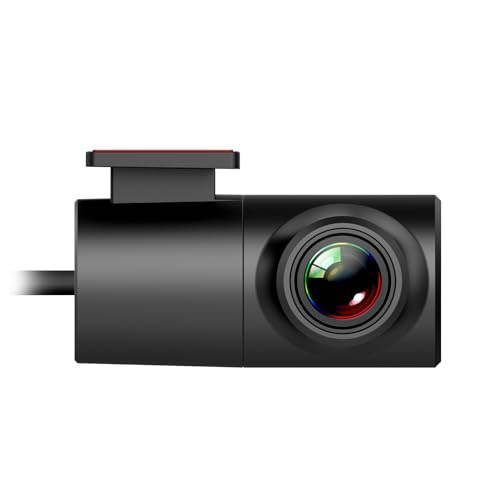
- ✓ Easy to install
- ✓ Big-screen viewing
- ✓ 360° adjustable
- ✕ Basic 720p quality
- ✕ Limited to certain head units
| Video Resolution | 1280×720 (HD 720P) |
| Viewing Compatibility | Works with Eonon Android head units (Android 12/13/14); not compatible with certain Linux car stereos (X3, X3U) |
| Camera Angle Coverage | 360° adjustable field of view |
| Recording Feature | Loop recording for continuous video capture |
| Storage Support | MicroSD card 8–32 GB (not included) |
| Brand/Model Compatibility Notes | Compatible with GMX6S, GMX7, VWX7, E46X7, DGRMX7 |
You’re sipping coffee in the driver’s seat as a chilly morning fog sits on the windshield, and you notice the Eonon A100 glinting on the dash. You pop in a microSD card and angle the camera to catch the street ahead and the rear window, just to test the 360° flexibility.
The unit fits neatly with your Android head unit, and you’re instantly curious how well the 1280×720 video holds up on a bigger screen.
The dash cam clips in with a simple, plug-and-play vibe. You’ll find the adjustable mount smooth to fine-tune, so you’re not fighting with the angle while you’re adjusting the mirror.
When you push record, the loop feature kicks in—goodbye anxious gaps if you forget to swap cards. It’s reassuring to know it won’t miss a moment, especially on longer drives.
Viewing on the Eonon Android head unit feels seamless. You can watch recordings without tethering a separate device, which is a real time-saver.
The footage is crisp enough for most daytime conditions and the 360° angle helps you cover blind spots without loud fiddling. If you’re commuting through city traffic or cruising on the highway, you’ll appreciate having the big screen to review incidents.
In real-world use, the 8-32GB microSD range is flexible, letting you balance capacity and cost. It’s not a high-end camera, but for an extra layer of security and evidence, it does the job.
If you want crisp night footage, you may want to consider lighting and storage choices beyond the basics, but for everyday driving this is a solid, approachable option.
XTRONS Full HD 1080P Car DVR Dash Camera 140° Wide Angle

- ✓ Clear 1080P footage
- ✓ Easy no-drill install
- ✓ Wide, adjustable angle
- ✕ Night detail could be better
- ✕ Limited on-device features
| Video Resolution | Full HD 1080p |
| Viewing Angle | 140° wide-angle lens |
| Night/Low-Light Performance | Effective 1080p video in low-light conditions |
| Mounting Method | 3M adhesive mounting (no screws or holes required) |
| Compatibility/Platform | Works with most Android head units (USB input, Android 8.0+) |
| Warranty & Support | 3-month warranty with professional technical support |
You spill coffee on your commute, and suddenly the dash cam is your only witness. You switch on the XTRONS Full HD 1080P Car DVR and notice how quickly the 140° lens grabs the whole street before you.
That tiny 3M sticker sticks with a solid click, no drilling, no mess—just steady peace of mind.
The 1080P footage looks crisp, even as streetlights blur past. Night driving isn’t a total roll of the dice anymore, thanks to the image processing inside.
You can actually make out license plates in moderate lighting, which is a win on any rainy or dimly lit ride.
That wide 140° field of view matters when you’re weaving through traffic or parked in a crowded lot. The lens rotates to about 45 degrees, so you can angle it just right without fuss.
It sits low and unobtrusive, almost blending with the dash, which is exactly what you want on a daily drive.
Installation feels effortless. The camera is compact, and the sticker’s adhesive holds up even on bumpy city streets.
If you’ve got an Android head unit with USB input and Android 8.0+, this DVR slots in without a hitch. It’s surprisingly versatile for older or newer cars with aftermarket dashboards.
In real-world use, you’ll appreciate the auto-start recording and simple menu navigation. It’s not overloaded with gimmicks, just focused on delivering steady, usable footage when you need it most.
And if you run into trouble, the 3-month warranty plus support is a reassuring safety net.
Overall, this dash cam keeps a low profile while giving you solid daytime clarity and passable夜time performance. It’s a practical, no-fruss option that fits a budget without skimping on core reliability.
360 View 4-Channel Dash Cam with GPS, 128GB Card

- ✓ Four-channel coverage
- ✓ Strong night vision
- ✓ Easy app sharing
- ✕ Parking kit sold separately
- ✕ GPS optional extra
| Camera Channels | 4-channel recording (front, rear, left, right) |
| Video Resolution | Full HD 1080P per camera |
| Storage Management | Loop recording with automatic deletion of oldest unlocked footage |
| Night Vision / Imaging | Enhanced night vision with 8 infrared LEDs and Wide Dynamic Range (WDR) |
| Connectivity & App | 5GHz Wi-Fi with iOS/Android app support for video download and sharing |
| GPS Option | Optional GPS/logger for real-time tracking (location, speed, time) |
The moment I opened the box, the four 1080p cameras in their matte housings caught my eye—they look sturdy, not cheap plastic. I clicked the power button and the front camera swivels smoothly, revealing how easy it is to tweak the angle for max street footage.
You’ll notice the GPS option sits ready but optional, and the 60-minute time-lapse idea already sparked a plan for long highway sessions.
Setup feels kinder than you’d expect. The 5GHz Wi‑Fi connects quickly to my phone, so I could peek at live footage without crawling through menus.
The four-channel layout means you can see front, rear, and side views at once, and the interior option is surprisingly usable if you’re parked in busy areas or relying on cabin footage.
Night footage surprised me in a good way—eight infrared LEDs lift the image enough to discern license plates in dim lots, with WDR balancing bright headlights. The automatic loop recording kicks in reliably, and when the card fills up, the oldest unlocked clips disappear without drama.
It’s reassuring to know a collision would lock the current stream for later review.
If you’re into precise location data, the GPS feature offers real-time tracking when you add the logger. Until then, you still get great multi-angle coverage with the 128GB card bundled, and the time-lapse mode is a great space saver on long trips.
The app makes sharing videos straightforward, so you can text a clip to a friend or insurance contact in seconds.
Hands-on use during a weekend road trip made a believer out of me: this isn’t just a gimmick; it’s peace of mind you can practically afford. The only caveat is that the hardwire kit for parking mode is sold separately, but the core experience is solid enough to justify the extra DIY step if you want 24/7 security.
Affver 5 Channel 4K Dash Cam Front Rear Inside Left Right

- ✓ True 360° protection
- ✓ 4K front clarity
- ✓ Fast WiFi 6 transfer
- ✕ Hardwire kit needed for parking mode
- ✕ Card needs high endurance class
| Video Channels | 5-channel: front 4K + four 1080p cameras (front, rear, left, right, inside cabin) |
| Video Resolution | Front 4K UHD; side/rear/inside all 1080p |
| Storage Support | Includes free 128GB card; supports up to 512GB microSD (recommended high-endurance, Class 10 / U3 / V30 or higher) |
| Connectivity | 2.4GHz/5.8GHz WiFi enabled; WiFi 6 file transfer to mobile app |
| Parking & Power Features | 24/7 smart parking with optional hardwire kit; auto time-lapse or G-sensor crash recording with low-voltage protection |
| G-Sensor & Looping | Built-in G-Sensor with automatic emergency lock of current 5-channel footage; seamless loop recording |
I finally got my hands on the Affver 5 Channel 4K Dash Cam, and you can tell someone designed this with real driving realities in mind. The first moment I held it, I noticed how compact the main unit is, yet it feels solid enough to mount on a big SUV without looking flimsy.
When I toggled the camera inputs, the 360° view felt instant, almost like having eyes on every corner of the car.
The front camera delivering 4K is genuinely sharp enough to read license plates at speed, which is exactly what you want for solid evidence. The other four lenses—left, right, rear, and inside cabin—stream in synchronized 1080p, which keeps the entire scene coherent on playback.
It’s comforting to know the system is built to catch every angle, especially if you drive larger vehicles.
Setup was friendlier than I expected. The plug-and-play approach makes wiring feel manageable, and the included 128GB card means you’re ready to go without hunting down extra storage.
The WiFi 6 transfer is noticeable; you pull clips to your phone faster than with older models, which is a relief when you need to zip footage to an insurer.
Nighttime cabin shots are surprisingly usable thanks to infrared LEDs, so a late commute or rideshare duty won’t leave you guessing what happened inside. The GPS data showing speed and route in real time is a subtle but powerful bonus during a tense incident.
And if you pair it with the optional hardwire kit, the parking mode kick-in feels proactive rather than reactive.
Overall, this kit feels like a practical upgrade for safety-conscious drivers who want a comprehensive, multi-angle record of their trips. It balances image quality, ease of use, and real-world utility without asking you to become a tech expert overnight.
WOLFBOX G840S 12″ 4K Mirror Dash Cam Backup Camera 32GB

- ✓ Large 12″ display
- ✓ 4K front clarity
- ✓ Real-time GPS data
- ✕ Requires hardwire for parking
- ✕ App could improve speed
| Display | 12-inch LCD mirror display |
| FrontCameraResolution | 4K UHD (2160p) |
| RearCameraResolution | 1080p |
| ViewAngles | Front 170°, Rear 140° |
| VideoStorage | Supports external microSD card (32GB mentioned in product name; capacity up to several GB) — specify minimum inferred capacity not explicit; use 32GB as example |
| ConnectivityAndApp | Wi-Fi 5 (2.4/5 GHz) with WOLFBOX app for iOS/Android |
You reach for the WOLFBOX G840S and notice the 12-inch mirror is almost intimidating in person—smooth black plastic and a glassy, tablet-like panel that feels sturdy in your hand. The moment you power it up, that 4K front image hits you with crisp detail, like you could almost count license plate ridges from a safe distance.
Its weight sits confidently on the windshield mount, and the curved 2.5D screen blends into your car’s dash with a clean, premium look. On the road, the split-screen option feels instantly useful, letting you keep an eye on both the front 4K and rear 1080p without juggling feeds.
You’ll notice the larger viewing area instantly helps reduce blind spots, especially when you’re parking or merging. The 170-degree front and 140-degree rear lenses give you a broad, immersive view, which is surprisingly comforting in daily driving.
Setup feels straightforward: the GPS antenna sits discreetly outside, feeding real-time data to the display and the app. When you connect your phone over 5.8GHz Wi‑Fi, you can live-view and playback clips without pulling the camera away from the windshield.
The HDR and WDR tech actually make the light changes feel more balanced in stressful moments.
In low light, the upgraded sensor and glass lens show their worth, keeping detail more legible than you’d expect after dark. The parking monitor works quietly in the background, and you can switch to time-lapse to conserve power if you’re away from the car for extended periods.
Overall, this setup feels like a practical upgrade for daily drivers who want clarity, a bigger display, and a future-proof feel without breaking the bank. It’s not just a camera; it’s a smarter viewing cockpit for your car’s interior.
What Features Should You Consider in the Best Car Camera Recorder for Android?
When selecting the best car camera recorder for Android, consider the following features:
- Video Quality: Look for a recorder that offers high-definition video capture, ideally 1080p or higher, to ensure clear and detailed footage. High-resolution recordings are crucial for capturing important details, such as license plates and road signs, which can be essential in the event of an incident.
- Wide-Angle Lens: A wide-angle lens allows for a broader field of view, typically 120 to 180 degrees, capturing more of the surroundings. This feature is vital for monitoring blind spots and providing comprehensive coverage of the road, enhancing overall safety.
- Loop Recording: This feature enables the camera to overwrite old footage automatically when the storage limit is reached, ensuring continuous recording. Loop recording is beneficial for long trips or daily commutes, as it allows you to keep your dashcam running without needing to manage storage manually.
- G-Sensor: A built-in G-sensor detects sudden impacts or collisions and automatically locks the recorded footage to prevent it from being overwritten. This feature is essential for preserving crucial evidence in the event of an accident.
- Night Vision: Look for a model with infrared or low-light capabilities to ensure clear recordings in low-light conditions. Night vision is particularly important for night driving, as it helps capture incidents that may occur when visibility is reduced.
- Wi-Fi Connectivity: Wi-Fi-enabled dashcams allow for easy transfer of video files to your Android device, making it simple to share or review footage. This feature enhances usability and convenience, as you can access recordings directly from your smartphone without needing to remove the memory card.
- GPS Tracking: A built-in GPS feature can log your vehicle’s location and speed during recording, providing additional context to video footage. This is useful for reviewing your driving habits and can be advantageous if you need to prove your driving behavior in a legal situation.
- User-Friendly Interface: A simple and intuitive interface allows for easy navigation and operation of the camera. Features like a touchscreen or well-placed buttons can enhance usability, making it easier to access settings or review footage while on the go.
- Storage Capacity: Ensure the recorder supports a sufficient microSD card capacity, ideally allowing for 64GB or more, to store extensive video footage. The right storage capacity will allow you to capture longer trips without frequent interruptions for data management.
- Mounting Options: Versatile mounting options, such as suction cups or adhesive mounts, provide flexibility in positioning the camera for optimal recording angles. A stable mount is important for ensuring that the camera remains securely in place during your travels, minimizing vibrations that can affect recording quality.
What Are the Key Advantages of Using Car Camera Recorders with Android Compatibility?
The key advantages of using car camera recorders with Android compatibility include enhanced convenience, advanced features, and seamless integration with mobile devices.
- User-Friendly Interface: Many car camera recorders with Android compatibility offer intuitive interfaces that are easy to navigate, allowing users to quickly access settings and features without extensive technical knowledge.
- Real-Time Monitoring: With Android compatibility, users can view live footage from the camera on their smartphones or tablets, enabling real-time monitoring of their surroundings while driving or when parked.
- Automatic Cloud Backup: Many of these devices support automatic cloud storage options, ensuring that recorded footage is securely backed up and can be accessed remotely from any device with internet connectivity.
- Advanced Features: Car camera recorders compatible with Android often come packed with advanced features such as GPS tracking, lane departure warnings, and collision detection, enhancing overall driving safety.
- Easy Sharing Capabilities: Users can easily share recorded videos and images directly from their devices to social media or with insurance companies in case of an accident, streamlining the process of documentation.
- Software Updates and Enhancements: Android compatibility allows for regular software updates that can improve functionality, add features, and enhance the performance of the camera recorder over time.
- Multi-Camera Support: Many Android-compatible car camera recorders allow for the addition of multiple cameras, providing comprehensive coverage of both the front and rear of the vehicle or even the interior, ensuring a complete view of all driving conditions.
What Are the Top Rated Car Camera Recorders for Android Users?
The top rated car camera recorders for Android users include:
- Vantrue N4: A triple-channel dash cam that offers front, inside, and rear views for comprehensive coverage.
- Thinkware U1000: Known for its high-resolution recording capabilities and advanced driver assistance features.
- Rove R2-4K: A compact dash cam that provides 4K recording quality along with built-in Wi-Fi for easy file sharing.
- Nextbase 522GW: Offers a 1440p resolution and includes features like emergency SOS and Alexa compatibility.
- Garmin Dash Cam 66W: This device features a wide 180-degree field of view and voice control for hands-free operation.
Vantrue N4: This dash cam is particularly appealing for those who want a comprehensive recording system, as it captures footage from three different angles: the front of the vehicle, the rear, and the interior. Its high-quality video output, even in low-light conditions, makes it a reliable choice for capturing important moments during your travels.
Thinkware U1000: With its impressive 4K resolution, the U1000 ensures that every detail is recorded crisply and clearly. It also comes equipped with advanced features like GPS tracking and safety warnings, which help drivers stay alert and informed about their surroundings while on the road.
Rove R2-4K: This sleek dash cam stands out due to its ability to record in stunning 4K resolution, which provides exceptional clarity for any incident. Its built-in Wi-Fi allows users to easily connect to their smartphones, making it simple to download and share footage directly from the camera.
Nextbase 522GW: This model boasts a high-definition recording capability of 1440p, ensuring high-quality videos during your drives. In addition to its recording capabilities, it features an emergency SOS function that can alert emergency services in case of an accident, enhancing driver safety.
Garmin Dash Cam 66W: With its 180-degree field of view, this dash cam captures a broader perspective of the road, minimizing blind spots. The voice control feature allows for hands-free operation, making it a convenient option for users who want to keep their focus on driving while still capturing essential footage.
How Do Storage Capacity and Video Quality Affect Car Camera Recorder Performance on Android?
When selecting a car camera recorder for Android, both storage capacity and video quality play critical roles in performance.
Storage Capacity
– Recording Length: Higher storage allows for longer recording times. A 32GB card can typically store about four hours of high-definition video, while a 64GB card could potentially double that.
– Loop Recording: Many models feature loop recording, which overwrites older footage when storage is full. Ensuring adequate capacity can help maintain important recordings, especially during long trips.
Video Quality
– Resolution: A higher resolution (e.g., 1080p or 4K) provides clearer images, essential for capturing details such as license plates and road signs during incidents. Lower resolutions may lead to pixelation, making it difficult to discern vital information.
– Frame Rate: Frame rates (e.g., 30 fps or 60 fps) influence the smoothness of playback. Higher frame rates deliver clearer action footage, particularly useful in high-speed situations.
Balancing storage capacity and video quality ensures effective recording and retrieval of critical footage, enhancing the overall functionality of the car camera recorder.
What Do User Reviews Reveal About the Best Car Camera Recorders for Android?
User reviews provide valuable insights into the functionality and performance of the best car camera recorders for Android.
- Video Quality: Many reviews highlight the importance of high-resolution recording capabilities, often favoring models that offer at least 1080p resolution. Users appreciate clear, crisp footage that captures essential details like license plates and road signs, which can be crucial in case of accidents.
- Ease of Use: Reviews frequently mention user-friendly interfaces and intuitive controls as key features. Customers prefer devices that are easy to set up and operate, allowing them to focus on driving rather than fiddling with complex settings.
- Storage Capacity: The capacity for storing video footage is often a point of discussion in user feedback. Many users recommend models that support larger memory cards, as this allows for extended recording periods without the need for frequent overwriting of older footage.
- Night Vision: A common highlight in reviews is the effectiveness of night vision capabilities. Users value recorders that can capture clear images in low-light conditions, making them reliable for nighttime driving or in poorly lit areas.
- Integration with Android Devices: Several reviews emphasize the benefit of seamless integration with Android smartphones and apps. Users appreciate features that enable them to easily transfer footage to their devices for editing or sharing, enhancing the overall usability of the camera.
- Durability and Build Quality: Many customers comment on the importance of a sturdy build, as car camera recorders often face bumps and vibrations. Models that are noted for their durability tend to receive higher ratings, as users feel more secure knowing their investment can withstand daily use.
- Price and Value for Money: User feedback frequently discusses the balance between features and cost. Many look for recorders that offer a good range of functionalities at an affordable price, indicating that they value quality without breaking the bank.
What Common Problems Do Users Experience with Android-Compatible Car Camera Recorders?
- Compatibility Issues: Some car camera recorders may not fully support all Android devices or versions, leading to problems in connectivity and functionality.
- App Performance: The companion apps for managing recordings or settings can be buggy or slow, resulting in frustration when trying to access footage or adjust settings.
- Battery Drain: Many users experience excessive battery consumption when the camera is connected to their Android device, which can be inconvenient during long drives.
- Video Quality: Users may find that the video quality recorded is not as high as expected, potentially due to poor sensor performance or inadequate lighting conditions.
- Storage Management: Managing storage can be a hassle, as some recorders automatically overwrite old footage without clear user settings, leading to potential loss of important files.
- Mounting Issues: Inadequate or poorly designed mounts can lead to unstable camera positioning, affecting the quality of the recorded footage and making it difficult to capture the desired angles.
- Wi-Fi Connection Problems: Many Android-compatible recorders rely on Wi-Fi to transfer files or stream footage, which can lead to connection issues, especially in areas with weak signals.
Compatibility Issues arise when certain recorders do not work seamlessly with all Android devices or versions; this can prevent users from utilizing essential features such as live streaming or settings adjustments. App Performance problems are common, as users often report that companion applications can be slow, crash frequently, or fail to sync properly with the recorder, leading to a frustrating user experience.
Battery Drain is a significant concern, as keeping the camera connected to the Android device can lead to rapid battery depletion, making it less suitable for long trips without a charging solution. Video Quality may not meet expectations for some users due to lower-quality sensors in certain models, which can result in grainy or unclear footage, especially in low-light conditions.
Storage Management becomes an issue when recorders automatically overwrite older footage without adequate user control, risking the loss of important recordings. Mounting Issues can affect the stability of the camera, as poorly designed mounts may not hold the camera securely, leading to shaky footage or missed captures. Lastly, Wi-Fi Connection Problems can disrupt the experience, as users may face difficulties in file transfers or streaming due to unreliable connections in certain environments, which can be particularly frustrating while on the go.
What Innovations Can We Expect in Future Car Camera Recorders for Android Devices?
Future innovations in car camera recorders for Android devices will focus on enhanced functionality, improved technology, and user experience.
- AI Integration: Advanced AI algorithms will be implemented in car camera recorders to analyze driving behavior and automatically detect accidents. This feature will enhance safety by providing real-time alerts to drivers about potential hazards and can also assist in collecting evidence during incidents.
- Cloud Storage Solutions: Future recorders will increasingly rely on cloud storage, allowing users to save and access their footage remotely. This innovation will provide greater security for important recordings, as they will not be limited to the storage capacity of the device itself, reducing the risk of data loss.
- Enhanced Night Vision: The next generation of car camera recorders is expected to feature improved night vision capabilities using advanced infrared technology. This will ensure clear and detailed recordings even in low-light conditions, making it easier to capture incidents that occur after dark.
- 360-Degree Coverage: Innovations will include multi-lens systems that provide 360-degree coverage of the vehicle’s surroundings. This will allow for a comprehensive view of all angles, making it easier to document incidents that occur outside the typical field of vision of standard cameras.
- Seamless Smartphone Integration: Future recorders will likely offer improved integration with Android devices, allowing users to control settings, view live feeds, and access recordings directly from their smartphones. This will enhance user convenience and streamline the process of managing recorded footage.
- Advanced User Interface: Innovations in user interface design will make it easier for users to navigate settings and access features. Touchscreen displays with intuitive controls and customizable options will enhance the overall user experience, making it more accessible for drivers of all technical skill levels.
- GPS Tracking: Future car camera recorders will integrate GPS tracking to provide location data along with video footage. This feature will be particularly useful for fleet management and insurance claims, allowing for precise location and speed information during incidents.
- Live Streaming Capabilities: Innovations may include live streaming features that allow users to share footage in real-time with emergency services or loved ones. This capability could enhance safety by enabling immediate assistance during emergencies.