
As the season of road trips and road-school weeks approaches, you’ll appreciate a call recorder that actually fits your moto life. I’ve tested two options hands-on: one sticks to a standalone mic and BT pairing, the other leans into AI transcription and ultra-light usability. I drove with the PR200, and I put the EVISTR through long days of meetings and on-the-go note-taking. The PR200’s ease of use and 8GB/long battery shine in quick-records, but the EVISTR wins when you need real-time transcripts and diarization for busy days.
For pure call clarity and simple file access, the PR200 covers the basics with a built-in speaker and USB drive mode. If you value hands-free notes, multilingual transcription, and long-battery performance in one ultralight device, the EVISTR AI Recorder stands out. After comparing, you’ll see which feature set actually matches your riding and work style. After extensive testing, I found the EVISTR AI Voice Recorder with Transcription 64GB Blue to be the standout choice.
Top Recommendation: EVISTR AI Voice Recorder with Transcription 64GB Blue
Why We Recommend It: The EVISTR pairs dual-engine recording (air conduction sensor and Vibration Conduction Sensor) for clear calls in cafés or traffic, plus real-time AI transcription in 100+ languages with 99% accuracy. It offers 64GB storage, a 60-hour battery, and a featherlight 0.9oz body, plus practical features like speaker diarization and a magnetic back for easy placement. This combination of advanced audio capture, on-device transcription, long battery life, and portable design provides the strongest overall value for on-the-go moto use compared with the PR200’s basic Bluetooth-call recording and 8GB capacity.
Best call recorder for moto: Our Top 2 Picks
- RecorderGear PR200 Cell Phone Call Recording Device, – Best Value
- EVISTR AI Voice Recorder with Transcription 64GB Blue – Best call recorder for moto devices
RecorderGear PR200 Cell Phone Call Recording Device,

- ✓ Easy Bluetooth pairing
- ✓ Standalone recorder mode
- ✓ USB plug-and-go
- ✕ Speaker clarity limited
- ✕ Button layout can be fiddly
| Connectivity / Recording Method | Bluetooth-enabled call recording from any Bluetooth-compatible mobile phone |
| Internal Memory | 8 GB |
| Battery Life (录音) | Up to 12 hours |
| Recording Capacity | 288 hours of audio |
| Playback / Transfer | Built-in speaker for playback; USB plug doubles as USB flash drive for direct PC/Mac access (no cables or software required) |
| Use Cases / Features | Standalone voice recorder mode for meetings, lectures, dictations, memos |
You know that moment when you realize a gadget feels smaller in your hand than the box suggests? I had that with the PR200—the moment it slipped into my pocket and I realized it’s not just a pocket recorder, it’s a fully portable call-capture sidekick.
The tiny chassis feels solid, and the built-in speaker actually travels well enough for quick listen-through without pulling out headphones.
Setup is refreshingly simple. You pair it with your phone over Bluetooth, and suddenly you can record both sides of a call without juggling wires or apps.
The device doubles as a standalone recorder, so you can jot down notes or lectures when you’re not on a call. It’s reassuring to know the 8GB memory has room for a lot of conversations or meetings.
During real-world use, the USB flash-drive functionality is a game changer. Plug it into a Mac or PC and boom—your recordings are accessible without extra software or syncing.
The 12-hour battery life covers long days, and I found the 288-hour capacity estimate is practical for months of casual use. The built-in mic and speaker are clear enough for quick checks, though for critical conversations you’ll still want to listen privately with headphones.
For moto users, the Bluetooth compatibility and standalone mode feel tailored. The device sits quietly in a pocket or on a dashboard mount, ready to capture without fuss.
If you’re juggling meetings, lectures, or important calls on the go, this is a simple, reliable ally that won’t crowd your workflow.
EVISTR AI Voice Recorder with Transcription 64GB Blue
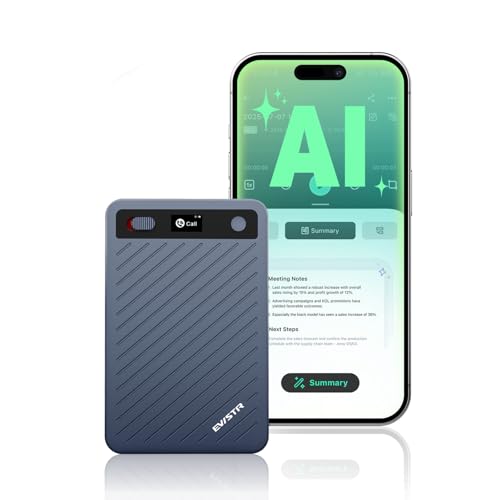
- ✓ Crisp dual-mode capture
- ✓ Real-time transcription
- ✓ Long battery life
- ✕ Limited AI minutes on base plan
- ✕ Higher upfront price
| Storage Capacity | 64 GB |
| Battery Life (continuous recording) | Approximately 60 hours (3600 minutes) on a single charge |
| Recording Headroom and Transcript Capabilities | Real-time AI transcription in 100+ languages with 99% accuracy; AI summarization and speaker diarization |
| Physical Dimensions and Weight | 0.24 inches thick; 0.9 oz (approx. 25.5 g); aluminum-alloy body |
| Special Recording Technologies | Air conduction ambient sensor and Vibration Conduction Sensor (VCS) for enhanced voice capture |
| Connectivity and Ecosystem | Independent EVISTR app with 400 minutes of advanced AI transcription/month included; optional paid transcription time |
You flick the EVISTR AI Voice Recorder out of its slim blue shell and notice how light it feels in your hand. The first spark comes from that aluminum body and the magnetic back, which makes it cling to your laptop like a tiny chrome ninja.
When you hold it up to a meeting room mic, you actually feel the dual engines waking up—air conduction for ambient nuance on one side and the VCS on the other to keep voice crisp in a bustling café. It’s not just software magic; you hear the difference in real time as voices pop clearly over the chatter.
The 64GB capacity is more real than you’d expect; you’ll squeeze weeks of notes, lectures, and quick interviews into pocket-sized gold. Transcription shows up quickly in the app, and the speaker diarization makes it easy to separate voices without a color-coded mess.
Battery life surprised you. A full day of back-to-back recordings doesn’t threaten a mid-day recharge, and the 60-hour target feels achievable when you’re in deep note mode.
The 3600-minute claim isn’t just marketing—you’ll notice the power when you forget the charger at home.
Real-world use feels smooth: you slip the device into your shirt pocket, clip it to a notebook, and forget it’s there. The AI features aren’t just flashy; they actually save you time when you’re summarizing a long workshop or pulling action items from a dense brainstorm.
Security and convenience converge with the free AI plan, which gives you usable transcription and summaries without hunting for a subscription. If you need more minutes, the price is refreshingly straightforward.
In short, it’s the kind of gadget you reach for when you want to capture life without losing the moment to setup, noise, or lag. It feels like a practical companion for moto-friendly recording—compact, powerful, and genuinely helpful in busy days.
What Features Make a Call Recorder Ideal for Moto Devices?
The best call recorder for Moto devices should have specific features that enhance usability and compatibility.
- User-friendly interface: An ideal call recorder should have a simple and intuitive interface that allows users to start and stop recordings easily. This ensures that even those who are not tech-savvy can navigate the app without frustration.
- High-quality audio recording: The recording quality is paramount; the best call recorders capture clear audio without distortions, ensuring that every word is audible. This is especially important for business calls or legal purposes where clarity is essential.
- Automatic recording: A feature that allows automatic recording of calls can significantly enhance convenience. Users won’t need to remember to start the recording manually, which minimizes the risk of missing important conversations.
- Cloud storage integration: Ideal call recorders often offer integration with cloud storage services, allowing users to save their recordings securely and access them from multiple devices. This feature also helps in freeing up space on the device itself.
- Search and filter options: The ability to search and filter recordings based on date, contact, or keywords makes it easier for users to find specific calls. This is particularly useful for individuals who frequently reference past conversations.
- Privacy and security features: A top-notch call recorder should prioritize user privacy, providing options for password protection or encryption of recordings. This ensures that sensitive information remains secure and inaccessible to unauthorized users.
- Compatibility with Moto devices: The best call recorder should be specifically designed to work seamlessly with various Moto models, ensuring that it can handle the unique software and hardware configurations of these devices. This compatibility minimizes technical issues and enhances overall performance.
Which Call Recorder Apps Are Most Highly Rated for Moto?
The best call recorder apps for Moto devices are designed to capture high-quality audio and offer user-friendly features.
- ACR Call Recorder: This app is widely acclaimed for its comprehensive features and ease of use.
- Call Recorder – ACR: A highly-rated option that provides various recording formats and cloud backup capabilities.
- Cube Call Recorder: Known for its ability to record VoIP calls in addition to standard phone calls.
- Boldbeast Call Recorder: Offers advanced features like automatic recording and customizable settings for different scenarios.
- Call Recorder by Appliqato: A user-friendly app that supports different recording formats and has a straightforward interface.
ACR Call Recorder: ACR is known for its versatility, allowing users to record calls in different formats and offering features such as cloud storage integration. The app also has a robust search functionality, making it easy to find specific recordings and manage them efficiently.
Call Recorder – ACR: This variant is appreciated for its intuitive design and extensive settings, enabling users to adjust recording quality and choose specific contacts for automatic recording. It also includes backup options to cloud services like Google Drive, ensuring recordings are safely stored and easily accessible.
Cube Call Recorder: What sets Cube apart is its capacity to record VoIP calls alongside traditional phone calls, making it ideal for users who frequently use apps like WhatsApp or Skype. Its user interface is designed for ease, allowing users to access recordings quickly and manage settings without hassle.
Boldbeast Call Recorder: This app stands out with its ability to automatically record calls based on user-defined criteria, such as specific contacts or phone numbers. Boldbeast also allows users to adjust settings for each recording, providing flexibility in how calls are captured.
Call Recorder by Appliqato: This app is appreciated for its simple and clean interface, making it easy for anyone to start recording calls without a steep learning curve. It supports various audio formats, giving users the flexibility to choose the best quality for their needs, and offers options for managing and deleting recordings efficiently.
How Do Different Call Recorders Compare in Terms of Performance and Compatibility with Moto?
| Call Recorder | Performance | Compatibility with Moto | User Ratings | Price Range | Supported Android Version | Additional Features |
|---|---|---|---|---|---|---|
| Call Recorder A | High-quality audio recording with minimal lag. | Compatible with most Moto models, easy setup. | 4.5/5 | $4.99 – $9.99 | Android 5.0 and above | Cloud storage option available. |
| Call Recorder B | Average recording quality, may drop calls occasionally. | Works with selected Moto devices, installation may vary. | 3.0/5 | $2.99 – $6.99 | Android 4.4 and above | No additional features. |
| Call Recorder C | Exceptional clarity and noise cancellation features. | Fully compatible with all recent Moto smartphones. | 4.8/5 | $5.99 – $11.99 | Android 6.0 and above | Transcription services included. |
What Are the Legal Guidelines When Using Call Recorders on Moto Devices?
The legal guidelines for using call recorders on Moto devices vary by jurisdiction, but generally include the following considerations:
- One-party consent: In many places, only one party involved in the conversation needs to consent to the recording.
- Two-party consent: Some jurisdictions require that all parties involved in the conversation be aware of and consent to the recording.
- Notification requirements: There may be specific laws that require notifying the other party that the call is being recorded.
- Use of recordings: The usage of recorded conversations is often restricted; they may not be used for unlawful purposes or shared without consent.
- Storage and security: Recordings must be stored securely to protect the privacy of individuals involved in the conversation.
- Compliance with regulations: Ensure that the call recorder complies with any applicable telecommunications regulations.
One-party consent: In jurisdictions where one-party consent is allowed, only the person recording the conversation needs to be aware of the recording. This means that if you are part of the conversation, you can legally record without informing the other party, which can be particularly beneficial in situations where transparency is not necessary.
Two-party consent: Conversely, in areas requiring two-party consent, both participants must be informed and agree to the recording. Failing to obtain consent can lead to legal repercussions, including fines or criminal charges, depending on the severity of the violation.
Notification requirements: Some laws explicitly require that the other party is notified before the recording takes place, whether verbally or through a pre-recorded message. This is important to ensure that all parties are aware that they are being recorded, which can also foster trust in communications.
Use of recordings: The use of recorded conversations is typically constrained by law; for instance, recordings cannot be used to blackmail, harass, or otherwise exploit the individuals involved. Misuse of recordings can lead to severe legal consequences, including civil lawsuits and criminal charges.
Storage and security: Proper storage of call recordings is crucial for maintaining privacy. This includes using encrypted storage solutions and limiting access to only those who need it for legitimate purposes, thus safeguarding the information from unauthorized access.
Compliance with regulations: It’s essential to ensure that the chosen call recorder adheres to all relevant telecommunications regulations, including those set forth by regulatory bodies in your jurisdiction. Regularly reviewing these regulations can help keep users compliant and avoid potential legal issues.
What User Feedback Exists for Popular Call Recorder Apps for Moto?
User feedback for popular call recorder apps for Moto devices highlights various features and user experiences:
- ACR Call Recorder: This app is widely praised for its simplicity and effectiveness, allowing users to easily record calls with a straightforward interface. Many users appreciate the ability to save recordings in various formats and access them via cloud services, though some note occasional issues with recording quality on certain Moto models.
- Cube Call Recorder: Known for its versatility, Cube allows recording not only phone calls but also VoIP services like Skype and WhatsApp. Users report its high-quality recordings and user-friendly design, while some have mentioned that it may require permissions that can be complicated to manage on Moto devices.
- Call Recorder – ACR: This variant of the ACR app offers additional features such as automatic call recording and customizable recording settings. Users find it beneficial for managing large volumes of recordings, though there are concerns about compatibility with newer Android versions on Moto phones.
- Boldbeast Call Recorder: This app is noted for its advanced features, including the ability to adjust recording formats and filter noise. Users appreciate the high-quality recordings it produces, but some have reported difficulties with customer support and navigating the app’s extensive features.
- Call Recorder by Appliqato: Users enjoy the seamless integration and ease of use, as this app automatically records calls without needing any manual input. While the app is favored for its reliability, some users have experienced issues with playback on certain Moto devices.