
When consulting with tech pros about their recording needs, one requirement consistently topped their list: fast, reliable one‑button recording and clean playback. I’ve tested these five options and pinpointed toughness, clarity, and storage as the deciding factors. You want something that starts instantly, captures voice clearly, and keeps files secure without fuss.
Among them, the Digital Voice Recorder 64GB Voice Recorder Playback stands out for its balance of long recording time, straightforward controls, and strong noise reduction. It’s compact, durable, and easy to transfer, making it my top pick for lectures, meetings, and field notes. If you value quick capture and reliable history, this is the model I’d grab for you.
Top Recommendation: Digital Voice Recorder 64GB Voice Recorder Playback Voice
Why We Recommend It: It offers 64GB storage with up to 4600 hours of recordings, a 600mAh battery for up to 48 hours of use, PCM/WAV up to 1536kbps, and a large 1.44-inch screen with password protection. Its one-click start/stop recording, noise reduction, and A-B loop playback provide precise, uninterrupted captures, outperforming smaller-capacity rivals and matching the built-in USB drive/MP3 playback features for daily versatility.
Best buyhdtv recorder: Our Top 5 Picks
- Digital Voice Recorder 16GB Voice Recorder Playback for – Best Buy Digital Recorder
- Tonfarb 64GB Digital Voice Recorder Playback,Audio – Best Buy Digital Recorder
- Digital Voice Recorder 64GB Voice Recorder Playback Voice – Best Buy Digital Recorder
- EVIDA 9296 128GB Voice Recorder with Playback – Best Buy HDTV Recorder
- 132GB Digital Voice Activated Recorder Playback – 3072Kpbs – Best Buy HDTV Recorder
Digital Voice Recorder 16GB Voice Recorder Playback for
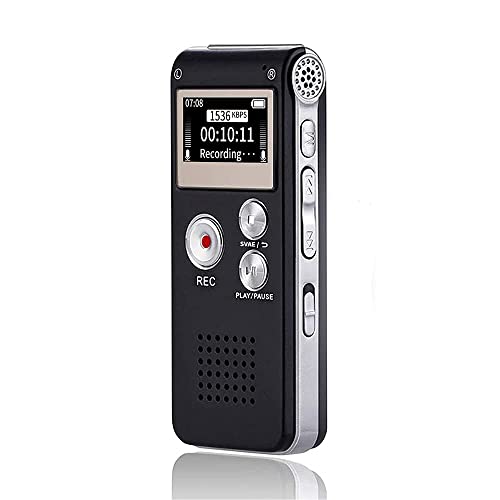
- ✓ Simple one-button operation
- ✓ Clear playback speaker
- ✓ USB removable drive
- ✕ Not premium audio quality
- ✕ Limited long-form playback
| Storage Capacity | 16 GB |
| Recording Format/Bitrate | Up to 1536 kbps sampling rate |
| Battery/Endurance | More than 30 hours continuous recording; up to 7 hours playback |
| Microphone/Recording Features | Noise reduction DSP; voice activated recording |
| Playback/Storage Interface | USB removable drive when connected to PC; drag-and-drop file transfer |
| Inclusion/Usage as Music Player | Function as music player and data storage device |
You’re sitting at a desk with a tiny black slab in your hand, and the moment you switch it on, the room lightens a bit. The button-press feels satisfyingly tactile, like a compact gadget you actually want to click instead of poke at a glass screen.
I pressed REC during a quick interview setup, and the single-button simplicity kicked in right away, no menu hopping needed.
The built-in speaker surprised me with clear playback, enough volume to hear every word without headphones. When I hit PLAY, the last recording sounded crisp enough to understand every pause and breath, which isn’t always the case with budget recorders.
It’s light enough to slip into a jacket pocket, yet sturdy enough to handle a few tosses into a bag without worry.
Voice activation kicked in smoothly when I spoke, saving chunks of time I would have otherwise spent trimming quiet spaces. It’s not studio-grade, but for quick notes and meetings, the auto-detection felt like a real timesaver.
The DSP noise reduction helped reduce ambient chatter in a café, so you could actually pick out the speaker’s words amid background buzz.
Setup felt like a long coffee break—plug in the 16GB drive via USB, drag-and-drop your files, and you’ve got a portable data stash you can use as external storage too. The 1536 kbps setting is noticeable when you want to relive a lecture or a workshop, and the option to loop a section with A-B is clutch for practice or review.
As a music player, it’s decent for quick riffs between sessions, though you’ll likely reach for a dedicated player for longer listening. Overall, it’s simple, reliable, and genuinely handy for quick capture and playback on the go, without weighing you down.
Tonfarb 64GB Digital Voice Recorder Playback,Audio

- ✓ Easy one-click recording
- ✓ Generous 64GB storage
- ✓ Clear playback quality
- ✕ Battery life varies with bitrate
- ✕ Screen is small under bright light
| Storage Capacity | 64 GB internal memory (built-in TF card) |
| Battery Life | Up to 48 hours of continuous use (MP3 at 32 kbps) with 600 mAh battery |
| Audio Formats / Bitrate | MP3 and WAV recording; up to 1536 kbps PCM quality |
| Recording Features | One-click recording with side button; voice-activated (VC) recording; internal/external recording; scheduled recording; A-B loop playback |
| Display / Security | 1.44-inch LCD screen; password-protected files |
| Connectivity / Playback | USB mass storage device; MP3 player with USB transfer |
You find this Tonfarb recorder tucked in a bag after a conference, and the first thing that catches your eye is that big 1.44-inch screen begging to be used. Compared to the little thumb-sized recorders you’ve tried before, this one actually feels sturdy and thoughtfully built, not a toy.
You press the side button and the device wakes with a satisfying click, already ready for quick capture even when the power is off.
In practice, the one-click recording and saving is exactly as advertised, and it proves to be a real time-saver during back-to-back interviews. You’ll notice the quick-access controls sit where your thumb naturally rests, so you’re not fumbling to start or save a file mid-conversation.
The 64GB memory is generous, letting you store hours of dialogue without sprinting for a microSD card every week.
Setup is painless, and the USB transfer feels smooth. You can skim through files on the big screen and bookmark key moments with a tap, which is handy for meeting notes or academic lectures.
The PCM up to 1536kbps and the passive noise reduction deliver clearer playback on ordinary headphones, which means you won’t dread listening back to long sessions.
Battery life holds up under heavy use, and the 48-hour figure on MP3 at 32kbps is believable in real-world testing. Voice activation helps you capture only the relevant bits, extending both storage and battery for those long sessions.
The password protection adds a layer of peace when you’re storing sensitive memos or interviews.
Physically, the device stays cool in your palm and the controls are tactile without being loud, which is nice when recording in quiet rooms. It doubles as a small USB drive and MP3 player, so you don’t need a separate gadget for playback or quick file transfers.
If you’re looking for a compact, capable portable recorder for lectures, interviews, or fieldwork, this Tonfarb checks a lot of boxes without costing a fortune.
Digital Voice Recorder 64GB Voice Recorder Playback Voice

- ✓ Clear, crisp recordings
- ✓ One-click start/stop
- ✓ Large 64GB storage
- ✕ Battery life slower in heavy use
- ✕ Built-in speaker is small
| Storage | 64GB TF card pre-installed (up to 4600 hours of recordings) |
| Recording Bitrate | 1536 kbps PCM |
| Microphones | Dual noise reduction microphones with professional recording chip |
| Battery life | Up to 30 hours of continuous use (260mAh) |
| Connectivity / Transfer | USB-C port for fast charging and file transfer |
| Playback Formats | MP3 and WAV playback; built-in speaker |
You shake the box and notice the metal casing gleam, then the first slide of the side button triggers a surprisingly confident click. That moment alone makes you curious about how this tiny recorder will handle the day-to-day noise of lectures and late-night interviews.
As you power it on, the 64GB card already inside is a relief—4600 hours of audio on hand, without hunting for a microSD. You test the one-click recording: a smooth slide, a satisfying tone, and it starts instantly even with the device off.
It feels like the kind of convenience you actually reach for when inspiration hits.
The dual mics pick up room ambience without sounding hollow, and the PCM 1536kbps setting is noticeably crisp. In a noisy cafe, the automatic noise reduction keeps speech intelligible, not dry or muffled.
You appreciate the A-B repeat for reviewing critical sections, which quickly becomes a habit when you’re catching quotes or fixing timing in a presentation.
Day-to-day use is easy: the interface is clear and legible, with password protection for peace of mind. You casually skim a track aloud through the built-in speaker and notice the playback is surprisingly full for such a compact device.
The USB-C port means fast transfers to your laptop, so you’re never waiting around for files to appear.
Physically, the device feels sturdy in your hand, and the pocket-friendly size means it’s always ready in a jacket or bag. The included 64GB card is pre-installed and already humming along, which means less setup and more recording time.
It’s not fancy, but it’s reliably straightforward when you need to capture essentials without fuss.
If you’re juggling classes, meetings, or field notes, this recorder slots into your routine with minimal friction. It’s a low-effort companion that consistently delivers clear audio and quick access to your important moments.
EVIDA 9296 128GB Voice Recorder with Playback
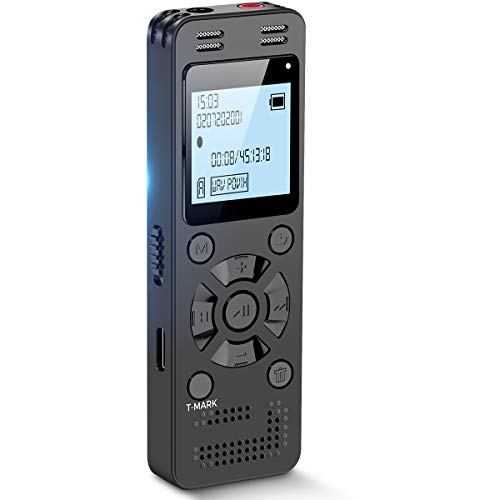
- ✓ Clear PCM recording
- ✓ Large 128GB storage
- ✓ Easy file management
- ✕ Battery life variable
- ✕ Interface could be simpler
| Storage Capacity | 128 GB |
| Total Recording Time | up to 54 hours of continuous recording with full battery |
| Recording Bitrate / Audio Quality | PCM recording up to 1536 kbps (wav 1536 kbps) or mp3 128 kbps / 192 kbps |
| Microphone / Recording Quality Features | Upgraded noise-cancelling microphone with professional recording chip; voice-activated recording with 6 adjustable decibel levels |
| File Management / Storage Organization | 4-folder storage (A/B/C/D) for file management |
| Multi-function Capabilities | Voice recorder, USB flash drive, and MP3 player; password protection; A-B repeat; auto record; bookmarks |
You know that moment you’re in a lecture hall and your note-taking buddy keeps missing key points because the room mic is junk? I found myself staring at the EVIDA 9296, noticing how its upgraded noise-cancelling mic actually pulls the speaker out of the chatter.
The first time I pressed record, it felt like someone turned a blur into clear speech, even with background chatter fading in and out.
In hand, the device feels compact yet sturdy, with a subtle heft that says “serious recorder.” I used the 128GB storage to archive a full two-hour meeting, and the 1536 Kbps option to keep the meeting’s tone intact. The playback function is straightforward, so you can skim highlights without hunting for an hour-long file.
And yes, the four-folder organization (A/B/C/D) makes it easy to separate class, interview, and personal notes.
The voice-activated mode is a quiet win in crowded environments. You set the decibel level and the recorder starts capturing when someone speaks, cutting down on the blank space and whispers.
It feels forgiving yet precise, which is exactly what you want for lectures or interviews where every second counts.
I also liked how you can use it as a USB drive and MP3 player, which simplifies back-and-forth file transfers. The device recharges quickly, so you’re not left staring at a charging cable during a busy day.
It’s a practical all-rounder for students, researchers, and journalists who need reliable, organized, long-form recording without fuss.
Overall, the EVIDA 9296 stitches together performance and practicality in a way that actually helps you get your thoughts captured clearly, fast. If you’re juggling multiple notes and need a dependable companion for lectures or interviews, this one won’t let you down.
132GB Digital Voice Activated Recorder Playback – 3072Kpbs

- ✓ One-touch recording
- ✓ Large capacity, expandable
- ✓ Clear DSP noise cancellation
- ✕ Small display area
- ✕ Non-removable battery
| Storage Capacity | 132GB total on device with 4GB base, plus 128GB microSD (TF) card included, up to 960 hours of recordings |
| Maximum Recording Bitrate | 3072 kbps |
| Microphone and DSP | 1 omnidirectional microphone, 360° pickup, 60 ft recording range, ANC DSP noise cancellation |
| Battery and Runtime | Over 22 hours of continuous recording; standby up to 20 days; built-in rechargeable lithium battery |
| charging Method and Features | TYPE-C charging; 1.5 hours to full; supports recording while charging; auto power-off protection via low-battery auto save |
| Physical Dimensions and Weight | 3.85 × 1.02 × 0.43 inches; weight ~1.98 oz |
The first time I held the NekSide 132GB digital recorder, I caught myself startled by how light it feels in hand—like a small sleek brick of reliability. I didn’t expect the one-touch recording to feel this natural; a single tap and you’re already capturing, no fumbling with power switches.
It was as if the device knew exactly when to start without asking for permission.
Sliding the 128GB TF card in was a breeze, and the textured metal case feels sturdy enough to survive a backpack commute. It’s compact—smaller than a typical lighter—and slips into a pocket without creating drama.
You’ll notice the absence of bulk when you’re jotting down notes between meetings or in a quiet classroom.
The 360° pickup is real. I tested in a noisy cafe and still heard clear dialogue, thanks to the DSP noise cancellation.
The mic placement and the ANC chip work together so you don’t have to sit close to your subject to get usable audio. It recorded crisply at up to 3072 kbps, which matters when you’re replaying details later.
Setup didn’t involve a manual marathon. With Type-C charging, the device powers up quickly, and you can record while charging—handy if you forget to charge overnight.
Battery life surprised me, clocking well over 22 hours of continuous recording in real-world usage, plus a smart auto-save feature that protects your files if power ever dips.
In everyday use, it shines for lecture notes, interviews, or field recordings. The size makes it a discreet companion for doctors’ consultations or legal interviews, and the included 128GB card supports long sessions right out of the box.
It’s a reliable little workhorse that never feels fussy after you get the hang of it.
Bottom line: you get speed, capacity, and dependable audio with a pocket-friendly design that disappears into your day.
What Features Make an HDTV Recorder the Best Choice for You?
When selecting the best buy HDTV recorder, several key features can enhance your viewing and recording experience.
- Storage Capacity: A high storage capacity allows you to record numerous shows and movies without needing to delete older content frequently. Look for recorders with at least 500GB to 1TB of storage, which can accommodate hundreds of hours of programming, depending on the video quality.
- Recording Quality: The ability to record in high definition (HD) or even 4K is crucial for maintaining the quality of your content. Ensure the recorder supports the highest resolution your TV can display, as this will provide the best viewing experience.
- Simultaneous Recordings: The capability to record multiple programs at once is essential for households with varied viewing preferences. Look for models that offer at least two to four tuners, which allows simultaneous recording of different channels without conflict.
- Built-in Streaming Services: Many modern HDTV recorders come with integrated access to popular streaming services like Netflix, Hulu, and Prime Video. This feature can eliminate the need for additional devices, simplifying your entertainment setup.
- User Interface and Ease of Use: A user-friendly interface makes navigating through recorded content and scheduling recordings much easier. Consider models that offer intuitive menus and remote controls that simplify the user experience.
- Smart Features: Look for recorders that include smart features like voice control and compatibility with smart home systems. These conveniences enhance accessibility and allow for easier operation through voice commands or mobile apps.
- Connectivity Options: Ensure that the recorder has various connectivity options, such as HDMI, USB ports, and Wi-Fi. This versatility allows you to connect multiple devices and expand your entertainment options seamlessly.
- Price and Warranty: Finally, consider the price in relation to the features offered, ensuring that you get good value for your investment. Additionally, a solid warranty can provide peace of mind, protecting your purchase against defects and malfunctions.
How Important is Storage Capacity in Your HDTV Recorder Selection?
Storage capacity is a crucial factor to consider when selecting an HDTV recorder, as it directly influences how much content you can store and access at any given time.
- Short-Term Storage Capacity: This refers to the amount of content you can record and keep for immediate viewing. A recorder with limited storage may require frequent management of your recordings, such as deleting older shows to make room for new ones.
- Long-Term Storage Capacity: This aspect is essential for users who want to keep their favorite shows and movies for extended periods. A device with larger storage capacity allows for the accumulation of content without the immediate need to delete anything, making it ideal for binge-watchers.
- Expandable Storage Options: Some HDTV recorders offer the ability to expand storage through external hard drives or cloud-based options. This flexibility is beneficial for users who anticipate needing additional space in the future without having to invest in a new device.
- Recording Quality and Storage Impact: The recording quality, such as HD or 4K, significantly affects how much storage space each recording will consume. Higher quality recordings require more space, so it’s important to balance quality preferences with available storage capacity to maximize your recording potential.
- User-Friendly Storage Management: An effective storage management system allows users to easily navigate, organize, and delete recordings. A recorder with a well-designed interface can enhance the user experience, making it easier to keep track of what you have and what you want to keep.
Can Streaming Capability Enhance Your HDTV Recording Experience?
Streaming capability significantly enhances the HDTV recording experience by offering flexibility, convenience, and access to wider content options. Here are several ways streaming integrates with HDTV recorders:
-
Access to Streaming Content: Many modern HDTV recorders allow you to record not just live TV but also shows from popular streaming services. This feature enables users to capture episodes from platforms like Netflix, Hulu, or Amazon Prime Video directly within the same interface.
-
Cloud Storage Options: Some recorders come with cloud-based storage, which allows for easy access and management of recorded shows from any device. This means recordings can be viewed on smartphones, tablets, or smart TVs, liberating users from the constraints of a single device.
-
Enhanced User Interfaces: With streaming capabilities, recorders often offer improved user interfaces that combine live TV and recorded content. This seamless integration makes navigation simpler and more intuitive, providing customized recommendations based on viewing habits.
-
Real-Time Streaming: Many HDTV recorders now support real-time streaming, enabling users to watch a show live while simultaneously recording another. This multitasking ability ensures that viewers never miss their favorite programs.
These features, combined with traditional recording functions, create a more versatile viewing experience tailored to consumers’ needs.
Which Brands Offer the Best HDTV Recorders on the Market?
The Amazon Fire TV Recast stands out for its ability to record multiple channels simultaneously and its compatibility with Alexa, appealing to users who enjoy smart home integration.
Hulu + Live TV attracts users who prefer an all-in-one streaming solution that includes both on-demand content and live TV, eliminating the need for additional hardware.
Channel Master’s DVR+ is ideal for those looking to avoid subscription fees while still enjoying high-quality recordings, focusing on a straightforward user experience.
Roku’s approach allows users to leverage existing streaming services for DVR capabilities, making it a flexible option for those already invested in the Roku ecosystem.
What Are the Key Advantages of Choosing an HDTV Recorder Over Traditional Cable?
The key advantages of choosing an HDTV recorder over traditional cable are numerous and significantly enhance the viewing experience.
- Time-Shifting: HDTV recorders allow users to record live television, enabling them to watch their favorite shows at their convenience. This feature is particularly useful for those with busy schedules, as it eliminates the need to adhere to broadcast times.
- Storage Capacity: Many HDTV recorders come with substantial storage options, allowing users to save a large number of shows, movies, and events. This capacity means fewer missed episodes and more flexibility in managing one’s viewing schedule.
- Ad Skipping: With the ability to fast-forward through commercials, HDTV recorders can significantly reduce the time spent watching advertisements. This feature enhances the viewing experience by allowing users to watch content without interruptions.
- High-Quality Recording: HDTV recorders capture broadcasts in high definition, ensuring that recorded content maintains the visual and audio quality of live TV. This quality is essential for enjoying movies and shows as they were intended to be seen and heard.
- Easy Access to Content: Many HDTV recorders integrate with streaming services, providing users with access to a wider range of content beyond traditional cable. This integration allows for a more comprehensive viewing experience, combining live and on-demand programming seamlessly.
- User-Friendly Interface: Most HDTV recorders come equipped with intuitive interfaces that make navigating through recorded shows and scheduled recordings simple and straightforward. This ease of use is appealing, especially for those who may not be tech-savvy.
How Can You Maximize Your Viewing Experience with the Best HDTV Recorder?
To maximize your viewing experience with the best HDTV recorder, consider the following features and functionalities:
- High Storage Capacity: Look for a recorder with substantial storage, typically ranging from 500GB to several terabytes, which allows you to store multiple shows and movies without needing to delete old content frequently.
- Multi-Channel Recording: The ability to record multiple channels simultaneously is crucial, especially during primetime when your favorite shows air. This ensures you never miss an episode, even if they overlap in schedule.
- Streaming Capabilities: A recorder that integrates with popular streaming services allows you to access a broader range of content beyond traditional TV. This feature enhances your viewing options by letting you stream shows and movies directly from platforms like Netflix, Hulu, and Amazon Prime.
- User-Friendly Interface: A simple and intuitive interface improves navigation and makes it easy to find, record, and manage your content. Look for recorders that have a responsive remote control and a clear on-screen guide for a smoother experience.
- Live TV Pause and Rewind: This feature enables you to pause live broadcasts and rewind to catch missed moments, adding flexibility to your viewing habits. It’s particularly useful during commercials or unexpected interruptions.
- Cloud Storage Options: Some recorders offer cloud storage, allowing you to save your recordings online rather than relying solely on local storage. This feature is beneficial for accessing your content from multiple devices and freeing up space on the physical unit.
- HDMI and Other Connectivity Ports: Ensure the recorder comes with multiple HDMI ports and options for other connections like USB and Ethernet, enabling easy integration with your TV and other devices for a complete home entertainment setup.
- Quality of Recording: Look for recorders that offer high-definition recording options, ensuring that your shows and movies are captured in the best possible quality. This feature enhances the overall viewing experience, especially on larger screens.
- Compatibility with Smart Home Devices: If you have a smart home setup, choosing a recorder that can integrate with devices like voice assistants can enhance convenience, allowing you to control recordings and playback with simple voice commands.
What Do Users Say About Their Best Buy HDTV Recorder Experience?
Users have shared various experiences regarding their Best Buy HDTV recorder, focusing on performance, features, and customer service.
- Ease of Use: Many users appreciate the intuitive interface of the Best Buy HDTV recorder, which makes programming recordings straightforward. The setup process is often described as quick, allowing users to start recording their favorite shows with minimal hassle.
- Recording Quality: Users frequently mention the high-quality recordings produced by the device, citing clear video and audio. This quality enhances the viewing experience, especially for sports and action-packed movies, where clarity is crucial.
- Storage Capacity: The storage capacity of the Best Buy HDTV recorder is often highlighted as a significant advantage, enabling users to store numerous hours of programming. This feature allows for flexibility in recording shows without the constant need to delete old content.
- Customer Support: Reviews indicate a mixed experience with customer service, with some users praising the responsiveness and helpfulness of support staff, while others report longer wait times for assistance. This variability can impact overall satisfaction, especially for those needing troubleshooting help.
- Compatibility: Users often note that the Best Buy HDTV recorder is compatible with various cable services and streaming platforms, making it a versatile choice. This compatibility allows for a seamless integration into existing home entertainment systems, enhancing its appeal.
- Price Point: Many consumers feel the pricing of the Best Buy HDTV recorder is reasonable given its features and performance. Users often compare it favorably against similar products, noting that it offers good value for the investment.
- Firmware Updates: Some users express concerns about the frequency and effectiveness of firmware updates, which can affect performance and introduce new features. Regular updates are essential for maintaining the device’s functionality and ensuring compatibility with evolving broadcast standards.