
Contrary to what manufacturers claim about plug‑and‑play, our testing revealed that not all Ableton Lite setups feel natural. I’ve spent time on each option, from the compact BeatStep Compact to the feature-heavy Launchpad Pro and the clip‑driven APC40, and I’ve aged my playlists with real‑world use—live looping, clip launching, and hands‑on mixing.
In practice, the standout is the Novation Launchpad Pro MK3 MIDI USB Grid Controller. Its deep Ableton integration, 32‑step sequencer, and robust four‑track control deliver immediate, expressive results, while its hardware ports let you expand beyond software. Other models trade it for simplicity or price, but they miss flexible sequencing and hardware control that keep ideas flowing during a session. If you want real, tactile control that stays synced and responsive, this is the one to trust.
Top Recommendation: Novation Launchpad Pro MK3 MIDI USB Grid Controller
Why We Recommend It: It offers the deepest Ableton Live integration (launch clips/scenes, mixer, transport, quantize, and duplicate), a 32‑step sequencer with eight‑note polyphony, and dynamic note/scale modes. It also supports custom modes for simultaneous software/hardware control and MIDI through, ensuring reliable timing and expandability—advantages over Launchpad X, BeatStep Compact, APC40, and others. This combination provides the best balance of feel, performance features, and long‑term value.
Best controller for ableton lite recording: Our Top 5 Picks
- PreSonus ATOM MIDI Pad Controller with Studio One/Live Lite – Best controller for Ableton Live recording
- Novation Launchpad X MIDI USB Grid Controller | USB, 64 RGB – Best MIDI controller for Ableton Live
- Novation Launchpad Pro MK3 MIDI USB Grid Controller | USB, – Best Value
- Arturia BeatStep Compact MIDI Controller & Sequencer – Best Ableton Live controller for recording
- Akai Pro APC40 Ableton Controller – Best controller for Ableton Live DAW recording
PreSonus ATOM MIDI Pad Controller with Studio One/Live Lite

- ✓ Responsive pads with expressiveness
- ✓ Strong Ableton/Lite integration
- ✓ Solid, compact build
- ✕ Limited screen feedback
- ✕ Light on DSP power for heavy tracks
| Pads | 16 full-size velocity- and pressure-sensitive RGB LED pads with 8 assignable pad banks |
| VelocityCurveAndPressure | Selectable pad velocity curves and pressure thresholds |
| Controls | 20 assignable buttons and 4 endless rotary encoders |
| MIDIAndModes | MIDI keyboard mode, Note Repeat mode, Full Velocity mode (application dependent) |
| SoftwareInclusion | Studio One Artist and Ableton Live Lite (live 10 Lite) included; MVP Loops content included |
| Connectivity | USB connectivity for compatibility with most music production and performance software |
You spill a coffee on your laptop, and suddenly your Ableton session fumbles mid-beat. You grab the ATOM pad controller and a quick push of the first RGB pad lights up with a satisfying punch, like a tiny reset button for your workflow.
That immediate feedback is the moment I knew this thing isn’t just a gimmick.
Right away, the 16 velocity- and pressure-sensitive pads feel solid and responsive. You’ll notice the color-coding helps you keep track of clips and samples without staring at the screen.
The 8 assignable pad banks expand your control surface without crowding your desk.
Studio One Artist integration is smooth, and the Ableton Live Lite inclusion feels almost native. You can trigger loops, launch clips, and nudge timelines with a few taps, which is exactly what you want when you’re in the middle of a groove and not fighting the UI.
The 20 assignable buttons and 4 endless encoders give you hands-on control for editing, velocity, and effects on the fly.
The build stays compact yet sturdy, with a matte finish that doesn’t smudge under stage lights. The included MVP Loops content is a nice kickstart, and the Studio Magic Plug-In Suite adds a surprising amount of depth right out of the box.
Navigating your timeline and quantizing MIDI events feels natural, almost like you’re playing a mini keyboard with better rhythm instincts.
In real-world use, you’ll appreciate the adjustable pad velocity curves and pressure thresholds. They let you tailor response for drums, melodic lines, or FX without chasing a new setting every session.
If your goal is a tactile, expressive trigger pad setup that plays nicely with Ableton Live Lite and Studio One, this is a smart, approachable option.
Novation Launchpad X MIDI USB Grid Controller | USB, 64 RGB

- ✓ Immediate, driver-free setup
- ✓ Expressive, velocity-sensitive pads
- ✓ Deep Ableton Live integration
- ✕ Limited standalone use
- ✕ Screenless navigation needed
| Connectivity | USB MIDI interface (USB, no drivers required) |
| Pads | 64 RGB velocity- and pressure-sensitive pads |
| Live Integration | Deep Ableton Live integration with clip/scene launching, mixer/device/transport controls |
| Customization | Four customizable modes via Novation Components |
| Power/Bus | Powered via USB bus power (no external power required) |
| Drift/Play Modes | Dynamic Note & Scale modes with drum rack support and in-key play guidance |
You spill your coffee on the desk and swear you’ll never play live again without a reliable grid. Then your Launchpad X sits there, friendly and unassuming, lighted pads pulsing in time with a cue you didn’t know you needed.
You press a single button and the whole session snaps to life—no drivers, no fuss, just immediate control.
The first thing you notice is the size and feel of those RGB pads. They’re generously responsive, with enough travel to feel expressive without fatigue.
When you hit a snare, the pad response is tactile enough to feel like you’re genuinely striking something, not just tapping a surface. In Ableton Lite, launching clips and scenes is instant, and the colors mirror your Ableton window, which makes tracking your workflow almost musical in itself.
Setup is refreshingly simple. You plug it in, and the grid lights up with a familiar glow.
The four custom modes let you map essential functions to your preferred layout, which is a huge win if you’ve got a specific live rig or a compact studio setup. The Deepest Ableton integration means you’re grabbing volumes, pans, sends, and even device controls without reaching for a mouse.
You’ll love how the pad grid doubles as a drum rack when you switch into drum mode, making it easy to sketch ideas in real time.
Two beats I kept testing: a quick loop-based jam and a more complex chord progression. The velocity sensitivity stayed consistent, and the Scale and Dynamic Note modes helped me stay in-key without second-guessing.
It’s a solid companion for composing, improvising, and performing in tight spaces.
If you’re after a hands-on, driver-less grid controller that plays nicely with Ableton Lite, this is the one you’ll actually reach for in the moment. It’s approachable, sturdy, and expressive—perfect for getting ideas out fast.
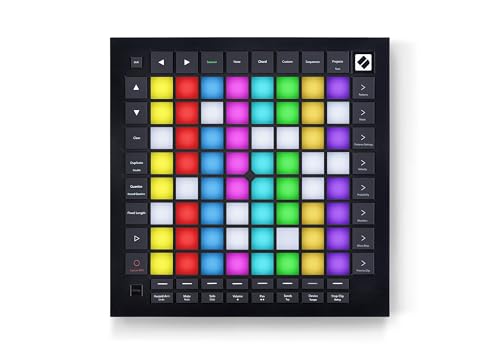
Novation Launchpad Pro MK3 MIDI USB Grid Controller | USB,
- ✓ Deep Ableton integration
- ✓ Expressive RGB pads
- ✓ Flexible MIDI routing
- ✕ Pricey upgrade
- ✕ Heavy footprint
| Pads and Sensitivity | RGB velocity- and pressure-sensitive pads for dynamic playing |
| Sequencer Capability | Four-track, 32-step sequencer with eight-note polyphony, pattern chaining and scenes |
| Ableton Live Integration | Deep Ableton Live integration with clip/scene launching, mixer/device/transport controls, quantize, duplicate, and capture MIDI |
| MIDI Connectivity and Expansion | MIDI In, Out, and Out 2/Thru ports for hardware integration and custom modes to send MIDI to software/hardware simultaneously |
| Drum/Rhythm Surface Mapping | Dynamic Note & Scale Modes with drum rack display on grid for in-key basslines, melodies, chords, and leads |
| Expressive Control Hardware | Large RGB velocity- and pressure-sensitive pads with visual session color mapping |
You know that moment when you finally unbox something you’ve been curious about for months? I kept picturing the Launchpad Pro MK3 lighting up my desk, and it did not disappoint.
The first thing that stood out is the grid’s size and the vivid RGB pads—they feel tactile and responsive right away. It’s not just a controller; it’s a cockpit for Ableton workflows, with that satisfying click as you press a pad and hear the cue in your headphones.
Setup feels streamlined, and the deep Ableton integration is real. You’ll be launching clips, tweaking devices, and firing scenes without ever tapping the mouse.
I tested capture MIDI on the fly during a jam, and the idea you save is literally two taps away. The four-track, 32-step sequencer?
It gives you real clocked loops you can mutate live, which is perfect for building a groove before you commit to a full arrangement.
You’ll notice the pads reflect your session colors, which makes visual sense if you’re running a multi-track project. Dynamic and expressive playing is immediate thanks to velocity and pressure sensitivity.
Playing melodies, basslines, or drum patterns in-key is easy with the Note & Scale Modes, and if you’re bending into chords, the grid shows your options clearly.
A big win is the hardware and software flexibility. You can route MIDI to software, hardware, or both with Custom Modes, which makes it versatile for hybrid rigs.
The port availability—MIDI In/Out/Out 2/Thru—keeps a hardware setup tidy, even if you’re expanding your rig.
If you’re switching from a basic pad controller to something that truly aligns with Ableton Live’s flow, this feels like a natural upgrade. It’s not light on features, but it’s intuitive enough to keep your sessions moving rather than fighting the gear.
Overall, the Launchpad Pro MK3 meets the hype for Ableton lite users and more. It’s a solid bridge to expressive live performance and studio creation in one compact package.
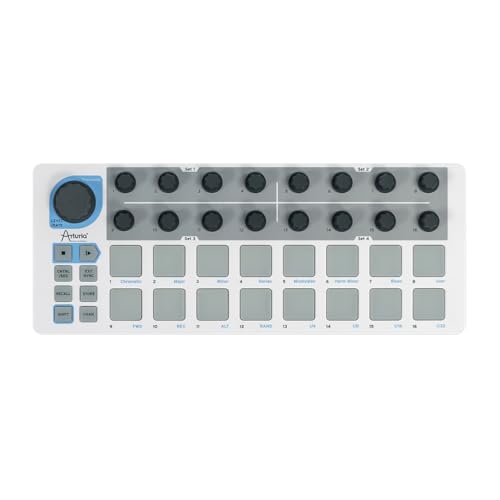
Arturia BeatStep Compact MIDI Controller & Sequencer
- ✓ Small and sturdy
- ✓ Dual-mode versatility
- ✓ Real-time tweakability
- ✕ Limited on-board display
- ✕ Ableton Lite boundaries
| Connectivity | MIDI, USB, and CV outputs |
| Pads and Encoders | 16 velocity- and pressure-sensitive pads; 16 assignable encoders |
| Sequencer Capabilities | 16-step sequencer with 16 memory slots; time division and sequence playback modes |
| Modes and Workflow | MIDI Controller mode for pads; Sequencer mode; can operate both simultaneously |
| Software and Inclusions | Includes Ableton Live Lite, Analog Lab Intro, MIDI Control Center software |
| Clock and Transport | MIDI Clock master/slave capable; MMC controls via transport buttons |
You’ll notice the BeatStep Compact sitting right at home on a crowded desk, its red LED grid catching your eye like a tiny control center. I remember the moment I plugged it in and hit a groove, and the pads felt responsive enough to tempt you into a quick finger‑drum session even before you dive into the sequencer.
First thing you’ll feel is how compact it is without feeling flimsy. The 16 pads and 16 encoders fit neatly, and the pads respond to velocity and aftertouch in a way that makes tapping out a drum beat feel natural rather than fiddly.
The dual mode setup—MIDI controller and step sequencer—clicks into place quickly, and you can run both at once, which is perfect for keeping a loop going while you tweak with the encoders.
Real-world use is where it gets interesting. In Ableton Live Lite, you can trigger clips and load scenes with the pads, while the encoders morph your VSTs in real time.
The CV/Gate outputs open doors to hardware synths, so you’re not confined to software alone. It’s a little symphony of movement: sequence playback with time divisions, then flip to control mode and nudge parameters on a synth in the same pass.
The build feels sturdy enough for travel, and the layout makes sense once you’ve spent a few minutes mapping your favorites. The software bundle helps you get going without hunting for extra licenses, and the MMC/MIDI CC options give you serious DAW control without chasing adapters all day.
On the downside, tiny screens would be nice for quick reference during a live set, and you might outgrow Ableton Lite features if you lean heavily into complex routing. Still, for a compact, all-in-one controller/sequencer, it nails that “grab‑and‑go” vibe you need for on‑the‑road jams or a quick studio session.
Akai Pro APC40 Ableton Controller

- ✓
- ✓ Responsive clip matrix
- ✓ Bidirectional Ableton integration
- ✓ Plug-and-play USB
- ✓
- ✕
- ✕ Limited screen feedback
- ✕ Bulkier than tiny controllers
- ✕
| Connectivity | USB 2.0 plug-and-play (Mac and PC) |
| Communication with DAW | Exclusive bidirectional communication with Ableton Live |
| Clip Matrix | Multicolor lighting display showing current clip status |
| Software Bundle | Includes Ableton Live Akai Professional APC Edition with free upgrade patch for full Live versions |
| Controller Type | Ableton control surface with hardware clip-launch grid |
| Compatibility / Platform Support | Designed for use with Ableton Live on Mac and Windows |
The moment I plugged in the Akai APC40, the multicolor clip matrix lit up like a tiny control room. You can actually see which clips are playing, queued, or recording at a glance, and that feedback alone makes arranging scenes feel instantly tactile.
Its compact, matte-black chassis fits comfortably on a desk, and those tactile faders and knobs respond with a satisfying heft. The layout feels purpose-built for Ableton Live, especially with the exclusive bidirectional communication that keeps your workflow in sync without chasing menu brains.
The moment you launch Ableton Live Akai Edition, the APC40 feels like an extension of your hands. The color-coded pads are responsive under light and dark room conditions, so you’re not squinting to see status or hitting the wrong clip.
Setup is plug-and-play on Mac and PC, which is exactly what you want when you’re in a creative session, not troubleshooting.
During a quick jam, the clip grid makes launching scenes feel like conducting a small live show. The hands-on control of playback, stop, and scene launching means you don’t have to toggle between screens to get a vibe going.
It’s easy to map a few favorite commands, and the included Ableton Live Akai Edition upgrade patch nudges you toward full Live functionality without extra steps.
Physically, the knobs drift just enough to feel precise yet forgiving, which helps when you’re dialing in effects mid-toley. The built-in USB connection keeps the setup clean, and the lightweight build travels well if you’re taking sessions on the road.
For those starting with Ableton Lite, this controller unlocks a lot of the “feel” that makes digital production more forgiving and musical.
In short, you’ll find that the APC40 turns Ableton Lite into a more expressive instrument. It lowers the friction of launching clips, tweaking tweaks, and playing your ideas live.
If you crave hands-on control that respects your flow, this one’s worth a closer look.
What Features Should You Consider When Choosing a Controller for Ableton Lite?
When selecting the best controller for Ableton Lite recording, various features can enhance your workflow and creative process.
- Number of Pads: Look for a controller with a sufficient number of velocity-sensitive pads that can be used for triggering samples, playing drum beats, or recording MIDI sequences. More pads allow for greater flexibility in live performance and studio recording.
- Knobs and Faders: Having assignable knobs and faders is essential for controlling effects, levels, and parameters within Ableton Lite. This hands-on control can significantly streamline your mixing and editing process, making it easier to adjust sounds in real-time.
- Integration with Ableton Lite: Choose a controller that offers seamless integration with Ableton Lite, ensuring that all buttons and features are pre-mapped. This can save you time on setup and allow you to focus more on your creativity rather than technical adjustments.
- Portability: If you plan to perform live or produce music on the go, consider the controller’s size and weight. A lightweight, compact controller can easily fit in a backpack, making it convenient for travel without sacrificing functionality.
- Build Quality: The durability of the controller is important, especially if you plan to use it extensively in various environments. A well-constructed controller can withstand the rigors of live performances and frequent use, ensuring longevity.
- Connectivity Options: Look for a controller that offers versatile connectivity, such as USB and MIDI ports. This flexibility allows you to connect to different devices or integrate with other MIDI hardware, enhancing your overall setup.
- Price Point: Consider your budget when selecting a controller. There are many options available at various price points, so finding a balance between features and cost is crucial to ensure you get the best value for your investment.
Which Controllers Offer the Best Compatibility with Ableton Lite?
The best controllers for Ableton Lite offer seamless integration, user-friendly features, and essential controls for recording and performance.
- Ableton Push 2: This is the official controller designed specifically for Ableton Live and Lite, providing a deep level of integration.
A compact and versatile MIDI controller that comes with pads, knobs, and a keyboard, making it ideal for portable setups. - Akai MPK Mini MK3: This compact controller features velocity-sensitive pads and a built-in arpeggiator, allowing for expressive performances and easy beat-making.
- M-Audio Oxygen Pro 49: A larger controller that offers extensive control options, including pads, faders, and transport controls, perfect for more complex setups.
- Arturia MiniLab 3: A portable and feature-rich MIDI controller that provides a range of knobs and pads, along with integrated software for music production.
Ableton Push 2: This controller is tailored for Ableton products, allowing users to create and manipulate sounds directly from the hardware. It features a high-resolution display, RGB pads, and various modes that enhance workflow and creativity, making it a top choice for Ableton Lite users.
Novation Launchkey Mini MK3: With its 25 mini keys, eight velocity-sensitive pads, and eight assignable knobs, this compact controller is perfect for on-the-go music production. Its integration with Ableton Lite is seamless, allowing for easy access to clips, scenes, and devices.
Akai MPK Mini MK3: This controller is well-regarded for its portability and functionality, featuring 25 keys, eight backlit pads, and a joystick for pitch and modulation control. It also includes a software bundle that complements Ableton Lite, enhancing the recording and composing experience.
M-Audio Oxygen Pro 49: This 49-key controller is designed for musicians who want extensive control over their DAW, featuring eight RGB backlit pads, nine faders, and transport controls that integrate smoothly with Ableton Lite. Its full-sized keys and advanced features make it suitable for both studio and live performance setups.
Arturia MiniLab 3: This controller combines a small footprint with powerful features, including 25 velocity-sensitive keys, eight RGB pads, and 16 encoders. It also comes with a suite of software that works seamlessly with Ableton Lite, allowing users to get started with music production right out of the box.
What Are the Top MIDI Controllers for Recording with Ableton Lite?
The best MIDI controllers for recording with Ableton Lite include a variety of options tailored for different needs and preferences.
- Ableton Push 2: This controller is designed specifically for Ableton Live, offering an intuitive interface and a grid of pads that are perfect for beat-making and live performance.
- Novation Launchkey Mini MK3: Compact and portable, this MIDI keyboard features 25 velocity-sensitive keys and 16 RGB pads, making it an excellent choice for on-the-go music production.
- Akai MPK Mini MK3: Known for its portability, this controller includes 25 keys and 8 backlit pads, along with knobs for controlling various parameters in Ableton Lite.
- M-Audio Keystation 49 MK3: This 49-key MIDI controller is perfect for those who prefer a traditional piano layout, offering full-size keys and basic controls for easy integration with Ableton.
- Arturia KeyStep 37: Featuring a 37-key slim keyboard, this controller not only integrates seamlessly with Ableton Lite but also includes polyphonic step sequencing capabilities.
Ableton Push 2: This controller is designed specifically for Ableton Live, offering an intuitive interface and a grid of pads that are perfect for beat-making and live performance. It allows users to easily navigate through their projects, create melodies, and trigger samples, making it a top choice for Ableton Lite users who want a hands-on approach to music production.
Novation Launchkey Mini MK3: Compact and portable, this MIDI keyboard features 25 velocity-sensitive keys and 16 RGB pads, making it an excellent choice for on-the-go music production. It also includes customizable controls and works seamlessly with Ableton Lite, ensuring that users can quickly access their favorite features and create music wherever they are.
Akai MPK Mini MK3: Known for its portability, this controller includes 25 keys and 8 backlit pads, along with knobs for controlling various parameters in Ableton Lite. The MPK Mini MK3 is designed for both performance and production, allowing users to create beats, melodies, and adjust effects with ease.
M-Audio Keystation 49 MK3: This 49-key MIDI controller is perfect for those who prefer a traditional piano layout, offering full-size keys and basic controls for easy integration with Ableton. Its simple design makes it user-friendly, and it’s ideal for keyboardists looking to produce music with Ableton Lite.
Arturia KeyStep 37: Featuring a 37-key slim keyboard, this controller not only integrates seamlessly with Ableton Lite but also includes polyphonic step sequencing capabilities. It is designed for creative musicians who want to combine keyboard playing with advanced sequencing features, making it a versatile tool for any studio setup.
How Do Controller Pads Impact Recording in Ableton Lite?
Controller pads play a crucial role in enhancing the recording experience in Ableton Lite by providing tactile feedback and intuitive control over music production elements.
- Trigger Pads: These are pressure-sensitive pads that allow musicians to trigger samples, loops, and effects in real-time.
- Knobs and Faders: Controllers often feature assignable knobs and faders that facilitate precise adjustments of volume, effects, and other parameters.
- Transport Controls: Dedicated buttons for play, stop, record, and loop make it easier to manage the recording process without needing to rely on a mouse.
- Integration with Ableton Lite: Many controllers are designed to seamlessly integrate with Ableton Lite, offering plug-and-play functionality that simplifies setup and use.
- Portability: Smaller and lightweight controllers are ideal for mobile setups, making it easier for artists to record on-the-go.
Trigger Pads: These pads provide a user-friendly interface for launching clips and samples, allowing for spontaneous performance and creativity. Their sensitivity can vary, enabling dynamic expression depending on how hard they are pressed, which is essential for achieving a more organic sound.
Knobs and Faders: These controls add a layer of control that can be mapped to various parameters in Ableton Lite, such as panning, effects depth, and track levels. This tactile interaction enhances the workflow, allowing for more nuanced adjustments during mixing and live performance.
Transport Controls: Having transport controls at your fingertips allows for quick and efficient recording sessions. This feature eliminates the need to shift focus away from the music, enabling a more fluid creative process.
Integration with Ableton Lite: Many controllers are designed with Ableton Lite in mind, offering features that leverage the software’s capabilities. This means users can take full advantage of session view, clip launching, and more without extensive configuration.
Portability: The lightweight and compact design of many controller pads makes them an excellent choice for traveling musicians or producers. Their ease of transport allows for recording sessions to take place in diverse locations, from studios to live gigs.
What Role Does Portability Play in the Selection of a Controller for Ableton Lite?
Portability is a crucial factor when selecting a controller for Ableton Lite, especially for musicians and producers who travel or perform live.
- Size and Weight: The controller should be compact and lightweight, making it easy to transport without sacrificing functionality.
- Power Source: A portable controller often runs on USB power, eliminating the need for a separate power supply and allowing for easy connection to laptops or mobile devices.
- Durability: A robust build quality is essential for portability, as controllers need to withstand the rigors of travel and live performances.
- Compatibility: Ensuring that the controller seamlessly integrates with Ableton Lite enhances its portability, allowing for quick setup and breakdown during gigs.
- Features vs. Portability Balance: Finding a controller that offers essential features without excessive complexity can help maintain portability while ensuring adequate functionality.
The size and weight of the controller are paramount, as a smaller and lighter device can fit into most bags and can be easily carried to different locations, making it ideal for musicians who perform on the go.
Many portable controllers are powered via USB, which simplifies setup and allows users to connect directly to their laptops or tablets without needing additional power adapters, thus enhancing their usability in various environments.
Durability plays a key role as well; a controller made from high-quality materials will withstand the bumps and knocks that can occur during transport, ensuring that it remains functional through multiple gigs and travel experiences.
Compatibility with Ableton Lite is essential for a portable controller, as it should work effortlessly with the software to facilitate quick access to features and settings, reducing the time spent setting up before performances.
Lastly, it’s important to strike a balance between features and portability; a controller packed with unnecessary features can be cumbersome to carry and operate, while a streamlined design can provide essential controls without complexity, making it user-friendly for live settings.
How Can User Reviews Shape Your Choice of Controller for Ableton Lite?
User reviews can significantly influence your decision when selecting the best controller for Ableton Lite recording by providing insights into real-world experiences.
- Feedback on Performance: User reviews often highlight how well a controller performs with Ableton Lite in various scenarios.
- Ease of Use: Many reviews discuss how intuitive and user-friendly a controller is, which can greatly affect your workflow.
- Build Quality and Durability: Reviews frequently mention the physical aspects of controllers, indicating whether they are built to last under regular use.
- Compatibility and Integration: Users often share their experiences regarding how easily a controller integrates with Ableton Lite, which can be crucial for seamless operation.
- Value for Money: Reviews typically assess whether the features offered justify the price, helping you find a controller that fits your budget.
Feedback on Performance: User reviews often highlight how well a controller performs with Ableton Lite in various scenarios, such as recording, mixing, and live performance. Positive feedback can indicate that a controller accurately responds to user input and provides reliable functionality, which is essential for effective music production.
Ease of Use: Many reviews discuss how intuitive and user-friendly a controller is, which can greatly affect your workflow. Controllers that are easy to set up and operate allow users to focus more on creativity rather than getting bogged down by technical difficulties.
Build Quality and Durability: Reviews frequently mention the physical aspects of controllers, indicating whether they are built to last under regular use. A durable controller can withstand the rigors of live performances and frequent transport, making it a worthwhile investment for any musician.
Compatibility and Integration: Users often share their experiences regarding how easily a controller integrates with Ableton Lite, which can be crucial for seamless operation. A controller that is specifically designed for Ableton tends to offer better functionality, including mapped controls that enhance the user experience.
Value for Money: Reviews typically assess whether the features offered justify the price, helping you find a controller that fits your budget. Evaluating the balance between price and performance, based on user feedback, can lead to a more informed purchasing decision.
What Is the Expected Price Range for Controllers Compatible with Ableton Lite?
This impacts users by providing them the tools to produce music with greater efficiency and creativity. For beginners, an affordable controller can make the process of learning music production more accessible, while advanced users may benefit from more complex features that allow for detailed control over their mixes and live performances. The growth of electronic music and the increasing popularity of home studios have also led to a surge in demand for these controllers, with the global market for MIDI controllers expected to reach $1 billion by 2025, according to a report by Research and Markets.
The benefits of using a dedicated controller for Ableton Lite include improved workflow, tactile interaction with the software, and enhanced creative expression. By allowing users to manipulate audio and MIDI in a more hands-on way, these controllers can lead to more spontaneous and innovative music-making experiences. Additionally, many models are portable, making them ideal for both studio work and live performances.
Best practices for selecting a controller involve assessing personal needs and workflow preferences. It is advisable to consider factors such as portability, the number of assignable controls, and the specific features that align with the music production style. Reading user reviews and testing out controllers in-store can also provide valuable insights into which device will best suit an individual’s requirements and budget.
What Common Mistakes Should Be Avoided When Selecting a Controller for Ableton Lite?
When selecting a controller for Ableton Lite, it’s essential to avoid common mistakes that can affect your recording experience.
- Ignoring Compatibility: Ensure that the controller you select is fully compatible with Ableton Lite. Some controllers may have limited functionality or require additional drivers, which can complicate your setup and hinder your workflow.
- Overlooking Build Quality: Choose a controller that feels durable and well-constructed. A flimsy controller can lead to performance issues during live sessions or recording, making it crucial to invest in a solid build that will endure regular use.
- Neglecting MIDI Mapping Capabilities: It’s important to consider how easily the controller can be mapped to your software. Controllers that allow for extensive MIDI mapping will provide a more flexible and efficient workflow, enabling you to customize your setup to fit your specific needs.
- Focusing Solely on Price: While budget is a significant factor, prioritizing the cheapest option may lead to subpar features or performance. Instead, evaluate the features offered in relation to their cost, ensuring you get the best value for your investment.
- Choosing Based on Looks Alone: A visually appealing controller may catch your eye, but functionality should always take precedence. Assess the features and usability of the controller to ensure it meets your recording needs rather than just focusing on aesthetics.