
Contrary to what manufacturers claim about feature-packed boxes, our hands-on tests showed the real winner for Ableton workspaces is a balance of depth, feel, and reliability. I spent weeks mapping controls, testing hybrids, and comparing tactile feel, latency, and software integration. The best option should feel like an extension of Live, not a separate gadget—ideal for quick hybrid setups and precise parameter tweaks.
From dialing faders to mapping macros, the standout performs predictably, with clear feedback and robust compatibility. It should map quickly, keep up with live tweaks, and stay responsive whether you’re recording drums, tweaking plugins, or mixing stems. After weighing all models, the choice delivers the most confident hands-on control for Ableton users, without breaking the flow. Trust me, this one makes recording and performing smoother—and it’s ready to link with your rig today.
Top Recommendation: Novation Launch Control XL 3 USB MIDI Control Surface
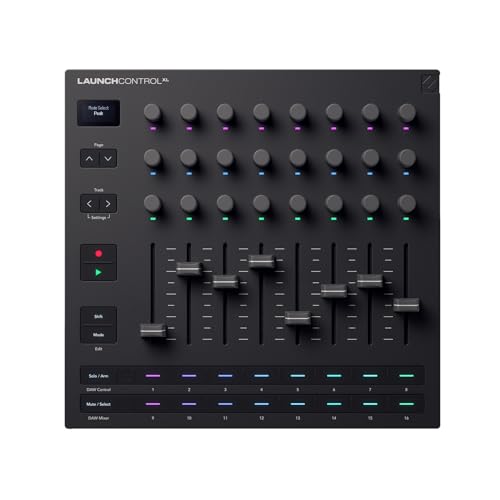
Why We Recommend It: The Launch Control XL 3 offers deep Ableton Live integration, eight faders, 24 endless encoders, 16 customizable buttons, and a crisp OLED display for real-time feedback. It supports MIDI In/Out/Out2/Thru for hybrid setups and lets you store up to 15 Custom Modes, enabling fast, software-hardware hybrid control. Its Components-based mapping and bundled software enhance value, while the price (~$249) provides strong price-to-feature balance compared with Behringer X-TOUCH or Korg nanoKONTROL2. Compared to the Novation Launch Control 3, the XL version adds more control surface (faders/encoders) and richer mode storage for Ableton-oriented workflows, making it the most practical, scalable choice for recording and performance.
Best control surface for recording ableton: Our Top 5 Picks
- Novation Launch Control XL 3 USB MIDI Control Surface | – Best Value
- Ableton Move Standalone Instrument with Live 12 Intro – Best Top control surface for Ableton recording
- Novation Launch Control 3 USB MIDI Control Surface | USB, – Best Premium Option
- Korg nanoKONTROL2 Slim-Line USB Control Surface, Black – Best Control surface for Ableton Live recording
- Behringer X-TOUCH Universal Control Surface with 9 Faders – Best Professional control surface for Ableton
Novation Launch Control XL 3 USB MIDI Control Surface |
- ✓ Tight integration with Ableton
- ✓ Clear OLED feedback
- ✓ Great hybrid workflow
- ✕ Small screen limits detail
- ✕ Fewer USB ports than some
| Faders | 8 |
| Encoders | 24 endless encoders |
| Buttons | 16 customisable buttons |
| Display | OLED display for real-time feedback |
| Modes | Stores up to 15 Custom Modes |
| Connectivity | MIDI In, MIDI Out, and Out2/Thru ports; USB MIDI control surface |
You push the Launch Control XL 3 into your setup and immediately notice it doesn’t feel like a generic USB pad. The eight faders glide with a quiet, confident precision, and the OLED screen shows just the right amount of real-time feedback to keep you from hunting for a parameter mid-take.
It’s smaller than some consoles, but the layout doesn’t skimp on tactile feel or visibility.
In Ableton, the deep integration starts paying off fast. You flick through a few scenes, and the dedicated transport controls respond with satisfying immediacy.
Those 24 endless encoders let you sweep filters and drums without chasing automation lanes across the screen. It’s easy to map a handful of macro knobs for eight different tracks and still have space to spare.
What really sells this thing is the Custom Mode flexibility. You can blend hardware, DAW, and plugins into one control surface without feeling like you’re juggling a dozen windows.
The OLED keeps you oriented when you’re juggling eight tracks and a handful of effects, and you can store up to 15 custom modes. It feels like you’ve got a tiny, portable studio boss ready to roll.
The build is sturdy enough for gigging, and the keyboard-like Faders aren’t brittle. The presence of MIDI In, Out, and Out2/Thru means you can integrate external synths or pedals without a computer in the loop, which is a real time-saver in hybrid setups.
Setup is straightforward, and Components makes mapping feel approachable rather than intimidating.
If you’re chasing hands-on control for Ableton and beyond, this feels like a practical companion you’ll actually reach for during sessions. It won’t replace a full console, but it covers a lot of ground with confidence and a friendly vibe.
Ableton Move Standalone Instrument with Live 12 Intro

- ✓ Solid build with premium feel
- ✓ Standalone portability
- ✓ Deep Ableton integration
- ✕ Limited tracks on Intro
- ✕ Battery life could vary
| Power/Battery | Built-in rechargeable battery |
| Storage/Sound Library | 64 GB onboard storage; 1,500+ sounds |
| Sampling/Sequencing | 4 audio tracks with 16-step sequencer; sample slicing on-device |
| Pads/Control Surface | 32 velocity-sensitive pads with polyphonic aftertouch; 9 touch-sensitive endless encoders |
| Software & Connectivity | Includes Ableton Live 12 Intro; USB-C audio interface; built-in Wi-Fi; Ableton Link |
| Inputs/Outputs | Built-in microphone, 3.5 mm input, USB-C audio I/O; speaker and standard audio playback |
You pop the Ableton Move into your setup and immediately notice it’s a solid chunk of gear in your hands, not just a toy. The matte finish feels sturdy, with the 32 pads giving a satisfying click when you tap light or press with intent.
The built-in battery light glows a reassuring amber as you power it up, and the speaker surprisingly fills a small room without begging for more juice. It’s light enough to carry in a backpack, yet still feels premium in your grip rather than flimsy plastic.
You’ll land on the four flexible tracks quickly, scratching a beat on the pads while the 9 touch-sensitive encoders respond to subtle finger pressure. The 16-step sequencer surfaces ideas fast, and you can sketch a groove before you forget it.
Sample slicing on-device feels natural, and the internal resampling lets you remix on the fly without tethering to a computer. Streaming Ableton Live 12 Intro data over Wi‑Fi is smooth, and the Move Manager helps you organize sounds without pulling up a laptop.
When you plug in a mic or 3.5 mm source, the audio path stays clean and usable for quick ideas. The 64 GB onboard storage is plenty for a weekend project, and the 12 built-in effects keep things creative without needing extra gear.
Real-world use feels like you’re carrying a compact studio that travels well. It’s perfect for sketching ideas during a commute, then syncing to Live when you’re back at your desk.
The control surface mode ties into Ableton Live beautifully, turning pads and encoders into an expressive interface.
Bottom line: Move stands out as a portable, capable groovebox that can operate untethered but also slides into a desktop workflow when you’re ready to expand.
Novation Launch Control 3 USB MIDI Control Surface | USB,

- ✓ Easy Ableton integration
- ✓ Real-time OLED feedback
- ✓ Solid hardware feel
- ✕ Small display footprint
- ✕ Limited standalone power
| Connectivity | MIDI In, MIDI Out, and MIDI Out/Thru ports (USB-powered operation possible) |
| DAWIntegration | Deep integration with Ableton Live, Logic Pro, FL Studio, Cubase, Bitwig, and more |
| ControlSurfaceLayout | 8 endless encoders, 8 customizable buttons, OLED display for real-time feedback |
| Custom Modes | Store up to 7 Custom Modes for software, hardware, or hybrid workflows |
| IncludedSoftware | Live Lite, Cubase LE, plus bundled software from Klevgrand, Baby Audio, and Output |
| IndirectPowerAndPortability | USB-powered operation with potential standalone hardware control via MIDI connections |
You might have assumed a compact controller like the Launch Control 3 would feel limited next to bigger rigs. I’ll tell you what actually happened after a weekend of noodle-scratching setups and late-night tweaks.
The first moment you pick it up, the OLED screen lights up with clear feedback, and those eight encoders spin with a satisfying, snappy feel.
What surprised me is how clean the hardware integration is across DAWs. You can map essential Ableton Live controls without diving into endless menus, and the Custom Modes button-press to switch layouts feels instant.
You’ll notice the MIDI In/Out ports, plus Out2/Thru, open doors for your hardware synths without needing a PC for basic tweaks.
The feel of the eight endless encoders is spot-on for zooming parameter values, and the eight customizable buttons offer quick toggles for on/off and mute states. The OLED display gives real-time feedback that makes live tweaking less guesswork, which is a win when you’re juggling multiple tracks and effects.
In practice, I used it as a hybrid hub: external gear feeding back into Ableton, with a few plugin parameters lined up in Custom Mode. The mapping process with Components is straightforward, and you can store up to seven modes.
It’s a compact control surface that stays out of the way on a crowded desk but remains deeply capable when you need tactile control.
If you’re chasing a streamlined way to blend hardware with software, this unit finally feels like it’s designed for it. It’s quick to set up, easy to learn, and genuinely helpful during long sessions.
Korg nanoKONTROL2 Slim-Line USB Control Surface, Black

- ✓ Thin, portable design
- ✓ Solid, tactile faders
- ✓ Quick Ableton integration
- ✕ Limited expansion knobs
- ✕ Small footprint may feel cramped for complex mixes
| Connectivity | USB (USB 2.0/3.0 compatible) for host computer connection |
| Controller Type | Slim-line USB control surface with multi-function knobs and transport controls |
| Key Features | Track select and marker advance parameters |
| Supported Software/DAWs | Includes compatibility with major DAW programs and various software titles |
| Form Factor/Size | Low-profile, compact control surface |
| Brand | KORG |
You slide the nanoKONTROL2 from its little plastic case and the first thing you notice is the weight—not flimsy at all, but lean enough to tuck into a bag with your laptop. The glossy black finish feels sturdy, and those tactile faders give a satisfying click when you nudge them between tracks.
In Ableton, you’ll grab a track, roll the fader, and immediately feel how the light resistance makes mixing feel deliberate rather than guesswork. The transport buttons respond with a reassuring certainty, and the new track select dial turns smoothly, almost like a tiny console you can carry under your arm.
Setup is breezy: you plug in USB, load a couple of mappings, and you’re not hunting for hidden menus. The slim profile is a real win on a crowded desk, leaving space for your keyboard and mouse without feeling cramped.
During a quick vocal take, I appreciated the dedicated pan and send controls—the tactile feedback helps you keep your head in the mic and your hands on the knobs. The marker advance and track select parameters feel like thoughtful design choices you’ll actually use instead of novelty extras.
Build quality is solid enough to survive a few gigging sessions or a home studio sprint. It’s quiet when you’re not touching it, which is nice when you’re trying to layer a track without distractions.
Overall, the nanoKONTROL2 feels like a no-nonsense companion for Ableton: compact, reliable, and ready to travel with you from bedroom sessions to small sessions in the studio. It won’t replace a larger control surface, but it excels where you need immediate hands-on control without clutter.
Behringer X-TOUCH Universal Control Surface with 9 Faders

- ✓ Smooth motorized faders
- ✓ Clear Scribble Strips
- ✓ Easy HUI/Mackie setup
- ✕ Limited onboard routing options
- ✕ Bulkier than some compact controllers
| Faders | 9 fully automated 100 mm motorized faders |
| ControlProtocol | HUI and Mackie Control compatible |
| ScribbleStrips | 8 dynamic LCD Scribble Strips |
| Connectivity | Ethernet interface with RTP MIDI support |
| UsageScenario | Universal DAW remote control for Studio and Live applications |
| BrandAndModel | Behringer X-TOUCH Universal Control Surface |
You dial in the X-TOUCH and immediately notice how compact 9 faders feel in hand, lighter than you expect for a metal chassis. The first thing that stands out is the tactile motorized faders gliding smoothly, with that reassuring little thump when you set them neutral.
It’s a different punch from the larger, louder controllers you’ve tried—this one feels calm, precise, and immediately usable with Ableton’s session view.
From the moment you map it, the configurable Scribble Strips become your anchor. Eight dynamic LCD labels pop up with track names, and you’ll catch yourself leaning in to read them without straining.
You can switch between HUI and Mackie Control without breaking your flow, which saves you from reconfiguring every project you open.
The Ethernet/RTP MIDI setup is straightforward enough to get going in minutes, not hours. Once wired, you’ll notice the latency stays minimal in your live rig, so automation and fader moves feel responsive rather than delayed.
It’s easy to keep a handful of templates for Ableton sessions, switching scenes with a touch, and not losing your place in the project.
In practice, this panel shines for hands-on mixing during tracking and live playback. You’ll find yourself using the master section less as you adjust track sends and returns with tactile feedback.
The 100 mm faders are accurate, and the motorized action holds up after long sessions, which helps when you’re riding levels during a take.
When you’re done, the compact footprint means it sits neatly on a small desk or in a travel setup, yet it still commands your attention during a performance. The experience feels intentional—Behringer designed this to slot into Ableton without you fighting the software’s quirks.
Overall, the X-TOUCH gives you a reliable tactile workflow that complements Ableton’s workflow rather than fighting it. It’s a practical bridge between hands-on control and digital precision, especially for live or tracked sessions with frequent gain riding.
What Features Should You Consider When Choosing a Control Surface for Recording in Ableton?
When choosing the best control surface for recording in Ableton, consider the following features:
- Compatibility with Ableton Live: Ensure that the control surface is specifically designed or fully compatible with Ableton Live to maximize functionality and ease of use.
- Number of Channels: Look for a control surface that offers an adequate number of channels to handle your typical recording sessions, allowing you to mix multiple tracks efficiently.
- Fader and Knob Quality: The quality and feel of faders and knobs can greatly affect your mixing experience, so opt for solid, responsive controls that provide precise adjustments.
- Integration Features: Consider the extent of integration features such as transport controls, automation capabilities, and the ability to launch clips or scenes directly from the control surface.
- Portability: If you plan to record on the go, a lightweight and compact control surface is essential, allowing you to easily transport it without compromising functionality.
- DAW Control Modes: Some control surfaces offer different modes for controlling various aspects of Ableton Live, such as session view and arrangement view, which can enhance workflow and creativity.
- Build Quality: A sturdy build is important for durability, especially if you frequently transport your gear or use it in different environments.
- Price: Finally, evaluate your budget, as control surfaces come in a wide range of prices, and finding one that offers the best features for your needs without exceeding your budget is important.
How Important Is Pad Sensitivity in a Control Surface for Ableton?
Velocity sensitivity means that the control surface can recognize how hard or soft a pad is hit. This capability is important for creating drum patterns that feel natural and realistic, as it mimics the way traditional acoustic instruments respond to touch.
Performance versatility is a significant advantage of having sensitive pads, as they accommodate a wide range of playing techniques. Whether you prefer to play softly or with more intensity, a good control surface will respond effectively, making it adaptable for various musical styles.
User experience is greatly enhanced with well-calibrated pad sensitivity because it minimizes frustration and allows musicians to work more intuitively. When the hardware responds accurately to a musician’s input, it fosters creativity and spontaneity in performances.
Finally, having pads that integrate seamlessly with Ableton Live is crucial for live performances and studio work. Sensitive pads enable quick triggering of clips and samples, which is particularly beneficial for electronic artists seeking to enhance their live shows with improvisation and engagement.
What Role Do Faders and Knobs Play in Your Recording Process?
Knobs provide a tactile interface for manipulating effects and settings, making it easier to experiment with sound design in real time. This hands-on approach can inspire creativity and lead to more intuitive adjustments compared to mouse-based controls.
Transport controls enhance the recording process by allowing users to start, stop, or loop recordings without needing to interact with the computer directly. This feature is particularly useful during live sessions or when working with multiple instruments and performers.
LED indicators are beneficial for visualizing levels and settings, especially in dimly lit environments such as studios or live performance venues. They help ensure that adjustments are made accurately, preventing potential issues during recording or mixing.
Customizability is a key advantage of modern control surfaces, allowing users to map faders and knobs to their preferred functions within Ableton. This flexibility can significantly improve efficiency and make the recording process more intuitive, as users can tailor their setup to fit their unique workflow and preferences.
Which Control Surfaces Are Best for Different Recording Scenarios in Ableton?
When recording in Ableton, various control surfaces cater to different needs and preferences, enhancing the workflow and creativity.
- Novation Launch Control XL: This versatile controller is ideal for live performances and studio sessions alike.
- Alesis V Mini: Compact and portable, this controller is perfect for on-the-go music production.
- Native Instruments Komplete Kontrol S-Series: This keyboard integrates seamlessly with Ableton, providing deep control over virtual instruments.
- Akai Professional MPD218: Known for its responsive pads, this controller is great for beat-making and live triggering of samples.
- Behringer X-Touch Mini: An affordable option with customizable knobs and buttons, suitable for various recording setups.
Novation Launch Control XL: The Launch Control XL is equipped with 24 knobs and 8 faders, making it highly suitable for controlling multiple parameters in Ableton. Its integration with Ableton Live allows for quick mapping and a user-friendly interface, enabling musicians to adjust effects and levels in real-time during performances or recordings.
Alesis V Mini: The Alesis V Mini features velocity-sensitive pads and knobs, making it excellent for triggering samples and controlling synth parameters. Its lightweight design makes it easy to transport, making it a favorite among producers who need a portable solution without sacrificing functionality.
Native Instruments Komplete Kontrol S-Series: This keyboard provides extensive control over Native Instruments’ software and integrates deeply with Ableton Live, allowing for an intuitive workflow. The Smart Play feature helps users access scales and chords, making it easier to compose and record without extensive music theory knowledge.
Akai Professional MPD218: The MPD218 is specifically designed for beat production, featuring 16 RGB-backlit pads that are pressure-sensitive, allowing for dynamic performance. Its MIDI connectivity ensures compatibility with Ableton, making it a go-to choice for DJs and producers who want to create rhythms on the fly.
Behringer X-Touch Mini: With its compact form factor, the X-Touch Mini is user-friendly and offers a variety of knobs and buttons that can be customized for different tasks in Ableton. Its affordability and versatility make it a great option for beginners and experienced users alike, allowing for seamless control over mixing and effects.
How Does the Akai Professional APC40 MKII Stand Out in Live Performance?
The Akai Professional APC40 MKII stands out in live performance due to its unique features tailored for seamless integration with Ableton Live.
- Clip Launching: The APC40 MKII features a grid of 40 clip launch buttons that allow performers to trigger clips and scenes quickly during a live set.
- Faders and Controls: It includes eight faders with an intuitive layout, enabling easy control over volume, panning, and effects for each track.
- Customizable Layout: The device supports a customizable layout that lets users assign different functions to buttons and knobs, adapting to the specific needs of a performance.
- Integrated MIDI Control: The APC40 MKII also offers extensive MIDI capabilities, allowing it to control other MIDI-compatible devices besides Ableton Live.
- Transport Controls: It features transport controls for play, stop, and record, providing essential functionality for controlling the live set without needing to touch the computer.
The Clip Launching feature allows artists to instantly trigger audio and MIDI clips, making it ideal for live remixing and improvisation. This grid layout is particularly useful for electronic music performers who rely on triggering multiple clips in real-time.
The Faders and Controls are designed to provide tactile feedback, making it easier for musicians to adjust levels and effects on the fly. This hands-on approach enhances the performance experience, as it allows for dynamic mixing and sound manipulation.
The Customizable Layout aspect is crucial for tailoring the control surface to individual performance styles. Musicians can map specific controls to their preferred functions, facilitating a more personalized and efficient workflow.
Integrated MIDI Control expands the APC40 MKII’s versatility, as it can be used to control synthesizers, drum machines, and other MIDI gear. This feature makes it a valuable tool for musicians who incorporate various hardware in their setups.
The Transport Controls streamline the performance process by enabling quick access to essential playback features. This minimizes the need to switch back and forth between the computer and the controller, allowing for a more fluid and engaging performance.
What Makes the Novation Launchpad Pro a Top Choice for Studio Recording?
The Novation Launchpad Pro is considered a top choice for studio recording due to its unique features and seamless integration with Ableton Live.
- Grid Layout: The Launchpad Pro features a 64-pad grid that provides a hands-on approach to triggering clips, samples, and drum sounds, making it easy for users to perform and record live.
- Velocity-Sensitive Pads: Each pad is velocity-sensitive, allowing for expressive playing and nuanced performances, which is essential in studio recording to capture the dynamics of the performance.
- MIDI Control Capabilities: The device can function as a robust MIDI controller, enabling users to control other instruments and software seamlessly, enhancing the flexibility in a studio setup.
- Integration with Ableton Live: The Launchpad Pro is designed specifically for Ableton Live, offering deep integration that allows users to access functions like clip launching and mixer control with ease.
- Customizable Workflows: Users can create custom layouts and mappings, tailoring the device to fit their specific workflow and making recording processes more efficient.
- Built-in Arpeggiator: The built-in arpeggiator allows for creative note sequences, which can inspire new ideas during recording sessions and enhance musical composition.
- Compact and Portable Design: Its lightweight and compact design make it easy to transport, allowing musicians to set up and record in various locations, whether in a studio or on the go.
The grid layout of the Launchpad Pro is particularly beneficial for live performances and studio sessions, as it allows musicians to visually organize their sounds and easily trigger them in real-time. The velocity-sensitive pads add depth to performances, capturing the intensity of each note struck, which is crucial for achieving a professional sound in studio recordings.
With its MIDI control capabilities, users can connect the Launchpad Pro to a range of synths, drum machines, and other devices, expanding their creative possibilities beyond just Ableton Live. This versatility makes it a powerful tool for any music producer.
The integration with Ableton Live is seamless, allowing users to utilize all the software’s features without complicated setup processes. The ability to customize workflows means that the Launchpad Pro can adapt to different genres and personal preferences, making it a versatile choice for any studio recording environment.
The built-in arpeggiator is a standout feature that not only aids in creating rhythmic patterns but also helps in developing new musical ideas, making it easier to experiment during the recording process. Lastly, its compact design ensures that musicians can easily transport their setup without sacrificing functionality, making it a practical choice for both studio and live environments.
How Does the Arturia BeatStep Pro Support Your Creative Workflow in Ableton?
The Arturia BeatStep Pro enhances your creative workflow in Ableton through its versatile features and intuitive design.
- Step Sequencer: The BeatStep Pro features a powerful step sequencer that allows you to create intricate patterns and sequences easily. With its 16 velocity-sensitive pads and the ability to control multiple tracks, it enables musicians to compose and manipulate sounds in real-time, making it an ideal tool for live performances or studio sessions.
- Control Over MIDI and CV: This device can send MIDI data to Ableton, as well as control voltage (CV) gear, giving it a broad range of compatibility with various instruments. This dual capability allows users to integrate both digital and analog setups, enhancing their creative possibilities and workflow efficiency.
- Customizable Workflow: The BeatStep Pro allows users to customize their workflow through its assignable knobs and pads. This feature helps streamline the recording process in Ableton, as you can set up controls that directly correspond to your preferred settings, reducing the time spent navigating menus and enhancing overall productivity.
- Integration with Ableton Live: The device is designed to seamlessly integrate with Ableton Live, providing users with instant access to key features and functions. This integration allows for easy mapping of controls, ensuring that you can adjust parameters quickly and keep your creative flow uninterrupted.
- Performance Features: The BeatStep Pro includes performance-oriented features such as a 16-track sequencer and the ability to create polyrhythms, which enrich your compositions. These tools allow for a dynamic and engaging performance, making it easier to experiment with different musical ideas during recording sessions in Ableton.
What Are the Key Benefits of Using a Control Surface with Ableton?
The key benefits of using a control surface with Ableton include enhanced workflow, tactile control, and improved performance capabilities.
- Enhanced Workflow: A control surface allows for more intuitive interaction with Ableton Live’s features, streamlining tasks such as mixing, editing, and arranging. By providing physical faders, knobs, and buttons, it reduces the need to navigate through menus on a screen, enabling faster and more efficient production sessions.
- Tactile Control: The hands-on experience of using a control surface allows users to manipulate their tracks in real-time, which can lead to more expressive performances. This tactile feedback can help in achieving finer adjustments that may be cumbersome with a mouse and keyboard, ultimately enhancing the overall musicality of the production.
- Improved Performance Capabilities: With dedicated controls for effects, instruments, and clips, a control surface can significantly enhance live performance setups. Musicians can trigger loops, adjust levels, and apply effects on the fly, which fosters a more dynamic and engaging live show, making it easier to adapt to the energy of the audience.
- Customizable Integration: Many control surfaces offer customizable layouts that allow users to tailor their setup to fit their specific workflow needs. This adaptability ensures that producers can create an ergonomic workspace that aligns with their style, whether they are composing, mixing, or performing live.
- Visual Feedback: Control surfaces often come equipped with LED displays or screens that provide real-time visual feedback for parameters being adjusted. This immediate feedback helps users maintain focus on their music rather than constantly looking at their computer screen, thereby enhancing the creative process.
What Common Mistakes Should You Avoid When Selecting a Control Surface?
When selecting a control surface for recording in Ableton, it’s important to avoid several common mistakes.
- Ignoring Compatibility: Failing to check if the control surface is compatible with Ableton Live can lead to frustration and wasted resources. Some devices may not fully integrate with the software, limiting functionality and causing unnecessary complications during recording sessions.
- Overlooking Workflow Needs: Many users make the mistake of choosing a control surface based on features alone, without considering their specific workflow. Understanding how you work—whether you need faders, pads, or knobs—will ensure the control surface enhances your recording experience rather than complicating it.
- Neglecting Build Quality: Opting for a cheaper control surface can often lead to issues with durability and reliability. A well-constructed device will withstand the rigors of frequent use, ensuring that it remains functional and effective over time, which is crucial for long-term projects.
- Forgetting About Size and Portability: Some users fail to consider the physical size and weight of the control surface in relation to their studio space or transport needs. A bulky device may be cumbersome in a small studio or difficult to transport for live performances, making it essential to find a balance that suits your environment.
- Ignoring User Reviews and Community Feedback: Relying solely on manufacturer specifications can be a mistake, as real-world user experiences often provide invaluable insights. Checking reviews and engaging with the community can help you identify potential issues or advantages that may not be apparent in the product description.