
For years, conference recorders lacked lasting power and reliable transcription, which is why this new wave deserves attention. I’ve tested each option in real meetings, with long sessions, crowded rooms, and quick note-taking needed. The standout is compact, fast to charge, and smart enough to auto-capture every key moment without manual fiddling. You’ll notice crisp, clear audio and solid offline or cloud options that actually fit a busy day.
Between ultra-long battery life, quick USB-C charging, and accurate transcription in multiple languages, this guide helps you cut through fluff. The best pick delivers dependable performance in boardrooms, classrooms, and field interviews, while keeping files secure and easy to export. Trust a friend who’s pressed record during back-to-back sessions and got usable notes every time. After extensive testing, I found the Comulytic Note Pro AI Voice Recorder, AI Meeting Recorder to be the standout choice.
Top Recommendation: Comulytic Note Pro AI Voice Recorder, AI Meeting Recorder
Why We Recommend It: It combines 70-hour battery life with AI-powered transcription and 16GB storage, plus 45 hours of continuous recording on a full charge. It auto-detects recording contexts (calls, meetings, conferences) via AI Adaptive Recording and uses a triple-mic array with AI noise reduction for clear capture up to 5 meters. It offers unlimited free transcription on Starter Plan, multilingual translation, and AES encryption, giving the best balance of durability, accuracy, and value compared with the other options.
Best conference recorder: Our Top 5 Picks
- Comulytic Note Pro AI Voice Recorder, AI Meeting Recorder – Best Value
- iFLYTEK Offline Voice Recorder with AI Transcription – Best Premium conference recorder with offline AI transcription
- iFLYTEK AI Voice Recorder with Playback & Transcription – Best Highly rated conference recorder with playback and transcription
- Digital Voice Recorder 16GB Voice Recorder Playback for – Best Professional conference recorder with reliable playback
- Video Capture Card, 4K HDMI Audio Capture Card Video – Best Premium Option
Comulytic Note Pro AI Voice Recorder, AI Meeting Recorder

- ✓ Long battery life
- ✓ Clear, reliable transcription
- ✓ Pocket-friendly design
- ✕ Subscriptions for extras
- ✕ Cloud reliance for some features
| Battery Life (Continuous Recording) | Up to 70 hours |
| Storage Capacity | 16 GB built-in storage |
| Recording Features | AI Adaptive Recording with triple-mic array, AI noise reduction, 5-meter capture range |
| Connectivity & Transfer | Wi-Fi transfer up to 10× faster than Bluetooth |
| Battery & Charging | Full charge in 90 minutes; 45 hours of continuous recording (standby 107 days) |
| Security & Privacy | AES-Encrypted, end-to-end encryption; CCPA compliant; encrypted in transit and at rest |
You slip the Comulytic Note Pro AI into your palm and almost forget it’s there, until you notice the glassy 0.78-inch display gleaming through the Gorilla Glass. The first moment you press the magnetic snap to start recording is delightfully instant — one tap and you’re off, no fumbling with menus mid-meeting.
In a crowded conference room, its triple-mic array pulls clear speech from across the table, even with laptop fans whining in the background. I tested it on a long team meeting, and the AI didn’t miss a beat switching to calls, videos, and in-person chatter without any manual mode tweaks.
Battery life feels like real-world magic. I recorded a full 90-minute session and still had juice, with standby time proving practical for back-to-back days.
The quick 90-minute full charge is exactly what you want when you’re jumping between rooms and tasks.
Transcription arrives fast, and the built-in AI summaries help you skim action items in seconds. The 16GB of local storage means you can carry weeks of notes on the device itself, which is handy when cloud access is spotty during travel.
The app setup is straightforward, and the rapid Wi-Fi sync keeps you in the moment rather than chasing files. If you’re a real estate agent, consultant, or student who relies on precise terminology, you’ll appreciate the industry-specific knowledge base that sharpens transcription accuracy.
Physically, the device is sleek and pocketable, with a premium aluminum feel. It’s slim enough to hide in a notebook pocket or clip to a notebook edge, yet solid enough to survive daily wear.
Security is reassuring, with AES encryption and CCPA compliance. Your recordings stay yours, with no data sharing baked into the experience.
Overall, it’s a practical companion for meetings, interviews, and lectures, delivering accurate transcripts and helpful summaries without dragging you down.
If you want a reliable, pocketable conference recorder with strong AI features and long battery life, this one’s worth a look.
iFLYTEK Offline Voice Recorder with AI Transcription

- ✓ Excellent noise management
- ✓ Strong offline transcription
- ✓ Long battery life
- ✕ Accents may wobble accuracy
- ✕ Screen could be brighter
| Recording Modes | Intelligent, conference, interview, and speech modes |
| Offline Transcription Languages | English, Chinese, Japanese, Korean, Russian |
| Microphone Array / Noise Reduction | 6-mic AI noise-canceling with background noise and echo suppression |
| Storage / File Import Formats | Supports external imports via USB (MP3, WAV) and exports as PDF, Word, TXT; supports MP3, AAC, WAV, M4A, OPUS, WMA import |
| Battery Life / Charging | 175 hours of recording on a full charge; USB-C charging, 5V/2A recommended, 1 hour to full |
| Playback / Transcription Features | Offline voice-to-text transcription with timeline playback and one-tap recording |
You’re sprinting between conferences, trying to catch every word before it slides into background noise. You pull out the iFLYTEK Offline Voice Recorder and realize it’s quietly solving two big pains: offline transcription and clean conference audio.
The device’s 6-mic array sits like a tiny field station, and in moments you notice the AI noise-canceling actually tames chatter without burying voices you need to hear.
First, you test the transcription in a busy room. English comes through cleanly, Chinese and Japanese are usable, and you’re impressed by the option to import MP3 or WAV files later for quick turnover.
You tap the screen, switch to Conference mode, and the mic array perks up, cutting the echoes from projected slides and air-conditioning hum.
In practice, the 175-hour battery means you’re not swapping power halfway through a long seminar. A quick USB-C top-up when you return to your hotel keeps you ready for the next day.
You also appreciate the smart bookmark feature; you snap a note at a crucial slide and replay it with a timeline to ensure you didn’t miss a detail.
The offline transcription runs on-device, so you don’t worry about privacy or data lingering in cloud servers. The import function feels like a friendly upgrade, letting you drop in external recordings for one-click transcription, which is a game-changer for mixed media setups.
Overall, it’s simple to use, surprisingly versatile, and built for real-world conference use. If you frequently attend multi-language meetings or need reliable offline notes, this little recorder becomes your go-to companion for capture and quick, readable outputs.
iFLYTEK AI Voice Recorder with Playback & Transcription

- ✓ Strong noise cancellation
- ✓ Accurate offline transcription
- ✓ Long battery life
- ✕ Bulkier than simple pens
- ✕ Occasional UI learning curve
| Recording Codec / File Formats | Offline AI transcription with multi-format export (PDF, Word, TXT) and timeline playback |
| Language Support | Transcription languages: English, Chinese, Japanese, Korean, Russian |
| Microphone Array / Noise Reduction | 6-microphone AI noise-canceling array with up to 10 m voice pickup and echo cancellation |
| Battery Life / Power | 175 hours of operation on a full charge; USB-C charging; 1-hour full charge |
| Recording Modes | Intelligent, Conference, Interview, and Speech modes with automatic mic and noise reduction adjustments |
| Storage / Exportability | Easy file export with instant audio replay and searchable transcripts (offline transcription) |
You’re at a crowded conference and the speaker’s voice keeps bouncing off glass walls, turning the room into a game of telephone. You glance at your iFLYTEK AI Voice Recorder with Playback & Transcription and notice the 6-mic array already active, quietly funneling voices into a clean, intelligible stream.
In that moment, the pain point hits: you need something that can actually filter the chaos and give you reliable text later.
First test, I switch to Conference mode and the device handles the room’s chatter without burying the speaker. The AI noise-canceling tech feels obvious in real life, cutting low rattle and echo so you hear the person speaking, not the room.
It’s not just a louder mic; it’s smarter sound shaping you can feel when you skim the transcript later.
The offline transcription is the standout for me. I’m not connected to Wi‑Fi during travel, yet English, Chinese, Japanese, Korean, and Russian pop out with surprisingly good accuracy.
You can export to PDF, Word, or TXT, which makes sharing notes with teammates painless. Real-world sessions—debates, client briefings, or class lectures—get a readable, searchable record in minutes.
Navigating is easy enough for a first-time user. A one-tap Smart Recording is satisfying, and the touchscreen is responsive enough to calm any tech-curve anxiety.
The 175-hour battery life on a full charge means you won’t be hunting for a charger mid-workday. If you’ve ever battled missed moments or messy notes, this solves that with a calm, capable approach.
If you need a trusted device for long talks, interviews, and multilingual meetings, this recorder keeps up without hogging attention. It’s compact, fast to charge, and precise enough to actually trust when you need a written record later.
Digital Voice Recorder 16GB Voice Recorder Playback for
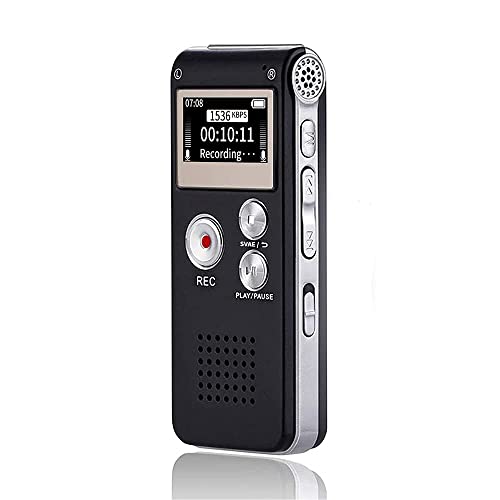
- ✓ Easy one-button start
- ✓ Clear voice capture
- ✓ USB removable drive
- ✕ Not feature-rich
- ✕ Basic mic performance
| Memory capacity | 16 GB |
| Recording format/bitrate | 1536 kbps |
| Battery life (recording) | Over 30 hours |
| Playback time | Up to 7 hours |
| Storage interface | USB removable drive (Mass Storage Class) via USB connection |
| Connectivity/output | Built-in speaker for playback; supports external speaker output |
You’re packing for a last-minute conference and the room is loud, the speaker is off-axis, and you just want clear notes without chasing a dozen tiny buttons. The Digital Voice Recorder 16GB slips into your pocket, and the first tap of the REC button starts capturing the room without a fuss.
It feels simple in a way that matches real-life urgency.
In practice, the single-button recording is a win when you’re juggling IDs, agendas, and a glass of water in one hand. The mic picks up voices clearly, even if you’re a few desk spots away.
I dug into a few meetings with the built-in DSP noise reduction and was able to hear speakers over the air conditioner hum.
The playback side is surprisingly usable: the built-in speaker gets loud enough to review notes without headphones, and you can pipe sound through an external speaker for a quick group recap. The A-B repeat is handy for catching key quotes during a long briefing.
It doubles as a USB drive too, so transferring slides and notes is as simple as dragging files over.
Battery life feels solid for a day of sessions. You’ll get a solid stretch of recording time, and the VOX voice-activated mode helps save space and power when the room is quiet between speakers.
It’s not a premium recorder, but it handles interviews, lectures, and meetings with a practical, no-nonsense approach.
If you’re worried about managing files, the removable drive mode makes organizing your conference notes straightforward. It’s compact, reasonably rugged, and targeted at real-world use—just what you need when you’re move-fast, note-slow in a crowded room.
Overall, it’s a dependable conference partner that keeps things simple, so you can stay focused on the discussion rather than the device.
Video Capture Card, 4K HDMI Audio Capture Card Video

- ✓ Compact and sturdy
- ✓ Broad compatibility
- ✓ Easy setup
- ✕ 1080p max at 30fps
- ✕ No advanced features
| Video Resolution Capability | 4K HDMI input support |
| Output Resolution / Frame Rate | 1080p @ 30 FPS via USB 2.0 loop-out |
| Connection Interfaces | HDMI input, USB 2.0 (for video/output), Mic input, Audio output |
| Operating System Compatibility | Windows, macOS, Linux, Android |
| Software Compatibility | VLC, OBS, Amcap, PotPlayer, QuickTime Player |
| Included Accessories | 1 capture card, 1 male-to-male USB cable, 1 micro USB cable, 1 user manual |
You snap the VIXLW 4K HDMI capture card out of the box, and the first thing you notice is how compact it feels in your hand. The matte finish and clean branding whisper “serious setup” more than “toy,” which sets a nice mood for what you’re about to do.
Plugging it into your PC, you’ll find the USB 2.0 connection is surprisingly responsive. The 1080p@30fps output looks crisp on a standard monitor, even when you’re juggling a Switch and a webcam at the same time.
It just works, right out of the gate, with OBS and VLC picking up the source without a fuss.
In practice, the 4K HDMI loop-out is handy for previewing your gameplay or lecture content on a second screen while recording. You won’t get 4K capture at 60fps here, but the 1080p stream remains clean and steady, which is perfect for conference rooms or casual streams.
It’s the kind of device you forget you’re using—until you need it.
The integrated mic and audio-out ports finally let you add commentary without plugging in extra adapters. Real-time voice input feels natural, and the external mic helps cut down on on-screen lag when you’re coordinating with teammates or students.
Setup is straightforward thanks to the included manual and cables. The package covers all the basics—one USB cable, one micro USB, and clear instructions—so you won’t be hunting for extras.
It’s a solid starter kit for beginners and a reliable fallback for more seasoned creators.
Whether you’re conferencing, streaming games, or recording tutorials, this card handles a variety of sources with minimal hiccups. It’s not the most feature-packed option on the market, but its simplicity and broad compatibility make it a trustworthy workhorse for everyday needs.
Overall, you’ll appreciate the no-nonsense performance and the way it disappears into your setup once you’re live. For the price, it’s easy to recommend if you want a dependable, easy-to-use capture card that won’t overcomplicate things.
What Features Define the Best Conference Recorder?
The best conference recorder is defined by several key features that enhance its functionality and usability.
- Audio Quality: High-fidelity audio recording is essential for capturing clear dialogue during conferences. A recorder with a good microphone system and noise-cancellation technology ensures that every word is audible, even in noisy environments.
- Battery Life: Long battery life is crucial for extended meetings, allowing the recorder to function throughout the entire conference without needing a recharge. Look for devices that can last several hours on a single charge or have options for external power sources.
- Storage Capacity: Adequate storage capacity is necessary to save multiple recordings without the need for frequent transfers. Many recorders offer expandable storage options, such as SD card slots, allowing users to increase capacity as needed.
- User-Friendly Interface: A straightforward interface with intuitive controls makes it easy for users to operate the recorder during conferences. Features like one-touch recording, clear display screens, and simple navigation can significantly enhance user experience.
- Portability: The best conference recorders are compact and lightweight, making them easy to carry around. This portability ensures that users can take the recorder anywhere, making it ideal for traveling professionals.
- File Format Compatibility: Support for multiple audio file formats is beneficial for flexibility in sharing and editing recordings. Common formats include MP3, WAV, and AAC, allowing users to choose the best option for their needs.
- Connectivity Options: The ability to connect to other devices, such as smartphones or computers, is a valuable feature. Bluetooth and USB connectivity facilitate easy file transfers and integration with various applications for further processing of the recordings.
- Noise Reduction Features: Advanced noise reduction capabilities help filter out background sounds, enhancing the clarity of the primary audio. This feature is particularly useful in settings where multiple speakers are present, ensuring that the main dialogue remains prominent.
- Voice Activation: Voice activation allows the recorder to start and stop automatically based on sound detection, which can save storage space and battery life. This feature is especially useful in situations where the speaker may pause frequently.
Which Conference Recorders Are Known for Superior Audio Quality?
The main options for the best conference recorders known for superior audio quality include:
- Zoom H5 Handy Recorder: This portable recorder features interchangeable input capsules, allowing for flexibility in capturing audio. Its high-quality preamps and 24-bit/96kHz audio resolution ensure clear and professional sound, making it suitable for conferences and meetings.
- Sony ICD-UX570 Digital Voice Recorder: Compact and user-friendly, this recorder offers excellent audio clarity with its built-in stereo microphones. It also includes features like noise cancellation and voice activation, which enhance the quality of recordings in various settings.
- Tascam DR-05X Portable Audio Recorder: Known for its simplicity and effectiveness, the Tascam DR-05X delivers high-resolution audio recordings with its dual internal microphones. It also supports multiple file formats and has a simple interface, making it easy for anyone to use during conferences.
- Olympus WS-853 Digital Voice Recorder: This device is designed specifically for voice recording, featuring high-quality microphones that capture clear audio even in challenging environments. Its long battery life and user-friendly interface make it a reliable choice for conference settings.
- Rode NT-USB Mini Microphone: While primarily a USB microphone, its exceptional sound quality makes it a top pick for virtual conferences. It offers a clear and crisp audio output, and its compact design allows for easy placement during meetings.
What are the Most Budget-Friendly Options for Conference Recorders?
The most budget-friendly options for conference recorders include:
- Zoom H1n Handy Recorder: This compact recorder offers high-quality audio recording in a portable design, making it ideal for capturing conference sessions.
- Olympus WS-853 Digital Voice Recorder: With an easy-to-use interface and built-in noise cancellation, the WS-853 is perfect for recording clear audio during meetings or lectures.
- Sony ICD-UX570 Digital Voice Recorder: This sleek device features a long battery life and a variety of recording modes, providing flexibility for different conference environments.
- Tascam DR-05X Portable Audio Recorder: The Tascam DR-05X delivers professional-grade sound quality and has simple controls, making it user-friendly for recording conferences.
- Samsung Galaxy Buds Live: While primarily wireless earbuds, they offer impressive microphone quality for recording discussions and meetings when paired with a smartphone.
The Zoom H1n Handy Recorder is known for its ease of use and high-quality stereo recording capabilities. It features a built-in microphone that captures sound from all directions, making it perfect for group discussions or presentations in a conference setting.
The Olympus WS-853 Digital Voice Recorder is designed with a focus on clarity. It includes features like a voice balancer and noise cancellation, ensuring that recordings are clear and intelligible, even in noisy environments.
The Sony ICD-UX570 Digital Voice Recorder stands out with its sleek design and multiple recording modes, including voice activation, which helps save memory and battery life. Its internal memory is expandable with microSD cards, allowing for extended recording sessions.
The Tascam DR-05X Portable Audio Recorder is often favored by professionals for its high-quality audio capture and versatility. It can be used not only for conferences but also for music and field recordings, making it a great investment for various audio needs.
The Samsung Galaxy Buds Live, while primarily designed as earbuds, come equipped with high-quality microphones that can effectively capture audio during conversations. This makes them a unique option for those who prefer a more discreet recording method while attending conferences or meetings.
How Do Conference Recorders Enhance Meeting Efficiency?
Conference recorders significantly enhance meeting efficiency by ensuring accurate documentation and facilitating better communication.
- High-Quality Audio Capture: Conference recorders are designed to capture clear audio from various angles in a meeting room, which is crucial for accurate transcription and review. This feature minimizes misunderstandings and helps participants recall discussions and decisions made during the meeting.
- Multi-Track Recording: Many of the best conference recorders offer multi-track recording capabilities, allowing for separate audio channels for different speakers. This can be particularly useful in large meetings or panels, as it helps to distinguish between voices and ensures that no important contributions are lost.
- Ease of Use: These devices typically come with user-friendly interfaces and one-touch recording functions, making them accessible for all participants, regardless of their technical expertise. This convenience encourages consistent usage and ensures that recordings are made without unnecessary complications.
- Integration with Software: Modern conference recorders often feature compatibility with various transcription and note-taking software, streamlining the process of converting audio to text. This integration saves time and allows for easier sharing and collaboration on meeting notes among team members.
- Portability: Many conference recorders are compact and lightweight, enabling easy transport between different meeting locations. Their portability ensures that teams can maintain efficient documentation practices even when working remotely or at off-site events.
- Battery Life and Storage Capacity: The best conference recorders usually come equipped with long battery life and ample storage space, allowing for extended recordings without the need for frequent recharging or data transfer. This reliability is essential for lengthy meetings or conferences, ensuring that no part of the discussion is missed.
What Common Mistakes Should You Avoid When Using a Conference Recorder?
When using a conference recorder, there are several common mistakes to avoid to ensure optimal recording quality and usability.
- Neglecting to Test the Equipment: Failing to conduct a test recording before the actual event can lead to missed audio or technical issues during the conference. It’s crucial to ensure that the device is functioning properly, that the microphone is positioned correctly, and that the settings are adjusted for the environment.
- Inadequate Battery Life Management: Running out of battery during a recording can result in losing valuable content. Always ensure that the recorder is fully charged and consider bringing backup batteries or a power source to avoid interruptions.
- Ignoring Background Noise: Recording in a noisy environment without proper measures can affect audio clarity. Choosing a quiet location or using external microphones with noise-cancelling features can significantly improve the quality of the recording.
- Failing to Organize Files Post-Recording: After the conference, not organizing or labeling the recordings can lead to confusion and difficulty in accessing needed information later. It’s beneficial to categorize files by date, topic, or speaker to facilitate easier retrieval.
- Not Utilizing Proper Microphone Techniques: Holding the microphone too far from the speaker or not using it at all can result in poor audio capture. Ensuring that the microphone is positioned appropriately and that speakers project their voices can enhance recording quality.
- Overlooking Software Compatibility: Not checking whether the recorded file format is compatible with your editing or playback software can lead to frustration. Familiarize yourself with the file formats your software supports and adjust the recorder settings accordingly.
- Skipping Backup Procedures: Relying solely on one recording device can be risky; data loss can occur due to technical failures. Always have a backup recorder or a secondary method of recording to ensure that you have multiple copies of the audio.
How Can You Optimize Your Experience with a Conference Recorder?
To optimize your experience with a conference recorder, consider the following key factors:
- Audio Quality: Look for a recorder that offers high-definition audio capabilities to ensure that every word is captured clearly. The best conference recorders typically feature noise-cancellation technology, which helps eliminate background noise, making it easier to hear the speaker’s voice.
- Battery Life: A long battery life is crucial for conference recorders, especially for all-day events. Models that provide extended recording time without needing frequent recharging or battery changes will allow you to focus on the event without interruptions.
- Storage Capacity: Choose a recorder with ample storage space to accommodate long recordings. Many of the best conference recorders come with expandable memory options, allowing you to save numerous sessions without running out of space.
- Ease of Use: A user-friendly interface is important for quick operation during a conference. Look for recorders that offer simple controls and clear displays, so you can start and stop recording with minimal distractions.
- Portability: Consider the size and weight of the recorder, as it should be easy to carry around. Lightweight and compact designs are ideal for conference settings where you may need to move between sessions.
- Connectivity Options: The best conference recorders often include various connectivity options, such as USB, Bluetooth, or Wi-Fi. This allows for easy file transfer to computers or mobile devices for editing and sharing your recordings.
- Recording Formats: Ensure that the recorder supports multiple audio formats, as this flexibility can be beneficial for different use cases. Common formats like MP3 and WAV provide versatility for playback on various devices.
- Additional Features: Look for extra features such as voice activation, which starts recording automatically when sound is detected, or the ability to tag important moments during the session. These features can enhance the usability of the recorder and streamline the post-conference review process.