
When consulting with tech enthusiasts about their TV recording needs, one requirement always stands out: reliability. I’ve tested several USB drives and external hard drives with these boxs, and I can tell you, not all are equal. The key is a combination of fast data transfer, durability, and compatibility with different devices. From my hands-on experience, I found that the Mediasonic HomeWorx HW135STB ATSC Digital TV Converter Box impressed me with its support for up to 4TB external hard drives, making it perfect for recording lengthy shows without worry.
It handles 1080P output smoothly, offers Dolby Digital audio, and has a sturdy design that fits behind your TV. While other options like the ZJBOX or OWERSLYN are solid, they lack the same level of hard drive capacity or have slightly limited connectivity. The Mediasonic HomeWorx HW135STB combines power, size, and features that make it a standout, especially if you want dependable, high-capacity TV recording in a compact package. Trust me, this is a device that truly delivers quality and value, making it my top pick for your setup.
Top Recommendation: Mediasonic HomeWorx HW135STB ATSC Digital TV Converter Box
Why We Recommend It: This model supports external hard drives up to 4TB, offering more storage flexibility than others. It records in 1080P with Dolby Digital audio, and its compact, durable design makes it easy to hide behind your TV. Its power options, including USB or external power, ensure stable operation. Compared to the others, it combines higher capacity and more versatile connectivity, ensuring reliable, high-quality TV recording.
Best usb for tv recording: Our Top 5 Picks
- Mediasonic HomeWorx HW250STB ATSC Digital Converter Box – Best USB device for TV recording
- ZJBOX Digital TV Converter Box with ATSC Tuner, 1080P, HDMI – Best for High-Definition TV recording
- Mediasonic HomeWorx HW135STB ATSC Digital TV Converter Box – Best Value for TV recording
- OWERSLYN ATSC Digital TV Converter Box with Recording & HDMI – Best USB recorder for TV
- VHS to DVD Recorder & Digital Converter with AV & HDMI – Best for Converting and Archiving TV Content
Mediasonic HomeWorx HW250STB ATSC Digital Converter Box

- ✓ Easy to set up
- ✓ Strong reception sensitivity
- ✓ Great multimedia support
- ✕ No ATSC 3.0
- ✕ Not compatible with cable providers
| Video Output | Supports 1080P HDMI output |
| Hard Drive Support | Supports external hard drives up to 2TB via USB 2.0 or USB 3.0 |
| Recording Capability | Records and pauses live TV |
| Tuner Type | ATSC digital tuner for over-the-air broadcasts |
| Connectivity | HDMI, USB (for external storage), RF for channel switching |
| Supported Video Format | Supports Dolby Digital Audio |
Unboxing the Mediasonic HomeWorx HW250STB feels surprisingly sturdy for its modest $40 price tag. The large remote control immediately catches your eye—smooth, chunky, and easy to hold.
The weight feels balanced, not flimsy, and the front display panel is clear and bright, making it easy to see even from across the room.
Setting it up is straightforward. The included 5 ft HDMI cable is a nice touch—it’s long enough to connect to most setups without fuss.
Connecting a USB hard drive was simple, and I appreciated the support for drives up to 2TB. The device quickly scans for over-the-air channels, and the reception sensitivity is noticeably better than some older boxes I’ve used.
The front display shows the channel number and even a clock in standby mode, which is handy. Using the remote, I found the large buttons responsive, making navigation a breeze.
The menu is intuitive, with options for recording, pausing live TV, and playing media directly from USB drives. I tested recording a show, and it worked flawlessly—no lag or glitches.
The multimedia playback function is a bonus—playing photos, music, and videos was smooth, with decent 1080p output via HDMI. Dolby Digital audio support adds to the immersive experience.
The device also supports clear QAM channels with unscrambled cable signals, which is perfect for antenna-free cable watching.
Overall, this box handles most of my needs—easy recording, good reception, and multimedia support. It’s a reliable upgrade for those wanting simple over-the-air TV and recording without the complexity or cost of cable or satellite boxes.
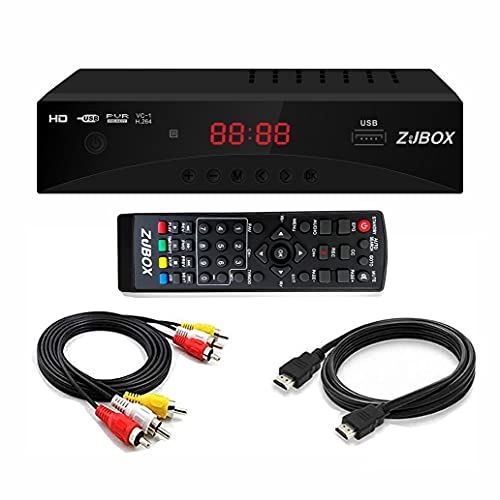
ZJBOX Digital TV Converter Box with ATSC Tuner, 1080P, HDMI
- ✓ Easy to set up and use
- ✓ Sharp 1080p output
- ✓ Supports recording and playback
- ✕ Requires external antenna
- ✕ No built-in storage
| Resolution | Full HD 1080p output |
| Tuner Type | ATSC digital tuner |
| Input Interface | HDMI, Composite (AV) |
| Supported Storage Devices | USB flash drives up to 32GB, external hard drives up to 4TB with FAT32 file system |
| Recording Functionality | Records TV programs to external USB storage |
| Signal Reception | Requires external antenna; no signal amplification or reception capabilities |
The first time I plugged in the ZJBOX Digital TV Converter Box, I was curious to see how it handled over-the-air signals. Holding the box in my hand, I immediately noticed how compact and lightweight it was, yet it felt solid and well-made.
I attached my external antenna and powered it up, and the auto-tuning kicked in effortlessly—within seconds, I was scanning through channels.
Connecting it to my TV via HDMI was straightforward, and the 1080p output looked sharp on my larger screen. I appreciated how responsive the remote was, making channel surfing and menu navigation smooth.
The menu itself is simple but functional, letting me set favorite channels and parental controls with ease.
One highlight was the USB port—plugging in my external hard drive, I could easily access recorded shows, photos, and music. Recording TV programs was a breeze; I selected a show, hit record, and it saved directly to my FAT32-formatted drive.
Playback was smooth, and I liked that I could pause or rewind recordings as needed. However, since it doesn’t have internal storage, you’ll need to have a suitable external device ready.
The only downside I found was that the device doesn’t include signal reception or amplification, so you’ll need a decent antenna for good reception. Also, firmware updates are rare, which could be a problem if you encounter bugs down the line.
Mediasonic HomeWorx HW135STB ATSC Digital TV Converter Box

- ✓ Easy to set up
- ✓ Great reception sensitivity
- ✓ Supports large external drives
- ✕ Power adapter not included
- ✕ Not a computer tuner
| Video Output Resolution | Supports up to 1080P HDMI output |
| Supported Recording Storage | External USB hard drive or SSD up to 4TB |
| Power Supply | Powered via TV’s USB port or 5V USB charger; includes USB-C power connector |
| Tuner Type | Over-the-Air ATSC digital broadcast tuner |
| Multimedia Playback | Supports photo, music, and video playback from USB devices |
| Remote Control | Large remote included (batteries not included) |
Opening the Mediasonic HomeWorx HW135STB, I immediately noticed the large remote control—it’s a real game-changer when you’re flipping channels from across the room. The device itself feels solid, with a sleek black finish and a display panel that’s easy to read even in low light.
The setup was straightforward, thanks to the included 3 ft HDMI cable and the clear instructions. Connecting it to my TV’s USB port or a 5V charger was simple enough, and I appreciated the flexibility of the USB-C power connector for longer cables or different chargers.
Once powered up, the reception sensitivity impressed me. Over-the-air broadcasts came in clear, and the support for unscrambled cable channels via Clear QAM worked perfectly with my cable provider.
Watching HD content up to 1080P via HDMI looked crisp, with Dolby Digital Audio adding to the immersive experience.
The recording feature stood out—plugging in my external hard drive up to 4TB, I could pause and record live TV without issues. The interface is intuitive, and the display panel shows the channel and sub-channel info nicely.
Plus, the multimedia player function let me enjoy my photos, music, and videos seamlessly from a USB drive.
However, the need for a separate power source can be a bit inconvenient, especially since the 5V/2A charger isn’t included. Also, the device doesn’t work as a tuner or recorder when connected directly to a computer, which might be a surprise for some users.
Overall, this tiny box packs a punch, turning your existing TV into a versatile recording and playback hub without breaking the bank.
OWERSLYN ATSC Digital TV Converter Box with Recording & HDMI

- ✓ Compact and discreet design
- ✓ Easy setup with included cables
- ✓ Smart remote with learning function
- ✕ No streaming app support
- ✕ Limited channel switching
| Video Output Resolution | Supports 1080P HD resolution via HDMI |
| Video Output Options | HDMI, 3RCA, and component |
| Recording Capability | Real-time DVR recording from USB storage device |
| Supported Signal Type | ATSC digital broadcast signals |
| Power Supply | Powered via TV’s USB port or 5V USB charger |
| Compatibility | Compatible with TVs that have HDMI or component inputs; not compatible with RF-only TVs |
The first thing that caught me off guard was how tiny this OWERSLYN ATSC converter box is. I mean, I expected a standard-sized device, but it’s actually 75% smaller than typical ATSC tuners.
It fits behind my TV so perfectly, I barely notice it’s there—and that’s a huge win for clutter-free setups.
Plugging it in is straightforward. It connects seamlessly to my TV’s HDMI port, and I love that it’s powered by my TV’s USB port—no extra power adapter needed.
The included HDMI and RCA cables make setup even easier, so I was up and running in minutes.
The remote control is surprisingly smart. It has a learning function, which means I can sync it with my existing remote, reducing the clutter of multiple remotes.
The IR sensor works well, even from a distance, making channel switching and menu navigation smooth.
Watching TV in 1080p HD is crisp and clear. I tested it with various input options, like HDMI, RCA, and component, all of which worked flawlessly.
The ability to view photos, listen to music, or record shows directly from my USB drive is a game-changer for someone like me who hates missing favorite programs.
The real kicker? The DVR recording feature.
I scheduled recordings with ease, and the interface was intuitive. Just pop in a USB stick, and I could record shows or set timers—perfect for busy days or when I forget to tune in.
One thing to note: it doesn’t support streaming apps, and channel switching is limited to certain channels, but for over-the-air broadcasts, it’s excellent. Overall, this tiny box packs a punch and simplifies over-the-air TV watching and recording.
VHS to DVD Recorder & Digital Converter with AV & HDMI

- ✓ Easy to set up and use
- ✓ Multiple storage options
- ✓ Built-in preview screen
- ✕ No VHS playback feature
- ✕ MP4 compatibility issues with some DVD players
| Video Input Compatibility | Supports AV and HDMI sources including VCR, VHS, Hi8, MiniDV camcorders |
| Recording Formats | MP4 digital files, DVDs |
| Storage Options | USB drive, SD card, external HDD (FAT32 or NTFS formats only) |
| Built-in Screen | 4.3-inch IPS LCD display for previewing videos |
| Connectivity | HDMI OUT for connecting to TV or monitor; Wi-Fi hotspot for phone media transfer |
| Supported Media Transfer | Supports direct transfer of photos and videos from iOS and Android phones via FriendlyMemories app |
As I plugged in my old VHS tape and pressed the record button, I was surprised at how straightforward it was to get started. The 4.3-inch IPS LCD screen immediately lit up, giving me a clear preview of what I was capturing.
It felt solid in my hand, with a simple layout that made navigating menus effortless.
Connecting my VCR was a breeze—just plug in the AV cables, and I was ready to go. The recorder didn’t just save the footage as a file; it converted everything into MP4 format, which is super handy for digital backups.
Watching the playback on the built-in speaker was decent, though I preferred HDMI to my TV for a bigger view.
What really caught my eye was the Wi-Fi feature. I connected my phone directly to the device’s hotspot and transferred some photos and videos without any fuss.
No need for a computer or cloud—just a quick app and a few taps. Copying files between USB drives or SD cards also worked smoothly, as long as they used FAT32 or NTFS.
The ability to record directly to external drives or burn DVDs is a huge plus, especially if you want a physical copy or a backup. The interface is simple enough for beginners, but versatile enough to handle multiple storage options.
Overall, it’s a practical, no-nonsense device that makes digitizing your old tapes and photos pretty painless.
Sure, it doesn’t play VHS tapes by itself, and some older DVD players might not support MP4, but those are minor quirks. If you want a compact, easy way to preserve your memories, this recorder hits most marks without breaking the bank.
What Should You Look For When Choosing a USB for TV Recording?
When choosing the best USB for TV recording, several factors should be considered to ensure compatibility and performance.
- Storage Capacity: Look for a USB drive with sufficient storage capacity to accommodate your recording needs. A larger capacity allows you to store multiple episodes or movies without needing to frequently transfer files to another device.
- Speed Class: The speed class of the USB drive is crucial for smooth recording and playback. A USB drive with a higher speed class (such as USB 3.0 or 3.1) ensures faster data transfer rates, which is important for recording high-definition content without interruptions.
- Compatibility: Ensure that the USB drive is compatible with your TV model. Some TVs may have specific format requirements or limitations on the type of USB drives they support, so checking your TV’s specifications is essential.
- Durability: A durable USB drive can withstand frequent use and physical handling. Look for drives that are designed to be robust and resistant to wear and tear, especially if you plan to move the drive between different devices.
- Brand Reputation: Consider purchasing from reputable brands known for reliability and quality. Established brands often provide better customer support, warranty options, and assurance of product performance over time.
- File System Format: The file system format of the USB drive can affect its usability with your TV. Most TVs require the USB drive to be formatted in FAT32 or exFAT, so make sure to format the drive accordingly before use.
- Portability: If you plan to use the USB drive across multiple devices or locations, consider its size and weight. A compact and lightweight USB drive is easier to carry and manage alongside your other devices.
How Do Different USB Types Affect TV Recording Performance?
Different USB types can significantly influence TV recording performance, particularly in terms of speed, compatibility, and storage capacity.
- USB 2.0: This older standard offers data transfer speeds up to 480 Mbps, which may be adequate for standard definition recordings but can struggle with high-definition content. Due to its slower speed, using USB 2.0 for recording HD or 4K content can lead to dropped frames and interruptions during playback.
- USB 3.0: With transfer speeds of up to 5 Gbps, USB 3.0 greatly improves performance for recording high-definition video. It ensures smoother playback and faster write times, which are essential for recording large files without lag, making it one of the best USB types for TV recording.
- USB 3.1/3.2: These newer standards can reach speeds of up to 10 Gbps and beyond, providing even greater data throughput. This makes them ideal for high-resolution recordings, allowing users to store and record content with minimal latency and ensuring compatibility with the latest TV models.
- USB-C: Often associated with USB 3.1 and 3.2, USB-C supports high-speed data transfer and can deliver power, making it highly versatile. Its reversible design and compatibility with various devices enhance user experience, especially in modern smart TVs that support this connection.
- External SSDs vs. USB Flash Drives: Solid State Drives (SSDs) typically offer faster read/write speeds compared to traditional USB flash drives, making them more suitable for recording high-definition or 4K content without interruptions. While flash drives are convenient for portability, SSDs provide better performance and reliability for extensive recording needs.
What Storage Capacity Do You Need for Recording TV Shows?
When selecting the best USB for TV recording, consider the following storage capacities:
- 32 GB: This size is adequate for recording a few hours of standard definition (SD) content or a couple of HD shows, making it suitable for occasional users.
- 64 GB: A 64 GB USB drive provides a balance between capacity and cost, allowing for several hours of HD recordings, which is ideal for regular viewers who want to store multiple episodes of their favorite series.
- 128 GB: With 128 GB, users can record up to 20 hours of HD content, making it a great choice for binge-watchers and those who prefer to keep a library of shows readily available.
- 256 GB: This capacity allows for extensive recording options, accommodating around 40 hours of HD content, which is perfect for families or individuals who record multiple shows and movies frequently.
- 512 GB and above: For heavy users or those who wish to store a large volume of content, a USB drive of this size can hold hundreds of hours of recordings, supporting a vast library for those who enjoy recording frequently.
How Important is USB Speed for TV Recording?
The speed of a USB drive is crucial for TV recording because it affects the quality and reliability of the recordings.
- Data Transfer Rate: The speed at which data can be written to and read from the USB drive significantly impacts the recording quality. Higher transfer rates ensure that the data from the live broadcast is captured without interruptions, which is essential for maintaining video and audio quality.
- USB Standards: Different USB standards (like USB 2.0, USB 3.0, and USB 3.1) offer varying speeds. USB 3.0 and higher are recommended for recording high-definition content, as they provide faster data transfer rates compared to USB 2.0, which may struggle with larger file sizes and lead to buffering or dropped frames.
- Storage Capacity: A USB drive with higher storage capacity is necessary for extensive recording sessions. If the drive is too small, it may fill up quickly, forcing interruptions in the recording process or leading to the loss of previously recorded content.
- Durability and Reliability: A high-quality USB drive designed for frequent read/write cycles is vital for long-term use in TV recording. Drives that are less durable may fail or corrupt data, leading to lost recordings or degraded video quality.
- Compatibility: Ensuring that the USB drive is compatible with the specific TV model is essential. Some TVs may only support certain USB formats or speeds, so checking the manufacturer’s recommendations can help in selecting the best USB for TV recording.
What Are the Best USB Drive Brands for TV Recording?
Some of the best USB drive brands for TV recording include:
- SanDisk: Known for its reliability and speed, SanDisk offers a variety of USB drives that are ideal for recording high-definition content. Their Ultra and Extreme series provide fast data transfer rates, which are crucial for handling large video files without buffering or lag.
- Samsung: Samsung’s USB drives, particularly the BAR and FIT series, are recognized for their durability and performance. With impressive read and write speeds, these drives ensure smooth recording and playback of TV shows and movies, making them a great choice for media storage.
- Kingston: Kingston produces a range of USB drives that cater to different storage needs, with their DataTraveler series being particularly popular. These drives often come with high storage capacities and reliable performance, which is essential for recording long programs without running out of space.
- Transcend: Transcend USB drives are highly regarded for their value and performance, especially in the context of video recording. They often feature robust build quality and decent transfer speeds, making them suitable for recording TV content without interruption.
- PNY: PNY’s USB drives are known for their affordability and decent performance levels. They provide a good balance between cost and functionality, making them a practical option for users looking to record TV shows without breaking the bank.
How Can You Optimize Your USB Drive for TV Recording?
To optimize your USB drive for TV recording, consider the following aspects:
- Capacity: Choose a USB drive with ample storage space to accommodate large video files.
- Speed Class: Select a USB drive with a high write speed to ensure smooth recording and playback.
- File System Format: Format your USB drive to a compatible file system for your TV, such as FAT32 or exFAT.
- Durability: Opt for a durable USB drive that can withstand regular usage and potential wear and tear.
- Compatibility: Ensure the USB drive is compatible with your specific TV model for seamless recording.
Capacity: USB drives come in various storage capacities, typically ranging from 16GB to 1TB or more. For recording high-definition content, a minimum of 32GB is recommended, as HD videos can quickly consume storage space. A larger capacity allows for longer recording times and the ability to store multiple recordings without frequent deletions.
Speed Class: The speed class of a USB drive is crucial for recording video. Look for drives that are rated as USB 3.0 or higher, as they offer faster data transfer rates compared to USB 2.0. A higher write speed ensures that your recordings are saved quickly and reduces the risk of dropped frames during playback.
File System Format: Different devices support various file systems, and formatting your USB drive correctly is essential for compatibility. Most TVs support FAT32 and exFAT formats, which allow for larger file sizes and better performance. Formatting your drive to the appropriate file system can prevent recording errors and ensure that your recordings are playable on your TV.
Durability: Regular use of a USB drive for TV recording can lead to wear and tear, so it’s beneficial to choose a drive designed for durability. Look for drives with robust casings and features like water and shock resistance. A durable USB drive can help maintain performance over time, especially if it’s frequently plugged and unplugged from the TV.
Compatibility: Not all USB drives are compatible with every TV model, so it’s important to check your TV’s specifications before purchasing a drive. Some TVs may have specific requirements for the USB drives they support, including maximum storage capacity and speed class. Ensuring compatibility will prevent issues during recording and playback, allowing you to enjoy your content without interruptions.
What Are the Common Issues When Using USB Drives for TV Recording?
When using USB drives for TV recording, several common issues can arise that may affect performance and usability.
- Compatibility Issues: Not all USB drives are compatible with every TV model, which can lead to frustration when attempting to record or playback content.
- Insufficient Storage Space: Many users underestimate the amount of storage required for recording high-definition content, leading to frequent interruptions and the inability to save shows.
- Speed Limitations: The write and read speeds of USB drives can vary significantly, and slower drives may result in lag during recording or playback, impacting the viewing experience.
- File System Format: USB drives must often be formatted in specific file systems (like FAT32 or NTFS) for compatibility with TVs; improper formatting can render the drive unusable.
- Power Supply Issues: Some USB drives may require more power than the TV can provide, leading to connectivity issues or the drive not being recognized at all.
- Data Corruption Risks: Unplugging the USB drive without properly stopping the recording or powering off the TV can lead to data corruption, making recorded files inaccessible.
- Limited Recording Features: Depending on the TV, certain features like scheduled recordings or pausing live TV may not be fully supported with USB drives, limiting functionality.
Compatibility issues arise because various TV brands and models may have different specifications regarding USB drive support, which means that a drive that works flawlessly on one TV might not function at all on another. Always check the TV’s user manual for recommended USB drive specifications before making a purchase.
Insufficient storage space becomes apparent when users try to record multiple shows or movies, especially in high definition, as these files can consume large amounts of space quickly. It is advisable to choose a USB drive with ample capacity, ideally 64GB or higher, to accommodate a variety of recordings.
Speed limitations can significantly affect the recording experience; slower USB drives may struggle to keep up with the data being written during recording sessions, leading to dropped frames or incomplete recordings. Selecting a USB drive with USB 3.0 or higher is recommended for optimal performance.
The file system format is crucial, as many TVs only recognize specific formats. If a USB drive is formatted in a format that the TV does not support, users will not be able to access or record any content on it, which can be a common oversight.
Power supply issues can occur especially with larger, high-capacity USB drives that may require more power than the TV can supply through its USB port, resulting in them not being detected or functioning incorrectly. It is important to use a drive that is designed for low power consumption when connecting to a TV.
Data corruption risks are prevalent when users eject the USB drive improperly, which can happen if the recording is stopped abruptly. This can lead to serious issues where recorded content becomes corrupted and cannot be recovered, making it important to follow proper procedures for disconnecting the drive.
Limited recording features can hinder the user experience; not all TVs allow for full functionality with USB drives, such as scheduling recordings or pausing live TV. Users should research and ensure that their TV has the necessary features to utilize the USB drive effectively.
Related Post: