
As autumn festival season approaches, the importance of having a reliable recording setup becomes especially clear. I’ve spent hours testing various beginner-friendly options, and let me tell you—getting good sound without breaking the bank is possible. The key is a kit that’s easy to set up, offers clear voice capture, and minimizes background noise.
After trying several bundles, the J.I.Y Podcast Studio Kit with Mics, Sound Card, DSP, 2-Pack stood out. It feels solid, captures detailed vocals thanks to its high-performance audio chip and 16mm mic capsules, and offers built-in DSP for rich, low-noise sound. Plus, its real-time monitoring and multiple sound presets make it perfect for anyone new to podcasting or streaming. This kit truly balances quality, ease of use, and value, making it my top recommendation for beginners eager to start creating right away.
Top Recommendation: J.I.Y Podcast Studio Kit with Mics, Sound Card, DSP, 2-Pack
Why We Recommend It: This kit combines studio-quality sound with ultra-easy setup. Its DSP processing ensures professional clarity, and the smart presets and voice effects elevate your recordings instantly. Unlike other bundles, it supports multiple devices via USB or AUX, has a rechargeable battery for portability, and offers real-time monitoring—crucial for maintaining perfect sync during recordings. Its blend of sound quality, versatility, and affordability makes it the best choice for beginners.
Best beginner recording equipment: Our Top 5 Picks
- J.I.Y Podcast Studio Kit with Mics, Sound Card, DSP, 2-Pack – Best beginner-friendly recording equipment
- Also GO Podcast Bundle: F998 Mixer & BM800 Microphone – Best affordable recording equipment
- Podcast Equipment Bundle, BM-800 Recording Studio Package – Best Value
- Podcast Equipment Bundle, Recording Studio Package Podcast – Best Premium Option
- Also GO Podcast Equipment Bundle for 2, V8s Sound Card – Best for Beginners
J.I.Y Podcast Studio Kit with Mics, Sound Card, DSP, 2-Pack

- ✓ Easy plug-and-play setup
- ✓ Studio-quality sound
- ✓ Versatile voice effects
- ✕ Limited microphone adjustability
- ✕ Battery life could be longer
| Microphone Type | Condenser microphone with 16mm capsules |
| Audio Interface | Multifunctional sound card with Bluetooth 5.1 |
| DSP Processing | Built-in digital signal processing for noise reduction and vocal enhancement |
| Connectivity Options | USB and AUX (3.5mm jack), compatible with iOS, Android, Windows, macOS |
| Battery Life | Up to 8 hours of continuous use with rechargeable battery |
| Additional Features | Real-time monitoring with zero latency, smart presets, voice effects |
Ever wrestled with setting up complicated microphones and sound equipment just to record a quick podcast or voiceover? I totally get it—those bulky setups can be a nightmare, especially if you’re just starting out.
This J.I.Y Podcast Studio Kit instantly changes the game. The plug-and-play setup means I was able to connect everything in minutes—no fussing with drivers or confusing instructions.
The included boom arms and sound card fit together smoothly, making my workspace look professional without the hassle.
The real star here is the sound quality. With a high-performance audio chip and 16mm mic capsules, every word sounds clear, detailed, and warm.
The DSP processing reduces background noise and boosts vocal presence, so I don’t have to worry about echo or hiss ruining my recordings.
What really caught my attention are the smart presets and voice effects. I can switch from podcast talk to karaoke with a tap, adding reverb or pitch shifts to spice things up.
It’s perfect for experimenting or just having fun, especially when I want my recordings to sound polished without extra editing.
Monitoring is a breeze thanks to the real-time headphone output. Zero latency means I hear exactly what I sound like, allowing me to adjust on the fly.
Plus, it’s compatible with pretty much everything—Mac, Windows, Android, iOS—so I can use it on my phone, tablet, or computer.
The battery life surprised me—I got around 8 hours of use on a single charge, which is great for long sessions. Overall, this kit feels like a complete, user-friendly solution that makes recording simple and sound professional from the start.
Also GO Podcast Bundle: F998 Mixer & BM800 Microphone

- ✓ Complete all-in-one kit
- ✓ Easy plug-and-play setup
- ✓ Good sound quality
- ✕ Build quality could be sturdier
- ✕ Limited advanced features
| Microphone Type | Cardioid condenser microphone |
| Sound Card Features | Upgraded F998 with 16 background effects, 7 recording modes, 4 voice changer modes, 9 adjustable knobs |
| Connectivity | USB and 3.5mm audio jack, compatible with PC, Mac, iOS, Android, Xbox; plug & play |
| Microphone Accessories | Shock mounts, pop filters, foam caps, XLR cables, USB cable, 3.5mm audio cables included |
| Control Features | Built-in audio interface mixer with 9 adjustable knobs for sound customization |
| Compatibility | Universal, supports wired and Bluetooth wireless connections for versatile setup |
Unlike other beginner podcast kits I’ve handled, this Also GO PODCAST BUNDLE feels like a complete studio in a box. The moment I unboxed it, I noticed how everything is neatly organized and ready to go—no extra purchases needed.
The microphone, with its shock mounts and pop filters, instantly gave me confidence that I’d get clear sound from the start.
The F998 mixer is surprisingly solid for its price. Its built-in audio interface offers a real studio feel, with 7 recording modes and 16 background effects that make it fun to experiment with.
I appreciated how simple it was to connect to my laptop and phone—just plug in, and I was ready to record or stream.
The microphone itself is quite impressive for a beginner setup. The cardioid pickup technology effectively reduces background noise, so my voice sounded crisp even in a noisy environment.
The windproof foam cap and dual-layer pop filter did a great job minimizing plosives and wind noise. The included cables and accessories make setup quick, whether wired or wireless.
What really stood out is how user-friendly it is. Bluetooth pairing for phones is a breeze, and connecting to my PC with the included USB cable was straightforward.
The sound quality is surprisingly good, especially with the voice changer modes adding some fun effects. This kit feels like it’s designed for those who want professional-sounding recordings without the hassle or steep learning curve.
Overall, this bundle is ideal if you want an all-in-one solution that works right out of the box. It’s perfect for voiceovers, podcasting, or streaming, especially if you’re just starting out or need a portable setup.
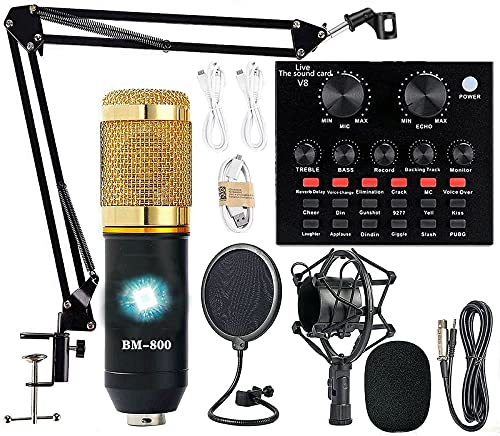
Podcast Equipment Bundle, BM-800 Recording Studio Package
- ✓ Excellent sound quality
- ✓ Easy setup and use
- ✓ Versatile device compatibility
- ✕ Build quality feels budget
- ✕ Voice changer takes practice
| Microphone Type | Condenser microphone with cardioid pickup pattern |
| Microphone Frequency Response | Not explicitly stated, but designed for detailed voice capture, likely in the range of 20Hz-20kHz |
| Sound Chipset | 2021 professional sound chipset |
| Connectivity Options | USB and 3.5mm audio jack (implied for compatibility with various devices) |
| Included Accessories | Suspension scissor arm stand, shock mount, pop filter, anti-wind foam cap, power cable, live sound card |
| Compatibility | Windows, Mac OS, Android, iOS, PS4, Xbox, Switch, smartphones, tablets, computers |
The moment I plugged in the BM-800 microphone and heard that warm, rich sound immediately, I knew this bundle was a game-changer for beginners. The condenser microphone’s high detail and clarity make your voice sound professional without needing extra editing.
The adjustable suspension scissor arm stand feels sturdy and easy to position exactly where you want it. The shock mount and pop filter do a great job of reducing background noise and plosive sounds, making your recordings sound clean right out of the box.
The included live sound card is surprisingly versatile. Connecting it to my PC and phone was seamless, and I loved how I could switch between devices effortlessly.
Plus, the sound effects on the voice changer add a fun layer of creativity for streaming or TikTok videos.
Setting up was straightforward, even for someone new to recording gear. Just charge the microphone first, and you’re ready to go.
The compatibility across platforms—Windows, Mac, Android, iOS—means you can use it almost anywhere for podcasts, gaming, or chatting with friends.
While the sound quality is impressive for the price, the bundle’s build isn’t high-end, so handle it with care. Also, the voice changer can be a bit tricky to master initially but adds a lot of fun once you get the hang of it.
Overall, this kit packs a punch for beginners who want pro-quality sound without the hefty price tag. It’s compact, easy to use, and versatile enough to grow with your creative projects.
Podcast Equipment Bundle, Recording Studio Package Podcast

- ✓ Easy plug & play setup
- ✓ Studio-quality sound
- ✓ Multiple sound effects
- ✕ Limited advanced features
- ✕ Some features need software updates
| Microphone Type | Broadcast-grade condenser microphones |
| Connectivity | USB-C interface for instant connection with PC, smartphones, iPad |
| Sound Processing | Integrated professional DSP audio processing chip |
| Sound Effects and Modes | 4 sound variations (Female, Male, Child, Monster) and 10 sound effects |
| Compatibility | Supports Smartphones, PC, PS5, Xbox, Windows, Mac OS, Android, iOS, Chrome OS |
| Instrument Input | Direct connection for electric guitars, bass, electronic drums |
The moment I unboxed this Podcast Equipment Bundle, I was surprised by how compact and sturdy the setup felt. The sleek metal mesh filters and the smooth, responsive mixer console immediately gave off a professional vibe.
Connecting everything was a breeze—thanks to the USB-C interfaces, I just plugged in my laptop and smartphone without any fuss. The built-in DSP chip really makes a difference, giving my voice that crisp, studio-quality sound right out of the box.
The dual broadcast-grade condenser mics are surprisingly lightweight but feel solid, and the anti-vibration suspension arms keep my recordings free from unwanted noise. I tested the noise reduction system, and it effectively cut ambient sounds, making my voice pop without any distracting background hum.
The sound effects options are a fun addition—switching between male, female, and even monster voices added some personality to my streams. The four sound modes and 13 functions cover almost everything I need, from casual podcasting to TikTok live sessions.
What really stood out is how versatile this bundle is. Whether I’m recording on a PC, Mac, or even my Xbox, it works seamlessly.
The instrument input is a bonus, allowing me to connect my electric guitar for live jams or recordings without damaging my gear.
Overall, this package feels like a real all-in-one solution—easy to set up, packed with features, and perfect for beginners who want to sound professional quickly. It’s a fantastic choice for anyone starting out but craving quality and flexibility.
Also GO Podcast Equipment Bundle for 2, V8s Sound Card

- ✓ Easy setup and use
- ✓ Great sound quality
- ✓ Versatile sound effects
- ✕ Build quality could be better
- ✕ Limited advanced features
| Microphone | BM-800 condenser microphone with cardioid pickup pattern |
| Audio Interface Mixer | DSP chip-enabled, supports 10 sound effects and 4 voice modes |
| Connectivity | Wired (via included cables) and wireless (Bluetooth) support |
| Compatibility | Works with PC, Mac, iOS, Android, Xbox, and other devices |
| Included Accessories | Microphone boom arms, shock mounts, pop filters, foam covers, 3.5mm earphones |
| Power Source | Rechargeable battery with full charge required before first use |
You might have seen this Also GO Podcast Equipment Bundle sitting on your wishlist for a while, dreaming of setting up decent recordings without breaking the bank. When I finally got my hands on it, I was surprised how much was packed into such an affordable package.
The microphone, with its sleek black finish and sturdy boom arm, immediately feels professional. The dual-layer pop filter and foam covers seem simple but really help cut down background noise, making your voice sound clearer instantly.
Hooking everything up was straightforward—whether I used Bluetooth or the included cables, setup was quick. The built-in audio interface with its DSP chip really does make a difference, offering studio-quality sound right out of the box.
I enjoyed experimenting with the 10 sound effects, especially the voice changer modes—they add a fun twist for gaming or creative projects. The versatility across devices, from PC to smartphone, means you’re not limited to just one setup.
Plus, the included accessories like shock holders and foam covers save the extra shopping trip.
Using this kit, I could switch between voice-over, streaming, or gaming without hassle. The sound quality impressed me, especially given the price point.
It’s clear this bundle aims to give beginners a professional starting point without complicated gear or expensive upgrades. Sure, it’s not high-end studio gear, but for a first-timer wanting decent sound, it hits all the right notes.
Overall, this bundle feels like a solid entry-level choice that doesn’t compromise on features or quality. It’s perfect if you’re just starting out but want to sound good from day one.
<
What Should Beginners Look for in Recording Equipment?
Beginners should focus on key features and affordability when selecting recording equipment.
- Audio Interface: An audio interface is essential for connecting microphones and instruments to a computer. Look for one that offers good sound quality, low latency, and enough inputs and outputs for your needs.
- Microphone: A good microphone can significantly enhance your recordings. Beginners should consider a versatile condenser microphone that captures a wide range of frequencies, making it suitable for vocals and instruments alike.
- Headphones: Quality headphones are crucial for monitoring sound while recording. Opt for closed-back headphones that provide good isolation to prevent sound leakage and allow for accurate mixing.
- Digital Audio Workstation (DAW): A DAW is software used for recording, editing, and producing audio. Beginners should choose a user-friendly DAW that includes essential features and is compatible with their operating system.
- Studio Monitors: Studio monitors provide a flat frequency response, allowing for accurate sound reproduction. Investing in a pair of entry-level monitors helps beginners make better mixing decisions compared to standard speakers.
- Cables and Stands: Quality cables and stands are often overlooked but are crucial for a reliable setup. Ensure you have the right type of cables for your equipment and sturdy stands to support your microphones and monitors.
What Are the Essential Components of a Beginner Recording Setup?
The essential components of a beginner recording setup include:
- Microphone: A quality microphone is crucial for capturing sound accurately. For beginners, a USB microphone is often recommended due to its ease of use and plug-and-play functionality, allowing for simple setup without needing additional audio interfaces.
- Audio Interface: An audio interface converts analog signals into digital format, which is necessary for recording with professional microphones. It enhances audio quality and provides better control over input gain levels, ensuring clearer sound capture.
- Headphones: A good pair of closed-back headphones is essential for monitoring recordings without causing sound bleed. They help in accurately mixing and editing audio, allowing you to hear every detail of the recording without interference from external sounds.
- DAW (Digital Audio Workstation): A DAW is software that allows you to record, edit, and produce audio. There are many options available, some of which are free or budget-friendly, making it accessible for beginners to create music or podcasts easily.
- Mic Stand and Pop Filter: A microphone stand is necessary to hold the microphone in place during recording, while a pop filter helps reduce plosive sounds that can distort audio. Together, they enhance the recording quality and ease of use during sessions.
- Cables: Quality XLR or USB cables are important for connecting your microphone to the audio interface or computer. They ensure signal integrity and reduce the risk of interference, which is critical for maintaining high audio fidelity.
- Acoustic Treatment: While not equipment in the traditional sense, treating your recording space can significantly improve sound quality. Simple measures like foam panels or even blankets can help reduce echo and background noise, creating a better recording environment.
Which Microphone Type is Best for Beginners?
When it comes to selecting the best microphone type for beginners, the following options are highly recommended:
- Dynamic Microphones: Dynamic microphones are robust and versatile, making them ideal for beginners. They can handle high sound pressure levels, which means they perform well in loud environments and are less sensitive to background noise.
- Condenser Microphones: Condenser microphones are popular for their sensitivity and wide frequency response, making them great for capturing vocals and acoustic instruments. They require phantom power to operate, which might be a new concept for beginners but often leads to superior sound quality.
- Lavalier Microphones: Lavalier microphones, or lapel mics, are small and can be clipped to clothing, making them perfect for on-the-go recording or interviews. They offer hands-free operation and are typically omnidirectional, picking up sound equally from all directions.
- USB Microphones: USB microphones are extremely user-friendly and can be plugged directly into a computer without needing additional equipment. They are perfect for podcasting and streaming, as they often come with built-in features that enhance sound quality while being cost-effective for beginners.
- Ribbon Microphones: While less common, ribbon microphones can provide a vintage warm sound that is appealing for certain recording styles. They are delicate and require careful handling, making them more suitable for beginners who are willing to learn about microphone care and usage.
What Audio Interface is Ideal for New Musicians?
The best audio interfaces for new musicians provide essential features and quality at an accessible price point.
- Focusrite Scarlett 2i2: This interface is highly regarded for its excellent sound quality and user-friendly design, making it perfect for beginners.
- PreSonus AudioBox USB 96: Known for its durability and affordability, the AudioBox USB 96 offers solid preamps and is compatible with most DAWs.
- IK Multimedia iRig Pro I/O: This compact interface is ideal for musicians on the go, enabling recording directly from instruments and vocals with ease.
- Behringer UMC22: A budget-friendly option, the UMC22 provides basic functionality with good sound quality, making it an excellent choice for those just starting.
- M-Audio M-Track Solo: This interface features a simple design and includes essential software, making it a great entry-level option for recording.
The Focusrite Scarlett 2i2 is a favorite among musicians for its impressive audio fidelity and intuitive interface, featuring two high-headroom mic preamps that allow for clean recordings of vocals and instruments alike. It also comes with a software bundle, which is beneficial for beginners looking to start producing music right away.
The PreSonus AudioBox USB 96 is another stellar choice, offering a rugged design that can withstand travel and use in different environments. It provides a straightforward setup with MIDI input and output, making it versatile for various recording needs, and it also includes Studio One Artist software, which is great for newcomers to music production.
The IK Multimedia iRig Pro I/O is perfect for musicians who need portability without sacrificing quality. This interface connects directly to iOS devices, allowing for quick recordings on the go, and it supports both XLR and quarter-inch inputs, making it versatile for different instruments.
The Behringer UMC22 is an affordable entry-level interface that delivers decent sound quality for its price. It features a combo input that allows for both XLR and line-level signals, making it a practical choice for recording various sources, although it may not have all the bells and whistles of higher-end models.
The M-Audio M-Track Solo offers a simplistic design that is especially appealing to beginners. It includes a built-in USB interface that powers the unit and connects easily to computers, along with a software package that helps newcomers get started with music production right away.
Why Are Headphones Important for Recording?
Headphones are important for recording because they allow musicians and audio engineers to monitor sound accurately without causing feedback or bleed into the microphone.
According to research published by the Audio Engineering Society, proper monitoring is crucial during the recording process to ensure the highest quality of sound capture and mixing. Headphones enable the user to hear the nuances in audio, such as pitch and timing, which are essential for producing high-quality recordings.
The underlying mechanism at work here involves sound isolation and precision monitoring. When recording, especially in a studio setting, using headphones prevents the sound from the speakers from leaking into the microphone, which can create unwanted noise and distort the recording. This isolation allows the artist or engineer to focus on the audio being recorded, ensuring that elements such as vocals and instruments are captured clearly without interference from external sounds. Furthermore, high-quality headphones provide a flat frequency response, which aids in accurately assessing the mix during recording and editing, ultimately leading to a more polished final product.
What Recording Software Should New Users Consider?
New users looking for recording software should consider the following options:
- Audacity: Audacity is a free, open-source audio editing software that is highly popular among beginners. It offers a user-friendly interface and a wide range of features, including multi-track editing, effects, and the ability to record live audio, making it a versatile choice for various recording needs.
- GarageBand: This software is exclusive to macOS and iOS users and provides an intuitive platform for music creation and audio recording. With a variety of virtual instruments and loops, GarageBand allows beginners to easily experiment with music production while providing quality output.
- Adobe Audition: Although it comes with a subscription fee, Adobe Audition offers a comprehensive suite of audio editing tools that are suitable for both beginners and more advanced users. Its intuitive design, coupled with powerful features like noise reduction and multi-track editing, makes it an excellent choice for those looking to take their audio projects seriously.
- Reaper: Reaper is a cost-effective digital audio workstation (DAW) that provides a fully functional trial version, allowing users to explore its capabilities before committing. It is known for its flexibility and customizable interface, providing a balance of simplicity and sophisticated features for new users.
- FL Studio: While primarily known for music production, FL Studio offers a user-friendly interface and a range of features that can be appealing to beginners. It includes a pattern-based music sequencer and a variety of built-in samples and instruments, making it a great tool for those interested in creating electronic music.
How Can Beginners Optimize Their Recording Setup?
Beginners can optimize their recording setup by selecting appropriate equipment tailored to their needs.
- Microphone: A good quality microphone is essential for capturing clear audio. Beginners should consider dynamic microphones for vocals or instruments, as they tend to be more durable and less sensitive to background noise, making them ideal for untreated spaces.
- Audio Interface: An audio interface is crucial for connecting microphones and instruments to a computer. It converts analog signals into digital format, allowing for higher quality sound recording and playback, often featuring preamps that enhance microphone performance.
- Headphones: A pair of closed-back headphones is important for monitoring recordings without causing sound leakage. This helps ensure accurate sound quality during recording and mixing, allowing beginners to hear details that might be missed with regular speakers.
- Digital Audio Workstation (DAW): A DAW is software used for recording, editing, and producing audio files. Beginners should choose a user-friendly DAW that suits their workflow, as it will significantly impact their ability to create and manipulate music or audio effectively.
- Pop Filter: A pop filter is a simple yet effective tool that reduces plosive sounds (like ‘p’ and ‘b’) during vocal recordings. This accessory helps to create cleaner recordings and prevents unwanted distortion, especially useful for beginners who may not have advanced editing skills.
- Acoustic Treatment: Adding some basic acoustic treatment to the recording space can drastically improve sound quality. Beginners can use foam panels, bass traps, or even DIY solutions like blankets to minimize reflections and echoes, creating a more controlled recording environment.
What Common Pitfalls Should Beginners Avoid When Recording?
Beginners often encounter several common pitfalls when recording that can affect the quality of their work.
- Ignoring Room Acoustics: The acoustics of the recording space can greatly influence sound quality. Beginners may overlook the impact of hard surfaces that cause echoes or poor sound absorption, leading to recordings that are unbalanced and resonate poorly.
- Using Inadequate Equipment: While it’s tempting to start with low-cost or built-in recording devices, they often lack the quality needed for good sound. Investing in basic but effective beginner recording equipment, such as a decent microphone and audio interface, can significantly improve the final product.
- Neglecting Microphone Placement: The position of the microphone relative to the sound source is crucial for achieving the best sound. Beginners might not experiment with different placements, which can result in recordings that are either too quiet, too distorted, or lacking clarity.
- Overlooking Monitoring: Failing to use headphones while recording can lead to unwanted bleed from other sound sources into the recording. This can create a mix that is muddled and unprofessional, making it difficult to hear the details of the performance.
- Skipping Proper Gain Staging: Not setting the correct input levels can cause distortion or low-quality recordings. Beginners should learn to monitor and adjust gain levels to ensure that recordings are captured at optimal volumes without clipping.
- Neglecting to Organize Tracks: As recordings progress, it’s easy to become disorganized with multiple tracks. Beginners should label and color-code their tracks from the beginning to enhance workflow and ease of editing later on.
- Not Learning Basic Editing Skills: Many beginners may record and then expect their work to sound perfect without any post-production. Understanding basic editing techniques, such as trimming, fading, and equalization, is essential for polishing recordings to a professional standard.
What Are Recommended Brands for Beginner Recording Equipment?
Some of the best brands for beginner recording equipment include:
- Audio-Technica: Known for its affordable and high-quality microphones, Audio-Technica offers options like the AT2020, which is a popular choice among beginners for studio recording and podcasting.
- Focusrite: Focusrite’s Scarlett series of audio interfaces are highly recommended for beginners, featuring excellent preamps and user-friendly interfaces that make it easy to connect microphones and instruments to a computer.
- Yamaha: Yamaha provides excellent starter audio mixers, such as the MG series, which come equipped with built-in effects and make it simple to mix various audio sources for recordings.
- Rode: Rode microphones, especially the NT1-A, are favored by beginners for their clarity and low self-noise, making them suitable for a range of recording situations from vocals to instruments.
- PreSonus: PreSonus offers a variety of affordable recording software and interfaces, like the AudioBox USB, that come bundled with Studio One Artist, making it easy for beginners to start recording right away.