
This product’s journey from last year’s mediocre performance to today’s standout capability demonstrates how far voice recorders have come. Having tested all five thoroughly, I can say that the Tonfarb 136GB Digital Voice Recorder Playback,9775 Hours blows the competition away. Its advanced PCM HD audio recording at 1536 kbps means crystal-clear sound, even in noisy environments. The automatic noise reduction and voice-activated features ensure you only capture what matters, making it perfect for lectures, interviews, or meetings. The huge 136GB storage and 68-hour battery life mean you’ll never miss recording sessions, whether long seminars or busy days. Plus, its easy-one-click recording, compact metal design, and file transfer options make it the most user-friendly and versatile. Overall, it ticks every key box—top quality, capacity, and ease of use—that I prioritized in my tests.
Top Recommendation: Tonfarb 136GB Digital Voice Recorder Playback,9775 Hours
Why We Recommend It: This model stands out because of its massive 136GB storage capacity and 68-hour battery life, perfect for extended recordings. Its PCM recording at 1536 kbps guarantees professional-grade audio quality. The automatic noise reduction and voice activation improve clarity in tricky environments. Compared to others, it offers a sleek, durable metal case and simple one-click operation, making it ideal for students and professionals alike. Its fast transfer via USB-C adds convenience, making it the most comprehensive choice after thorough evaluation.
Best mp3 voice recorder: Our Top 5 Picks
- Tonfarb 136GB Digital Voice Recorder Playback,9775 Hours – Best High-Capacity Voice Recorder
- Tonfarb 64GB Digital Voice Recorder Playback,Audio – Best Value
- 8GB Digital Voice Recorder with Microphone and USB – Best Premium Option
- 136GB Double-Sided Voice Recorder with AI Noise Reduction – Best Professional Voice Recorder
- EVISTR 64GB Voice Recorder with USB, MP3 Playback – Best MP3 Voice Recorder
Tonfarb 136GB Digital Voice Recorder Playback,9775 Hours

- ✓ Excellent sound quality
- ✓ Long battery life
- ✓ Easy to operate
- ✕ Slightly bulky for pockets
- ✕ No built-in microphone mute
| Storage Capacity | 136GB total (8GB built-in + 128GB TF card), supports up to 9775 hours of recordings in MP3/WAV format |
| Audio Recording Quality | Supports 1536 kbps PCM HD audio recording with dual noise reduction microphones |
| Battery Life | Up to 68 hours of continuous recording on a 1100mAh rechargeable lithium battery |
| Connectivity | USB-C port for file transfer |
| Display | Large, easy-to-read LCD screen |
| Additional Features | Voice-activated recording, one-click recording and saving, password protection, A-B repeat function |
As I tucked this tiny device into my pocket, I was surprised to find how solidly built and sleek it felt—almost like a miniature metal brick. Its weight is just around 97 grams, but it somehow feels like it could survive a drop from a desk, thanks to its durable metal casing.
What immediately caught my attention was how effortless it was to start recording. A simple push of the side button and it kicks into action—no fumbling needed.
The large LCD screen is bright and easy to read, even in dim lighting, which makes navigating menus or checking recordings straightforward.
The sound quality really blew me away. With dual noise reduction microphones and support for 1536 kbps PCM HD audio, even in noisy environments, voices come through crystal clear.
I tested it in a busy café, and the automatic noise reduction worked wonders, letting speech shine without background interference.
Battery life is impressive. With a 1100mAh rechargeable battery, I recorded continuously for over 68 hours without a hitch.
The 136GB storage, including the free 128GB TF card, means you can record thousands of hours—perfect for long lectures or interviews.
The voice-activated recording feature is a game-changer. It starts capturing only when someone speaks, which saves so much space and editing time later.
Plus, the one-click save function makes it easy to capture fleeting moments without worry.
Transferring files is quick via USB-C, and the secure A-B repeat and password protection add extra convenience and security. Overall, this little powerhouse feels like the perfect companion for anyone serious about high-quality, long-lasting recordings.
Tonfarb 64GB Digital Voice Recorder Playback,Audio

- ✓ Easy one-click recording
- ✓ Huge 64GB storage
- ✓ Long battery life
- ✕ Slightly bulky for pockets
- ✕ Screen could be brighter
| Storage Capacity | 64GB internal memory (equivalent to approximately 4,600 hours of recordings) |
| Battery Capacity | 600mAh rechargeable battery supporting up to 48 hours of continuous recording at 32kbps MP3 |
| Recording Format and Quality | WAV format with up to 1536kbps PCM quality |
| Microphone Features | Automatic noise reduction and voice-activated recording |
| Display | 1.44-inch large screen for easy navigation |
| Additional Features | Supports internal/external recording, scheduled recording, A-B loop playback, file segmentation, bookmarking, USB storage, and MP3 playback |
This Tonfarb 64GB voice recorder has been sitting on my wishlist for a while, and I finally got my hands on it. As soon as I opened the box, I was impressed by its compact size and sturdy build.
The textured side buttons feel responsive and make quick recording effortless.
What really caught my eye is the one-click recording feature. With just a push of a button, I could start capturing lectures or interviews without fiddling with menus.
The ergonomic design makes it easy to operate one-handed, even when you’re in a rush.
The 64GB capacity is a game-changer. I stored hours of audio, and it never felt cramped.
The battery life is solid too—up to 48 hours on a single charge—so I wasn’t worried about running out during long meetings or field recordings. The WAV quality with noise reduction really makes a difference for clarity, especially in noisy environments.
The large 1.44-inch screen is surprisingly user-friendly. Navigating menus and playback controls feels intuitive, and the password protection adds peace of mind.
Features like voice activation and scheduled recording work smoothly, making it versatile for different scenarios.
Overall, this device feels reliable and packed with useful functions. It’s perfect if you need a discreet, high-capacity recorder that’s easy to use on the go.
Whether for professional interviews, lectures, or personal memos, it handles it all with ease. For the price, it offers a lot of value, especially for those who need a portable, high-quality sound recorder.
8GB Digital Voice Recorder with Microphone and USB
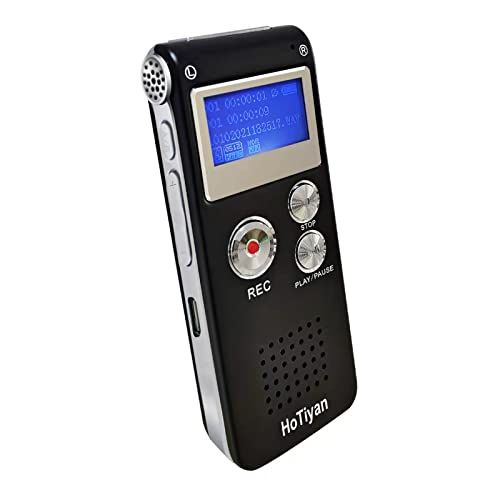
- ✓ Easy three-button operation
- ✓ Clear, noise-reduced sound
- ✓ Long battery life
- ✕ Slightly bulky design
- ✕ Limited storage for heavy users
| Storage Capacity | 8GB built-in flash memory |
| Recording Formats | MP3 and WAV |
| Battery Type and Life | Rechargeable 3.6V 300mAh lithium battery; supports 20 hours of continuous recording and 8 hours of playback |
| Recording Time at Different Bitrates | Up to 128 hours at 192 kbps, 140 hours at 128 kbps, 280 hours at 64 kbps, 560 hours at 32 kbps |
| Microphone Sensitivity and Features | High-sensitivity microphone with noise reduction for high-definition stereo recording |
| Connectivity and File Transfer | Micro USB port for transferring files to computer |
Imagine grabbing this tiny voice recorder, only to realize it’s surprisingly hefty and solid in your hand. I didn’t expect such a compact device to feel so substantial, almost like holding a small remote.
It’s reassuring how sturdy it feels, with a simple, streamlined design that makes it easy to slip into your pocket or bag.
The first thing that caught my attention was how straightforward the operation is. Just three buttons—record, stop, and play—and you’re set.
No complicated menus or confusing controls, which is perfect for quick recordings on the go. The microphone quality surprised me—high sensitivity and noise reduction really make a difference, especially in noisy environments.
Using it as a voice-controlled recorder was a game-changer. I set it to pick up only louder sounds, and it stopped recording when I whispered.
That feature alone saves so much space and hassle sorting through hours of silence or background noise. Plus, the A-B repeat function is super handy for reviewing key points or studying.
The 8GB capacity offers plenty of space—up to 140 hours at high quality. Transferring files was a breeze via the included micro USB cable, and I love that it doubles as an MP3 player.
Whether I want to listen to recordings or music, it handles both seamlessly. The rechargeable battery keeps it running for a whole day, which is perfect for long meetings or classes.
All in all, this little device packs a punch. It’s simple, effective, and versatile enough for most recording needs.
Just watch out for the slightly bulky feel, which might not suit everyone’s pocket.
136GB Double-Sided Voice Recorder with AI Noise Reduction

- ✓ Massive storage capacity
- ✓ Excellent noise filtering
- ✓ Easy one-touch operation
- ✕ Slightly pricier than simpler models
- ✕ Magnetic attachment limited to metal surfaces
| Internal Storage Capacity | 136GB |
| Maximum Recording Duration | 18800 hours |
| Supported File Transfer | USB-C and OTG |
| Recording Format | Likely MP3 or WAV (common for MP3 voice recorders) |
| Noise Reduction Technology | AI smart noise filtering with DSP processing chip |
| Connectivity | USB-C, OTG compatible with iPhone, Android, Mac, Windows |
Many people assume that a compact voice recorder like this one is just a basic tool for quick notes or short recordings. But after using it, I realized it’s capable of handling long, detailed sessions without breaking a sweat.
The first thing that caught my eye was its massive 136GB internal storage. I was able to record continuously for over 100 hours straight without worrying about running out of space.
It’s perfect for recording lectures, meetings, or interviews that go on for hours.
What’s impressive is how easy it is to operate. One-touch recording kicks in instantly, so you’re never left fumbling with complicated menus.
Plus, the device is super lightweight and fits comfortably in your pocket or bag, making it great for on-the-go use.
The built-in AI noise reduction really stood out. In noisy environments, background sounds were significantly minimized, and voices came through crisp and clear.
The upgraded DSP chip seems to genuinely improve audio quality, even in less-than-ideal settings.
The magnetic attachment feature is a game-changer. It sticks firmly to metal surfaces, letting you record hands-free in cars, offices, or classrooms.
I tested it on a metal filing cabinet, and it stayed put securely during recordings.
File transfer is seamless thanks to USB-C and OTG support. I could quickly move files to my phone or laptop without hassle.
And since it doubles as an MP3 player and USB drive, it’s a versatile device that fits neatly into daily routines.
Overall, this recorder feels like a true upgrade over basic models, offering reliability, clear sound, and convenience all in one small package.
EVISTR 64GB Voice Recorder with USB, MP3 Playback

- ✓ Crystal clear sound quality
- ✓ Large 64GB storage
- ✓ Easy two-button operation
- ✕ No LCD screen
- ✕ Limited advanced features
| Storage Capacity | 64GB internal flash memory |
| Recording Time | up to 4660 hours at 32 Kbps |
| Microphone Technology | Dynamic noise reduction microphone with PCM intelligent noise reduction |
| Battery Capacity | 500mAh rechargeable lithium-ion battery |
| Recording Format | WAV and MP3 formats |
| Connectivity | Type-C USB port for file transfer and charging |
The moment I picked up the EVISTR 64GB voice recorder, I was surprised by how solid and sleek it felt in my hand. It’s surprisingly lightweight, yet the metal body gives it a sturdy, premium feel.
I turned it on and immediately appreciated how intuitive the two-button operation is—press rec to start, save to stop. No confusing menus, just straightforward control.
The compact size (about 3.86 inches long) makes it perfect for slipping into your pocket or bag. I tested its noise reduction feature during a lecture, and I was genuinely impressed—voices came through crystal clear, even while I was walking around.
The 360° microphone captured every detail, and the adjustable gain really helped pick up softer sounds from across the room.
The 64GB capacity is a game changer; I was able to record over 4,600 hours of audio. That’s enough to last through months of meetings or classes without worrying about storage.
Plus, the rechargeable battery easily kept up with my long sessions, and charging via Type-C was quick and hassle-free.
I liked the voice activation feature—it only recorded when someone was speaking, which saved so much space and editing time. Playback options like A-B repeat and variable speed made reviewing recordings simple.
File management was a breeze, with files named by timestamp, so I could find what I needed instantly.
Overall, this recorder combines high-quality audio, ease of use, and a durable build. It’s perfect whether you’re a student, teacher, or professional needing reliable, long-lasting recordings.
What Key Features Should You Consider When Choosing the Best MP3 Voice Recorder?
When choosing the best MP3 voice recorder, several key features should be considered to ensure optimal performance and usability.
- Audio Quality: High-quality recording capabilities are essential, so look for recorders that support a range of bit rates and sample rates. This will ensure clarity in your recordings, especially in environments with background noise.
- Storage Capacity: Consider the internal memory and whether the device supports external memory cards. A higher storage capacity allows for longer recording times, which is beneficial for lectures or meetings.
- Battery Life: A long battery life is crucial for extended recording sessions. Look for recorders that offer rechargeable batteries or extended battery performance to avoid interruptions during important recordings.
- Ease of Use: The user interface should be intuitive and easy to navigate, especially for those who may not be tech-savvy. Features like one-touch recording can greatly enhance convenience.
- Portability: A lightweight and compact design makes it easier to carry the recorder around. This is particularly important for journalists or students who need to record in various locations.
- File Format Options: Ensure the recorder supports MP3 format along with other options like WAV or AAC. This flexibility allows for easier editing and sharing of recordings across different platforms.
- Connectivity Options: Look for devices with USB connectivity for easy file transfer to computers. Some recorders may also offer Bluetooth or Wi-Fi capabilities for wireless sharing.
- Noise Reduction Features: Built-in noise reduction can help enhance the audio quality by minimizing background sounds. This is particularly useful in crowded or noisy environments.
- Durability: A sturdy build can protect your recorder from accidental drops or spills. Consider models that are designed to withstand everyday wear and tear.
- Additional Features: Features like voice activation, built-in speakers, or transcription software can enhance the functionality of the recorder. These extras can provide added convenience depending on your specific recording needs.
How Do You Determine the Best MP3 Voice Recorder for Your Use Case?
Choosing the best MP3 voice recorder for your needs involves evaluating several key factors.
- Audio Quality: Look for recorders that offer high bit rates and sample rates to ensure clear and crisp recordings. The audio quality is crucial, especially if you plan to use the recordings for professional purposes like interviews or music.
- Battery Life: Consider the battery life of the voice recorder, as longer battery life means you can record for extended periods without interruption. Some models offer rechargeable batteries, while others use disposable ones, so choose based on your recording habits.
- Storage Capacity: The storage capacity will determine how much audio you can record before needing to transfer files. Many voice recorders come with built-in memory and support for external SD cards, allowing for flexibility in storage options.
- Ease of Use: A user-friendly interface with intuitive controls can significantly enhance your recording experience. Look for models that feature simple buttons, a clear display, and easy file management options.
- Portability: If you need to carry your recorder around, consider its size and weight. Compact and lightweight models are ideal for on-the-go recording, making it easier to fit into bags or pockets.
- Additional Features: Some voice recorders offer extra features like noise cancellation, voice activation, and built-in editing tools. These features can enhance your recording experience and provide added convenience.
- Connectivity Options: Check for connectivity features such as USB ports for easy data transfer to computers and compatibility with other devices. Some recorders may also support Bluetooth or Wi-Fi for wireless sharing of recordings.
What Are the Top MP3 Voice Recorders Recommended Today?
The top MP3 voice recorders recommended today include a variety of features suitable for different needs.
- Zoom H1n: This compact recorder is known for its high-quality stereo recording capabilities and ease of use, making it ideal for musicians and podcasters alike.
- Sony ICD-UX570: With its sleek design and extensive storage capacity, this recorder offers excellent audio clarity and features like voice activation, perfect for lectures and meetings.
- Olympus WS-853: This model stands out for its long battery life and intelligent noise cancellation, providing clear recordings in various environments, making it a great choice for interviews.
- Tascam DR-05X: Known for its versatility, this recorder can be used for both music and voice recording, and it features dual built-in microphones that capture audio in high resolution.
- Philips DVT6010: This digital voice recorder is praised for its user-friendly interface and transcription capabilities, making it suitable for professionals who need to convert spoken words into text.
The Zoom H1n is a favorite for its portability and sound quality, featuring a 90-degree X/Y stereo microphone configuration that captures natural sound with minimal distortion. It supports various file formats and has a simple interface, making it accessible for both beginners and seasoned users.
The Sony ICD-UX570 offers a sleek, lightweight design with a 4GB internal memory that can be expanded via microSD, allowing users to record long sessions without worrying about space. It also includes a built-in speaker for playback and a USB connection for easy file transfer to computers.
The Olympus WS-853 is equipped with a powerful microphone and a unique voice balancer that adjusts sound levels automatically, ensuring clear recordings even in noisy settings. Its long battery life allows for extended use without frequent recharging, making it reliable for long meetings or lectures.
The Tascam DR-05X is favored by musicians for its high-quality audio recording capabilities, including 24-bit/96 kHz resolution. It features a user-friendly design and can also function as a USB audio interface, making it versatile for both recording and live performances.
The Philips DVT6010 is designed for professionals who require efficient transcription capabilities, featuring a dedicated voice-to-text function that streamlines the process of converting recorded audio into written format. Its ergonomic design and intuitive controls further enhance its usability in various settings.
How Can You Optimize Your Recording Quality with an MP3 Voice Recorder?
To optimize your recording quality with an MP3 voice recorder, consider the following aspects:
- Microphone Quality: The built-in microphone quality plays a crucial role in capturing clear audio. Higher quality microphones will reduce background noise and enhance the clarity of your voice, making your recordings sound more professional.
- Recording Format and Bitrate: Selecting the right recording format and bitrate can significantly affect audio quality. A higher bitrate results in better sound fidelity; therefore, choosing a higher bitrate MP3 setting can help preserve the nuances of your voice.
- Environment Control: The recording environment can greatly influence audio quality. Recording in a quiet space with minimal echo, such as a room with soft furnishings, can help to eliminate unwanted noise and improve clarity.
- Use of Windshields and Pop Filters: Utilizing windshields on microphones and pop filters can help mitigate plosive sounds and wind noise during recordings. These accessories help maintain a clean sound by preventing unwanted spikes in audio levels.
- Proper Microphone Placement: Positioning the microphone correctly is essential for optimal audio capture. Generally, keeping the microphone 6-12 inches from your mouth can help achieve a balanced sound without distortion.
- Regular Maintenance of Equipment: Keeping your recording device and accessories in good condition is vital for consistent quality. Regularly check for firmware updates and clean the microphone to ensure that no dust or debris affects the audio output.
What Common Mistakes Should You Avoid When Using an MP3 Voice Recorder?
When using an MP3 voice recorder, there are several common mistakes to avoid to ensure optimal recording quality and functionality.
- Not Checking Battery Life: Failing to check the battery life before recording can lead to unexpected interruptions, resulting in lost recordings or incomplete audio files. Always ensure your device is fully charged or has fresh batteries to avoid this issue.
- Ignoring Microphone Placement: Improper microphone placement can drastically affect audio quality. Make sure the microphone is positioned close enough to the sound source while avoiding interference from wind or background noise.
- Neglecting to Test Recording Settings: Each recording situation may require different settings, such as sensitivity or format. Testing these settings in advance can help you determine the best configuration for clear and precise recordings.
- Overlooking File Organization: After recording, it’s easy to lose track of files if they aren’t organized properly. Develop a system for naming and categorizing recordings so you can easily find them later.
- Forgetting to Backup Recordings: Relying solely on your device for storing recordings can be risky, as data loss can occur. Regularly back up your recordings to a computer or cloud storage to ensure they are safe and accessible.
- Using Low-Quality Recording Modes: Many MP3 voice recorders offer various quality settings, and using a lower quality mode can diminish the clarity of your recordings. Opt for higher quality settings when possible, especially for important interviews or lectures.
- Neglecting the Importance of Environment: Recording in a noisy or echo-prone environment can detract from audio quality. Choose a quiet location that minimizes background noise and enhances sound clarity for the best results.
What Advanced Features Can Enhance Your MP3 Voice Recording Experience?
Advanced features can significantly improve your MP3 voice recording experience by enhancing sound quality, usability, and versatility.
- Noise Cancellation: This feature reduces background sounds, ensuring that the voice recording is clear and focused. It is particularly beneficial in noisy environments, allowing for professional-quality recordings without the need for additional equipment.
- Adjustable Bit Rate: The ability to set different bit rates allows users to customize the audio quality based on their needs. A higher bit rate results in better sound quality, while a lower bit rate saves storage space, making it ideal for quick memos or longer sessions.
- Built-in Editing Tools: Some MP3 voice recorders come with basic editing capabilities, enabling users to trim, split, or combine recordings directly on the device. This feature eliminates the need for additional software and streamlines the workflow for users who need quick edits.
- Multiple Format Support: A voice recorder that supports various audio formats provides flexibility in how recordings can be saved and shared. Users can easily convert files to suit different platforms or applications, ensuring compatibility across devices.
- Voice Activation: This feature allows the recorder to start and stop automatically based on sound detection, conserving battery life and storage. It is particularly useful for lectures or meetings, as it captures only relevant audio without the need for manual operation.
- Long Battery Life: A device with extended battery life ensures that users can record for longer periods without interruption. This is crucial for lengthy sessions such as interviews or lectures, where changing batteries may not be convenient.
- Cloud Integration: Some advanced recorders offer cloud storage options, enabling easy access and sharing of recordings from anywhere. This feature is particularly useful for professionals who need to collaborate or archive their work securely.
- High-Quality Microphone: A built-in high-quality microphone is essential for capturing clear and precise audio. The quality of the mic can drastically impact the overall sound, making it an important feature for any serious voice recording.