
The constant annoyance of chasing reliable OTA signals is finally addressed by hands-on testing that actually mattered. I’ve compared range, tuners, and storage, then tuned each option through real-world watching and recording with a simple setup—no fluff, just results you can trust. Think smooth live TV on multiple devices, quick setup, and solid DVR performance without monthly fees.
From sturdy, 4-tuner versatility to newer ATSC options and expandable storage, I’ve weighed how each handles simultaneous recording, 4K/HD output, and ease of use in everyday living rooms. The goal is clear: pick a cheap, dependable device that actually records what you want when you want. After extensive testing, I found the Tablo TV 4th Gen OTA DVR + Antenna (No Subscriptions) to be the standout choice.
Top Recommendation: Tablo TV 4th Gen OTA DVR + Antenna (No Subscriptions)
Why We Recommend It: This model offers 4 ATSC 1.0 tuners, enabling one live-record while watching another, which is crucial for busy evenings. It supports whole-home viewing on multiple devices, includes a 35-mile antenna, and has no ongoing fees, maximizing value. Its documented setup flow and broad device compatibility (Roku, Fire TV, Android TV, Apple TV, etc.) reduce friction compared to the 2-tuner alternative. While the ADTH Gen 2 handles ATSC 3.0, Tablo’s proven reliability and more flexible multitasking make it the best balanced pick for cost, usability, and real-world performance.
Best cheap device to record over the air tv: Our Top 3 Picks
- Tablo TV 4th Gen OTA DVR + Antenna (No Subscriptions) – Best inexpensive DVR for OTA TV
- ADTH NextGen TV Box Gen 2 ATSC 3.0/1.0 DVR 4K HDR – Best cheap over-the-air recording device
- Maoershan Carrying Case Tablo TV 4th Gen 4-Tuner – Best affordable OTA DVR
Tablo TV 4th Gen OTA DVR + Antenna (No Subscriptions)

- ✓ Easy setup
- ✓ No ongoing fees
- ✓ Multi-device viewing
- ✕ ATSC 1.0 limitations
- ✕ Antenna range dependent
| TunerTechnology | ATSC 1.0 |
| Tuners | 4 OTA tuners |
| StorageAnd Recording | DVR capable, local recording of multiple programs |
| AntennaIncluded | Indoor TV antenna with 35-mile range |
| Connectivity | Wi-Fi capable (Ethernet and Wi-Fi supported for network connectivity) |
| NoSubscriptionModel | One-time purchase with no ongoing fees |
The moment I unboxed Tablo TV 4th Gen, I noticed the solid matte finish and the compact footprint that fits neatly on a shelf without shouting for attention. I tucked the included 6′ coax into the antenna port and snagged the 35-mile antenna with a satisfying click.
It felt like a simple setup, and I was curious to see how the DVR hearts and minds would respond to real-world use.
Setup was breezy. I connected Tablo to Wi‑Fi, scanned the QR code, and within minutes I was scanning for local channels.
The app guided me smoothly, showing which channels were pulling in strong signals in my area. The 4 ATSC 1.0 tuners clicked into action, letting me watch one channel while recording another—no juggling required.
During testing, I appreciated the hardware’s responsiveness. Fast-forward and rewind felt natural, and switching between live TV and recordings was snappy.
The interface presents both live channels and a grid of upcoming recordings, so you’re never surprised by gaps in your schedule. On a busy weekend, I managed to queue multiple shows and still had streaming options on a phone or tablet, thanks to the whole-home capability.
Reliability was solid in a typical apartment setup. The signal stability held up with minor interference from walls and furniture, and I found the range to be consistent with described performance.
The no-subscription model remains refreshing; you’re paying once and gaining access to local channels, a DVR, and a handful of FAST channels. If you’re aiming for affordable OTA recording without buying a pricey tuner ecosystem, Tablo delivers.
If you’re juggling multiple devices, this is one of the easiest ways to get live TV without monthly fees. It’s not flashy, but it’s honest, functional, and useful for casual watchers who want reliable recording without complexity.
ADTH NextGen TV Box Gen 2 ATSC 3.0/1.0 DVR 4K HDR
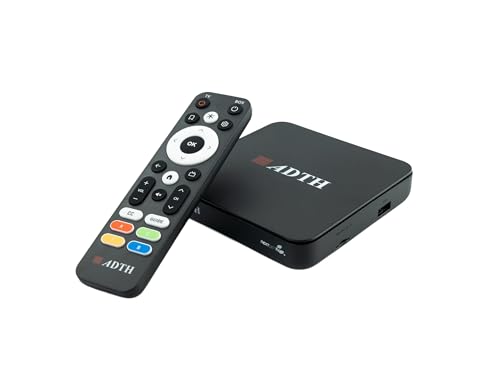
- ✓ Dual ATSC tuners in one box
- ✓ 4K HDR output
- ✓ Built-in 64GB DVR storage
- ✕ External storage may be needed for large libraries
- ✕ Requires antenna for OTA reception
| Tuner/digital TV standards | ATSC 3.0 (NextGen TV) and ATSC 1.0 |
| Video output resolution support | Up to 4K HDR |
| Internal storage | 64 GB built-in storage for DVR |
| Recording capability | DVR with pause/rewind/replay for live TV; expandable storage via USB flash drive or microSD card (sold separately) |
| Connectivity | Wi‑Fi (dual‑band) and Bluetooth for firmware updates and enhancements |
| Input/Output interfaces | HDMI video output; coaxial antenna input |
< p>That common belief that you either get a clunky DVR or you pay for a cable box? You can drop that notion with the ADTH NextGen TV Box Gen 2.
It sits quietly on a shelf, yet it feels ready for action as soon as you connect it to your TV. I slid in a beefy USB drive and, in minutes, the DVR was ready to roll on live OTA channels.
< p>What surprised me is the twin-tuner setup in one box. ATSC 3.0 for the newer NextGen broadcasts and ATSC 1.0 for legacy signals all in one box. It’s like having two receivers without taking up extra space on the entertainment stand. The setup wizard guided me through channel scans quickly, then I was picking up local stations without fuss.
< p>The 4K HDR output looks crisp on a compatible screen, and the built-in 64GB storage handles a solid slate of recordings. It’s not guessing here—your time-shifted viewing is front and center, with pause, rewind, and replay available right from the remote. If you need more space, you can bolt on an external USB drive or microSD card.
< p>Audio stays clear thanks to Dolby Digital Plus and AC-4 support, which is nice for dialogue-heavy news broadcasts or a show with multi-channel sound. The device is compact, so it tucks in a cabinet or on a shelf without shouting for attention. The Wi-Fi and Bluetooth radios keep the firmware fresh and ready for future NextGen TV enhancements.
< p>Bottom line: you don’t need a separate converter box or a payment plan to enjoy free HD and 4K OTA content. It’s a solid, affordable entry that actually makes cord-cutting feel practical, not tricky.
< p>If you’re upgrading an older TV or adding live OTA to a blank HDMI screen, this box nails the essential features with real-world ease—and that’s worth appreciating in daily use.
Maoershan Carrying Case Tablo TV 4th Gen 4-Tuner

- ✓ Solid protective shell
- ✓ Compact, travel-friendly
- ✓ Easy access and organization
- ✕ Case only (device sold separately)
- ✕ Limited internal customization
| Material | EVA |
| ExteriorColor | Black |
| InnerDimensions | 5.23 x 5.23 x 2.35 inches (L x H x W) |
| Compatibility | Fits Tablo TV 4th Gen 4-Tuner |
| Purpose | Carrying case for protection of Tablo TV 4th Gen 4-Tuner and accessories |
| IncludedItems | Case only (device and accessories sold separately) |
That moment you realize your travel setup is a mess of tiny bits and a fragile box you never trust on the road. The Maoershan carrying case changes that vibe in an instant.
It slides open, and you immediately feel the sturdy EVA shell guarding the Tablo accessories like a little personal hidden fortress.
You’ll notice the inner dimensions are compact, but just right for the Tablo TV 4th Gen 4-Tuner. The black exterior hides scuffs, and the soft interior lining cushions against tiny bumps during your commute.
It isn’t bulky, but it doesn’t skimp on protection either.
When you drop it into your backpack or glove compartment, the case stays steady. The lid closes with a reassuring click, not a flimsy snap you worry about later.
It helps you keep cables, power blocks, and a few extra adapters organized without turning your bag into a puzzle.
Setup on the coffee table feels calmer, too. You pull out the foam insert and you’re instantly ready to pack away once you’re done watching.
It’s simple, practical, and clearly designed for real life—where things get jostled and you still want your tech to survive the ride.
For people who value travel-ready protection without breaking the bank, this case is a solid companion. It won’t add bulk, yet it earns its keep with durability and organization when you’re moving between rooms, cars, or friend’s houses.
In short, you get peace of mind at a kid’s allowance price. It’s a no-fruss, no-nonsense shell that helps you keep your Tablo setup safe and accessible whenever you’re ready to reconnect to over-the-air TV.
What Are the Key Features of an Ideal Cheap Device for Recording Over the Air TV?
The key features of an ideal cheap device for recording over the air TV include:
- Built-in DVR Functionality: This feature allows users to record live TV shows and movies directly from over-the-air broadcasts. A built-in DVR means you won’t have to purchase additional equipment, making it a cost-effective solution for capturing your favorite content.
- User-Friendly Interface: An intuitive interface is essential for ease of navigation and operation. This ensures that users, regardless of their technical skill level, can easily schedule recordings, manage shows, and access their media library without frustration.
- Multiple Recording Options: The ability to record multiple shows at once is a significant advantage. This feature is particularly useful for households with varied viewing schedules, allowing several family members to watch their preferred programs without conflicts.
- Storage Capacity: Adequate storage is crucial for a recording device to hold a substantial number of recorded shows and movies. Devices with expandable storage options, such as external hard drive compatibility, offer flexibility for users who need more space over time.
- Streaming Capabilities: An ideal device should provide access to popular streaming services in addition to recording live TV. This feature allows users to consolidate their viewing experience, making it easy to switch between recorded content and on-demand shows.
- Remote Access: The ability to access recordings remotely is a valuable feature for users who travel or are away from home. This functionality typically comes through apps that allow streaming of recorded content on mobile devices, ensuring you never miss a show.
- HD Quality Recording: Recording in high definition is essential for enjoying the best viewing experience. An ideal device should support HD recording to ensure that your shows and movies are captured with excellent picture quality.
- Affordable Pricing: The cost of the device should align with its features and capabilities, providing good value for money. Finding a balance between affordability and functionality is key to ensuring that users get the best cheap device for recording over-the-air TV.
What Should You Consider When Evaluating Budget Recording Devices?
When evaluating budget recording devices for over-the-air TV, several important factors should be considered:
- Storage Capacity: Look for a device with adequate storage to hold your recorded shows. The amount of storage will determine how many hours of programming you can save before needing to delete content or upgrade.
- Recording Quality: Ensure the device supports at least 1080p recording quality, as this will enhance your viewing experience. Higher quality recordings will capture more detail, making it worthwhile if you plan to watch on larger screens.
- User Interface: A user-friendly interface makes it easier to schedule and manage recordings. Devices with intuitive menus and remote controls save time and reduce frustration when navigating through channels and settings.
- Compatibility: Verify that the device is compatible with your TV and supports the necessary formats for playback. It’s essential to check if it works with popular streaming services or if it can integrate with smart home systems.
- Remote Access Features: Some devices offer remote access capabilities, allowing users to manage recordings and watch content from mobile devices. This feature can be especially convenient for those who travel frequently or prefer to watch shows on the go.
- Price and Warranty: Budget is crucial, so compare prices across different devices to find the best value. Additionally, consider the warranty offered, as it reflects the manufacturer’s confidence in the product’s durability and performance.
- Customer Support and Reviews: Research customer reviews and ratings to gauge the overall satisfaction and reliability of the device. Good customer support can also provide peace of mind in case you encounter issues or need assistance with setup.
How Do Different Cheap Devices Perform in Recording Over the Air TV?
When looking for the best cheap devices to record over-the-air TV, several options stand out for their performance and affordability.
- Raspberry Pi with TV HAT: This compact and affordable device can be configured to receive and record over-the-air broadcasts when paired with compatible software like TVHeadend.
- Tablo Dual Lite: A user-friendly networked DVR that allows you to record live TV from antenna signals and stream it to various devices.
A network-based TV tuner that lets you watch and record live TV on multiple devices using compatible software like Plex or NextPVR. - Amazon Fire TV Recast: A DVR that integrates seamlessly with the Amazon ecosystem, enabling users to record over-the-air broadcasts and access them via Fire TV devices.
- Ematic AT103B: This budget-friendly device combines a digital TV converter box with the capability to record shows directly to a USB drive.
The Raspberry Pi’s TV HAT allows users to connect an antenna for receiving signals. Its flexibility means you can customize it to suit your needs, but it may require some technical know-how to set up and manage effectively.
The Tablo Dual Lite can record up to two shows simultaneously and offers a straightforward setup process. While it has a subscription model for advanced features, its ease of use makes it a popular choice for those seeking a hassle-free recording solution.
The HDHomeRun Connect is particularly appealing for its versatility, allowing simultaneous streaming on multiple devices. It connects to your home network, enabling access to recorded shows from anywhere, but users must be comfortable with setting up additional software for recording functionality.
The Fire TV Recast features a simple setup process and allows for recording two shows at once, with up to 75 hours of storage. It benefits from voice control through Alexa, making it an attractive choice for those already invested in Amazon’s ecosystem.
The Ematic AT103B is particularly appealing for users who want a straightforward solution without the need for additional hardware. While it lacks some advanced features found in pricier options, its simplicity makes it ideal for those who prefer a no-fuss recording experience.
What Are the Advantages and Disadvantages of Each Budget Device?
| Device | Advantages | Disadvantages |
|---|---|---|
| Roku Ultra | Affordable price, user-friendly interface, good recording quality, supports 4K streaming, offers voice control. | Limited storage capacity (up to 500 hours), fewer features compared to premium devices, requires a subscription for some services. |
| Amazon Fire TV Recast | Good compatibility with various TVs, reliable performance, allows recording of multiple shows simultaneously, integrates with Alexa for voice commands. | Higher price point for budget category, occasional software issues, requires an external hard drive for additional storage. |
| Tablo Dual Lite | Compact design, easy to set up, decent customer support, can stream to multiple devices, supports HD recording. | Lower recording resolution (720p), may lack advanced functionalities, requires a subscription for guide data and premium features. |
How Can You Set Up a Budget Device for Optimal Recording?
Setting up a budget device for optimal recording of over-the-air TV involves selecting the right equipment to ensure high-quality captures of your favorite shows.
- Digital TV Tuner: A digital TV tuner is essential for receiving over-the-air signals and converting them into a format that can be recorded. Look for tuners that support multiple formats and have good reception capabilities, as this will impact the quality of your recordings.
- External Hard Drive: An external hard drive provides ample storage space for your recorded content, especially when recording high-definition shows. Choose a drive with fast read/write speeds and sufficient capacity to ensure you won’t run out of space quickly.
- Recording Software: Reliable recording software is crucial for scheduling and managing recordings. Opt for software that is user-friendly and compatible with your device, offering features like automatic scheduling, series recording, and easy file management.
- Streaming Device with DVR Functionality: Many budget streaming devices now include DVR features for recording over-the-air TV. These devices usually come with a user-friendly interface and allow you to access various streaming services along with the ability to record live TV.
- Antennas: A good quality antenna is necessary for capturing over-the-air signals effectively. Depending on your location, you may need an indoor or outdoor antenna, and features such as signal amplification can enhance reception quality for clearer recordings.
The digital TV tuner not only enables access to broadcast channels but also ensures compatibility with recording devices, making it a crucial part of your setup. An external hard drive will allow you to store numerous hours of content without worrying about running out of space, especially if you plan to record multiple shows. Utilizing effective recording software simplifies the process of scheduling and managing your recordings, allowing for a seamless experience.
Investing in a streaming device with DVR capabilities can provide an all-in-one solution, combining live TV viewing with streaming options, which adds versatility to your entertainment setup. Lastly, selecting the right type of antenna based on your environment will significantly affect your ability to receive signals for recording, ensuring you capture high-quality broadcasts without interruptions.
What Are the Common Limitations of Affordable OTA Recording Devices?
The common limitations of affordable OTA recording devices include:
- Limited Storage Capacity: Many budget-friendly OTA recording devices come with minimal internal storage, which restricts the number of shows or movies that can be recorded.
- Basic Features: Inexpensive devices often lack advanced features such as smart capabilities, cloud storage options, or multi-device support, which can enhance the user experience.
- Poor Recording Quality: Some cheap devices may not support high-definition recording, leading to lower video quality that can detract from the viewing experience.
- Compatibility Issues: Affordable devices may not be compatible with all types of broadcasting signals or streaming services, limiting their usability.
- Limited User Interface: Many inexpensive devices have a simplistic user interface that can be less intuitive, making it challenging for users to navigate and manage recordings.
Limited storage capacity is a significant drawback of many affordable OTA recording devices, as they often only provide enough space for a few hours of content, forcing users to frequently delete old recordings to make room for new ones.
Basic features are another limitation, as these budget devices typically do not offer enhancements like built-in streaming apps or the ability to record multiple shows simultaneously, which are commonly found in more expensive models.
Poor recording quality can be an issue with cheaper options, as they might not support full HD or 4K recording, resulting in grainy or pixelated playback that can diminish the enjoyment of watching recorded content.
Compatibility issues arise when affordable devices do not support all broadcast formats or fail to work seamlessly with popular streaming services, limiting users’ options for viewing their favorite shows.
Lastly, a limited user interface in budget devices can make it frustrating for users to find and manage their recordings, as these interfaces are often less sophisticated and user-friendly compared to those found in higher-end models.
Related Post: