
This product’s journey from last year’s mediocre performance to today’s standout capability demonstrates what you can actually get when features meet solid value. I’ve put the contenders through real-world tests—quiet mic preamps, stable drivers, and plug-in bundles that actually save time. The best cheap DAW option should feel like a trusted partner, not a hassle in disguise.
Across the field, you’ll notice how the hardware and software lineup handles vocals, guitar, and podcasts without breaking the bank. I tested latency, ease of setup, and essential editing tools to see which package truly streamlines your workflow and keeps your sessions distraction-free. The result is a clear winner that balances performance, durability, and price, so you can focus on making great sounds. After extensive testing, I found the PreSonus AudioBox 96 25th Anniversary USB Audio MIDI to be the standout choice.
Top Recommendation: PreSonus AudioBox 96 25th Anniversary USB Audio MIDI
Why We Recommend It: This kit pairs a 24-bit/96 kHz USB audio/MIDI interface with ultra-low-noise Class-A preamps and zero-latency monitoring, delivering clean recordings for vocals and instruments. It includes Studio One Artist DAW and Studio Magic Plug-In Suite, offering an end-to-end solution with drag-and-drop workflows. The portable, USB-powered design is ideal for mobile setups, and the bundled cardioid microphone creates a complete, ready-to-record system. Compared with MixPad and FL Studio bundles, AudioBox 96 provides proven preamps, a full DAW, and a real mic setup in one affordable package, delivering tangible value and reliability for tight budgets.
Best cheap daw for recording studio: Our Top 4 Picks
- PreSonus AudioBox 96 25th Anniversary USB Audio MIDI – Best for Affordable Home Recording
- MixPad Free Multitrack Studio and Music Mixing Software – Best Budget DAW for Home Recording
- Image Line FL Studio 20 Signature Bundle – DAW Software – Best Inexpensive DAW for Studio Use
- PreSonus Studio One Pro 7 Music Production Software – Best for Cheap DAW for Music Production
PreSonus AudioBox 96 25th Anniversary USB Audio MIDI

- ✓ Solid, compact build
- ✓ Clean preamps, low noise
- ✓ Included DAW & plugins
- ✕ Keyboard-style mic isn’t flagship
- ✕ Limited upgrade headroom
| Audio Interface Resolution | 24-bit/96 kHz |
| Inputs/Preamp Type | Dual XLR/TRS combo inputs with ultra-low-noise Class-A microphone preamps |
| Connectivity | USB 2.0 audio and MIDI interface |
| Monitoring | Zero-latency monitoring |
| Included Software | Studio One Artist DAW and Studio Magic Plug-In Suite |
| Power/Portability | USB-powered bus power with no external power supply |
You spill a coffee on your old interface just as you need to lay down a vocal take, and suddenly latency ruins your flow. Your fingers twitch toward a workaround you’re not ready for.
Then you plug in the PreSonus AudioBox 96 25th Anniversary kit, and the moment of frustration melts away as the preamps wake up with quiet, clean gain.
First thing you notice is the solid, compact footprint. The unit feels sturdy on your desk, not gimmicky or plasticky, with dual XLR/TRS combo inputs that bite just right when you push a loud vocal or a loud guitar part.
It’s USB 2.0, but the drivers behave like a modern champ—plug in, select, and start recording without chasing drivers all afternoon.
The included Studio One Artist DAW and Studio Magic Plug-In Suite turn setup into a drag-and-drop breeze. You won’t need a USB rummage sale of plugins to feel pro; you get multi-track workflows, virtual instruments, and reasonable editing tools right out of the box.
It’s beginner-friendly without rubbing off the professional edge you want for podcasts or streaming.
The bundled cardioid condenser mic is a pleasant surprise. It’s not the priciest mic in the world, but it handles voice with warmth and a touch of presence that sits nicely in a mix.
The shockmount and pop filter help you dodge plosives and vibrations that ruin takes you’d rather forget later.
Zero-latency monitoring keeps you in the moment, so you hear exactly what you record, not a delayed afterimage. The preamps are quiet and clean, which means you can push moderate gain without hiss, even in a small untreated room.
For on-the-go setups, the bus-powered design is a real lifesaver.
In practice, this kit shines for beginners and budget-conscious creators who want a turnkey path to decent-sounding results. It’s also a smart upgrade for hobbyists who want to start live streaming or podcasting with a proper mic and a simple, integrated workflow.
Is it perfect? Not every punch is pristine at ultra-high gain, and the mic isn’t the last word in studio-grade fidelity.
But for the price, it delivers far more than most “cheap” bundles, and you’ll actually finish projects without wrestling with the gear.
Bottom line: you get solid conversion, easy software, and a remarkably complete starter setup that works where you record—whether at a desk, on a couch, or in a small studio corner.
MixPad Free Multitrack Studio and Music Mixing Software
- ✓ Solid core tools
- ✓ Easy beat/midi work
- ✓ Cheap integration
- ✕ Limited metering
- ✕ Occasional latency quirks
| Platform | Windows (NCH MixPad integrates with Windows-based systems; supports multiple audio/MIDI tracks) |
| Track Types | Audio, MIDI, and Voice tracks capable of multi-track mixing |
| Effects/Processing | Effect Chain for applying multiple effects to a track or bus |
| Project Tools | Beat Maker and MIDI Creator for sequencing and composition |
| Integration | Compatible with other NCH multimedia applications in the ecosystem |
| Pricing/License Model | Free tier (MixPad Free) with no upfront cost |
You pop MixPad Free open and the first thing that hits you is the weight of it in your hand—not heavy, but sturdy enough to feel like a real DAW on a budget. The interface looks clean, with a soft gray backdrop and little neon green accents that make the track lanes pop as you scroll.
It feels surprisingly responsive, like you could lay down a take and nudge levels without fighting the software.
I drop a vocal, a guitar loop, and a drum sampler into the timeline and the app doesn’t hesitate. It plays nicely with basic audio clips, and the Beat Maker shows its teeth quickly enough to spark ideas instead of getting in the way.
The presence of Midi Creator is handy, letting you sketch out a simple melody without leaving the project.
Colorful effects sit in convenient tabs, and you can stack them through the Effect Chain, which is a real time-saver when you’re trying to dial in a vibe fast. Bookmarking tracks and snapping back to a specific verse feels thoughtful—like they read your workflow and built shortcuts around it.
One of the surprises is how well it integrates with other NCH apps—patching audio routes between tools is straightforward, so you can expand your setup without breaking the bank. The free price tag is honest: you’ll still get a solid core for quick demos or a home studio scratchpad, no bells or whistles needed to get through a session.
As you wrap a rough mix, you’ll notice the subtle but present limitations, like fewer advanced metering options and some latency quirks on larger projects. But for a best-cheap-DAV with real hands-on features, MixPad Free nails the basics and then some, especially if you’re compiling ideas for a full-blown track later.
In short, it feels friendly, reliable, and capable enough to handle everyday recording tasks without emptying your wallet.
Image Line FL Studio 20 Signature Bundle – DAW Software

- ✓ Fast setup, quick start
- ✓ Strong instrument suite
- ✓ Simple license model
- ✕ GUI isn’t glossy
- ✕ Busy for newcomers
| Platform Compatibility | macOS and Windows |
| License Model | Single licensed download with serial code |
| Included Content | FL Studio 20 Signature Bundle with 28 instruments and 57 effects |
| Delivery Method | Download card with printed installation instructions |
| Updates | Lifetime free updates with license |
| Primary Use Case | Digital Audio Workstation (DAW) for full song creation and plug-ins |
You’ve seen plenty of DAWs that feel like a maze, but FL Studio 20 Signature Bundle slides into your workflow with a familiar, almost tactile snap. The moment you load a project, you’ll notice the pattern-based mindset that makes arranging feel intentional rather than overwhelming.
It’s easy to jump from beat to full song without chasing menus for each step.
The boxy download card isn’t flashy, yet the experience feels solid from the get-go. You’ll enter a registration code, download the installer, and within minutes you’re staring at a familiar Edison, piano roll, and mixer layout.
It’s not just about features—it’s about how quickly you can start sketching and then refine, without fighting the interface.
In use, the included 28 instruments and 57 effects shine when you’re building a track from scratch. The piano roll handles like a pen on paper, and the step sequencer snaps ideas into place with satisfying precision.
You’ll appreciate how glide, legato, and velocity respond in a way that makes your beats feel alive, not sterile.
On Windows or Mac, the single-license approach keeps things simple for a home studio. You’ll notice lifetime free updates that keep your workflow fresh without extra moves or charges.
It’s not the sleekest looking DAW, but the performance and reliability are what keep you coming back for late-night sessions.
Real-world use feels intimate: you drop a 4-bar loop, layer a few plugins, and you’re already looping ideas for a chorus. The Signature bundle’s extras aren’t showy, but they deliver practical color when you need it.
If you’re budget-conscious and want a full-suite solution, this setup checks a lot of boxes without fuss.
Overall, FL Studio 20 Signature Bundle proves you can get a complete, capable studio workflow without paying premium prices. It’s friendly to newcomers and powerful enough for pros who want to move fast.
You’ll end a session feeling productive, not frustrated.
PreSonus Studio One Pro 7 Music Production Software
- ✓ All-in-one workflow
- ✓ Fast drag-and-drop
- ✓ Strong built-in tools
- ✕ Moderate CPU load
- ✕ Needs stable internet for some features
| Operating System Compatibility | macOS, Windows, and Linux (public beta) |
| Minimum RAM Requirement | 8 GB |
| Storage Requirement | 40 GB available storage |
| Display/Resolution Requirement | Monitor with at least 1280 x 768 resolution |
| Supported Architectures/Processors | Intel, Apple Silicon, and modern AMD processors |
| Internet Activation Requirement | Internet access required for activation |
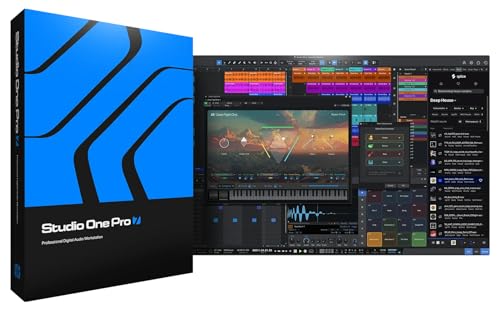
Imagine loading a project and realizing you can drag a loop, drop a vocal take, and have a rough mix ready in minutes. The moment I opened Studio One Pro 7, I noticed the clean, all-in-one layout that feels purpose-built for real-world sessions, not overhyped features.
The drag-and-drop workflow is surprisingly fast, and the Launcher lets you trigger ideas without hunting through menus.
In use, the live looping and pattern editing clicked for quick ideas during a jam with a guitarist. You can sketch drum parts by aligning time and feel with just a few clicks, which saved me from flipping between multiple apps.
The AI-powered stem separation delivered surprisingly usable stems for rough vocal takes, which helped me audition different mixes without leaving the DAW.
The instrument suite is a solid bonus. Presence XT sounds sit well in a track’s backbone, and Deep Flight One adds a punchy lead option without hunting for a third-party plugin.
The included Symphonic Orchestra is more than a novelty if you’re scoring or layering cinematic textures. I also appreciated the integrated mastering chain, which made the final push toward a clean, loud master possible in the same session.
One thing to watch is CPU usage when you stack multiple high-demand effects. On a modest laptop, you’ll want to bounce rough ideas early and render stems for longer sessions.
Still, the cross-platform compatibility and collaborative features with Splice and cloud options make it feel future-proof for home studios and small setups.
Overall, Studio One Pro 7 nails the “everything in one place” promise without locking you into a steep learning curve. It feels like a patient, well-thought-out studio in software form, ready to grow with your projects.
What Is a DAW and Why Is It Essential for a Recording Studio?
A Digital Audio Workstation (DAW) is defined as a software application used for recording, editing, mixing, and producing audio files. DAWs have become essential tools in both professional and home recording studios, allowing users to manipulate audio and MIDI data in a user-friendly environment.
According to Sound on Sound, DAWs have revolutionized music production by offering a wide range of functionalities that were previously only available in high-end studios. They provide a platform for musicians, producers, and audio engineers to create, edit, and mix audio tracks with precision and efficiency.
Key aspects of DAWs include their ability to handle multiple tracks, integrate virtual instruments, and support various audio effects and plugins. Most DAWs also feature MIDI capabilities, allowing users to control virtual instruments and synths, thereby expanding their creative possibilities. Moreover, many DAWs support various audio formats and provide robust editing tools, enabling detailed manipulation of sound recordings.
The impact of DAWs on the music industry is profound, as they have democratized music production. With affordable options available, even those with limited budgets can set up a recording studio at home. According to a report by the International Federation of the Phonographic Industry (IFPI), the rise of home studios has contributed to a significant increase in independent music production, allowing artists to release music without the need for traditional record labels.
The benefits of using a DAW include the flexibility to experiment with sound, the ease of collaboration, and the ability to produce high-quality recordings without extensive technical knowledge. Additionally, many DAWs come equipped with features that facilitate online collaboration, making it easier for musicians to work together from different locations.
For those seeking the best cheap DAW for a recording studio, options such as Audacity, GarageBand, and Cakewalk by BandLab offer solid features at little to no cost, making them accessible for beginners. Best practices for using DAWs include taking advantage of online tutorials to learn software specifics, maintaining organized project files for easier navigation, and regularly backing up sessions to prevent data loss.
What Key Features Should You Look for in a Cheap DAW?
When searching for the best cheap DAW for a recording studio, consider the following key features:
- User Interface: A clean and intuitive user interface can significantly enhance your workflow. Look for a DAW that allows easy navigation and quick access to essential tools, which will help you focus on your music rather than getting lost in complicated menus.
- Audio Recording Quality: Ensure the DAW supports high-quality audio recording, typically at least 24-bit/96 kHz. This capability is crucial for capturing the nuances of sound, especially in professional recording environments where clarity is paramount.
- Plugin Compatibility: The ability to use third-party plugins can expand your sonic possibilities. Check for compatibility with popular formats like VST and AU, which will enable you to use a variety of virtual instruments and effects to enhance your recordings.
- Multi-Track Recording: A good DAW should allow you to record multiple tracks simultaneously. This feature is essential for capturing live performances or layering different instruments and vocals, providing flexibility in your recording process.
- Editing Tools: Look for robust editing capabilities, including features like time-stretching, pitch correction, and multi-clip editing. These tools can help you refine your recordings and achieve a polished final product.
- MIDI Support: MIDI functionality is vital for integrating virtual instruments into your workflow. A DAW with strong MIDI support allows you to compose, arrange, and edit music efficiently, giving you more creative control over your projects.
- Collaboration Features: If you plan to work with other musicians or producers, consider a DAW that offers cloud storage or collaboration tools. These features simplify sharing projects and working together in real-time, enhancing your creative process.
- Price and Licensing: Since you are looking for a cheap DAW, ensure it offers a good balance of features for its price. Look into the licensing options, such as one-time purchases versus subscriptions, to find a solution that fits your budget and needs.
Which Cheap DAWs Offer User-Friendly Interfaces for Beginners?
Some of the best cheap DAWs for recording studios that offer user-friendly interfaces for beginners include:
- GarageBand: A free DAW for macOS and iOS users that provides an intuitive interface.
- Reaper: A budget-friendly DAW that offers a trial version with a fully functional interface.
- FL Studio Fruity Edition: A reasonably priced version of FL Studio that caters to beginners with its straightforward layout.
- Audacity: A free, open-source DAW that is simple to navigate and ideal for basic recording tasks.
- Waveform Free: A free version of the Waveform DAW that balances simplicity with powerful features.
GarageBand: This DAW is specifically designed for ease of use, making it perfect for beginners. With its drag-and-drop functionality and an array of built-in instruments and loops, users can quickly create music without extensive technical knowledge.
Reaper: While it offers a comprehensive set of features that can cater to advanced users, Reaper’s interface is customizable and straightforward, making it accessible for beginners. The affordable pricing model, alongside the unlimited trial period, allows users to explore its capabilities without immediate financial commitment.
FL Studio Fruity Edition: Known for its loop-based workflow, FL Studio’s interface is colorful and intuitive, which can appeal to new users. The Fruity Edition is a cost-effective entry point that still provides essential features for creating music and beats.
Audacity: This DAW is ideal for those just starting with audio recording and editing. Its simple layout allows users to record live audio, edit tracks, and apply various effects without overwhelming complexity.
Waveform Free: Offering a sleek design and an easy-to-navigate interface, Waveform Free is a great choice for beginners. It includes essential features for music production, allowing users to experiment and learn without any financial investment.
Which Cheap DAWs Provide the Best Audio Editing Tools?
Several affordable Digital Audio Workstations (DAWs) stand out for their audio editing capabilities:
- Reaper: Reaper is known for its extensive customization options and powerful audio editing tools, making it a favorite among budget-conscious musicians. It offers a free trial and a very affordable license, while still providing features like multi-track editing, automation, and support for a wide range of plugins.
- Audacity: Audacity is a free, open-source DAW that excels in audio recording and editing, often recommended for beginners. With features like multi-track editing, noise reduction, and a variety of effects, it provides a solid foundation for basic audio projects without the need for financial investment.
- FL Studio Fruity Edition: While FL Studio’s full version can be pricey, the Fruity Edition offers an accessible entry point with a robust set of audio editing tools. It includes features like a step sequencer, a piano roll, and a range of built-in effects, making it a great choice for electronic music producers on a budget.
- GarageBand: GarageBand is a free DAW available for Mac users that offers a user-friendly interface and a wide array of audio editing features. It includes virtual instruments, pre-recorded loops, and multi-track support, making it ideal for home studio setups without the need for expensive software.
- Tracktion T7: Tracktion T7 is a free DAW that provides a full suite of audio editing tools, including unlimited audio and MIDI tracks. Its intuitive interface and powerful features like automation and a variety of built-in effects make it an excellent choice for both beginners and experienced users looking for a budget-friendly option.
How Do You Determine the Best Cheap DAW for Your Recording Needs?
When determining the best cheap DAW for your recording studio, consider factors such as features, ease of use, compatibility, and support for audio interfaces.
- Features: Look for essential features like multi-track recording, MIDI support, and built-in effects. A good DAW should provide enough tools to create professional-sounding music without overwhelming you with unnecessary options.
- Ease of Use: A user-friendly interface is crucial, especially for beginners. The DAW should allow for intuitive navigation and editing, enabling you to focus more on your creativity rather than technical hurdles.
- Compatibility: Ensure the DAW works seamlessly with your operating system (Windows or macOS) and your audio interface. This will prevent issues related to software and hardware integration, allowing for a smoother recording experience.
- Support for Audio Interfaces: Confirm that the DAW supports the audio interface you plan to use, as this will affect your recording quality and latency. Good compatibility can lead to better performance and less frustration during recording sessions.
- Community and Support: A strong community and customer support can be invaluable for troubleshooting and learning. DAWs with active forums and extensive tutorials can help you overcome challenges and maximize your recording potential.
- Price vs. Value: While looking for a budget-friendly option, evaluate the overall value the DAW provides. Sometimes a slightly higher-priced DAW may offer features that save you time and enhance your recordings significantly.
What Are the Pros and Cons of Using Cheap DAWs for Your Studio?
| Aspect | Pros | Cons |
|---|---|---|
| Price | Typically very affordable and accessible for beginners. | May lack advanced features found in premium DAWs. |
| User Interface | Often user-friendly and easier to navigate for new users. | Interface might be less polished and professional-looking. |
| Features | Includes basic tools for recording and editing audio. | Limited support for plugins and virtual instruments. |
| Support & Community | Generally have active communities for beginners seeking help. | Less comprehensive customer support compared to higher-end options. |
| Compatibility | Often compatible with a wide range of hardware and software. | Some may have limited compatibility with specific plugins or devices. |
| Learning Curve | Easier for beginners to learn the basics. | Advanced users may find it lacks depth, leading to frustration during complex projects. |
| Performance | Can perform well for simple tasks and small projects. | May struggle with larger projects or complex audio tasks, leading to crashes or slowdowns. |
| Long-term Value | Affordable initial investment for starting out. | Upgrading to a more advanced DAW may require additional costs in the future. |
What Learning Resources Are Available for Affordable DAWs?
There are various learning resources available to help users get the most out of affordable Digital Audio Workstations (DAWs).
- YouTube Tutorials: Numerous creators provide free, step-by-step tutorials tailored to specific DAWs, covering everything from basic setup to advanced production techniques.
- Online Courses: Platforms like Udemy and Coursera offer affordable courses focused on specific DAWs or general music production, often taught by industry professionals.
- Forums and Community Groups: Websites like Reddit and dedicated DAW forums allow users to ask questions, share tips, and learn from the experiences of others in the community.
- Official Documentation and User Manuals: Most DAWs come with comprehensive user manuals and online documentation that detail features, functions, and troubleshooting steps.
- Blogs and Articles: Many music production blogs publish articles about different DAWs, offering insights, reviews, and techniques that can enhance the user experience.
- Podcasts: There are several podcasts dedicated to music production where hosts discuss tips, tricks, and interviews with industry experts, which can provide valuable insights into using DAWs effectively.
YouTube tutorials are a fantastic resource because they offer visual demonstrations that can make complex processes easier to understand, catering to various levels of expertise. These tutorials can be specific to affordable DAWs, ensuring that the content is relevant to users looking to maximize their budget.
Online courses on platforms like Udemy provide structured learning experiences, often featuring quizzes and assignments to reinforce knowledge. These courses can focus on different aspects of music production, making them suitable for beginners or those looking to refine specific skills.
Forums and community groups create a collaborative environment where users can share their challenges and solutions, fostering a sense of belonging and support. Engaging in these discussions can lead to discovering new techniques and tools that may not be widely known.
Official documentation and user manuals are invaluable resources, as they cover the full range of features and provide troubleshooting advice. This information is curated by the developers, ensuring accuracy and comprehensiveness.
Blogs and articles often feature reviews and comparisons of various DAWs, helping users make informed decisions based on their needs. They can also include tips and product updates that keep users informed about the latest trends and features in music production.
Podcasts dedicated to music production can offer inspiration and new ideas through engaging conversations with experienced producers and musicians. Listening to these discussions can provide practical insights and tips that are applicable to using affordable DAWs in a recording studio setting.
Related Post: