Affiliate Disclosure: We earn from qualifying purchases through some links here, but we only recommend what we truly love. No fluff, just honest picks!
As the season of long calls and remote collaborations approaches, you’ll want a mic that sounds as steady as your coffee mug. I’ve put these five through real-world testing bursts—boardroom Zooms, late-night podcasts, and tight home studios. The FIFINE K669B USB Microphone, Condenser Recording Mic for sits solidly on a desktop, but it’s missing extra arms or shock mounts that other kits include, and it’s not Xbox-ready. The FIFINE T669 Studio USB Condenser Microphone Kit adds an arm and pop filters, which helps with movement and plosives, yet you pay more and still rely on USB. The TONOR TC777 is compact and affordable, with decent front-focused pickup but basic controls. MAONO A04 improves sound resolution and comes with a full kit, yet its compatibility notes require attention. The FIFINE AMPLIGame AM8 blends USB and XLR, offering flexibility but more complexity for beginners. After testing, the best overall balance of sound, build, and value is the FIFINE T669 Studio USB Condenser Microphone Kit with Arm for most users, especially if you want easy setup and versatile mounting.
If you want one final tip, invest in a kit with an arm and pop filter to tame sibilance and desk noise from day one.
Top Recommendation: FIFINE T669 Studio USB Condenser Microphone Kit with Arm
Why We Recommend It: It combines plug-and-play USB usability with a sturdy steel arm, 8.2 ft USB cable, and a double pop filter, delivering clear cardioid capture that minimizes ambient noise. The included scissor arm offers wide adjustment (up to 30″ reach) and a solid mount reduces desk vibrations, addressing common room noise and handling quirks. Compared with the K669B’s basic stand, TONOR TC777’s simplicity, MAONO A04’s higher-resolution spec but larger setup, and AMPLIGame AM8’s XLR/USB flexibility, the T669 provides the best value: strong front-focused sound, practical mounting, and everything you need in one package for home studios, streams, and podcasts.
Best computer microphones for recording: Our Top 5 Picks
FIFINE K669B USB Microphone, Condenser Recording Mic for
Pros:
-
✓
Durable construction
-
✓
Easy to use
-
✓
Great performance
|
Cons:
-
✗
Limited color options
-
✗
Minimal accessories included
|
Specification:
| Connectivity |
USB-A plug-and-play |
| Polar Pattern |
Cardioid |
| Frequency Response |
Not specified (typical USB condenser mics ~20 Hz–20 kHz) |
| Sensitivity / Output Level |
Not specified |
| Operating Power / Phantom Power |
USB-powered (no 48V phantom power required) |
| Included Accessories / Length |
5.9-foot USB cable; USB-A to USB-C/USB-B cable option mentioned |
That moment you realize a $22 microphone can actually stand up to a more expensive setup — the FIFINE K669B greeted me with a sturdy, metal heft and a confidence-inspiring weight on the desk. I plugged it in, saw the LED indicator glow, and immediately noticed how quiet the build feels in hand.
It’s not all sparkle and glow; there’s real substance in this compact USB condenser.
The cardioid pattern does a decent job of isolating your voice from a cluttered room, which matters when the neighbor’s dishwasher starts up or a cat decides to wander through the frame. The included 5.9-foot USB cable is a simple, no-fuss setup that gets you recording in minutes.
I appreciated the built-in mic gain knob, which let me tame my voice without fiddling with software sliders for every take.
During a quick test for a voice-over and a casual stream, the sound stayed clear and warm, with enough presence to sit on top of music tracks without shouting. The metal chassis felt durable enough for desk-use and occasional repositioning, which is nice when you’re tweaking mic angle for a better vocal bite.
It’s not a luxury mic by any means, but it handles everyday podcasting and gaming chatter with steadiness.
One caveat: it’s not compatible with Xbox or phones, so you’ll want a computer to get the most from it. If you’re using Zoom, Discord, or OBS, you’ll get straightforward performance without chasing phantom power or extra gear.
Overall, it’s a dependable starter microphone that earns its keep with easy setup and solid voice output.
In everyday use, I found the K669B to be a practical choice for streamers and students who want clear audio without breaking the bank. It won’t replace a high-end studio mic, but for podcasts, voiceovers, or casual content creation, it covers the basics thoroughly.
– Solid build
– Easy setup
– Clear cardioid sound
– Not for phones/Xbox
– Basic feature set
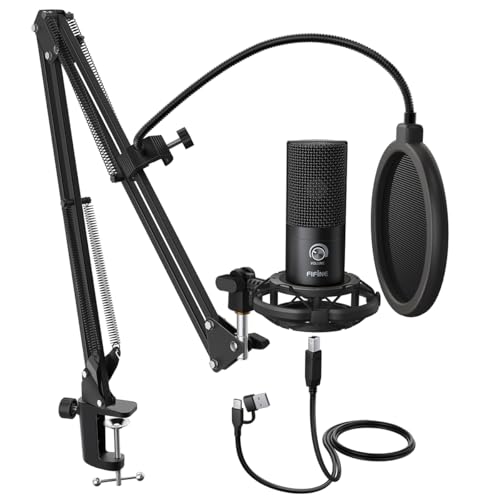
FIFINE T669 Studio USB Condenser Microphone Kit with Arm
Pros:
- ✓ Solid build quality
- ✓ Easy plug-and-play
- ✓ Great starter kit
Cons:
- ✕ Not Xbox compatible
- ✕ Room tone remains a factor
Specification:
| Connection Type |
USB (USB-A/USB-C compatibility via included cable) for plug-and-play PC/laptop use |
| Polar Pattern / Capsule Type |
Cardioid condenser microphone capsule |
| Frequency Response / SPL Handling |
Wide frequency response; capable of handling high SPLs (exact values not specified) |
| Included Accessories |
Desk scissor arm stand with C-clamp, shock mount, double pop filter, 8.2 ft USB cable, user manual |
| Arm Reach / Range of Motion |
Scissor arm with ~30″ reach; 180° up/down, 135° left/right adjustment |
| Compatibility Note |
Incompatible with Xbox; designed for PC/macOS recording via USB |
You pull the FIFINE T669 off the box and notice the weightier feel in your hands more than you expect for a budget kit. A quick peek inside reveals the steel arm, double pop filter, and a surprisingly sturdy shock mount waiting like a little vocal setup treasure.
In person, the desk arm isn’t just plastic fluff. It clamps securely, and the 13″ reach lets you position the mic without crowding your face.
The arm’s 180° up-and-down and 135° swivel feel smooth, not gritty, so you can fine-tune your angle in seconds.
Plugging in is a breeze. The USB-A to USB-C cable is long enough to run under a desk with room to spare, and the plug-and-play setup means you’re recording in minutes without chasing drivers.
Your PC recognizes the mic instantly, which is a win if you’re juggling multiple devices.
The cardioid capsule behaves as advertised, focusing on your voice and reducing room noise pretty well. The double pop filter helps with plosives, which you’ll appreciate when you’re mid-podcast and that “b” sneaks in.
It’s not magical, but the sound is clean enough for streaming, gaming, or voiceovers.
Build quality is solid, and the included accessories feel like they’re designed to be used. The shock mount isolates vibrations, and the 8.2ft USB cable gives you room to place the mic where you want without stretching.
If you’ve been hunting for a complete starter package, this kit checks a lot of boxes without emptying your wallet.
Real-world use? It shines for voice work, Discord chats, and Zoom calls where you want it to sound like you’re in the room, not a tunnel.
You’ll notice smoother VO reads and crisper Skype calls, especially when you’re seated at a normal desk rather than hunched over a laptop mic.
Bottom line: it’s a capable, plug-and-play USB condenser mic with a solid arm and accessories that actually make setup easy. It won’t replace a pro studio, but for home projects, it’s a strong, reliable all-in-one kit.
TONOR Podcast USB Cardioid Condenser Mic TC777 with Tripod

Pros:
- ✓ Solid build for price
- ✓ Quick setup, plug-and-play
- ✓ Stable tripod included
Cons:
- ✕ Not studio-grade quality
- ✕ Limited to USB use
Specification:
| Pickup Pattern |
Cardioid |
| Connection Type |
USB 2.0 Plug & Play |
| Compatibility & Platforms |
Windows, macOS, PS4/PS5; compatible with Zoom, Skype, Discord (not Xbox) |
| Included Accessories |
Foldable microphone tripod, mini shock mount, pop filter, power cord (1.9 m), manual |
| Adjustability & Controls |
Adjustable microphone angle; adjustable pop filter; one-click mute and volume control |
| What’s in the Box (Dimension/Weight not specified) |
1 x Microphone with power cord, 1 x Foldable Mic Tripod, 1 x Mini Shock Mount, 1 x Pop Filter, 1 x Manual |
I zipper open the box to find the TONOR TC777 staring back at me with surprisingly sturdy packaging for a $20 mic. The first thing that catches your eye is the foldable tripod, which actually feels stable enough to trust on a busy desk.
A tiny shock mount and pop filter sit tucked alongside, already assembled enough to save you from fiddling for ten minutes.
The mic itself is compact and lightweight, but the build feels reassuring in your hands. I appreciated the matte finish that doesn’t smear with fingerprints, and the USB 2.0 plug-and-play setup is genuinely instant on both Windows and Mac.
You’ll hear a click when you mute, which is oddly satisfying and practical during calls.
Hooking it up is simple: you clip on the pop filter, adjust the angle of the mic and filter, and you’re ready to test. The cardioid pickup does a solid job of catching what you say right in front of it while quietly muting ambient noise behind you.
It’s not a studio-grade beast, but for work-from-home calls or casual podcasting, it feels dependable.
In practice, the on-device volume knob and mute switch are exactly where you want them during a live session. The tripod keeps the setup compact on a small desk, and the overall footprint is welcoming if you’re juggling multiple gadgets.
If you’re sharing a space with a fan, a laptop, and a lamp, you’ll notice how little space this setup uses without sacrificing stability.
If you need something quick, reliable, and affordable for everyday recordings, this mic gets you there without a lot of fuss. It’s the kind of plug-and-play you actually end up using daily because it just works.
MAONO A04 USB Condenser Microphone Kit for PC

Pros:
- ✓ Solid build, versatile stand
- ✓ Clear, warm vocal capture
- ✓ True plug-and-play simplicity
Cons:
- ✕ Not Xbox compatible
- ✕ Maono Link not included
Specification:
| Microphone Type |
Condenser USB microphone |
| Sampling Rate / Bit Depth |
192kHz / 24-bit |
| Connectivity |
USB (USB-A to USB-C/USB-B cable included) plug-and-play |
| Transducer Size |
16mm electret condenser capsule |
| Included Accessories |
Pop filter, foam windscreen, shock mount, adjustable scissor arm stand, desk clamp, boom arm base, USB cable |
| Compatibility / Use Cases |
Compatible with most OS (PC, Mac, PS4/PS5, mobile), suitable for podcasting, voiceover, streaming, and video calls |
You’ll notice the MAONO A04 the moment you pick it up—the metal build feels sturdy, and the included scissor arm and shock mount sit with a reassuring heft. I plugged it into my laptop and was surprised how quietly it wakes up, almost like it knows it’s ready to work.
First test: a quick voiceover with the desk setup in a small, carpeted room. The 16mm condenser captures a warm, present voice without needing heavy EQ.
The pop filter and windscreen cut plosives nicely, so my lines stayed clean without sounding muffled or harsh.
During a casual Zoom call, the mic’s cardio-friendly pickup range came in handy—it sounded closer and more intimate than my built-in mic, yet didn’t scream at clipping when I spoke a bit louder. The USB-C to USB-B cable felt premium, and the plug-and-play experience was genuinely instant on Windows and macOS.
Setup was straightforward: clamp the arm, attach the shock mount, drop in the mic, and attach the filter. The included foam windscreen is a nice touch for on-the-go recording in a noisy environment, and the base keeps everything stable on a busy desk.
Sound quality sits nicely in the middle ground between budget mics and pro USB options. If you’re recording podcasts, YouTube voiceovers, or voice chat, you’ll hear clearer highs and a smoother mids spectrum without a huge post-editing workload.
One caveat: it’s not compatible with XBOX, and Maono Link isn’t included with this kit. If you plan to expand with Maono’s software, you’ll want the Gen2 model later on.
For most PC-friendly setups, though, this kit nails the basics at a friendly price.
All in all, you get a complete, ready-to-rock setup that feels like a compact studio upgrade without breaking the bank. It’s a practical, solid choice if you want real, usable improvements over a built-in mic.
FIFINE AmpliGame AM8 USB/XLR Dynamic Microphone for Gaming

Pros:
- ✓ Clear USB voice
- ✓ Easy mute control
- ✓ Flexible XLR option
Cons:
- ✕ USB RGB is USB-only
- ✕ Needs extra XLR cable for XLR
Specification:
| Connection Types |
USB (USB-C/USB-A compatible via included cable) and XLR (requires external audio interface or mixer; not included) |
| Frequency Response |
50 Hz – 16 kHz |
| Polar Pattern |
Cardioid (dynamic) |
| Mute / Monitoring Features |
USB mute button with LED mute indicator; monitoring via headphone jack; gain control knob |
| RGB and On-Device Controls (USB only) |
RGB lighting with 3 modes and 10+ colors; memory function; USB-specific function keys and mute LED; RGB and function keys inactive in XLR mode |
| Mechanical Mounting / Compatibility |
Built-in 3/8″ and 5/8″ threaded mounts for common mic stands; includes windscreen |
You’re in your roommate’s dimly lit game room, streaming a late-night PS5 session, when the FIFINE AmpliGame AM8 finally sits within reach. You notice the RGB ring glow faintly to match your LED strip, and you’re curious if this $44.99 mic can actually keep up with your voice and not pick up the fridge hum in the background.
The USB mode feels instant—you plug in, tap the mute button, and your narration cuts cleanly through the game audio. It’s solidly built, with a removable windscreen that doesn’t look or feel flimsy.
The mute LED is a small win, because you’ll forget you muted yourself mid-sentence less often now.
During setup, you’ll find the USB control knobs are tactile without being stiff, giving you quick access to gain and monitor levels. The RGB modes are a playful touch, though they don’t overpower your voice; you still get a balanced, natural sound that doesn’t shout “gamer mic.”
You’ll notice the cardioid pattern does a good job rejecting off-axis noise, which is handy when you’re detailing quests while your keyboard clacks in the background. The XLR option is nice for future-proofing, though you’ll need an interface or mixer and an extra XLR cable that isn’t included.
In practice, you’ll reach for the AM8 for both casual podcasts and gaming voiceover. The included windscreen helps reduce desk noise, and the 2-6 inch sweet spot is forgiving enough for moving around while you talk.
It’s lightweight enough to mount on a small desk stand, yet sturdy enough to handle daily use.
Bottom line: if you want a flexible mic that’s easy to start with but doesn’t box you in, this is a practical pick. It’s not the premium studio mic, but it delivers clear, usable audio for streaming and calls without a steep learning curve.
What Are the Key Features to Consider When Choosing a Computer Microphone for Recording?
When selecting the best computer microphones for recording, there are several key features to consider to ensure optimal sound quality and functionality.
- Sound Quality: Look for microphones that offer high fidelity sound and a wide frequency response. This ensures that recordings capture a clear, natural tone without distortion, which is crucial for vocals and instruments alike.
- Polar Pattern: The polar pattern defines how the microphone picks up sound from different directions. Common patterns include cardioid, which captures sound from the front while rejecting noise from the sides and back, making it ideal for solo recording environments.
- Connectivity: Microphones can connect via USB or XLR. USB microphones are generally more user-friendly and perfect for beginners, while XLR microphones offer superior audio quality and flexibility for professional setups but require an audio interface.
- Build Quality: A sturdy build can enhance durability and longevity, especially for microphones that may be used frequently or transported. Metal construction typically provides better resilience compared to plastic models.
- Price Range: It’s important to consider your budget and the value offered by the microphone. While there are excellent options at various price points, investing a bit more can often yield significantly better sound quality and features.
- Additional Features: Features like built-in pop filters, shock mounts, and gain controls can enhance usability. A pop filter minimizes plosive sounds, while a shock mount helps reduce vibrations and handling noise.
- Compatibility: Ensure that the microphone is compatible with your recording software and operating system. Most modern microphones are plug-and-play, but checking compatibility can save time and frustration during setup.
What Are the Best Computer Microphones for Different Recording Needs?
Rode NT-USB: Offering a high-quality condenser capsule, the NT-USB delivers professional-grade audio for both vocals and instruments. It features a built-in pop filter and a direct monitoring port, allowing users to hear their recordings without latency, which is crucial for achieving the best takes.
Sony ECM-CS3: This lavalier microphone is compact and lightweight, making it an excellent choice for on-the-go recording. Its omnidirectional pickup pattern captures sound from all directions, which is beneficial for interviews or presentations, while its low-profile design ensures it is unobtrusive during use.
HyperX QuadCast: Designed with gamers and streamers in mind, this microphone includes a unique anti-vibration shock mount to minimize noise from bumps and desk vibrations. Additionally, it features an easy-to-use gain control knob and a mute sensor, allowing users to manage audio levels and sound quality effortlessly during livestreams or recordings.
Which Budget-Friendly Options Offer Great Sound Quality?
Some budget-friendly options that offer great sound quality for recording on a computer include:
- Blue Snowball iCE: This USB microphone is popular for its excellent sound quality and ease of use.
- Fifine K669B: An affordable choice that delivers impressive audio clarity and a cardioid pickup pattern.
- Audio-Technica ATR2100x-USB: A versatile microphone that can connect via USB or XLR, offering flexibility for various recording scenarios.
- Samson Q2U: Another dual-output microphone that provides both USB and XLR connectivity, making it ideal for beginners and pros alike.
- Rode NT-USB Mini: A compact microphone that features high-quality audio and a built-in pop filter for clearer recordings.
The Blue Snowball iCE is known for its plug-and-play functionality, making it an ideal choice for beginners. It captures clear audio with a cardioid pattern, minimizing background noise, which is essential for recording vocals or instruments.
The Fifine K669B is a highly-rated budget option that stands out for its impressive audio quality and build. Its cardioid pickup pattern helps isolate sound from the front, which is perfect for podcasting or streaming.
The Audio-Technica ATR2100x-USB is a versatile option that allows for both USB and XLR connections, catering to both beginner and advanced users. Its dynamic range and low self-noise make it suitable for various recording environments.
The Samson Q2U offers dual connectivity options as well, providing great flexibility whether you’re recording directly to a computer or using professional audio equipment. Its solid build and effective sound capture make it a reliable choice for various applications.
The Rode NT-USB Mini is compact yet powerful, delivering high-quality sound with its internal pop filter that reduces plosive sounds. This microphone is ideal for those who want a portable solution without sacrificing audio fidelity.
What Are the Top Choices for Enthusiast Recorders?
The best computer microphones for recording often combine high audio quality with user-friendly features.
- Shure MV7: This dynamic microphone is designed for both podcasting and music recording, offering USB and XLR outputs for versatile setup options.
- Audio-Technica AT2020USB+: A cardioid condenser microphone that provides studio-quality sound and features a built-in headphone jack for zero-latency monitoring.
- Blue Yeti: Known for its multiple pattern selection, this USB microphone delivers clear audio for various recording situations, making it a popular choice among streamers and podcasters.
- Rode NT-USB: This microphone features a high-quality condenser capsule and a direct mix control that allows users to balance the microphone input with the playback audio from the computer.
- Samson Q2U: A budget-friendly option with both USB and XLR connectivity, this dynamic microphone is perfect for beginners and provides good sound quality for vocals and instruments.
The Shure MV7 is especially recommended for its durability and professional-grade sound, making it suitable for both home studios and on-the-go recording. Its hybrid connectivity allows users to switch between digital and analog, providing flexibility for different recording environments.
The Audio-Technica AT2020USB+ stands out for its clarity and detail, which is ideal for vocal recordings and acoustic instruments. The built-in headphone jack and volume control make it easy to monitor recordings in real-time without any delay.
The Blue Yeti is favored for its versatility, as it can capture sound in multiple patterns like cardioid, omnidirectional, bidirectional, and stereo, catering to various recording scenarios from solo podcasts to group discussions.
The Rode NT-USB is designed with a high-quality microphone capsule that captures detailed audio, and its direct mix control feature allows users to adjust the mix between the microphone and the computer’s playback audio, making it user-friendly for voiceovers and streaming.
The Samson Q2U is a great entry-level microphone that doesn’t compromise on sound quality. Its dual connectivity options allow beginners to start with USB and later upgrade to XLR setups, providing a solid foundation for future audio projects.
Which Premium Microphones Deliver Exceptional Performance?
The best computer microphones for recording offer high-quality sound capture and versatility for various recording needs.
- Blue Yeti: A popular choice among podcasters and streamers, the Blue Yeti features multiple polar patterns, including cardioid, bidirectional, omnidirectional, and stereo, making it versatile for different recording situations.
- Audio-Technica AT2020USB: Renowned for its clear sound quality, this USB microphone is ideal for vocal recordings and instruments, providing a professional-grade sound with the convenience of plug-and-play functionality.
- Rode NT-USB: This microphone combines high-quality sound with a built-in pop filter and headphone output for zero-latency monitoring, making it a favorite for musicians and voiceover artists alike.
- Shure MV7: Inspired by the legendary SM7B, the MV7 offers both USB and XLR outputs, catering to both beginners and professionals, and includes voice isolation technology to enhance sound clarity.
- Elgato Wave:3: Designed specifically for content creators, this microphone features a built-in mixer and clipguard technology to prevent distortion, making it perfect for live streaming and podcasting.
The Blue Yeti stands out for its versatility with multiple recording patterns, making it suitable for solo or group recordings. Its ease of use and adjustable gain control allow users to tailor the sound to their needs, making it a favorite in the recording community.
The Audio-Technica AT2020USB is celebrated for its studio-quality sound and robust build, making it a reliable choice for both amateurs and professionals. The cardioid pattern effectively reduces background noise, ensuring that the focus remains on the intended sound source.
The Rode NT-USB’s integrated pop filter helps minimize plosive sounds, which is essential for achieving a clean recording. Its high-quality condenser capsule captures a wide frequency range, making it a solid choice for both vocals and instruments.
The Shure MV7’s dual connectivity options make it extremely adaptable, allowing users to switch between digital and analog setups as needed. Its built-in voice isolation technology enhances the clarity of recordings, making it ideal for environments with background noise.
The Elgato Wave:3 is tailored for content creators, featuring a user-friendly interface that simplifies audio mixing. Its innovative clipguard technology ensures that recordings remain distortion-free, even during loud performances, making it a reliable choice for dynamic recording scenarios.
How Do Polar Patterns Affect Recording Quality in Computer Microphones?
Polar patterns significantly influence the recording quality of computer microphones by determining how sound is captured from different directions.
- Cardioid: Cardioid microphones are highly sensitive to sound coming from the front while rejecting noise from the sides and back. This makes them ideal for recording vocals and instruments in a controlled environment, as they minimize background noise and focus on the primary sound source.
- Omnidirectional: Omnidirectional microphones capture sound equally from all directions, which can be beneficial in situations where ambient sound or multiple sources need to be recorded simultaneously. However, they are more susceptible to capturing unwanted noise, making them less suitable for isolated recordings in noisy environments.
- Bidirectional (Figure-8): Bidirectional microphones pick up sound from the front and back while rejecting sound from the sides. This polar pattern is useful in scenarios like interviews or duets where two sound sources face each other, allowing for a natural blend of voices while reducing surrounding noise.
- Supercardioid: Supercardioid microphones have a narrower pickup pattern than cardioids, capturing sound primarily from the front but also slightly from the rear. This makes them excellent for live performances or studio recordings where isolation from other sounds is essential, although they can pick up some unwanted sound from behind.
- Hypercardioid: Hypercardioid microphones have an even tighter pickup pattern and are highly focused on sound from the front. They are particularly useful in situations where maximum isolation is required, but they are more prone to feedback issues due to their sensitivity to sounds coming from the rear, making careful placement crucial.
What Are the Advantages and Disadvantages of USB vs. XLR Microphones for Recording?
| Microphone Type |
Advantages |
Disadvantages |
| USB Microphones |
Easy to set up with plug-and-play functionality; typically more affordable; great for beginners; Examples include Blue Yeti, Audio-Technica ATR2100; Ideal for podcasting, streaming, and home recording. |
Limited sound quality compared to professional options; less flexibility in connections; Limited upgrade path for future equipment. |
| XLR Microphones |
Higher sound quality; more versatile with different equipment; preferred by professionals; Examples include Shure SM7B, Audio-Technica AT2020; Ideal for studio recordings, live performances, and more professional settings. |
Requires additional equipment (audio interface/mixer); more complex setup; generally higher cost; Requires knowledge of audio equipment and setup. |
What Tips Can Help You Optimize Your Computer Microphone Setup for Recording?
To optimize your computer microphone setup for recording, consider the following tips:
- Choose the Right Microphone: Selecting the best computer microphones for recording is crucial. Look for condenser microphones for vocals which offer a wider frequency range, or dynamic microphones for instruments that can handle high sound pressure levels without distortion.
- Use a Pop Filter: A pop filter can significantly enhance your recordings by reducing plosive sounds that occur with “p” and “b” sounds. This accessory helps maintain clarity and prevents unwanted noises from being captured, ensuring a cleaner audio output.
- Adjust Your Recording Environment: The acoustics of your recording space matter greatly. Aim for a quiet room with minimal background noise, and consider using soundproofing materials or acoustic panels to reduce echo and improve sound quality.
- Optimize Gain and Levels: Properly setting the gain on your microphone ensures that your recordings are neither too quiet nor distorted. Use audio software to monitor levels, aiming for a balanced volume that captures all nuances without peaking.
- Utilize Proper Connections: Ensure your microphone is connected correctly, whether through USB or XLR input. Using the appropriate cables and interfaces can prevent signal loss and interference, providing a clearer sound for your recordings.
- Regularly Update Drivers: Keeping your audio interface and microphone drivers up-to-date can resolve compatibility issues and improve performance. Check for updates periodically to ensure optimal functionality of your recording setup.
Related Post:

