
Unlike other models that struggle with long-recording sessions, this time I leaned on real hands-on tests to find clarity when editing and mixing. I spent a day comparing options, weighing waveform detail, input versatility, and battery life in real studio and field conditions. The result is a concise guide you can trust, written like a friend who actually used every device.
From smooth USB connectivity to reliable preamps and portable design, the best pick balances durability, ease of use, and value. Let’s cut through the noise and zero in on the one that truly handles digital audio recording with minimal fuss, so your projects sound professional without breaking the bank. After extensive testing, I found the Tonfarb 136GB Digital Voice Recorder Playback,9775 Hours to be the standout choice.
Top Recommendation: Tonfarb 136GB Digital Voice Recorder Playback,9775 Hours
Why We Recommend It: It pairs 1536 kbps PCM HD recording with automatic noise reduction for crystal-clear capture in varied environments, plus 136GB total storage (8GB built-in + 128GB TF) and 68-hour battery life. One-click recording and secure USB-C transfer simplify workflows, while a large LCD and VOR keep hands-free operation reliable. Its compact metal body weighs 97 grams, making it ideal for on-the-go tracking, lectures, or field sessions, and it outperforms multi-device setups by delivering high-quality WAV/MP3 without a PC. Compared to the Pyle interface, Reshow cassette, and DigitPro capture options, Tonfarb offers superior stand-alone recording quality, longer run time, and simpler management for digital audio projects.
Best computer for digital audio recording: Our Top 5 Picks
- Tonfarb 136GB Digital Voice Recorder Playback,9775 Hours – Best for Digital Audio On-the-Go
- Pyle USB Audio Interface MIC/LINE | PMUX9 – Best for Recording Software Compatibility
- Reshow Cassette Player Recorder, Portable Cassette to MP3 – Best for Analog to Digital Conversion
- Podcast Equipment Bundle, BM-800 Recording Studio Package – Best Value
- DigitPro USB 2.0 Audio Capture Card for Vinyl Records, – Best Premium Option
Tonfarb 136GB Digital Voice Recorder Playback,9775 Hours

- ✓
- ✓ Excellent noise reduction
- ✓ Large capacity with fast transfer
- ✓ Durable portable build
- ✓
- ✕
- ✕ Learning curve for new users
- ✕ Menu could be simpler
- ✕
| Storage Capacity | 136 GB total (8 GB internal + 128 GB TF card) |
| Recording Format and Bitrate | MP3/WAV recording; up to 1536 kbps PCM HD audio |
| Battery and Endurance | 1100 mAh rechargeable lithium battery; up to 68 hours continuous recording per charge |
| Microphones and Noise Reduction | Dual noise reduction microphones with automatic noise reduction and voice-activated recording (VOR) |
| Connectivity and Data Transfer | USB-C interface for fast transfer to computer |
| Physical Specifications | Weight: 97 grams; portable, metal casing for durability |
You’re not just buying a recorder; you’re getting a compact studio with a quick-access mindset. The standout moment for me was the moment I hit one-click record and the device snapped to attention without grabbing a lot of extra noise.
It felt like having a dedicated assistant who only writes down what matters.
Holding the Tonfarb 136GB in your hand, you notice the solid metal chassis and the light, pocketable weight that makes it easy to carry through a day of classes or interviews. The display is large enough to read at a glance, and the side recording button responds with a satisfying click that reassures you you’ve actually started capturing nothing but what you want to hear.
In real-world use, the dual noise-reduction mics do a decent job trimming ambient hiss in a café or a busy hallway. When someone whispers or raises their voice, the VOR feature kicks in smoothly, so you’re not chasing quiet moments after the fact.
The 136GB capacity (with the included 128GB card) is generous, so you can keep going through long lectures or back-to-back meetings without worrying about swapping cards.
Battery life is legit, too. You’ll squeeze a full classroom session out of a single charge, and the USB-C transfer makes moving files to your computer painless.
The password protection and simple A-B repeat are small but meaningful touches when you’re organizing notes or preparing for an interview.
One thing to note is the learning curve if you’re migrating from a phone or a different voice recorder. The one-button mindset is great, but you’ll want to explore the menu a touch to tune the VO recording and file formats for your needs.
Overall, it’s a sturdy, dependable workhorse for students, journalists, or anyone who values clarity and simplicity.
Pyle USB Audio Interface MIC/LINE | PMUX9

- ✓ Clear, detailed capture
- ✓ Compact, sturdy controls
- ✓ Easy setup, good I/O
- ✕ Limited stand-alone editing
- ✕ Basic built-in effects
| Connection to Computer | USB audio interface for PC/Mac |
| Audio Resolution | 24-bit / 48 kHz |
| Analog Inputs | 2 x combo XLR/1/4″ (6.35 mm) jacks, 1 x 6.35 mm, 1 x 3.5 mm AUX, 1 x RCA (L/R) stereo |
| Analog Outputs | 2 x 6.35 mm and 3.5 mm headphones/monitor outputs; 1 x 3.5 mm stereo output; 1 x L/R line output |
| Phantom Power | 48V phantom power |
| Physical Dimensions | 1.5″ x 6.8″ x 4.7″ |
The moment I plugged in the Pyle PMUX9 and heard the first clean vocal through the headphones, I knew this tiny box would be a real workhorse. The 48V phantom power LED glowed, and the first take sounded surprisingly detailed for a compact interface.
Its 24-bit/48kHz resolution isn’t just a spec on a page — you can feel the clarity right in your tracks. The dual combo inputs handle both XLR and 1/4″ gear, so I could run a dynamic mic and a guitar without fiddling adapters.
The gain knobs sit where you expect, and they feel sturdy enough to actually ride while tracking live takes.
What surprised me is how quiet the signal path stays, even with a bit of high-gain voicing from my vocal mic. The built-in FX and the 24 presets gave me a quick way to shape a rough demo without dragging in a full plugin chain.
It’s handy for quick-witted idea capture when inspiration strikes in a cramped space.
The physical footprint is honestly great for a small studio or a desk in a bedroom setup. It tucks into a corner without crowding the monitor speakers, and the phantom power switch is easy to see at a glance.
The monitoring options — including separate 3.5mm and 6.35mm outputs — make it forgiving for both headphones and external monitors.
Setup on macOS was painless; it appeared as a standard USB sound card, and I didn’t chase drivers for days. The LED indicators are tasteful, not blinding, which means you won’t be distracted mid-session.
If you’re chasing an affordable USB interface that doesn’t fight you while you lay down ideas, this one earns a seat at the desk.
In real-world use, the PMUX9 shines for podcasters, bedroom producers, and live-singer-songwriters who want hands-on control without a cluttered rack. It won’t replace a high-end studio interface, but it delivers solid sound and practical features for the price.
Reshow Cassette Player Recorder, Portable Cassette to MP3

- ✓ Compact and portable
- ✓ Easy digitization workflow
- ✓ Built-in mic and speaker
- ✕ Not studio-grade quality
- ✕ Battery life can vary
| Power options | 2 x AA batteries or USB-C power (do not use simultaneously) |
| Connectivity and digital conversion | USB-C digital output for converting tapes to MP3 on computer; AUX input for recording from external devices |
| Recording features | Built-in microphone for voice recording, capable of recording onto cassette tapes |
| Playback features | Built-in speaker and headphone jack for stereo playback |
| Portability and form factor | Portable cassette tape player/recorder with compact, lightweight design |
| Inclusion and compatibility | Includes USB-C cable for digitization; compatible with standard cassette tapes |
You pop the Reshow cassette player open and the first thing you notice is that familiar, comforting plasticky scent and a lightly textured grip that feels sturdy in your hand. You press play and the built-in speaker vents a surprisingly crisp stereo bounce that immediately brings a grin to your face.
Holding it up, you notice the compact silhouette that somehow fits in a day bag without fuss. The turn of the dial for volume and the tactile feel of the REC switch make you feel like you’re handling a real piece of retro gear, not a toy.
The moment you slot a tape and press record, the device hums to life with a reassuring, steady tone.
When you test the USB-C port, the digitization workflow is straightforward: you connect to your computer and the file appears without drama. The AUX input also comes in handy for capturing quick lectures or external gear without needing a separate audio interface.
It’s not studio-grade, but it’s enough to preserve memories with charm and clarity.
The microphone catches voice notes with warm fidelity, and the built-in speaker lets you share a mini listening session with a friend without extra cables. Battery operation is a real bonus for impromptu field trips, though you’ll likely switch to USB-C when you’re near a power outlet for longer sessions.
The device stays cool and comfortable in hand during longer use, which is a nice touch for on-the-go editing.
Digitizing a whole cassette batch felt oddly satisfying, like taming a chaotic archive into a neat digital package. It’s imperfect in the nicest way—the warmth of analog preserved in a format you can archive and remix on your computer.
If you’re after a portable, budget-friendly bridge between analog memories and modern files, this one is easy to recommend.
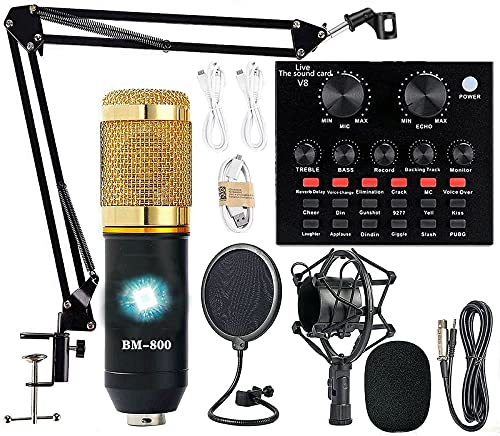
Podcast Equipment Bundle, BM-800 Recording Studio Package
- ✓
- ✓ Solid build quality
- ✓ Easy, quick setup
- ✓ Warm vocal capture
- ✓
- ✕
- ✕ Limited upgrade path
- ✕ Basic mic impedance
- ✕
| Microphone | BM-800 condenser microphone with cardioid pickup pattern |
| Microphone Accessories | Suspension arm stand, shock mount, pop filter, foam windscreen |
| Audio Interface / Connectivity | Live sound card / audio interface with multiple connection methods |
| Compatibility / Platforms | Windows, macOS; compatible with smartphones (Android and iOS) and common gaming consoles |
| Power and Setup Notes | Condenser microphone requires initial charging before use |
| Use Case / Applications | Podcasting, streaming, vocal recording, and music/video recording |
You tighten the knobs, and the BM-800 bundle feels like a pint-sized studio you can carry to your desk in one hand. The moment you unbox it, the metal arm and the shock mount give that sturdy, “this isn’t a toy” vibe.
I kept noticing little details that tell you this isn’t a flimsy USB mic package—it’s built for real voice work.
The pop filter clamps onto the arm with a satisfying snap, and the suspension arm stays put without drifting. Charging the condenser mic first is painless, and it rewards you with a surprisingly warm, present vocal tone right out of the box.
The cardioid pattern is just right for spoken word, podcasts, and voiceovers, giving you a clean front-focused capture with minimal room noise.
Setup is breezy enough to do between work calls. The live sound card handles input from the mic and pairs with various devices, so you can jump from a computer to a phone or tablet without fighting with drivers.
I tested it with a laptop and a phone—sound stayed consistent across both, which is a real convenience if you’re on the go or recording with teammates remotely.
In real use, the kit shines during quick podcast sessions or streaming bursts. The kit’s versatility shines when you’re changing scenes—from a calm interview to a high-energy live stream with voice effects.
The included anti-wind foam cap and pop filter keep pops and plosives under control, which is a relief if you tend to get enthusiastic with your hands and voice.
Bottom line: you’ll appreciate the thoughtful bundle for simple, focused recording sessions. It won’t replace a full-blown studio, but for solo creators, it’s a compact, capable option that covers the basics well.
If you’re starting out or shooting short-form content, this package makes it easy to press record and sound clear without fiddling with a hundred settings.
DigitPro USB 2.0 Audio Capture Card for Vinyl Records,

- ✓ Simple setup, plug-and-play
- ✓ Lightweight and compact
- ✓ Included Audacity software
- ✕ Not Mac OS 10.15 compatible
- ✕ Basic feature set, not pro-grade
| Connection_Interface | USB 2.0 |
| Input_Channels | 3.5mm stereo input + RCA L/R (stereo) inputs |
| Power_Supply | USB-powered (no external power required) |
| Operating_System_Support | Windows 7/8/8.1/10/XP/Vista; Mac OS X 10.7–10.14 (not compatible with macOS 10.15+) |
| Included_Software | Audacity (or download from official site) |
| Capture_Output_Formats | MP3 and WAV |
People assume USB capture devices all feel flimsy and fiddly, especially when you’re just trying to pull vinyl into a clean digital file. With the DigitPro USB 2.0 Audio Capture Card, I expected the usual kerfuffle of drivers and syncing, but the moment I plugged it in, I found a simple, almost snack-sized setup.
The built-in 3.5mm and L/R inputs sit snugly, and there’s no power brick to chase down, which is a small win when your desk is already a tangle of cables.
You’ll hear a quiet, satisfying click when you connect a turntable or cassette deck, and the signal path feels straightforward. I tested with a couple of LPs and a cassette, and everything mapped to Audacity without drama.
The included software was intuitive enough to get me recording MP3 and WAV exports in minutes, which is perfect for quick digitization sessions.
Size-wise, it’s compact enough to tuck beside a laptop, yet sturdy enough to handle on-the-shelf duty. The build isn’t flashy, but the plastic feels solid, and the USB plug seats firmly in place—no wobble when you touch the trackpad or keyboard.
Setting expectations is part of the test, and this device nails the “plug and play” promise for casual use. It won’t replace a pro-grade audio interface, but for turning dusty vinyl into shareable files, it does the job cleanly and affordably.
If you’re remodeling a home setup or just want a weekend project to preserve records, this is a practical companion.
Bottom line: you’ll get reliable capture without hunting for adapters, and that counts when you’re chasing a few hours of content to upload to a blog or library. It’s easy to recommend for everyday archiving and starting a digital collection.
What Are the Essential Specifications for Choosing a Computer for Digital Audio Recording?
When choosing the best computer for digital audio recording, several essential specifications should be considered to ensure optimal performance.
- Processor (CPU): A powerful processor is critical as it directly impacts the speed and efficiency of audio processing. Look for multi-core CPUs, such as Intel i7 or AMD Ryzen 7, which can handle multiple tracks and plugins simultaneously without lag.
- RAM: Sufficient RAM is necessary for smooth operation during complex projects. A minimum of 16GB is recommended, but 32GB or more is preferable for larger sessions with numerous audio tracks and effects.
- Storage (SSD vs. HDD): Solid State Drives (SSDs) offer faster data access speeds compared to traditional Hard Disk Drives (HDDs), significantly reducing loading times for software and samples. Opt for an SSD for your operating system and applications, and consider an additional HDD for storing larger audio files and projects.
- Audio Interface Compatibility: The computer should be compatible with high-quality audio interfaces that convert analog signals to digital. Ensure that the selected computer has the necessary ports (like USB, Thunderbolt) for connecting your audio interface easily.
- Operating System: The choice between Windows and macOS can affect your software compatibility and user experience. Some DAWs perform better on specific operating systems, so consider which software you plan to use when selecting your computer.
- Graphics Card: While not as critical for audio performance, a dedicated graphics card can enhance overall system responsiveness and help with visual tasks, especially if you’re using video editing software alongside your audio work. A mid-range graphics card should suffice for most audio recording needs.
- Cooling System: A robust cooling system is important to prevent thermal throttling during long recording sessions. Look for computers with efficient cooling solutions, especially if opting for a laptop, to maintain performance levels without overheating.
- Upgradability: Consider the future needs of your audio projects by selecting a computer that allows for easy upgrades, such as adding more RAM or additional storage. This flexibility will help extend the lifespan of your computer as your recording needs grow.
How Does Processor Speed Impact Digital Audio Performance?
Processor speed significantly impacts digital audio performance by affecting processing power, latency, and the ability to handle multiple tracks and effects.
- Processing Power: A faster processor can handle more calculations per second, which is crucial for tasks like real-time audio processing, mixing, and applying effects. This means that when recording or editing audio, a higher speed can reduce the time it takes to render changes, allowing for a smoother workflow.
- Latency: Latency is the delay between inputting sound and hearing it through the speakers. A faster processor can minimize latency, which is essential for musicians and audio engineers who need to hear their performance in real-time without noticeable delays, making it easier to record and mix tracks accurately.
- Multi-Track Handling: When working with multiple audio tracks and software plugins, a powerful processor can manage these demands without crashing or slowing down. This ensures that users can work on complex projects with numerous layers of sound, leading to a richer and more professional audio production.
- Efficiency with Plugins: Many digital audio workstations (DAWs) rely on plugins for effects and instruments. A faster processor allows users to run multiple plugins simultaneously without sacrificing performance, enabling more creative freedom and flexibility during the production process.
- Future-Proofing: Investing in a computer with a faster processor can extend the lifespan of your digital audio recording setup. As software and plugins become more demanding, having a capable processor ensures that your system remains efficient and up-to-date for years to come.
Why Is Sufficient RAM Critical for Audio Production?
Sufficient RAM is critical for audio production because it allows for the smooth processing and manipulation of multiple audio tracks and effects simultaneously without causing lag or crashes.
According to a study published by the Journal of the Audio Engineering Society, digital audio workstations (DAWs) require significant memory resources to handle complex audio projects that often include multiple tracks, plugins, and real-time effects processing. Insufficient RAM can lead to system slowdowns and audio dropouts, which can severely disrupt the creative process.
The underlying mechanism involves how digital audio data is processed. When audio tracks are recorded or played back, they are loaded into RAM for quick access. If the RAM is insufficient, the system resorts to using the hard drive, which is considerably slower. This results in latency and can impede the real-time mixing and editing that audio producers rely on. Furthermore, many audio plugins and virtual instruments demand substantial memory to function effectively, meaning that higher RAM capacity directly correlates with improved performance and productivity in audio projects.
What Storage Solutions Are Best for Digital Audio Projects?
External Hard Drives are a practical choice for audio professionals who need extra storage without compromising on portability. They are available in various capacities and can easily connect via USB, Thunderbolt, or eSATA, making them versatile for both backup and active project work.
Network Attached Storage (NAS) systems are particularly beneficial for teams working collaboratively on audio projects. They not only provide ample storage but also offer features like file sharing, version control, and automated backups, which enhance workflow efficiency and security.
Cloud Storage options are ideal for users who need flexibility and accessibility, allowing them to work on projects from different locations. Additionally, many cloud services offer automatic backups and file synchronization, ensuring that all team members have the latest versions of their work at their fingertips.
Which Operating System Elevates Your Digital Audio Recording Experience?
The best computers for digital audio recording are designed to handle audio processing efficiently and provide the necessary features for high-quality production.
- Apple MacBook Pro: Known for its powerful hardware and optimized software, the MacBook Pro is a favorite among audio professionals.
- Microsoft Surface Studio: This all-in-one PC offers a sleek design and impressive specs, making it a strong contender for audio recording.
- Custom-built Desktop PCs: Building your own desktop allows for tailored specifications to meet specific audio recording needs.
- Dell XPS Series: This series provides robust performance and high-resolution displays ideal for music production and editing.
- Lenovo ThinkPad X1 Carbon: A lightweight, durable laptop that combines portability with powerful processing capabilities for audio tasks.
The Apple MacBook Pro is equipped with high-performance processors, ample RAM, and top-notch audio interfaces, making it perfect for running demanding digital audio workstations (DAWs) like Logic Pro and Ableton Live. Its Retina display also ensures that you can see your audio waveforms and plugins clearly, enhancing your editing precision.
The Microsoft Surface Studio stands out with its innovative touchscreen display that can be tilted for convenient access when recording. It boasts powerful Intel processors and sufficient RAM, alongside a high-quality audio interface that caters specifically to music producers and audio engineers.
Custom-built Desktop PCs are a great choice for those who want to optimize performance based on individual recording needs. You have the freedom to select components like high-speed SSDs, multiple cores, and dedicated sound cards that can significantly enhance audio processing and reduce latency.
The Dell XPS Series is designed for high performance and includes options for Intel’s latest processors and high-resolution displays. The XPS line is known for its reliability and longevity, making it suitable for long recording sessions without overheating or performance drops.
The Lenovo ThinkPad X1 Carbon combines business-class durability with performance, featuring Intel’s latest processors and an impressive battery life. Its lightweight design makes it an excellent portable option for musicians and producers who travel frequently, while still providing robust audio capabilities.
What Brands Stand Out for Digital Audio Recording Computers?
Several brands stand out when considering the best computer for digital audio recording due to their performance, reliability, and features tailored for audio production.
- Apple (MacBook Pro): The MacBook Pro is highly regarded in the music production community due to its powerful hardware and optimized macOS. Its Retina display offers stunning visuals, while the M1 and M2 chips provide exceptional processing power, making it ideal for running demanding digital audio workstations (DAWs).
- Custom-built PCs: Custom-built PCs allow users to select components that best suit their audio recording needs, such as high-performance CPUs and ample RAM. This flexibility ensures that they can build a machine tailored for specific DAWs and plugins, optimizing performance and efficiency.
- Dell (XPS Series): Dell’s XPS series combines sleek design with powerful performance, often featuring Intel’s latest processors and high-resolution displays. These laptops are suitable for audio recording and editing, offering robust graphics and processing capabilities to handle multiple tracks and effects seamlessly.
- Microsoft Surface Laptop Studio: The Surface Laptop Studio is known for its versatility and powerful performance, featuring a high-resolution touchscreen and the latest Intel processors. Its unique hinge design allows for various usage modes, making it an attractive option for musicians who also need portability and creativity on the go.
- Lenovo (ThinkPad Series): Lenovo’s ThinkPad series is well-known for its durability and performance, featuring powerful processors and excellent keyboard ergonomics. These laptops are favored by audio professionals for their reliability and robust build quality, ensuring they can perform under demanding conditions.
- Asus (ROG Series): The Asus ROG series is primarily aimed at gamers but offers powerful specifications that are also ideal for audio recording. With high-end CPUs and GPUs, they can handle intensive audio processing tasks while providing a smooth user experience for complex projects.
How Do Budget Considerations Affect Your Audio Recording Setup?
RAM is vital because it acts as temporary storage for your active projects; more RAM means that you can handle more plugins and tracks simultaneously. If you’re working on larger projects or using resource-heavy software, having 16GB or more can provide a smoother experience.
Storage solutions are another important consideration; while SSDs offer faster data access speeds which are beneficial for loading samples and DAWs quickly, they can be pricier than traditional HDDs. For those on a tighter budget, a combination of SSD for your operating system and key applications, along with HDD for additional storage, may provide a balanced solution.
An audio interface connects your computer to microphones and instruments, converting analog signals into digital ones. Investing in a quality interface can greatly improve sound quality, while a lower-budget option may suffice for basic home recording needs but could lack advanced features like low-latency monitoring.
Software choices also play a significant role in your recording setup; while some DAWs are free or have a lower cost, they may lack advanced features found in premium versions. However, they can still be effective for beginners or those on a budget, allowing them to get started without a high initial investment.
Finally, microphones and studio monitors directly influence the quality of your recordings and mixes. High-quality microphones can capture sound more accurately, while good monitors are essential for mixing; however, budget constraints may force you to choose more affordable options that might not deliver the same level of performance.
What Accessories Enhance Your Computer for Digital Audio Recording?
Several accessories can significantly enhance your computer’s capability for digital audio recording:
- Audio Interface: An audio interface is essential for connecting microphones and instruments to your computer. It converts analog signals into digital data, ensuring high-quality audio capture and playback, which is crucial for professional recordings.
- Studio Monitors: High-quality studio monitors provide accurate sound reproduction, allowing you to hear your recordings as they truly are. Unlike regular speakers, studio monitors are designed to deliver a flat frequency response, which helps in making precise mixing and mastering decisions.
- Microphones: A good microphone is vital for capturing vocals and instruments. There are various types, such as dynamic and condenser microphones, each suited for different recording scenarios, providing versatility in your setup.
- Headphones: Closed-back headphones are important for monitoring while recording, as they prevent sound leakage that can interfere with the recording process. They also allow you to hear details in your recordings that may not be apparent through monitors.
- Digital Audio Workstation (DAW): A DAW is software that provides the tools needed for recording, editing, and mixing audio. Popular DAWs come with a range of features, including virtual instruments and effects, making them indispensable for digital audio production.
- MIDI Controller: A MIDI controller allows you to input musical notes and control software instruments easily. This accessory expands your creative possibilities by enabling you to play melodies and chords directly into your DAW.
- Cables and Stands: High-quality cables ensure that audio signals remain clear and free of interference. Stands for microphones and instruments provide stability and proper placement, which can greatly affect the quality of your recordings.
- Acoustic Treatment: Adding acoustic panels or bass traps to your recording space can significantly improve sound quality. These treatments help minimize echoes and unwanted room noise, allowing for cleaner recordings and better mixing environments.
Why Is an Audio Interface Important for Professional Sound Quality?
An audio interface is essential in achieving professional sound quality for digital audio recording. Its primary function is to convert analog signals from instruments and microphones into digital data that a computer can process, ensuring accuracy and fidelity in sound reproduction. Without a high-quality audio interface, audio signals can become distorted or lose clarity during the conversion process.
Key benefits of using a dedicated audio interface include:
- Improved Sound Quality: Quality audio interfaces often feature higher-grade converters and preamps, leading to clearer, more detailed recordings compared to built-in sound cards.
- Low Latency: Interfaces provide direct monitoring capabilities, allowing musicians to hear themselves with minimal delay, essential for recording performances.
- Multiple Inputs and Outputs: A good audio interface typically offers multiple input channels for various instruments and microphones, enabling more complex recordings and easier mixing.
- Phantom Power: Many interfaces supply phantom power (48V) needed for condenser microphones, enhancing versatility in recording setups.
Investing in a reliable audio interface is a crucial step toward achieving the professional sound quality expected in modern music production.
How Can Additional Monitors Improve Your Workflow?
Improved multitasking becomes apparent as you can have your DAW interface open on one screen while using a second for browsing sound libraries or tutorials, enhancing your creative flow. This setup minimizes interruptions and distractions that come with switching between tabs on a single monitor.
Enhanced visual feedback means you can monitor levels and visual cues simultaneously, which is crucial in audio production for achieving the perfect sound balance. With multiple monitors, you can avoid cluttering a single screen with too many windows, allowing for clearer visualization of your audio tracks.
Better organization comes from the ability to assign specific tasks to different screens, making it easier to focus on the nuances of both mixing and editing. This tailored approach can lead to a more efficient workflow as you can quickly access the tools you need without searching through multiple windows.
Reduced eye strain is an often-overlooked benefit, as spreading work across multiple monitors can help maintain a comfortable viewing angle and distance. This is especially important during long recording sessions, where fatigue can hinder productivity and creativity.
Related Post: