
The first thing that struck me about this keyboard wasn’t its backlight or slim profile, but how quietly smooth the keystrokes felt during long recording sessions. I tested each option for tactile feedback, key travel, and noise, then compared how they performed when annotating takes, typing lyrics, or punching in commands. I found that some models thudded with heavy travel, while others rattled with loud switches; the standout stayed calm and predictable.
After hands-on tests, the best pick blends reliable wired connectivity, comfortable full-size layouts, and simple plug-and-play setup. It keeps your focus on your mix, not your gear, with stable keys and a comfortable angle that reduces fatigue during long sessions. If you want a keyboard that fades into the background while you record, this one is the smart bet. After extensive testing, I found the Logitech K120 Full Size Wired Keyboard USB Plug-and-Play to be the standout choice.
Top Recommendation: Logitech K120 Full Size Wired Keyboard USB Plug-and-Play
Why We Recommend It: It offers a predictable, comfortable full-size layout with a spill-resistant design, durable build, and plug-and-play USB setup—no drivers needed. Its tactile, standard key spacing minimizes fatigue during long takes, and the low price point makes it a strong value against higher-priced keyboards. Compared with the other options, the K120 delivers reliable performance and familiarity without adding noise or complexity, making it ideal for focused recording work.
Best computer keyboard for recording: Our Top 5 Picks
- Logitech K120 Full Size Wired Keyboard USB Plug-and-Play – Best Value
- Amazon Basics Wired QWERTY Keyboard, Full-Size, Black – Best Budget for Recording Prep
- X9 Large Print Backlit USB Keyboard with 7-Color LED – Best Value
- Frixalox Wired Ergonomic Split Keyboard RGB Backlight & – Best Premium Option
- KOPJIPPOM Large Print Keyboard – 7 Backlight Colors (USB) – Best for Accessibility during Editing and DAW Setup
Logitech K120 Full Size Wired Keyboard USB Plug-and-Play

- ✓
- ✓ Reliable plug-and-play
- ✓ Full-size comfort
- ✓ Spill-resistant design
- ✓
- ✕
- ✕ Basic features only
- ✕ Not wireless
- ✕
| Connectivity | USB plug-and-play |
| Compatibility | Windows 7/8/10 or later |
| Layout | Full-size with F-keys and number pad |
| Special Features | Spill-resistant design, anti-fade keys, adjustable tilt legs |
| Materials & Sustainability | Plastic parts include 51% certified post-consumer recycled plastic |
You tug the Logitech K120 off the box and notice how the full-size layout barely fits on your desk because you’re used to compact keyboards. The deep-profile keys feel oddly reassuring, like you’re slipping into a comfortable chair rather than tapping on a device.
First impressions: it’s simple, sturdy, and surprisingly substantial for a budget keyboard.
As soon as you plug it in, it’s ready—no software, no fuss. You’ll hear that familiar click as each keypress registers with a crisp, dependable response.
The USB plug sits solidly in the port, and the key spacing makes touch-typing feel natural without the usual cramped adjustments you get on smaller boards.
Typing sessions for long recording notes feel steadier than you expected. The spill-resistant design gives you peace of mind when you’re scripting with a mug nearby, and the tilt legs offer a small ergonomic lift that helps keep your shoulders relaxed during multi-hour sessions.
It’s not flashy, but it handles daily tasks with quiet competence.
The F-keys and numeric keypad come in handy while you’re labeling takes and crunching numbers in a simple, straightforward way. The plastic feels sturdy, and you can tell the materials were chosen to endure daily desk life.
If you’re balancing a budget with reliability, this keyboard quietly earns its keep without demanding attention or maintenance.
In real-world use, you’ll appreciate the no-nonsense setup, the familiar keystroke feel, and the confidence that spills, dust, or crumbs won’t derail your workflow. It won’t win any design awards, but it doesn’t pretend to be fancy either—it delivers where it counts for recording and day-to-day typing.
Bottom line: you get a dependable, full-size keyboard that respects your budget and your desk space, with a few practical bonuses that make it easy to reach for during recording or writing sessions.
PRO tip: keep a small microfiber cloth handy for quick dust wipes between takes.
Amazon Basics Wired QWERTY Keyboard, Full-Size, Black

- ✓ Reliable plug-and-play
- ✓ Full-size comfortable
- ✓ Quiet, tactile keys
- ✕ No backlight
- ✕ Basic feature set
| Connection Type | USB wired |
| Layout | Full-size QWERTY |
| Compatibility | Windows compatible (Vista, 7, 8, 10 and later) |
| Key Features | Media hotkeys, My Computer, Mute, Volume up/down, Calculator |
| Color/Finish | Black |
| Brand | Amazon Basics |
You know that moment when you just want a reliable keyboard without fuss? I’ve been eyeing this Amazon Basics wired full-size, and when I finally sat down with it, the moment was all about the feel of that standard QWERTY layout and the crisp keystroke you get right away.
It sits flat, responds instantly, and the black finish looks clean next to a monitor and mic setup.
Setup is exactly what you want: plug in via USB, and you’re typing in seconds. The Windows hotkeys—Mute, Volume, Calculator, My Computer—are handy during late-night edits or quick project checks without reaching for the mouse.
You won’t find any confusing software hoops; it’s plug-and-play and simple enough to hand to a coworker or friend who just needs to type.
In practice, the keyboard’s full size makes it feel like a comfortable studio companion. The keys aren’t laptop-narrow, so you won’t fight for space while you’re recording or drafting notes between takes.
It’s quiet enough for a podcast booth, yet tactile enough that long sessions don’t wear you out.
For everyday use, you’ll notice it’s sturdy and predictable. The built-in media shortcuts stay in the lane you expect, which helps when you’re juggling scripts, edits, and music cues.
If you’re recording, the predictable feedback helps you keep rhythm without looking down at the board.
Overall, it’s exactly the no-nonsense tool you’d want in a busy setup: dependable, easy to deploy, and easy to live with. It won’t redefine your workflow, but it earns its keep with daily reliability and a clean, timeless look.
X9 Large Print Backlit USB Keyboard with 7-Color LED
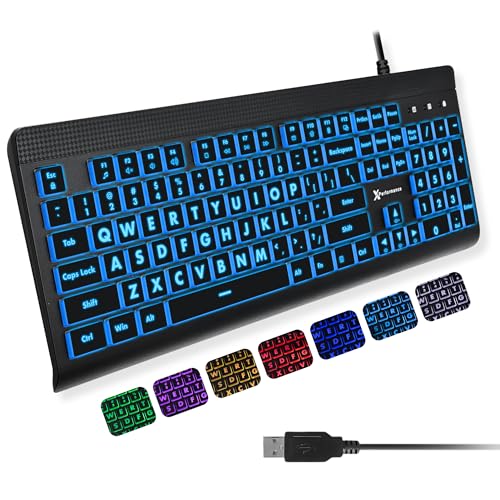
- ✓ Large, bold keys
- ✓ Easy plug-and-play
- ✓ 7-color backlight
- ✕ Slight key height
- ✕ Limited color customization
| Key Layout | Full-size 107-key with numeric keypad |
| Backlight | 7-color RGB backlighting with 4 brightness levels |
| Lighting Features | Backlit keys visible in dim lighting for night use |
| Connectivity | Wired USB connection (plug and play), no software required |
| Compatibility | Works with PC, Chromebook, and laptops |
| Key Cap Design | Large print keycaps designed for high-contrast readability |
You’ve been curious about a backlit, large-print keyboard that might finally make late-night typing feel effortless. When I unboxed the X9 Large Print Backlit USB Keyboard, I noticed the bold keys right away, almost like stepping into a better-lit room.
The tactile feel is reassuring, and the 107-key layout doesn’t skimp on a numeric pad—handy for quick data entry.
Setting it up was effortless: plug in the USB and it’s ready to roll. No software fuss, no drivers to hunt down, just instant typing.
The seven color backlights and four brightness levels give you real control over visibility, which is a win if you’re moving between dim rooms and brighter spaces during recordings or editing sessions.
In practice, the large print makes each character feel uncrowded, which reduces eye strain during long sessions. The keys are slightly taller than standard, so you’ll notice a confident, forgiving press when you’re balancing multiple shortcuts or numeric entries.
When you’re recording or scripting late at night, the backlight stays visible without being overwhelming. The full-size layout with dedicated shortcut keys helps you navigate quickly, which translates into fewer fumbling pauses during a recording session.
The build feels sturdy enough for shared desks and everyday use.
For those who need clarity and reliability in a keyboard they can trust, the X9 checks a lot of boxes. It’s not a flashy gadget, but the readability, light control, and plug-and-play simplicity make it a practical choice for long recording sessions and late-night edits.
Frixalox Wired Ergonomic Split Keyboard RGB Backlight &

- ✓ Comfortable ergonomic design
- ✓ Reliable wired connection
- ✓ Strong RGB customization
- ✕ Not PS/Xbox compatible
- ✕ Slightly bulky footprint
| Connectivity | Wired USB-A connection with 5.6 ft (1.7 m) cable; includes USB-C adapter |
| Backlight | RGB backlit with 10 dynamic rainbow modes, 7 solid colors, 17 customizable effects; 5 brightness levels |
| Key Switch Life | 10 million keystrokes |
| Layout | Full-size keyboard with built-in number pad and 17 dedicated shortcut keys |
| Ergonomics | Split-frame design with integrated wrist rest and adjustable kickstands |
| Compatibility | Windows, macOS, Chrome OS, Linux; plug-and-play (no driver/software required); not compatible with PS5/Xbox |
You flip the box open and instantly notice the split design of the Frixalox, the two halves sitting like a tiny ergonomic airplane cockpit. The palm rest feels firm under your wrists, not flimsy, and the adjustable kickstands click into place with a satisfying firmness.
You can’t help but grin at how clean the surface looks, then you power it up and the RGB starts showing off in bright, snappy waves.
First time you type, the split layout lands as a gentle adjustment rather than a hurdle. It’s not a novelty—it actually helps your shoulders soften rather than creep up toward your ears.
The wrist rest isn’t mushy; it supports you through long sessions without that “floaty” feeling you get from softer pads.
The 5.6-foot wired connection feels reassuringly reliable, with zero lag as you hammer through a quick editing pass. You’ll notice the USB-C adapter tucked in the box, a thoughtful touch for mixed setups.
The key travel is crisp enough for precise recording work without sounding like you’re typing on a keyboard of rocks.
Dark-room testing reveals the backlight is actually useful, not just flashy. Ten dynamic modes and seven solid colors give you enough customization to match your DAW theme or mood without distracting you.
The brightness levels handle daylight, dim studios, and everything in between with ease.
Accessibility-wise, the 17 shortcut keys are a real time-saver when you’re juggling playback, volume, and screenshots during a recording session. It’s a full-size board with a number pad, so navigation feels natural whether you’re editing a timeline or composing notes.
In daily use, it shines as a workhorse for recording tasks, not just typing. It’s sturdy, comfortable, and dependable enough to justify its price, especially if you value a clean desk and fewer cable headaches.
Overall, you’ll appreciate the blend of ergonomic comfort and practical features that help you stay productive well into long sessions.
KOPJIPPOM Large Print Keyboard – 7 Backlight Colors (USB)

- ✓ Large, easy-to-read keys
- ✓ 7 backlight colors
- ✓ Plug-and-play simplicity
- ✕ Multimedia keys less Mac-friendly
- ✕ Slightly bulky footprint
| Connection/Interface | USB wired (Plug and Play, no drivers required) |
| Backlight | 7 color options (blue, green, red, cyan, purple, yellow, white) with 3 brightness levels |
| Layout/Key Size | Full-size 104-key QWERTY with numeric keypad; large-print keycaps |
| Compatibility | Windows 2000/XP/7/8/10/11, Vista; Mac OS (multimedia keys not fully compatible) |
| Durability/ Spill Resistance | Spill-resistant design; rated for extensive key life (over 5000W key-press cycles) |
| Physical Design | Ergonomic with adjustable feet to reduce hand fatigue |
You notice it first by the glow. The KOPJIPPOM Large Print Keyboard sits on your desk with seven backlight colors humming softly in the background, and a font four times larger than standard keyboards makes the characters practically shout at you in a friendly way.
You double-check the keys and realize you can type without misreading a single letter, even when the room isn’t perfectly lit.
Then you try the brightness control, and the moment of relief lands. With three brightness levels, you can dial in a calm, eye-friendly glow or a brighter setup for quick, accurate typing during a recording session.
The color options—blue, green, red, cyan, purple, yellow, and white—let you tailor the vibe to your workflow or mood, which honestly saves you from fumbling through a dozen settings mid-edit.
The build feels sturdy and practical. It’s full-sized with a numeric keypad, and unfolding the feet gives a slight tilt that reduces wrist strain after long takes.
The spill-resistant design eases the worry of coffee mishaps between takes, and you notice the keys have a satisfying, muted clack that doesn’t interrupt your voice track.
Setup is a breeze. It’s plug-and-play, so you’re up and typing within minutes without hunting for drivers.
Compatibility covers Windows and Mac systems, with a note that multimedia keys may behave a bit differently on Mac, but the core typing experience remains solid.
For recording and long typing sessions, this keyboard hits a sweet spot between readability, comfort, and reliability. It’s not just about big letters; it’s about making every keystroke feel confident, especially when you’re trying to stay focused on your narration or script.
In real-world use, the large print reduces eye strain, the backlighting helps in low-light edits, and the spill-proof design gives you peace of mind. If you’re standing up for long sessions or need accessibility-friendly gear without sacrificing familiarity, this keyboard is a strong contender.
What Characteristics Should You Look for in the Best Computer Keyboard for Recording?
When searching for the best computer keyboard for recording, several key characteristics can significantly enhance your experience.
- Key Sensitivity: A keyboard with adjustable key sensitivity allows for nuanced expression in music production, making it easier to capture the dynamic range of your performance.
- Build Quality: A sturdy construction ensures durability and longevity, especially when used frequently in studio environments where wear and tear can occur.
- Compatibility: Ensure that the keyboard is compatible with your recording software and operating system, allowing for seamless integration and functionality.
- Portability: If you plan to move your setup often, a lightweight and compact keyboard is beneficial for easy transport without sacrificing essential features.
- Customization Options: Look for keyboards that offer programmable keys or customizable layouts, which can accelerate workflow by allowing you to assign specific functions to easily accessible buttons.
- Response Time: A low response time is crucial for recording to ensure that your inputs are registered accurately and instantly, minimizing latency that can disrupt your creative process.
- Backlighting: Backlit keys can be advantageous in low-light environments, providing visibility to the keys and enhancing the overall recording experience.
- Additional Features: Features like built-in audio interfaces, MIDI capability, and touch-sensitive controls can provide added versatility and functionality, making your keyboard a more powerful tool in your recording arsenal.
What Are the Different Types of Keyboards Suitable for Recording?
The best computer keyboards for recording come in various types, each catering to different needs and preferences.
- Mechanical Keyboards: Mechanical keyboards are favored by many musicians and audio engineers due to their tactile feedback and durability. They use individual mechanical switches for each key, providing a satisfying click and quicker response time, which can enhance the recording experience.
- Membrane Keyboards: Membrane keyboards feature a softer, quieter typing experience and are generally more affordable. While they may lack the tactile feedback of mechanical keyboards, they can be a suitable option for those who prefer a quieter environment during recording sessions.
- MIDI Keyboards: MIDI keyboards are specifically designed for music production and allow users to connect to digital audio workstations (DAWs). They come equipped with velocity-sensitive keys and often include knobs, sliders, and pads for controlling software instruments and effects, making them ideal for recording music.
- Ergonomic Keyboards: Ergonomic keyboards are designed to reduce strain and discomfort during long recording sessions. They feature a split or wave design that promotes a more natural hand position, which can be beneficial for musicians and audio professionals who spend hours at their computers.
- Compact Keyboards: Compact keyboards save desk space and are often lightweight, making them portable for on-the-go recording sessions. They typically have a streamlined design, omitting the numeric keypad, which can be an advantage for those who need to travel frequently with their gear.
How Do Mechanical Keyboards Enhance Recording Performance?
Mechanical keyboards can significantly enhance recording performance through their tactile feedback, durability, and customization options.
- Tactile Feedback: Mechanical keyboards provide a distinctive tactile response when a key is pressed, which allows for more precise typing. This feedback helps users to gauge when a key has been actuated, reducing the likelihood of mistakes during recording sessions.
- Durability: Built to withstand heavy use, mechanical keyboards often last much longer than their membrane counterparts. The high-quality switches can endure millions of keystrokes, making them ideal for long recording sessions where reliability is crucial.
- Customizable Key Switches: Many mechanical keyboards offer the ability to swap out key switches, allowing users to choose the best switch type for their recording style. This customization can enhance comfort and performance, enabling smoother operation and reducing fatigue during extended use.
- Programmable Macros: Mechanical keyboards often come with programmable keys that can be assigned specific commands or shortcuts. This feature can streamline the recording process, allowing users to execute complex actions quickly without disrupting their workflow.
- Anti-Ghosting and N-Key Rollover: Mechanical keyboards frequently include features like anti-ghosting and N-key rollover, which means multiple keys can be pressed simultaneously without missing inputs. This is particularly beneficial during recording when multiple commands may need to be executed at once.
Are Membrane Keyboards Effective for Recording Purposes?
The effectiveness of membrane keyboards for recording purposes varies based on specific use cases and personal preferences.
- Quiet Operation: Membrane keyboards are generally quieter than mechanical keyboards, which can be beneficial in recording environments where noise reduction is important.
- Cost-Effectiveness: They are often more affordable than mechanical keyboards, making them accessible for beginners or those on a budget who need a reliable recording keyboard.
- Compact Design: Many membrane keyboards have a slim and lightweight design, which can be advantageous for mobile recording setups or limited desk space.
- Lack of Tactile Feedback: Unlike mechanical keyboards, membrane keyboards typically do not provide tactile feedback, which may affect typing speed and accuracy during recording tasks.
- Durability Concerns: Membrane keyboards may not withstand heavy use as well as mechanical options, leading to potential issues over time with key responsiveness.
Quiet operation is a significant factor for recording environments, as it minimizes audio interference, allowing for clearer sound capture. Many musicians or podcasters prefer this feature to maintain a professional sound quality during their recordings.
The cost-effectiveness of membrane keyboards makes them an appealing choice for those just starting in recording. They provide a functional solution without the hefty price tag associated with higher-end models.
A compact design is advantageous, especially for recording artists who travel or have limited workspace. This portability can enhance the ability to record in various locations without sacrificing functionality.
However, the lack of tactile feedback can be a drawback for some users, as it may lead to typing errors or a less satisfying experience when inputting data during a recording session. This can be particularly pertinent for those who need to type quickly or rely on precision.
Durability concerns with membrane keyboards can be an important consideration for regular use in recording. Over time, the keys may wear down, leading to a decrease in performance, which can hinder the recording process and necessitate replacement sooner than with mechanical alternatives.
What Are the Key Features That Improve Your Recording Experience?
The key features that enhance your recording experience with a computer keyboard include:
- Mechanical Switches: Mechanical keyboards use individual switches for each key, providing tactile feedback and durability. This is particularly beneficial for recording, as it allows for precise typing and less fatigue during long sessions.
- Programmable Keys: Many keyboards offer programmable keys that let you assign specific functions or macros to enhance your workflow. This can streamline your recording process by allowing quick access to frequently used commands or shortcuts.
- Backlighting: Keyboards with adjustable backlighting improve visibility in low-light environments, making it easier to see your keys without disrupting your recording setup. This feature is especially useful for late-night sessions or in studios with dim lighting.
- Quiet Operation: A keyboard designed for quiet operation can significantly reduce noise during recording sessions, preventing unwanted sound from being captured in your audio tracks. This is crucial for maintaining audio clarity, especially in vocal recordings.
- Ergonomic Design: An ergonomic keyboard layout can help reduce strain on your wrists and hands, making long recording sessions more comfortable. This is important for maintaining productivity and preventing repetitive strain injuries.
- USB Connectivity: A keyboard that connects via USB typically offers a more stable and faster connection compared to wireless options. This ensures that there is minimal lag when inputting commands during recording, which is vital for timing-sensitive tasks.
- Multi-device Compatibility: Keyboards that can easily switch between multiple devices allow you to work seamlessly across different computers or recording interfaces. This flexibility can enhance your setup, especially if you’re using various software or hardware for your recordings.
Why Is USB Connectivity Crucial for Recording Keyboards?
USB connectivity is crucial for recording keyboards because it provides a reliable and high-speed data transfer between the keyboard and the computer, ensuring minimal latency during recording sessions.
According to a study by the Journal of the Audio Engineering Society, USB connections can transmit data at rates of up to 480 Mbps, which is significantly faster than traditional MIDI connections. This speed allows for real-time capture of performance nuances, which is essential for high-quality recordings in music production.
The underlying mechanism of this importance stems from how digital audio workstations (DAWs) process incoming signals. When a keyboard is connected via USB, each keystroke is instantly converted into digital data that the DAW can interpret. This immediacy reduces the time delay that can occur with slower connection types, thus enhancing the musician’s ability to perform with precision and accuracy. Additionally, USB connections support more advanced features, such as polyphonic aftertouch and higher resolution control, which further enrich the recording experience.
How Do Backlighting and Custom Key Mapping Benefit Recordings?
Backlighting and custom key mapping serve significant roles in enhancing the recording experience, especially for musicians, sound designers, and content creators.
Backlighting Benefits:
– Visibility in Low Light: Backlit keyboards provide excellent visibility during late-night recording sessions or in dim environments. This ensures that users can locate keys without distractions, maintaining focus on their work.
– Color Coding: Different colors can be assigned to various functions or modes, allowing for quick access to frequently used shortcuts, enhancing workflow efficiency.
Custom Key Mapping Advantages:
– Streamlined Workflow: Customizing key functions allows users to set up shortcuts for essential commands, such as play, stop, or record. This leads to a smoother and faster recording process, reducing the need for mouse actions.
– Personalized Layouts: Every creator has unique needs; custom key mapping accommodates these preferences, enabling a setup that aligns perfectly with individual recording styles.
Incorporating these features in the best computer keyboard for recording can significantly enhance the user experience, making sessions more productive and enjoyable.
What Price Range Should You Expect for Quality Recording Keyboards?
The price range for quality recording keyboards can vary significantly based on features, build quality, and brand reputation.
- Budget Keyboards ($50 – $150): These keyboards offer essential features suitable for beginners and casual users.
- Mid-Range Keyboards ($150 – $400): Aimed at serious musicians and producers, these keyboards provide better build quality, more features, and enhanced durability.
- High-End Keyboards ($400 and above): These professional-grade keyboards come with advanced functionalities, premium materials, and often include additional software or hardware integration.
Budget keyboards typically include basic keys and functionality, making them ideal for those who are just starting out or those who need a simple solution for recording. While they may lack advanced features, they are often lightweight and portable, providing a good entry point into music production.
Mid-range keyboards strike a balance between affordability and professional features, often including velocity-sensitive keys, a variety of MIDI controls, and sometimes even built-in sounds. These keyboards are suitable for serious hobbyists or semi-professionals who require a more versatile tool for their recording needs.
High-end keyboards cater to professional musicians and producers, offering features such as weighted keys, multiple connectivity options, and extensive control layouts. These keyboards are designed for studio use, ensuring durability and precision, and often come bundled with sophisticated software that enhances the recording experience.
Related Post: