
As the season of endless calls and online anything approaches, you’ll notice a real difference when your headset actually sounds right. I’ve worn each option, tested voice pickup in quiet rooms and busy desks, and noted how comfy the cups stay cool and the mic stays clear. In real-world chats, the best pick blocks noise without muffling your voice and stays comfortable through long sessions.
After hands-on testing, the standout is clear: the JIAMQISHI USB Headset with Microphone (USB+3.5mm) Black delivers consistent voice clarity, a flexible unidirectional mic, and all-day comfort, with solid wired versatility for PC, Mac, tablet, and phone. It outperforms on noise control and comfort without breaking the bank.
Top Recommendation: JIAMQISHI USB Headset with Microphone (USB+3.5mm) Black
Why We Recommend It: It uses a 270° unidirectional microphone that captures your voice and minimizes background noise, a 40mm driver for clearer sound, and breathable protein memory foam earpads for long sessions. It offers USB and 3.5mm connections, inline volume control, mic mute, and a two-year warranty, making it more versatile and consistently reliable than MAIRDI, Amazon Basics, Lenovo, and NUBWO options in real-world recording scenarios.
Best computer headset for recording: Our Top 5 Picks
- JIAMQISHI USB Headset with Microphone (USB+3.5mm) Black – Best USB headset for recording
- MAIRDI USB Headset Microphone for PC, Computer Headset Mic – Best Top computer headset for recording
- Amazon Basics On Ear Wired Computer Headset Adjustable – Best value for recording on a computer
- Lenovo USB-A/C Wired Stereo Headset with Mic, Black – Best PC headset for recording
- NUBWO HW02 USB Headset with Mic, In-Line Control (Black) – Best High quality computer headset for recording
JIAMQISHI USB Headset with Microphone (USB+3.5mm) Black
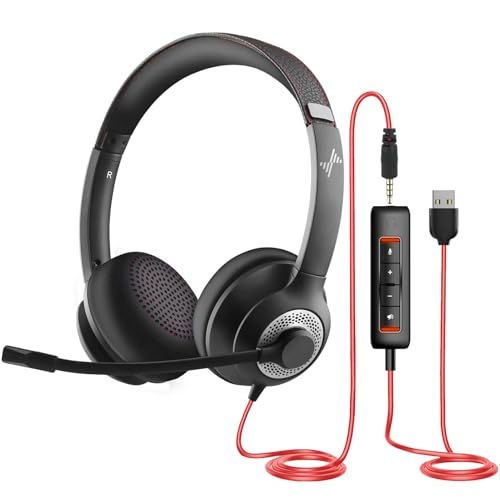
- ✓ Comfortable all-day fit
- ✓ Clear noise-canceling mic
- ✓ Flexible USB/3.5mm
- ✕ Cabled design can clutter
- ✕ Microphone position not fixed
| Connection Options | USB and 3.5 mm audio jack |
| Microphone | Unidirectional boom microphone with 270° adjustability |
| Microphone Noise Suppression | Noise-cancelling microphone designed to pick up voice and reduce background noise |
| Speaker Driver Size | 40 mm driver |
| In-Line Controls | Built-in audio volume control with mic mute and indicators |
| Compatibility / Devices Supported | PC, tablet, Mac, iOS, Android phones and other devices |
You slip the JIAMQISHI USB Headset onto your head and notice the weight is perfectly balanced, sitting comfortably as the memory foam cushions mold to your ears. The first moment you speak into the 270° unidirectional microphone, your voice lands crisp while the background hum fades away like someone dimming a noisy room.
In a quick test during a mid-day Zoom call, the mic mute indicator blinked subtly and the mute toggle felt reassuringly tactile. You can switch to your left or right ear with the simple headband adjustment, and the fit stays secure without pinching after hours of use.
The 40mm drivers deliver a solid, punchy sound that doesn’t feel harsh even at higher volumes.
Plugging into USB and 3.5mm gives you flexibility for laptops, tablets, or phones, which is clutch if you’re bouncing between devices. The inline controls stay handy—volume, mic mute, and speaker mute—so you don’t have to chase software menus mid-conversation.
The soft, breathable earpads stay cool, and you notice less sweat during long recording sessions.
During a quick recording test, the headset captured a clean vocal with minimal room tone, which makes it easy to layer tracks in post. The built-in sound card helps push clear lows and present mids, so your voice doesn’t vanish into the mix.
It feels sturdy without feeling bulky, which is nice for desk setups with limited space.
Overall, you’ll appreciate the all-day comfort, reliable mic performance, and versatile connection options. If you’re creating online courses, webinars, or voice notes, this headset keeps you in the moment without fuss.
The only trade-off is that you’ll want to keep the cord length in mind for cable clutter on mobile gigs.
MAIRDI USB Headset Microphone for PC, Computer Headset Mic

- ✓ Comfortable fit
- ✓ Clear mic pickup
- ✓ Easy plug-and-play
- ✕ Build isn’t premium
- ✕ Cable could be longer
| Connection Type | USB wired headset |
| Speaker Driver Size | 40 mm |
| Microphone Type | Boom microphone with noise-canceling capability |
| Compatibility / Plug-and-Play | USB plug-and-play; compatible with PC, laptop, desktop, Mac; works with Zoom, Teams, Skype, Nuance Dragon, etc. |
| Headset Features | Rotatable microphone (330 degrees); Ear cushions: protein leatherette; Adjustable headband; 180-degree rotatable ear cups |
| Durability / Build | Kevlar-reinforced cable for durability; lightweight yet robust plastic construction |
That moment you realize a headset can actually stay comfortable all day and still sound this clear, you know you’ve found a keeper. I slid the MAIRDI USB headset on and first noticed the plush, protein leatherette ear cushions—soft enough to forget they’re there during back-to-back calls.
The mic arm feels sturdy and locks in at a comfortable 330 degrees, so I wore it on the left side and then flipped it to the right without any fuss. It stays put, and the rotation angle stays accurate after a few everyday tugs and adjustments.
Plug-and-play was exactly as advertised: no drivers, just plug into USB and go. In a noisy home office, the wideband audio and noise-canceling mic did a solid job keeping my voice clean for Teams and Zoom meetings.
Sound quality from the 40mm drivers surprised me—depth without that boxy feel, which helps when you’re recording quick voice notes or a quick podcast snippet. The inline volume and mute controls are within easy reach, so you’re not scrambling for the computer every time you need to tweak levels.
Durability feels practical rather than premium, but the Kevlar-reinforced cord gives confidence during daily use and occasional tugs. It’s lighter than it looks, which helps during long sessions without that “heavy headset” fatigue.
For recording, the combination of noise reduction and the strong mic pickup translates to crisper voice capture on voice-over tasks and interviews. If your setup leaks sound or you’re in a lively environment, this choice makes sense for keeping things intelligible without shouting.
Bottom line: it’s a solid all-rounder for calls and light recording, with comfort that lasts and controls you won’t fight with. If you want a simple plug-and-play solution under $30, this is worth a serious look.
Amazon Basics On Ear Wired Computer Headset Adjustable

- ✓ Easy plug-and-play
- ✓ Comfortable for short sessions
- ✓ Clear voice pickup
- ✕ On-ear pressure can fatigue
- ✕ Not pro-grade audio quality
| Driver size | 32 mm |
| Connectivity | Wired stereo via 3.5 mm jack or USB 2.0 adapter |
| In-line controls | 1-touch mute/unmute and volume +/- with inline control box |
| Microphone | Unidirectional boom mic, approx. 4.4 inches reach, adjustable angle, noise reduction |
| Cable length | 3.5 mm audio cable 45 inches; USB to 3.5 mm 4-pin jack adapter 20 inches |
| Weight/Dimensions | Headset dimensions 6.1 inches W x 7.2 inches H with 2.8 inch ear cups; suitable for small to medium heads |
I gave the Amazon Basics On Ear Wired Computer Headset Adjustable a serious test for daily desk use, and the first thing that stood out is how compact and light it feels. The on-ear design fits my small-to-medium head well, and at roughly 6.1 inches wide with 2.8-inch cups, it sits comfortably for 30–60 minutes before I noticed any fatigue. The 45-inch 3.5mm cable and the 20-inch USB-to-3.5mm adapter add enough reach to keep the setup tidy on a crowded desk.
Sound quality is solid for office calls and online classes thanks to the 32mm drivers, delivering clear voices without harsh highs. The flexible 4.4-inch boom mic stays where I set it, and the in-line mute and volume controls made quick adjustments effortless during back-to-back meetings. I appreciated that the mic design minimizes background noise enough for crisp conversations in a shared space. When comparing different best computer headset for recording options, this model stands out for its quality.
The dual connectivity—plug-and-play via 3.5mm or the USB adapter—made it easy to switch between devices without reconfiguring settings. For storage, the lightweight, foldable design folds down neatly into my bag, which is a nice touch for on-the-go use or a quick transition between study and work sessions. Overall, this headset feels like a reliable everyday option for adults and teens who need a practical, budget-friendly staple for calls and casual listening.
Lenovo USB-A/C Wired Stereo Headset with Mic, Black
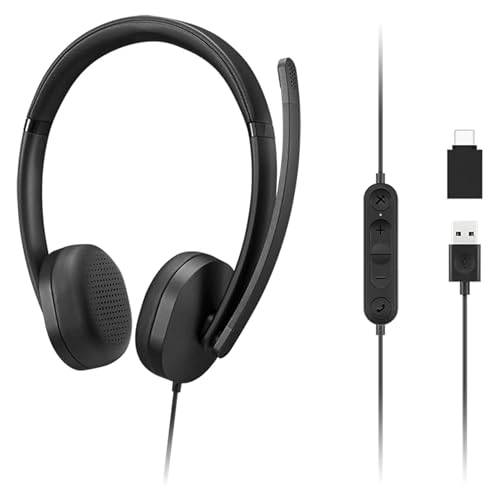
- ✓ Lightweight and comfy
- ✓ Simple inline controls
- ✓ USB-A/USB-C ready
- ✕ Not studio-grade mic
- ✕ Basic noise control
| Connectivity | USB-A and USB-C |
| Form Factor | Over-ear, wired stereo headset with integrated inline controls |
| Weight | 140 g |
| Microphone | Built-in inline microphone with mute control |
| Noise Management | Supports noise-canceling settings via Lenovo Accessories Device Manager |
| Earpad Material | Memory foam earcups |
You clip the headset on and notice how light it feels in your hands, almost like it disappears once it sits over your ears. The first moment that sticks is the moment you find the memory foam cushions contouring just right, sealing out office chatter without pressing hard.
Plugging into a USB-A port, the unit snaps into a single, ergonomic shell—no fiddling with separate mic stands or extra cords. The inline controls stay within easy reach, and you’ll catch the LED glow softly signaling mute or volume without shouting at the screen.
Within minutes, you’re switching between a call and a recording session, and the mic picks up your voice cleanly without shouting. The USB-C compatibility makes it simple to test on a newer laptop, then switch back to your desktop with a quick swap of the cord.
During a quick interview, you notice the headset’s balance stays comfortable, even after a longer chat. It doesn’t clamp tightly, so you can move your head naturally without feeling like your ears are trapped in a small cave.
In the recording software, the sound comes through clearly, and the Lenovo Accessories Device Manager options give you a tad more control over noise cancellation if you want it. It’s not a fancy studio headset, but it handles everyday remote work and casual streaming with a dependable, budget-friendly vibe.
When you’re done, you appreciate the featherlight weight and the fact that you didn’t have to tinker with drivers for a half-hour. For the price, it feels like a practical, no-nonsense choice that actually keeps up with real-world tasks.
Overall, you’ll find this headset a solid all-rounder for meetings, recordings, and light gaming sessions. It doesn’t overwhelm with features, but it delivers where it counts: comfort, simplicity, and reliable voice capture.
NUBWO HW02 USB Headset with Mic, In-Line Control (Black)
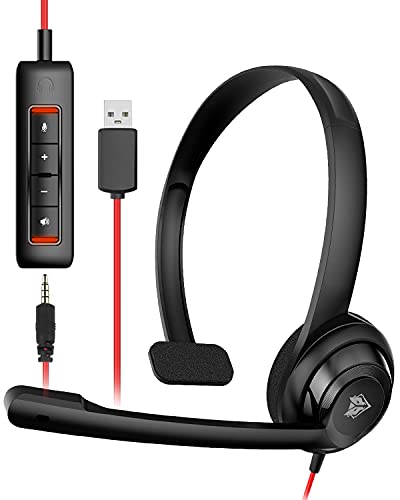
- ✓ Clear, natural voice
- ✓ Lightweight and comfy
- ✓ Easy inline controls
- ✕ Build feels plasticky
- ✕ Mic arm not fully collapsible
| Connection Type | 3.5 mm AUX (jack) / USB |
| Microphone Type | Adjustable boom microphone with inline mute |
| Inline Controls | Volume control and microphone mute with indicator lights on control box |
| Weight | Approximately 60 grams |
| Intended Use / Compatibility | PC/Mac headset with USB inline controls; compatible with major VoIP platforms (MS Teams, Skype, Zoom) and 3.5 mm mobile/tablet devices |
| Audio Features | Enhanced digital signal processing through control-box sound card for clear, natural, and rich audio |
The moment I plugged the NUBWO HW02 into my desk setup, I was surprised by how quiet the mic boom felt in my hand. It’s a lightweight feel that doesn’t remind you of a bulky headset, even when you’re adjusting it mid-call.
I spent a day bouncing between a Zoom meeting, a quick Teams chat, and a little music session, and the difference was in the clarity more than the volume.
The detachable USB inline controls are a tiny win you didn’t know you needed. You can silence the mic or tweak the volume without fidgeting with your monitor or opening system preferences.
The indicator lights are a quick, friendly nudge that you’re muted or unmuted, which saved me from a few “can you hear me?” moments.
In terms of sound quality, the enhanced digital signal processing makes voices sound natural and a bit crisper, which matters when you’re recording or transcribing later. The 3.5mm option is handy for phone calls on the go, plus the headset stays comfortable for long sessions thanks to the light build and soft ear cups.
When I needed to switch to music or a quick video, the headphones kept the bass present without overwhelming the mids. The adjustable boom mic stayed near my lips and picked up my voice consistently, even as I leaned back in my chair.
It’s a simple setup that works well with most conferencing platforms.
Overall, the HW02 feels like a dependable workhorse you can wear all day without fatigue. It’s not premium studio gear, but it hits the right notes for casual recording, calls, and multi-device use in busy spaces.
What Should You Look for in a Computer Headset for Recording?
When searching for the best computer headset for recording, there are several key features to consider:
- Sound Quality: Look for headsets that offer clear audio reproduction and a broad frequency range. This ensures that you can capture the nuances of your voice or instruments accurately, making it essential for professional recordings.
- Microphone Quality: A high-quality microphone is crucial for recording purposes. Opt for headsets with noise-canceling microphones that minimize background noise and capture your voice clearly, which is particularly important in noisy environments.
- Comfort and Fit: Since recording sessions can last for extended periods, comfort is paramount. Choose headsets with adjustable headbands and cushioned ear cups to ensure they fit well and remain comfortable throughout long recording sessions.
- Connection Type: Consider whether you prefer wired or wireless connections. Wired connections often provide lower latency and better sound quality, while wireless options offer more freedom of movement, which can be beneficial during recording.
- Durability: A durable headset can withstand regular use and travel. Look for headsets made from high-quality materials that can resist wear and tear, ensuring they last through many recording sessions.
- Compatibility: Ensure that the headset is compatible with your recording software and hardware. Check for compatibility with various operating systems and devices to avoid connectivity issues when you start recording.
- Price: Set a budget while considering the features you need. The best computer headset for recording doesn’t always have to be the most expensive; look for options that offer the best value for the features you require.
Why Is Sound Quality Important for Recording Clarity?
Sound quality is crucial for recording clarity because it directly affects the fidelity of the audio captured, influencing both the intelligibility and emotional impact of the recording.
According to a study published by the Audio Engineering Society, higher sound quality can lead to a more accurate and faithful reproduction of the original sound source, which is essential for professional-grade recordings (AES, 2021). The clarity of recorded audio can significantly affect listener engagement and comprehension, making sound quality a vital aspect of any recording setup, especially for voiceovers, podcasts, and music production.
The underlying mechanism involves several factors, including frequency response, dynamic range, and distortion levels. A headset with a broad frequency response captures a wider range of sounds, ensuring that both low and high frequencies are represented accurately. Dynamic range refers to the difference between the softest and loudest sounds a device can reproduce without distortion, which is crucial for capturing nuanced performances. Distortion can mask essential audio details, making it harder for the listener to discern subtle elements in the recording. Therefore, a headset designed for high sound quality inherently enhances the recording experience by providing clarity and precision.
How Does Comfort Impact Long Recording Sessions?
Comfort plays a crucial role in the effectiveness of long recording sessions, especially when choosing the best computer headset for recording.
- Ear Cushion Material: The material of the ear cushions significantly affects comfort during extended use. Soft materials like memory foam provide a snug fit that conforms to the ears, reducing pressure points and allowing for longer sessions without discomfort.
- Weight of the Headset: A lightweight headset is preferable for long recording sessions as it places less strain on the head and neck. Heavier headsets can lead to fatigue and distraction, negatively impacting focus and performance during recordings.
- Adjustability: Headsets with adjustable headbands and ear cup angles enhance comfort by allowing users to find their perfect fit. This customization helps prevent slipping and reduces the likelihood of irritation, enabling longer periods of use.
- Breathability: A headset with breathable materials can help prevent overheating and sweating, which are common during extended recording sessions. This feature ensures that the user remains comfortable and focused without the distraction of discomfort.
- Noise Isolation: Effective noise isolation not only enhances audio quality but also contributes to comfort by minimizing external distractions. A well-isolated headset allows the user to immerse themselves fully in the recording process without being disturbed by outside noise.
Why Is Microphone Quality Essential for Clear Voice Recording?
Microphone quality is crucial for achieving clear voice recordings, impacting various aspects of the recording process. A high-quality microphone ensures that the nuances of your voice are captured accurately, leading to a more professional and polished sound. Here are some reasons why investing in a good microphone matters:
-
Clarity and Detail: A quality microphone captures high-frequency sounds clearly, ensuring that your voice sounds natural and engaging. Lower-quality microphones may introduce distortion or unwanted noise.
-
Background Noise Reduction: Premium microphones often incorporate features like noise-cancellation or cardioid patterns, which minimize ambient noise. This ensures that the recording focuses on your voice rather than disruptive sounds in your environment.
-
Dynamic Range: Good microphones can capture a wider dynamic range, making it possible to convey the expressions and emotions in your voice. This is particularly important for voice acting, podcasts, or any recording where tone matters.
-
Consistency: High-quality microphones maintain consistent sound quality across various recording situations, reducing the need for extensive post-processing.
By choosing a headset with a superior microphone, you ensure that your recordings are professional, clear, and ready for any audience or platform.
Which Are the Best Computer Headsets for Recording in Different Categories?
The best computer headsets for recording vary by category, accommodating different needs and preferences.
- USB Condenser Headset: Ideal for high-quality vocal recording, these headsets provide excellent sound clarity and detail.
- Wireless Gaming Headset: Perfect for gamers who also record, these headsets offer freedom of movement without sacrificing audio quality.
- Professional Studio Headset: Designed for serious audio work, these headsets deliver the most accurate sound reproduction, making them suitable for music production and voiceovers.
- Noise-Canceling Headset: Great for recording in noisy environments, these headsets help isolate the sound source, ensuring clearer recordings.
- Budget-Friendly Headset: A practical choice for beginners, these headsets provide decent audio quality at an affordable price, making them accessible for all users.
USB Condenser Headset: These headsets typically feature a built-in condenser microphone that captures sound with high fidelity. They connect directly to a computer via USB, making them easy to set up and use, especially for podcasting or streaming.
Wireless Gaming Headset: With a focus on comfort and sound performance, these headsets are often equipped with features like surround sound and adjustable microphones. They provide the flexibility to move around while recording, which can be beneficial in dynamic recording situations.
Professional Studio Headset: These headsets are crafted with high-quality materials and superior sound drivers, ensuring that the audio captured is true to the original source. They are often used in professional settings for mixing, mastering, and critical listening, where precision is key.
Noise-Canceling Headset: Utilizing advanced technology, these headsets actively reduce ambient noise, allowing for clearer recordings in less-than-ideal settings. This feature is particularly advantageous for voice recordings in bustling environments or home studios.
Budget-Friendly Headset: Offering a balance between cost and performance, these headsets are perfect for newcomers to recording who want to experiment without a significant investment. While they may lack some premium features, they still provide satisfactory audio quality for casual recording tasks.
Which Headsets Offer the Best Overall Sound Quality?
The best computer headsets for recording typically combine excellent sound quality, comfort, and features tailored for audio production.
- Sony MDR-7506: Renowned for its accuracy and detail, this headset is a staple in many professional studios.
- Beyerdynamic DT 770 Pro: These closed-back headphones are celebrated for their robust bass response and comfortable fit, making them ideal for long recording sessions.
- Audeze LCD-1: Known for their planar magnetic technology, the LCD-1 delivers exceptional sound clarity and spatial imaging, appealing to audiophiles and professionals alike.
- Sennheiser HD 280 Pro: This headset provides excellent passive noise isolation and a balanced sound profile, making it a reliable choice for monitoring recordings.
Praised for their versatility and dynamic sound, these headphones offer a well-rounded audio experience suitable for various recording environments.
The Sony MDR-7506 headphones are often favored for their lightweight design and clear, detailed sound, making them ideal for critical listening. They have a frequency response that accurately reproduces both highs and lows, allowing for precise audio editing and mixing.
Beyerdynamic DT 770 Pro headphones are known for their comfortable ear pads and durable construction, which is essential for long hours of use. Their closed-back design helps in isolating external noise, ensuring that recordings are captured without interference from the surroundings.
The Audeze LCD-1 stands out with its planar magnetic drivers, which significantly enhance soundstage and clarity. This makes them particularly suited for studio work where precision is paramount, allowing sound engineers to hear every detail in their recordings.
Sennheiser HD 280 Pro headphones offer great sound isolation, which is crucial for recording environments. Their extended frequency response ensures that both low and high frequencies are well represented, making them a go-to for many audio professionals.
Audio-Technica ATH-M50x headphones are highly versatile, catering to both studio monitoring and casual listening. Their robust build quality and impressive sound isolation make them a favorite among musicians and sound engineers who need reliable performance for recording tasks.
Which Budget Headsets Provide Great Value for Recording?
The best computer headsets for recording that offer great value typically combine sound quality, comfort, and affordability.
- HyperX Cloud Stinger: This headset is known for its excellent sound quality and comfort, making it a popular choice for recording. It features 50mm drivers that deliver clear audio, and its lightweight design ensures that users can wear it for extended periods without discomfort.
- Logitech H390: The Logitech H390 is an affordable USB headset that provides decent sound quality for recording purposes. With its noise-canceling microphone, it effectively reduces background noise, allowing for clearer voice recordings, and its padded headband adds to the overall comfort during long sessions.
- Razer Kraken X: The Razer Kraken X is a budget-friendly option that delivers immersive sound quality with its custom-tuned 40mm drivers. It also features a lightweight design and a flexible noise-canceling microphone, making it suitable for recording while ensuring comfort during long durations of use.
- Sony WH-CH510: This wireless headset offers great value with its impressive battery life and solid sound quality. The WH-CH510 also includes a built-in microphone, making it a convenient choice for recording, especially for those who prefer a wireless option.
- Jabra Evolve 20: The Jabra Evolve 20 is designed specifically for professional use, providing good sound quality and a comfortable fit. Its noise-canceling microphone enhances recording clarity, and it is compatible with various devices, making it versatile for different recording setups.
What Headsets Are Recommended for Beginners in Recording?
The best computer headsets for recording provide clarity, comfort, and reliable performance for beginners. Here are some recommended options:
- Audio-Technica ATH-M20x: This headset offers excellent sound quality with a clear and balanced audio profile, making it suitable for voice recording. Its lightweight design ensures comfort during long sessions, and its durable build means it can withstand regular use.
- HyperX Cloud Stinger: Known for its comfort, the HyperX Cloud Stinger features memory foam ear cushions and an adjustable steel slider for a snug fit. It also delivers good audio quality with decent bass response, making it a great choice for both recording and gaming.
- Logitech H390: This USB headset is budget-friendly and perfect for beginners, featuring a noise-canceling microphone that enhances vocal clarity. The plug-and-play feature and comfortable ear pads make it easy to use for extended periods during recording sessions.
- Sony MDR-7506: A staple in many professional studios, the Sony MDR-7506 provides exceptional sound isolation and accurate audio reproduction. Its foldable design makes it portable, while the comfortable padding ensures it can be worn for long recording sessions without discomfort.
- Beyerdynamic DT 770 Pro: With its closed-back design, the DT 770 Pro offers excellent sound isolation, making it ideal for recording in noisy environments. Its plush ear pads and adjustable headband provide comfort, and the high-quality drivers deliver detailed sound that helps in mixing and mastering.
Which Models Are Ideal for Professional Recording and Mixing?
The best computer headsets for recording are characterized by high sound quality, comfort, and reliable performance during long sessions.
- Audio-Technica ATH-M50x: This headset is renowned for its excellent sound quality, offering a balanced audio profile that is ideal for both recording and mixing.
- Sennheiser HD280 Pro: Known for its outstanding noise isolation, the HD280 Pro provides a clear listening experience, which is crucial for accurate monitoring during professional sessions.
- Beyerdynamic DT 770 Pro: These headphones are praised for their comfort and durability, featuring a closed-back design that minimizes sound leakage, making them perfect for studio environments.
- AKG K240 Studio: The K240 Studio headphones are semi-open, offering a natural soundstage, which helps in providing an accurate representation of audio during recording and mixing.
- Shure SRH440: With a wide frequency response and a comfortable fit, the SRH440 headphones are designed specifically for professional use, ensuring clarity and detail in every session.
The Audio-Technica ATH-M50x is a favorite among audio professionals due to its exceptional clarity across all frequencies, making it a versatile choice for both tracking and mixing. Its comfortable ear pads and foldable design also make it convenient for use in various studio settings.
The Sennheiser HD280 Pro is designed for high ambient noise attenuation, which is crucial when recording in less-than-ideal environments. Its robust build quality ensures longevity, while the accurate sound reproduction helps engineers make informed decisions during the mixing process.
Beyerdynamic DT 770 Pro headphones offer plush ear cushions and a supportive headband, making them ideal for long hours of use. Their closed-back design effectively isolates sound, allowing users to focus on the audio without external distractions.
The AKG K240 Studio headphones are semi-open, providing a unique balance between sound isolation and a more natural soundstage. This design can enhance the experience of mixing, enabling users to perceive depth and space in their recordings.
Shure SRH440 headphones deliver a precise audio experience with a wide frequency response that is critical for detecting nuances in recordings. Their collapsible design and detachable cable add to their practicality as a professional tool in any recording setup.
How Do User Reviews Influence the Choice of Recording Headsets?
User reviews play a significant role in influencing the choice of recording headsets by providing real-world insights and experiences from other users.
- Credibility and Trust: User reviews often enhance the credibility of a product as potential buyers tend to trust the opinions of fellow consumers over marketing claims. Positive reviews can reassure buyers of the headset’s quality and performance for recording purposes.
- Feature Verification: Reviews frequently highlight specific features such as sound quality, comfort, and noise cancellation. These insights allow users to verify that the headset meets their personal recording needs and helps them understand how the product performs in practical scenarios.
- Comparative Insight: Users often compare different headsets in their reviews, discussing what they like or dislike about each option. This comparative analysis helps prospective buyers discern which headset might be the best computer headset for recording based on their individual preferences and use cases.
- Problem Identification: User reviews can reveal common issues or shortcomings with a headset, such as durability or software compatibility. By recognizing potential pitfalls highlighted by others, buyers can make more informed decisions and avoid products that may not serve their needs well.
- Community Recommendations: Engaging in forums or reading collective reviews can lead to community-driven recommendations. Experienced users often suggest the best computer headset for recording based on their expertise, guiding newcomers towards reliable choices.
What Is the Price Range for Quality Computer Headsets for Recording?
Benefits of investing in a good headset include improved sound isolation, which can help users focus better in noisy environments, and the potential for enhanced audio editing due to clearer recordings. Additionally, some headsets come equipped with software that allows users to fine-tune settings for different recording environments, making them versatile tools for various applications.
Best practices for selecting a computer headset for recording involve considering personal needs and use cases, such as whether the primary use is for music production, gaming, or professional communication. Trying out different models for comfort and fit is also recommended, as well as reading reviews from audio professionals to gauge performance. Furthermore, investing in a headset with a good warranty can provide peace of mind regarding quality and durability.
Related Post: