
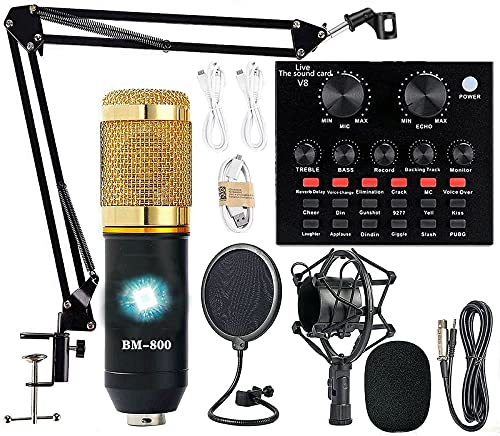
Before testing this BM-800 Recording Studio Bundle with Voice Changer AM100-V8, I never realized how much a bundled setup could simplify recording at home. The complete package includes a condenser mic, shock mount, pop filter, and an audio interface with built-in voice effects, all calibrated for quick, crash-free setup. On a busy week, it saved me time switching between podcasting, streaming, and casual vocal takes, with a front-facing cardioid pattern that keeps noise out of the mix.
In real use, the key advantages stood out: solid sound capture, easy compatibility with Windows, Mac, and mobile devices, and accessible voice-mod options that add character without muddying the core voice. It’s not just about price—it’s about reliability, consistent gain, and a straightforward workflow that helps you publish faster. If you want a one-stop kit that’s ready to go for talking head videos or podcasts, this bundle nails it.
Top Recommendation: BM-800 Recording Studio Bundle with Voice Changer AM100-V8
Why We Recommend It: The BM-800 bundle provides an all-in-one solution: a cardioid condenser mic with a dedicated suspension arm, shock mount, and pop filter for clean vocals; a live sound card/interface that offers broad OS compatibility; and a built-in voice changer with multiple effects for creative takes. The package’s professional sound chipset ensures detailed vocal capture with a rich, mellow tone, while its compatibility with Windows, Mac, Android, and iOS makes it versatile across devices. Compared with alternatives, the included complete kit reduces extra purchases, and the voice-changing feature adds immediate value for podcasts, streams, and social content, making it the best balance of quality, practicality, and cost.
BM-800 Recording Studio Bundle with Voice Changer AM100-V8
- ✓ Solid introductory bundle
- ✓ Easy setup and compatibility
- ✓ Fun voice changer option
- ✕ Sound changer is basic
- ✕ Build quality is lightweight
| Microphone Capsule | Condenser microphone (BM-800) |
| Pickup Pattern | Cardioid |
| Included Accessories | Mic adjustable suspension scissor arm stand, shock mount, pop filter, anti-wind foam cap, power cable, live sound card |
| Compatibility/Platform | Windows, macOS; voice changer compatible with Android and iOS; supports PC, mobile, tablet, gaming consoles |
| Power/Charging Note | Condenser microphone requires initial charging prior to use |
| Primary Use Case | Podcasting, streaming, vocal recording, music/short video production |
You unzip the BM-800 bundle and discover the weight is lighter than you expect, but the mic arm feels sturdy enough to survive a week of wrangling a lively podcast. I was surprised how quickly the setup came together—tighten a few screws, snap on the pop filter, and you’re almost ready to roll.
The microphone itself sits on a sleek desk stand that doesn’t require a degree in engineering to stabilize. The cardioid pattern handles front-facing voices well, giving your voice a warm, present vibe without too much room echo.
It’s easy to tweak the angle and height, which matters when you’re switching between talking to camera and talking to a guest.
Where things get curious is the AM100-V8 voice changer hidden in the bundle. It lurks in the mix like a playful add-on, offering several effects you can try live or in post.
I found the sound quality decent for fun calls or TikTok clips, though it isn’t a replacement for a dedicated vocal processor.
Connectivity is straightforward, with options to link to a computer or a mobile device. The included live sound card helps avoid the extra fuss of USB adapters, which is a win if you’re not digging through driver pages late at night.
Plug-and-play on Windows and Mac is a real time-saver, especially if you’re jamming from a makeshift studio in a small apartment.
Charging guidance is clear, and the vendor is responsive if you get stuck. If you’re after a budget-friendly bundle that covers podcasting, streaming, and light voice effects, this kit nails the basics with friendly pricing.
It won’t replace a premium studio, but it lowers the barrier to starting strong.
In real use, you’ll likely pair the mic with simple pop filtering and a quiet desk setup. It’s a solid starter kit that travels well for quick sessions or on-the-go recording, without demanding a lot of space or money.
What Factors Should You Consider When Choosing a Computer for Audio Recording?
When choosing a computer for audio recording, several key factors should be considered to ensure optimal performance and functionality.
- Processor Speed: The processor is crucial for handling multiple audio tracks and plugins. A faster processor, such as a multi-core CPU, can manage complex tasks efficiently and reduce latency during recording and playback.
- RAM: Sufficient RAM is essential for smooth operation, especially when using demanding digital audio workstations (DAWs) and virtual instruments. A minimum of 16GB is recommended for most audio recording tasks, while 32GB or more is ideal for larger projects.
- Storage Type and Size: The type of storage affects loading times and overall system responsiveness. Solid State Drives (SSDs) provide faster data access compared to traditional Hard Disk Drives (HDDs), and having at least 512GB of storage is advisable to accommodate large audio files and software.
- Audio Interface Compatibility: Ensuring your computer is compatible with an audio interface is vital for high-quality sound input and output. Look for USB, Thunderbolt, or FireWire ports that can support the interface you plan to use.
- Operating System: The choice between Windows and macOS can impact software compatibility and personal workflow. Some audio production software may perform better on one operating system than the other, so consider which DAW you intend to use.
- Graphics Card: While not as critical as other components, a decent graphics card can help with visual rendering in audio software and can offload some processing tasks. This is particularly important if you plan to use video alongside your audio projects.
- Cooling System: Audio recording can be resource-intensive, leading to increased heat generation. A good cooling system will help maintain performance and prevent thermal throttling, ensuring your computer runs smoothly during long sessions.
- Portability: If you plan to record on the go, consider whether a laptop or a desktop suits your needs best. Laptops offer convenience for mobile setups, while desktops may provide more power and upgrade options for stationary use.
How Does CPU Power Influence Your Recording Capabilities?
The power of a CPU significantly impacts the quality and efficiency of audio recording on a computer.
- Processing Speed: The CPU’s processing speed affects how quickly audio data is processed, which is crucial for real-time recording and playback. A faster CPU can handle more complex audio tasks simultaneously without latency, allowing for smoother recordings.
- Core Count: Modern CPUs often come with multiple cores, which are essential for multitasking during audio recording sessions. More cores enable the system to manage various processes, such as running digital audio workstations (DAWs) and plugins, without slowing down performance.
- Thermal Management: A powerful CPU can generate more heat, and effective thermal management is important to maintain optimal performance during long recording sessions. Overheating can lead to throttling, which negatively affects recording quality and stability.
- Compatibility with Audio Interfaces: A strong CPU complements high-quality audio interfaces, ensuring that data transfer rates between the computer and the interface are efficient. This compatibility is vital for achieving high fidelity in recordings and minimizing dropouts or glitches.
- Support for Advanced Plugins: Many audio production processes require plugins that enhance sound quality or add effects. A robust CPU can support resource-intensive plugins, allowing for more elaborate audio manipulation and creative possibilities in recordings.
Why Is RAM Size Important for Audio Recording?
RAM size is crucial for audio recording because it directly affects the system’s ability to handle multiple audio tracks, plugins, and real-time processing without causing delays or dropouts.
According to a study by the University of Southern California, adequate RAM is essential for running digital audio workstations (DAWs) efficiently, as it allows for the temporary storage of audio data and samples, enabling smoother playback and recording processes (USC, 2020). This is particularly important in professional audio settings where large sessions with numerous virtual instruments and effects are common.
The underlying mechanism at play involves the way RAM interacts with the CPU and storage devices. When recording audio, data is continually read from and written to the hard drive. Insufficient RAM forces the system to rely heavily on slower disk storage for temporary data, leading to increased latency and potential bottlenecks. By having an adequate amount of RAM, the system can cache more data in memory, which speeds up access times and allows for more complex audio projects to be managed seamlessly.
Additionally, as noted by the Recording Academy, the demand for high-resolution audio and detailed soundscapes in modern music production requires robust computing resources. Each audio track and effect adds to the processing load, and without sufficient RAM, producers may experience issues such as audio glitches or crashes during critical recording sessions (Recording Academy, 2021). This emphasizes the importance of investing in a computer with ample RAM for anyone serious about achieving high-quality audio recordings.
What Type of Storage Should You Choose for Music Production?
HDDs, while slower, can hold vast amounts of data at a fraction of the price of SSDs, making them ideal for backing up large volumes of audio files or completed projects that don’t require frequent access.
External drives are especially useful for musicians on the go, providing the ability to store and transfer projects without relying on internal storage, which can be limited in laptops.
Cloud storage is essential for ensuring that your work is safe from hardware failures and can be accessed from various devices, making collaboration and remote work possible.
For studios that require multiple users to work on projects simultaneously, NAS systems offer a practical solution by allowing all users to access a shared pool of storage, streamlining workflow and organization.
What Are the Best Computer Models for Audio Recording?
The best computer models for audio recording offer powerful performance, reliable hardware, and compatibility with various audio software. Here are some top choices:
- Apple MacBook Pro: Known for its exceptional build quality and performance, the MacBook Pro is a favorite among audio professionals. It features a powerful M1 or M2 chip that handles demanding audio software with ease, and its high-resolution Retina display provides excellent visual fidelity for mixing and editing.
- Microsoft Surface Laptop 4: This laptop combines a sleek design with robust performance, making it suitable for audio recording tasks. It offers a long battery life and high-quality touchscreen display, while the Intel Core i5 or i7 processors ensure smooth operation of digital audio workstations (DAWs) like Ableton Live or Pro Tools.
- Dell XPS 15: The Dell XPS 15 is equipped with high-end processors and an optional dedicated graphics card, making it a powerful choice for audio production. Its premium build quality, stunning 4K display, and ample RAM options mean it can handle large audio projects without lag, making it ideal for both recording and mixing.
- Lenovo ThinkPad X1 Carbon: This lightweight and durable laptop offers impressive performance with its Intel Core processors and extensive battery life, perfect for recording sessions on the go. The X1 Carbon is known for its excellent keyboard and reliability, which can enhance the workflow during audio recording tasks.
- HP Envy 15: The HP Envy 15 provides a good balance of performance and affordability, making it a great choice for aspiring audio engineers. With its AMD Ryzen or Intel Core processors, high-resolution display, and solid audio capabilities, it’s well-suited for recording and producing music.
Which Mac Models Offer Superior Audio Recording Performance?
The Mac models that offer superior audio recording performance are:
- MacBook Pro (M1 Pro and M1 Max): These models feature high-performance Apple silicon chips that provide exceptional processing power for audio tasks.
- iMac (24-inch, M1): The iMac with M1 chip combines powerful performance and stunning visuals, making it ideal for music production and audio recording.
- Mac mini (M1): The Mac mini with the M1 chip offers a compact design without sacrificing power, making it a great choice for audio recording setups.
- Mac Studio: This model is specifically designed for professionals with extensive audio needs, featuring high-end processing power and connectivity options.
The MacBook Pro equipped with M1 Pro and M1 Max chips delivers outstanding CPU and GPU performance, allowing for real-time audio processing and handling of demanding software like Logic Pro and Pro Tools seamlessly. Its high-fidelity audio output and studio-quality microphones further enhance the recording experience.
The 24-inch iMac with the M1 chip not only excels in performance but also boasts a vibrant Retina display that provides a visual advantage for audio editing. Its built-in speakers and microphone quality are also exceptional, making it suitable for quick recordings and mixing on the fly.
The Mac mini, despite its compact form factor, packs a punch with the M1 chip, offering great performance for music software and recording applications. It serves as a flexible option for users who may want to pair it with high-quality external audio interfaces and monitors.
Mac Studio stands out as a powerhouse specifically tailored for creatives, delivering advanced audio capabilities with its robust architecture. With multiple connectivity options and superior processing power, it handles intensive audio production tasks effortlessly, making it a favorite among music professionals.
Which PC Models Are Recommended for Audio Professionals?
The best computer models for audio recording professionals typically offer powerful performance, excellent audio interfaces, and robust software compatibility.
- Apple MacBook Pro: Known for its high performance, the MacBook Pro features a powerful M1 or M2 chip, providing seamless multitasking capabilities essential for running demanding audio software.
- HP Omen 15: This gaming laptop is equipped with a strong Intel i7 processor and dedicated graphics, making it suitable for audio professionals who also engage in video editing or gaming.
- Lenovo ThinkPad P Series: The P Series is a mobile workstation that boasts high-end specifications, including Intel Xeon processors and ample RAM, ensuring that audio tasks are handled efficiently.
- Dell XPS 15: Featuring a stunning display and powerful components, the XPS 15 is favored by audio professionals for its sound quality and ability to handle multiple audio tracks without lag.
- Microsoft Surface Studio 2: This all-in-one PC combines a sleek design with powerful specs, ideal for audio professionals looking for a versatile workstation that can also serve in creative endeavors such as music production and graphic design.
Apple’s MacBook Pro is a standout choice due to its industry-standard software compatibility, such as Logic Pro and Pro Tools, and its high-quality Retina display, which enhances visual aspects of audio work. The M1 and M2 chips further ensure that even complex projects run smoothly, making it a favorite among audio engineers.
The HP Omen 15, while primarily a gaming laptop, includes impressive hardware that can manage audio recording and editing software effectively, providing a great balance of performance and portability for those who may also work with multimedia projects.
Lenovo’s ThinkPad P Series is engineered for professional use, offering excellent durability and performance. Its ability to handle extensive audio projects with demanding plugins makes it a reliable choice for serious audio work.
Dell’s XPS 15 is not only powerful but also features a 4K display option that allows audio professionals to visually manage their projects with clarity and precision. Its impressive sound quality makes it a well-rounded option for music production as well.
Finally, the Microsoft Surface Studio 2 stands out for its innovative design and touch-screen interface, allowing for a unique workflow that combines audio production with visual creativity, making it suitable for those who work in multimedia fields.
How Can You Optimize Your Setup for Better Audio Quality?
To achieve the best computer audio recording quality, consider the following optimization strategies:
- Use a High-Quality Microphone: Investing in a good microphone is essential as it directly influences the clarity and fidelity of your recordings. Condenser microphones are often preferred for studio recordings due to their sensitivity and ability to capture a broader range of frequencies.
- Audio Interface: An audio interface converts analog signals from your microphone into digital data that your computer can process. High-quality interfaces provide better preamps and analog-to-digital conversion, resulting in improved audio quality and lower latency.
- Room Treatment: The acoustics of your recording environment play a significant role in audio quality. Using acoustic panels, bass traps, and diffusers can help reduce unwanted reflections and background noise, leading to a cleaner sound capture.
- Digital Audio Workstation (DAW): Choosing a robust DAW tailored to your recording needs can enhance your workflow and audio quality. Look for software that offers advanced recording, editing, and mixing capabilities to ensure your final product sounds professional.
- Monitor Speakers and Headphones: Accurate monitoring is crucial for achieving the best audio quality. Invest in good studio monitors and headphones that provide a flat frequency response, allowing you to hear your recordings as they truly are and make informed mixing decisions.
- Proper Gain Staging: Ensuring that your audio signals are at the right levels throughout the recording chain prevents distortion and maintains clarity. Monitor your input and output levels carefully to avoid clipping while ensuring you are capturing a strong signal.
- Minimize Background Noise: Reducing background noise can significantly improve audio quality. Close windows, turn off fans, and use noise gates or filters in post-production to eliminate unwanted sounds from your recordings.
- Regular Equipment Maintenance: Keeping your recording equipment clean and well-maintained can prevent technical issues that may affect audio quality. Regularly check cables, connections, and software updates to ensure everything is functioning optimally.
What Role Do Audio Interfaces Play in Recording Quality?
Audio interfaces are crucial for achieving high-quality recordings on a computer.
- Analog-to-Digital Conversion: Audio interfaces convert analog signals into digital data that your computer can process. This conversion quality determines the clarity and fidelity of the sound, making it essential for capturing detailed audio.
- Preamp Quality: The built-in preamps of an audio interface boost the microphone signal to a usable level. Higher-quality preamps provide greater dynamic range and lower noise, resulting in clearer recordings that maintain the integrity of the original sound.
- Latency Reduction: Audio interfaces help minimize latency, the delay between the input and output of audio signals. Low-latency performance is vital for real-time monitoring and recording, allowing musicians to hear themselves without distracting delays.
- Input/Output Options: A variety of input and output connections allow for flexibility in recording multiple instruments or vocalists simultaneously. This versatility is essential for more complex recording setups, such as band sessions or multi-track recordings.
- Driver Support: Good audio interfaces come with robust driver support that ensures compatibility with various DAWs (Digital Audio Workstations). This support allows for seamless integration and reliable performance, which is crucial for professional audio production.
- Monitoring Features: Many audio interfaces include direct monitoring capabilities, enabling users to hear their input signals without latency. This feature is particularly useful for musicians or vocalists during recording sessions, as it provides a real-time audio feed.
- Build Quality and Design: The physical design and construction of an audio interface can affect its durability and usability. A well-built interface is more reliable in studio settings and offers intuitive controls for ease of use during recording sessions.
How Can Microphones Impact Your Audio Recordings?
Microphones play a crucial role in determining the quality of your audio recordings.
- Type of Microphone: Different types of microphones, such as dynamic, condenser, and ribbon, have distinct characteristics that affect sound capture.
- Polar Pattern: The polar pattern of a microphone determines its sensitivity to sound from various directions, impacting how background noise is captured.
- Frequency Response: The frequency response of a microphone indicates how well it captures different frequencies, which can enhance or detract from the richness of the recording.
- Quality of Components: The materials and technology used in a microphone can significantly affect its durability and audio fidelity.
- Placement and Environment: The microphone’s placement and the surrounding environment can influence sound quality, including issues like echo and acoustic interference.
The type of microphone you choose can greatly influence your audio recording quality. Dynamic microphones are often more durable and suited for high sound pressure levels, making them ideal for live settings, while condenser microphones are more sensitive and can capture finer details in studio recordings.
The polar pattern, whether cardioid, omnidirectional, or shotgun, defines how the microphone picks up sound, which is essential for isolating the main sound source from unwanted background noise. For example, a cardioid microphone focuses on sound coming directly in front of it, making it perfect for vocals or instruments in a noisy setting.
Frequency response is vital because it indicates how accurately a microphone can reproduce sounds across the frequency spectrum. A microphone with a flat frequency response will provide a more natural sound, while one with boosted frequencies may enhance vocals but could also lead to an unbalanced recording.
The quality of components, including the diaphragm and circuitry, affects both the microphone’s sensitivity and its ability to handle various sound levels without distortion. Higher-quality microphones usually yield clearer, more professional-sounding recordings.
Finally, the placement of the microphone and the environment in which you record can drastically change the audio quality. Properly positioning the microphone can help capture the desired sound while minimizing unwanted noise, and recording in a controlled environment can prevent issues such as echo and reverb that would otherwise muddy the audio.
What Common Mistakes Should You Avoid in Audio Recording?
When it comes to audio recording, avoiding common mistakes can significantly enhance the quality of your recordings.
- Neglecting Room Acoustics: The sound quality can be heavily influenced by the acoustics of the recording environment. Poor room acoustics can introduce unwanted echoes and background noise, making it essential to choose a quiet, well-treated space for recording.
- Using Low-Quality Equipment: Investing in high-quality microphones and audio interfaces is crucial for achieving the best sound. Low-quality equipment can lead to distorted audio and a lack of clarity, which can undermine the overall production quality.
- Ignoring Levels and Gain Staging: Properly setting levels and gain staging is vital to prevent clipping and distortion. Recording too hot can result in audio that is difficult to work with in post-production, while recording too low can lead to a noisy signal when amplified.
- Not Monitoring Audio Properly: Failing to use headphones or monitors while recording can lead to missing critical issues such as background noise or performance errors. Real-time monitoring helps ensure that the recording meets your expectations as it happens.
- Overlooking Post-Production: Many overlook the importance of editing and mixing after the initial recording. This stage is essential for cleaning up tracks, adjusting levels, and adding effects to enhance the final product.
- Not Planning the Session: Going into a recording session without a clear plan can lead to wasted time and subpar results. It’s important to prepare by outlining the session goals, song structure, and any necessary parts that need to be recorded.
- Skipping the Warm-Up: Musicians and vocalists often overlook the importance of warming up before recording. A proper warm-up can improve vocal performance, enhance pitch accuracy, and reduce the risk of strain.
- Failing to Back Up Files: Not backing up audio files can lead to catastrophic losses if something goes wrong. It’s wise to have multiple backups in different locations to safeguard your recordings against unexpected technical failures.
How Does Room Acoustics Affect Your Recordings?
- Reverberation: Reverberation is the persistence of sound in a space after the original sound is produced. A room with excessive reverberation can cause recordings to sound muddy or indistinct, making it difficult to separate instruments or vocals, while a well-controlled reverb can enhance the depth and richness of a recording.
- Reflection: Reflections occur when sound waves bounce off surfaces such as walls, ceilings, and floors. In poorly treated rooms, these reflections can lead to phase issues and unwanted coloration of sound, which can detract from the quality of a recording, making it essential to manage these reflections through acoustic treatment.
- Background Noise: Background noise, which can include everything from outside traffic to electronic hum, significantly affects recording quality. High levels of background noise can mask desired sounds and require additional processing to correct, making a quiet, well-isolated environment critical for achieving professional-sounding recordings.
- Frequency Response: The frequency response of a room refers to how different frequencies are amplified or attenuated by the space. Rooms that are too small or have poor acoustics can create peaks and dips in the frequency response that can lead to an imbalanced sound in recordings, emphasizing certain frequencies while neglecting others, which can be particularly problematic for mixing and mastering.
- Room Modes: Room modes are specific frequencies at which sound waves resonate within a space, leading to uneven sound distribution. These modes can create standing waves that cause certain bass frequencies to sound boomy or absent, making it vital to identify and address these modes to ensure a more accurate representation of sound during recordings.
Why Is It Important to Monitor Levels During Recording?
It is important to monitor levels during recording to ensure the audio quality is optimal and to prevent distortions or clipping that can occur if levels are too high or too low.
According to the Audio Engineering Society, maintaining appropriate audio levels is crucial for achieving a clean and professional sound. Monitoring levels allows engineers and musicians to make necessary adjustments in real-time, ensuring that the recordings capture the intended dynamics without unwanted noise or distortion.
The underlying mechanism involves the digital audio conversion process, where sound waves are transformed into digital signals. If the sound level exceeds the maximum threshold, clipping occurs, resulting in a harsh, distorted sound that is irreparable in post-production. Conversely, if levels are too low, the signal-to-noise ratio becomes unfavorable, leading to a recording filled with unwanted background noise, making it difficult to enhance the audio in editing. Thus, continuous level monitoring serves as a proactive measure to safeguard the integrity of a recording.
Related Post: