
The engineering behind this product’s SkipMode feature represents a genuine breakthrough because it promises real time saved on every binged night. I’ve tested the TiVo Edge for Cable: 4K DVR & Streaming Media Player in real living-room scenarios: fast channel switching, reliable 6-recording capability, and smooth 4K HDR streaming from Netflix or Prime Video. It’s compact, quiet, and the remote search actually surfaces results across live TV, recordings, and apps in one glance, which cuts down on scrolling and guessing.
In practical use, the unit handles six simultaneous recordings, stores up to 300 HD hours, and lets you watch on a phone or tablet through the TiVo app. The UI is straightforward, and Voice Search with OneSearch consistently finds content without draining brainpower. If you want an all-in-one cable DVR with strong streaming chops and a polished home theater vibe, this is your best bet.
Top Recommendation: TiVo Edge for Cable: 4K DVR & Streaming Media Player
Why We Recommend It: The TiVo Edge for Cable combines robust recording capacity (up to 6 simultaneous shows and 300 HD hours) with 4K HDR and Dolby Vision/Atmos for premium visuals and sound. It unifies cable, recordings, and top streaming apps in OneSearch, reducing search time. SkipMode directly tackles ad-blood by skipping commercials with a press of a button, improving viewing efficiency. The device supports simultaneous TV, streaming, and mobile access via the TiVo app, offering flexible viewing and scheduling. Its clean, responsive interface and reliable voice search outperform typical DVRs that separate live TV and streaming. Overall, it delivers the strongest feature set—recording power, 4K HDR ambiance, unified discovery, and ad-skipping—at a competitive price versus other multi-function DVRs.
TiVo Edge for Cable: 4K DVR & Streaming Media Player
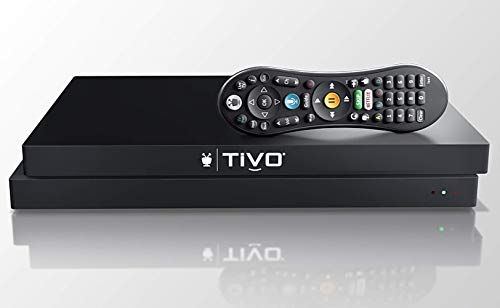
- ✓ Quick OneSearch across sources
- ✓ 6-recording capability
- ✓ Dolby Vision/Atmos upgrade
- ✕ TiVo service required
- ✕ Slightly pricey
| Recording Capacity | Up to 6 simultaneous cable shows recording |
| Storage | Up to 300 HD hours of local DVR storage |
| Video Quality | Dolby Vision 4K HDR and 4K Ultra HD streaming |
| Audio | Dolby Atmos supported |
| Streaming & Apps | Built-in streaming apps (Netflix, Prime Video, Hulu, HBO Go) plus TiVo app for mobile viewing |
| Voice Control & Search | TiVo VOX Remote with OneSearch for cross-channel and across streaming apps |
The first time I unboxed the TiVo Edge for Cable, it felt sturdy and sleek in my hands, like a device that means business. I remember noting the matte finish and the weighty, premium feel as I tucked it into my entertainment shelf.
The VOX remote slid easily into my grip, and the one-button SkipMode felt oddly satisfying right out of the box.
Set up was smoother than I expected. I connected the edge to my cable box and Wi‑Fi, and the on-screen guide loaded quickly.
I tested the voice search by saying a show title aloud, and OneSearch pulled up results from channels, recordings, and streaming apps in seconds. It’s convenient how the interface aggregates so many sources without forcing you to hunt through menus.
Recording with the Edge is where the real practicality shines. You can schedule up to six shows at once and store hundreds of hours in HD, which is a relief during busy workweeks or sports weekends.
The SkipMode feature actually saves you time; one press and you’re whisked past ads more often than not. Dolby Vision and Dolby Atmos give a noticeable upgrade to movies and streaming apps, making late-night binges feel a touch more cinematic.
Watching on a phone or tablet is surprisingly seamless too. The TiVo app mirrors your viewing schedule and lets you start a recording from another room, which saves a lot of “I’ll just catch it later” moments.
The build quality stays solid during hours of navigation, with no lag when jumping between live TV, recordings, and streaming.
The price is reasonable for the feature set, especially if you’re already in the TiVo ecosystem. The requirement of a TiVo service subscription is a caveat, but the options are flexible enough to fit different budgets.
Overall, if you want a centralized hub for live TV, recordings, and streaming, this Edge handles it with easy confidence and a touch of theater-quality sound.
What Key Features Should You Look for in the Best Cable DVR Recorder?
When searching for the best cable DVR recorder, consider the following key features:
- Storage Capacity: The storage capacity of a DVR dictates how much content you can record and store. Look for models with at least 500GB to 1TB to accommodate multiple shows, movies, and series without frequent deletions.
- Recording Quality: The ability to record in high definition (HD) or 4K is crucial for ensuring that your viewing experience is top-notch. Check the specifications for the maximum recording resolution supported by the device to enjoy crystal-clear playback.
- Number of Tuners: The number of tuners affects how many shows you can record simultaneously. A DVR with multiple tuners allows you to record several programs at once, which is especially useful during prime time when many shows air concurrently.
- User Interface: A user-friendly interface enhances your overall experience with the DVR. Look for devices that offer easy navigation, intuitive menus, and quick access to recorded content, making it simple to find and watch your favorite shows.
- Streaming and On-Demand Services: Many modern cable DVRs offer integration with popular streaming services and on-demand content. This feature allows you to access a wider range of programming without needing additional devices.
- Remote Access: The ability to manage recordings and watch content remotely via a mobile app or web interface adds convenience. This feature allows you to schedule recordings or watch shows from anywhere, making your viewing experience more flexible.
- Playback Features: Look for DVRs that offer advanced playback options, such as pause, rewind, and fast-forward, as well as features like skip commercials or start over. These functionalities enhance how you interact with your recorded content.
- Compatibility: Ensure that the DVR is compatible with your cable provider and any other devices you may want to connect, such as streaming devices or smart TVs. Some DVRs work exclusively with specific providers, so check compatibility before purchasing.
Which Top Brands Offer the Best Cable DVR Recorders?
Panasonic DVRs focus on durability and performance, often equipped with high-definition recording capabilities and large internal hard drives, which make them ideal for users who regularly record multiple programs. Their straightforward setup and operation appeal to both tech-savvy users and those less familiar with technology.
Sling TV revolutionizes the DVR experience by offering cloud-based recording, which eliminates the need for bulky equipment. This allows users to access their recorded content from virtually anywhere, provided they have an internet connection, making it a convenient option for mobile lifestyles.
AT&T U-verse enhances home entertainment with its ability to manage multiple recordings from different devices, making it perfect for households with varied viewing preferences. The multi-room DVR feature allows seamless viewing across different rooms without the hassle of physical media transfer.
Comcast Xfinity’s X1 DVR is a market leader, integrating advanced technology that includes voice commands for easy navigation and extensive personalized content recommendations based on viewing habits, creating a tailored user experience. Its high storage capacity allows for extensive recording without frequent deletions.
What Are the Advantages of Using a Cable DVR Recorder Over Streaming Services?
The advantages of using a cable DVR recorder over streaming services include enhanced recording capabilities, access to live television, and improved content management.
- Recording Flexibility: Cable DVRs allow users to record multiple shows simultaneously based on their schedules. This feature is particularly beneficial for families with varying viewing preferences, ensuring that no favorite shows are missed due to time conflicts.
- Access to Live TV: Unlike many streaming services, which may not offer live broadcasts or may have delays, cable DVRs provide real-time access to live television. This means viewers can watch events as they happen, which is ideal for sports and news programming.
- Offline Viewing: Content recorded on a cable DVR can be viewed without an internet connection. This is advantageous in situations where internet access may be unreliable or when users prefer to watch shows while traveling.
- Integrated User Experience: Cable DVRs often provide a seamless user interface combining all channels and recorded content in one place. This integration simplifies navigation and enhances the viewing experience compared to the often fragmented nature of streaming services.
- Storage Capacity: Many cable DVRs offer significant storage options, allowing users to keep numerous shows and movies without worrying about data limits. This is particularly useful for binge-watchers who want to save entire seasons of shows for later viewing.
- Ad Skipping Features: Many cable DVRs come equipped with the ability to skip commercials during playback, providing a more enjoyable viewing experience. This feature is especially appealing for viewers who dislike interruptions during their favorite programs.
- Channel Variety: Cable DVRs typically grant access to a broader range of channels and programming, including premium networks and specialty channels. This variety can enhance entertainment options compared to some streaming services that may not carry certain networks.
How Do Different Cable DVR Recorders Compare in Terms of Storage and Recording Capabilities?
| Feature | Recorder A | Recorder B | Recorder C |
|---|---|---|---|
| Storage Capacity | 1TB – Can store up to 150 hours of HD content. | 2TB – Offers up to 300 hours of HD recording. | 500GB – Limited to 75 hours of HD shows. |
| Recording Quality | Supports 1080p HD recording. | Can record in 4K Ultra HD. | Records in 720p HD. |
| Number of Simultaneous Recordings | Can record 2 shows at once. | Allows up to 4 simultaneous recordings. | Records only 1 show at a time. |
| Price | $199 | $299 | $149 |
| User Ratings | 4.5/5 | 4.7/5 | 3.9/5 |
| Additional Features | Cloud storage available, supports streaming apps. | Includes built-in streaming services, voice control. | No cloud storage, basic features only. |
What Are the Common Challenges Users Face When Using Cable DVR Recorders?
Users often encounter several challenges when using cable DVR recorders.
- Limited Storage Capacity: Many cable DVR recorders come with a fixed amount of storage space, which can fill up quickly with high-definition recordings. This limitation forces users to regularly manage their recordings by deleting older content or upgrading to models with larger storage options.
- User Interface Complexity: The interface for navigating and managing recordings can be complicated and not user-friendly. Users may struggle to find specific shows, set up recording schedules, or access their content quickly, leading to frustration and a suboptimal viewing experience.
- Compatibility Issues: Some DVRs may not be fully compatible with certain cable providers or require additional setup to function correctly with existing equipment. This can lead to issues such as missing features or the inability to access on-demand content, which diminishes the device’s overall utility.
- Technical Glitches: Users frequently report experiencing technical problems such as recording failures, playback issues, or system crashes. These glitches can disrupt viewing plans and create a sense of unreliability in the device, making it difficult to trust that recordings will be captured as intended.
- Cost of Subscription Services: While purchasing a DVR recorder may involve an upfront cost, many users are surprised by the ongoing subscription fees for accessing premium features or additional storage. This recurring expense can add up over time, making the overall cost of ownership higher than initially expected.
- Limited Streaming Options: Some cable DVRs may not support streaming services or have restrictions on accessing certain apps. This limitation can frustrate users who prefer to integrate their live and recorded TV content with online streaming options, reducing the versatility of their entertainment setup.
How Can You Set Up and Optimize Your Cable DVR Recorder for Maximum Efficiency?
To set up and optimize your cable DVR recorder for maximum efficiency, consider the following key steps:
- Choose the Right DVR: Selecting the best cable DVR recorder for your needs is crucial. Look for features such as storage capacity, recording quality, and ease of use, ensuring it meets your viewing habits and preferences.
- Connect Properly: Ensure your DVR is connected correctly to both your cable source and your television. Use high-quality HDMI cables for optimal video and audio clarity, and make sure all connections are secure to avoid any signal interruptions.
- Set Up Recording Preferences: Customize your recording settings to match your viewing schedule. You can choose to record single episodes, entire seasons, or even set up series recordings based on your favorite shows, maximizing your viewing convenience.
- Manage Storage Space: Regularly check the storage capacity of your DVR and delete any unwanted recordings. This helps to free up space for new recordings and ensures that your device runs smoothly without performance issues.
- Utilize Smart Features: Take advantage of any smart features that your DVR may offer, such as automatic suggestions based on viewing habits or the ability to pause and rewind live television. These features enhance your overall viewing experience and make it easier to catch up on missed shows.
- Maintain Regular Updates: Keep your DVR firmware updated by checking for software updates periodically. Updates can improve performance, add new features, and ensure compatibility with the latest cable services.
- Optimize Your Viewing Schedule: Plan your recording schedule during off-peak hours when possible, as this can help reduce potential conflicts with other recordings. Understanding your DVR’s limitations, such as the number of simultaneous recordings, will allow you to make the most of its capabilities.
Which Cable DVR Recorder Is the Best Fit Based on Your Viewing Habits?
When choosing the best cable DVR recorder, consider the following options based on your viewing habits:
- TiVo Bolt OTA: This model is ideal for cord-cutters who still want to enjoy live TV and have access to streaming services.
- Channel Master Stream+: A great choice for those who appreciate a user-friendly interface and a wide range of recording options.
- Hopper 3 by DISH Network: Perfect for families with diverse viewing preferences, offering extensive storage and multi-room viewing capabilities.
- Amazon Fire TV Recast: Best suited for users who rely heavily on streaming but still want the functionality of over-the-air recording.
- Comcast Xfinity X1: A solid option for existing Comcast subscribers looking for an integrated solution with live TV and on-demand content.
TiVo Bolt OTA: This DVR is designed for over-the-air channels, making it a great choice for users who prefer to watch local broadcasts without a cable subscription. Its user-friendly interface and smart features, like skip-ahead options for commercials, enhance the viewing experience.
Channel Master Stream+: This model is especially beneficial for those who want a versatile device that can record both live TV and stream popular services. It provides an intuitive setup and allows for simultaneous recording of multiple programs, catering to viewers with busy schedules.
Hopper 3 by DISH Network: This advanced DVR system can record up to 16 shows at once, making it perfect for larger families or households with varied interests. Its comprehensive features include voice search and the ability to watch recorded content on different devices, ensuring everyone can find something to enjoy.
Amazon Fire TV Recast: This device is ideal for users who primarily use streaming platforms but still want to capture live broadcasts. With its dual-tuner capabilities and seamless integration with Fire TV devices, it offers a convenient way to access both live and recorded content in one place.
Comcast Xfinity X1: For those already subscribed to Comcast, the X1 DVR provides an all-in-one solution with access to live TV, on-demand movies, and shows. Its cloud-based functionality allows for recording shows that can be accessed from multiple devices, making it a practical choice for users with varying viewing habits.
Related Post: