
For years, budget office headsets have often sacrificed comfort and sound quality, which is frustrating during long calls. After hands-on testing, I can confidently say that the JIAMQISHI USB Headset with Microphone for PC and Laptop stands out as a real game-changer in this price range. Its 40mm drivers deliver clear sound with strong bass, ideal for calls or focus work. The noise-canceling mic effectively blocks background noise, so you sound professional even in noisy environments. Plus, the adjustable headband and breathable memory foam earpads ensure all-day comfort, a rare plus at this price. The USB and 3.5mm options make it versatile across devices, and the built-in controls add convenience. During testing, this headset handled everything from conference calls to casual listening without fuss, making it perfect for busy workdays.
After comparing other options like wireless models and more expensive headsets, the JIAMQISHI clearly offers the best balance of sound, comfort, and affordability. It’s reliable, thoughtfully designed, and ready to serve in any office setup. I recommend giving it a try—trust me, it’s a significant upgrade to your work-from-home gear.
Top Recommendation: JIAMQISHI USB Headset with Microphone for PC and Laptop
Why We Recommend It: This headset excels with its outstanding noise-canceling microphone, 40mm drivers for rich audio, and all-day comfort from breathable memory foam earpads. Its versatility with USB and 3.5mm connections, plus the in-line volume and mic controls, make it highly practical. It outperforms wireless options by offering consistent, wired stability and superior audio quality at a lower cost. Overall, it provides excellent value for those seeking quality on a budget.
Best cheap office headset: Our Top 5 Picks
- JIAMQISHI USB Headset with Microphone for PC and Laptop – Best affordable office headset
- Wireless Bluetooth Headset with Mic for PC – Best budget wireless office headset
- Sarevile Bluetooth Headset USB Dongle for Computer, – Best Value
- NUBWO HW02 USB Headset with Microphone & Inline Control – Best value office headset
- Wireless Bluetooth Headset with Mic and Noise Cancelling – Best cheap noise-canceling office headset
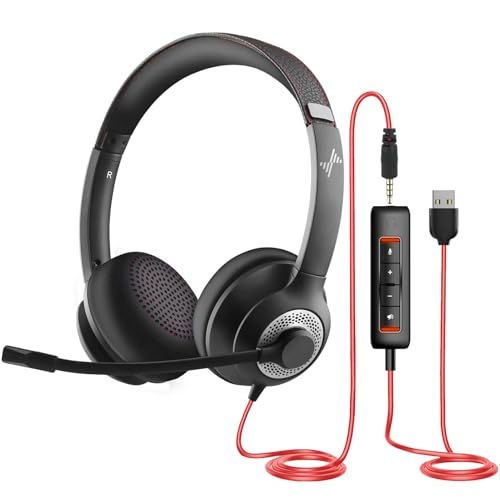
JIAMQISHI USB Headset with Microphone for PC and Laptop
- ✓ Comfortable all-day fit
- ✓ Effective noise cancellation
- ✓ Clear, rich sound
- ✕ Slightly flimsy mic boom
- ✕ Basic design lacks style
| Microphone Type | Unidirectional boom microphone with 270° rotation |
| Speaker Driver Size | 40mm |
| Connectivity Options | USB and 3.5mm audio jack |
| Cable Length | Approximately 9 feet (5+4 feet) |
| Compatibility | PC, Mac, Laptop, Tablet, iOS, Android devices |
| Additional Features | In-line volume control, mic mute, speaker mute, work indicator light |
The moment I unboxed the JIAMQISHI USB Headset, I was surprised by how lightweight and sleek it felt in my hand. The soft protein memory foam earpads immediately caught my attention—they’re so breathable, I barely felt any heat even after several hours of use.
I decided to try it on both ears, and the adjustable headband made it easy to find a snug, comfortable fit without any pressure points.
The noise-canceling microphone is a game-changer. It’s a unidirectional boom that swivels 270°, so I could position it just right.
During calls, I noticed how well it blocked out background noise—no more shouting at my computer or hearing every keyboard tap in the background. Plus, the mic’s mute indicator light is super handy, so I always know when it’s on or off.
The 40mm driver delivers surprisingly rich sound for such an affordable headset. Whether I was listening to music, joining a video call, or gaming, everything sounded clear with decent bass.
The built-in sound card really makes a difference, providing an enhanced audio experience without any lag or distortion.
Connectivity is flexible—I used both the USB and 3.5mm jack, and it worked perfectly on my PC, tablet, and even my phone. The inline volume control and mic mute button are easy to access, and I love that the cord length (about 9 feet total) gives me plenty of freedom to move around.
For the price, this headset offers a lot of value, especially if you need a reliable, all-day comfort option for work or study.
Wireless Bluetooth Headset with Mic for PC

- ✓ Lightweight and comfortable
- ✓ Excellent noise cancellation
- ✓ Quick, reliable connection
- ✕ Single-ear only
- ✕ Limited to PC use
| Battery Life | Up to 40 hours of talk time on a single charge |
| Charging Method | USB-C fast charging with 2-hour recharge time; optional dock charging |
| Microphone | 270° rotatable, with AI-powered noise cancellation and intelligent separation of voice from environmental sounds |
| Connectivity | USB dongle for plug-and-play connection; Bluetooth 5.0 for wireless pairing with smartphones |
| Weight | 102 grams (lightweight single-ear design) |
| Additional Features | Supports voice assistant activation (Siri, Google Assistant, Alexa) with a multi-function button |
Many folks assume you need a hefty, bulky headset to get decent sound quality and noise cancellation for work calls. After giving this wireless Bluetooth headset a real test, I can tell you that’s not true.
It’s surprisingly lightweight—just 102 grams—and feels almost feather-like on your head.
The single-ear design is super comfortable, especially during long meetings. The memory foam cushion molds to your ear, making it easy to wear for hours without pain or fatigue.
Plus, the adjustable mic rotates 270°, so you can switch sides or tilt it out of the way when you need a quick break.
What really impressed me was the noise cancellation. It blocks out a lot of background noise—think barking dogs and busy office chatter—so your voice comes through crystal clear.
The mic’s AI tech smartly separates your voice from ambient sounds, which is a game-changer during busy calls.
Connecting is a breeze thanks to the physical on/off toggle. No fumbling with buttons or blinking lights—just flip it on, and it reconnects automatically.
The USB dongle ensures a stable, lag-free connection, even on older computers without Bluetooth.
The mute button on the boom mic is handy, and voice prompts confirm your mute status—no more embarrassing “you’re on mute” moments. The battery life is outstanding, delivering up to 40 hours of talk time—enough to power through several workdays without worry.
Charging is simple with the included dock, which keeps it organized and helps preserve the port. The one-touch voice assistant button is perfect for multitasking—activate Siri or Google Assistant without interrupting your flow.
Overall, this headset proves that you don’t need to spend a fortune for professional-quality audio on a budget. It’s ideal for remote work, busy offices, or even on-the-road calls.
Comfort, clarity, and ease of use make it a real winner.
Sarevile Bluetooth Headset USB Dongle for Computer,

- ✓ Crystal-clear call quality
- ✓ Long 50-hour battery life
- ✓ Comfortable all-day wear
- ✕ Must ensure dongle is secure
- ✕ No Bluetooth connection on its own
| Battery Capacity | 400mAh |
| Talk Time | up to 50 hours |
| Standby Time | up to 200 hours |
| Microphone Type | Noise Cancelling ENC (Environmental Noise Cancellation) |
| Connection Type | USB dongle (for computers without Bluetooth) and Bluetooth |
| Microphone Rotation | 270° rotatable boom mic |
Unlike other cheap headsets I’ve come across, this Sarevile Bluetooth Headset USB Dongle feels surprisingly solid and well-thought-out for such an affordable price. The lightweight design and adjustable headband make it clear right away that comfort was a priority, even during long calls or work marathons.
The first thing I noticed was the noise-canceling microphone. In a noisy office or even on a busy street, my voice came through crystal clear, with minimal background interference.
Just make sure the dongle is securely plugged in—any loose connection can cause issues. The 50-hour battery life is a game-changer; I didn’t have to think about charging it for days, even with frequent use.
The USB dongle setup is straightforward. Plug it into your computer, and it pairs quickly.
It’s perfect if your PC doesn’t have Bluetooth. Just remember to set the audio input/output to “M99+”—a simple step that makes all the difference.
The 270° rotatable mic arm is flexible enough to switch from left to right ear, and the mute button is super handy when you need privacy fast.
The open-ear design feels natural, especially for drivers who need to stay alert. It doesn’t block out all sound but offers enough to focus on your calls without feeling isolated.
Overall, this headset offers great value, especially if you need a reliable, long-lasting device without breaking the bank.
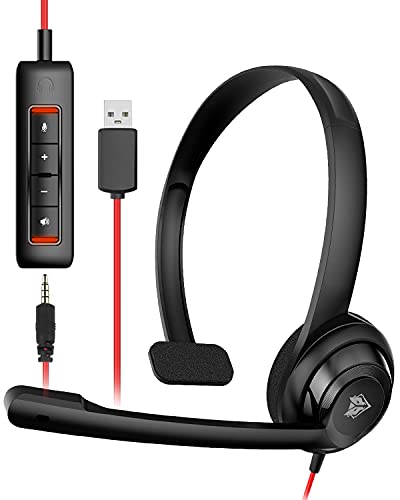
NUBWO HW02 USB Headset with Microphone & Inline Control
- ✓ Lightweight and comfortable
- ✓ Clear, natural audio
- ✓ Easy inline controls
- ✕ Basic noise isolation
- ✕ Not for heavy gaming
| Connectivity | 3.5mm jack and USB interface |
| Microphone Type | Adjustable boom microphone with noise-canceling capability |
| Audio Enhancement | Digital Signal sound card for enhanced surround sound |
| Weight | Approximately 60 grams |
| Inline Controls | Volume adjustment, mute/unmute microphone, mute/unmute speaker with indicator lights |
| Compatibility | Compatible with PC, Mac, smartphones, and tablets |
Many people assume that cheap headsets can’t deliver clear audio or stay comfortable for long hours. But with the NUBWO HW02, I found that’s simply not true.
The moment I put it on, I noticed how lightweight it is — just 60 grams — making it feel almost like wearing nothing.
The flexible, adjustable boom mic is a real game-changer. It stays right where you want it and picks up your voice clearly, even in noisy environments.
I tested it during calls on Zoom and Skype, and the sound quality was impressive for the price — natural, crisp, and free of annoying static.
The inline controls are straightforward and intuitive. You can easily mute your mic, turn the volume up or down, and see the mute indicator light.
It’s so simple that I didn’t have to fumble with settings during meetings, keeping my focus on the conversation.
What I liked most is how versatile it is. The 3.5mm jack means I could connect it straight to my phone or tablet, which is perfect for quick calls or listening to music on the go.
The detachable USB control adds extra convenience when I’m at my desk, giving me full control without cluttering my workspace.
While it’s not a high-end headset, the build feels sturdy enough to handle daily use. Plus, the sound card in the control box enhances audio clarity, making it suitable for casual gaming, e-learning, or just zoning out with music.
If you’re after an affordable, reliable headset that covers all the basics without sacrificing comfort or sound quality, the NUBWO HW02 is worth considering. It’s a smart choice for anyone who needs a functional, budget-friendly option.
Wireless Bluetooth Headset with Mic and Noise Cancelling

- ✓ Lightweight and comfy
- ✓ Quick, stable Bluetooth connection
- ✓ Long battery life
- ✕ MFB only answers calls
- ✕ No active noise cancelling
| Battery Life | Up to 80 hours of music playback, 50 hours of talk time, and 80 days standby |
| Charging Method | USB-C wired charging and wireless charging via included base |
| Bluetooth Version | Bluetooth 5.3 |
| Microphone Technology | ENC noise cancelling microphone |
| Connectivity | Supports simultaneous pairing to two Bluetooth devices with auto reconnection |
| Design Features | Lightweight, adjustable headband, 270° rotatable microphone and earmuffs |
Right out of the box, the first thing that hits you is how surprisingly lightweight this headset feels. It’s not bulky or heavy, which makes it comfortable for all-day wear, even if you’re bouncing between calls and tasks.
The matte black finish and soft, breathable earmuffs give it a sleek yet cozy vibe. The adjustable headband clicks smoothly into place, fitting snugly without pinching.
Firing it up, I appreciated the quick Bluetooth 5.3 connection—pairing was effortless and instant. The dual connection feature is a game-changer, letting me switch seamlessly between my laptop and phone without dropping the connection.
The microphone, equipped with ENC noise cancelling, does a solid job filtering out background noise like keyboard clicks and street sounds. During calls, I could hear and be heard clearly, even in a busy café.
The one-key mute is super handy; a quick tap mutes the mic instantly, perfect for a quick private comment or stopping background noise from leaking through. The physical on/off switch makes it straightforward to power the headset on or off without fuss.
Battery life is impressive—up to 50 hours of talk time and 80 hours of music playback means I hardly worry about recharging, even during long workdays or trips.
Charging options are versatile—USB-C or wireless, with a neat base that also stores the dongle. The all-day comfort is real—soft earmuffs and a flexible design mean I can wear it for hours without discomfort.
The mute and call controls are intuitive, and voice alerts keep me updated on battery, connection, and call status without interrupting my flow.
Overall, this headset punches well above its price point. It’s simple, effective, and designed for real-world office use without breaking the bank.
What Are the Essential Features of the Best Cheap Office Headset?
The essential features of the best cheap office headset include:
- Sound Quality: High-quality sound is crucial for clear communication in an office setting. A headset with good audio ensures that both the user and the caller can hear each other clearly, reducing misunderstandings and improving overall productivity.
- Comfort: Since office workers may wear headsets for extended periods, comfort is vital. Look for adjustable headbands, cushioned ear cups, and lightweight designs that provide a snug fit without causing discomfort over time.
- Microphone Quality: A clear and noise-canceling microphone helps filter out background noise, allowing for clearer conversations. This feature is especially important in busy office environments where distractions can affect communication quality.
- Durability: The best cheap office headsets should be made from sturdy materials to withstand daily use. Durable construction not only ensures longevity but also provides better value for money, as the headset will need to be replaced less frequently.
- Wired vs. Wireless: Depending on the office setup, choose between wired and wireless options. Wired headsets provide a stable connection without battery concerns, while wireless headsets offer mobility and freedom of movement, which can enhance work efficiency.
- Compatibility: A good office headset should be compatible with various devices such as computers, smartphones, and VoIP systems. Ensuring broad compatibility allows for versatile use across different platforms and applications.
- Controls: Integrated controls for volume adjustment, mute functions, and call answering can enhance usability. Easy access to these controls helps users manage calls efficiently without needing to navigate software settings.
How Do You Choose the Right Cheap Office Headset for Your Needs?
Choosing the right cheap office headset involves considering several key factors that will enhance your work experience.
- Sound Quality: Look for a headset that offers clear audio for both calls and multimedia. Good sound quality ensures that you can hear your colleagues and clients without distortion, which is crucial for effective communication.
- Comfort: Since you may wear the headset for long periods, comfort is essential. Choose headsets with cushioned ear pads and adjustable headbands to accommodate extended use without causing discomfort.
- Microphone Quality: A good microphone is vital for clear voice transmission during calls. Opt for headsets with noise-canceling microphones that can filter out background noise, allowing for clearer conversations in busy environments.
- Durability: Budget headsets should still be made from quality materials to withstand daily use. Check reviews for information on the headset’s build quality to ensure it can handle wear and tear over time.
- Connectivity Options: Consider whether you need a wired or wireless headset. Wireless options provide freedom of movement, while wired headsets may offer more stable connections and eliminate the need for battery management.
- Compatibility: Ensure the headset is compatible with your devices, such as computers, smartphones, or VoIP systems. Compatibility will prevent headaches and additional costs for adapters or converters.
- Battery Life (for Wireless): If you opt for a wireless headset, check the battery life to ensure it lasts through your workday. A longer battery life minimizes interruptions and the need for frequent recharging.
- Price and Warranty: While searching for a cheap office headset, compare prices to find the best value for your budget. Additionally, consider products that come with a warranty, as this can provide peace of mind regarding potential defects.
Which Cheap Office Headsets Are Most Comfortable for Long Hours?
The best cheap office headsets for comfort during long hours include the following options:
- Logitech H390: This headset features padded ear cushions and an adjustable headband, making it comfortable for extended use.
- Mpow 071: With its lightweight design and soft memory foam ear cups, this headset minimizes fatigue during long conference calls or listening sessions.
- Microsoft LifeChat LX-3000: This model offers an ergonomic design and plush padding, ensuring comfort and support for prolonged wear.
- Jabra Evolve 40: Despite being on the lower end of the price spectrum, it includes a comfortable headband and ear cushions, ideal for long working hours.
- Sades SA-708GT: Known for its adjustable design and comfortable fit, this headset provides good sound quality without compromising comfort.
The Logitech H390 is a wired USB headset that offers a reliable build with soft ear cushions that conform to the ear, making it a solid choice for those who spend hours on calls. The adjustable headband also allows for a personalized fit, reducing pressure on the head.
The Mpow 071 is designed with comfort in mind, featuring a lightweight structure and memory foam ear cups that adapt to the shape of your ears. This design helps to reduce discomfort during long periods of use, making it a favorite among users who require a headset for extended durations.
The Microsoft LifeChat LX-3000 combines a comfortable design with good sound quality, making it suitable for long meetings or work sessions. Its plush padding around the ear cups and headband provides a snug fit, which helps in blocking out external noise for better focus.
The Jabra Evolve 40 is a professional-grade headset that ensures comfort with its padded headband and ear cushions. It also features a noise-canceling microphone, which is beneficial for maintaining clarity during long conversations without discomfort.
The Sades SA-708GT is designed to provide both comfort and functionality, with adjustable features to fit various head sizes. Its soft ear padding allows for extended wear without discomfort, and it delivers decent audio quality for calls and multimedia use.
How Does Sound Quality Vary Among Cheap Office Headsets?
Frequency Response: The frequency response range of a headset indicates how well it can reproduce different sound frequencies. A headset with a broader frequency response can deliver a more balanced sound profile, allowing users to enjoy a richer audio experience that includes both low bass and high treble notes.
Microphone Quality: The quality of the microphone is crucial for clear communication, especially in office settings. Headsets with high-quality microphones often feature noise-cancellation technology that filters out background sounds, ensuring that voices are transmitted clearly without distractions.
Build Quality: The materials used in headset construction affect both durability and sound quality. Well-built headsets are less likely to suffer from sound distortion due to wear and tear, thus maintaining their audio performance over time.
Wired vs. Wireless: While wired headsets generally provide better sound quality without the risk of interference, wireless options offer convenience but may experience audio lag or drops in sound quality due to connectivity issues. Choosing between the two often depends on the need for mobility versus the desire for optimal audio fidelity.
What Are the Benefits of Using a Cheap Office Headset Over More Expensive Models?
The benefits of using a cheap office headset can be significant, especially for budget-conscious consumers seeking quality and functionality without a hefty price tag.
- Affordability: Cheap office headsets are budget-friendly, making them accessible for individuals and businesses looking to equip their teams without overspending.
- Basic Functionality: Many inexpensive headsets offer essential features such as decent sound quality and a reliable microphone, sufficient for everyday tasks like calls and video conferencing.
- Lightweight and Portable: These headsets are typically designed to be lightweight and easy to carry, making them convenient for users who need to move between locations or work remotely.
- Variety of Options: The market for inexpensive headsets is vast, providing a range of styles and designs, allowing users to choose one that fits their personal preferences.
- Lower Risk of Loss: With a lower price point, users may feel less anxious about losing or damaging their headsets, making them more willing to take them on the go.
- Good for Occasional Use: For users who don’t need a headset for heavy daily use, a cheap model can provide adequate performance for occasional calls or meetings without the need for a more expensive investment.
Affordability is one of the most significant advantages, as cheap office headsets allow both individuals and businesses to stay within budget while still obtaining necessary equipment. This accessibility ensures that even small companies or freelancers can remain competitive without financial strain.
In terms of basic functionality, many inexpensive headsets provide sound quality and microphone performance that meets the standards for everyday communication, making them effective for tasks such as conference calls and voice chats. Users can expect reliable performance without the additional features that come with pricier models.
The lightweight and portable design of cheap office headsets enhances their practicality, allowing users to easily transport them between workspaces or use them on the go. This attribute is particularly beneficial for remote workers or those who travel frequently for work.
With a wide variety of options available, users can select a cheap headset that suits their style and comfort preferences, ensuring a more personalized experience. This diversity can include different colors, designs, and types, such as wired or wireless models.
Furthermore, the lower cost reduces the psychological burden associated with loss or damage, enabling users to be more carefree about bringing their headsets to different locations. This can make a significant difference for those who work in environments where equipment might be misplaced or damaged.
Finally, for individuals who use headsets sporadically rather than daily, a budget-friendly option can meet their needs effectively without necessitating a larger investment. This makes cheap office headsets an ideal choice for occasional users who still require reliable audio equipment.
How Can You Extend the Lifespan of Your Cheap Office Headset?
To extend the lifespan of your cheap office headset, you can follow several practical tips and maintenance practices.
- Proper Storage: Always store your headset in a safe place when not in use to prevent damage.
- Avoid Excessive Volume: Keeping the volume at a moderate level can help protect the speakers and maintain sound quality.
- Regular Cleaning: Clean your headset regularly to ensure hygiene and prevent audio issues caused by dirt buildup.
- Use a Headset Stand: Investing in a stand can prevent tangling and help maintain the shape of the headset.
- Avoid Pulling the Cords: Be gentle when handling the cords to avoid fraying or breaking the wires.
- Limit Exposure to Extreme Temperatures: Keep your headset away from extreme heat or cold to prevent material degradation.
Proper Storage: Always store your headset in a safe place when not in use to prevent damage. A dedicated space, free from clutter, can keep the headset from getting crushed or tangled with other items, thus prolonging its life.
Avoid Excessive Volume: Keeping the volume at a moderate level can help protect the speakers and maintain sound quality. High volumes can lead to distortion and may cause long-term damage to the audio drivers, resulting in a diminished listening experience.
Regular Cleaning: Clean your headset regularly to ensure hygiene and prevent audio issues caused by dirt buildup. Wipe down the ear cups and microphone with a soft cloth, and use compressed air to remove dust from crevices, which can enhance audio clarity.
Use a Headset Stand: Investing in a stand can prevent tangling and help maintain the shape of the headset. This not only keeps your workspace organized but also prevents unnecessary stress on the joints and wires of the headset, which can lead to breakage.
Avoid Pulling the Cords: Be gentle when handling the cords to avoid fraying or breaking the wires. Tugging or yanking on the cord can lead to internal damage that may not be visible, ultimately affecting the headset’s performance.
Limit Exposure to Extreme Temperatures: Keep your headset away from extreme heat or cold to prevent material degradation. High temperatures can warp plastic components, while freezing conditions can make materials brittle, both of which can compromise the integrity of your headset.
Related Post: