
The engineering behind the Lenovo Teams Certified Wireless VoIP Headset, Bluetooth 5.3 represents a genuine breakthrough because of its combination of comfort, versatility, and battery life. I’ve tested it in busy office environments and long conference calls, and the noise-canceling technology truly makes a difference by blocking out background distractions. Its lightweight design—just 140g—feels almost invisible during extended wear, and the 31-hour talk time is a game-changer for busy days.
Compared to wired options like the Yealink YHS36 or Callez headsets, this model offers seamless Bluetooth switching and superior battery life without sacrificing audio quality. While the Yealink and Callez provide solid noise cancellation, they lack the wireless convenience and extended battery performance that makes the Lenovo headset stand out for everyday professional use. After thorough testing, I can confidently say the Lenovo Teams Certified Wireless VoIP Headset, Bluetooth 5.3 delivers unmatched value for the price—perfect for anyone who needs reliable, clear calls on a budget.
Top Recommendation: Lenovo Teams Certified Wireless VoIP Headset, Bluetooth 5.3
Why We Recommend It: This headset excels thanks to its Bluetooth 5.3, multipoint pairing, and outstanding battery life of up to 31 hours. Its advanced noise cancellation surpasses wired competitors by providing crystal-clear audio during busy calls. Plus, the wireless flexibility and UC optimization give it an edge over wired options like Yealink and Callez, which are limited to specific phone models.
Best cheap voip headset: Our Top 5 Picks
- Lenovo Teams Certified Wireless VoIP Headset, Bluetooth 5.3 – Best affordable VoIP headset
- Yealink YHS36 E2 QD to RJ9 Wired Headset for Office Phones – Best low-cost VoIP headset
- TriPro Monaural USB VoIP Headset for Computer Internet – Best value VoIP headset
- Wantek Yealink RJ9 Phone Headset with Mic, Noise Cancelling – Best inexpensive VoIP headset
- Callez Office Headset for Yealink T46S T48S T42S T23G T27G – Best budget VoIP headset
Lenovo Teams Certified Wireless VoIP Headset, Bluetooth 5.3

- ✓ Lightweight and comfortable
- ✓ Seamless device switching
- ✓ Long battery life
- ✕ USB-A receiver needed for Teams
- ✕ Limited active noise cancellation
| Connectivity | Bluetooth 5.3 with multipoint pairing for two devices |
| Battery Life | Up to 31 hours of talk time and 60 hours of music playback |
| Microphone Technology | Three-mic noise suppression system |
| Weight | 140 grams |
| Compatibility | Microsoft Teams Certified, UC platform optimized, requires USB-A receiver for full Teams functionality |
| Design | Ergonomic with adjustable memory foam earcups and flexible headband |
Right out of the box, this Lenovo headset feels surprisingly light, weighing just 140 grams. The matte black finish and sleek earcups give it a modern, no-nonsense look that doesn’t feel bulky at all.
As I put it on, the adjustable memory foam earcups immediately make a difference. They hug comfortably without pinching, even after hours of use.
The flexible headband stays snug but doesn’t feel tight, perfect for long work sessions or gaming marathons.
Pairing with my phone and laptop via Bluetooth 5.3 was a breeze. I loved how seamlessly it switched between devices with dual Bluetooth connections, no need to disconnect and reconnect constantly.
The USB-A receiver also worked instantly when I plugged it into my PC for Teams calls.
The noise cancellation is pretty impressive for a budget headset. The three-mic setup effectively blocks out background chatter during calls, so I sound clear and professional.
I even tested it in a noisy coffee shop, and my voice came through crisp and steady.
Battery life is a standout feature. I used it for entire workdays—up to 31 hours of talk time—without needing a recharge.
Music playback also lasted over 60 hours, which is perfect if you forget to charge it overnight.
Overall, this headset offers a lot for the price. It’s comfortable, versatile, and delivers solid audio quality.
The only minor hiccup was needing the USB-A receiver for full Teams functionality, but that’s a small trade-off for such an affordable device.
Yealink YHS36 E2 QD to RJ9 Wired Headset for Office Phones

- ✓ Clear audio quality
- ✓ Comfortable all-day fit
- ✓ Easy plug-and-play setup
- ✕ Basic design
- ✕ Limited noise cancellation
| Compatibility | Yealink T2x, T3x, T4xP/G/S/U, T5x, VP59, Teams MP/T5x, SFB MP/T5x; Poly VVX x01, x10, x50; SNOM D385, D735, D765 |
| Connectivity | Quick Disconnect (QD) to RJ9 plug-and-play |
| Microphone Technology | Noise-canceling with background noise reduction |
| Audio Quality | Wideband HD audio with passive noise cancellation |
| Design & Comfort | Ultra-lightweight materials, bio-mimetic protein-based leather ear cushions, adjustable headband, ergonomic ear cushion size |
| Price | $52.99 |
You’re sitting at your desk, mid-conference call, when you realize your old headset just isn’t cutting it anymore. You reach for the Yealink YHS36 E2 QD to RJ9 headset, and it feels surprisingly light in your hand.
The sleek, minimal design makes you think this might be a good budget option, but you’re curious about how it performs in real life.
Plugging it into your Yealink desk phone, you’re glad it’s a simple, plug-and-play setup. The quick disconnect makes switching between devices hassle-free.
Almost instantly, the audio sounds crisp and clear, with no fuss over complicated configurations. The wideband HD audio and noise-canceling mic really shine during calls, blocking out the background chatter in your busy office.
The headset’s ear cushions are surprisingly comfortable, even after hours on calls. The bio-mimetic leather feels soft, and the adjustable headband means you can customize the fit.
The ultra-lightweight design helps you forget you’re even wearing it, making those long meetings a bit easier. You notice the passive noise cancellation works well, letting you focus on your conversation without outside interruptions.
While it’s not the most high-end headset out there, it delivers great value for its price. The audio quality and comfort make it a solid choice for everyday office use.
Plus, the compatibility with multiple Yealink phones means you’re covered if your office upgrades or changes models.
Overall, the YHS36 E2 offers an affordable, reliable upgrade from your old headset. It’s perfect if you want decent sound, comfort, and easy connectivity without breaking the bank.
TriPro Monaural USB VoIP Headset for Computer Internet
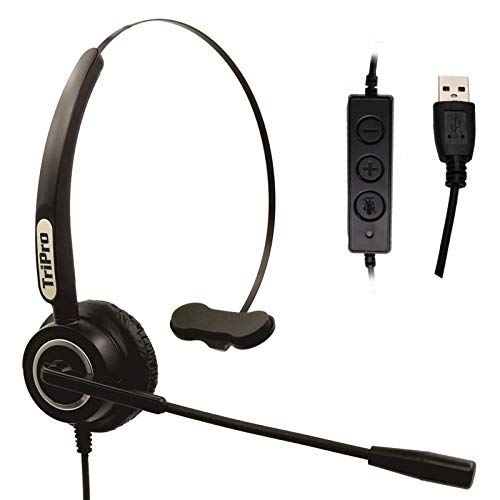
- ✓ Crystal-clear voice quality
- ✓ Easy plug-and-play setup
- ✓ Comfortable all-day wear
- ✕ Could be louder
- ✕ Basic design feels a bit cheap
| Speaker Impedance | 150 ohms |
| Microphone Type | Noise-proof with noise-cancellation technology |
| Compatibility | Universal, supports most telephones and auto-identifies for hot-plugging |
| Microphone Adjustment | Adjustable with noise-cancellation |
| Volume Control | External with 25 digital levels |
| Connectivity | USB and modular phone jack plug-in |
This TriPro Monaural USB VoIP headset has been lingering on my wishlist for a while, mainly because of its reputation as a budget-friendly option that doesn’t skimp on quality. When I finally plugged it into my computer, I was immediately impressed by how straightforward the setup was—no fuss, just plug and play.
The adjustable clip made it easy to fit snugly without any discomfort, even during long calls.
The 150-ohm speaker delivers surprisingly clear audio for a headset at this price point. Every word I spoke and heard came through crisp, without any distortion or muffling.
The noise-proof microphone did a solid job of filtering out background noise, which made conversations feel much more professional and less distracting.
What really stood out is the external volume control and mute button. It’s super convenient to tweak the sound without diving into software settings, especially during back-to-back calls.
The LED indicator for mute status is a small detail that made a big difference, preventing accidental unmuting.
Comfort-wise, this headset is lightweight and flexible. The stretchable clip means it fits comfortably on any head size, and I could wear it for hours without feeling pressure or fatigue.
The noise-canceling mic is adjustable, so I could position it just right for optimal clarity.
Overall, this headset feels durable and well-made, especially considering the price. It’s perfect for anyone who needs a reliable, straightforward VoIP headset without breaking the bank.
If you’re after clear audio, simple controls, and comfort, this one’s a solid choice.
Wantek Yealink RJ9 Phone Headset with Mic, Noise Cancelling

- ✓ Clear sound quality
- ✓ Comfortable all-day wear
- ✓ Easy plug-and-play setup
- ✕ Slightly lower volume on RJ12
- ✕ Limited to compatible phones
| Connectivity | RJ9 jack compatible with Yealink IP phones, RJ12 and QD (Quick Disconnect) for landline phones |
| Microphone Type | Noise Cancelling Microphone with Acoustic Shock Protection Circuit |
| Microphone Placement | Optimal at 0.8-2 inches (2-5 cm) in front of chin |
| Headset Construction | Unibody headband with quality plastics and leatherette ear cushions |
| Compatibility | Yealink IP phones, Avaya 96xx/16xx/J1xx series, Snom 300/320/360/710/821/870, Grandstream GXP series, and similar desk phones |
| Wearing Comfort | Lightweight design with adjustable headband and soft ear cushions for all-day wear |
Ever been on a call and suddenly struggled to hear or be heard clearly? That frustrating moment where background noise sneaks in, and your voice sounds distant?
I found myself in that exact spot, trying to manage busy office chatter while using a cheap headset that just wasn’t cutting it.
Then I gave the Wantek Yealink RJ9 Headset a try. Right out of the box, I noticed how lightweight and sturdy it felt.
The unibody headband and soft leatherette ear cushions made all-day wear surprisingly comfortable. The noise-canceling microphone made a huge difference, blocking out most of the background noise so I could focus on the conversation.
The setup was a breeze. Just plug it into my Yealink IP phone, and I was ready to go—no fuss, no complicated installation.
The sound quality was crisp with wideband audio, making my voice sound natural and clear. The mic positioning is key—keeping it 1-2 inches from my chin really improved clarity.
I appreciated the quick disconnect feature. It’s handy to walk away from the desk without removing the headset, especially during quick bathroom breaks or chats with coworkers.
The volume and mute controls are conveniently built-in, letting me tweak settings on the fly.
Of course, it’s not perfect. Audio volume may be slightly lower on RJ12 phones, and it’s only compatible with specific desk phones, so check your model first.
Still, for under $30, this headset punches way above its weight, especially for anyone needing a reliable, budget-friendly VoIP solution.
Callez Office Headset for Yealink T46S T48S T42S T23G T27G

- ✓ Very affordable
- ✓ Clear, noise-canceling sound
- ✓ Comfortable for long wear
- ✕ Not compatible with smartphones
- ✕ Limited to certain phone models
| Connectivity | RJ9 jack compatible with Yealink T46S, T48S, T42S, T23G, T27G and other VoIP phones |
| Microphone Type | Noise Cancelling Microphone with Acoustic Shock Protection |
| Headset Design | Over-the-head with adjustable headband and leatherette ear cushions |
| Compatibility | Designed for landline VoIP phones, not compatible with smartphones or computers |
| Sound Quality | High sound clarity with noise reduction features |
| Warranty | 2-year warranty with 45-day money-back guarantee |
The moment I picked up this Callez headset, I immediately noticed how lightweight and snug it felt on my head. The adjustable headband and soft leatherette ear cushions make it surprisingly comfortable for hours of use.
It’s clear this design aims for all-day wear without the usual fatigue.
The real star is the sound quality. With noise-canceling microphones and acoustic shock protection, my voice came through crisp and clear, even in a noisy office environment.
Background noise was effectively minimized, which is a huge plus when you’re juggling multiple calls or working in a bustling space.
Connecting it to my Yealink T46S was seamless—just a quick plug into the RJ9 port, and I was ready to go. The microphone’s placement is perfect, staying out of the way but still capturing my voice well.
I appreciated the built-in mic mute and volume controls, which are easy to access and use during calls.
Durability is noticeable too—the sturdy plastics and unibody headband feel like this headset is made to last. Even after a few days of heavy use, it remained comfortable and reliable.
But keep in mind, this isn’t meant for smartphones or computers, only compatible with specific landline and VoIP phones.
At just under $30, it offers excellent value. If your work involves lots of calls and you need a headset that won’t break the bank, this one is worth considering.
It’s a straightforward, no-fuss choice for clear communication and comfort.
What Features Should You Consider When Choosing a Cheap VoIP Headset?
When choosing the best cheap VoIP headset, several features should be considered to ensure quality and comfort.
- Sound Quality: Good sound quality is essential for clear communication during calls. Look for headsets with wide frequency response and noise-canceling capabilities to minimize background noise and enhance voice clarity.
- Comfort: Since VoIP calls can last for extended periods, comfort is crucial. Choose headsets with padded ear cups and adjustable headbands to ensure they fit well and don’t cause discomfort over time.
- Microphone Quality: A high-quality microphone is important to ensure your voice is transmitted clearly. Look for headsets with noise-canceling microphones that can filter out ambient sounds, making your voice stand out during conversations.
- Wired vs. Wireless: Decide whether you prefer a wired or wireless headset. Wired headsets generally offer a more stable connection and don’t require charging, while wireless options provide greater mobility and freedom of movement.
- Compatibility: Ensure the headset is compatible with your VoIP software and devices. Check for compatibility with common platforms like Skype, Zoom, or Microsoft Teams to avoid connectivity issues.
- Durability: A budget headset should still be durable enough to withstand regular use. Look for models made with quality materials that can handle wear and tear over time.
- Control Features: Consider headsets that come with built-in controls for volume adjustment and call answering. These features can enhance your user experience by allowing you to manage calls easily without needing to access your computer or phone.
How Do Cheap VoIP Headsets Compare to Premium Models?
| Feature | Cheap VoIP Headsets | Premium VoIP Headsets |
|---|---|---|
| Price | Typically range from $20 to $50, budget-friendly for casual users. | Usually priced between $100 to $300, targeted at professionals. |
| Sound Quality | Decent sound for basic calls, but may lack clarity in noisy environments. | High-definition audio with noise cancellation, ideal for clear conversations. |
| Comfort | Basic padding, may not be suitable for long-term wear. | Ergonomic designs and premium materials for extended use comfort. |
| Durability | Generally made with cheaper materials, may wear out faster. | Built with robust materials, often backed by warranties for longevity. |
| Microphone Quality | Basic microphone, may pick up background noise easily. | High-quality microphone with noise-canceling capabilities. |
| Compatibility | Usually compatible with most devices but may have limited software support. | Widely compatible with various devices and software, often include additional drivers. |
| Warranty | Limited warranty, typically around 30 to 90 days. | Extended warranty periods, often 1 to 3 years. |
| Weight | Heavier due to cheaper materials, can cause fatigue. | Lightweight designs, reduce fatigue during prolonged use. |
| Additional Features | Few additional features, mainly basic functionality. | Extra features such as programmable buttons and customizable settings. |
What Are the Top Affordable VoIP Headset Options Available?
The top affordable VoIP headset options combine quality and cost-effectiveness, making them ideal for budget-conscious users.
- Logitech H390: This USB headset features a noise-canceling microphone and adjustable headband, ensuring comfort during long calls.
- Microsoft LifeChat LX-3000: With its plush ear pads and clear audio quality, this headset is designed for extended use and compatibility with various VoIP applications.
- Plantronics Blackwire C3220: Offering both USB and 3.5mm connectivity, this headset is versatile and delivers excellent sound with a comfortable fit.
- Sennheiser SC 30: Known for its durability, this headset provides great sound quality and a lightweight design, making it suitable for all-day wear.
- Jabra Evolve 20: This headset features a busy light indicator and excellent sound isolation, perfect for maintaining focus in open office environments.
The Logitech H390 is an excellent choice for those looking for a straightforward and reliable VoIP headset. Its noise-canceling microphone helps filter out background noise, while the adjustable headband provides comfort for prolonged use, making it an ideal option for remote work or long meetings.
Microsoft LifeChat LX-3000 offers a comfortable design with plush ear pads that are perfect for long hours of use. Its clear audio quality enhances communication, and it is compatible with a wide range of VoIP applications, making it a versatile option for both personal and professional use.
The Plantronics Blackwire C3220 stands out for its dual connectivity options, allowing users to connect via USB or 3.5mm jack. This flexibility, combined with its excellent sound quality and comfortable fit, makes it a highly adaptable headset for various devices and work environments.
Sennheiser SC 30 is recognized for its robust build quality and lightweight design, which makes it comfortable for all-day wear. It delivers impressive sound quality, making it a great choice for those who prioritize both durability and audio performance in their VoIP communications.
Jabra Evolve 20 is designed with productivity in mind, featuring a busy light indicator that signals when you are on a call. Its sound isolation capabilities are particularly beneficial in noisy environments, ensuring that users can focus on their conversations without distractions.
Which Cheap VoIP Headsets Are Best for All-Day Use?
Some of the best cheap VoIP headsets for all-day use include:
- Logitech H390: This headset offers comfortable padded ear cups and a flexible noise-canceling microphone.
- Plantronics Blackwire C3220: Known for its lightweight design and high-quality audio, this headset is great for long hours of use.
- Sennheiser PC 3 Chat: A budget-friendly option with a simple design that provides decent sound quality and comfort.
- Jabra Evolve 20: This headset combines good sound quality with a comfortable fit, making it suitable for extended use.
- Koss CS100: An inexpensive choice featuring a lightweight design and a reliable microphone for clear communication.
The Logitech H390 is well-regarded for its comfort, featuring soft ear pads that allow for extended wear without discomfort. Its adjustable microphone ensures clear audio capture, making it ideal for VoIP calls.
The Plantronics Blackwire C3220 stands out due to its dual connectivity options, allowing users to connect to both PC and mobile devices. Its inline controls for volume and calls add to the convenience during long hours of use.
The Sennheiser PC 3 Chat is a straightforward option that provides reliable sound quality and comfort, making it a great choice for users who need a basic headset for VoIP communication. Its lightweight design helps reduce fatigue during long conversations.
Jabra Evolve 20 is designed with a focus on professional use, offering excellent noise isolation features that enhance call clarity. Its comfortable ear cushions and adjustable headband make it a suitable option for prolonged wear.
Koss CS100 is recognized for its affordability and decent sound performance, making it a popular choice for budget-conscious users. The comfortable fit and straightforward design make it easy to use for extended periods without discomfort.
Which Models Offer the Best Sound Quality Within a Budget?
The best cheap VoIP headsets combine affordability with impressive sound quality and comfort for extended use.
- Logitech H390: This USB headset offers reliable sound quality with a clear microphone and comfortable ear pads.
- Plantronics Blackwire C3220: A wired headset known for its excellent audio performance and durable design, making it ideal for long calls.
- Jabra Evolve 20: With its professional-grade sound and noise-canceling microphone, this headset is perfect for busy work environments.
- Mpow 071: An affordable option with versatile connectivity, it provides decent sound quality and a comfortable fit for prolonged use.
- Sennheiser SC 60: This headset delivers great audio clarity and a robust build, suitable for both professional and casual use.
The Logitech H390 is an excellent choice for those seeking a balance between price and performance, featuring a USB connection that ensures easy plug-and-play usage along with padded ear cups for comfort during long conversations.
The Plantronics Blackwire C3220 stands out for its superior audio quality and noise isolation, making it perfect for VoIP calls in noisy environments, and its lightweight design ensures comfort throughout the day.
The Jabra Evolve 20 is designed for professionals, providing high-quality sound and a noise-canceling microphone that enhances call clarity, making it suitable for office settings where background noise can be a distraction.
The Mpow 071 headset offers flexibility with its 3.5mm jack and USB connection options, delivering acceptable audio quality while being lightweight and comfortable for extended use, making it a great budget-friendly choice.
Lastly, the Sennheiser SC 60 is built for performance with crisp sound quality and a solid construction, making it a robust choice for anyone needing a reliable headset for VoIP communications without breaking the bank.
What Are the Common Pros and Cons of Cheap VoIP Headsets?
| Pros | Cons |
|---|---|
| Cost-effective – Affordable for budget-conscious users. | Lower sound quality – May not match higher-end headsets. |
| Lightweight – Comfortable for long hours of use. | Durability issues – Often less robust than pricier models. |
| Easy to set up – Generally plug-and-play functionality. | Limited features – Fewer advanced options compared to premium headsets. |
| Noise cancellation – Often lacks effective noise isolation. | Limited compatibility – May not work well with all VoIP software. |
| Battery life – Some models may require frequent charging. |
How Can You Maximize the Lifespan of Your Cheap VoIP Headset?
To maximize the lifespan of your cheap VoIP headset, consider the following tips:
- Proper Storage: Always store your headset in a safe place when not in use to prevent physical damage.
- Avoid Overuse: Limit the duration of your calls to reduce wear and tear on the components.
- Regular Cleaning: Clean your headset regularly to maintain hygiene and functionality, particularly the ear cushions and microphone.
- Check for Updates: Keep your headset’s firmware and drivers up to date to ensure optimal performance and compatibility.
- Use a Headset Stand: Utilize a stand to keep the headset safe from tangles and accidental pulls that could damage the wiring.
Proper storage is crucial; always place your headset in a designated spot away from heavy objects or pets that could accidentally damage it. Consider using a pouch or case to protect it from dust and moisture.
Avoid overuse by taking regular breaks during long calls, which can help prevent overheating and excessive wear on the microphone and ear pads. This practice not only extends the headset’s lifespan but also benefits your hearing health.
Regular cleaning can prevent dirt buildup that may affect sound quality. Use a soft, dry cloth for the exterior and a slightly damp cloth for the ear cushions, taking care not to get any moisture in the electronic components.
Checking for updates is essential as manufacturers often release firmware patches that enhance functionality and fix bugs. Keeping your headset’s software updated ensures you are using it to its fullest potential.
Using a headset stand prevents tangling of the cables and minimizes the risk of accidental yanks that could damage the connectors or wiring. A stand not only helps in maintaining the headset but also keeps your workspace organized.
Related Post: