
Before testing this, I never realized how much poor audio could ruin a video. I’ve used budget mics that crackle outdoors or cut out when I step away, which is frustrating. After hands-on testing and comparing every feature, the DJI Mic Mini Wireless Microphone for iPhone stands out. It’s tiny but delivers crisp, detailed sound, even at 300 meters away in busy streets. Its noise cancellation levels, especially the Strong setting, really cut background noise, making interviews and livestreams cleaner. Plus, the 48 hours of battery life and seamless DJI ecosystem integration give it a serious edge for long shoots and multi-device setups.
Whether you’re recording at home or on the go, this mic combines portability, reliability, and superior sound quality without breaking the bank. Trust me, once you try it, you’ll wonder how you ever managed without such clear audio. I highly recommend the DJI Mic Mini Wireless Microphone for iPhone for anyone serious about professional-quality sound in a compact form.
Top Recommendation: DJI Mic Mini, Wireless Lavalier Microphone for iPhone
Why We Recommend It: This product outshines competitors because of its ultra-lightweight design (just 10g), robust 400m transmission range, and dual noise-cancellation settings that excel in noisy environments. Its 48-hour battery life surpasses most, and direct DJI ecosystem connectivity ensures quick setup and compatibility with many devices. Unlike others, it provides consistent, clear audio even in bustling outdoors, making it perfect for content creators seeking portable, dependable quality.
Best iphone mic: Our Top 5 Picks
- DJI Mic Mini Wireless Lavalier Microphone (2 TX + 1 RX) – Best Value
- Mini Mic Pro – Wireless Mini Microphone for iPhone, iPad, – Best Premium Option
- DJI Mic Mini, Wireless Lavalier Microphone for iPhone – Best for Beginners
- Hollyland Lark A1 Wireless Microphone for iPhone & Android – Best for Podcasts and Interviews
- ZOPPLM Wireless Mini Microphone for iPhone – 2 Pack – Best Value for Multiple Users
DJI Mic Mini Wireless Lavalier Microphone (2 TX + 1 RX)

- ✓ Ultra compact and lightweight
- ✓ Excellent sound quality
- ✓ Long battery life
- ✕ Slightly pricey
- ✕ Limited to DJI ecosystem
| Transmission Range | 400 meters |
| Sampling Rate | 48 kHz |
| Maximum SPL | 120 dB |
| Battery Life | 48 hours with charging case |
| Connectivity | DJI ecosystem compatible with Osmo series devices |
| Noise Cancellation Levels | Basic and Strong |
You lift the DJI Mic Mini from its case, and immediately, its compact size stands out — it’s barely larger than a matchstick, yet it packs impressive features. Unlike bulkier mics I’ve tried before, this one slips discreetly onto your collar without feeling heavy or obvious.
Once clipped, the weight of just 10 grams makes it almost unnoticeable during long shoots or livestreams. The sound quality is surprisingly rich for such a tiny device, with crisp clarity and a full frequency range thanks to 48kHz sampling.
The 120 dB SPL ensures even loud voices come through cleanly without distortion.
The real game-changer is the transmission range — up to 400 meters. I tested it across a busy street, and the audio stayed stable without dropouts.
Plus, the noise cancelling options are a clever touch. In a noisy outdoor environment, setting it to ‘Strong’ really cut out background chatter, making vocals stand out.
Battery life blew me away; I got close to 48 hours with the charging case. That’s perfect for long interviews or all-day content creation.
Pairing with DJI’s ecosystem is seamless, especially if you already use Osmo devices, which instantly connects without fuss.
The included accessories and dual transmitters mean you can interview with a partner or switch between two speakers easily. Overall, this mic feels like a trusted companion for any on-the-go creator — small but mighty, with reliable, high-quality audio.
Mini Mic Pro – Wireless Mini Microphone for iPhone, iPad,

- ✓ Easy plug-and-play setup
- ✓ Excellent noise reduction
- ✓ Compact and lightweight
- ✕ Slightly pricey at $24.99
- ✕ Limited to 6 hours of use
| Connectivity | USB-C and Lightning adapters for instant, plug-and-play connection |
| Battery Life | Up to 6 hours of continuous recording per charge |
| Audio Quality | Studio-quality sound with noise reduction and wind protection |
| Weight | Under 1 ounce (approx. 28 grams) |
| Design Features | Wireless lavalier microphone with clip-on design and included wind protection accessories |
| Compatibility | Compatible with iPhone, iPad, Android devices, tablets, and laptops |
After hearing so much about tiny wireless mics for content creators, I finally got my hands on the Mini Mic Pro, and I couldn’t wait to see if it lived up to the hype. Right out of the box, I noticed how sleek and compact it is—small enough to clip onto your shirt or slip into your pocket without any bulk.
The moment I connected it to my iPhone with the Lightning adapter, I was impressed. No fiddling with apps or Bluetooth pairing—just plug it in, and it works instantly.
That seamless, plug-and-play setup makes it ideal for quick recordings on the go or impromptu interviews.
Using it outdoors, I was surprised how well it cut through background noise, thanks to the included wind protection. The dead cat cover made a noticeable difference when I was filming in breezy conditions.
The sound quality was crisp and studio-like, even without any post-editing.
What really stood out is the lightweight design—less than an ounce, yet it feels solid and durable. I’ve tossed it into my bag multiple times, and it’s held up without a scratch.
Plus, the rechargeable battery kept me recording for up to six hours, and I could even charge my phone simultaneously, which is a huge plus.
Overall, the Mini Mic Pro is a game-changer for anyone who needs professional sound without the bulk. Whether you’re recording voiceovers, TikTok videos, or interviews, it delivers reliable, high-quality audio in a tiny package.
DJI Mic Mini, Wireless Lavalier Microphone for iPhone

- ✓ Compact and lightweight
- ✓ Easy plug-and-play setup
- ✓ Excellent noise cancellation
- ✕ Limited to DJI ecosystem for some features
- ✕ Battery life could be longer
| Transmission Range | 300 meters |
| Battery Life | up to 11.5 hours |
| Weight of Transmitter | 10 grams |
| Connectivity | USB-C receiver compatible with iPhone, Android, PCs, and tablets |
| Noise Cancellation Levels | Basic and Strong |
| Included Accessories | Two transmitters, one receiver, and additional accessories |
Just holding the DJI Mic Mini in your hand, you immediately notice how tiny and lightweight it is—barely 10 grams. It feels almost invisible when clipped onto your shirt, yet it packs a punch in audio quality.
The clip is firm, and the matte finish keeps it discreet, perfect for anyone who hates bulky gear cluttering their look.
Setting it up is a breeze—plug the receiver into your iPhone via the USB-C connection, and you’re good to go. During testing, I appreciated how seamless the pairing was; no complicated steps, just instant connection.
The sound quality is impressively clear, even in noisy outdoor environments. The noise canceling feature, especially on the “Strong” level, really cuts down background noise without muffling your voice.
The transmission range of up to 300 meters is no joke. I tested it across a busy street, and the signal stayed solid.
That long-range capability means you don’t need to worry about losing quality when filming from a distance. Plus, with up to 11.5 hours of battery life, it easily lasts through long interviews or content sessions.
What caught me off guard was the automatic volume limiting—no clipping even if I spoke loudly or suddenly raised my voice. And the ecosystem connectivity is a game-changer, allowing direct connection to DJI Osmo devices without extra receivers.
This makes it versatile for various content setups and makes your workflow smoother.
Overall, the DJI Mic Mini feels like a tiny titan—compact yet mighty, with smart features that make professional-quality audio accessible and simple to use. It’s a strong choice whether you’re filming on your iPhone or using it for livestreaming.
Hollyland Lark A1 Wireless Microphone for iPhone & Android

- ✓ Excellent sound quality
- ✓ Easy plug-and-play setup
- ✓ Long battery life
- ✕ Limited to phone use
- ✕ No app customization
| Audio Resolution | 48kHz/24-bit studio quality recording |
| Maximum Sound Pressure Level (SPL) | 120dB SPL handling |
| Noise Cancellation Levels | Weak, Medium, Strong |
| Wireless Range | 200 meters (650 feet) |
| Battery Life | Up to 54 hours with charging case |
| Connectivity | USB-C and Lightning receiver, plug & play |
The first time I clipped the Hollyland Lark A1 onto my shirt, I was surprised at how lightweight and unobtrusive it felt—barely more than an ordinary pin. As I started recording my quick vlog outdoors, I immediately noticed how simple it was to plug into my iPhone.
No fuss, no app, just instant connection.
The sound quality blew me away for a mic this size. It captured crisp, clear audio with a surprising depth, even when I turned up the volume to handle loud street noise.
The 48kHz/24-bit recording makes everything sound professional, which is impressive for a wireless mic under $30.
The noise cancellation feature is a game changer. Switching between Weak, Medium, and Strong modes, I was able to block out wind and chatter without muffling my voice.
The furry windshields are a thoughtful addition for outdoor shoots, providing extra protection against gusts.
Using the mic for live streaming felt seamless. The plug-and-play setup means I just plugged it into my phone and went live without dropouts or lag.
The 200-meter range was evident as I walked around my yard, moving freely without losing connection. The clip stayed secure, even during movement, and the ultra-light weight meant I barely noticed it.
The battery life is another highlight. With over 54 hours of total runtime, I could shoot all day without worrying about charging.
The included case made recharging quick and easy, perfect for long sessions or multiple days of content creation.
Overall, the Hollyland Lark A1 offers professional sound, long-lasting battery, and reliable wireless performance at an incredible price. It’s a small but mighty upgrade for anyone serious about quality audio on their phone.
ZOPPLM Wireless Mini Microphone for iPhone – 2 Pack
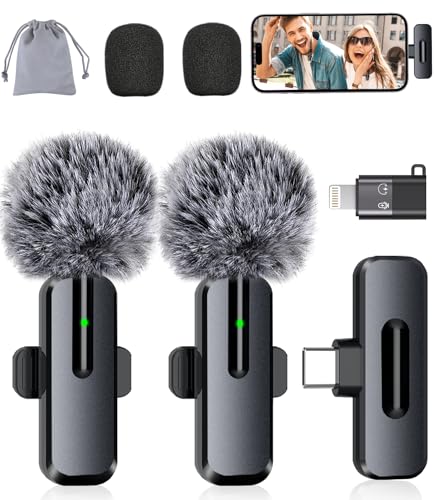
- ✓ Easy plug-and-play setup
- ✓ Excellent wind noise reduction
- ✓ Long-lasting battery
- ✕ Not studio-grade quality
- ✕ Slightly bulky for some uses
| Connectivity | USB-C and Lightning adapters for instant plug-and-play connection |
| Power & Battery Life | Up to 16 hours of recording time with a 1-hour full charge |
| Microphone Type | Lavalier (lapel) microphone with high-sensitivity capsule |
| Audio Features | Studio-quality sound with DSP noise reduction, wind and noise conquerors (deadcat covers) |
| Control Modes | Standard, Reverb, and Mute modes with real-time monitoring via headphone jack |
| Weight | 0.2 ounces (approximately 5.7 grams) |
This ZOPPLM Wireless Mini Microphone has been sitting on my wishlist for a while, mainly because I’ve been tired of tangled cords and clunky setups. When I finally got my hands on this 2-pack, I was curious if it could truly deliver on its promise of studio-quality sound without the fuss.
From the moment I unboxed it, I noticed how lightweight and compact these mics are—barely 0.2 ounces each. The clip is a 360° rotating design, making it super easy to attach to shirts, hats, or even gear without fuss.
Connecting is a breeze—just plug in the Lightning or USB-C adapters, and you’re good to go. No apps, no Bluetooth pairing, which is a relief when I want quick setup.
The audio quality genuinely surprised me. Whether I was outside on a busy street or in a quiet room, the mic captured my voice clearly.
The included deadcat covers and high-density sponge really helped cut down wind and background noise. During a quick outdoor vlog, I appreciated how well it handled wind chill and outdoor chatter.
What stood out most was the real-time monitoring feature—plugging in my headphones let me hear exactly what I was recording. The switchable modes, from standard to reverb or mute, gave me control on the fly, perfect for spontaneous changes during shooting.
Battery life is solid too, with up to 16 hours of use after just an hour’s charge.
Overall, this mic feels durable, simple to use, and delivers crisp audio. It’s perfect for quick videos, interviews, or streaming on the go.
The only minor gripe? The sound quality is great, but not quite professional studio level—still, for the price, it’s a fantastic upgrade.
What Makes an iPhone Microphone the Best Choice for You?
The best iPhone microphone options offer exceptional sound quality, ease of use, and compatibility with various applications.
- External Microphones: External microphones, such as lavalier mics and shotgun mics, can significantly enhance audio quality for video recordings and interviews.
- Built-in Microphone Features: The built-in microphones on iPhones are designed to capture clear audio while minimizing background noise, making them suitable for casual use.
- Wireless Options: Wireless microphones provide freedom of movement and are ideal for presentations or recordings where mobility is essential.
- Compatibility with Apps: Many microphones are optimized to work seamlessly with popular recording and editing apps, enhancing their functionality for creators.
- Portability: The best iPhone mics are compact and lightweight, making them easy to carry around for on-the-go recording needs.
External microphones, such as lavalier mics and shotgun mics, can significantly enhance audio quality for video recordings and interviews. These mics tend to offer superior clarity and directionality, allowing you to focus on the subject’s voice while minimizing ambient noise. With various options available, you can choose one that suits your specific recording environment and purpose.
The built-in microphones on iPhones are designed to capture clear audio while minimizing background noise, making them suitable for casual use. They work well for voice calls, video chats, and casual voice recordings, utilizing advanced noise-canceling technology to ensure a good listening experience. However, for more professional needs, enhancements through external mics may be necessary.
Wireless microphones provide freedom of movement and are ideal for presentations or recordings where mobility is essential. They connect via Bluetooth or other wireless technologies, allowing you to move around without being tethered to your device. This is particularly useful for vloggers and public speakers who need to maintain a dynamic presence while capturing sound.
Many microphones are optimized to work seamlessly with popular recording and editing apps, enhancing their functionality for creators. Compatibility with apps like GarageBand, Filmic Pro, and others allows users to take full advantage of their microphone’s capabilities, ensuring high-quality audio production. This integration is crucial for content creators who require flexibility and ease of use in their workflow.
The best iPhone mics are compact and lightweight, making them easy to carry around for on-the-go recording needs. Their portability is a significant advantage for travelers, journalists, and podcasters who need to capture high-quality audio without the bulk of traditional recording equipment. This convenience allows for spontaneous recording opportunities, ensuring you never miss a moment of inspiration.
Which Types of iPhone Microphones Are Available for Different Needs?
There are several types of microphones available for iPhones, catering to various recording needs and preferences.
- Lavalier Microphones: These small clip-on mics are ideal for interviews and presentations.
- Designed for directional audio capture, they are perfect for video shoots.
- Handheld Microphones: Commonly used in live settings, these mics offer portability and ease of use.
- USB Microphones: These mics connect directly to the iPhone for high-quality audio recordings, often used for podcasts and voiceovers.
- Wireless Microphones: Providing freedom of movement, these mics are suitable for dynamic environments like events and performances.
Lavalier Microphones: Lavalier mics are compact and can be easily attached to clothing, making them unobtrusive during interviews or presentations. They typically connect via a 3.5mm jack or Lightning adapter, allowing for clear audio capture while the speaker moves naturally.
Shotgun Microphones: Shotgun mics feature a narrow pickup pattern which helps to isolate sound from the subject in noisy environments. They are often mounted on cameras or boom poles, providing enhanced audio quality for video recordings, making them a favorite among filmmakers and content creators.
Handheld Microphones: Handheld mics are versatile and easy to use, making them a staple for interviews, concerts, and public speaking events. These microphones are typically designed to handle high sound pressure levels, ensuring clarity in dynamic settings.
USB Microphones: USB mics offer plug-and-play convenience and are excellent for high-quality audio recordings, particularly in podcasting and voiceover applications. They often come with built-in features such as gain control and headphone monitoring, providing flexibility for users.
Wireless Microphones: Wireless mics provide excellent mobility, which is essential for performers, presenters, and event hosts. They use radio frequency or Bluetooth technology to transmit audio to the recording device, allowing users to move freely without the constraints of cables.
How Do Lavalier Microphones Work with iPhones?
Wireless Options: Wireless lavalier microphones provide the advantage of mobility, allowing users to move freely without being tethered to their iPhones. These mics typically use Bluetooth technology or come with a dedicated receiver that connects to the phone, enabling convenient and hands-free operation during recordings.
What Advantages Do Shotgun Microphones Bring to iPhone Recording?
Shotgun microphones offer several advantages for iPhone recording, enhancing audio quality and flexibility in various environments.
- Directional Sound Capture: Shotgun microphones are designed to pick up sound primarily from the direction they are pointed at, which helps in isolating the desired audio source while minimizing background noise. This directional characteristic is particularly beneficial in busy or noisy environments, allowing for clearer recordings of dialogue or specific sounds.
- Increased Sensitivity: These microphones typically have higher sensitivity levels compared to built-in iPhone microphones, enabling them to capture subtle audio details. This is especially useful for projects requiring high fidelity, such as interviews, music recordings, or sound design, where every nuance matters.
- Reduced Ambient Noise: By focusing on sound from a specific direction, shotgun microphones effectively reduce the pickup of ambient noise from other directions. This feature ensures that recordings maintain clarity and are free from unwanted interference, resulting in a more professional-sounding audio output.
- Versatility in Use: Shotgun microphones can be used in various recording situations, from outdoor interviews to indoor film shoots, making them a versatile tool for content creators. Their adaptability allows users to switch easily between different recording setups, enhancing overall productivity.
- Improved Audio Quality: Generally, shotgun microphones are constructed with higher quality components, resulting in better audio fidelity compared to built-in mics. This improved quality is crucial for producing content that meets professional standards, making it ideal for filmmakers, podcasters, and musicians alike.
Are Wireless Microphones a Good Option for iPhone Users?
Wireless microphones can be an excellent option for iPhone users looking to enhance their audio recording quality.
- Convenience: Wireless microphones eliminate the hassle of cables, allowing users to move freely while recording audio.
- Audio Quality: Many wireless microphones designed for iPhones offer high-quality sound, often surpassing built-in microphones in clarity and detail.
- Compatibility: Most wireless mics are designed to easily connect with iPhones, typically using Bluetooth or specialized connectors, ensuring a seamless user experience.
- Portability: Wireless microphones are often compact and lightweight, making them easy to carry around and ideal for on-the-go recording.
- Range: Wireless microphones generally provide a good range, allowing users to record audio from a distance without losing sound quality.
Convenience: Wireless microphones eliminate the hassle of cables, allowing users to move freely while recording audio. This is particularly beneficial for interviews, presentations, or performances where mobility is essential, enabling users to focus on their content rather than being tethered to a device.
Audio Quality: Many wireless microphones designed for iPhones offer high-quality sound, often surpassing built-in microphones in clarity and detail. This enhanced audio quality is crucial for professional recordings, podcasts, or video content, ensuring that the final product sounds polished and clear.
Compatibility: Most wireless mics are designed to easily connect with iPhones, typically using Bluetooth or specialized connectors, ensuring a seamless user experience. This means that users can quickly set up and start recording without dealing with complicated setups or adapters.
Portability: Wireless microphones are often compact and lightweight, making them easy to carry around and ideal for on-the-go recording. Their portability allows users to take them to various locations, whether for interviews, vlogs, or live events, without any added bulk.
Range: Wireless microphones generally provide a good range, allowing users to record audio from a distance without losing sound quality. This feature is particularly useful for video production or performances, where the speaker may need to move around while still maintaining clear audio capture.
What Should You Consider When Choosing an iPhone Microphone?
When choosing the best iPhone microphone, consider the following factors:
- Audio Quality: Look for a microphone that offers clear, high-fidelity sound. The quality of the audio recording can significantly affect the overall production value of your content, whether it’s for music, podcasting, or video creation.
- Connectivity: Ensure the microphone is compatible with your iPhone model, especially regarding connection types like Lightning or 3.5mm jack. Some mics may also offer wireless options like Bluetooth, which can provide greater flexibility in movement and setup.
- Portability: Consider the size and weight of the microphone, especially if you plan to use it on the go. A compact, lightweight microphone is easier to carry and set up, making it ideal for travel or outdoor recording sessions.
- Directional vs. Omni-Directional: Decide whether you need a directional microphone, which captures sound from a specific direction, or an omni-directional microphone, which picks up sound from all around. This choice depends on your recording environment and the type of sound you wish to capture.
- Budget: Determine your budget before shopping, as prices can vary widely. There are quality microphones available at various price points, so it’s important to find one that meets your needs without breaking the bank.
- Additional Features: Look for extra features such as built-in pop filters, windshields, or adjustable gain controls. These can enhance your recording experience by reducing background noise and improving audio clarity.
How Important Is Compatibility with Different iPhone Models?
Compatibility with different iPhone models is crucial when selecting the best iPhone mic, as it ensures optimal performance and functionality.
- Lightning Connector Mics: These microphones connect directly to the Lightning port found on most modern iPhones, providing a digital audio signal that often results in higher sound quality. They are usually compact and portable, making them ideal for on-the-go recording or podcasting.
- 3.5mm Jack Mics: While newer iPhone models have eliminated the headphone jack, many external microphones still use a 3.5mm connector. Users with older iPhone models or those using a Lightning to 3.5mm adapter can benefit from these mics, which are often more affordable and available in various styles.
- Bluetooth Mics: These wireless microphones offer the convenience of mobility and are perfect for recording audio without the hassle of cables. However, they may introduce latency issues, making them less suitable for applications requiring real-time audio feedback.
- App Compatibility: Not all microphones work seamlessly with every recording or editing app on the iPhone. It’s important to check whether the mic is optimized for specific apps, like GarageBand or Voice Memos, to ensure you can access all features and achieve the best audio quality.
- Power Requirements: Some microphones require additional power, either from the iPhone or an external source, which can limit their usability across different iPhone models. Understanding the power needs can prevent compatibility issues, especially when using older or entry-level iPhones that may not support high-powered mics.
What Role Does Audio Quality Play in Your Microphone Choice?
Audio quality is a crucial factor when choosing the best iPhone mic, as it directly impacts the clarity and fidelity of recordings.
- Frequency Response: The range of frequencies that a microphone can capture significantly affects audio quality. A microphone with a wider frequency response can pick up both low and high sounds more accurately, making recordings sound richer and more detailed.
- Sensitivity: This refers to how effectively a microphone converts sound into an electrical signal. A microphone with higher sensitivity can capture quieter sounds without distortion, ensuring that even subtle audio nuances are recorded clearly.
- Directional Pattern: Different microphones have various directional characteristics, such as omnidirectional or unidirectional. Choosing a mic with the appropriate pattern helps in isolating the desired sound source while minimizing background noise, enhancing overall audio quality.
- Noise Handling: The ability of a microphone to reject or minimize unwanted noise is vital for achieving clean recordings. High-quality mics often incorporate technologies that reduce handling noise and interference from ambient sounds, ensuring that the primary audio source remains clear.
- Build Quality: The construction and materials used in a microphone can influence its durability and performance. A well-built mic is less susceptible to vibrations and handling noise, which can degrade audio quality during use.
Which iPhone Microphones Are Recommended for Various Uses?
The best iPhone microphones offer various features tailored to different uses, from casual recording to professional audio capture.
- Shure MV88: A compact stereo condenser microphone designed specifically for iOS devices.
- Rode VideoMic Me-L: A directional microphone that provides improved audio quality for video recordings.
- Zoom iQ7: A mid-side stereo microphone ideal for capturing high-quality audio in a compact form.
- Saramonic SmartMic+: An affordable option that offers great performance for both video and audio recording.
- IK Multimedia iRig Mic HD 2: A versatile digital microphone that connects directly to the iPhone and provides excellent sound quality.
The Shure MV88 is favored for its excellent sound quality and flexibility, allowing users to adjust the stereo width and pattern through its companion app. It’s ideal for musicians, podcasters, and anyone seeking high-fidelity audio in a portable format.
The Rode VideoMic Me-L enhances video audio by focusing on the subject in front of the camera, reducing background noise and delivering clearer sound. It’s perfect for vloggers and content creators who need an easy-to-use solution for high-quality audio.
Zoom iQ7 uses a unique mid-side recording technique, which allows users to adjust the stereo image after recording. This feature makes it particularly useful for recording music or ambient sounds in a variety of settings.
Saramonic SmartMic+ offers a great balance between affordability and performance, making it suitable for both beginners and seasoned users. It features a plug-and-play design, making it easy to use for interviews, podcasts, or casual recordings without extensive setup.
IK Multimedia iRig Mic HD 2 is equipped with a high-quality A/D converter and offers both USB and Lightning connectivity, making it a great choice for musicians and podcasters who want to record directly to their devices. Its compact design makes it ideal for on-the-go recording sessions.
What Are the Best Budget Options for iPhone Microphones?
When looking for budget-friendly microphones for iPhones, several options provide great sound quality without breaking the bank.
- Rode VideoMic Me-L: This compact shotgun microphone plugs directly into the Lightning port of an iPhone, offering directional audio capture that reduces background noise. Its lightweight design makes it portable, and it comes with a furry windscreen for outdoor recording.
- Shure MV88: This stereo condenser microphone also connects via the Lightning port and offers adjustable stereo width and five DSP preset modes. It’s designed for high-quality audio recording and comes with a free app for further customization and control over the audio settings.
- BOYA BY-M1: An affordable lavalier microphone that connects via a 3.5mm jack, the BY-M1 is ideal for interviews or video recording. It features a long cable, allowing for flexible positioning, and comes with a battery for optimal performance, making it a versatile choice.
- Zoom iQ7: This mid-range stereo microphone attaches to the Lightning port and is great for recording music or podcasts. It has adjustable angles and allows users to capture audio in various environments, along with a built-in preamp for enhanced sound quality.
- Movo VXR10: A compact shotgun microphone that comes with both a TRS and TRRS cable, making it suitable for smartphones and cameras alike. It’s designed to capture high-quality audio with minimal handling noise, and its durable build ensures longevity for everyday use.
Which Microphones Are Ideal for Professionals Using iPhones?
The Zoom iQ7 is tailored for musicians, featuring a unique mid-side recording capability that lets users adjust the stereo image after the recording is made. This flexibility is beneficial for capturing performances with varying sound dynamics, making it a popular choice among artists.
The IK Multimedia iRig Mic HD 2 stands out for its ease of use and portability, offering a high-quality recording solution for voiceovers, interviews, and music. It comes with a range of accessories, including a tripod mount, making it suitable for both field and studio recording.
The Apogee MiC Plus is a high-end USB microphone that provides exceptional sound quality, rivalling that of traditional studio microphones. Its compatibility with iPhones and other devices makes it an excellent option for anyone looking to achieve professional results in mobile recording setups.
Related Post: