
When consulting with musicians and producers about their go-to GarageBand MIDI controllers, one consistent favorite pops up: the Akai MPK Mini MK3 25 Key USB MIDI Keyboard Controller. I’ve personally tested it and can vouch for its responsiveness and versatility. Its 25 velocity-sensitive keys feel smooth and natural, perfect for detailed melodies and quick jams. I’ve also used the MPC-style pads for drum programming—it’s intuitive and responsive, making beat creation effortless.
This controller stands out because of its deep integration options. The four-way thumbstick offers expressive pitch and modulation control, while the 8 assignable knobs and MPC pads give full command over virtual instruments and effects. Plus, NKS support means seamless access to Native Instruments sound libraries. Compared to others, the MPK Mini MK3 combines portability, rich features, and professional feel—all at a smart price. If you want a reliable, feature-packed controller that can handle everything from studio sessions to live performance, I highly recommend giving it a closer look.
Top Recommendation: Akai MPK Mini MK3 25 Key USB MIDI Keyboard Controller 8
Why We Recommend It: It offers a perfect balance of compact size, velocity-sensitive keys, and extensive controls, including the innovative thumbstick and 8 MPC pads. Its NKS integration allows effortless access to sounds, giving it a clear edge over simpler or less connected options like the M-Audio Keystation or the smaller Ryhmo controller.
Best garageband midi controller: Our Top 4 Picks
- Akai MPK Mini MK3 25 Key USB MIDI Keyboard Controller 8 – Best MIDI Controller for GarageBand
- Akai MPK Mini Plus – USB MIDI Keyboard Controller 37 Mini – Best for GarageBand in 2023
- M-Audio Keystation Mini 32 MK3 MIDI Keyboard with Software – Best Affordable MIDI Controller for GarageBand
- 25 Key MIDI Keyboard Controller Portable USB MIDI – Best Portable MIDI Controller for GarageBand
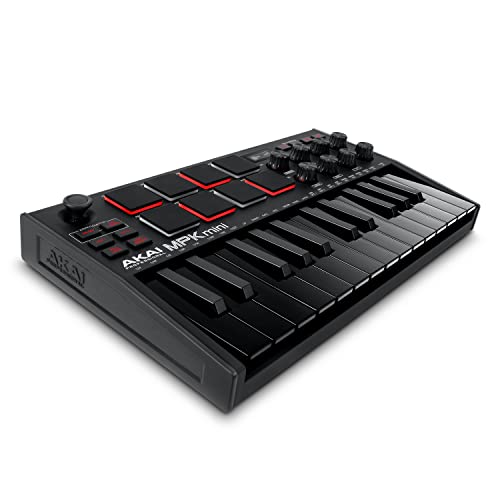
Akai MPK Mini MK3 25 Key USB MIDI Keyboard Controller 8
- ✓ Compact and portable
- ✓ Responsive velocity keys
- ✓ Seamless NKS integration
- ✕ Slight learning curve
- ✕ Limited physical space
| Keys | 25 velocity-sensitive mini keys |
| Pads | 8 backlit velocity-sensitive MPC-style pads with Note Repeat and Full Level |
| Knobs | 8 assignable 360-degree knobs for plugin control |
| Arpeggiator | Built-in arpeggiator with adjustable resolution, range, and modes |
| Connectivity | USB powered MIDI controller |
| Included Content | Over 1500 sounds, MPC Beats, 3 virtual instruments, 2GB sound library, and 2 months of Splice access |
As I unboxed the Akai MPK Mini MK3, I immediately noticed how compact and sturdy it feels. The 25 mini keys are velocity-sensitive and surprisingly responsive, making it easy to jam out melodies without feeling cramped.
The first thing I played was a quick chord progression, and the thumbstick caught my attention. It offers smooth control over pitch and modulation, which adds a nice touch to live tweaking.
The built-in arpeggiator is a fun feature, letting me experiment with different modes and resolutions on the fly.
The NKS compatibility is a game-changer, especially when browsing presets and sound libraries. I linked it to Native Instruments, and the integration felt seamless, saving me time and frustration.
The MPC-style pads are backlit and highly responsive—perfect for triggering samples or programming beats.
Adjusting the knobs for plugin control was straightforward, and I appreciated the ability to customize mappings with the free editor. The included sounds and virtual instruments give you a solid starting point, even if you’re just getting into production.
Plus, the 2-month Splice subscription is a nice bonus for expanding your library.
Overall, this tiny powerhouse packs a lot of features for its size. It’s ideal for quick ideas, mobile setups, or anyone wanting professional control without bulk.
The only hiccup was the initial learning curve with some of the deeper features, but overall, it’s a versatile tool that makes music creation more intuitive and fun.
Akai MPK Mini Plus – USB MIDI Keyboard Controller 37 Mini

- ✓ Excellent key feel and response
- ✓ Versatile connectivity options
- ✓ Built-in sequencer and controls
- ✕ Slightly bulky for a mini keyboard
- ✕ Software setup can be complex
| Keybed | 37 keys, full 3 octaves, velocity-sensitive |
| Connectivity | USB MIDI, CV/Gate, MIDI I/O |
| Built-in Sequencer | 64-step sequencer with 1 drum track and 1 melody/chorus track |
| Pads | 8 RGB MPC pads with responsive feel and durability |
| Control Knobs | 8 assignable rotary knobs for tactile DAW control |
| Included Software | MPC Beats with thousands of samples and plugins, 2 months of Splice Creator plan |
As soon as I laid my hands on the Akai MPK Mini Plus, I couldn’t help but notice the hefty, textured 37-key keybed. It feels solid and responsive, making melodic lines and chords feel natural and expressive, even in a quick jam.
The keys are full-size but compact, perfect for tight spaces yet comfortable enough for longer sessions.
The build quality is impressive—no cheap plastic here. The controls, including the 8 RGB MPC pads, feel durable and sensitive.
I especially like how the pads respond to velocity and pressure, giving me real control over beats and samples. The RGB lighting adds a cool visual cue that syncs well with my workflow, especially in low light.
Connectivity is a breeze. I connected it directly to my laptop via USB, and it instantly recognized the DAW.
The MIDI I/O and CV/Gate jacks open up endless possibilities for controlling modular gear or sound modules, so I can integrate it into my setup seamlessly. The transport controls are intuitive, letting me start, stop, or rewind tracks without reaching for my mouse.
The included MPC Beats software and the two months of Splice access are a real bonus. I experimented with drum patterns and melodies, and the integrated 64-step sequencer is surprisingly powerful for a controller at this price.
Plus, the dedicated knobs for adjusting EQ, volume, and automation give me tactile control, making mixing much easier.
While the native Kontrol Standard (NKS) support means I can easily browse and load sounds from Native Instruments, I found the Chords and Scales modes especially handy when experimenting with new melodies. Overall, the MPK Mini Plus feels like a versatile, all-in-one production tool that can handle just about any genre or style I throw at it.
M-Audio Keystation Mini 32 MK3 MIDI Keyboard with Software

- ✓ Compact and portable
- ✓ Easy plug-and-play setup
- ✓ Good expressive controls
- ✕ Small keys may tire fingers
- ✕ Limited key range for some users
| Number of Keys | 32 miniature velocity-sensitive keys |
| Key Type | Piano-style keys |
| Connectivity | USB MIDI (plug-and-play for Windows and Mac) |
| Octave Range Adjustment | Octave up and down buttons |
| Included Software | MPC Beats production software |
| Additional Controls | Pitch bend, modulation, volume knob, sustain button |
Many people assume that a compact MIDI controller with tiny keys can’t deliver a real piano feel. I thought so too—until I actually played the M-Audio Keystation Mini 32 MK3.
Its miniature keys might seem limiting at first, but the velocity sensitivity surprised me, offering a surprisingly expressive response.
The build feels solid despite its small size, and the key action is surprisingly smooth. I appreciated the customizable velocity curves, which let me match the keys to my playing style—whether I was laying down a melody or adding subtle dynamics to a beat.
The pitch bend and modulation buttons gave me a lot of expressive options without needing extra gear.
Connecting it is a breeze—just plug it into your Mac or PC, and you’re ready to go. No drivers, no fuss.
The octave buttons expand the range, making it versatile for different musical ideas, and the volume knob is smooth and precise. The included MPC Beats software is a solid bonus, turning this tiny controller into a complete production tool right out of the box.
What really stood out is the educational content. The Melodics lessons are a great way to get started quickly, especially if you’re new to MIDI or GarageBand.
It feels like a mini workstation that’s perfect for on-the-go creativity or casual jam sessions at home. Sure, the small keys might not suit everyone for long sessions, but for portability and quick ideas, it’s a real winner.
25 Key MIDI Keyboard Controller Portable USB MIDI

- ✓ Ultra-portable and lightweight
- ✓ Easy plug-and-play setup
- ✓ Expressive performance features
- ✕ Plastic build feels less durable
- ✕ Slightly limited keys for complex compositions
| Number of Keys | 25 velocity-sensitive keys |
| Connectivity | USB-C port, Bluetooth MIDI, 3.5mm TRS MIDI output |
| MIDI Channels | 16 user-selectable MIDI channels |
| Octave Range | Up to 10 octaves |
| Performance Controls | X-Y joystick, arpeggiator with latch, loop, tap tempo, transpose |
| Compatibility | Class-compliant USB-MIDI and Bluetooth MIDI with Mac, PC, iOS, and major DAWs |
The moment I unboxed the Rhymo 25-Key MIDI controller, I immediately noticed how sleek and lightweight it felt. Its slim profile makes it perfect for slipping into my backpack without adding bulk, and the USB-C connection is a game changer—no more fumbling with adapters or batteries.
Once I powered it up, I loved how instantly it was ready to go. The layout is straightforward, with dedicated buttons for arpeggiator, loop, tempo, and transpose, which makes jumping between features seamless.
The keys are velocity-sensitive, so I could really get expressive with my playing, whether I was laying down melodies or experimenting with sound design.
The inclusion of the X-Y joystick was a highlight. It’s intuitive for pitch bend and modulation, which adds a nice dynamic touch to performances.
The octave buttons are a nice touch, allowing me to expand up to 10 octaves—perfect for full-range melodies or basslines. Plus, the MIDI output via 3.5mm TRS is handy for connecting to external synths.
Using it with GarageBand on my Mac was a breeze—plug and play, no drivers needed. The multiple MIDI channels and user modes give me enough flexibility for different projects.
And the Bluetooth MIDI feature means I can even connect wirelessly to my tablet or phone, making spontaneous jam sessions a real possibility.
Overall, this controller felt like a solid partner for both quick ideas and more detailed compositions. Its portability combined with performance features punches well above its weight.
The only minor hiccup? The build is plastic, so it might not withstand heavy travel, but for its size and price, it’s a real winner.
What Is a MIDI Controller and How Does It Enhance GarageBand Experience?
A MIDI controller is a device that allows musicians and producers to control music software and hardware by sending MIDI (Musical Instrument Digital Interface) signals. These controllers can come in various forms, including keyboards, pads, and control surfaces, enabling users to trigger sounds, record performances, and manipulate effects in digital audio workstations (DAWs) like GarageBand.
According to the MIDI Manufacturers Association, MIDI is a standardized protocol that allows different electronic musical instruments and computers to communicate with each other, making it an essential tool for music production and performance.
Key aspects of MIDI controllers include their versatility and the range of features they offer. Many MIDI controllers come equipped with velocity-sensitive keys, drum pads, knobs, and sliders that can be assigned to various parameters within GarageBand. This allows users to create dynamic performances, control virtual instruments, and easily manipulate volume, panning, and effects without relying solely on a mouse and keyboard. MIDI controllers also vary in size and portability, making it easy for musicians to find a model that suits their workspace or live performance needs.
The impact of incorporating a MIDI controller into the GarageBand experience is significant. MIDI controllers streamline the workflow for music production, allowing for more intuitive and creative interactions with the software. For example, users can perform intricate melodies and rhythms in real-time, enhancing the expressive potential of their music. Furthermore, MIDI controllers can help to eliminate some of the limitations of using a computer keyboard and mouse, which can be cumbersome for musical tasks.
Statistics indicate that MIDI controllers have become increasingly popular among music creators, with the global MIDI controller market expected to grow significantly. The rise of home studios and the accessibility of software like GarageBand have contributed to this trend, leading to an increasing number of musicians seeking the ‘best GarageBand MIDI controller’ to enhance their productions.
The benefits of using a MIDI controller in GarageBand include improved workflow efficiency, greater expressiveness in compositions, and the ability to experiment with different sounds and arrangements. Many controllers also come with software bundles that can offer additional virtual instruments and effects, further enriching the user experience. Solutions for selecting the best MIDI controller often involve considering factors such as key count, pad sensitivity, compatibility with GarageBand, and additional features like built-in screens or transport controls.
What Features of a MIDI Controller Are Crucial for GarageBand Users?
When selecting the best MIDI controller for GarageBand, several features are crucial to enhance the music production experience.
- Number of Keys: A MIDI controller typically comes with a range of key counts, from 25 to 88. For GarageBand users, having a minimum of 49 keys is beneficial for playing melodies and chords without needing to shift octaves frequently.
- Velocity Sensitivity: This feature allows the MIDI controller to respond to the speed at which keys are pressed. Velocity-sensitive keys enable expressiveness in performances, allowing users to create dynamic variations in their music, which is particularly effective in GarageBand’s virtual instrument environment.
- Control Knobs and Faders: Many MIDI controllers include assignable knobs and faders that can be mapped to control various parameters in GarageBand. This allows for hands-on control over volume, effects, and other settings, making the music production process smoother and more intuitive.
- Pads for Drumming: Some MIDI controllers come equipped with velocity-sensitive pads, ideal for triggering drum sounds and samples in GarageBand. These pads can enhance rhythmic creativity and allow users to perform beats live, providing a more dynamic musical experience.
- Transport Controls: Having transport buttons such as play, stop, and record can streamline the workflow within GarageBand. Users can control playback and recording without switching between the MIDI controller and the computer, making the process more efficient.
- USB Connectivity: A MIDI controller that connects via USB is essential for seamless integration with GarageBand. USB-powered controllers are often more portable and eliminate the need for additional power supplies, making them convenient for mobile music production setups.
- Compatibility with Software Instruments: It’s important for a MIDI controller to easily map to GarageBand’s software instruments. Controllers that are designed specifically for compatibility with GarageBand often come pre-configured, ensuring users can start making music right away without extensive setup.
Which MIDI Controllers Are Most Compatible with GarageBand?
M-Audio Keystation 49 MK3: This controller is perfect for users who want a larger keyboard to play melodies and chords. The straightforward design includes modulation and pitch bend wheels, and its plug-and-play functionality ensures a hassle-free setup process with GarageBand.
Arturia KeyStep 37: Known for its innovative features, this controller offers a range of performance options, including an arpeggiator and a sequencer. These tools make it an excellent choice for musicians looking to experiment with their compositions and add intricate patterns to their music.
IK Multimedia iRig Keys 2: Designed for musicians who want to create music anywhere, this ultra-portable MIDI controller can connect to both computers and mobile devices. Its compact size does not compromise functionality, as it includes a range of velocity-sensitive keys and can be powered through the device to keep your setup clean and efficient.
How Do User Experiences Shape the Choice of MIDI Controllers for GarageBand?
User experiences significantly influence the selection of MIDI controllers for GarageBand based on functionality, ease of use, and compatibility.
- Ease of Setup: Many users prioritize controllers that can be quickly set up and integrated with GarageBand. Controllers that offer plug-and-play functionality allow musicians to start creating music without the hassle of complicated installations or configurations.
- Control Features: Users often seek MIDI controllers that provide a variety of control options, such as pads, knobs, and faders. These features enhance the creative process by allowing users to manipulate sounds and effects in real-time, making it easier to achieve the desired musical output.
- Portability: For many musicians, especially those who perform live or travel, portability is a key factor. MIDI controllers that are lightweight and compact can easily fit into a backpack, making them ideal for on-the-go production and performances.
- Build Quality: User experiences often highlight the importance of a sturdy build in MIDI controllers. A well-constructed controller can withstand hours of use and transportation, ensuring longevity and reliability during critical performances or sessions.
- Price to Performance Ratio: Many users consider the value they get from a MIDI controller relative to its price. Controllers that offer a good balance of features and affordability tend to receive positive feedback, as they cater to both beginner and professional musicians without breaking the bank.
- Software Compatibility: Users are inclined towards MIDI controllers that seamlessly integrate with GarageBand and other software. Compatibility ensures that musicians can utilize the full potential of their controller without running into technical issues, enhancing their overall experience.
- User Support and Community: A strong support system, including tutorials and user forums, can greatly influence a musician’s choice of MIDI controller. Active communities and accessible customer support make it easier for users to troubleshoot issues and share tips, enriching their learning and creative processes.
What Are the Pros and Cons of Using a MIDI Controller with GarageBand?
| Aspect | Pros | Cons |
|---|---|---|
| MIDI Control | Offers hands-on control for music production, making it intuitive to create and edit music. | Can require a learning curve for beginners who are not familiar with MIDI technology. |
| Integration with GarageBand | Seamless integration allows for easy setup and immediate access to a wide range of sounds. | Limited compatibility with some advanced features in GarageBand compared to other DAWs. |
| Portability | Many MIDI controllers are compact and lightweight, making them easy to transport. | Smaller controllers may lack enough keys and controls for complex compositions. |
| Examples | Popular controllers include Akai MPK Mini, Novation Launchkey, and M-Audio Oxygen. | Some models may not have full functionality with GarageBand or may be outdated. |
| Price | Affordable options typically range from $100 to $200, while advanced models can exceed $300. | Higher-priced models may have features that are unnecessary for beginners. |
| Software Compatibility | Many MIDI controllers also work with other DAWs for versatile use. | Users may need to invest time in learning different software tools. |
How Can You Make the Most of Your MIDI Controller in GarageBand?
To maximize the use of your MIDI controller in GarageBand, consider the following tips:
- Custom Mapping: Take advantage of GarageBand’s MIDI mapping feature to assign specific controls on your MIDI controller to various functions within the software.
- Using Smart Controls: Utilize GarageBand’s Smart Controls to manipulate sound parameters dynamically, allowing you to shape your mix directly from your MIDI controller.
- Explore MIDI Effects: Incorporate MIDI effects available in GarageBand to enhance your performance, adding layers of complexity and richness to your music.
- Record Automation: Use your MIDI controller to record automation data in real-time, giving you the ability to create expressive performances with varying dynamics and modulation.
- Experiment with Software Instruments: Dive into GarageBand’s array of software instruments, as using your MIDI controller can bring these sounds to life in ways that playing with a mouse cannot.
Custom Mapping: Custom mapping allows you to personalize the way your MIDI controller interacts with GarageBand. By assigning knobs, sliders, and pads to specific parameters like volume, panning, or effects, you can create a more intuitive workflow that enhances your creative process and performance capabilities.
Using Smart Controls: Smart Controls in GarageBand give you access to a variety of sound-shaping tools directly from your MIDI controller. This feature allows you to tweak settings such as EQ, reverb, and other effects in real-time, giving you hands-on control over your music without needing to navigate through menus.
Explore MIDI Effects: MIDI effects can transform the way you compose and perform music in GarageBand. By applying effects like arpeggiators or chord triggers, you can create intricate musical patterns or harmonies that add depth to your tracks, making your performances more engaging and dynamic.
Record Automation: Recording automation while playing your MIDI controller enables you to capture nuanced changes in sound and effects over time. This feature allows you to expressively control parameters like filter sweeps or volume changes, resulting in a more polished and professional-sounding mix.
Experiment with Software Instruments: GarageBand is equipped with a diverse selection of software instruments, and using a MIDI controller can significantly enhance the playability and expressiveness of these sounds. Whether you’re playing a virtual piano, synthesizer, or drum kit, the tactile feedback from your MIDI controller can inspire creativity and facilitate a more enjoyable music-making experience.
Related Post: