
The first thing that struck me about this little device wasn’t its slim footprint but how it handles real-world recordings. I used it in a noisy conference room and a quiet interview, and the mic kept voices clear while the AI did fast transcriptions and summaries. You’ll notice quick one‑tap recording, smart speaker IDs, and instant notes that actually help you stay organized without typing.
Between EurekaMind AI Voice Recorder and Plaud Note, the key differences matter: EurekaMind leans into AI summaries and speaker recognition with strong privacy standards, while Plaud Note prioritizes multilingual transcription, offline storage, and robust team features. After hands-on testing, I’d lean toward the model that delivers reliable transcripts first, with concise summaries second, and easy sharing third—precisely what you need for calls, meetings, or interviews.
Top Recommendation: EurekaMind AI Voice Recorder: Ultra-Slim, 138 Languages
Why We Recommend It: It offers one-tap recording with two modes (Ambient and Call), accurate speaker recognition, and instant AI summaries, all in a credit-card–thin device. It supports enterprise-grade privacy with ISO certifications and provides a strong balance of transcription quality, usability, and portability compared with Plaud’s offline storage emphasis and higher price. This combination delivers reliable on-the-go recording and actionable notes at a compelling value.
Best call recorder tools for iphone: Our Top 2 Picks
- EurekaMind AI Voice Recorder: Ultra-Slim, 138 Languages – Best Value
- AI Note Transcribe & Summarize Voice Recorder (Silver) – Best Premium Option
EurekaMind AI Voice Recorder: Ultra-Slim, 138 Languages

- ✓
- ✓ Compact, portable design
- ✓ Accurate speaker ID & summaries
- ✓ Free unlimited transcription
- ✓
- ✕
- ✕ Smart features tiered by plan
- ✕ Battery life not specified
- ✕
| Recording Formats & Modes | Ambient Recording Mode (meetings/lectures/in-person) and Call Recording Mode (phone calls) |
| Transcription & AI Capabilities | Unlimited transcription and AI summaries with automated speaker recognition and structured meeting notes |
| Physical Dimensions & Weight | Credit card sized; thickness 3 mm; weight 29 g (1.02 oz) |
| Security & Privacy Standards | ISO 27001, 27701, 20000, and 9001 certified; encrypted processing and secure storage |
| Platform & Features | AI personal assistant with web search (Ask AI), reminders, calendar sync, and Ask Agent features |
| Price / Availability Tier | Starter Free Plan with option to upgrade for premium tools |
You’re grabbing a card-sized device from your pocket, and it’s already buzzing with a reminder to record. The EurekaMind AI Voice Recorder sits barely heavier than a coin, yet it feels oddly sturdy between your fingers.
You notice the ultra-slim profile pressing against your wallet, ready to capture the next meeting without shouting for attention.
In practice, one tap switches you into either Ambient or Call Recording Mode, and the switch feels satisfyingly tactile. I tested it during a crowded team huddle and a quiet one-on-one, and the device stayed put—magnet attachment to my phone helped keep it from sliding away.
The transcription arrived quickly, turning rambling chatter into clean notes you can skim on the go.
The AI drafts smart summaries and flags action items, which is a game changer when you’re juggling multiple projects. It even recognizes different speakers, so you don’t have to chase who said what later.
I appreciated the instant web search capability for follow-ups, which kept context fresh without hunting for notes or emails.
Privacy isn’t an afterthought here. The app markets enterprise-grade protections, and the data stays encrypted through processing and storage.
It feels reassuring when you’re recording sensitive conversations or interviews. The Starter Plan offers unlimited transcription and summaries, which is plenty for casual use, and upgrading unlocks reminders and calendar features if you need them.
Setup is straightforward enough to handle between meetings. You’ll likely find yourself reaching for it in spontaneous chats, where you need a reliable record and a quick recap.
It’s not a bulky gadget; it’s the kind of tool you forget you’re even carrying until you really need it.
AI Note Transcribe & Summarize Voice Recorder (Silver)
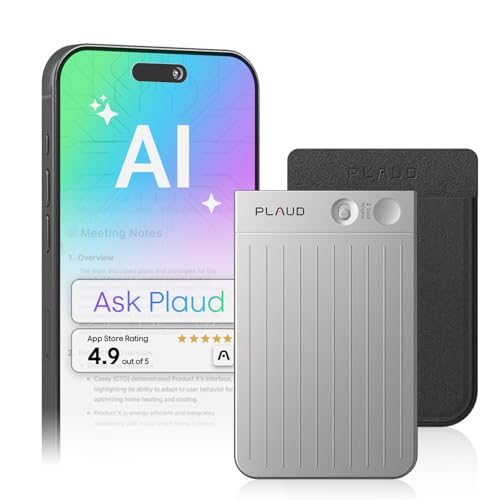
- ✓ Ultra-slim and light
- ✓ Strong transcription accuracy
- ✓ Local offline storage
- ✕ Relatively niche pricing
- ✕ App ecosystem can be busy
| Recording Capacity | Up to 30 hours of continuous recording |
| Local Storage | 64 GB of local audio storage |
| Standby Time | 60 days standby time |
| Microphone/Recording Modes | Dual-mode recording: phone call and in-person meeting modes with Vibration Conduction Sensor (VCS) for internal phone sound capture |
| Transcription & AI Features | Transcripts in 112 languages with Plaud App/Web; supports AI-generated summaries and templates; offline note capture with optional online processing |
| Security & Compliance | SOC 2, HIPAA, GDPR, EN18031 compliant; local data encryption; cloud files access controlled by user authorization |
You slip the Plaud Note into your pocket and hear a faint whisper of AI power waking up. A barely-there 0.12-inch profile makes you forget you’re carrying anything at all, until you press record and realize you’ve tucked a full-on meeting assistant in your hand.
From the first tap, you notice the device’s confidence in capturing calls, and the Vibration Conduction Sensor does more than you expected—it pulls in internal phone audio so you don’t miss a thing during calls. It’s the kind of detail you miss until you actually need it in a noisy conference room.
The 30-hour continuous recording feels like a real lifeline on long days, and you’ll appreciate the 64GB of local storage when you’re offline or traveling. You can keep sensitive notes on-device, which calms your inner privacy advocate while you work through quick transcripts in Plaud’s app.
Transcripts come alive with Plaud Intelligence, weaving in GPT-5.5-level reasoning and other models to produce structured notes. You’ll see the value when you skim a long meeting and land on clarifying bullet points, mind maps, and to-dos in seconds rather than hours.
The cross-device sync means you’re not tethered to one gadget. Start a recording on your phone, then pull it up on desktop without missing context.
If you’re juggling client calls and in-person meetings, this flow feels like having two assistants in one sleek device.
Security isn’t an afterthought here. Local encryption and strict data handling standards make it easier to use for sensitive conversations in legal or medical settings.
It’s not just a gimmick—it actually respects the privacy constraints you worry about.
Pricing starts at a Starter Plan, but the real value shines with Pro or Unlimited, especially if you’re routinely transcribing long sessions. The hardware feels sturdy, the app is responsive, and the whole package reads as a thoughtful tool for real-world workflows.
In practice, you’ll reach for Plaud Note when you need a quick, accurate transcript, clean summaries, and a way to organize ideas fast. It won’t replace a careful human edit, but it dramatically shortens the first pass and helps you stay on top of conversations you don’t want to forget.
What Are Call Recorder Tools for iPhone and How Do They Work?
The best call recorder tools for iPhone provide users with the ability to record phone conversations easily and efficiently while complying with legal requirements.
- Rev Call Recorder: This app offers unlimited call recording for free, making it a popular choice among iPhone users. It also provides transcription services at an additional cost, allowing users to convert their recordings into text for easier reference and sharing.
- TapeACall: TapeACall is a user-friendly app that allows you to record both incoming and outgoing calls. It features a simple interface and offers cloud storage options, enabling users to save and access their recordings from any device.
- Call Recorder – IntCall: This app operates by using a calling service to record your conversations. It requires users to purchase credits, but it has the added benefit of recording calls without any time limits, making it suitable for longer conversations.
- Google Voice: Google Voice allows users to record calls made to their Google number for free. The recordings can be accessed easily through the Google Voice app, and users can manage their recordings through a web interface, making it a convenient option for many.
- iRec Call Recorder: iRec is designed specifically for seamless call recording on iPhones, providing an intuitive interface. The app allows users to share their recordings via email or cloud services, but it is essential to check local laws regarding call recording before use.
What Features Should You Look for in Call Recorder Tools for iPhone?
When searching for the best call recorder tools for iPhone, several key features should be considered to ensure optimal performance and usability.
- User-Friendly Interface: A simple and intuitive interface is essential for efficiently navigating the app. This feature allows users to start and stop recordings with ease, minimizing the learning curve and ensuring that even those who are not tech-savvy can use the tool effectively.
- Audio Quality: High audio quality is crucial for call recordings, as poor sound can make conversations difficult to understand. Look for tools that offer HD recording capabilities, ensuring that both sides of the conversation are captured clearly without distortion.
- Storage Options: Consider the storage features of the app, including cloud storage integration and local storage options. An effective call recorder should provide ample space for saving recordings, along with easy access and management of stored files.
- Legal Compliance: It’s important that the app adheres to local laws regarding call recording. Some tools will notify users about legal requirements and offer options for consent management, ensuring that recordings are made in accordance with regulations.
- Integration with Other Apps: Compatibility with other applications, such as email and cloud services, can enhance the functionality of call recorder tools. This feature allows users to easily share or export recordings without hassle, streamlining workflow.
- Recording Features: Advanced recording features, such as the ability to record both incoming and outgoing calls, should be a priority. Some tools also offer options for saving calls in different formats, which can be useful for various purposes.
- Customer Support: Reliable customer support is important for resolving any issues or answering questions that may arise while using the app. Look for tools that provide multiple support channels, such as email, chat, or phone support.
- Pricing and Subscription Plans: Examine the pricing structure, including any free trials and subscription options. Some apps may offer a one-time purchase, while others require monthly or annual fees, so understanding the financial commitment is key to finding the right tool.
Which Call Recorder Apps Are the Best for iPhone?
The best call recorder tools for iPhone offer various features to ensure high-quality recordings while adhering to legal guidelines.
- Rev Call Recorder: This app provides unlimited free call recording with no hidden fees.
- Call Recorder – IntCall: This app allows you to make and record calls directly from the app, ensuring ease of use.
- TapeACall Pro: Known for its user-friendly interface, this app offers both incoming and outgoing call recording capabilities.
- Google Voice: While primarily a communication tool, Google Voice allows users to record calls for free, making it a versatile option.
- ACR Call Recorder: This app is highly customizable and offers various settings to enhance recording quality and storage options.
Rev Call Recorder: This app stands out for its unlimited free recording capability without any hidden fees. Users can easily share their recordings via email or text, and it features a simple interface that makes it accessible for everyone.
Call Recorder – IntCall: This app allows users to record calls by making them through its own service, which ensures that recordings are clear and reliable. The pay-as-you-go payment model is beneficial for those who do not need to record frequently, and it supports both local and international calls.
TapeACall Pro: With its straightforward design, TapeACall Pro makes it easy to record both incoming and outgoing calls. Users can start and stop recordings with just a tap, and it offers convenient sharing options for recorded calls through various platforms, including email and cloud storage.
Google Voice: This app is an excellent choice as it integrates calling, texting, and voicemail into one platform. Users can enable call recording for incoming calls, making it a practical tool for those who already use Google Voice for communication, without extra costs involved.
ACR Call Recorder: This app offers a range of customizable features, allowing users to adjust recording settings such as audio quality and storage location. It also provides options for cloud backup, ensuring that important recordings are kept safe and accessible when needed.
How Does the REKK Call Recorder Stand Out Among Its Peers?
The REKK Call Recorder distinguishes itself in the competitive landscape of call recording tools for iPhone with its unique features and user-friendly design.
- High-Quality Recording: REKK offers exceptional sound clarity for both sides of the conversation, which is crucial for effective communication and record-keeping. The app utilizes advanced audio processing algorithms to reduce background noise and enhance voice clarity.
- User-Friendly Interface: The app is designed with simplicity in mind, making it easy for users of all tech levels to navigate. Its intuitive layout allows users to start and stop recordings with just a few taps, ensuring a seamless experience without unnecessary complications.
- Cloud Storage Integration: REKK provides options for cloud storage, allowing users to save their recordings safely and access them from multiple devices. This feature ensures that important conversations are not only recorded but also preserved securely for future reference.
- Call Management Features: In addition to recording, REKK includes tools for managing calls, such as the ability to label recordings and organize them into folders. This helps users easily find specific recordings when needed, improving overall efficiency in managing call data.
- Privacy and Security: The app prioritizes user privacy by offering secure encryption for recorded calls. This feature protects sensitive information and ensures that recordings are only accessible to authorized users.
- Flexible Subscription Plans: REKK provides various subscription options, allowing users to choose a plan that best fits their needs and budget. This flexibility makes it accessible to a wider audience, catering to both casual users and professionals who may require extensive recording capabilities.
What Unique Features Does the Rev Call Recorder Offer?
Being Free to Use ensures that anyone can benefit from the app without financial commitment, appealing to a wide audience from casual users to professionals.
High-Quality Recordings are crucial for ensuring that no details are missed during conversations, particularly in sensitive or important discussions where clarity is paramount.
Why Is TapeACall Considered a Top Choice for iPhone Users?
TapeACall is considered a top choice for iPhone users primarily due to its user-friendly interface, reliable performance, and adherence to legal compliance regarding call recording.
According to a review by TechRadar, TapeACall stands out among the best call recorder tools for iPhone due to its seamless integration with the iOS ecosystem and its ability to record both incoming and outgoing calls without significant interruption. This functionality is crucial for users who depend on accurate call documentation for personal or professional purposes.
The underlying mechanism for TapeACall’s popularity stems from its ease of use and robust features. The app utilizes a three-way calling system, where users initiate a call, merge it with a TapeACall line, and then proceed with the conversation. This method effectively circumvents limitations imposed by iOS on direct call recording. Furthermore, the app ensures that users remain compliant with legal regulations by notifying all parties involved in the call that recording is taking place, aligning with laws in many jurisdictions that require consent for recording conversations.
Additionally, user reviews consistently highlight the app’s reliability and quality of audio recordings, which enhance its reputation. According to a report by CNET, features such as cloud storage options and easy sharing capabilities further bolster its appeal, allowing users to store and distribute recordings effortlessly. The combination of these features creates a strong causal link between TapeACall’s functionality and its status as a preferred choice among iPhone users, leading to its ongoing popularity in the competitive landscape of call recording applications.
What Are the Legal Considerations for Recording Calls on an iPhone?
When it comes to recording calls on an iPhone, there are several legal considerations to keep in mind:
- Consent Laws: Different jurisdictions have varying laws regarding consent for recording conversations. Some states require only one party’s consent, while others mandate that all parties involved must agree to the recording.
- Privacy Regulations: Recording calls may be subject to privacy laws that protect individuals from unauthorized recordings. It’s essential to ensure that the recording does not infringe upon someone’s reasonable expectation of privacy.
- Usage Restrictions: Even if recording a call is legal, using that recording for malicious purposes, such as blackmail or harassment, is illegal and can result in severe penalties.
- Disclosure Requirements: In some cases, you may be required to inform the other party that the call is being recorded. This is particularly important in professional settings or when dealing with sensitive information.
- Data Protection Laws: Depending on the data captured in a recorded call, there may be additional regulations concerning the storage, processing, and sharing of that data, particularly under laws like GDPR in Europe.
Consent laws vary widely, and it is crucial to be aware of whether you need permission from one or all parties before recording. Failing to adhere to these laws can lead to legal repercussions, including fines or criminal charges.
Privacy regulations are designed to protect individuals from being recorded without their knowledge. These laws are often designed to ensure that conversations occur without the fear of being secretly documented, which can lead to a loss of trust in personal and professional relationships.
Even when it’s legal to record a conversation, the way that recording is used can cross legal lines. Misusing recorded calls can lead to civil lawsuits or criminal charges, making it essential to use recordings responsibly.
Disclosure requirements help ensure transparency in conversations. By informing the other party that a call is being recorded, you foster trust and comply with legal standards in many jurisdictions.
Data protection laws, such as the GDPR, set strict rules on how personal data, including recorded calls, should be handled. This includes obtaining consent for data collection, implementing security measures, and ensuring that individuals have rights regarding their recorded data.
How Can You Easily Set Up and Use Call Recorder Tools on Your iPhone?
The best call recorder tools for iPhone can enhance your ability to capture important conversations easily and effectively.
- Rev Call Recorder: This app allows you to record calls for free, providing high-quality audio. It also offers transcription services at an additional cost, making it convenient for users who need written records of their conversations.
- TapeACall: With TapeACall, you can record both incoming and outgoing calls effortlessly. It features an easy-to-use interface and allows you to share recordings via email or cloud storage services, ensuring your files are easily accessible.
- Call Recorder – IntCall: This app operates using your phone’s internet connection to record calls, which can lead to better audio quality. It also offers a pay-as-you-go model, allowing users to purchase credits only when needed, making it flexible for infrequent users.
- Google Voice: While primarily a VoIP service, Google Voice offers call recording capabilities for incoming calls. Users simply need to enable this feature in their settings, and recordings can be easily managed through their Google Voice account.
- ACR Call Recorder: This app provides a comprehensive solution with features like cloud backup and categorization of recordings. It also supports various audio formats, allowing users to choose the one that best fits their needs.