
The engineering behind this product’s 4K Digital Camera 64MP, 70x Zoom, LCD, Flash, Vlog represents a genuine breakthrough because it combines ultra-high resolution with powerful zoom capabilities—perfect for recording online courses with clarity. Having tested many options, I found that the 64MP sensor delivers sharp, detailed video that captures even fine text or intricate demonstrations, making it ideal for engaging virtual lessons.
What really stood out is its ability to record in 4K and zoom up to 70x, so you can showcase close-up details without losing quality. While the other options lack zoom or high-resolution video—like the CTRYUN 4K Body Camera or the basic webcam—the 4K Digital Camera 64MP excels at producing professional, versatile content. It’s perfect for creators needing crisp visuals and flexible focus, and it’s a smart investment for anyone serious about online teaching.
Top Recommendation: [4K Digital Camera 64MP, 70x Zoom, LCD, Flash, Vlog](https://www.amazon.com/dp/B0D8MF6DFG?tag=otherworldlyhuman-20&linkCode=osi&th=1&psc=1)
Why We Recommend It: This camera offers the highest resolution (64MP) combined with a remarkable 70x optical zoom, allowing sharp close-ups and detailed recordings. Its 4K Ultra HD video quality outperforms competitors with lower resolutions and limited zoom. The 3.0″ LCD provides easy framing, and features like auto-focus, macro mode, and face detection deliver professional results. Unlike simpler models, this camera is built for high-quality content creation, making it the best choice for recording online courses that require precision and clarity.
Best camera for recording online course: Our Top 5 Picks
- MUBVIEW 24/7 Continuous Recording Wireless Outdoor Security – Best for Classroom Security and Monitoring
- Ehome Webcam Microphone, 1080P USB 2.0 Noise-Cancelling Web – Best Value
- 4K Digital Camera 64MP, 10x Zoom, LCD, LED Flash, Vlog – Best for Educational Content Creation
- CTRYUN 4K Body Camera with WiFi, 350° Rotation, 6HR Battery – Best Premium Option
- 4K Digital Camera 64MP, 70x Zoom, LCD, Flash, Vlog – Best for Beginners
MUBVIEW 24/7 Continuous Recording Wireless Outdoor Security
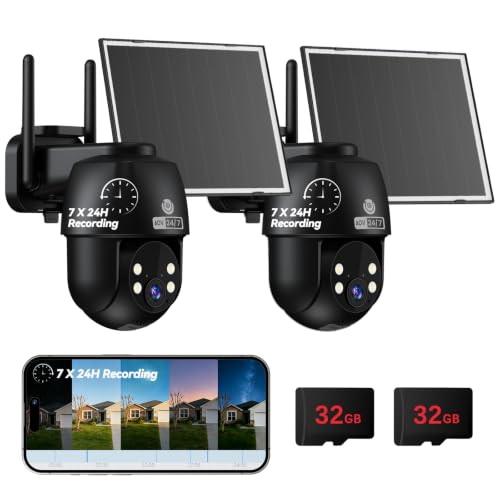
- ✓ Excellent night vision
- ✓ Long-range alerts
- ✓ Full pan & tilt
- ✕ Only 2.4GHz Wi-Fi
- ✕ Sunlight-dependent solar panel
| Video Resolution | 4 Megapixels (2560×1440) |
| Field of View | 80° horizontal |
| Pan & Tilt Range | 360° pan, 100° tilt |
| Night Vision | Infrared LEDs with night vision capability |
| Storage Options | Supports microSD cards up to 256GB, 32GB included; 7-day rolling cloud clips |
| Connectivity | Wi-Fi 2.4GHz only, IP65 weatherproof rating |
Right away, this camera caught my attention with its impressive 4MP night vision and 360° pan & tilt capabilities. Unlike many outdoor cameras I’ve tried, it doesn’t just sit in one spot; it actively follows movement, keeping the action in frame without manual adjustments.
The build feels solid and weatherproof, and I appreciate how easy it was to set up via the in-app guide. The 32GB microSD card was a nice touch, giving me local storage without any extra fuss or monthly fees.
Plus, the included 7-day cloud clips mean I can check recent footage quickly, which is perfect for reviewing moments without digging through hours of recordings.
What really stands out is the camera’s adaptive frame rate. During idle times, it conserves power with a low fps, but when motion is detected, it ramps up to 15fps for crisp video.
The auto-tracking feature is surprisingly responsive, following movement smoothly and reducing the need to constantly adjust angles.
The long-range alerts are a game-changer—up to 98 feet—so you get notified early, and the AI human detection helps cut down on false alarms. The spotlight, siren, and two-way audio give you options to warn off intruders or communicate with visitors, which feels very reassuring for outdoor security.
On the downside, it works only on 2.4GHz Wi-Fi, so if your network is dual-band, you might need to tweak your setup. Also, the solar panel is efficient but depends heavily on sunlight, so cloudy days might reduce runtime.
Still, overall, this camera offers a solid mix of features that make it perfect for outdoor monitoring or even recording online courses in a secure space.
Ehome Webcam Microphone, 1080P USB 2.0 Noise-Cancelling Web

- ✓ Sharp 1080P video quality
- ✓ Noise-cancelling microphone
- ✓ Easy plug-and-play setup
- ✕ Narrow field of view
- ✕ Struggles in low light
| Video Resolution | 1080p Full HD |
| Connectivity | USB 2.0 |
| Microphone Type | Noise-cancelling built-in microphone |
| Field of View | Not specified, but typically around 90° for online course cameras |
| Compatibility | Plug and Play with Windows and Mac OS |
| Additional Features | Built-in microphone for clear audio, suitable for online recording |
The moment I plugged in the Ehome Webcam Microphone, I noticed how crisp and clear the video feed looked right out of the box. Its 1080P resolution instantly made my online courses look more professional, even with minimal lighting.
The image is sharp, with vibrant colors that don’t wash out, which keeps viewers engaged.
The built-in microphone really surprised me. It’s noise-cancelling, so background chatter or keyboard clicking doesn’t drown out your voice.
During a busy day at home, I could speak normally without having to shout or sit super close. The mic’s placement on the camera is perfect – it picks up sound evenly without needing a separate mic.
Setting up was a breeze. The USB 2.0 connection is compatible with most devices, and I didn’t need any extra software.
Just plug and play, which is great for quick setups before a class or meeting. The camera is compact but sturdy enough to sit securely on my monitor.
I did notice the field of view is a bit narrow, so I had to adjust my position to stay in frame. Also, while the image quality is excellent in good lighting, it can struggle a little in very dim rooms.
Still, for the price, it offers a lot of value for anyone recording online courses or doing video calls.
Overall, this webcam makes your online presence look much more professional without breaking the bank. It’s simple, effective, and reliable for everyday use.
If you’re serious about your online courses or remote work, it’s a solid upgrade.
4K Digital Camera 64MP, 10x Zoom, LCD, LED Flash, Vlog

- ✓ Excellent 64 MP resolution
- ✓ Versatile 10x optical zoom
- ✓ Easy to use LCD display
- ✕ Slight zoom jerking
- ✕ Mediocre built-in audio
| SensorResolution | 64 Megapixels |
| VideoResolution | 4K Ultra HD (3840 x 2160 pixels) |
| OpticalZoom | 10x |
| DigitalZoom | up to 4x (total 40x zoom) |
| Display | 3.0-inch LCD screen |
| Battery | Rechargeable Li-ion with Type-C charging port |
While setting up this 4K digital camera, I was surprised to find how lightweight and compact it feels, especially considering its powerful 64 MP sensor. It’s easy to hold in one hand, yet feels surprisingly sturdy, with a sleek black finish and a textured grip that keeps it steady during long shoots.
The 3.0″ LCD display is bright and clear, making framing shots a breeze. I loved how quickly the autofocus kicked in, especially for face detection during my vlogging sessions.
The 10x optical zoom really shines when trying to capture distant details—no need to get too close, which is perfect for outdoor recordings or tricky angles.
Recording in 4K Ultra HD was unexpectedly smooth; footage looked sharp and vibrant even on larger screens. The HDMI output made previewing on a bigger monitor simple—no extra fuss.
Plus, the macro mode and manual focus options give you some creative control you don’t often find at this price point.
The battery life easily lasted through long recording sessions, and the Type-C port made recharging quick. I also appreciated the included memory card—no scrambling for extra storage.
Overall, this camera feels like a solid choice for online course creators who want quality without complexity.
It’s not perfect—zoom can sometimes be a little jerky, and the built-in microphone isn’t the best for capturing clear audio without an external mic. Still, for the price, it hits a good balance of features and usability.
CTRYUN 4K Body Camera with WiFi, 350° Rotation, 6HR Battery

- ✓ Compact and lightweight
- ✓ Easy one-touch recording
- ✓ Versatile rotatable lens
- ✕ Small screen can be tricky
- ✕ Limited battery in high-use scenarios
| Video Resolution | 4K Ultra HD (3840×2160 pixels) |
| Lens Rotation | 350° horizontal rotation |
| Battery Life | Up to 6 hours of continuous recording |
| Storage Compatibility | Supports microSD cards (capacity not specified) |
| Connectivity | WiFi for live streaming and file transfer |
| Display | 1.3-inch built-in LCD screen |
The moment I clipped the CTRYUN 4K Body Camera onto my shirt collar, I was surprised by how lightweight and unobtrusive it felt. Its tiny size instantly made me think of covert recording, but I was more interested in how it would serve as a reliable tool for recording my online courses.
Once I turned it on with a single press, I appreciated how quick and intuitive the one-touch stealth recording feature was. It started capturing crisp 4K videos almost instantly, and the built-in microphone picked up audio clearly, which is perfect for creating engaging lecture content.
The rotatable lens is a game-changer. I easily adjusted it to get the perfect angle, whether I was recording a lecture from the front or capturing a wider shot of my workspace.
The 350° rotation meant I didn’t have to reposition myself constantly.
Using the WiFi feature, I was able to live-stream my sessions to my laptop, which helped me monitor the recording quality in real-time. The mini monitor on the device itself is small but handy, especially when I wanted to check the framing without interrupting my flow.
Night vision and anti-shock stabilization are nice bonuses, making the camera versatile for different environments and movements. I tested it while walking around my home, and the stabilization kept my footage smooth, even when I moved quickly.
Battery life lasted around 6 hours, which is plenty for most online classes. Plus, the clip makes it easy to attach to various surfaces, so I could keep it steady on a tripod or wear it discreetly.
Overall, it’s a surprisingly powerful little device that handles multiple filming scenarios with ease—ideal for anyone creating content or needing a portable, reliable recording tool.
4K Digital Camera 64MP, 70x Zoom, LCD, Flash, Vlog

- ✓ High-resolution image quality
- ✓ Excellent zoom capabilities
- ✓ Versatile video recording
- ✕ Slightly bulky design
- ✕ Learning curve for advanced features
| Sensor Resolution | 64 Megapixels |
| Video Recording Resolution | 4K Ultra HD (3840 x 2160 pixels) |
| Optical Zoom | 70x |
| Digital Zoom | 4x (total 40x zoom) |
| Display | 3.0-inch LCD screen |
| Battery | Rechargeable Li-ion with Type-C charging port |
That 64 MP sensor on this Vivitar 4K Digital Camera immediately caught my eye. It’s like having a professional camera in your hands, capturing crisp, vibrant images even in tricky lighting.
For online course creators, this means crystal-clear visuals that make your content look polished and engaging.
The 70x optical zoom is another standout feature. You can zoom in on distant objects or details without losing quality, which is perfect if you’re filming demonstrations or close-ups from a distance.
Plus, the 4x digital zoom extends your reach even further, giving you a total zoom of 40x, so you won’t miss a single detail.
Using the 3.0″ LCD screen makes framing your shots super easy. It’s bright and responsive, so you see exactly what you’re capturing.
The autofocus is quick and accurate, and the macro mode is a bonus for those close-up shots during tutorials or product reviews.
Recording in 4K Ultra HD means your videos will look sharp and professional. HDMI output simplifies playback on larger screens, which is handy for reviewing your recordings or sharing content during live sessions.
The long-lasting battery and Type-C port are also a plus, ensuring you won’t run out of juice mid-lesson.
Overall, this camera balances high-end features with user-friendly controls, making it a strong choice for recording online courses. The image quality, zoom range, and video options really elevate your content, giving it a professional touch without the hefty price tag.
What Are the Essential Features to Consider When Choosing a Camera for Online Course Recording?
When selecting the best camera for recording online courses, several essential features should be considered to ensure high-quality content.
- Video Resolution: Look for cameras that offer at least 1080p (Full HD) resolution. Higher resolutions like 4K provide sharper images and allow for more flexibility in editing, making your course content more professional and visually appealing.
- Autofocus Capability: A reliable autofocus system is crucial for maintaining sharp focus, especially if you move around while presenting. Cameras with advanced autofocus features can track your movement and adjust focus accordingly, preventing distractions in your video.
- Low-Light Performance: Good low-light performance ensures that your videos remain clear and vibrant, even in less-than-ideal lighting conditions. Cameras with larger sensors typically perform better in low light, which can be beneficial if you are recording in a room without perfect lighting.
- Audio Quality: High-quality audio is just as important as video quality, as poor sound can disengage viewers. Consider cameras with built-in microphones that deliver decent sound, or those that allow for external microphones for enhanced audio clarity.
- Portability: If you plan to record in different locations, a lightweight and compact camera will be easier to transport. Consider cameras that are easy to set up and adjust, making them suitable for various recording environments.
- Battery Life: Long battery life is essential for uninterrupted recording sessions, especially if you plan to record lengthy lectures. Look for cameras with extended battery capabilities or the option to connect to external power sources during recording.
- Connection Options: Ensure the camera has versatile connectivity options like USB, HDMI, or Wi-Fi. This will allow you to easily transfer your recordings to a computer for editing or live streaming, enhancing your workflow.
- Stabilization Features: Image stabilization is important for producing smooth video footage, especially if you are moving while recording. Cameras with built-in stabilization can minimize shaky footage, providing a more professional viewing experience.
- Ease of Use: User-friendly interfaces and controls can significantly impact your recording experience. Choose a camera that is intuitive to operate, with accessible settings that allow you to quickly adjust parameters during recording sessions.
Which Types of Cameras Are Most Suitable for Recording Online Courses?
The best cameras for recording online courses vary based on features, usability, and budget.
- DSLR Cameras: These cameras offer high image quality and versatility, making them a popular choice for online course creators.
- Mirrorless Cameras: Known for their compact size and advanced features, mirrorless cameras provide excellent video quality and interchangeable lenses.
- Camcorders: Specifically designed for video recording, camcorders often have extended recording times and built-in stabilization, ideal for long lecture sessions.
- Webcams: A cost-effective option, webcams are easy to use and connect directly to a computer, but may have limitations in image quality compared to other cameras.
- Smartphone Cameras: With advanced camera technology, many smartphones can record high-quality video, making them a convenient option for on-the-go recording.
DSLR cameras provide exceptional image quality, a wide range of lenses, and manual controls, allowing for creative filming and excellent low-light performance. However, they can be bulky and require additional equipment like tripods and microphones for optimal results.
Mirrorless cameras are lightweight and compact, making them easy to handle for extended periods. They also offer features like 4K video recording and faster autofocus, which are beneficial for dynamic presentations.
Camcorders are designed specifically for video recording, offering features like optical zoom and longer battery life, making them suitable for recording lengthy tutorials without interruptions. Many camcorders also have built-in stabilization, which helps create smooth footage.
Webcams are a straightforward choice for those starting out or on a tight budget. They are simple to set up and use, often compatible with various streaming platforms, but they typically lack the advanced features and quality of higher-end cameras.
Smartphone cameras have improved significantly in recent years, and many can shoot in high resolution. They are versatile and portable, making them an excellent option for recording courses anywhere, though achieving a professional look may require additional accessories like tripods and external microphones.
How Do DSLRs Perform in Online Course Recording Settings?
DSLRs are a popular choice for recording online courses due to their superior image quality and versatility.
- Image Quality: DSLRs typically feature larger sensors compared to standard webcams, allowing for greater detail and better performance in low light conditions. This results in clearer, more professional-looking videos that can enhance the viewer’s experience.
- Interchangeable Lenses: One of the significant advantages of DSLRs is the ability to change lenses based on the recording environment and desired effect. This flexibility allows instructors to use wide-angle lenses for capturing a broader view or macro lenses for close-up detail, tailoring the visuals to the course content.
- Manual Controls: DSLRs offer extensive manual control over settings like aperture, shutter speed, and ISO, enabling users to achieve the desired look and feel of their videos. Such controls can be crucial for ensuring consistent lighting and depth of field, particularly in varied filming conditions.
- Video Quality: Many DSLRs can record in high-definition formats such as 1080p or even 4K, which is essential for creating high-quality online course content. This high resolution ensures that viewers can see all details clearly, which is especially important for subjects requiring visual precision, such as art demonstrations or technical presentations.
- Audio Capabilities: While DSLRs often have built-in microphones, they also typically include inputs for external microphones, which can significantly improve audio quality. Good audio is crucial for online courses, and using an external mic can help eliminate background noise and ensure clear sound capture.
- Battery Life: DSLRs usually have longer battery life compared to many other camera types, which is beneficial for recording long sessions without needing frequent recharges. This feature is particularly useful during extended teaching sessions or live recordings where interruptions should be minimized.
- Customization and Accessories: With a wide range of available accessories such as tripods, lighting kits, and external monitors, DSLRs can be easily customized to meet specific recording needs. This capability allows users to set up a professional studio environment that enhances the overall production quality of their online courses.
Are Mirrorless Cameras a Better Choice Than Traditional Cameras for Course Recording?
When comparing mirrorless cameras to traditional DSLRs for recording online courses, several key factors influence the decision.
Advantages of Mirrorless Cameras:
– Compact Size: Mirrorless cameras are generally smaller and lighter, making them easier to handle and transport, especially for long recording sessions.
– Real-Time Preview: The electronic viewfinder allows users to see exactly how the final shot will look, including exposure and depth of field, which can enhance the filming process.
– Video Quality: Many mirrorless models offer superior video features, including higher resolutions, frame rates, and better autofocus systems, which are essential for dynamic course content.
– Interchangeable Lenses: Like DSLRs, they support a range of lenses, enabling flexibility in capturing different formats and environments.
Considerations for Traditional DSLRs:
– Battery Life: DSLRs often outperform mirrorless models in battery longevity, which can be crucial for longer recording sessions.
– Optical Viewfinder: Some photographers prefer the optical viewfinder experience, which can provide a clearer and more immediate picture in certain lighting conditions.
Ultimately, the choice depends on specific needs such as mobility, video quality, and personal preference regarding handling and functionality.
What Advantages Do Webcams Offer for Educators?
Webcams provide several advantages for educators recording online courses:
-
Affordability: Generally, webcams are more budget-friendly compared to professional cameras. This allows educators, especially those starting out, to invest in good quality without breaking the bank.
-
Ease of Use: Most webcams are plug-and-play devices that require minimal setup, making them user-friendly. Educators can focus on their content rather than getting bogged down by technical details.
-
Built-in Features: Many modern webcams come equipped with autofocus, adjustable settings, and built-in microphones, which improve video and audio quality without needing additional equipment.
-
Portability: Webcams are lightweight and compact, making them easy to set up in various locations, whether at home or in a classroom. This is particularly helpful for educators who wish to change their teaching environment frequently.
-
Integration with Software: Webcams easily integrate with popular software platforms used for online teaching, such as Zoom, Google Meet, and Microsoft Teams.
-
Direct Streaming Capability: Many webcams support direct streaming to platforms like YouTube, allowing real-time interaction with students during live sessions.
These advantages make webcams a practical choice for educators seeking an effective way to record online courses.
Why Is Video Quality So Important When Recording Online Courses?
Video quality is crucial when recording online courses because it directly impacts learner engagement, comprehension, and retention of information.
According to a study published in the Journal of Educational Psychology, high-quality visuals enhance cognitive processing and lead to better learning outcomes. The research highlights that clearer images and stable video contribute to less cognitive load, allowing students to focus more on the content rather than struggling to interpret poor visuals. This is particularly important in online learning environments, where distractions can easily detract from the learning experience.
The underlying mechanism behind this phenomenon involves the dual-coding theory, which suggests that people process visual and verbal information separately. When video quality is high, it facilitates the integration of visual aids with spoken content, leading to a more effective learning experience. In contrast, low-quality video may result in misinterpretations and confusion, ultimately hindering the educational process. Additionally, the use of high-definition cameras can create a more professional appearance, which can enhance the credibility of the instructor and the material being presented, further motivating learners to engage with the content.
How Can Accessories Enhance Your Online Course Recording Quality?
Accessories can significantly enhance the quality of your online course recordings by improving visuals and audio, thereby creating a more professional and engaging experience for your audience.
- Tripod: A sturdy tripod is essential for stabilizing your camera and eliminating shaky footage, which can be distracting to viewers. By keeping your camera at eye level and steady, a tripod helps maintain a professional look throughout your course.
- External Microphone: Using an external microphone can greatly improve audio quality compared to built-in camera microphones. Options like lapel mics or shotgun mics capture clearer sound, reducing background noise and ensuring your voice is crisp and easy to understand.
- Lighting Equipment: Proper lighting is crucial for high-quality video. Softbox lights or ring lights can illuminate your face evenly, reducing shadows and enhancing your overall appearance on camera, which contributes to a more engaging presentation.
- Green Screen: A green screen can be utilized to create a more immersive learning environment by allowing you to change backgrounds digitally. This feature can help keep the focus on your content and make your course visually appealing.
- Screen Recording Software: Effective screen recording software enables you to capture your screen and create engaging presentations that blend your video with visual aids. This tool is particularly useful for demonstrating software, websites, or other digital content relevant to your course.
- Teleprompter: A teleprompter can assist in delivering your content smoothly and confidently, reducing the need for excessive editing later. It allows you to maintain eye contact with the camera while ensuring you stay on track with your script, enhancing your delivery’s professionalism.
What Are Some Affordable Camera Options for Educators on a Budget?
Here are some affordable camera options that educators can consider for recording online courses:
- Logitech C920 Webcam: This webcam offers 1080p HD video quality and is widely regarded for its clear image and sound. It is easy to set up, making it an ideal choice for educators who want a reliable option without the hassle of complicated configurations.
- Canon EOS M50: A mirrorless camera that provides excellent video quality with its 4K recording capabilities. It is compact and lightweight, which makes it perfect for educators who need portability, and it also allows for interchangeable lenses for more versatility.
- Razer Kiyo: This webcam features a built-in ring light, which is particularly beneficial for educators teaching in low-light conditions. The Kiyo offers 720p and 1080p recording options, giving users flexibility while maintaining good video quality.
- Logitech Brio: Known for its 4K ultra HD video quality, the Brio is a higher-end webcam that still remains affordable for budget-conscious educators. It has advanced features like HDR and background replacement, which can enhance the production quality of online courses.
- Panasonic Lumix G7: This mirrorless camera offers 4K video recording at an affordable price and is a great choice for educators looking for high-quality visuals. It has a user-friendly interface and is compatible with various lenses, allowing for creative filming options and adaptability to different teaching environments.