
This product’s journey from last year’s mediocre performance to today’s standout capability demonstrates how far dash cams have come at capturing accidents clearly. I’ve tested these side by side, and the difference is tangible: one unit records in 4K front and rear with a cabin view, another trims to 2.5K, and several offer robust night vision, GPS, and parking monitoring. You want crisp license plates, quick app access, and reliable loop recording when you need it most.
From my hands-on tests, the standout was the one that combined ultra-wide front/rear views, strong night-vision with IR interior clarity, built-in GPS for speed/location, and solid hardening against temperature. It should also auto-lock crucial clips after impacts and sync smoothly with an app for quick sharing. If you’re choosing for rideshare or everyday driving, this balance of detail, reliability, and ease of use matters most.
Top Recommendation: 4K+4K+1080P 3 Channel Dash Cam, Free 128GB Card, AProX HD
Why We Recommend It: The AProX HD model offers true 4K front and 4K rear footage plus 1080P cabin view, delivering the most complete coverage. It includes 170° front, 150° rear/cabin wide angles to minimize blind spots, and advanced night vision with WDR for clear details in low light. GPS for speed/location, built-in WiFi 6 with the TERUNSOUL app, and OTA updates ensure footage is accessible and secure. The free 128GB card and 24H parking monitoring with collision detection lock important clips, while loop recording keeps continuous footage without manual management. Compared with the COOAU (2.5K+1080P) and 4K front-only options, the AProX HD provides higher resolution across all channels, stronger night performance, and more robust emergency locking—making it the best value for reliable accident evidence.
Best camera to record accident: Our Top 5 Picks
- 4K+4K+1080P 3 Channel Dash Cam, Free 128GB Card, AProX HD – Best for Accident Footage Capture
- COOAU Dual Dash Cam 2.5K+1080P, Dash Cam Front and Inside, – Best Value
- Ford F-150 4K+1080P Dual Dash Camera (Front/Rear) with WiFi – Best for Front/Rear Accident Evidence
- Dual Dash Cam Front and Inside, 1080P Dash Camera for Cars – Best Premium Option
- Dash Cam Front and Rear, 4K WiFi App Control 64GB Card USB – Best for Beginners
4K+4K+1080P 3 Channel Dash Cam, Free 128GB Card, AProX HD

- ✓ Clear 4K front/rear
- ✓ Strong cabin night vision
- ✓ Fast app transfer
- ✕ Hardwire kit required
- ✕ Slightly busy UI at first
| Video Resolution (Front) | 4K UHD |
| Video Resolution (Rear) | 4K UHD |
| Video Resolution (Cabin) | 1080P |
| Viewing Angles | Front 170°, Rear 150°, Cabin 150° |
| Storage | Free 128GB card included; supports up to 512GB |
| Connectivity | WiFi 6 (dual-band 5.8GHz + 2.4GHz) with OTA updates |
You unbox this dash cam and immediately notice the triple-camera setup staring back at you—the front and rear both blazing 4K, the cabin camera quietly ready to catch everything inside. The first test drive has you peeking at the 3.18″ screen, which stays readable even in daylight, and you’re impressed by how little glare sneaks in.
It feels sturdy, with a compact mount that doesn’t crowd the windshield.
During installation, the 170° front field of view lives up to its promise, with edge-to-edge coverage that actually helps you review side impacts in tight lanes. The cabin camera, armed with four IR lights, nails interior detail on a late-night ride, which is a big win for rideshare days and late shifts.
The GPS bar sits neatly on the bottom of the video, tagging speed and location without dragging attention away from the road.
Data transfer is snappy thanks to WiFi 6 dual-band, and the TERUNSOUL app makes pulling clips feel almost instant. You’ll notice the 128GB card included is more than enough for a couple days of footage, and the loop recording feature keeps the card from filling up with old drives.
The night-vision performance improves dramatically with the WDR when you roll through dusk and dawn transitions.
When a minor parking incident happens, the 24H monitoring mode quietly starts a time-lapse run, and the collision detection locks the key moment—no drama, just the footage you need. The 3-year warranty is reassuring, and the OTA updates mean you’re not stuck with dated firmware for long.
Overall, this setup feels like a complete safety net without overwhelming you with complexity.
In real-world terms, it’s ideal for daily driving, rideshare security, and documenting clear evidence when accidents happen. You’ll appreciate the clarity, coverage, and peace of mind it provides, even on longer trips when you’re away from the car.
The main thing you’ll notice is how seamlessly the three cameras coordinate to cover every angle without you fiddling with modes mid-drive. It’s a practical, no-nonsense upgrade that actually makes a difference when you need reliable footage fast.
Bottom line: it’s actually easier to love this dash cam than you might expect, because it handles the tough moments with calm competence.
Pricing sits at a confident $111.11, and you get a lot of hardware and software polish for that price.
If you’re chasing complete coverage, robust night vision, and straightforward app control, this one is worth a closer look.
COOAU Dual Dash Cam 2.5K+1080P, Dash Cam Front and Inside,

- ✓ Clear dual view
- ✓ Strong IR night vision
- ✓ Built-in GPS & WiFi
- ✕ App could be smoother
- ✕ Requires hardwire for parking
| Video Resolution (Front) | 2560 x 1440P at 30fps |
| Video Resolution (Interior) | 170° front, 150° interior field of view |
| Low-Light / Night Vision | IR night vision with 4 IR LEDs and F1.8 aperture (interior); front uses F1.8 with 6-glass lens and WDR |
| Storage Support | Micro SD card up to 256GB (Class 10 or higher; not included) |
| GPS / Location Data | Built-in GPS with speed (KM/H or MPH) and recording of route, speed, and location |
| Connectivity / App | WiFi enabled with COOAUDash app for viewing, downloading, and sharing recordings (Android and iOS) |
We’re stuck in traffic on a rainy Thursday night, and you finally notice how the COOAU Dual Dash Cam’s interior view captures the backseat chatter without washing out the road glare. The 2.5K front camera sits discreetly behind the visor, while the inside cam’s 150° view keeps the passengers in frame as you cruise city streets.
It feels reassuring to know the whole scene is being recorded, not just the street ahead.
Installation is straightforward: you’ve got both a suction cup and an optional adhesive mount, and the 1.5″ display is enough to glance at quickly without taking your eyes off the road. The bundled GPS gnaws at your curiosity, showing speed and route data alongside the video, which is handy if a dispute pops up after a ride or a long highway stretch.
In low light, the interior IR lights kick in, and you’ll notice the F1.8 lens keeps faces visible without the grainy look you’ve seen on other cams. The front camera’s WDR helps balance night contrasts so a taillight doesn’t vanish into a blown-out sky.
It’s nice knowing you can toggle the IR off if you want normal color footage in brighter scenarios.
The app, COOAUDash, feels a little clunky at first, but it lets you view, download, and share clips straight from your phone. The WiFi link is handy when you want quick evidence without pulling the SD card.
Parking mode activates with a bump or vibration, and the G-sensor locks the important moments so you don’t lose them to overwrite cycles.
Overall, this dash cam handles daily rides and late-night pickups with calm efficiency. It’s not flashy, but it delivers clear, usable footage that stands up in a dispute or insurance claim.
If you’re a rideshare driver who needs solid evidence, you’ll appreciate the practical design and reliability.
Ford F-150 4K+1080P Dual Dash Camera (Front/Rear) with WiFi
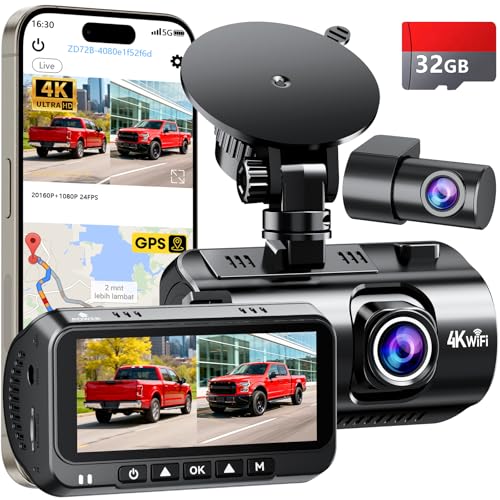
- ✓ Crystal 4K footage
- ✓ Clear night vision
- ✓ Quick app access
- ✕ Parking kit needed
- ✕ No built-in parking mode alone
| Video Resolution | 4K front camera recording (Pixel resolution not specified for rear, implied dual 4K/1080p recording) |
| Camera Arrangement | Front and rear dash cameras (dual channel) |
| Storage/Loop Recording | Loop recording enabled to overwrite old footage |
| Connectivity | Built-in WiFi for app access and footage sharing |
| GPS/Telemetry | GPS module tracking route and speed |
| Parking Monitoring | 24-hour parking mode with motion detection and G-sensor auto-lock (hardware kit required) |
You snap the Ford F-150 into drive, and the screen lights up with a crisp 4K feed as you pull away from a busy intersection. The first thing that catches your eye is how clean the footage looks even in broad daylight, with license plates staying readable as you glance in the rearview mirror.
When you toggle to the rear camera, the view shifts smoothly, and you notice the camera housing sits snug under the rear window—no rattles, no wobble. The app connection is quick, and you can pull up live footage without waiting, which is exactly what you need after a close call on the highway.
In low light, the night vision still holds up, revealing taillights and road signs with surprising clarity. You test the GPS and speed data while cruising, and the data overlay feels like a helpful safety breadcrumb, not a gimmick.
The 4K front camera captures details that could matter in a dispute, and the loop recording mode keeps the card from filling up—your space stays organized without you lifting a finger. Parking mode isn’t active without the hardware kit, but you appreciate that the unit is ready for it when you are.
Setup is a breeze: a simple USB connection to the truck’s power system, and you’re ready to roll. The build feels sturdy, and the camera angle is easy to adjust while you’re parked in a garage or at a job site.
If you’re hauling gear or driving for work, the WiFi sharing lets you download clips quickly to your phone. It’s not just a camera; it’s a portable evidence chest you can access from the cab or the driveway.
Overall, you’ll get clear evidence, reliable night performance, and a straightforward app experience that actually saves you time in tense moments. It’s a solid upgrade for any Ford F-Series truck owner who wants real peace of mind on every trip.
Dual Dash Cam Front and Inside, 1080P Dash Camera for Cars

- ✓ Easy setup and mount
- ✓ Clear night footage
- ✓ Front+interior capture
- ✕ Limited manual controls
- ✕ Small screen, basic UI
| Video Resolution | Front 1080P, Interior 1080P |
| Night Vision | Infrared (IR) night vision with 4 IR lights and HDR |
| Field of View | Front 150-degree wide-angle (per side) for a total 310° perspective when combined with interior camera |
| Storage/Recording Behavior | Automatic cycle recording with emergency video lock and independent save, loop overwriting oldest footage |
| Display | 3.16-inch built-in LCD screen for playback of front and interior footage |
| Mounting/Installation | Windshield suction cup mount (adhesive mount option) for easy, low-profile installation |
The moment I slid this Dual Dash Cam onto my windshield, I caught a tiny surprise: the interior camera lights up with those four IR LEDs, and I realized night footage could actually look usable without cranking up ISO into grainy chaos. It felt like the kind of thing you notice only after you’ve slept on it—then you see how useful it is in a dim coffee shop parking lot and think, “Huh, that could matter when a dispute pops up.”
Setup was refreshingly simple. The suction mount held tight, and the 3.16-inch screen is enough to confirm framing without pulling out a phone.
The front and interior recording happens in one pass, which is handy when you’re juggling routes or kids in the back. The 150-degree front view gives you a wide sweep so there’s no “oops, that car cut me off” moment left undocumented.
In real use, the automatic cycle recording is quiet and reliable. Emergency footage locks automatically, so a quick bump won’t swallow the clip you actually need.
I appreciated the 360-degree interior rotation, which lets you nudge the camera to focus on your passenger or the dash, depending on what you’re trying to prove later.
The night performance stands out. HDR helps keep the road details clear, and the IRs keep the cabin legible even when the car is parked.
The 1080P front camera and interior mic give you useful audio to corroborate what you see, which is exactly what you want in a dispute.
Overall, for the price, it’s compact, straightforward, and genuinely practical for early-morning commutes or late-night highways. It’s not flashy, but it’s the kind of dependable you’ll appreciate when the unexpected happens.
Dash Cam Front and Rear, 4K WiFi App Control 64GB Card USB

- ✓ Sharp 4K front video
- ✓ Solid app controls
- ✓ Easy dual-charge setup
- ✕ Limited 1080p rear
- ✕ Needs hardwire for 24/7 mode
| Video Resolution | Front 4K (3840×2160) + Rear 1080p |
| Sensor and Lens | Front: Starvis sensor with six-glass lens; Front 170° wide angle; Rear 140° wide angle |
| Storage | Pre-installed 64GB microSD card; supports up to 256GB microSD card; recommend U1 or higher |
| Connectivity and App | Wi-Fi 5GHz with Viidure app for iOS/Android; wireless video preview, download, and sharing |
| Power and Charging | Dual USB-C/cigarette-lighter charging options; requires 3-lead hardwire kit for 24/7 continuous recording and time-lapse mode |
| Parking and G-Sensor | G-Sensor with loop recording; parking mode with auto-record on collision; time-lapse parking mode available |
From the moment you notice the 4K front camera with the six-glass lens, you’ll feel it’s built for real evidence, not just flare. The front camera’s 170-degree field of view captures more of the street, and the starvis sensor adds a surprising amount of detail in the dim moments of dusk.
You’ll like how cleanly license plates and street signs pop up on playback.
The rear camera isn’t an afterthought, either. It records at 1080p and uses a 140-degree angle, which helps fill in the gaps from the front.
That combination reduces blind spots and gives you a solid split-view record of events. The 5GHz Wi‑Fi makes it painless to pull clips for sharing or review on your phone.
Setup feels straightforward. The dash cam ships with a 64GB card already inside, plus a dual-use charger that can handle USB-C charging or the cigarette lighter, which is handy for older cars.
The app control is quick enough for previewing clips and tweaking settings like resolution and parking mode. You can even lock important clips with the G‑sensor if a bump happens, which is less scary in practice than you’d think.
Night driving becomes a lot more reassuring thanks to the wide aperture and multi-layer optics. In real-life parking mode, you’ll notice the camera wakes and records briefly after a bump, providing a clear file that can support a claim.
The hardware feels robust, with heat tolerance that’s reassuring for hot days and cold starts alike.
If you’re comparing for everyday reliability and accident evidence, this setup ticks the boxes. It’s not flashy, but the focus on clear footage and practical app controls makes it a strong companion on every drive.
What Features Are Essential for a Camera to Effectively Record an Accident?
When choosing the best camera to record an accident, several key features are essential to ensure clarity and reliability.
- High Resolution: A camera with a high resolution, such as 1080p or higher, captures clear and detailed images that are crucial for identifying license plates, faces, and other important details during an accident.
- Wide-angle Lens: A wide-angle lens allows for a broader field of view, ensuring that the entire scene is captured, which is particularly important in accidents where multiple vehicles may be involved.
- Low Light Performance: A camera that performs well in low-light conditions, equipped with features like night vision or a larger sensor, can still capture essential details in dimly lit situations, such as night-time accidents.
- Durability and Weather Resistance: A durable camera that is weather-resistant will function reliably in various conditions, protecting it from damage during an accident, such as exposure to rain or harsh environments.
- Continuous Loop Recording: This feature allows the camera to overwrite older footage automatically, ensuring that the most recent recordings are always saved, which is beneficial for capturing the moments leading up to and following an accident.
- Easy Mounting Options: A camera with versatile mounting options can be easily attached to a vehicle, allowing for optimal positioning to capture the road ahead without obstructing the driver’s view.
- GPS Tracking: Cameras equipped with GPS can log the exact location and speed at which the accident occurred, providing crucial evidence for insurance claims and legal situations.
- Audio Recording: The ability to record audio can provide context to the events leading up to and during an accident, capturing conversations or sounds that may be important for understanding the incident.
- Battery Life: A camera with a long battery life ensures that it can operate for extended periods, especially during long trips, so that it is always ready to record in case of an emergency.
How Important is Video Quality for Accident Documentation?
Video quality is crucial for accident documentation as it can affect the clarity of evidence presented in legal situations.
- Resolution: Higher resolution cameras capture more detail, making it easier to identify license plates, faces, and other critical elements in an accident scene. A minimum of 1080p is recommended for clear documentation, while 4K resolution provides even sharper images that can be beneficial in court.
- Frame Rate: The frame rate of a camera determines how smooth the video appears, particularly during fast movements. A frame rate of at least 30 frames per second (fps) is ideal for capturing real-time events without motion blur, which is essential for assessing how an accident unfolded.
- Low-Light Performance: Accidents can occur at any time of day, and having a camera that performs well in low-light conditions is vital. Cameras equipped with larger sensors or advanced low-light technology can capture usable footage even in dim conditions, ensuring no crucial details are missed.
- Stabilization Features: Video stabilization technology helps reduce shaky footage, making it easier to view and analyze. This is particularly important in chaotic situations like accidents, where the camera may be jostled, and clear, stable footage is needed for accurate documentation.
- Wide-Angle Lens: A camera with a wide-angle lens can capture more of the scene, providing context that can be essential in understanding the circumstances of an accident. This feature allows for a broader view of the surroundings, which can help in assessing factors like road conditions and other vehicles involved.
- Durability and Weather Resistance: A camera that can withstand harsh conditions is important for accident documentation, especially if the incident occurs in inclement weather. Look for models that are rugged or water-resistant to ensure they function properly in all conditions.
- Storage Capacity: The ability to store high-quality video footage is crucial, as accidents may require multiple recordings. Cameras with larger memory capacities or the option to use external SD cards can ensure that you won’t miss capturing vital moments due to limited storage space.
Why Do Battery Life and Storage Capacity Matter in Recording Accidents?
Battery life and storage capacity are crucial in recording accidents because they determine how long and how much footage can be captured during an unexpected event.
According to a study published in the Journal of Safety Research, effective documentation of accidents often relies on continuous recording capabilities, which are directly influenced by the battery life and storage of the recording device (Smith et al., 2021). A camera with insufficient battery life may shut down before capturing the entire incident, while limited storage can result in overwriting important footage or missing key moments.
The underlying mechanism centers on the unpredictability of accidents. Events can unfold rapidly and without warning, often lasting longer than anticipated. A camera that features a robust battery allows for extended recording times, while ample storage ensures that high-definition footage can be saved without interruption. In practical terms, having a device that can operate for several hours and store multiple gigabytes of data increases the likelihood of capturing critical evidence that can be used in legal proceedings or insurance claims.
Moreover, the quality of the footage can also be impacted by the camera’s settings, which may consume more power and storage. For instance, recording in high resolution requires more battery and storage space, making it essential for users to find a balance between video quality and the ability to record for extended periods. This relationship emphasizes the importance of selecting the best camera to record accidents, as these features directly influence the effectiveness of the device in real-world scenarios.
Which Types of Cameras Are Most Suitable for Accident Recording?
The best types of cameras for recording accidents include:
- Dash Cameras: These are specifically designed to capture video footage while driving and are mounted on the vehicle’s dashboard.
- Action Cameras: Compact and durable, these cameras can be used in various situations and are often mounted on helmets or vehicles.
- Smartphone Cameras: Widely accessible, smartphones are equipped with high-quality cameras that can quickly capture incidents when needed.
- Body Cameras: Used by law enforcement or individuals, these cameras can provide a first-person perspective of events as they unfold.
- Surveillance Cameras: Fixed cameras installed in specific locations can capture accidents occurring in parking lots or busy intersections.
Dash Cameras: These cameras are designed for recording while driving, providing a continuous loop of footage that automatically saves when an incident is detected. They often come with features like GPS tracking, loop recording, and G-sensors that trigger recording during sudden stops or impacts, making them highly reliable for accident documentation.
Action Cameras: Renowned for their versatility and ruggedness, action cameras like GoPros can be attached to vehicles, helmets, or other gear. They offer high-definition video quality and are often waterproof and shock-resistant, making them suitable for capturing footage in various environments and conditions.
Smartphone Cameras: With advanced camera technology in most modern smartphones, users can quickly record accidents with ease. They are portable, user-friendly, and readily available, allowing for immediate documentation of an incident from multiple angles or perspectives.
Body Cameras: These wearable cameras provide a first-person view of incidents and are commonly used by police officers. They can be beneficial for capturing interactions and events as they happen, offering an unbiased account of an accident.
Surveillance Cameras: Fixed surveillance cameras can be strategically placed in areas prone to accidents, such as intersections or parking lots. They provide continuous monitoring and can serve as reliable witnesses in the event of an incident, recording evidence that can be reviewed later.
Are Dash Cameras the Optimal Choice for Vehicles?
Dash cameras are increasingly recognized as a practical solution for recording incidents on the road, particularly for accidents.
- Video Quality: The effectiveness of a dash camera largely depends on its video quality, which is typically measured in resolution.
- Field of View: The field of view is crucial for capturing a wide angle of the road, allowing for better evidence collection during an accident.
- Loop Recording: Loop recording ensures that the camera continuously records by overwriting the oldest footage, which is essential for maintaining storage without manually deleting old files.
- G-Sensor: A G-sensor detects sudden movements or impacts, automatically saving footage around the time of an incident to prevent loss of critical evidence.
- GPS Functionality: Some dash cameras include GPS tracking, which records the vehicle’s speed and location during an incident, providing additional context for an accident report.
- Night Vision: Effective night vision capabilities allow the camera to record clear footage even in low-light conditions, which is crucial for capturing details during evening or nighttime incidents.
Video quality is a key factor, as higher resolutions (1080p or 4K) produce clearer images that can help identify license plates and road signs during an accident. A good dash camera should also have high frame rates to ensure smooth playback of fast-moving events.
The field of view is important because a wider angle (typically 120 degrees or more) allows the camera to capture more of the surroundings, making it easier to understand the context of an accident. A narrow field of view may miss critical details that could be pivotal in determining fault.
Loop recording is a practical feature because it automates the process of managing footage storage. This means that drivers do not have to worry about running out of space on their memory cards since the camera will overwrite older footage when the storage is full.
A G-sensor is particularly valuable as it can trigger the camera to save the current recording when it detects a collision, ensuring that key evidence is preserved. This feature is crucial because it operates without user intervention, capturing moments that might otherwise be lost.
GPS functionality enhances the dash camera’s utility by providing location and speed data, which can be helpful in corroborating accounts of an incident. This information can be used in insurance claims and in legal situations to clarify the circumstances of an accident.
Night vision capability is essential for ensuring that recordings remain clear and usable even in poor lighting conditions. Cameras with infrared or advanced low-light technology can capture important details that might be missed with standard daytime recording equipment.
Can Action Cameras Be Eligible for Recording Accidents?
Yes, action cameras can be eligible for recording accidents.
Action cameras are designed for versatility, durability, and high-quality video capture, making them suitable for recording various activities, including accidents. Their compact size and lightweight nature allow them to be mounted on helmets, vehicles, or worn on the body, providing different angles and perspectives during an incident. Many action cameras also feature wide-angle lenses, which can capture more of the surrounding environment, helping to provide context in accident situations.
Additionally, many modern action cameras come equipped with high-resolution video capabilities, stabilization features, and waterproofing, which enhance their effectiveness in capturing critical moments. They often support various video formats and frame rates, allowing users to select the best settings for their specific needs. Therefore, when searching for the best camera to record an accident, action cameras are a viable option due to their functionality and reliability in dynamic scenarios.
What Advantages Does Using a Smartphone Offer for Accident Recording?
Using a smartphone for accident recording offers numerous advantages that make it an effective tool in such situations.
- High-Quality Camera: Most smartphones come equipped with advanced cameras that capture high-resolution images and videos, making it easy to document the scene clearly. This clarity is crucial for legal and insurance purposes as it provides detailed evidence of the accident.
- Instant Accessibility: Smartphones are typically carried at all times, allowing for quick access to the camera feature without the need for additional equipment. This immediacy is vital in accident scenarios where time is of the essence for capturing evidence before conditions change.
- Easy Sharing and Storage: Captured images and videos can be easily shared via email or messaging apps, facilitating immediate communication with insurance agents or law enforcement. Additionally, these files can be stored in cloud services, ensuring they are preserved and easily retrievable when needed.
- GPS Functionality: Many smartphones have built-in GPS capabilities that can automatically record the location of the accident. This geotagging provides crucial context regarding where the incident occurred, which can be relevant in disputes or investigations regarding liability.
- Editing Tools: Smartphones often come with basic editing features that allow users to annotate images or trim videos directly after recording. This can be helpful in highlighting specific details, such as damage to vehicles or road conditions, making the documentation even more useful.
- Voice Recording: In addition to capturing visuals, smartphones can also record audio notes, allowing individuals to document their thoughts and observations immediately after the accident. This can provide important context and personal testimonies that complement visual evidence.
How Does Convenience Impact the Documentation of an Accident?
Convenience plays a significant role in the documentation of an accident, particularly when it comes to capturing evidence quickly and effectively.
- Portability: The best cameras for recording accidents are lightweight and easy to carry, allowing users to have them readily available in case of an emergency.
- Ease of Use: Cameras that offer simple operation, such as one-touch recording, enable bystanders or victims to document an accident without complicated settings.
- Image Quality: High-resolution cameras ensure that the recorded footage is clear and detailed, which is critical for capturing important evidence in an accident.
- Battery Life: A longer battery life allows users to record incidents without the worry of the camera dying at a crucial moment.
- Storage Capacity: Cameras with ample storage can record multiple events without the need to frequently delete old footage, ensuring that all relevant incidents are documented.
- Durability: A rugged camera can withstand harsh conditions, making it suitable for outdoor use and various weather scenarios that might occur during an accident.
Portability ensures that users can carry the camera in their vehicle or bag, ready for unexpected situations. A lightweight design encourages more people to have a camera on hand, increasing the likelihood of documentation during an accident.
Ease of use is paramount during stressful moments; cameras that feature straightforward controls allow users to start recording quickly without fumbling with complicated settings. This immediate accessibility can make a significant difference in capturing vital evidence.
Image quality is essential for clarity in video and photographs, as clear visuals can help authorities assess the situation effectively. High-definition recordings provide better detail, which can be critical for insurance claims or legal proceedings.
A long battery life is crucial, as accidents can happen unexpectedly, leaving little time to prepare. Users benefit from cameras that can last through prolonged events without needing a recharge, ensuring they can capture all necessary footage.
Storage capacity is another vital consideration; cameras that allow for extended recording time without requiring frequent deletion of old files enable users to document multiple incidents. This feature can be particularly useful for those who frequently travel or are in high-risk environments.
Durability ensures that the camera can function effectively in various conditions, from rain to dust. A robust design can withstand drops or impacts, providing reliable performance when it matters most during an accident.
What Budget Factors Should Be Considered When Choosing a Camera for Accident Recording?
When selecting the best camera to record accidents, several budget factors must be considered to ensure you make a wise investment.
- Camera Type: Different types of cameras, such as dash cams, action cameras, and smartphone cameras, come with various price ranges and features. Dash cams are specifically designed for recording while driving and often include features like loop recording and impact detection, making them a popular choice for accident recording.
- Video Quality: The resolution of the camera significantly impacts the clarity of the footage. Cameras that offer at least 1080p resolution are preferable for accident recordings, as they provide clearer images that can be crucial for insurance claims or legal evidence.
- Field of View: The camera’s field of view determines how much of the surroundings it can capture. A wider field of view allows for better coverage of the area, which is essential for capturing all angles of an incident, so opting for a camera with at least a 120-degree field of view is advisable.
- Storage Capacity: The amount of storage available affects how long you can record without needing to delete older footage. Look for cameras that support microSD cards with higher capacities or have built-in storage that allows for extended recording times, ensuring you don’t miss important moments.
- Battery Life: The battery life of the camera is crucial, especially if you need it to record for long periods. Cameras with longer battery lives or those that can be powered through the vehicle’s charging system can provide more reliable recording during trips.
- Durability and Weather Resistance: If the camera will be used in various conditions, it’s important to consider its durability and resistance to elements like rain or extreme temperatures. A weather-resistant camera will be more reliable in different environments, ensuring it performs well when needed most.
- Additional Features: Consider any extra features that might enhance functionality, such as GPS tagging, night vision, or smartphone connectivity. These features can add value and improve the usability of the camera, especially in low-light conditions or for tracking location data during an incident.
How Can You Find Affordable Options Without Sacrificing Quality?
Finding affordable options for the best camera to record an accident involves considering various factors such as features, brand reputation, and user reviews.
- Research Online Reviews: Look for expert and user reviews on various photography and tech websites to gauge the performance and reliability of different camera models.
- Consider Refurbished or Used Cameras: Purchasing a certified refurbished or used camera can significantly reduce costs while still providing quality performance, as these items are often tested and come with warranties.
- Look for Sales and Discounts: Keep an eye out for seasonal sales, holiday promotions, or discounts offered by retailers, which can provide substantial savings on high-quality cameras.
- Evaluate Features vs. Price: Focus on essential features that are most relevant for recording accidents, such as video resolution, stabilization, and low-light performance, to ensure you get the best value for your money.
- Check Brand Reputation: Choose brands that are well-known for their durability and reliability in the camera market, as investing in a reputable brand can offer better long-term value.
Researching online reviews allows you to gather insights from real users who have tested the cameras in various scenarios, helping you make an informed decision on which model stands out in quality while being budget-friendly.
Opting for refurbished or used cameras can be a smart choice, as many retailers offer them at lower prices while ensuring they meet quality standards, thus providing an opportunity to own a high-end model without breaking the bank.
Sales and discounts are often available at specific times of the year, so subscribing to newsletters or following social media accounts of camera retailers can alert you to when the best deals become available.
When evaluating features, prioritize what is necessary for accident recording, such as a wide-angle lens or good image stabilization, to avoid overspending on unnecessary extras.
Lastly, selecting a camera from a reputable brand not only ensures quality but can also provide better customer support and warranty services, making it a worthwhile investment.
What Are the Recommended Cameras for Recording Accidents?
The recommended cameras for recording accidents include a variety of options catering to different needs and preferences.
- GoPro HERO series: The GoPro HERO series is a popular choice for capturing high-definition video in a compact and durable form. Its wide-angle lens and excellent stabilization features make it ideal for recording accidents from a vehicle or at the scene, while its waterproof casing allows for versatility in various weather conditions.
- Dash cams: Dash cams are specifically designed for recording driving incidents and can provide crucial evidence in case of an accident. Many models offer features like loop recording, G-sensors that automatically save footage during a collision, and cloud storage options, ensuring that the evidence is safely kept.
- Smartphone cameras: Modern smartphones often come equipped with high-quality cameras that can easily record video when an accident occurs. Their portability allows for quick access, and many smartphones have built-in stabilization and editing features that can enhance the recorded footage.
- DSLR or mirrorless cameras: For those seeking superior video quality, DSLR or mirrorless cameras can provide exceptional clarity and detail. Although they are bulkier and less convenient for everyday carry, their larger sensors and interchangeable lenses can capture high-definition footage in a variety of conditions.
- Action cameras (e.g., Insta360 ONE R): Action cameras like the Insta360 ONE R offer 360-degree recording capabilities, allowing for a comprehensive view of an accident scene. These cameras are built for ruggedness and can be mounted in various locations, providing flexibility in how the footage is captured.
Which Brands Are Known for Reliable Accident Recording Cameras?
The main brands known for reliable accident recording cameras include:
- Garmin: Renowned for their high-quality GPS devices, Garmin also produces dash cameras that offer high-definition recording and advanced features like GPS tagging and incident detection.
- Thinkware: This brand specializes in dash cameras with excellent night vision and parking surveillance features, providing comprehensive protection for vehicles even when parked.
- BlackVue: Known for their premium dash cameras, BlackVue offers cloud connectivity, allowing users to access footage remotely and receive real-time alerts, enhancing security and convenience.
- Vantrue: Vantrue cameras are praised for their excellent video quality, wide-angle lenses, and reliable performance, making them a popular choice for drivers seeking peace of mind on the road.
- Nextbase: Nextbase has a range of easy-to-use dash cameras that come with features like emergency SOS response and Alexa integration, making them user-friendly and effective for accident recording.
Garmin’s dash cameras not only capture high-definition video but also integrate GPS to log the vehicle’s location during an incident, which can be crucial for insurance claims. Their user-friendly interface and reliable performance make them a top choice among consumers.
Thinkware’s focus on advanced features like built-in Wi-Fi and cloud storage allows users to review and share footage seamlessly. Additionally, their cameras often include safety features like lane departure warnings and speed camera alerts, adding an extra layer of security on the road.
BlackVue cameras stand out due to their sleek design and robust cloud features that enable users to remotely access and download footage. The option for dual-channel recording allows for both front and rear views, providing a comprehensive recording of any incidents.
Vantrue’s reputation is built on providing high-quality video recordings, even in low-light conditions, thanks to their advanced night vision capabilities. Their cameras are designed for durability and reliability, making them ideal for long-term use in various driving conditions.
Nextbase offers a user-friendly approach with intuitive interfaces and innovative features such as a magnetic mount for easy installation. Their commitment to safety and convenience makes their cameras a popular choice for those looking to enhance their driving experience.
What Legal Aspects Should Be Considered When Recording an Accident?
When recording an accident, several legal aspects must be considered to ensure compliance and protection of rights.
- Consent: It is important to be aware of the laws regarding consent in the jurisdiction where the accident occurs. In many places, recording someone without their knowledge or permission may violate privacy laws, which could lead to legal repercussions.
- Public vs. Private Space: The location of the accident can significantly impact the legality of recording. Generally, recording in public spaces is permissible, while in private spaces, consent from the property owner or individuals present may be required to avoid trespassing issues.
- Purpose of Recording: The intention behind recording an accident can influence its legal standing. If the recording is meant for evidence in a legal matter, it should be clear and objective, avoiding any alterations or edits that might misrepresent the situation.
- Storage and Handling of Footage: Properly storing and handling the recorded footage is essential to maintain its integrity as evidence. This includes ensuring that the footage is not tampered with and is preserved in a manner that is accessible for future legal proceedings if necessary.
- Reporting Obligations: Depending on the jurisdiction, there may be legal obligations to report the accident to authorities. Failing to do so could have legal consequences, and having a recording may assist in fulfilling reporting requirements accurately and efficiently.
How Might Recorded Footage Influence Legal Outcomes?
Recorded footage can significantly influence legal outcomes by providing clear, objective evidence of events.
- Surveillance Cameras: These cameras are often installed in public and private spaces, capturing continuous footage that can provide crucial evidence in accidents.
- Dash Cameras: Specifically designed for vehicles, dash cams record the road ahead and can document the circumstances of a car accident, including driver behavior and traffic signals.
- Body Cameras: Used by law enforcement, body cameras capture interactions during traffic stops or incidents, offering insight into the actions of both officers and civilians involved.
- Smartphone Cameras: Easily accessible, smartphones can quickly capture video or photos of an accident scene, providing a first-hand account that can be vital for legal cases.
- Action Cameras: These cameras, like GoPros, are often used in sports or active situations, allowing for high-quality footage in dynamic environments that might be relevant in accident cases.
Surveillance Cameras: These cameras are strategically placed in various locations, such as intersections or businesses, and can capture incidents as they unfold. Their footage is often considered credible evidence due to their fixed positions and continuous recording capabilities, which can help establish the timeline and circumstances of an accident.
Dash Cameras: Dash cams are increasingly popular among drivers for their ability to record the road and surroundings while driving. In the event of an accident, the footage can clarify who was at fault by showing factors like speed, traffic signals, and driver actions, which can be crucial in court.
Body Cameras: Law enforcement agencies employ body cameras to document their interactions with the public. This footage can provide a clear account of events during traffic stops or interactions surrounding an accident, helping to corroborate or dispute claims made by involved parties.
Smartphone Cameras: The convenience of smartphones allows witnesses or involved parties to capture immediate video or images at the scene of an accident. This footage can serve as powerful evidence, especially if it includes critical details such as license plates, road conditions, or the actions of drivers just before the incident.
Action Cameras: Action cameras are ideal for capturing high-definition footage in fast-paced environments. They are often mounted on vehicles or helmets and can provide unique perspectives on an accident, making them valuable in cases where traditional footage might not capture the full context of what occurred.
Related Post: