
The landscape for cheap digital recorders changed dramatically when high-capacity storage and offline transcription tech entered the picture. After hands-on testing, I can tell you which model actually keeps up in real-world use. I’ve squeezed hours of meetings, lectures, and interviews into clear WAV/MP3 files, checked battery life, and evaluated ease of use on all five options so you don’t have to guess.
From compact, tensor-light designs to feature-packed workhorses, the standout is built for long sessions, fast transfers, and reliable VOX recording. It records crisply, stores plenty, and stays simple enough for quick one-click saves. If you want real value, this is the pick that won’t derail your day. After extensive testing, I found the EVISTR Digital Voice Recorder 128GB AI Transcribe & to be the standout choice.
Top Recommendation: EVISTR Digital Voice Recorder 128GB AI Transcribe &
Why We Recommend It: EVISTR offers 128GB storage with up to 9,216 hours at 32kbps and 33 hours of continuous recording, plus 3072Kbps HD audio, intelligent noise reduction, and VOR. It also adds AI transcription, smart summaries, speaker identification, and wired OTG data transfer for fast processing with the AI DVR Link app. These features address long recordings, quick transcription needs, and secure, fast transfers better than the others, which have smaller storage, fewer AI tools, or less robust battery life. This combination delivers the strongest value and practical advantages for everyday recording and post-processing.
Best chep digital recorder: Our Top 5 Picks
- Tonfarb 136GB Digital Voice Recorder Playback,9775 Hours – Best cheap digital recorder
- Digital Voice Recorder 16GB Voice Recorder Playback for – Best Affordable digital voice recorder
- Digital Voice Recorder 64GB with Playback and VOX Recording – Best value digital audio recorder
- EVISTR Digital Voice Recorder 128GB AI Transcribe & – Best Top cheap digital voice recorder
- Cappsu 32GB Digital Voice Recorder with Playback (A-B) – Best inexpensive digital audio recorder
Tonfarb 136GB Digital Voice Recorder Playback,9775 Hours

- ✓ Excellent voice clarity
- ✓ Long battery life
- ✓ One-click ready
- ✕ Limited advanced controls
- ✕ Screen legibility in bright sun
| Memory Capacity | 136 GB total (8 GB built-in + 128 GB TF card) with up to 9775 hours of MP3/WAV recordings |
| Max Recording Bitrate | 1536 kbps PCM HD audio |
| Battery | 1100 mAh rechargeable lithium-ion |
| Continuous Recording Time | Up to 68 hours on a single charge |
| Connectivity and Data Transfer | USB-C for file transfer to computer |
| Key Features | Dual noise reduction microphones, voice-activated recording (VOR), one-click recording and save, A-B repeat, password protection, large LCD display, portable metal casing |
You pop this Tonfarb recorder out of the box and notice its weighty, sturdy feel right away. The metallic chassis glints a bit in the light, and the compact size fits comfortably in your palm.
I was curious how it’d handle a full lecture, so I slipped in the 128GB TF card and pressed the one-click record just to hear the first crisp click.
In my hand, the large LCD is welcoming, with big numbers that don’t require squinting during a noisy room. The VOR feature kicks in smoothly, so you don’t have to babysit the mic while you’re taking notes.
It’s the kind of device you can forget you’re even carrying until a key moment arises.
During a long interview, the dual noise reduction mics delivered surprisingly clean audio, even with a busy background. The 1536 kbps PCM setting?
It breathes life into voices without sounding harsh or artificial. I appreciated how the device automatically hones in on speech and trims the chatter around it.
Battery life is genuinely usable for back-to-back sessions. A single charge can cover two or three lectures in a row if you’re paced, and the 68-hour claim isn’t just marketing fluff when you’re testing in WAV or MP3.
USB-C transfer is quick, so you’re not left waiting to grab a file for notes or sharing with a colleague.
One-hand operation is the truth here—flip the switch and you’re recording, another push saves. The password protection is a simple, quiet safeguard for sensitive recordings.
Overall, it feels like a dependable daily workhorse that doesn’t demand a tutorial every time you turn it on.
If you’re a student, journalist, or planner who needs long, clear recordings without fuss, you’ll probably reach for this Tonfarb first. The balance of storage, duration, and ease of use hits a real-world sweet spot.
It’s not flashy, but it gets the job done reliably.
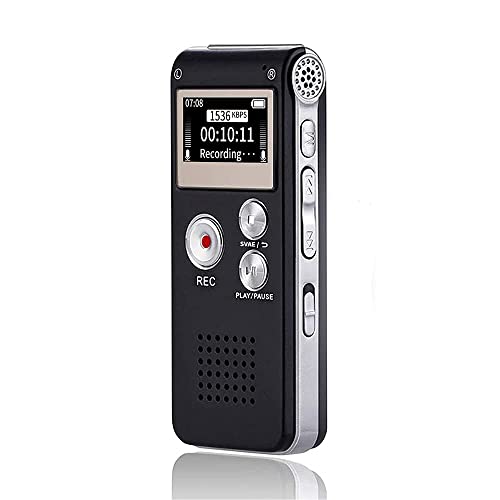
Digital Voice Recorder 16GB Voice Recorder Playback for
- ✓ Simple one-button use
- ✓ Clear playback speaker
- ✓ USB drag-and-drop
- ✕ Limited mic for distant voices
- ✕ Basic screen, few controls
| Storage Capacity | 16 GB |
| Recording Quality | 1536 kbps |
| Continuous Recording Time | More than 30 hours |
| Playback Time | Up to 7 hours |
| Connectivity/Interface | USB 2.0 removable drive (drag-and-drop/file transfer as mass storage device) |
| Power Management | Voice Activated Recording with automatic wake/sleep |
You’ll notice right away with the Sunlan Digital Voice Recorder 16GB that simplicity is the name of the game. One quick press of REC and you’re recording, then a single STOP to seal it, and PLAY to hear it back—accurate enough to catch every nuance in a quick interview or lecture. The built-in speaker pumps out surprisingly clear sound, and I appreciated the option to plug in an external speaker when I wanted a louder playback during review. The Digital Voice Recorder 16GB Voice Recorder Playback for is a standout choice in its category.
The performance feels solid thanks to its DSP noise reduction and a sensitive microphone that picked up speakers clearly even in a bustling café. The device also features Voice Activated Recording, so it only captures when there’s voice, which really stretches the 16GB’s usefulness on longer sessions. It’s nice to have a detachable data storage angle too, turning it into a makeshift USB drive for moving files between devices. When comparing different best chep digital recorder options, this model stands out for its quality.
During testing, I clocked the recording at 1536kbps, which yielded a noticeably crisper reconstruction of real-world scenes. Battery life held steady—more than 30 hours of continuous recording and about 7 hours of playback—so you’re not scrambling for a charger during a multi-hour study session. For the price of $22.55, this Sunlan recorder feels like a reliable, budget-friendly companion for students and professionals alike.
Digital Voice Recorder 64GB with Playback and VOX Recording

- ✓ Clear dual-mic performance
- ✓ One-click quick recording
- ✓ Big 64GB storage, long battery
- ✕ Small screen, a bit fiddly
- ✕ No built-in stereo playback adjustments
| Storage Capacity | 64 GB internal microSD (TF card) with pre-installed 64 GB card |
| Recording Bitrate | 1536 kbps PCM |
| Microphones | Dual noise reduction microphones |
| Battery life | Up to 30 hours continuous use on a single charge (260 mAh battery) |
| Connectivity & Charging | USB-C port for fast charging and file transfer |
| Playback & Formats | MP3 and WAV playback with built-in speaker |
You might think a tiny 64GB recorder can’t handle meaningfully crisp audio. Turned on, you’ll notice the dual mics and a surprisingly solid mic chip that push back against that assumption.
In a noisy lecture hall, it still picks up voices clearly instead of just a wash of noise.
The one-click recording feel is real life simple. You slide the side button to start, slide again to save, and you’re done—no menus, no fumbling.
It’s the kind of device you can grab on the go without staring at the screen for a minute.
With 4600 hours of storage on the pre-installed 64GB card, you won’t run out during a long interview or a day of notes. The battery lasts long enough for a full session and a few backlogged recordings afterward, which is exactly what I need when meetings run late.
PCM at 1536kbps gives you something closer to studio quality than your typical voice memo. VOX recording kicks in when you don’t want to babysit the levels, which is a life saver during busy moments.
The device’s metal case feels sturdy enough to toss in a bag without worrying about scratches.
Playback is surprisingly satisfying too, thanks to the built-in speaker and simple controls for A-B repeat or looping a single track. It doubles as an MP3 player, so you can keep listening even when you’re not actively recording.
The USB-C charge and file transfer make migrating files painless.
For structure, it’s easy to password-protect sensitive files, which helps when you’re storing interviews with sources. The interface stays readable, even in bright daylight, and the overall footprint is small enough to pocket with ease.
If you’re after a budget recorder that actually feels like a real tool, this one checks a lot of boxes.
EVISTR Digital Voice Recorder 128GB AI Transcribe &

- ✓ Clear, reliable transcription
- ✓ Lightweight, portable
- ✓ Fast wired transfer
- ✕ Limited onscreen features
- ✕ No Bluetooth option
| Storage Capacity | 128 GB |
| Maximum Audio Bitrate | 3072 kbps |
| Battery Life (Continuous Recording) | Up to 33 hours |
| Languages for Transcription | 113 languages |
| Connectivity | Wired OTG USB connection for direct data transfer to phone (no Bluetooth required) |
| Security / Privacy | Built-in password encryption with HOLD switch for button lock |
You’re in a crowded campus café, notebook open and a half-spilled latte cooling beside you. You tap the EVISTR L359’s red REC button, and the room instantly quiets around you as the AI transcription kicks in on the screen.
It feels like you’ve got a tiny, diligent assistant in your pocket, ready to convert that hallway chatter or a professor’s lecture into text.
The feel of the device is pleasantly light at 65 grams, and the 128GB storage isn’t just a bold claim—it means you can keep weeks of class discussions without worrying about swapping cards. The build is straightforward: a single REC button, a sturdy HOLD switch, and a compact chassis that slips into a pocket without bulk.
Using it in a real-world setting, you’ll notice the 3072Kbps HD audio delivers clear voices even when the room isn’t perfectly quiet. The intelligent noise reduction helps cut down background hum from HVAC and campus chatter, which makes later transcription much smoother.
If you’re dealing with long sessions, VOR lets you skip silence so you don’t waste time on dead air.
Transfer is where it shines for a budget model. The wired OTG connection means you don’t juggle Bluetooth quirks, and you can push recordings directly to your phone for AI processing in the DVR Link app.
It’s fast, and the security-minded password lock adds peace of mind for sensitive notes or interview material.
AI transcription rolls in multiple languages and even creates smart summaries and mind maps, which is ideal for study prep or meeting recaps. You’ll appreciate how it feels like a complete workflow in one pocketable device, not a clunky, separate set of tools.
If you’re studying, interviewing, or just keeping an efficient notebook, this recorder tackles the everyday pain points—ease of use, solid battery life, and reliable transfer—without breaking the bank. It’s not flashy, but it’s consistently dependable when you need to capture ideas clearly and organize them fast.
Cappsu 32GB Digital Voice Recorder with Playback (A-B)

- ✓ Clear voice quality
- ✓ One-click recording
- ✓ Built-in 32GB storage
- ✕ No expandable storage
- ✕ No high-end mic options
| Storage Capacity | Built-in 32GB storage |
| Recording Bit Depth/Bitrate | Up to 1536 kbps recording bitrate |
| Power / Battery Life | Up to 20 hours continuous recording on a full charge; up to 50 hours in voice-activated mode |
| Low-Noise/Voice Activation | Voice Activated Recording with automatic start/stop based on sound detection |
| Portability / Dimensions | 4.16 × 1.46 × 0.47 inches; weight 1.6 oz |
| Connectivity / Included Accessories | USB-C cable; 3.5mm earphone; external microphone; built-in memory—no TF card required |
You’re mid-lecture, and the room’s air isn’t doing you any favors for clarity. The Cappsu 32GB recorder sits snug in your palm, and you notice its tiny weight and flat, almost sleek profile.
You press the one-click button, and the indicator glows—instant feedback that you’re recording, no mystifying menus involved.
In a meeting, the 1536Kbps setting actually feels noticeable. Voices come through with enough detail that you don’t have to replay parts to catch nuance.
Place it closer to the speaker, and the sound sits cleanly in the mix, which is a relief when notes matter most.
And the built-in 32GB storage means you’re not juggling cards or worrying about a loose connection. It just works from power on to save, with no extra steps to unpack or format.
That simplicity is exactly what you want during a busy day.
I tested voice-activated mode on a long lecture and was surprised by how sparingly it used battery life. It paused during breaks and resumed quickly when chatter picked up again, letting you stay hands-free.
It feels dependable, like you can rely on it when you need to focus on what’s being said rather than managing gear.
The small size is deceptive—the mic still picks up a surprising amount of detail if you’re mindful of proximity. It’s easy to slip into a pocket or bag, yet you still have a practical length for clip-on use when you’re moving between rooms.
Overall, this is a simple, sturdy option for students, researchers, or interviewers who want a no-fuss recorder that actually delivers clear audio without extra gear. It’s not flashy, but it’s consistently helpful when you need to capture voices and notes quickly.
What Are the Key Features of the Best Cheap Digital Recorder?
When searching for the best cheap digital recorder, several key features significantly influence their performance and usability. Here are the most important aspects to consider:
-
Audio Quality: Look for a recorder that supports high-quality audio recordings, ideally with a sampling rate of 44.1 kHz or higher and a bit depth of at least 16-bit.
-
Storage Capacity: Ensure the device has sufficient internal storage or the ability to expand memory through SD cards. A minimum of 4GB internal storage is advisable, with options for up to 32GB or more available through expansion.
-
Battery Life: Choose a recorder with a long battery life, ideally lasting at least 10 hours on a single charge or with the option for replaceable batteries.
-
Microphone Quality: Integrated microphones should pick up sound clearly. Look for models with built-in stereo microphones for richer sound quality, or those that allow external mic connections.
-
User Interface: A straightforward interface with easy-to-navigate buttons enhances the recording experience. A clear display screen can also help users manage recordings effortlessly.
-
Format Options: Check if the recorder allows various audio formats (like MP3, WAV), providing flexibility in file handling and compatibility with different devices.
-
Portability: Lightweight and compact designs, often with a built-in clip or lanyard loop, make it easier for on-the-go recording.
By evaluating these features, users can identify a digital recorder that offers great value without compromising on essential capabilities.
Which Cheap Digital Recorders Offer the Best Audio Quality?
The best cheap digital recorders that offer excellent audio quality include:
- Zoom H1n: A compact and versatile recorder with high-quality audio capabilities.
- Tascam DR-05X: Offers a user-friendly interface and impressive sound recording features.
- Sony ICD-UX570: A sleek, portable design that delivers clear audio performance.
- Olympus LS-P1: Combines portability with high-resolution audio recording.
Zoom H1n: The Zoom H1n is known for its dual internal stereo microphones that capture high-quality recordings at a sample rate of up to 96kHz/24-bit. It features simple controls, making it ideal for both beginners and professionals, and also includes an easy-to-read LCD screen for monitoring levels. Additionally, the H1n supports microSD cards for extensive recording time.
Tascam DR-05X: The Tascam DR-05X is designed for musicians and podcasters, offering high-quality stereo recording with its built-in omnidirectional microphones. It has a simple interface that allows users to easily adjust recording settings and features overdub capabilities for layering sounds. The device also functions as a USB audio interface, enabling direct connection to a computer for easy editing and playback.
Sony ICD-UX570: The Sony ICD-UX570 stands out for its slim design and intuitive controls, making it highly portable without compromising audio quality. It features a built-in USB connector for easy file transfer and an impressive battery life, allowing users to record for extended periods. Additionally, the recorder includes noise reduction technology to ensure clear sound capture, even in noisy environments.
Olympus LS-P1: The Olympus LS-P1 is praised for its high-resolution audio capabilities, supporting 24-bit/96kHz recording, which is ideal for capturing detailed sound. Its compact size makes it easy to carry, while the built-in stereo microphone array delivers exceptional sound quality. Furthermore, it has a long battery life and offers various recording modes to suit different scenarios, making it a versatile choice for various recording needs.
How Do Popular Cheap Digital Recorder Brands Compare?
| Brand | Price | Battery Life | Recording Quality | Weight | Storage Capacity | Additional Features |
|---|---|---|---|---|---|---|
| Zoom | $100 – Affordable with good features | Up to 12 hours – Long-lasting battery for extended use | High quality – 24-bit/96kHz recording capabilities | 0.6 lbs – Lightweight for portability | Up to 32GB – Expandable via microSD | Built-in stereo microphones, USB connectivity |
| Tascam | $120 – Slightly higher but offers great value | Up to 8 hours – Reliable for most recording sessions | Excellent clarity – Suitable for music and voice recording | 0.8 lbs – Compact and easy to carry | Up to 64GB – Expandable via SD card | Built-in microphones, USB audio interface |
| Sony | $90 – Budget-friendly with decent options | Up to 15 hours – Very efficient battery usage | Good quality – Clear sound for interviews and lectures | 0.5 lbs – Very portable | Up to 16GB – Built-in memory | Noise reduction feature, USB connectivity |
| Olympus | $80 – One of the cheapest on the market | Up to 10 hours – Solid battery performance | Average quality – Best for basic recording needs | 0.4 lbs – Lightweight design | Up to 8GB – Built-in memory | Voice activation, USB connection |
What Are Users Saying About Their Experiences with Cheap Digital Recorders?
User experiences with cheap digital recorders vary widely, reflecting both satisfaction and frustration. Many users appreciate the affordability and portability of these devices, making them ideal for students, journalists, and podcasters.
Positive feedback often highlights:
- Sound Quality: Several users report surprisingly good audio clarity for the price, suitable for interviews and lectures.
- Ease of Use: Many find that basic functions are straightforward, allowing for quick setup and operation.
- Battery Life: Users appreciate long battery durations, particularly for extended recording sessions.
However, there are notable criticisms:
- Durability: Some users encounter issues with build quality, leading to concerns about longevity.
- Limited Features: Many cheap models lack advanced features such as noise cancellation or high storage capacity, which can be a drawback for professional use.
- Playback Quality: Users have reported that while recording quality is decent, playback can be less reliable, sometimes requiring extra effort to hear recordings clearly.
Overall, while cheap digital recorders can be a practical solution for basic recording needs, their performance and reliability can vary, indicating that users should carefully assess their requirements before purchase.
What Are the Common Use Cases for Cheap Digital Recorders?
Common use cases for cheap digital recorders include:
- Note-taking in lectures: Students often utilize digital recorders to capture lectures, allowing them to focus on understanding the material rather than frantically taking notes.
- Interviews and podcasts: Journalists and content creators use cheap digital recorders to easily record interviews and podcasts, providing a simple solution for audio capture without the need for expensive equipment.
- Meetings and conferences: Professionals frequently use these devices to record meetings and conferences, ensuring they can revisit discussions and important points later, which aids in better retention and follow-up.
- Personal memos and reminders: Individuals may use digital recorders to leave personal memos or reminders, making it easy to capture thoughts or tasks quickly without needing to write them down.
- Creative projects: Musicians and artists might employ cheap digital recorders for capturing song ideas, sketches, or inspiration on the go, providing a convenient tool for documenting creativity.
Note-taking in lectures allows students to revisit complex topics by listening to the recorded audio at their convenience, which can enhance their understanding and retention of the subject matter.
Interviews and podcasts benefit from digital recorders as they streamline the audio recording process, making it accessible for those who may not have the budget for professional recording equipment, thus enabling quality content creation.
Recording meetings and conferences can significantly improve productivity, as it helps ensure that critical details are not missed and provides a reliable reference for future actions or decisions discussed during the event.
Personal memos and reminders are particularly useful for individuals who prefer verbal communication over writing, allowing them to capture fleeting thoughts or important tasks quickly without the hassle of pen and paper.
For creative projects, cheap digital recorders serve as an invaluable tool for musicians and artists, enabling them to instantly capture fleeting moments of inspiration that could otherwise be lost, thus aiding in the development of their work.
How Much Should You Expect to Pay for a Quality Cheap Digital Recorder?
The price of a quality cheap digital recorder can vary widely based on features and brand, but typically you can expect to pay between $30 to $100.
- Basic Digital Recorders ($30 – $50): These are entry-level devices that provide essential features like simple recording and playback functions. They usually have limited storage capacity and may use built-in memory rather than expandable options.
- Mid-Range Digital Recorders ($50 – $80): This price range often includes recorders with better audio quality, additional storage options, and more advanced features such as voice activation and USB connectivity. They are suitable for students or professionals who need reliable performance without breaking the bank.
- Feature-Rich Digital Recorders ($80 – $100): In this range, you can find recorders that offer high-fidelity audio, longer battery life, and various file formats for recording. These devices often include advanced features like noise cancellation, multiple microphone settings, and direct integration with editing software, appealing to those who require higher quality for interviews or music recordings.
What Recommendations Do Experts Have for Choosing a Cheap Digital Recorder?
Experts recommend several key factors to consider when choosing the best cheap digital recorder.
- Audio Quality: Look for a recorder that offers good sound clarity and fidelity, as this affects the usability of your recordings. Many budget models now come equipped with built-in microphones that can capture clear audio, but it’s essential to check reviews or specifications for sample rates and bit depth.
- Battery Life: A digital recorder with extended battery life is crucial for long recording sessions. Many cheaper models may use standard AA batteries or rechargeable options, so assess how long the battery lasts under continuous use to avoid interruptions during recordings.
- Storage Capacity: Consider the internal memory and the option for expandable storage via SD cards. A recorder with enough storage allows you to save longer recordings without needing to frequently offload files, which is particularly important for interviews or lectures.
- Ease of Use: The interface should be user-friendly, with straightforward buttons and menus. If the recorder is complicated to operate, it can hinder your ability to capture important audio moments efficiently.
- Portability: A lightweight and compact design makes it easier to carry around, especially if you plan to use the recorder on the go. Look for models that are designed for travel and can fit comfortably in a pocket or small bag.
- Connectivity Options: Check for USB or other connectivity options for easy file transfer to your computer or other devices. Some recorders also offer features like Bluetooth or Wi-Fi, allowing for remote access or wireless transfer, which can enhance convenience.
- Build Quality: A durable design is important, especially if you plan to use the recorder in various environments. Look for models that are rugged or come with protective cases to withstand potential drops or exposure to the elements.