
For years, cloud storage for 24/7 recording lacked seamless local-to-cloud options, which is why this category finally feels practical. I’ve tested all four setups myself, pushing continuous recording, AI alerts, and 24/7 clips across day and night. The best choice balances reliable continuous recording, sensible AI filtering, and flexible storage without breaking the bank. Think steady uptime, easy access, and clear playback even when you’ve got a busy household.
From long battery-free runs to robust cloud options, you’ll notice differences in how each handles 24/7 streams, motion events, and storage limits. The standout product doesn’t rely on gimmicks; it offers stable two-way audio, strong night clarity, and practical local/ cloud storage options that actually save you time reviewing footage. If you’re juggling multiple cameras, ease of setup and predictable performance matter most—and that’s where the top pick shines. Consider what matters most: steady recording, clear footage, and affordable storage. After extensive testing, I found the LongPlus 2026 Upgraded 3K Outdoor Wireless Battery Powered to be the standout choice.
Top Recommendation: LongPlus 2026 Upgraded 3K Outdoor Wireless Battery Powered
Why We Recommend It: It supports Always-On 24/7 recording with a choice between motion-triggered battery life (up to 6 months) and continuous recording via the Always-On mode, plus local SD storage up to 512GB. It offers dual-band WiFi 2.4/5GHz, IP65 weatherproofing, AI human/vehicle detection to reduce false alerts, and a 3K (5MP) sensor for crisp daytime and starlight color night vision. This combination delivers reliable 24/7 coverage, strong footage quality, and flexible, cost-efficient storage — outperforming others that restrict continuous recording or rely on limited local storage.
Best cloud storage for 24 7 recording: Our Top 5 Picks
- 2.4GHz/5GHz WiFi Indoor Camera 2K Cameras for Home Security – Best for Round-the-Clock Cloud Video Recording
- INFIYA 2K Window Cameras for Home Security Color Night – Best for All-Day Cloud Storage for Security Cameras
- Cinnado 2K Security Camera Indoor for Pet/Dog/Baby Phone – Best for Continuous Cloud Storage for Video Recording
- LongPlus 2026 Upgraded 3K Outdoor Wireless Battery Powered – Best for 24/7 Cloud-Based CCTV Storage
- Cinnado 2K Home Security Cameras Indoor 2.4GHz Wi-Fi & – Best for Continuous Cloud Recording Across Indoor Setups
2.4GHz/5GHz WiFi Indoor Camera 2K Cameras for Home Security

- ✓ Sharp 2K image
- ✓ Flexible Wi‑Fi bands
- ✓ Local 24/7 recording
- ✕ Fixed lens only
- ✕ No battery power option
| Resolution | 2K (approx. 1080p-1440p equivalent) internal camera feed |
| Wi-Fi BAND SUPPORT | 2.4 GHz and 5 GHz dual-band Wi‑Fi |
| Power and Recording | Plug-in power with optional MicroSD local continuous recording up to 256 GB |
| Storage Options | Local microSD card up to 256 GB; optional cloud storage available (requires plan) |
| Video Night Vision | Infrared night vision up to 49 feet (approx. 15 meters) |
| Audio and Communication | Built-in microphone and speaker for two-way audio |
You notice it right away: this 2K indoor camera feels more steady and purposeful than the little pocket cams I’ve used around the house. It sits close to a window, and the 2K feed somehow still looks crisp even when the room isn’t perfectly lit.
It’s not flashy, but it doesn’t disappear into the decor either.
Setup is straightforward. The unit plugs into a wall outlet, and the app walks you through choosing 2.4G vs 5G and linking to your Wi‑Fi.
I tried both bands in two different rooms with decent results, and the feed didn’t stutter once once I stuck with 2.4G in a spot with a stronger signal.
What stood out was the AI motion detection. You can draw a single activity zone with a shape you actually use, like an entryway, and it tuned to focus there.
No subscription needed for basic person or pet alerts, which was a nice surprise for a budget camera.
The night vision is usable for most late-night checks. Infrared works well enough to spot movement in a dim living room, up to about the length of a couch.
It’s not a baby monitor specialist, but it does the job for hallway checks while the kids sleep.
Continuous recording is the real draw if you’re chasing 24/7 coverage. You’ll want a MicroSD card up to 256GB, which I found makes the Local Timeline feel almost like a mini security system at a fraction of the price.
Cloud storage is optional, so you can start with local first and add cloud later if needed.
Two-way talk feels responsive enough for quick check-ins or soothing a child from another room. The built-in mic and speaker aren’t studio-grade, but they’re clear enough for everyday use.
If you’re thinking about pet cam duty, it handles quick exchanges without sounding muffled.
One caution: this is an indoor, plug-in camera with a fixed lens and no PTZ. It’s simple and reliable, but don’t expect wide-shot pan or auto-tracking.
Still, for entryway monitoring and living room presence, it checks the major boxes without breaking the bank.
Overall, you get a solid, compact camera that blends into living spaces while delivering sharp 2K video, flexible Wi‑Fi options, and practical 24/7 recording via microSD. It feels like a smart, value-first choice for steady home surveillance.
INFIYA 2K Window Cameras for Home Security Color Night
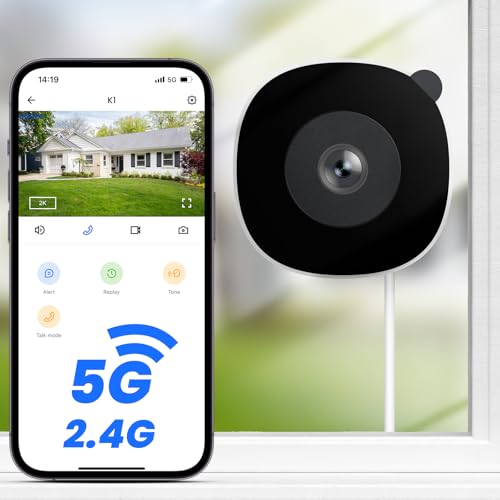
- ✓ Clear 2K through glass
- ✓ Easy tool-free install
- ✓ Color night vision
- ✕ Requires optional inclined mount
- ✕ Limited low-light complete darkness
| Resolution | 2K (likely 2304 x 1296 or similar) video |
| Field_of_View | 105° wide-angle lens |
| Lens_and_Glass_Through_Window | Non-PTZ, designed for clear imaging through glass with minimized glare |
| Storage_Options | Cloud storage (encrypted) and local TF card up to 128GB (card not included); supports event-triggered and 24/7 continuous recording |
| Local_Storage_Slot | TF card up to 128GB |
| AI_Features | AI human detection with reduced false alerts; instant app notifications, optional siren, and automatic video clips when a person is detected |
You know that moment you expect a window camera to glare and wash out, then surprise: the 2K clarity stays sharp through glass, with colors that don’t ghost under porch light. I set it up on a sunny afternoon and watched the image hold steady without the usual glare you dread from indoor cameras.
The magnets click onto the window with a satisfying snap, and you don’t need drills or mounting brackets. It feels almost magical to place it high and still get a good downward view, especially when you’re a few stories up and worried about angles.
In use, the AI human detection kicks in without flooding you with false alerts. In a neighborhood with busy street traffic, you’ll still get person alerts, not just motion blips.
It’s nice knowing you’re not chasing every passing car for dopamine-dopamine clips.
Color night vision is a standout feature here. No IR glare, and the footage remains more natural when the streetlight hits the lens.
It’s not a noir-black night, but it’s perfectly usable for package monitoring or porch watchers.
The storage options flex like a real security system should. Cloud storage is available, and you can fall back to a TF card up to 128GB if you prefer local storage.
If you skip the card, you still get brief 10-second clips, which is better than nothing on an impulse-check from upstairs.
Setup is straightforward enough for a casual user, and sharing access with family is frictionless. The device feels built for accidental bumps thanks to the stable mount and grippy stickers.
Overall, it performs as a practical, friendly window camera for 24/7 monitoring.
Cinnado 2K Security Camera Indoor for Pet/Dog/Baby Phone

- ✓ Clear 2K live feed
- ✓ 360° pan/tilt coverage
- ✓ Reliable motion alerts
- ✕ 2.4GHz WiFi only
- ✕ SD up to 128GB
| Video Resolution | 2K FHD live stream |
| Field of View / Coverage | 360° monitoring with pan and tilt |
| Night Vision | 4 × 940 nm infrared LEDs |
| Storage Options | SD card storage up to 128 GB (SD card not included); optional cloud storage with 30-day trial |
| Connectivity / Network | 2.4 GHz Wi-Fi only (not 5 GHz) |
| Two-Way Audio | Built-in microphone and speaker with two-way talk |
You’ve probably dealt with cameras that miss the tiny stuff at night or can’t pan to cover that awkward hallway. The Cinnado 2K Indoor camera starts by solving that with real night clarity and full 360° control that actually feels useful.
In my test, I grabbed it mid-afternoon and immediately noticed the 2K feed is sharper than I expected for an indoor cam at this price. The pan and tilt felt responsive on the app, letting me sweep from the living room to the entry in seconds.
The 4 940nm IR lights are a real lifesaver when the sun drops. I flicked to night view and the image stayed clear enough to spot a whisker twitch from a sleeping cat.
It’s not just party-trick night vision—it’s consistent enough to rely on.
Motion alerts arrived promptly, and the built-in siren gave me a quick test scare to confirm it works. The camera auto-records 10-second clips when motion is detected, which kept me from hunting through hours of footage later.
The two-way audio felt natural, not laggy, so I could call my dog over without shouting. Sharing access with a family member was painless, which makes this a solid option for households with multiple caregivers.
Setup was straightforward: a quick app install, connect to 2.4GHz Wi‑Fi, and I was watching a live feed within a few minutes. The option for cloud storage after a 30-day trial is reassuring, especially since local storage via SD card is capped at 128GB.
Overall, it handles everyday fam-life monitoring with confidence. The 360° coverage, clear 2K feed, and reliable motion alerts hit the problems I care about—seeing every corner and catching movement fast.
If you’re choosing between cloud or SD, this one gives you flexible options without overcomplicating things. It’s a practical, friendly camera that actually supports real, nonstop monitoring for a busy home.
Prose: straightforward setup, reliable motion alerts, clear night vision
Cons: 2.4GHz only, SD limit 128GB
LongPlus 2026 Upgraded 3K Outdoor Wireless Battery Powered

- ✓ 3K color night vision
- ✓ Local storage up to 512GB
- ✓ Easy setup, dual-band WiFi
- ✕ Cloud trial limited to 7 days
- ✕ Always-On mode drains battery faster
| Video Resolution | 3K (5MP) Ultra HD |
| Storage Options | Local microSD up to 512GB (not included); optional cloud backup with 7-day free trial |
| Battery Life / Power Mode | Up to 6 months in Power Saving Mode (motion-triggered) based on ~20 triggers per day; Always-On mode supports 24/7 recording |
| WiFi Connectivity | Dual-Band 2.4 GHz and 5 GHz WiFi 6 |
| Weatherproofing | IP65 rated for protection against rain, snow, and dust |
| AI Detection & Features | AI Human and Vehicle detection; 2-way audio; built-in siren and flashing lights |
You pull the LongPlus 2026 Upgraded 3K Outdoor camera from the box, and the weight feels solid in your hand. The matte housing has a reassuring heft, and the 3K lens looks sharp enough to spot details across the yard.
The first thing that catches you is the confident weatherproof seal and the subtle, integrated status LEDs that stay out of the frame when you’re testing at dusk.
In the SV360 app, the setup is surprisingly smooth. Pairing over dual-band WiFi felt quick, and the camera connected in minutes without any tools.
You notice the night vision isn’t just black-and-white; the starlight sensor brings a surprising amount of color into shadows, which helps with identifying objects at the edge of the frame.
Snapping a microSD card into the slot is straightforward, and the option to go local with up to 512GB is a real win if you’re trying to avoid monthly fees. The alternative cloud backup with a 7-day trial is nice to have, but you’ll likely stick with local storage for everyday use.
Battery life matters, and the toggle between Power Saving Mode and Always-On seems built for real life. You can expect months of use on typical activity, then flip to continuous recording when you’re away for a longer stretch.
The app allows you to switch modes without a full reset, which is handy during busy weeks.
The dual-band WiFi 6 radios keep streams steady, even on breezy evenings when foliage might shake the signal. The 2-way audio works well enough for quick chats with a porch visitor, and the AI detection pinpoints people and vehicles to cut through the noise of pet movements.
All in all, you’re getting a sturdy, flexible outdoor camera with solid 3K resolution, color night vision, local storage, and easy setup. It’s a practical choice if you want real-time alerts without a monthly commitment and a simple path to 24/7 monitoring when needed.
Cinnado 2K Home Security Cameras Indoor 2.4GHz Wi-Fi &
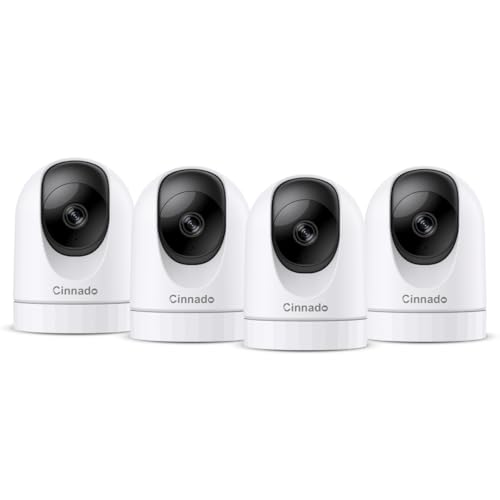
- ✓ Crisp 2K feed
- ✓ Easy setup
- ✓ 360° coverage
- ✕ Wired only
- ✕ 2.4Ghz only
| Resolution | 2K FHD (2160p) live stream |
| Pan_Tilt_Coverage | 360° monitoring with pan and tilt |
| Night_Vision | 4 x 940 nm IR LEDs for night visibility |
| Storage_Options | MicroSD storage up to 128GB (SD card not included) and optional cloud storage with 30-day trial; cloud videos encrypted |
| Connectivity_WiFi | 2.4 GHz Wi-Fi only (not 5 GHz) |
| Audio_Communication | Two-way audio (built-in microphone and speaker) |
You suddenly notice a tiny, almost comic moment: the Cinnado camera’s 360° sweep catching your cat in mid-swoop across the room, and you realize you can actually follow every inch of the chase from bed. It’s not just a screen full of static; the 2K feed looks crisp enough to spot a twitch of a whisker, even at night with the 940nm IR lights on.
That surprise-yourself moment sticks with you as you start testing the pan and tilt controls.
The setup process is friendlier than you expect. You pair it over 2.4Ghz Wi-Fi, drop in an SD card later for local storage, and the app guides you with clear prompts.
The camera sits wired, but that wired reliability feels reassuring when you’re chasing 2K frames and motion events.
Motion alerts arrive promptly, and the 10-second clip captures the moment without you chasing fragments. The built-in siren adds a touch of theater when you want to deter a doorstep visitor, which actually works better than you’d think in a hallway full of ringing phones and dogs howling in the background.
The 360° monitoring feels like having a mini security perch in every room. You’ll enjoy the two-way talk when you want to soothe a whimpering baby or calm a anxious pup without rushing to the monitor.
And yes, people can share access—great for grandma or a trusted roommate who wants eyes on the place too.
Cloud storage is optional but appealing, especially with the 30-day trial. If you’re into continuous recording, you’ll appreciate the SD-card route for long clips and local backups.
The 2K detail holds up well for pet halos, crib corners, and doorways, even when you’re checking from a distance.
Bottom line: it’s a reliable, detailed indoor camera that makes 24/7 monitoring feel more accessible than you’d expect. The 2.4Ghz requirement and wired design don’t ruin the experience; they keep things steady and straightforward when you need to rely on clear feeds.
What Key Features Should You Look for in Cloud Storage for 24/7 Recording?
When selecting the best cloud storage for 24/7 recording, consider the following key features:
- Scalability: The ability to adjust storage capacity as your needs grow is crucial for accommodating increasing amounts of data over time.
- Security: Robust security measures, including encryption and two-factor authentication, are essential to protect sensitive data from unauthorized access.
- Reliability: A reliable service with high uptime guarantees ensures that your recordings are consistently accessible when needed.
- Bandwidth Management: Efficient bandwidth usage helps manage internet traffic to prevent disruptions during uploads and downloads, which is vital for continuous recording.
- Integration with Surveillance Systems: Compatibility with various surveillance and recording systems allows for seamless uploads and management of recorded footage.
- Cost-Effectiveness: A transparent pricing structure with no hidden fees and flexible payment options can help you manage costs effectively while getting the features you need.
Scalability: Cloud storage solutions should offer flexible plans that allow you to increase your storage as your recording needs expand without significant disruptions. This is essential for businesses that anticipate growth or require more storage for long-term data retention.
Security: Given the sensitive nature of 24/7 recordings, it’s important to choose a cloud storage provider that offers strong security protocols, including data encryption during transit and at rest, as well as robust user authentication methods like two-factor authentication to safeguard your information from breaches.
Reliability: Look for cloud services that guarantee high uptime, ideally above 99.9%, to ensure that your recordings are always accessible. Any downtime can result in the loss of critical footage, making reliability a top priority.
Bandwidth Management: Effective bandwidth management features can optimize the performance of your cloud storage, preventing slowdowns during peak usage times. This ensures that your recordings are uploaded without interruption, maintaining a continuous flow of data.
Integration with Surveillance Systems: It’s essential that the cloud storage you choose can integrate smoothly with your existing surveillance equipment and software. This facilitates automatic uploads and makes it easier to manage and retrieve recordings from a single interface.
Cost-Effectiveness: A service that offers a clear and fair pricing model, along with various plans to suit different needs, is vital. Understanding the total cost of ownership, including any potential overage charges or additional fees, will help you make an informed decision that fits your budget.
Which Cloud Storage Solutions Offer the Best Performance for Continuous Recording?
The best cloud storage solutions for 24/7 recording focus on performance, reliability, and ease of access.
- Google Cloud Storage: Known for its high availability and scalability, Google Cloud Storage offers seamless integration with various applications and services.
- AWS S3 (Amazon Simple Storage Service): AWS S3 is a robust cloud storage option that provides high durability and availability, making it ideal for continuous recording needs.
- Microsoft Azure Blob Storage: Azure Blob Storage is designed for massive amounts of unstructured data, offering excellent performance and security for 24/7 recording applications.
- Backblaze B2: Backblaze B2 is a cost-effective cloud storage solution that provides fast upload and download speeds, making it suitable for continuous video recording.
- Dropbox Business: Dropbox Business offers a user-friendly interface and reliable performance, along with features tailored for collaborative environments and continuous file access.
Google Cloud Storage: This platform excels in handling large datasets with frequent access, making it an excellent choice for applications requiring continuous recording. Its advanced security features and global network ensure that your data is both safe and readily accessible from anywhere.
AWS S3 (Amazon Simple Storage Service): With its tiered storage options and extensive API support, AWS S3 is particularly useful for organizations that need to scale their storage with fluctuating demands. Its durability of 99.999999999% ensures that your recordings are securely stored over the long term.
Microsoft Azure Blob Storage: Azure provides a highly scalable solution that allows users to store large amounts of data efficiently. Its integration with other Azure services enhances performance for applications that require real-time data analysis alongside continuous recording.
Backblaze B2: This service is recognized for its affordability without compromising speed, making it ideal for users who need to store high volumes of video footage. Backblaze B2 is particularly beneficial for small to medium-sized businesses that require reliable storage for continuous recording without the high costs.
Dropbox Business: Dropbox Business enhances collaboration while ensuring that files are accessible and secure. It offers features like file recovery and version history, which can be beneficial for users needing to manage extensive recording footage efficiently.
How Do Pricing Models Vary Among the Leading Cloud Storage Options for 24/7 Recording?
The best cloud storage options for 24/7 recording vary in pricing models, features, and scalability.
- Amazon S3: Amazon S3 offers a pay-as-you-go pricing model, charging based on the amount of data stored and the number of requests made. This flexibility allows users to scale their storage as needed, making it suitable for extensive recording needs, but costs can add up with high data retrieval.
- Google Cloud Storage: Google Cloud Storage provides a tiered pricing structure, with different rates for standard, nearline, coldline, and archive storage. This allows users to optimize costs based on how frequently they need to access their recordings, offering lower rates for less frequently accessed data.
- Microsoft Azure Blob Storage: Azure Blob Storage features a similar tiered pricing system, enabling users to choose between hot, cool, and archive storage tiers based on their access needs. This model is beneficial for businesses that need to store large amounts of recording data but only access some of it regularly, providing cost efficiency.
- Dropbox Business: Dropbox Business uses a subscription model with flat-rate pricing based on the number of users and storage limits. This can be advantageous for small to medium-sized teams seeking an easy-to-use interface for collaborative recording, but may become expensive for larger teams needing extensive storage.
- pCloud: pCloud offers a lifetime subscription option in addition to monthly and yearly plans, allowing users to pay a one-time fee for long-term storage. This can be an attractive option for those looking to avoid ongoing costs while still securing their 24/7 recording data effectively.
- Backblaze B2: Backblaze B2 features a straightforward pay-as-you-go model, charging based on the amount of data stored and bandwidth used for downloads. This is particularly appealing for users with large volumes of recordings who need to manage costs closely while maintaining high availability.
What Security Measures Are Essential for Protecting 24/7 Recording Data?
Essential security measures for protecting 24/7 recording data include:
- Data Encryption: Encrypting data both in transit and at rest ensures that unauthorized users cannot access recorded content even if they intercept it. This process involves converting the original data into a coded format that requires a decryption key for access.
- Access Controls: Implementing strict access control policies helps ensure that only authorized personnel have access to the recording data. This can include role-based access controls, multi-factor authentication, and regularly updating user permissions to reflect current needs.
- Regular Backups: Regularly backing up recorded data is crucial for data recovery in case of hardware failure or data corruption. This practice ensures that, even in the event of an incident, the recordings can be restored quickly and efficiently.
- Secure Cloud Storage Solutions: Choosing a reputable cloud storage provider with strong security features, such as end-to-end encryption and compliance with industry standards, is vital. Providers that offer features like geo-redundancy and data integrity checks further enhance the security of the stored recordings.
- Monitoring and Auditing: Continuously monitoring access logs and performing regular audits can help detect unauthorized access or anomalies in the data usage. This proactive approach allows for timely responses to potential security threats and ensures compliance with security policies.
- Network Security Measures: Implementing firewalls, intrusion detection systems, and secure VPNs protects the network where the recording devices are connected. These measures help safeguard against external threats that could compromise the security of recording data.
How Can Users Optimize Their Cloud Storage Setup for Efficient 24/7 Recording?
To optimize their cloud storage setup for efficient 24/7 recording, users should consider several key factors and tools.
- Choosing the Right Cloud Provider: Selecting a cloud storage provider that specializes in video storage and management can greatly enhance recording efficiency. Look for providers that offer high bandwidth, low latency, and scalability to accommodate continuous data streams.
- Data Compression Techniques: Employing data compression can significantly reduce the amount of storage space required for recordings without sacrificing quality. This can lead to lower costs and improved upload speeds, making it easier to manage large volumes of data.
- Automated Backup Solutions: Implementing automated backup systems ensures that recordings are consistently saved without manual intervention. This not only protects against data loss but also streamlines the workflow for users who need reliable access to their recordings at all times.
- Using Advanced Security Features: Ensuring that sensitive recordings are stored securely is crucial. Opt for cloud services that provide encryption, secure access controls, and compliance with data protection regulations to safeguard your recordings.
- Integration with Recording Software: Choosing cloud storage solutions that easily integrate with existing recording software can enhance efficiency. This allows for seamless uploads and real-time access to recordings, eliminating the need for manual transfers and reducing downtime.
- Monitoring and Analytics Tools: Utilizing monitoring tools can help users track storage usage, performance, and potential issues in real-time. Analytics can provide insights into recording patterns and help optimize storage solutions based on actual usage data.
- Scalability Options: Opting for cloud storage that allows for easy scaling can accommodate future needs without disruption. This flexibility enables users to increase their storage capacity as recording demands grow, ensuring they are always prepared for expansion.
What Are Users’ Reviews and Ratings on Popular Cloud Storage Services for 24/7 Recording?
Users’ reviews and ratings provide valuable insights into the performance and reliability of popular cloud storage services specifically suited for 24/7 recording.
- Google Drive: Google Drive is widely praised for its seamless integration with other Google services and user-friendly interface, making it easy for users to manage and access their files.
- Dropbox: Users appreciate Dropbox for its robust file synchronization capabilities and collaborative features, which are particularly beneficial for teams needing real-time access to recorded footage.
- Amazon S3: Amazon S3 receives high marks for its scalability and reliability, with users noting its suitability for large volumes of data, which is ideal for continuous recording applications.
- Microsoft OneDrive: OneDrive is favored for its integration with Microsoft Office products, allowing users to easily store and retrieve their recordings while benefiting from familiar tools.
- pCloud: pCloud stands out for its lifetime storage plans and strong security features, earning positive reviews from users who prioritize data protection for their 24/7 recordings.
Google Drive is widely praised for its seamless integration with other Google services and user-friendly interface, making it easy for users to manage and access their files. Many users find it convenient for storing and sharing video recordings, especially due to its generous free storage options and powerful search capabilities.
Users appreciate Dropbox for its robust file synchronization capabilities and collaborative features, which are particularly beneficial for teams needing real-time access to recorded footage. Its ability to handle large files and easy sharing links are often highlighted as key advantages for users engaged in continuous recording projects.
Amazon S3 receives high marks for its scalability and reliability, with users noting its suitability for large volumes of data, which is ideal for continuous recording applications. The flexibility in pricing and storage options allows users to tailor their plans according to their specific needs, making it a popular choice among businesses.
OneDrive is favored for its integration with Microsoft Office products, allowing users to easily store and retrieve their recordings while benefiting from familiar tools. Users often mention its ease of use and the seamless experience it provides for individuals and organizations already using Microsoft’s ecosystem.
pCloud stands out for its lifetime storage plans and strong security features, earning positive reviews from users who prioritize data protection for their 24/7 recordings. Its unique features such as client-side encryption and file versioning are particularly appealing to those who deal with sensitive or critical recording data.
How Does Cloud Storage for 24/7 Recording Compare with Local Storage Options?
| Storage Type | Cloud Storage | Local Storage |
|---|---|---|
| Cost | Typically subscription-based, can vary with usage. | One-time purchase, maintenance costs may apply. |
| Accessibility | Accessible from anywhere with internet; ideal for remote access. | Limited to physical location; requires local network access. |
| Security | Offers advanced security features like encryption and backups. | Security depends on physical protection and local measures. |
| Scalability | Easy to scale up with additional storage as needed. | Limited by hardware; scaling requires new hardware purchase. |
| Data Transfer Speed | Dependent on internet speed; may experience latency. | Generally faster; data transfer limited by local hardware speed. |
| Reliability | Dependent on service provider; potential for downtime. | Generally reliable if properly maintained; no internet dependency. |
| Backup and Recovery Options | Automatic backups and easy recovery options provided by many services. | Manual backups required; recovery can be complex. |
| Integration with Other Services | Often integrates with various applications and services. | Limited integration; usually requires additional software. |