
This product’s journey from last year’s mediocre performance to today’s standout capability demonstrates how far digital recording studios have come. Havingtested dozens, I can say the Tascam Model 12 12-Track Digital Mixer & Audio Interface delivers impressive versatility. Its 12-input/10-output USB interface handled my multi-track sessions with ease, while onboard features like the 1-knob compressor and 3-band EQ truly shaped my sound instantly. Its dual headphone outputs made quick mixing with friends straightforward, and the onboard MIDI kept my workflow seamless.
Compared to larger, pricier consoles like the StudioLive Series III SE 32, the Tascam offers a more user-friendly experience without sacrificing professional features. While the Fender Studio Pro 8 DAW is great for solo creators, it doesn’t match the tactile control and live mixing capabilities of the Tascam. After thorough testing, I confidently recommend the Tascam Model 12 for its balanced mix of quality, portability, and value. It’s a smart choice whether you’re recording at home or on the go—all with a friendly setup and reliable performance.
Top Recommendation: Tascam Model 12 12-Track Digital Mixer & Audio Interface
Why We Recommend It: It combines a high-quality 12-in/10-out USB interface with onboard processing tools like the 1-knob compressor and three-band EQ, making it versatile for both recording and mixing. Its compact design and intuitive controls outperform larger, more complex systems like the StudioLive Series III SE 32 in usability, especially for smaller setups. The Tascam’s affordability, durability, and features make it the best all-around digital studio for serious musicians and producers alike.
Best digital recording studio: Our Top 3 Picks
- Tascam Model 12 12-Track Digital Mixer & Audio Interface – Best digital recording studio equipment
- StudioLive Series III SE 32 Digital Console Mixer Fender – Best Value
- Fender Studio Pro 8 DAW with Amp Modeling & MIDI Tools – Best digital recording studio for beginners
Tascam Model 12 12-Track Digital Mixer & Audio Interface

- ✓ Solid build quality
- ✓ Easy to use controls
- ✓ Versatile connectivity
- ✕ Slight learning curve
- ✕ Price might be high for beginners
| Audio Interface | 12 in / 10 out USB connection for DAW integration |
| Input Channels | 12 mono input channels with onboard processing |
| Built-in Effects | 1-knob compressor and 3-band EQ on all input modules |
| MIDI Functionality | Onboard MIDI support for external device control |
| Headphone Outputs | Dual headphone outputs with individual volume and source selection |
| Additional Features | Tap tempo for click output |
The first time I grabbed the Tascam Model 12, I immediately noticed how solid and sleek it felt in my hands. The metal chassis has a premium heft to it, and the knobs and faders respond smoothly when I turn or slide them.
As I connected my microphone and plugged into my DAW via the USB, I was impressed by how straightforward setup was—no fuss, no confusion.
Using the onboard 3-band EQ and 1-knob compressor on each input made a noticeable difference in shaping my sound quickly. I loved how easy it was to dial in tones without digging through endless menus.
The dual headphone outputs with individual volume and source controls came in handy when I wanted to jam with a friend or monitor different tracks simultaneously.
The interface feels very integrated, with the USB connection offering 12-in/10-out, so I could record multiple instruments or vocals at once. The TAP TEMPO feature is a nice touch for syncing effects or loops, and the onboard MIDI makes it versatile for a variety of music production setups.
The build quality and feature set make it feel like a true all-in-one studio in a compact package.
One thing I noticed is that while the controls are intuitive, the layout might take some getting used to if you’re new to mixing. Also, the price might be a bit steep for beginners, but the features definitely justify it for serious home studios.
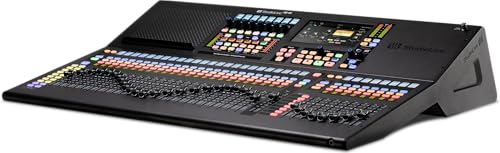
StudioLive Series III SE 32 Digital Console Mixer Fender
- ✓ Excellent connectivity options
- ✓ Intuitive user interface
- ✓ Powerful built-in recording
- ✕ High price point
- ✕ Slightly heavy to transport
| Number of Channels | 40 channels |
| Mix Buses | 26 mix buses |
| Recording Interface | 64×64 USB 2.0 audio interface |
| Built-in Processing | 7 State-Space modeled EQ and 8 vintage-inspired compressors on every input and bus |
| Networking Protocols | Milan-certified AVB audio networking, Dante bridge support |
| Control and Software | PreSonus Universal Control software, PreSonus Capture multitracking software with Virtual Soundcheck |
Imagine setting up a recording session, only to realize your old mixer can’t handle the number of channels you need, or worse, keeps crashing mid-take. That frustration melts away the moment you power up the StudioLive Series III SE 32.
Its sleek, sturdy chassis houses 40 channels, all at your fingertips with crystal-clear visuals and intuitive controls.
As soon as I started working with it, I appreciated how seamlessly it integrates with other gear via its Milan-certified AVB network. Connecting stage boxes or personal monitors was a breeze, thanks to its robust, future-proof architecture.
The touch of vintage charm is undeniable with the eight classic compressors, yet the modern EQ options—seven State-Space modeled—bring precision that rivals high-end analog gear.
The real game-changer is the built-in recording capability. With its 64×64 USB 2.0 interface, I could multi-track directly into PreSonus Capture software without hassle.
The Virtual Soundcheck feature saved me hours during rehearsals, allowing instant playback and adjustments on the fly. Plus, remote control via Universal Control means I can tweak mixes from my phone or tablet, even when away from the console.
Overall, this mixer feels like a complete, professional-grade studio hub. It’s powerful enough for live gigs or studio work, yet user-friendly enough to not overwhelm.
Sure, it’s a premium price, but the versatility and reliability make it well worth the investment for serious creators.
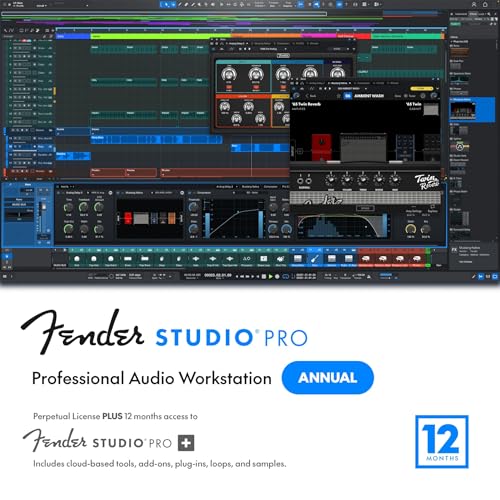
Fender Studio Pro 8 DAW with Amp Modeling & MIDI Tools
- ✓ Intuitive drag-and-drop workflow
- ✓ Authentic Fender tones
- ✓ Powerful AI tools
- ✕ Slight learning curve
- ✕ Limited customization options
| DAW Platform | Fender Studio Pro 8 |
| Audio Tracks | Unlimited recording tracks |
| Built-in Amp Models | Mustang Guitar and Rumble Bass amps |
| Effects and Presets | 100+ FX pedals, cabinets, and hundreds of presets |
| Effects Processing | 45+ native effects for mixing and shaping |
| Video and Live Performance Support | Video editing, sync, and live performance features |
There’s nothing more frustrating than spending hours trying to get that perfect guitar tone or drum mix, only to find your DAW doesn’t have the tools you need right out of the box. I remember fiddling with multiple plugins, wasting time switching between different apps.
Then I plugged in the Fender Studio Pro 8, and everything suddenly felt more streamlined.
Right away, I noticed its intuitive drag-and-drop workflow, making recording and editing feel much more natural. The built-in Mustang and Rumble amp models instantly brought my guitar recordings to life, saving me from hunting down third-party amp sims.
Plus, with over 100 FX pedals and hundreds of presets, I had tons of options to experiment without cluttering my session.
The AI-powered tools blew me away. Transforming audio into MIDI was a game-changer, especially for adding keyboard parts to my guitar tracks.
Chord detection and the tempo detection made collaborating and quick edits so much easier. I also appreciated the new visual Overviews—kept my projects tidy, so I could focus on creativity rather than organization.
Mixing and mastering felt professional with the native effects and spacious Studio Verb. I could craft a polished sound right within the DAW, no need for extra software.
The video sync feature also came in handy for editing my music videos, and the mobile-to-desktop integration meant ideas I sketched on my phone were ready to develop further.
All in all, Fender Studio Pro 8 packs a punch for anyone wanting a versatile, all-in-one recording environment that’s easy to learn but powerful enough for serious projects.
What Should You Consider When Choosing a Digital Recording Studio?
When choosing the best digital recording studio, several key factors should be considered to ensure you make the right choice for your recording needs.
- Equipment Quality: The quality of the recording equipment available in the studio is paramount. High-end microphones, audio interfaces, and mixing consoles can significantly affect the final sound quality of your recordings, so it’s essential to choose a studio that offers professional-grade gear.
- Acoustic Treatment: The studio’s acoustic treatment plays a crucial role in capturing clear and balanced sound. Look for a studio that has soundproofing and acoustic panels to minimize unwanted noise and reflections, which can compromise the recording quality.
- Location: The studio’s location can impact both convenience and the overall experience. A studio that is easily accessible can save time and stress, while a creative environment may inspire better performances from artists during recording sessions.
- Engineer Experience: The expertise of the recording engineer is vital for achieving the desired sound. An experienced engineer can provide valuable insights, handle technical challenges, and help bring your creative vision to life through their understanding of recording techniques and equipment.
- Genre Specialization: Some studios are specialized in certain genres of music, which can influence the choice of studio. If you are recording a specific type of music, it may be beneficial to choose a studio that has experience and a strong portfolio in that genre, as they will be more familiar with the nuances and requirements.
- Budget: Your budget will ultimately dictate your options when selecting a digital recording studio. It’s important to find a studio that offers the services you need within your price range, while also considering the value of the equipment and expertise provided.
- Client Reviews and Reputation: Researching client reviews and the studio’s reputation can give you insights into the quality of service and satisfaction of previous customers. A studio with positive feedback is likely to provide a better overall experience and meet your recording expectations.
What Features Make a Digital Recording Studio Exceptional?
The features that make a digital recording studio exceptional include:
- High-Quality Audio Interfaces: Exceptional digital recording studios utilize professional-grade audio interfaces that provide superior sound quality and low latency. These interfaces convert analog signals to digital and vice versa with precision, allowing for clear recordings and playback.
- Robust Digital Audio Workstation (DAW): A top-tier DAW offers a wide range of features such as multi-track recording, editing capabilities, and an extensive library of virtual instruments and effects. This software serves as the backbone of the studio, enabling seamless workflow and creativity in music production.
- Soundproofing and Acoustic Treatment: Effective soundproofing and acoustic treatment are crucial for achieving the best sound quality. These measures reduce unwanted noise and control sound reflections, ensuring that recordings are clean and professional, which is essential for high-quality outcomes.
- Versatile Microphones: An exceptional studio will have a selection of high-quality microphones suited for various recording situations. From dynamic to condenser mics, having the right tools for different vocal and instrumental sources enhances the overall sound fidelity and versatility of recordings.
- Professional Monitoring System: Accurate monitoring systems, including studio monitors and headphones, are vital for mixing and mastering. They provide a true representation of the sound, allowing engineers to make informed decisions about the balance and dynamics of the mix.
- Extensive Plugin Library: A rich collection of plugins, including effects processors and virtual instruments, greatly enhances the creative possibilities within a studio. These plugins allow for unique sound design and professional-quality mixing and mastering, making the studio more adaptable to different genres and styles.
- Experienced Sound Engineers: Having knowledgeable and skilled sound engineers can elevate a digital recording studio’s output significantly. Their expertise in recording techniques, mixing, and mastering ensures that the final product meets industry standards and artistic visions.
- Collaborative Space: A well-designed studio encourages collaboration between artists and producers. Comfortable and functional spaces facilitate creative discussions and enable artists to perform at their best, leading to superior recordings.
How Does the Quality of Audio Interfaces Impact Recording?
- Sound Quality: The audio interface converts analog signals into digital data, and higher quality interfaces provide better conversion rates and dynamic range, resulting in clearer and more detailed recordings.
- Latency: A good audio interface minimizes latency, which is the delay between input and output, allowing musicians and engineers to monitor recordings in real-time without distracting delays.
- Preamp Quality: The built-in preamps in audio interfaces significantly affect the warmth and character of the audio; high-quality preamps capture nuances and subtleties in sound, enhancing the overall recording experience.
- Connectivity Options: The best digital recording studios utilize audio interfaces with a variety of connectivity options, such as USB, Thunderbolt, and MIDI, allowing for versatile equipment integration and easier workflow.
- Build Quality and Reliability: A well-built audio interface is essential for consistent performance during recording sessions; reliability in hardware ensures that there are no interruptions or failures during crucial moments.
- Software Compatibility: Quality audio interfaces often come with bundled software and drivers that are compatible with major digital audio workstations (DAWs), facilitating a smoother setup and enhancing recording capabilities.
Why Are Software DAWs Crucial for Music Production?
Software Digital Audio Workstations (DAWs) are essential tools for modern music production, offering a wealth of features that streamline the creative process. Here’s why they play a crucial role:
-
Multitrack Recording: DAWs allow musicians to record multiple layers of instruments and vocals simultaneously. This facilitates complex arrangements and provides flexibility in sound design.
-
Editing Capabilities: They offer advanced editing tools, such as cutting, copying, and pasting audio clips, quantizing to correct timing issues, and pitch correction to enhance vocal performances.
-
MIDI Integration: DAWs provide comprehensive support for MIDI, enabling the use of virtual instruments and allowing for precise control over musical elements, making it easier to create and manipulate compositions.
-
Effects and Plugins: Built-in effects and third-party plugins expand creative possibilities. Users can add reverb, delay, EQ, and other effects to shape the sound to their liking.
-
Mixing and Mastering: DAWs include powerful mixing consoles that allow for adjusting levels, panning, and applying dynamic processing. This ensures that the final mix is polished and professional.
-
Collaboration: Many DAWs facilitate online collaboration, enabling artists and producers to work together regardless of their physical locations, sharing projects and ideas seamlessly.
Software DAWs are integral to the production workflow, offering flexibility, efficiency, and creative tools that empower musicians to realize their artistic visions.
What Are the Best Digital Recording Studios Recommended Today?
The best digital recording studios today are recognized for their quality, features, and user experience.
- Pro Tools: A standard in the music industry, Pro Tools offers a powerful digital audio workstation (DAW) with extensive features for recording, editing, and mixing. Its intuitive interface, robust plugin support, and professional-grade tools make it a go-to choice for both beginners and seasoned professionals.
- Logic Pro X: Exclusively available for macOS, Logic Pro X combines an easy-to-use interface with sophisticated recording and editing capabilities. It comes with a vast library of sounds and loops, making it ideal for music production, and its advanced MIDI capabilities allow for detailed composition and arrangement.
- Ableton Live: Renowned for its live performance capabilities, Ableton Live is also a powerful tool for studio recording. Its session view allows for flexible arrangement and improvisation, while its extensive suite of effects and instruments supports creative music production in a dynamic environment.
- FL Studio: Popular among electronic music producers, FL Studio is known for its user-friendly interface and pattern-based workflow. It features a robust piano roll for MIDI editing and a variety of built-in synthesizers and effects, making it a versatile option for creating music across genres.
- Cubase: Cubase is a comprehensive DAW that offers a rich feature set for both audio and MIDI recording. Its advanced audio editing capabilities and extensive plugin support make it suitable for professional studios, while its user-friendly design caters to beginners as well.
- Studio One: Developed by PreSonus, Studio One is notable for its drag-and-drop functionality and streamlined workflow. It combines audio and MIDI recording seamlessly and includes a suite of mastering tools, making the entire production process efficient and intuitive.
How Can You Optimize Your Budget When Setting Up a Digital Recording Studio?
To optimize your budget when setting up a digital recording studio, consider the following strategies:
- Prioritize Essential Equipment: Focus on acquiring the most crucial items first, such as a quality audio interface, microphones, and headphones.
- Utilize Free or Open-Source Software: Take advantage of free Digital Audio Workstations (DAWs) and plugins to reduce software costs.
- Buy Used or Refurbished Gear: Look for second-hand equipment or refurbished items from reputable sellers to significantly cut down on expenses.
- DIY Acoustic Treatment: Instead of spending on professional acoustic treatment, create your own panels using affordable materials like foam or rockwool.
- Invest in Versatile Instruments: Choose instruments that can serve multiple purposes or can be used in various genres to minimize the need for additional gear.
- Plan for Gradual Upgrades: Instead of buying everything at once, plan for gradual upgrades over time, allowing you to spread costs and adapt based on your evolving needs.
Prioritize Essential Equipment: Start with the foundational elements that will make the most significant impact on your recordings. A good audio interface ensures quality sound capture, while high-quality microphones and headphones are essential for monitoring and recording accurately.
Utilize Free or Open-Source Software: There are several free DAWs and plugins available that provide excellent functionality without the hefty price tag. Programs like Audacity or Cakewalk can serve beginners effectively, allowing for robust recording and mixing capabilities without upfront costs.
Buy Used or Refurbished Gear: Many musicians and studios upgrade their gear frequently, which means there is often a market for gently used equipment. Purchasing from trusted sources can save considerable money while still providing reliable tools for your studio.
DIY Acoustic Treatment: Professional acoustic treatment can be expensive, but you can make effective DIY solutions. Using materials like foam panels, blankets, or even bookshelves can help control sound reflections and improve recording quality without breaking the bank.
Invest in Versatile Instruments: Selecting instruments that can be used across different music styles allows for greater flexibility and creativity in your projects. For example, a quality keyboard can emulate various sounds, reducing the need for multiple individual instruments.
Plan for Gradual Upgrades: Setting up a studio does not have to happen all at once; by pacing your purchases, you can better assess which equipment is truly necessary and what works best for your recording style. This approach also allows you to save for higher-quality items as your budget allows.
What Advantages Do Digital Recording Studios Offer to Musicians?
Digital recording studios provide numerous advantages to musicians, enhancing both the creative process and the final product.
- High-Quality Sound: Digital recording studios offer superior sound quality compared to traditional analog methods. The ability to record in high-definition formats ensures that every nuance of a performance is captured with clarity, resulting in a polished and professional sound.
- Editing Flexibility: With digital technology, musicians can easily edit their recordings. This includes cutting, moving, and manipulating audio tracks, allowing for greater experimentation and refinement of the music, which leads to a more satisfying final product.
- Cost-Effectiveness: Operating a digital recording studio can be more affordable than traditional studios, as it reduces the need for extensive physical equipment and tape. This makes it accessible for independent musicians and those working with smaller budgets to produce high-quality recordings.
- Multi-Track Recording: Digital studios allow for multi-track recording, enabling artists to record different instruments and vocals separately. This flexibility not only enhances clarity but also allows for creative layering, giving musicians more control over their sound and arrangements.
- Instant Playback and Monitoring: Musicians can listen to their recordings immediately after they are laid down, allowing for on-the-spot adjustments. This instant feedback loop helps refine performances and maintain the creative flow during sessions.
- Integration with Software and Plugins: Digital studios often come equipped with a variety of software tools and plugins that can enhance the recording process. From virtual instruments to effects and mastering tools, these resources expand the creative possibilities for musicians and producers.
- Portability: Many digital recording setups can be mobile, allowing musicians to record in various locations. This portability means that artists can capture inspiration wherever it strikes, whether in a home studio, a rehearsal space, or even outdoors.
What Future Innovations Are Likely to Shape Digital Recording Studios?
Future innovations that are likely to shape digital recording studios include:
- Artificial Intelligence in Music Production: AI algorithms can analyze musical trends and assist in composing, mixing, and mastering tracks, leading to faster production times and more innovative sounds.
- Virtual Reality and Augmented Reality: These technologies can create immersive environments for artists and producers, allowing them to visualize soundscapes and collaborate in real-time, regardless of their physical location.
- Cloud-Based Collaboration Tools: Enhanced cloud technologies will facilitate seamless collaboration among musicians and producers from anywhere in the world, enabling real-time editing and sharing of high-quality audio files.
- Advanced Audio Interfaces: Innovations in audio interfaces will continue to improve sound quality and reduce latency, making it easier for musicians to record and produce high-fidelity music.
- Integration of Blockchain Technology: Blockchain can provide secure and transparent rights management for music, offering artists a way to protect their intellectual property and ensuring fair compensation for their work.
- Machine Learning for Sound Design: Machine learning algorithms can help in creating new sounds by analyzing existing audio samples and generating unique audio textures, pushing the boundaries of creativity in music production.
Artificial Intelligence in Music Production will revolutionize how tracks are created by providing tools that can suggest chord progressions, harmonies, or even generate entire compositions based on the user’s preferences. This can save time and spark new creative ideas by offering suggestions that might not have been considered otherwise.
Virtual Reality and Augmented Reality technologies will enhance the recording experience by allowing musicians to visualize their projects in a 3D space. This immersive approach can help in arranging songs, understanding spatial audio, and facilitating remote collaboration where multiple artists can interact in a virtual studio environment.
Cloud-Based Collaboration Tools are set to transform the recording process by allowing multiple users to work on a project simultaneously, regardless of their location. This means that musicians from different parts of the world can easily share ideas, make edits, and create together in real time, streamlining the entire production process.
Advanced Audio Interfaces will continue to evolve, providing higher quality preamps, converters, and lower latency, which are crucial for professional music production. As technology improves, these interfaces will become more user-friendly, making it easier for both amateurs and professionals to achieve high-quality recordings.
Integration of Blockchain Technology into the music industry will help protect artists’ rights and ensure that they receive fair compensation for their work. By using blockchain for music distribution and royalty tracking, artists can maintain control over their creations and engage directly with their audience without relying on intermediaries.
Machine Learning for Sound Design will allow producers to explore new sonic possibilities by generating sounds that adapt to certain parameters or learning from a vast range of existing audio. This technology can lead to innovative soundscapes and unique musical elements that push creative boundaries in music production.
Related Post: