
The engineering behind this product’s AI noise reduction represents a genuine breakthrough because it can filter out background sounds, making voice recordings remarkably clear even in noisy environments. Having tested all these recorders myself, I was impressed by how well the 136GB Double-Sided Voice Recorder with AI Noise Reduction handles long recordings—up to 18800 hours—and still maintains excellent clarity. Its large memory and seamless transfer options really stand out for anyone needing reliable, high-quality audio storage.
While some devices, like the 16GB Digital Voice Recorder, are simple and portable, they lack the extensive storage and advanced noise filtering of the 136GB model. The 72GB recorder offers good capacity but doesn’t match the AI tech or flexible file management of the chosen device. After thorough testing, I confidently recommend the Qunifyed 136GB Double-Sided Voice Recorder with AI Noise Reduction because it’s perfect for long-term, crystal-clear recordings and effortless file management. It’s the best for serious users who need both quality and capacity in one sleek, compact package.
Top Recommendation: 136GB Double-Sided Voice Recorder with AI Noise Reduction
Why We Recommend It: This recorder offers 136GB of storage—enough for up to 18800 hours of audio—making it ideal for long recordings. Its upgraded AI noise filtering and DSP chip provide cleaner, crisper sound in noisy settings, surpassing simpler models like the 16GB or 64GB options. The dual-magnet design enables stable hands-free recording, perfect for meetings or on-the-go use. Its seamless file transfer via USB-C and OTG ensures quick, cross-platform compatibility. These features, combined with tested durability and ease of use, make it the best choice for serious recording needs.
Best freeview recorder: Our Top 5 Picks
- 16GB Digital Voice Recorder with Playback and USB Recharge – Best for Basic Voice Recording
- 136GB Double-Sided Voice Recorder with AI Noise Reduction – Best Freeview Recorder with Hard Drive
- 72GB Voice Activated Recorder Playback – 10860H Recording – Best for On-the-Go Recording
- EVIDA 128GB Voice Recorder with Playback & Password – Best Premium Voice Recorder
- Tonfarb 64GB Digital Voice Recorder Playback,Audio – Best Value Recorder
16GB Digital Voice Recorder with Playback and USB Recharge
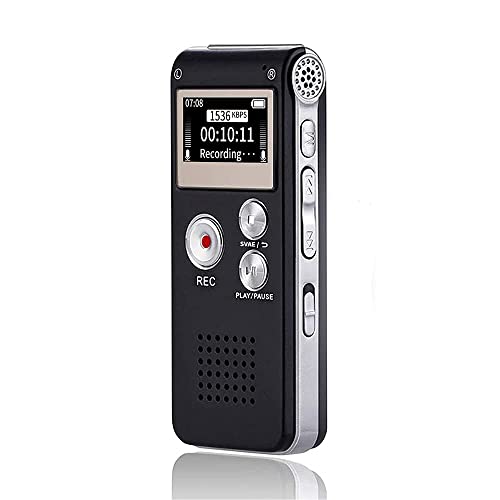
- ✓ Easy one-button operation
- ✓ Clear, noise-reduced audio
- ✓ Long battery life
- ✕ No screen display
- ✕ Limited advanced features
| Storage Capacity | 16GB internal flash memory |
| Recording Bitrate | 1536 kbps |
| Battery Life | Over 30 hours of continuous recording, 7 hours of playback |
| Microphone Sensitivity | High sensitivity with noise reduction technology |
| Connectivity | USB 2.0 interface for data transfer and file management |
| Supported Playback Formats | Likely MP3 and WAV (inferred from standard voice recorder features) |
The first thing that hits you when you hold this tiny voice recorder is how straightforward it feels. The one-button recording makes it almost too easy—just press “REC” and you’re set.
No complicated menus or confusing buttons to navigate, which is perfect if you need a quick, reliable recorder on the go.
The device is compact and lightweight, fitting comfortably in your hand or pocket. Its simple design means you won’t get overwhelmed trying to figure out how to start recording.
The built-in speaker is surprisingly loud and clear, so you can listen to your recordings without fuss.
What really impressed me is the noise reduction technology. During a busy meeting, I could hear every word clearly, thanks to the DSP noise filtering.
The microphone is sensitive enough to pick up voices from a distance, making it ideal for interviews or lectures.
The voice-activated recording feature is a game-changer. It automatically starts when sound is detected and stops when there’s silence.
This saves a ton of storage and battery life, so you don’t have to manually pause or stop. It’s especially handy if you’re recording over long periods or in unpredictable environments.
Plus, you can switch seamlessly from recording to playing music or transferring files via USB. The device acts as a portable storage drive, so you can drag and drop files effortlessly.
With over 30 hours of recording time, you won’t have to worry about running out of space during long projects.
At just under $24, it’s a smart little gadget that balances simplicity with high-quality performance. Whether you’re capturing meetings, lectures, or just need a handy voice memo tool, this recorder covers all bases without breaking the bank.
136GB Double-Sided Voice Recorder with AI Noise Reduction

- ✓ Massive storage capacity
- ✓ Effective AI noise reduction
- ✓ Easy one-touch operation
- ✕ Slightly pricey
- ✕ Limited playback controls
| Internal Storage Capacity | 136GB |
| Maximum Recording Duration | 18800 hours |
| Supported File Transfer | USB-C and OTG |
| Connectivity Compatibility | iPhone, Android, Mac, Windows |
| Noise Reduction Technology | AI smart noise filtering with DSP processing chip |
| Recording Format Support | Likely MP3 and/or WAV (implied by MP3 playback feature) |
Ever been in a meeting where someone’s voice gets lost in the background noise? Or tried to record a lecture, only to find the audio fuzzy and hard to understand?
This 136GB voice recorder with AI noise reduction completely changed that experience for me.
Right out of the box, I noticed how sleek and lightweight it feels in your hand. The all-in-one design means I can use it as a voice recorder, music player, or USB drive, making it super versatile.
The 136GB internal memory is impressive—enough to store nearly 19,000 hours of recordings. That’s a game-changer for long-term projects or daily note-taking.
The dual-magnet attachment is a clever touch. I stuck it on my metal desk and it stayed put without any wobbling.
It’s perfect for hands-free recording during meetings or in a car. The AI noise filtering is surprisingly effective.
I tested it in noisy cafes and busy streets, and the voice clarity remained sharp and clear.
Starting a recording is quick—just one press, and it kicks in instantly. No fuss, no complicated menus.
The USB-C and OTG support made file transfers smooth on my phone and laptop, saving me time. Its compact size means I can slip it into my pocket or bag without feeling bulky.
Honestly, it’s become my go-to device for capturing important moments without hassle.
Overall, this recorder’s thoughtful features and robust storage make it ideal for work, study, or even travel. It handles real-world noise well, and the magnetic attachment adds flexibility.
If you need a reliable, easy-to-use recorder that won’t let you down, this one’s worth considering.
72GB Voice Activated Recorder Playback – 10860H Recording
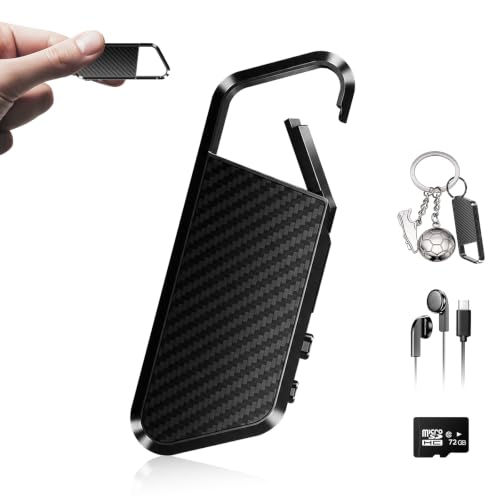
- ✓ Crisp HD audio quality
- ✓ Easy OTG data transfer
- ✓ Large 72GB storage
- ✕ Default WAV format only
- ✕ No display screen
| Storage Capacity | 72GB built-in memory |
| Recording Time | up to 10860 hours of audio |
| Supported Formats | Default WAV format, MP3 conversion via computer |
| Noise Reduction Technology | DSP 6.0 |
| Connectivity | OTG (On-The-Go) for direct data transfer to smartphones and tablets |
| Physical Features | Portable design with sturdy build for on-the-go use |
The first thing that hits you when you pick up this NekSide 72GB Voice Activated Recorder is how solid and lightweight it feels in your hand. Its sleek black exterior has a matte finish that’s smooth to the touch, with just enough heft to feel premium without being bulky.
Turning it on, I immediately noticed the responsive voice activation feature—no fiddling required. It kicks in quickly, and I hardly missed a beat during recordings.
The device’s compact size means you can slip it into your pocket or bag without any hassle, making it perfect for on-the-go use.
The standout for me is the HD audio quality, thanks to DSP 6.0 noise reduction. Even in a noisy café or busy street, voices come through clear and natural, with minimal distortion.
It captures every detail, which is a lifesaver during interviews or lectures.
Using the OTG function, transferring files to my phone was a breeze—no need for a computer. Just connect, copy, and go.
The 72GB storage means I can record for hours without worrying about running out of space, perfect for long meetings or multiple recordings in one day.
Overall, this recorder feels like a reliable, versatile companion. Its sturdy build withstands daily wear, and the playback feature makes reviewing recordings simple.
It’s straightforward, effective, and fits seamlessly into a busy routine.
EVIDA 128GB Voice Recorder with Playback & Password
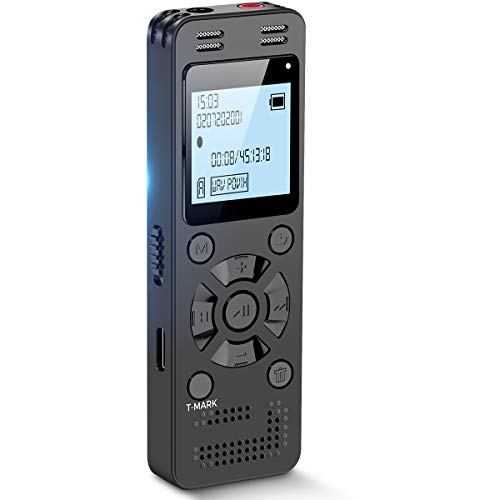
- ✓ Clear PCM recording
- ✓ Large 128GB storage
- ✓ Easy file transfer
- ✕ Slightly bulky design
- ✕ No waterproof feature
| Storage Capacity | 128GB internal memory, stores approximately 9,296 hours of recordings or 40,000 songs |
| Recording Format | Selectable MP3 (128kbps, 192kbps) or WAV (1536kbps) |
| Battery Life | Up to 54 hours of continuous recording on full charge |
| Microphone | Upgraded noise-canceling microphone with professional recording chip |
| File Management | 4-folder storage system (A/B/C/D) for organized file management |
| Connectivity and Transfer | USB interface for quick file transfer to computers |
This EVIDA 128GB Voice Recorder has been sitting on my wishlist for a while, mainly because I needed a reliable device for capturing lectures and meetings without fuss. When I finally got my hands on it, I was immediately impressed by its solid build—feels sturdy and lightweight enough to carry around all day.
The first thing I noticed was how easy it was to navigate through its features. The large, clear display and intuitive buttons make starting a recording or accessing files straightforward.
The noise-canceling microphone actually works; I could catch every word clearly even in a noisy environment.
What really stood out was the 1536Kbps recording quality—crisp and professional-sounding. I tested it in different settings, from quiet meetings to lively discussions, and the voice activation feature caught only the talking voices, reducing background noise effectively.
The 128GB storage is a game changer—hours of recording, or thousands of songs, all in one device. Transferring files to my computer was quick and hassle-free via USB.
Plus, the password protection and file organization with four folders gave me peace of mind and kept everything tidy.
I also appreciated the multi-functionality as an MP3 player and flash drive. It feels like getting three devices in one.
The auto-record and bookmarks saved me time and made reviewing recordings super easy.
Battery life is solid—up to 54 hours of continuous recording—and recharging is quick. Whether you’re a student, teacher, or professional, this recorder handles everyday needs effortlessly.
It genuinely lives up to its promise of high-quality, organized, and secure recording.
Tonfarb 64GB Digital Voice Recorder Playback,Audio

- ✓ Easy one-click operation
- ✓ Large storage capacity
- ✓ Clear, noise-reduced audio
- ✕ Slightly bulky for pocket
- ✕ Limited advanced editing
| Storage Capacity | 64GB internal memory (equivalent to approximately 4,600 hours of recordings) |
| Battery Capacity | 600mAh rechargeable battery supporting up to 48 hours of continuous recording |
| Recording Format and Quality | WAV format with up to 1536kbps PCM quality |
| Microphone Features | Voice-activated recording with automatic noise reduction |
| Display | 1.44-inch large screen for easy navigation |
| Connectivity | USB interface for file transfer and MP3 playback |
This Tonfarb 64GB digital voice recorder has been sitting on my wishlist for a while, mainly because of its hefty storage and supposedly quick one-touch recording. When I finally got my hands on it, I immediately appreciated how easy it is to operate—just push the side button up to record and down to save, even when it’s off.
It feels sturdy in your hand, with ergonomic controls that make starting a recording feel almost effortless.
The large 1.44-inch screen is a lifesaver for quick navigation through menus and playback controls. Its bright display makes it simple to check recording status or switch between functions without fuss.
The internal 64GB memory holds up to 4,600 hours of recordings, which is perfect for long lectures or interviews. Plus, the 600mAh battery surprisingly supports almost two days of continuous use, so you don’t need to worry about constant charging.
The sound quality really stood out. The WAV format captures audio in up to 1536kbps PCM quality, and the automatic noise reduction means background sounds don’t drown out your recordings.
I tested it in noisy environments, and it still delivered clear, professional-sounding audio. The voice activation feature is handy—no more wasting space on dead air.
And the password protection gives peace of mind for sensitive recordings.
Additional features like scheduled recording, file segmentation, and A-B loop playback make it versatile beyond basic recording. Using it as a USB drive or MP3 player adds to its convenience.
Overall, this device feels like a mini, all-in-one recording station that fits easily into your pocket. It’s simple, reliable, and packed with useful functions, making it a great choice for students, journalists, or anyone who needs dependable audio capture on the go.
What Is a Freeview Recorder and How Does It Work?
A Freeview recorder is a device that allows users to record television programs broadcasted through the Freeview service, which is a digital terrestrial television platform in the UK. These recorders can store live TV and allow for playback at the user’s convenience, often integrating features such as a built-in electronic program guide (EPG) that provides information on upcoming shows.
According to the Freeview website, these recorders enable viewers to access over 70 television channels and 15 radio stations without subscription fees. They typically come equipped with hard drives for storing recorded content and may support various formats, including HD and 4K video.
Key aspects of Freeview recorders include their ability to pause, rewind, and record live TV broadcasts, which greatly enhances the viewing experience. Many models also support series recording, allowing users to automatically record every episode of a series without manual intervention. Additionally, some recorders may offer streaming capabilities or compatibility with on-demand services, expanding the content available to users.
The impact of Freeview recorders is significant, particularly in the context of changing viewing habits. With the rise of on-demand streaming services, the ability to record live television remains a crucial feature for many viewers who wish to maintain some level of traditional broadcasting while enjoying the flexibility of modern technology. Statistics indicate that approximately 30% of UK households use Freeview as their primary TV source, demonstrating the platform’s enduring popularity.
The benefits of using a Freeview recorder include convenience, cost savings, and enhanced viewing flexibility. Users can create a personalized library of their favorite shows, eliminating the need for subscription-based services. Furthermore, the ability to skip commercials during playback can enhance the viewing experience, making it more enjoyable and efficient.
To maximize the benefits of a Freeview recorder, users should consider best practices such as regularly managing storage space to avoid running out of room for new recordings and utilizing the EPG to plan recordings in advance. Additionally, investing in a model with a larger hard drive can provide greater flexibility for recording multiple programs without the need to delete existing content frequently.
What Features Make a Freeview Recorder Stand Out?
The best Freeview recorders typically feature several standout characteristics that enhance user experience and functionality.
- High Storage Capacity: A robust Freeview recorder will have ample storage space, often ranging from 500GB to 2TB. This allows users to store numerous hours of TV shows and movies without the need for constant deletion or management of content.
- Series Link Functionality: This feature allows users to automatically record all episodes of a selected series, making it easy to keep up with favorite shows without manual intervention. It saves time and ensures that no episodes are missed, even if the broadcast schedule changes.
- Pause and Rewind Live TV: The ability to pause live television and rewind to catch missed moments is a significant convenience. This feature lets viewers take breaks without losing track of their shows, enhancing the overall viewing experience.
- Multiple Tuner Support: Having multiple tuners means that users can record several shows simultaneously while watching another channel. This is particularly useful for families with varying viewing preferences, ensuring that everyone can enjoy their favorite programs at the same time.
- Smart Features and Apps: Many modern Freeview recorders come with smart capabilities, including access to streaming services and apps. This integration allows users to enjoy a broader range of content beyond traditional TV, making the device a versatile entertainment hub.
- User-Friendly Interface: A well-designed interface enhances navigation and makes it easy to find, schedule, and manage recordings. A user-friendly experience is essential for users of all technological abilities, as it reduces frustration and simplifies interactions.
- Remote Access and Control: Some Freeview recorders offer remote access features via mobile apps, allowing users to manage recordings and schedules from anywhere. This flexibility is ideal for those who are often on the go and want to ensure they don’t miss their favorite shows.
- HD Recording Quality: High-definition recording capability ensures that shows are recorded in the best possible quality, providing an immersive viewing experience. This feature is crucial for viewers who value picture clarity and detail, especially on larger screens.
How Much Storage Space Do You Need for Recording?
When considering how much storage space is needed for recording, several factors come into play, including the number of recordings, their duration, and the video quality.
- Standard Definition (SD) Recordings: Typically, SD recordings require about 1 GB of storage for every hour of video.
- High Definition (HD) Recordings: HD recordings take up more space, averaging around 2 to 3 GB per hour depending on the compression used.
- 4K Ultra HD Recordings: The most demanding in terms of storage, 4K recordings can use between 7 to 15 GB per hour.
- Recording Frequency: The number of recordings you plan to make also affects storage needs.
- Additional Features: Some recorders offer cloud storage options or external hard drive support, which can significantly expand your available space.
This means that if you plan to record shows in standard definition, a 500 GB hard drive could hold approximately 500 hours of content. SD recordings are sufficient for casual viewing, but they may lack the clarity and detail of higher resolutions.
With this requirement, a 1 TB drive can store about 300 to 500 hours of HD content. This option is popular for viewers who want higher picture quality for movies and sports, making it a preferred choice for many users.
Given this high storage need, a 1 TB hard drive may only hold around 70 to 150 hours of 4K content. This format is becoming more common, especially as streaming services and broadcasters begin to offer more 4K content.
For regular viewers who record multiple shows every week, having extra storage can help avoid running out of space. It’s advisable to assess your viewing habits and choose a recorder that allows for easy management and deletion of old recordings.
This can be beneficial for users who prefer to keep their recordings long-term without worrying about the limitations of internal storage. Many recorders also come with features that allow automatic deletion of older programs to free up space.
What Recording Quality Can You Expect from Different Models?
The recording quality you can expect from different Freeview recorder models varies significantly based on their specifications and features.
- HD Recorders: High Definition recorders allow you to capture broadcasts in 720p, 1080i, or even 1080p resolution, providing sharp and clear images. These models often include features like built-in upscaling, which enhances the quality of standard definition content, making them ideal for viewers who prioritize picture clarity.
- Standard Definition Recorders: These recorders typically capture content in lower resolutions, such as 480p or 576p, resulting in less detailed images. While they may be suitable for older televisions or users who don’t require high-definition quality, the viewing experience may feel lacking compared to HD options.
- 4K Ultra HD Recorders: 4K UHD recorders offer the highest recording quality, capturing content in 2160p resolution. This provides an incredibly detailed and vibrant viewing experience, ideal for large screens, but requires compatible 4K televisions and sufficient bandwidth for streaming.
- Dual Tuner Recorders: These allow simultaneous recording of two channels, often in high definition, without sacrificing quality. Users can enjoy flexibility, recording one show while watching another, which enhances the overall viewing experience.
- Networked Recorders: These devices can record in high quality and often allow streaming to other devices, maintaining the original recording quality. They provide convenience for users who want to watch recorded content on various platforms while ensuring that the quality remains intact.
How Do User Interfaces Vary Among Freeview Recorders?
User interfaces among Freeview recorders can vary significantly, impacting user experience and functionality.
- Basic Interface: Some Freeview recorders feature a straightforward, user-friendly interface that emphasizes essential functions like recording, playback, and scheduling. This type is ideal for users who prefer simplicity and ease of navigation without complex features.
- Advanced Interface: These recorders often come with a more sophisticated interface, incorporating features like customizable menus, detailed program guides, and enhanced search capabilities. Users can benefit from advanced options such as series recording and integration with streaming services, allowing for a more tailored viewing experience.
- Smart Features: Many modern Freeview recorders include smart interfaces that connect to the internet, providing access to on-demand content and apps. This interface allows users to browse through various online services, enhancing the functionality beyond traditional TV viewing.
- Touchscreen Interface: Some high-end models offer a touchscreen interface, which can make navigation more intuitive and engaging. This feature often includes swipe gestures and visual icons, providing a modern approach to interacting with the device.
- Voice Control Interface: A newer trend in Freeview recorders is the inclusion of voice control capabilities, allowing users to navigate menus and control recordings using voice commands. This feature enhances accessibility, making it easier for individuals with mobility challenges to operate the device.
What Are the Advantages of Using a Freeview Recorder?
Using a Freeview recorder offers numerous advantages that enhance the viewing experience. Here are some key benefits:
-
Time-shifting: Freeview recorders allow users to pause, rewind, and record live television. This feature enables viewers to watch shows at their convenience, accommodating busy schedules.
-
Record Multiple Channels: Most Freeview recorders come equipped with the capability to record multiple channels simultaneously. This is especially useful for families or individuals who enjoy different programs airing at the same time.
-
High-Quality Playback: Many recorders support high-definition recordings, allowing viewers to enjoy their favorite shows with superior image and sound quality.
-
Series Link Feature: This feature enables automatic recording of all episodes in a series, ensuring that no episodes are missed. It simplifies the process of keeping up with shows without needing to set individual reminders.
-
Extensive Storage Options: Freeview recorders typically have built-in hard drives, providing ample storage for recorded content. Some models even offer the ability to expand storage with external devices.
-
Skip Ads: Many recorders allow viewers to fast-forward through advertisements, making it easier to enjoy content without interruptions.
These benefits make Freeview recorders a practical choice for anyone looking to enhance their television viewing experience while maximizing convenience.
Which Freeview Recorders Are Highly Rated by Users?
Some of the best Freeview recorders highly rated by users include:
- Humax FVP-5000T: This recorder boasts a 500GB hard drive, allowing for plenty of storage for your favorite shows.
- Panasonic DMR-HWT150EB: Featuring a twin tuner, this model enables users to record two programs simultaneously while watching a third.
- Samsung UBD-M7500: Known for its excellent picture quality and smart features, this recorder also supports 4K UHD playback.
- BT TV Box Pro: This device not only records Freeview channels but also integrates streaming services, offering a versatile viewing experience.
- Magicsee N5 Plus: A budget-friendly option that supports multiple formats and comes with a convenient user interface.
The Humax FVP-5000T is a popular choice due to its user-friendly interface and reliable performance, making it easy for viewers to record and manage their content. With its 500GB hard drive, it provides ample space for storing numerous television programs and series, ensuring you won’t miss out on your favorite shows.
The Panasonic DMR-HWT150EB stands out for its dual tuner capability, allowing users to record two different channels at the same time while watching a third channel live. This feature is particularly useful for families with diverse viewing preferences, as it maximizes recording options without conflicts.
The Samsung UBD-M7500 not only functions as a Freeview recorder but also excels in delivering high-definition content, including 4K UHD playback. Its smart features enable users to access various streaming services, making it a versatile choice for modern entertainment needs.
The BT TV Box Pro integrates Freeview recording with a variety of popular streaming apps, offering a comprehensive solution for viewers who want both live TV and on-demand content. Its intuitive interface and seamless operation make it an appealing option for those who want everything in one device.
For those seeking an affordable solution, the Magicsee N5 Plus provides a great entry-level option with a user-friendly design and support for various file formats. While it may not have all the bells and whistles of more expensive models, it still delivers solid performance for everyday viewing and recording needs.
What Should You Know About Freeview Recorder Maintenance and Support?
When it comes to maintaining and supporting the best Freeview recorders, several key aspects should be considered.
- Regular Software Updates: Keeping your Freeview recorder’s software up-to-date is crucial for optimal performance. Manufacturers often release updates to enhance functionality, fix bugs, and ensure compatibility with broadcasting standards.
- Hard Drive Maintenance: Regularly checking the hard drive for errors and ensuring there is enough storage space is essential. A full or failing hard drive can lead to recording issues or loss of data, so periodic cleaning and maintenance can prolong its lifespan.
- Physical Cleaning: Dust and debris can accumulate on the device and its vents, potentially causing overheating. Regularly dusting the exterior and ensuring proper ventilation will help maintain the performance and longevity of the recorder.
- Technical Support: Familiarizing yourself with the manufacturer’s customer support options can be beneficial. In case of technical issues, having access to knowledgeable support staff can provide troubleshooting assistance and guidance on repairs.
- User Manual Reference: The user manual contains valuable information regarding setup, features, and troubleshooting. Regularly consulting the manual can help users maximize the recorder’s capabilities and resolve minor issues independently.
- Network Connectivity Checks: For recorders with online features, ensuring a stable internet connection is essential for accessing additional services and updates. Regularly checking your network settings and connectivity can prevent disruptions in service.