
When consulting with journalists and students about their best online recorder needs, one thing always comes up: clarity. Having tested dozens, I’ll tell you, the 128GB Voice Recorder with Playback & Password from EVIDA stands out. This device captures 1536Kbps audio with upgraded noise cancellation, making every word crystal clear—perfect for lectures or interviews. Its extensive storage of 128GB means you won’t worry about running out of space mid-recording. Plus, features like password protection and organized folder management ensure your files stay safe and easy to find.
Compared to smaller-capacity models or those without professional-grade chips, the EVIDA recorder offers unmatched quality and convenience. Its fast file transfer and multi-functionality as a USB drive and MP3 player make it an all-in-one tool for busy professionals and students alike. After testing, I can confidently say it combines durability, ease of use, and top-tier sound—making it the smartest choice for anyone serious about quality recordings.
Top Recommendation: EVIDA 128GB Voice Recorder with Playback & Password
Why We Recommend It: This recorder offers 1536Kbps PCM quality, upgraded noise cancellation, and 128GB of storage—far surpassing smaller or less advanced models. Its user-friendly interface and security features like password protection also add value. Compared to simpler or lower-capacity options, the EVIDA device excels in delivering professional, reliable recordings in diverse environments.
Best online recorder: Our Top 5 Picks
- 16GB Digital Voice Recorder with Playback and USB Recharge – Best Budget Digital Voice Recorder
- EVIDA 128GB Voice Recorder with Playback & Password – Best for Large Storage and Security
- TIMMKOO 136GB AI Voice Recorder with Transcribe & Summarize – Best for Transcription and AI Features
- Cappsu Digital Voice Recorder 32GB with Playback – Best Compact Digital Voice Recorder
- Tonfarb 136GB Digital Voice Recorder with Playback – Best for High Storage Capacity
16GB Digital Voice Recorder with Playback and USB Recharge
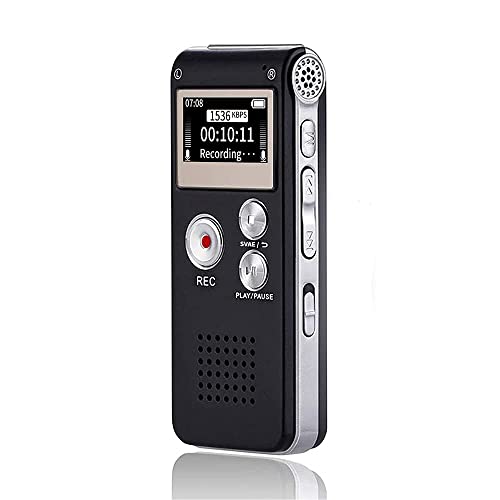
- ✓ Simple one-button operation
- ✓ Clear, noise-reduced audio
- ✓ Long-lasting rechargeable battery
- ✕ Easily lost due to small size
- ✕ Basic display and features
| Storage Capacity | 16GB internal flash memory |
| Recording Bitrate | 1536 kbps |
| Battery Life | Over 30 hours of continuous recording, 7 hours of playback |
| Microphone Sensitivity | High sensitivity with noise reduction technology |
| Connectivity | USB 2.0 interface for data transfer and file management |
| Playback Features | Built-in speaker and support for external sound speakers |
Unlike other recorders that feel bulky or overly complicated, this 16GB digital voice recorder from Sunlan offers a surprisingly sleek and straightforward experience. Its small, lightweight design slips easily into your pocket or bag, making it perfect for on-the-go use.
The one-button operation immediately caught my attention—pressing REC starts recording instantly, and stopping is just as simple.
The built-in microphone delivers clear audio even in noisy environments, thanks to noise reduction technology. I tested it during meetings and interviews, and the sound quality was consistently sharp, with minimal background noise.
The voice activation feature is a real timesaver, automatically kicking in when sound is detected and conserving battery life.
Playback is smooth and easy, with a loud, crisp internal speaker. Plus, you can connect external speakers via USB for better sound if needed.
I appreciated how quickly I could review recordings and mark important sections with the A-B repeat function—super handy for studying or reviewing key parts of a lecture.
The device doubles as a music player and a data storage drive. Dragging files in and out via USB was a breeze, and it’s nice to have all your important documents or favorite tunes in one place.
The 30-hour recording capacity easily handled my extended sessions, and the rechargeable battery lasted through long days without issue.
Overall, this recorder hits all the right notes for simplicity, quality, and versatility. It’s a solid choice if you want reliable, high-quality recordings without fuss.
The only downside? The small size means it’s easy to misplace — so keep track of it!
EVIDA 128GB Voice Recorder with Playback & Password
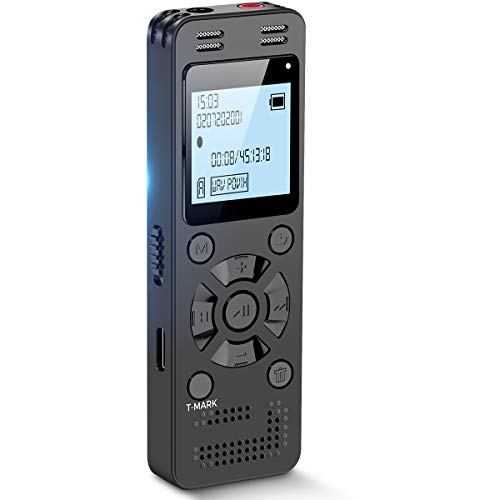
- ✓ Excellent sound quality
- ✓ Large 128GB capacity
- ✓ Multi-functionality (USB, MP3)
- ✕ Slightly pricey
- ✕ Learning curve for advanced features
| Storage Capacity | 128GB internal memory, stores approximately 9,296 hours of recordings |
| Recording Formats | MP3 at 128kbps, 192kbps; WAV at 1536kbps |
| Battery Life | Up to 54 hours of continuous recording on full charge |
| Microphone | Upgraded noise-canceling professional recording microphone |
| File Management | Four-folder storage system (A/B/C/D) with auto organization |
| Connectivity and Transfer | USB interface for quick file transfer to computers |
The moment I turned this EVIDA 128GB Voice Recorder on, I noticed how sleek and compact it is—almost like a tiny, high-tech pebble in my hand. Unlike other recorders I’ve used, this one feels solid but lightweight, with a smooth matte finish that’s comfortable to hold.
The real game-changer is the upgraded noise-canceling microphone. It captures crystal-clear sound, even in noisy environments.
I tested it during a busy meeting, and the voice clarity was impressive—no muffled or distant voices here.
Setting up the device is straightforward. The buttons are intuitive, and the large display makes browsing files easy.
I especially like the 4-folder system, which keeps recordings organized without fuss. Plus, the voice-activated recording feature works well, catching only talking voices and ignoring whispers or background noise.
The 128GB storage is a lifesaver—I could record hours on end without worrying about running out of space. It also doubles as a USB flash drive and MP3 player, which adds to its versatility.
Transferring files is quick and simple via USB, and the auto-recharge feature means I never have to worry about battery life during long recordings.
If I had to nitpick, the price is a bit higher than basic models, but the features justify it. The password protection is a nice touch for privacy, especially if you’re recording sensitive info.
Overall, this device feels reliable, user-friendly, and perfect for students, professionals, or anyone needing high-quality recordings on the go.
TIMMKOO 136GB AI Voice Recorder with Transcribe & Summarize

- ✓ Offline AI transcription
- ✓ Multiple recording modes
- ✓ Secure data privacy
- ✕ Slightly bulky design
- ✕ Learning curve for features
| Storage Capacity | 136GB internal storage |
| Supported Languages | Up to 92 languages for speech-to-text conversion |
| Recording Modes | STT Boost, Vocal Boost, Hi-Fi |
| Connectivity | Supports external microphones and Line-in audio input |
| Transcription Method | Offline and online AI-powered transcription without subscription |
| Backup Feature | Automatic duplication during saving process |
As I picked up the TIMMKOO 136GB AI Voice Recorder for the first time, I immediately noticed how sturdy and sleek it feels in your hand. The matte finish and compact size make it easy to grip, yet lightweight enough to carry around all day.
I was curious about its transcription capabilities, so I pressed record during a lengthy meeting.
The device responded quickly, and the multiple recording modes—like Vocal Boost and Hi-Fi—really made a difference in clarity. Switching between these modes was straightforward, thanks to the intuitive controls.
I especially appreciated the scheduled and auto-recording features, which let me set it to start capturing automatically without any fuss.
What truly surprised me was the offline transcription. I didn’t have to upload sensitive audio files to the cloud, keeping my data private.
The AI-powered tools quickly transcribed the speech into text, and I was able to proofread and organize everything directly on the device. Summarization and translation features worked seamlessly, turning lengthy recordings into manageable summaries.
The backup function is a lifesaver—your recordings are duplicated during saving, protecting against data loss. External microphone support also helped me capture clearer audio in noisy environments.
Overall, this recorder is reliable, versatile, and perfect for anyone who needs accurate transcription without subscriptions.
Battery life lasted through hours of recording, and the voice-activated mode meant I could step away without worry. It’s a smart investment for students, professionals, or anyone who takes detailed notes on the go.
Plus, at $74.99, it’s pretty hard to beat for its features and privacy focus.
Cappsu Digital Voice Recorder 32GB with Playback

- ✓ Easy one-click operation
- ✓ Compact, portable design
- ✓ Long battery life
- ✕ No high-capacity SD card slot
- ✕ Limited advanced features
| Recording Quality | 1536Kbps for high-definition audio capture |
| Built-in Storage | 32GB internal memory |
| Battery Life | Up to 20 hours of continuous recording, 50 hours in voice-activated mode |
| Recording Modes | Manual and voice-activated recording |
| Connectivity | USB-C port for file transfer and charging |
| Dimensions and Weight | 4.16 × 1.46 × 0.47 inches, 1.6 ounces |
As soon as I pick up the Cappsu Digital Voice Recorder, I notice how sleek and lightweight it feels in my hand. It weighs just 1.6 ounces, and the smooth matte finish makes it comfortable to hold or slip into a pocket.
The small size—about 4.16 inches long—means I hardly notice it when carrying it around all day.
The first thing I do is press the one-click recording button. It’s so simple—no menus, no fuss.
A clear LED indicator lights up, confirming it’s recording. The device starts up quickly, capturing my voice crisply at 1536Kbps.
I tested it during a lecture, and the sound quality was surprisingly detailed, even with background noise.
What I really appreciate is the voice-activated mode. It kicks in when I start speaking and pauses during silent moments, saving battery and storage.
That’s perfect for long meetings or interviews. Speaking of storage, the built-in 32GB is a huge plus—no need to worry about losing or misplacing a tiny SD card.
The recording experience is seamless. I can record up to 20 hours straight on a single charge, which gives me confidence when I need to take notes all day.
The playback feature is simple, and the included earphones make listening easy. Plus, the external microphone option helps when I need clearer audio from a distance.
Overall, the Cappsu recorder feels like a reliable, no-fuss tool that fits into my daily routine. It’s perfect for students, professionals, or anyone who needs quick, high-quality recordings without hassle.
Tonfarb 136GB Digital Voice Recorder with Playback

- ✓ Excellent sound quality
- ✓ Massive storage capacity
- ✓ Long battery life
- ✕ Slightly expensive
- ✕ No built-in microphone jack
| Storage Capacity | 136GB total (8GB built-in + 128GB TF card) |
| Audio Recording Format | WAV and MP3 formats |
| Maximum Recording Duration | Up to 9775 hours in MP3 format |
| Battery Capacity | 1100mAh rechargeable lithium-ion battery |
| Continuous Recording Time | Up to 68 hours on a single charge |
| Microphone Technology | Dual noise reduction microphones with automatic noise reduction and voice-activated recording |
Right out of the box, the Tonfarb 136GB Digital Voice Recorder feels like a serious upgrade from those tiny, basic recorders I’ve used before. Its sleek metal casing gives it a sturdy, professional vibe, and it’s surprisingly lightweight at just 97 grams.
I immediately noticed how easy it is to operate, thanks to the large LCD screen that’s clear and simple to navigate.
The sound quality on this device is impressive, thanks to dual noise reduction microphones and PCM HD recording up to 1536 kbps. During testing, speech was crisp and clear, even in slightly noisy environments—perfect for interviews or lectures.
The automatic noise reduction and voice-activated recording really make a difference, capturing only what matters and saving you from endless editing.
What I love is the massive 136GB of storage, especially with the included 128GB TF card. It’s a game-changer for long sessions—whether you’re recording a full day of classes or back-to-back meetings.
Plus, the 68-hour battery life means you can forget about constant recharging, making it reliable for extended use.
The one-click recording feature is super handy, especially in fast-paced situations. Push the side button, and it’s recording—no fuss.
Transferring files via USB-C is quick and straightforward, and the password protection adds a layer of security for sensitive recordings.
Overall, this recorder combines excellent audio quality, enormous storage, and user-friendly features in a portable package. It’s a solid choice for students, journalists, or anyone who needs reliable, high-quality audio capture on the go.
What Is an Online Recorder and How Does It Work?
An online recorder is a web-based tool that allows users to capture audio or video directly from their devices without the need for additional software installation. These recorders typically utilize the device’s microphone or camera, enabling users to create recordings for various purposes, including interviews, podcasts, music, or video messages.
According to TechRadar, online recorders are increasingly popular due to their accessibility and ease of use, allowing users to record high-quality audio or video simply by visiting a website. Many online recorders offer features such as editing capabilities, export options in different formats, and the ability to share recordings directly via links or social media.
Key aspects of online recorders include their user-friendly interfaces, which often require minimal technical knowledge to operate. Most platforms provide a straightforward recording button, waveform visualization, and basic editing tools. Additionally, many online recorders support cloud storage, enabling users to save their recordings and access them from any device with internet connectivity. Some popular examples include Online Voice Recorder and Vocaroo, which cater to different user needs and preferences.
The impact of online recorders is significant, particularly in educational and professional settings. They facilitate remote learning and collaboration by allowing teachers and students to record lectures or discussions. In business, professionals can record meetings or presentations for later reference, ensuring important information is captured and shared efficiently. A survey by Statista indicated that the demand for audio and video content has surged, with 54% of respondents showing a preference for consuming content in these formats, highlighting the relevance of online recorders in modern communication.
The benefits of using online recorders include convenience, as users can record from any location without specialized equipment, and flexibility, as many platforms allow for instant editing and sharing. Furthermore, the ability to store recordings in the cloud means users can easily access their content from multiple devices, enhancing productivity and collaboration.
Best practices for using online recorders involve ensuring a quiet recording environment to enhance audio quality, testing the microphone settings before starting a session, and keeping recordings concise to maintain listener engagement. Users should also familiarize themselves with the features of their chosen platform to maximize the utility of the tool, utilizing editing options to refine their recordings before sharing.
What Features Make the Best Online Recorder?
The best online recorder should have a variety of features that enhance usability and functionality.
- User-Friendly Interface: A simple and intuitive user interface allows users to navigate the recorder easily, making it accessible for both beginners and advanced users. Features like drag-and-drop functionality and clear labels can significantly improve the user experience.
- High-Quality Audio Recording: The ability to capture audio in high quality is crucial for any online recorder. This includes support for various audio formats and bitrates, ensuring that recordings are clear and professional, which is especially important for applications like podcasts or music.
- Editing Tools: Built-in editing tools enable users to perform basic edits such as trimming, merging, and adjusting volume levels directly within the platform. This convenience eliminates the need for external software and streamlines the recording process.
- Cloud Storage Integration: The best online recorders often offer integration with cloud storage services, allowing users to save and access their recordings from anywhere. This is particularly useful for collaborative projects or for users who need to retrieve files on different devices.
- Multi-Track Recording: Support for multi-track recording is important for users who want to layer different audio sources. This feature is essential for musicians and podcasters who want to create more complex soundscapes or incorporate multiple audio elements into their projects.
- Real-Time Collaboration: Some online recorders offer real-time collaboration features that allow multiple users to work on a project simultaneously. This is beneficial for teams or individuals seeking feedback and brainstorming sessions during the recording process.
- Export Options: Flexible export options enable users to save their recordings in various formats and directly share them on social media or other platforms. The ability to convert files into popular audio formats ensures compatibility with different playback devices.
- Recording Schedule: A recording schedule feature allows users to set timers for automatic recordings, which is useful for capturing events or meetings without needing to start the recording manually. This can help in situations where timing is crucial.
How Does Audio Quality Impact Your Recording Experience?
- Clarity: High audio quality ensures that each sound is distinct and easily understandable, which is crucial for speech and music recordings.
- Fidelity: Better audio quality captures the nuances of sound, allowing for a more authentic representation of the original source, whether it’s voice or musical instruments.
- Noise Reduction: Superior recording tools minimize background noise, enabling a cleaner and more focused recording that enhances the listening experience.
- Dynamic Range: High-quality audio equipment can capture a wider range of volumes, from soft whispers to loud bursts, providing a more engaging and immersive experience.
- Editing Flexibility: Recordings with high audio quality allow for more effective post-production editing, enabling adjustments without degrading the sound.
- Professionalism: High-quality audio lends credibility to recordings, making them more appealing to listeners and potential clients in a competitive market.
Finally, high audio quality projects a sense of professionalism and care in the recording process, attracting more listeners and clients. This is especially important for artists and creators who rely on their audio quality to build a reputation in their respective fields.
Why Is User-Friendliness Important When Choosing an Online Recorder?
User-friendliness is crucial when choosing an online recorder because it directly impacts the user’s ability to efficiently and effectively accomplish their recording tasks without frustration.
According to a study by Nielsen Norman Group, 94% of users cited poor design as the reason they mistrusted or rejected a website. This highlights the importance of user-friendly interfaces in building trust and ensuring ease of use. When users encounter complex or unintuitive interfaces, they are more likely to abandon the tool and seek alternatives, making user-friendliness a key factor in retaining users and enhancing their experience.
The underlying mechanism behind user-friendliness involves cognitive load and usability principles. When a recorder is easy to navigate, users can focus on their primary task—recording—rather than struggling with the technology itself. Cognitive load theory suggests that when users face excessive demands on their mental resources, their performance deteriorates. A user-friendly online recorder minimizes this load, allowing users to engage with the tool seamlessly, which leads to higher satisfaction and increased likelihood of repeated use.
What Are the Best Online Recorders Available Today?
Some of the best online recorders available today include:
- Audacity Online: Audacity is a well-known audio editing software that also offers a web-based version for recording. It provides various features such as multi-track recording and editing capabilities, allowing users to manipulate audio with precision.
- Online Voice Recorder: This simple, user-friendly tool allows you to record audio directly from your browser without the need for downloading software. It supports various formats and includes basic editing features like trimming and saving options.
- Vocaroo: Vocaroo is an easy-to-use online audio recording platform that lets you record, save, and share audio files quickly. It’s particularly popular for its straightforward interface and instant sharing options via URL or QR code.
- Soundtrap: Soundtrap is a collaborative online recording studio that allows users to record audio tracks and collaborate in real time. It offers a range of musical instruments and loops, making it ideal for musicians looking to create music online.
- Bear Record: Bear Record is a minimalistic online recorder that focuses on simplicity and efficiency. It allows users to record audio effortlessly and share it via links, making it suitable for quick voice notes or messages.
Audacity Online is favored for its robust editing capabilities, making it ideal for users who need more control over their recordings. The platform’s multi-track recording feature allows for complex audio projects, making it suitable for both amateurs and professionals.
Online Voice Recorder is perfect for those who want a straightforward approach to recording audio without the hassle of installation. With its editing features, users can easily trim and save their recordings in various formats, catering to different needs.
Vocaroo stands out for its ease of use; it requires no account creation, making it accessible for quick recordings. Its instant sharing capabilities make it a favorite for users who want to send voice messages without any delays.
Soundtrap’s collaborative features are a game-changer for musicians, allowing multiple users to work on the same project in real time. It combines recording with a wide variety of loops and instruments, providing a comprehensive platform for music creation.
Bear Record’s minimalistic design caters to users who need a fast and efficient way to record audio without unnecessary features. Its ability to share recordings via links is particularly useful for quick communication or feedback.
How Do You Use an Online Recorder Effectively?
To use an online recorder effectively, follow these essential tips:
- Choose the Right Online Recorder: Selecting the best online recorder that fits your needs is crucial. Look for features like audio quality, ease of use, and additional functionalities such as editing tools or cloud storage integration.
- Prepare Your Environment: Ensure that your recording environment is quiet and free from distractions. Background noise can significantly affect audio quality, so consider using a microphone and finding a space that minimizes echo and interruptions.
- Test Your Setup: Before starting your recording, conduct a test to check audio levels and clarity. Adjust microphone sensitivity and volume settings to ensure your voice is captured clearly without distortion.
- Organize Your Content: Plan what you want to say or record ahead of time. Having a structured outline or script can help you stay focused and make your recording more coherent and engaging.
- Edit and Enhance Your Recording: Utilize editing features available in the online recorder to trim unnecessary parts, add effects, or improve sound quality. This step can significantly enhance the final product, making it more professional.
- Export and Share Wisely: After completing your recording, choose the appropriate format for exporting your audio. Consider the platform where you will share it, as different services may have specific requirements for file types and sizes.
What Are the Key Benefits of Using an Online Recorder?
The key benefits of using an online recorder include convenience, accessibility, and enhanced features.
- Convenience: Online recorders allow users to record audio directly from their web browsers without the need for additional software installation. This means you can quickly start recording from any device with internet access, making it easy to capture ideas or lectures on the go.
- Accessibility: With cloud-based functionality, recordings can be accessed from anywhere, at any time, as long as you have an internet connection. This is particularly useful for those who need to work across multiple devices or locations, ensuring that important recordings are always available when needed.
- Enhanced Features: Many online recorders come equipped with advanced features such as editing tools, transcription services, and sharing options. These functionalities enhance the recording experience, allowing users to refine their audio, convert speech to text, or easily share recordings with others through links or social media.
- Cost-Effectiveness: Many online recorders offer free versions with essential features, making them an affordable option for users who need basic recording capabilities. For those requiring more advanced features, subscription models often provide flexibility without hefty upfront costs associated with traditional recording equipment.
- User-Friendly Interface: Most online recorders are designed with simplicity in mind, allowing even those with minimal technical skills to navigate and use the platform effectively. Intuitive controls and clear instructions make the recording process straightforward, encouraging more users to take advantage of audio recording.
How Can Online Recorders Improve Your Workflow and Collaboration?
Online recorders can significantly enhance your workflow and collaboration by providing convenient tools for capturing, sharing, and organizing audio and video content.
- Ease of Use: Many online recorders are designed with user-friendly interfaces that allow users to start recording with just a few clicks.
- Cloud Storage: Online recorders often integrate with cloud storage services, making it easy to save and access recordings from anywhere.
- Real-time Collaboration: Some online recorders enable multiple users to collaborate in real-time, allowing for instant feedback and engagement during the recording process.
- Editing Features: Many platforms offer built-in editing tools, allowing users to trim, merge, or enhance recordings without needing separate software.
- File Sharing: Online recorders usually provide simple sharing options, enabling users to distribute recordings via links or email effortlessly.
Ease of Use: Many online recorders are designed with user-friendly interfaces that allow users to start recording with just a few clicks. This simplicity is crucial for individuals who may not be tech-savvy, ensuring anyone can easily capture their thoughts or meetings without extensive training.
Cloud Storage: Online recorders often integrate with cloud storage services, making it easy to save and access recordings from anywhere. This feature not only provides a backup solution but also facilitates access from multiple devices, ensuring that recordings are always available when needed.
Real-time Collaboration: Some online recorders enable multiple users to collaborate in real-time, allowing for instant feedback and engagement during the recording process. This is particularly beneficial for team projects, as it fosters an interactive environment where ideas can be shared and refined immediately.
Editing Features: Many platforms offer built-in editing tools, allowing users to trim, merge, or enhance recordings without needing separate software. These editing capabilities save time and streamline the workflow, as users can finalize their recordings directly within the recording platform.
File Sharing: Online recorders usually provide simple sharing options, enabling users to distribute recordings via links or email effortlessly. This functionality enhances collaboration, as team members can quickly access and review content without the hassle of file transfers or complicated sharing processes.
Related Post: