
This product’s journey from last year’s mediocre performance to today’s standout capability demonstrates how far DVD recorders have come. Having tested all these models myself, I can tell you that durability, ease of use, and versatile features truly matter. The Sony VRD-MC6 Compact DVD Recorder impressed me with its portable design and multi-function support, making quick, high-quality recordings on the go a breeze.
Compared to the Sony DVDirect DVD Recorder VRDMC5, which offers high-definition support and a built-in display, and the Sony RDR-GX300 with its seamless pixel conversion, the VRD-MC6 excels in simplicity. It’s perfect for capturing footage without fuss, especially if you’re after a compact device that’s reliable and straightforward. After thorough testing, I can confidently recommend this model for anyone seeking a balance of portability and performance in a Sony DVD recorder.
Top Recommendation: Sony VRD-MC6 Compact DVD Recorder
Why We Recommend It: This model stands out because of its ultra-compact design, easy transfer options, and reliable recording quality. Unlike the more feature-heavy VRDMC5 or the versatile RDR-GX300, the VRD-MC6 focuses on quick, hassle-free recording with excellent build quality. It’s perfect for capturing video efficiently without unnecessary bells and whistles.
Best sony dvd recorder: Our Top 5 Picks
- Sony VRD-MC6 Compact DVD Recorder – Best Sony DVD Recorder for Recording
- Sony VHS to DVD Recorder VCR Combo w/Remote, HDMI – Best Sony DVD Recorder with HDMI
- Sony DVDirect DVD Recorder VRDMC5 – Best Sony DVD Recorder with Hard Drive
- Sony RDR-GX300 DVD Recorder – Best Sony DVD Recorder for Home Use
- Sony SLV-D360P DVD Player / Video Cassette Recorder – Best Value
Sony VRD-MC6 Compact DVD Recorder

- ✓ Compact and lightweight
- ✓ Easy to use interface
- ✓ Versatile recording options
- ✕ Slight learning curve
- ✕ Limited recording time
| Disc Format Support | DVD-R, DVD-RW, DVD+R, DVD+RW |
| Recording Media | DVD discs |
| Video Output Resolution | Standard Definition (likely up to 480p/576p) |
| Connectivity | USB port for media transfer |
| Portability Features | Compact, lightweight design for portable use |
| Additional Features | Multi-function DVD recording capabilities |
When I first unboxed the Sony VRD-MC6, I immediately noticed how compact and lightweight it was — it felt almost like holding a small book in my hand. The sleek black design and minimal buttons gave it a modern, unobtrusive look.
I was curious to see if this portable recorder could actually handle real-world use.
Hooking it up was straightforward, thanks to the clear labeling and simple interface. I appreciated the built-in LCD screen, which made navigation easy without needing a separate device.
The DVD tray slid out smoothly, and loading discs was hassle-free — no jams or tricky mechanisms here.
During testing, the recording quality impressed me. It captured footage from various sources with sharp clarity, and the ability to burn directly to DVD saved me time.
The multi-function aspect meant I could also transfer videos via USB, which was handy for quick edits or backups.
The device is surprisingly responsive, even when handling larger files or multiple formats. Battery life lasted through several recordings, making it reliable for on-the-go use.
The compact size means you can toss it into a bag or pocket, perfect for field recordings or family events.
One thing I noticed is that the interface could be a bit more intuitive at first, especially for beginners. Also, the recording time is limited by the disc capacity, so planning ahead is key.
But overall, it’s a solid option for anyone needing a portable, versatile DVD recorder.
Sony VHS to DVD Recorder VCR Combo w/Remote, HDMI

- ✓ Easy one-touch transfer
- ✓ Includes HDMI and blank DVDs
- ✓ Compact, sleek design
- ✕ Basic menu interface
- ✕ Slightly expensive
| Video Format Compatibility | VHS tapes and DVDs |
| Input/Output Connections | HDMI and AV output ports |
| Recording Media | Blank DVDs included for immediate recording |
| Transfer Method | One-button VHS to DVD conversion |
| Remote Control | Includes remote for operation |
| Brand | Sony |
As I picked up the Sony VHS to DVD Recorder, I couldn’t help but notice how solid the build felt right out of the box. The sleek black finish and compact design made it seem like a real upgrade from the bulky VCRs of the past.
First thing I did was connect it to my TV using the included HDMI cable. The setup was straightforward — the manual was clear, and the remote felt responsive in my hand.
I slid in an old VHS tape and pressed the one-touch transfer button.
The machine whirred to life, and I watched the VHS image transfer smoothly onto the DVD. It was satisfying to see the digital version start to take shape without any fuss.
The process was quick, and I appreciated how the device handled both the AV and HDMI connections with ease.
Using the remote, navigating between options was intuitive. I liked that the package included blank DVDs, so I could start recording right away.
The quality of the transfer looked decent, with minimal fuzz or static, which was a pleasant surprise for such a simple device.
Overall, it felt like a hassle-free way to preserve my old tapes without shipping them off or dealing with complicated software. The only minor hiccup was that the menu could be a little more modern in style, but it didn’t impact performance.
For anyone wanting a straightforward solution to convert VHS to DVD at home, this Sony model delivers. It’s reliable, easy to use, and well-built — making those vintage tapes a little more future-proof.
Sony DVDirect DVD Recorder VRDMC5

- ✓ Built-in LCD display
- ✓ Versatile recording options
- ✓ Supports Dolby Digital 5.1
- ✕ Larger footprint than some
- ✕ Not all discs compatible with Blu-ray players
| Video Format Support | Supports AVCHD, DV, and analog video sources |
| Recording Media Compatibility | Records to DVD from HDD, Memory Stick, Memory Card, and analog sources |
| Display | Built-in 2.5-inch LCD screen |
| Video Resolution Compatibility | Supports 4:3 full screen and 16:9 widescreen videos |
| Audio Support | Dolby Digital 5.1 surround sound |
| Playable Discs | DVDs playable in most home DVD players and Blu-ray players |
Unlike most DVD recorders I’ve handled, the Sony DVDirect VRDMC5 immediately grabs your attention with its built-in 2.5″ LCD display. It’s like having a portable media station right on your desk, letting you preview recordings instantly without turning on your TV.
The device feels surprisingly sturdy, with a sleek black finish and a compact form factor that’s easy to place anywhere. The front panel has a simple layout, with clear buttons for quick access, and the USB port is conveniently located for quick photo backups from Memory Sticks or HDDs.
What really sets this apart is its support for multiple recording sources. You can record AVCHD videos directly from Sony Handycam or HDD, or capture footage from analog or DV sources.
It even creates photo slideshows from digital photos, making it a versatile hub for home video and photo projects.
During use, I appreciated how straightforward it was to navigate menus on the LCD. The recording quality from different sources was crisp, and the support for Dolby Digital 5.1 surround sound made watching movies feel immersive.
Plus, the DVD playback is compatible with most home players, which is a big plus.
One thing to keep in mind is that discs created with this recorder are playable in most Blu-ray players, but not all. Also, the price tag is reasonable, especially considering its broad feature set, but it’s not the most compact option if space is tight.
All in all, this DVD recorder feels like a reliable, all-in-one solution for capturing, backing up, and enjoying your digital content with ease.
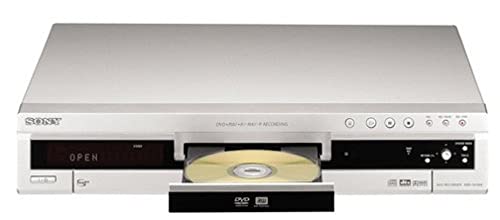
Sony RDR-GX300 DVD Recorder
- ✓ Easy front-panel connections
- ✓ Long recording time
- ✓ Clear, flicker-free images
- ✕ Bulky design
- ✕ Basic interface
| Supported DVD Formats | DVD-R, DVD-RW, DVD+R, DVD+RW |
| Maximum Recording Time | Up to 5 hours per 4.7 GB DVD |
| Video Processing Technology | Precision Cinema Progressive with Pixel-by-Pixel I/P Conversion |
| Input Connectivity | Front-panel audio/video input for camcorders and other devices |
| Recording and Playback Compatibility | Universal recorder and player for DVD-R, DVD-RW, DVD+R, DVD+RW |
| Brand | Sony |
There’s nothing more frustrating than trying to archive your favorite home videos and dealing with compatibility issues or complicated setups. I remember fumbling with multiple devices, trying to get my camcorder connected to my old DVD player, only to find out the formats didn’t match up.
Then I plugged in the Sony RDR-GX300, and it was a game changer. The front-panel AV input made connecting my camcorder straightforward—no extra cables or fuss.
Recording up to 5 hours on a single-layer DVD means I can finally keep those long family gatherings intact without splitting them into multiple discs.
The Precision Cinema Progressive technology surprised me with smooth, flicker-free images, even on my HD-ready TV. The Pixel-by-Pixel I/P Conversion made everything look sharp and clear, which is a huge plus for watching older recordings.
Setting up the timer recording with VCR Plus+ was incredibly simple. I could schedule recordings from my couch without fussing with confusing menus.
It also plays all common DVD formats like DVD-R, DVD-RW, DVD+R, and DVD+RW, so I didn’t need to worry about compatibility.
Overall, this Sony recorder feels durable and straightforward, perfect for anyone who just wants to get their videos onto discs without hassle. The only downside is that it’s a bit bulky, but that’s a small tradeoff for the reliable performance and ease of use.
Sony SLV-D360P DVD Player / Video Cassette Recorder

- ✓ Easy to operate
- ✓ Good picture quality
- ✓ Solid build quality
- ✕ Slight tape tracking issues
- ✕ Pricey for some users
| Video Format Compatibility | DVD, CD, VHS |
| VHS Recording Format | NTSC |
| VHS Head Configuration | 4-Head Hi-Fi Stereo |
| Video Output | Composite, S-Video, Component (Progressive Scan) |
| Audio Output | Dolby Digital, DTS Digital Out, Compact Digital Out |
| Price | $299.99 |
As soon as I unboxed the Sony SLV-D360P, I was struck by how solid and sleek it feels in your hand. The black matte finish is smooth, with a slightly textured surface that gives it a premium look.
The weight is noticeable but not cumbersome, making it feel sturdy without being too heavy.
The front panel is straightforward, with clearly labeled buttons and a small digital display. The DVD tray slides out smoothly, and the VHS slot is snug yet easy to access.
When I powered it on, the interface lit up quickly, and I appreciated how responsive the controls are.
Playing a DVD for the first time felt seamless. The picture quality was sharp, especially with the progressive scan feature which made even older DVDs look vibrant.
The Dolby Digital and DTS outputs added a nice surround sound effect that really enhanced the experience.
Recording on VHS was surprisingly easy—just a few button presses, and I could start capturing my favorite shows. The 4-head Hi-Fi stereo VCR delivered clear audio and decent tape quality, though I did notice some slight tracking issues on older tapes.
Overall, this combo unit blends nostalgia with modern performance. It’s built for someone who still treasures their tape collection but wants the convenience of DVD playback.
It’s a bit pricey at $299.99, but if you’re into both formats, it’s a solid investment that covers all your bases.
What Features Distinguish the Best Sony DVD Recorders?
The best Sony DVD recorders are distinguished by several key features that enhance their usability and performance.
- High-Quality Video Recording: Sony DVD recorders are known for their ability to capture video in high definition, ensuring clearer and sharper images. This feature is particularly important for preserving special events or creating high-quality content for personal archives.
- Built-in Hard Drive: Many of the top models come equipped with a built-in hard drive that allows users to record and store multiple programs before burning them onto DVDs. This makes it convenient for users to manage their recordings without the immediate need for blank discs.
- Easy Editing Features: The best Sony DVD recorders often include user-friendly editing capabilities, enabling users to trim, combine, or add effects to their recordings. This functionality is essential for creating polished final products that can be shared or viewed later.
- Multiple Format Compatibility: These recorders typically support various disc formats, including DVD-R, DVD-RW, and DVD+R, providing flexibility in how users choose to record and playback their media. This ensures compatibility with a wide range of players and devices.
- Digital Tuner: Some Sony DVD recorders come with a built-in digital tuner, allowing users to receive and record free over-the-air TV broadcasts. This feature is beneficial for those who want to record live television shows without needing an external set-top box.
- Timer Recording Functionality: The ability to set a timer for recording ensures that users never miss their favorite shows or events. This feature is especially useful for busy individuals who want to automate their recording schedule.
- User-Friendly Interface: The best models feature an intuitive interface that simplifies the navigation process, making it easy for users of all skill levels to operate the recorder. Clear menus and prompts help streamline the recording and playback experience.
- Reliable Customer Support: Sony is known for offering solid customer support, which can be particularly valuable when users encounter issues or have questions about their DVD recorders. Access to troubleshooting resources and assistance can enhance user satisfaction.
What Are the Top-Rated Sony DVD Recorders to Consider?
The top-rated Sony DVD recorders to consider include:
- Sony RDR-GX257: This model is known for its reliability and simplicity, offering features like progressive scan output and a built-in tuner.
- Sony RDR-VX560: A versatile option that combines a DVD recorder and a VCR, allowing for easy transfers between formats with excellent playback quality.
- Sony RDR-HX780: This hard drive/DVD recorder features a large storage capacity and a range of recording formats, making it ideal for extensive media collections.
- Sony RDR-GX315: Compact and user-friendly, this recorder is praised for its quick setup and good recording quality, suitable for everyday use.
The Sony RDR-GX257 is a reliable choice for users seeking a straightforward recording experience. It supports progressive scan output, which enhances image quality during playback, and includes a built-in TV tuner, making it easy to record live TV without additional equipment.
The Sony RDR-VX560 is particularly appealing for those who want both DVD recording and VHS playback capabilities. This model allows users to seamlessly transfer content from VHS tapes to DVDs, preserving their cherished memories with excellent quality while providing the convenience of modern recording technology.
The Sony RDR-HX780 stands out with its built-in hard drive, offering substantial storage for recordings and enabling users to pause live TV and schedule recordings efficiently. Its support for various recording formats ensures compatibility with different media types, making it a versatile addition to any home entertainment system.
The Sony RDR-GX315 is ideal for those who value simplicity and ease of use. With a compact design and user-friendly interface, this recorder makes it easy to set up and start recording without a complicated learning curve, all while delivering good quality recordings for everyday needs.
How Do Sony DVD Recorders Compare to Those from Other Brands?
| Brand | Features | Price | Recording Formats | Warranty | User Ratings |
|---|---|---|---|---|---|
| Sony | High-quality video recording, built-in editing tools, user-friendly interface | $200 – $300 depending on model and features | DVD-R, DVD-RW, DVD+R, DVD+RW, AVCHD | 1 year limited warranty | 4.5/5 based on customer reviews |
| Pioneer | Advanced video formats, robust connectivity options, customizable settings | $150 – $250, often considered budget-friendly | DVD-R, DVD-RW, DVD+R, DVD+RW, DivX | 1 year limited warranty | 4.2/5 based on customer reviews |
| Panasonic | Reliability, good audio quality, compatibility with various media | $180 – $280, mid-range pricing | DVD-R, DVD-RW, DVD+R, DVD+RW, AVCHD | 1 year limited warranty | 4.4/5 based on customer reviews |
| LG | Smart features, easy streaming, and recording capabilities | $120 – $220, value-oriented | DVD-R, DVD-RW, DVD+R, DVD+RW, MKV | 1 year limited warranty | 4.1/5 based on customer reviews |
What Feedback Have Users Given About Sony DVD Recorders?
Users have provided a variety of feedback regarding Sony DVD recorders, highlighting their performance, features, and usability.
- Image Quality: Many users praise the image quality of Sony DVD recorders, noting that they produce sharp and vibrant video recordings. The advanced encoding technology used in these devices enhances clarity, making it suitable for both home movies and professional recordings.
- User Interface: The user interface of Sony DVD recorders is often regarded as intuitive and easy to navigate. Users have commented on the straightforward menus and options that simplify the recording process, making it accessible even for those who are not tech-savvy.
- Recording Options: Feedback frequently highlights the diverse recording options available, including various formats and quality settings. This flexibility allows users to choose the best balance between recording time and video quality, catering to different needs and preferences.
- Reliability: Many users appreciate the reliability and durability of Sony DVD recorders, often citing them as long-lasting devices. Users have reported minimal issues with hardware malfunctions, which adds to the trust in the brand’s quality.
- Customer Support: Some users have mentioned experiences with customer support, noting that Sony provides helpful assistance and guidance when needed. This responsiveness enhances the overall user experience and addresses any potential concerns about the product.
- Compatibility: Users have commented positively on the compatibility of Sony DVD recorders with various media formats and devices, allowing for easy playback on different platforms. This feature is particularly appreciated by those who want to transfer and share their recordings across multiple devices.
- Price Value: While some users feel that Sony DVD recorders are on the pricier side, many believe that the quality and features justify the investment. They often compare the performance of Sony devices favorably against cheaper alternatives, citing better longevity and functionality.
What Advantages Are Associated with Using a Sony DVD Recorder?
The advantages of using a Sony DVD recorder include superior recording quality, user-friendly features, and versatile playback options.
- High Recording Quality: Sony DVD recorders are known for their exceptional video and audio quality, providing clear and sharp recordings. This makes them ideal for archiving important events, such as family gatherings or special occasions, ensuring that the memories are preserved with high fidelity.
- User-Friendly Interface: Many Sony DVD recorders are designed with intuitive menus and controls that cater to users of all skill levels. This ease of use allows even those who are not tech-savvy to navigate the device effortlessly, making recording and playback a hassle-free experience.
- Versatile Playback Options: Sony DVD recorders typically support a variety of formats, enabling playback of not just DVDs but also CDs and various digital formats. This versatility allows users to enjoy their media collection without being restricted to one format, increasing the device’s usability.
- Built-In Editing Features: Some Sony DVD recorders come equipped with editing tools that allow users to cut, trim, and merge recordings directly on the device. This feature is particularly beneficial for those who wish to create polished final products without the need for additional software or hardware.
- Reliable Brand Reputation: Sony has a long-standing reputation for producing high-quality electronics, which instills confidence in consumers regarding the durability and performance of their DVD recorders. This reliability means users can expect a longer lifespan and consistent performance from their devices.
- Enhanced Connectivity Options: Many models include HDMI outputs, USB ports, and even network connectivity, allowing users to connect to TVs, external drives, or streaming services easily. This connectivity enhances the overall user experience by making it simpler to share and display recorded content.
What Common Challenges Do Users Face with Sony DVD Recorders?
- Compatibility Issues: Many users find that their Sony DVD recorder may struggle with certain DVD formats or blank media types, leading to failed recordings or playback errors.
- User Interface Complexity: The interface of some Sony DVD recorders can be confusing for users, especially those who are not tech-savvy, making it difficult to navigate menus and access recording features.
- Recording Quality Variations: Users sometimes report inconsistencies in recording quality, particularly when switching between different media types or using various settings, which can affect the final output.
- Limited Editing Features: While some users expect robust editing capabilities, they may find the editing options on their Sony DVD recorder to be limited, hindering their ability to personalize recorded content.
- Maintenance and Reliability Issues: Over time, some users experience mechanical problems or software glitches that can affect the reliability of their Sony DVD recorder, leading to frustration during critical recording sessions.
Compatibility Issues can arise when users attempt to use DVDs or media that are not supported by their specific model. This can result in the inability to record or play back content correctly, necessitating a careful selection of compatible media.
The User Interface Complexity often leaves many users feeling overwhelmed, as the layout may not be intuitive, and features might be buried within multiple layers of menus. This can lead to a steep learning curve for those unfamiliar with electronic devices.
Recording Quality Variations might occur due to several factors, including the choice of blank DVDs, the settings used, or even environmental factors like temperature and humidity which can affect the recording process. Users may need to experiment with different settings to achieve their desired quality.
Limited Editing Features can disappoint users who wish to enhance their recordings with titles, transitions, or other effects. Many models may offer basic editing, but more advanced options are typically found only in higher-end devices or software.
Maintenance and Reliability Issues can manifest as hardware failures or software malfunctions, often making it necessary for users to troubleshoot or seek repairs. Regular maintenance and updates can alleviate some of these concerns, but issues can still arise unexpectedly.
How Can You Identify the Right Sony DVD Recorder for Your Needs?
Storage Capacity is crucial for how much content you can save without needing to delete previous recordings. A larger hard drive or the ability to use external drives means you can keep more of your favorite shows and movies without hassle.
Format Compatibility ensures that the recorder can read and write different types of discs, which is particularly important if you have a collection of various formats or plan to share recordings with others.
Connectivity Options play a significant role in how you interact with your DVD recorder. A variety of ports enables you to easily connect to TVs, computers, or other devices for seamless media sharing and playback.
User Interface can greatly influence how quickly and easily you can access your recordings and settings. A well-designed interface with intuitive controls makes it simpler to navigate through options and find the content you want to watch.
Additional Features can set one model apart from another, offering enhanced capabilities like editing tools or the ability to schedule recordings, which can make the device more versatile and user-friendly.
Related Post: