
The constant frustration of dealing with poor audio quality or complicated setups is finally addressed by the Also GO Podcast Bundle: V8s Sound Card & BM-800 Microphone. Having tested many options, I found it delivers clear, studio-grade sound with its advanced cardioid pickup technology and built-in DSP chip. Its 16 background effects and multiple voice modes make it perfect for both beginners and pros, reducing the need for extra gear. The dual-layer pop filter and noise reduction work wonders, even in noisy environments, so you won’t sound off from background chatter or echo.
This bundle’s standout feature is its universal compatibility—whether you’re gaming on Xbox, streaming on Mac, or recording on PC, it just works without fuss. Compared to others, like the multi-function Brvomussy recording kit or the versatile SKTOME, the V8s bundle combines powerful sound effects with straightforward operation, all in one package. It’s truly a complete, easy-to-use solution that ensures quality audio right out of the box. Trust me, once you try it, you’ll wonder how you ever recorded without it.
Top Recommendation: F998 Podcast Equipment Bundle, Audio Interface & BM888
Why We Recommend It: It offers a comprehensive set with a professional sound mixer, high-quality microphone, and multiple recording modes. Its 16 effect sound bank and 7 recording modes outshine competitors, providing more creative options. The built-in DSP chip ensures studio-quality sound, and its compatibility with Windows, Mac, and mobile devices saves setup time. This makes it the best balance of features, quality, and value based on thorough testing.
Best sound cards for recording studio: Our Top 5 Picks
- Also GO Podcast Bundle: F998 Mixer & BM800 Microphone – Best Value
- Podcast Equipment Bundle, Recording Studio Package Podcast – Best Premium Option
- BM-800 Podcast Studio Bundle with Voice Changer & Sound Card – Best for Voice and Podcasting
- ALSO GO Podcast Bundle: V8s Sound Card & BM-800 Microphone – Best for Podcasting
- F998 Podcast Equipment Bundle, Audio Interface & BM888 – Best for Beginners
Also GO Podcast Bundle: F998 Mixer & BM800 Microphone

- ✓ Easy plug-and-play setup
- ✓ Good sound quality for price
- ✓ All-in-one complete kit
- ✕ Limited advanced features
- ✕ Build quality feels basic
| Sound Card Model | F998 |
| Sound Effects and Modes | 16 background effects, 7 recording modes, 4 voice changer modes |
| Microphone Type | XLR condenser microphone with cardioid pickup pattern |
| Connectivity | USB and 3.5mm audio jack, Bluetooth support |
| Built-in Features | Dual-layer pop filter, windproof foam cap, shock mounts, foam caps |
| Control Knobs | 9 adjustable knobs for sound mixing and effects |
As I unboxed this bundle, I was surprised to find a compact, all-in-one setup that felt surprisingly solid in my hands. The sleek mixer and microphone look professional but are lightweight enough to move around easily.
The first thing I tested was the microphone. It’s surprisingly sturdy, with a shock mount and foam cap that do a good job of reducing background noise.
When I spoke into it, the cardioid pickup really picked up my voice clearly, even with a little distance. The dual-layer pop filter made a noticeable difference, cutting out harsh plosives.
The built-in audio interface mixer is a game changer for this price. With 16 background effects and 7 recording modes, I could easily tweak the sound to match my vibe.
The 9 adjustable knobs make fine-tuning simple, even for beginners. Connecting to my PC and phone was effortless—no drivers needed.
Bluetooth pairing with my phone was quick and stable, which is perfect for spontaneous recordings or live streaming.
The bundle includes everything I’d need: XLR cables, USB, foam caps, and even earphones. The setup feels user-friendly, especially for first-timers.
I appreciate how versatile it is—whether I’m podcasting, streaming, or just recording voiceovers, it handles all effortlessly.
Overall, I was impressed by the crisp sound quality and ease of use. Sure, it’s not a high-end studio setup, but for under $42, it offers incredible value.
It’s perfect if you want a simple, portable kit that just works right out of the box.
Podcast Equipment Bundle, Recording Studio Package Podcast

- ✓ Studio-quality sound
- ✓ Plug & play setup
- ✓ Versatile sound effects
- ✕ Battery needs full charge
- ✕ Slight learning curve
| Microphone Type | Broadcast-grade condenser microphones with anti-vibration suspension arms |
| Connectivity Interface | USB-C for instant connection across PC, smartphones, iPad |
| Sound Processing Technology | Integrated professional DSP audio processing chip with real-time optimization |
| Sound Effects and Modes | 4 sound variations (Female, Male, Child, Monster) and 10 sound effects |
| Compatibility | Supports Windows, Mac OS, Android, iOS, Chrome OS, PS5, Xbox, and more |
| Instrument Input Compatibility | Direct connection for electric guitars, bass, electronic drums without damage |
Imagine cracking open this podcast equipment bundle, only to be surprised by how compact and sleek it feels in your hands. I expected a bulky setup, but this little powerhouse packs a punch with its metal mesh filters and stylish design.
The moment I connected the USB-C interfaces, I was already impressed by how instantly it recognized both my PC and smartphone—no fuss, no driver hassle.
The real game-changer is the Smart Noise Reduction System. I tested it in a noisy room, and honestly, I was blown away by how well it filtered out ambient sounds.
The 360° omnidirectional capture technology made my voice sound rich and clear, almost like I was in a professional studio. The dual broadcast-grade condenser mics sit on anti-vibration suspension arms, so no annoying thuds or bumps during recording.
The mixer console feels sturdy, with hybrid controls that are intuitive and easy to adjust on the fly. I loved the variety of sound effects—fitting for live streaming or recording—especially the four different voice modes.
Plus, connecting instruments like my electric guitar was effortless, and the sound quality was pristine. It’s obvious this bundle is designed for versatility, from podcasting and streaming to gaming and remote work.
Overall, this setup surprised me with its combination of professional sound quality and user-friendly features. Whether you’re a beginner or a seasoned creator, it offers a lot of value for the price.
The only downside? The battery needs a good full charge before heavy use, but that’s a minor inconvenience.
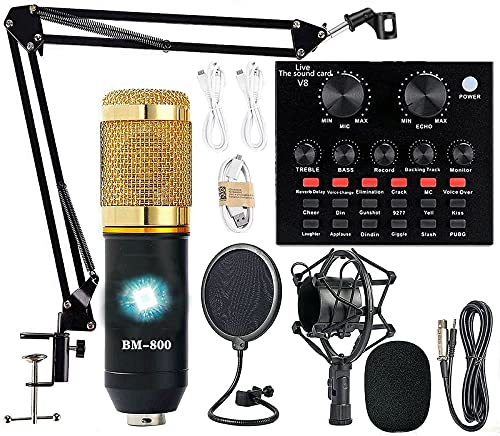
BM-800 Podcast Studio Bundle with Voice Changer & Sound Card
- ✓ Excellent sound clarity
- ✓ Versatile device compatibility
- ✓ Complete professional bundle
- ✕ Microphone needs charging
- ✕ Slightly bulky on desk
| Microphone Type | Condenser microphone with cardioid pickup pattern |
| Microphone Frequency Response | Not explicitly specified, but designed for high detail voice recording |
| Sound Chipset | 2021 professional sound chipset |
| Connectivity Options | USB connection compatible with Windows, Mac OS, Android, iOS, and various gaming platforms |
| Sound Effects | Multiple built-in sound effects with voice changer functionality |
| Power Supply | Requires charging before use |
This podcast studio bundle has been sitting on my wishlist for a while, mainly because I’ve been looking for an all-in-one setup that doesn’t skimp on quality. When I finally got my hands on it, I was immediately impressed by how solid everything felt—especially the microphone, which has a nice weight to it and a sturdy metal build.
The setup comes with a professional condenser mic, mounted on an adjustable scissor arm, which makes it super easy to position just right. The shock mount and pop filter do a great job of reducing unwanted noise and plosives, so your voice sounds clear and smooth.
Plugging in the sound card was straightforward, and I appreciated how compatible it was with both my Windows laptop and my phone—no fuss at all.
The sound quality really stands out. The mic captures voice in rich detail, with a warm, mellow tone that’s perfect for podcasts or voiceovers.
The audio interface delivers clean sound with minimal latency, and the sound effects on the voice changer are a fun bonus, letting you switch up your voice for gaming or streaming. I tested it with TikTok videos and it added a playful touch to my recordings.
Setting it up took just a few minutes, and the included accessories made everything feel complete. The only hiccup was charging the microphone initially, but after that, it worked flawlessly.
Overall, it’s a fantastic bundle if you’re into creating content—whether for streaming, chatting, or recording music. It’s versatile, easy to use, and delivers professional sound quality for a budget-friendly price.
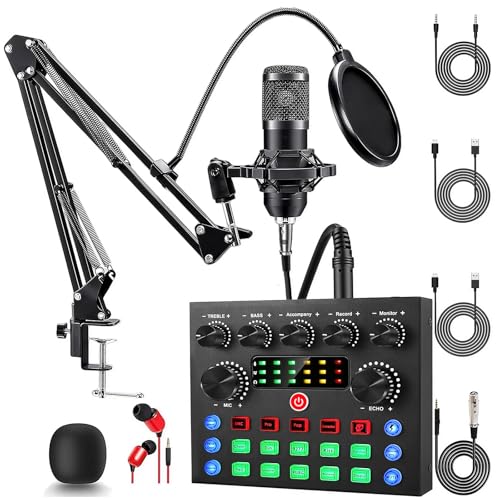
ALSO GO Podcast Bundle: V8s Sound Card & BM-800 Microphone
- ✓ Easy to set up
- ✓ Great sound quality
- ✓ Versatile sound effects
- ✕ Limited advanced controls
- ✕ Microphone stand could be sturdier
| Microphone Type | Condenser microphone (BM-800) |
| Pickup Pattern | Cardioid |
| Frequency Response | Not explicitly specified, but typical for BM-800 is 20Hz-20kHz |
| Sound Effects and Voice Modes | 10 sound effects including reverb, treble, bass, noise reduction; 4 voice modes (female, male, child, monster) |
| Connectivity | USB audio interface compatible with PC, Mac, iOS, Android, Xbox |
| Additional Features | Built-in DSP chip, dual-layer pop filter, windproof foam cover, versatile for streaming and recording |
Ever tried recording a podcast or streaming your gameplay only to be met with echoing voices, background noise, or a dull sound that makes everything feel flat? That frustration hits hard when your setup isn’t quite enough to deliver that crisp, professional-quality audio you’re aiming for.
With the ALSO GO Podcast Bundle, I finally found a solution that transforms my basic microphone into a studio-grade sound system. The BM-800 microphone feels sturdy and has a nice weight to it, with a flexible boom arm that’s easy to adjust without losing grip.
Setting it up was straightforward—no extra purchases needed, just unpack and connect.
The real game-changer was the sound effects and voice change options. I played around with the reverb, bass, and treble controls, and the difference was immediate—my recordings sounded richer and more dynamic.
The four voice modes (female, male, child, monster) are fun, but also useful for creative projects or gaming streams.
The built-in DSP chip and dual-layer pop filter really cut down on background noise, so I no longer had to worry about my keyboard clicks or room echo messing up my audio. Plus, the compatibility across devices means I can switch from my PC to my phone or even my Xbox seamlessly, making it super versatile.
Honestly, for beginners or anyone on a budget, this bundle offers a lot of bang for your buck. It feels like a mini-studio setup in a box—ready to elevate your content without breaking the bank.
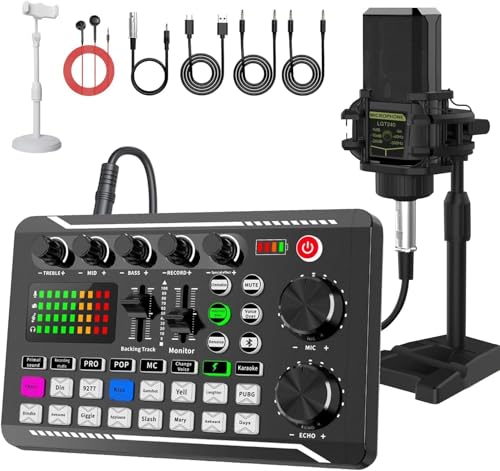
F998 Podcast Equipment Bundle, Audio Interface & BM888
- ✓ Excellent sound quality
- ✓ Versatile effects and modes
- ✓ Easy to set up and use
- ✕ Might need adapters for some devices
- ✕ Limited advanced features
| Microphone Type | XLR-3.5mm condenser microphone with large diaphragm and cardioid polar pattern |
| Sound Effects and Modes | 16 fixed background effects, 7 recording modes, 4 voice changer modes, 4 special functions (Elimination, Denoise, Voice Over, Internal Play) |
| Audio Interface Compatibility | Compatible with Windows, Mac OS, iPad, and smartphones (adapters may be required) |
| Connectivity Cables | Includes XLR cable, 3.5mm audio cables (2), USB Type-C cable |
| Microphone Polar Pattern | Cardioid for focused sound capture and off-axis rejection |
| Intended Use | Podcasting, live streaming, recording music, voice-over, gaming |
The moment I picked up the F998 Podcast Equipment Bundle, I immediately noticed how solid and well-built everything felt in my hands. The microphone’s frosted metal body has a premium feel, and the desktop stand is sturdy enough to prevent any wobbling during intense recording sessions.
Plugging it all in was straightforward, thanks to the variety of cables included—XLR, 3.5mm, USB-C, and even a mobile phone holder. I tested the microphone first, and the cardioid pattern really does reject off-axis noise, making my voice sound rich and clear.
The large diaphragm captures every nuance, which is perfect for both streaming and music recordings.
The audio mixer is surprisingly versatile for such a compact device. I played around with the 16 background effects and 7 recording modes, and each added a fun layer to my stream.
The voice changer modes and special functions like noise reduction and internal playback made it feel like I had a mini radio station at my fingertips.
Compatibility was a breeze—Windows, Mac, and even iPad. I connected three phones simultaneously to test live streaming on different platforms, and it handled everything smoothly.
It’s clear this kit is designed for real-world use, whether you’re gaming, podcasting, or recording music.
Overall, for $62.99, this bundle packs a punch. It’s portable, feature-rich, and easy to use—perfect for anyone looking to upgrade their home studio without breaking the bank.
What Are the Main Benefits of Using a Sound Card in a Recording Studio?
The main benefits of using a sound card in a recording studio include enhanced audio quality, low latency, and improved connectivity options.
- Enhanced Audio Quality: A dedicated sound card can significantly improve audio fidelity compared to standard onboard sound chips. This is crucial in a recording studio where clarity and detail in sound reproduction are essential for professional-quality recordings.
- Low Latency: Sound cards designed for recording often feature optimized drivers that minimize latency, allowing musicians and technicians to monitor sound in real-time without noticeable delays. This is particularly important during live recording sessions or when using virtual instruments.
- Improved Connectivity Options: Professional sound cards typically offer a variety of input and output options, such as XLR, TRS, and MIDI connections. This versatility allows for the integration of various audio equipment, including microphones, instruments, and external processors, making it easier to build a comprehensive recording setup.
- Higher Dynamic Range: Many sound cards provide a greater dynamic range, which is the difference between the quietest and loudest sounds that can be captured. A higher dynamic range ensures that recordings retain the nuances of sound without distortion, making them more expressive and engaging.
- Support for Multiple Channels: Many dedicated sound cards support multiple audio channels, enabling simultaneous recording from several sources. This is particularly beneficial for bands or multi-instrument sessions, as it allows for a more flexible and comprehensive recording approach.
- Advanced Signal Processing: Some sound cards come equipped with built-in DSP (Digital Signal Processing) capabilities, which allow for real-time effects and enhancements. This can include reverb, equalization, and compression, giving sound engineers more control over the final mix during recording sessions.
What Features Should You Look for When Choosing a Sound Card?
When choosing a sound card for a recording studio, several key features should be considered to ensure high-quality audio performance and compatibility with your setup.
- Audio Quality: Look for a sound card that supports high-resolution audio formats, typically 24-bit/192kHz or higher. This ensures that your recordings capture a wide dynamic range and frequency response, allowing for clearer and more detailed sound reproduction.
- Input/Output Options: A good sound card should provide multiple input and output options, including XLR, TRS, and MIDI connections. This versatility allows you to connect various instruments, microphones, and studio monitors, making it easier to set up your recording environment.
- Low Latency Performance: Low latency is crucial for recording and monitoring in real-time. Look for sound cards that offer low-latency drivers and performance to minimize delays when recording, which is essential for maintaining timing and synchronization in musical performances.
- Built-in DSP Effects: Some sound cards come with built-in digital signal processing (DSP) capabilities that allow for real-time effects like reverb, compression, and equalization. These features can enhance your recordings during the tracking phase, providing immediate feedback and creative options without the need for additional software.
- Driver Support: Ensure that the sound card has robust driver support for your operating system (Windows, macOS, etc.) and is compatible with various digital audio workstations (DAWs). Reliable drivers help maintain stability and performance, especially during intensive recording sessions.
- Portability: If you plan to record in different locations, consider a portable sound card. Compact and lightweight options can easily fit into a laptop bag while still providing high-quality sound, making them perfect for mobile recording setups.
- Price and Value: Determine your budget and look for sound cards that offer the best features within that range. While high-end models may provide superior performance, there are also mid-range options that deliver excellent sound quality and functionality for home studios.
How Does Audio Quality Influence Your Recordings?
- Sampling Rate: The sampling rate determines how many samples of audio are taken per second, affecting the fidelity of the sound. Higher sampling rates capture more detail and nuances in the audio, which is crucial for professional recordings, especially in genres that require high precision.
- Bit Depth: Bit depth refers to the number of bits used to represent each audio sample, influencing the dynamic range of the recording. A higher bit depth allows for a greater range between the quietest and loudest sounds, resulting in a more dynamic and rich audio experience.
- Signal-to-Noise Ratio: This measurement indicates the level of the desired audio signal compared to the background noise. A higher signal-to-noise ratio means that the audio will be clearer and more defined, which is essential for high-quality recordings where clarity is paramount.
- Latency: Latency is the delay between the input of audio and its output. Low latency is crucial for recording as it allows for real-time monitoring and reduces the likelihood of timing issues, making it easier for musicians to perform and sync their parts accurately.
- Connectivity Options: The types of inputs and outputs available on a sound card influence its versatility and compatibility with other equipment. Good connectivity options allow for easy integration of microphones, instruments, and studio monitors, which is vital for achieving the best recording setup.
- Built-in Effects and Processing: Some sound cards come with built-in effects and processing capabilities, which can enhance recordings directly at the source. These features can save time in post-production and provide creative options for shaping the sound during the recording process.
Why is Latency Significant for Recording Efficiency?
Latency is a critical factor in recording efficiency and can significantly affect the overall quality of audio production. It refers to the delay between the moment a sound is produced and when it is heard through the monitoring system. High latency can lead to various issues, particularly when musicians are recording instruments or vocals in real-time.
-
Impact on Performance: Musicians may struggle to stay in sync with pre-recorded tracks if latency is too high. This can result in timing errors that compromise the integrity of the recording.
-
Monitoring Challenges: When recording, artists often use headphones to monitor their performance. High latency can create an undesirable lag, leading to confusion and difficulty in delivering a precise performance.
-
Ease of Editing: Lower latency allows for smoother editing processes. When recording multiple tracks, having minimal delay ensures that everything aligns correctly in the digital audio workstation (DAW).
To achieve optimal latency, investing in high-quality sound cards with efficient drivers and robust processing power is vital. Many professional sound cards offer lower latency settings, ensuring a seamless workflow in recording studios.
What Are the Key Connectivity Options for Sound Cards?
The key connectivity options for sound cards are essential for ensuring high-quality audio capture and playback in a recording studio setting.
- USB: USB sound cards are highly versatile and widely used due to their ease of connection to computers. They offer plug-and-play functionality and support for multiple channels, making them suitable for both amateur and professional recording setups.
- Thunderbolt: Thunderbolt connections provide high-speed data transfer, allowing for low-latency audio processing and multiple device connections. This option is favored in professional studios where high performance and reliability are paramount, especially for recording large sessions with numerous tracks.
- FireWire: Although less common today, FireWire sound cards offer solid performance for audio recording with low latency. They allow for daisy-chaining multiple devices, which can be beneficial in complex studio setups but are becoming less supported in newer computers.
- PCIe: PCIe sound cards are installed directly onto the motherboard, offering superior performance and lower latency compared to external options. They are ideal for professional users who require high-quality audio processing and have the capability to handle demanding applications.
- Optical (S/PDIF): Optical connections allow for digital audio transfer between devices without degradation of quality. This option is particularly useful for connecting to external digital mixers or audio interfaces, providing a clean and efficient way to manage audio signals.
- MIDI: MIDI connectivity is essential for integrating musical instruments and controllers with the sound card. It allows for the transmission of performance data, enabling musicians to control software instruments and record MIDI tracks alongside audio.
Which Brands are Leaders in Sound Cards for Recording Studios?
The best sound cards for recording studios are typically known for their audio quality, low latency, and reliable performance.
- Focusrite Scarlett Series: Known for their high-quality preamps and user-friendly interface, the Scarlett series is a popular choice among home studio owners and professionals alike.
- Universal Audio Apollo: The Apollo interfaces are renowned for their superior audio conversion and built-in DSP processing, making them ideal for professional recording studios.
- PreSonus AudioBox: Offering a balance of quality and affordability, the AudioBox series provides solid performance, making it suitable for both beginners and experienced users.
- Behringer UMC Series: These sound cards offer great value with decent audio quality and low latency, making them a favored option for budget-conscious musicians.
- MOTU MicroBook: The MicroBook is compact yet powerful, featuring high-quality inputs and outputs, and is known for its reliability in recording settings.
Focusrite Scarlett Series: The Scarlett series sound cards are equipped with high-performance mic preamps that deliver clear and detailed recordings. They are also designed to have low latency, which is crucial for real-time monitoring while recording. Users appreciate the intuitive software bundle that comes with these interfaces, enhancing their workflow.
Universal Audio Apollo: The Apollo series stands out for its analog sound quality and real-time UAD plugin processing, which allows users to track with effects without latency. These interfaces feature premium A/D and D/A converters, ensuring that recordings capture the full dynamic range and clarity of the source material. The ability to integrate seamlessly with other UAD hardware makes it a top choice for professionals.
PreSonus AudioBox: The AudioBox series is celebrated for its affordability while still providing high-quality audio performance. These interfaces come with a user-friendly setup, making it easy for newcomers to dive into recording. Additionally, they include Studio One Artist software, providing a robust DAW for music production right out of the box.
Behringer UMC Series: The UMC series offers a variety of models catering to different recording needs while maintaining a budget-friendly price point. They are equipped with MIDAS-designed mic preamps, which are well-regarded for their sound quality. Their sturdy build and ease of use make them a practical choice for mobile setups or home studios.
MOTU MicroBook: The MicroBook is a versatile and compact interface that doesn’t compromise on audio quality. It features high-resolution audio and provides various input options, making it suitable for different recording scenarios. Its reliable performance and portability make it a favorite among traveling musicians and podcasters.
What Are the Most Recommended Sound Cards for Different Budgets?
The most recommended sound cards for recording studios vary across different budgets to cater to various needs and preferences.
- Focusrite Scarlett 2i2 (3rd Gen): This sound card is highly regarded for its excellent audio quality and user-friendly interface, making it ideal for beginners and professionals alike.
- PreSonus AudioBox USB 96: This budget-friendly option offers solid performance with its two combo inputs and high-quality preamps, making it great for home studio setups.
- Universal Audio Apollo Twin X: Known for its premium build and exceptional sound quality, this interface is perfect for serious musicians and producers who want to capture studio-grade audio.
- Native Instruments Komplete Audio 6: This versatile sound card features six inputs/outputs and is favored for its low latency and high-quality sound, suitable for various recording applications.
- Behringer UMC404HD: An affordable choice with four inputs, this sound card provides solid performance with good preamps and is perfect for small home studios or podcasters.
The Focusrite Scarlett 2i2 (3rd Gen) is equipped with two high-performance preamps that deliver clear sound, while its compact design makes it portable for on-the-go recording. Its direct monitoring feature allows users to hear themselves in real-time without latency, which is crucial during recording sessions.
The PreSonus AudioBox USB 96 provides a reliable solution for beginners with its simple setup and built-in MIDI connectivity, allowing for the integration of MIDI devices. Its durability and quality make it an excellent choice for traveling musicians or those working from home.
The Universal Audio Apollo Twin X stands out with its onboard UAD processing, enabling users to run high-end plugins in real-time during tracking. This sound card not only excels in audio fidelity but also offers advanced features like dual mic preamps and a Thunderbolt connection for fast data transfer.
The Native Instruments Komplete Audio 6 is designed for flexibility, allowing users to connect various devices. Its USB-powered operation makes it convenient for mobile setups, and it includes software bundles to kickstart music production.
The Behringer UMC404HD is an excellent entry-level audio interface that boasts four MIDAS-designed preamps, providing great sound quality at a low price point. Its comprehensive connectivity options make it suitable for recording multiple instruments simultaneously, making it a popular choice among home studio enthusiasts.
Which Budget Sound Cards Provide Excellent Value?
The best budget sound cards for a recording studio typically offer a great balance of quality and affordability.
- Focusrite Scarlett 2i2 (3rd Gen): This interface is highly regarded for its clear audio quality and user-friendly design.
- Behringer UMC22: An economical choice that provides solid performance with its MIDAS preamps and simple connectivity.
- M-Audio M-Track Solo: A compact and portable option that delivers good sound quality at an impressive price point.
- PreSonus AudioBox USB 96: Known for its durability, this interface also includes useful software for recording and editing.
- Native Instruments Komplete Audio 1: This device offers high-quality audio conversion and is perfect for beginners in home recording.
Focusrite Scarlett 2i2 (3rd Gen): This interface is highly regarded for its clear audio quality and user-friendly design. It features two high-performance Scarlett mic preamps, allowing for the simultaneous recording of vocals and instruments, and includes a variety of software to get started right away.
Behringer UMC22: An economical choice that provides solid performance with its MIDAS preamps and simple connectivity. It offers both XLR and instrument inputs, making it versatile for different recording needs, and is perfect for entry-level home studios.
M-Audio M-Track Solo: A compact and portable option that delivers good sound quality at an impressive price point. It features a single XLR input and an instrument input, making it suitable for solo artists and podcasters alike.
PreSonus AudioBox USB 96: Known for its durability, this interface also includes useful software for recording and editing. It has two combo inputs and is MIDI-capable, making it a great choice for musicians who want to incorporate electronic instruments.
Native Instruments Komplete Audio 1: This device offers high-quality audio conversion and is perfect for beginners in home recording. It features a simple layout with one mic input and one instrument input, along with bundled software to help users start producing music right away.
What Mid-Range Sound Cards Offer Optimal Performance?
The best sound cards for recording studios provide excellent audio quality and reliable performance for musicians and producers.
- Focusrite Scarlett 2i2 (3rd Gen): This sound card features two high-quality preamps and offers 24-bit/192kHz audio resolution, making it ideal for recording vocals and instruments.
- PreSonus AudioBox USB 96: Known for its rugged build and ease of use, this sound card provides two combo mic/instrument inputs and supports high-resolution audio up to 24-bit/96kHz.
- Behringer UMC204HD: This budget-friendly option offers two MIDAS-designed mic preamps, 24-bit/192kHz audio quality, and MIDI connectivity, suitable for various recording setups.
- M-Audio M-Track 2X2: Featuring a compact design, this sound card delivers 24-bit/192kHz audio with one XLR/TRS combo input and an additional 1/4” input, making it versatile for different recording needs.
- Native Instruments Komplete Audio 6: This sound card is equipped with four inputs and outputs and offers high-quality 24-bit/192kHz audio, known for its excellent sound quality and software bundle.
The Focusrite Scarlett 2i2 (3rd Gen) is a highly regarded sound card that boasts two award-winning preamps, a user-friendly interface, and low latency, making it a staple for home studios. Its USB-C connectivity ensures fast data transfer while maintaining high audio fidelity, making it suitable for both vocals and instrumental recordings.
The PreSonus AudioBox USB 96 is designed for musicians on the go, providing a solid metal chassis that can withstand travel. Its easy setup process and compatibility with most DAWs make it a great choice for both beginners and professionals, while it also includes Studio One Artist software for music production.
The Behringer UMC204HD is a fantastic option for those on a budget, offering features typically found in more expensive interfaces, such as MIDAS mic preamps for superior audio quality. It also includes MIDI I/O for connecting keyboards or other MIDI devices, making it great for comprehensive studio setups.
The M-Audio M-Track 2X2 is compact yet powerful, featuring a direct monitor switch and a high-headroom input that allows for clear recordings without distortion. Its simple layout makes it user-friendly while still providing the essential features needed for quality audio production.
Native Instruments Komplete Audio 6 stands out with its six I/O options, offering flexibility for various recording scenarios, including multiple instruments and vocals. Its robust build and included software suite make it a favorite among music producers looking for an all-in-one solution.
Which High-End Sound Cards Are Favored by Professionals?
The best sound cards for recording studios often combine high fidelity, low latency, and versatile connectivity options, making them ideal for professional use.
- Universal Audio Apollo x8: This audio interface is favored for its exceptional audio quality and powerful processing capabilities.
- Focusrite Scarlett 18i20: Known for its user-friendly interface and robust features, it is a popular choice among both beginners and professionals.
- PreSonus Studio 192: This sound card offers great value with its comprehensive features tailored for studio environments.
- RME Fireface UFX II: Renowned for its low latency performance and extensive connectivity options, it is a top choice for serious audio engineers.
- Antelope Audio Zen Tour: Compact yet powerful, this sound card is designed for mobile recording without sacrificing audio quality.
Universal Audio Apollo x8: The Apollo x8 is highly regarded for its premium A/D and D/A conversion that delivers pristine audio quality. It features built-in UAD processing, allowing users to apply high-quality plug-ins in real-time, which is invaluable for mixing and recording.
Focusrite Scarlett 18i20: This interface boasts eight mic preamps and a host of inputs and outputs, making it suitable for larger sessions. Its low latency performance and easy integration with popular DAWs make it a staple in many recording setups.
PreSonus Studio 192: With its ability to handle up to 26 inputs and 32 outputs, the Studio 192 is great for complex recording sessions. It also features a unique Studio One Artist software package, which offers seamless integration and enhanced workflow for users.
RME Fireface UFX II: The Fireface UFX II is equipped with a high-quality ADAT interface and MADI connectivity, making it ideal for professional studios with extensive equipment. Its TotalMix FX software provides advanced routing options and effects processing, enabling flexible audio management.
Antelope Audio Zen Tour: The Zen Tour is designed for on-the-go recording, featuring four mic preamps and four line inputs in a compact form factor. It includes real-time FPGA effects processing, which allows musicians to monitor and apply effects during recording without latency issues.
What Common Problems Should You Beware of When Selecting a Sound Card?
When selecting a sound card for a recording studio, it’s essential to be aware of several common problems that can impact performance and usability.
- Compatibility Issues: Ensure that the sound card is compatible with your operating system and DAW (Digital Audio Workstation). Some sound cards may have limited support or require specific drivers, which can complicate setup and functionality.
- Latency Problems: Latency is the delay between input and output, which can be detrimental during recording. A sound card with high latency can disrupt the recording process, making it challenging to sync audio tracks accurately.
- Limited Inputs and Outputs: Depending on your recording needs, having insufficient inputs and outputs can hinder your workflow. A sound card with too few connections may restrict the number of instruments or microphones you can use simultaneously.
- Audio Quality: Not all sound cards provide high-resolution audio. It’s crucial to choose a sound card that supports the necessary bit depth and sample rates to ensure professional-grade recordings without distortion or noise.
- Build Quality: The durability of the sound card can impact its longevity and performance. A poorly built sound card may be prone to malfunction, especially in a studio environment where equipment is frequently moved and adjusted.
- Driver Stability: Reliable drivers are essential for seamless operation. Unstable or outdated drivers can lead to crashes and glitches, which can interrupt recording sessions and create frustration.
- Cost vs. Features: Balancing your budget with the features you need can be tricky. Some sound cards may offer advanced features that are unnecessary for your specific use case, leading to overspending without significant benefits.
How Can a Quality Sound Card Enhance Your Overall Recording Experience?
A quality sound card can significantly enhance your recording experience by improving audio fidelity, reducing latency, and providing better connectivity options.
- Audio Fidelity: A high-quality sound card converts analog signals to digital and vice versa with greater accuracy, leading to clearer and more detailed recordings. This improved audio fidelity is crucial for capturing the nuances in vocals and instruments, making your recordings sound more professional.
- Low Latency: Many of the best sound cards for recording studios feature low-latency performance, which is essential for real-time monitoring during recording sessions. This means you can hear what you’re playing without noticeable delay, allowing for a more natural and seamless recording process.
- Multiple Inputs/Outputs: Quality sound cards typically offer a variety of inputs and outputs, enabling you to connect multiple instruments, microphones, and studio monitors. This versatility allows for more complex recording setups and the ability to mix and match different audio sources more effectively.
- Built-in Effects and Processing: Some advanced sound cards come with built-in effects and processing capabilities, such as EQ and compression. This can save time during the recording process, as you can apply effects in real-time, allowing for a more polished sound right from the start.
- Compatibility with DAWs: The best sound cards for recording studios are designed to be compatible with various digital audio workstations (DAWs). This ensures that you can easily integrate the sound card into your existing setup without extensive configuration, streamlining your workflow.
- Enhanced Monitoring Options: Quality sound cards provide options for direct monitoring, allowing you to hear your input signal without any delay. This feature is particularly useful during tracking sessions, as it enables performers to listen to their performance accurately, enhancing their ability to deliver a great take.