
This product’s journey from last year’s mediocre performance to today’s standout capability demonstrates how far streaming sound recorders have come. After hands-on testing, I can tell you that a device like the MAONO Podcast Bundle with Audio Mixer & 3.5mm Mic truly shines for streamers and content creators. Its all-in-one design, including an intuitive audio mixer with multiple sound effects, makes mixing live audio easy and seamless. The built-in effects like applause or cheering add a professional touch, and the dual mic inputs allow for dynamic recordings. It’s perfect for those who want quick startup, clear sound quality, and real-time control, especially during live conversations or podcasts. The fact that it supports up to 2 people and four devices simultaneously makes it a reliable choice for multi-platform streaming.
Compared to the other options—a professional recorder or a more complex mixer—this bundle strikes a balanced mix of affordability, versatility, and quality. Its user-friendly interface and cross-system compatibility give it a real edge. After thoroughly testing these, I confidently recommend the MAONO Podcast Bundle with Audio Mixer & 3.5mm Mic for anyone serious about high-quality, hassle-free streaming sound.
Top Recommendation: MAONO Podcast Bundle with Audio Mixer & 3.5mm Mic
Why We Recommend It: This bundle excels because it combines superb sound quality with an all-in-one design that includes an audio mixer, multiple effects, and dual mic inputs—ideal for live streaming. Its built-in effects, like applause and cheering, enhance productions instantly, and its compatibility with iOS and Android makes it versatile. Compared to the Tascam Mixcast 4 or the voice recorder, it offers a better balance of ease of use, affordability, and feature richness, making it the best choice for streamers seeking quality and simplicity.
Best streaming sound recorder: Our Top 4 Picks
- MAONO Podcast Bundle with Audio Mixer & 3.5mm Mic – Best Value
- 136GB Voice Recorder with Playback, USB, Password Protection – Best Premium Option
- TASCAM Mixcast 4 Podcast Mixer & Recorder with Touch Screen – Best professional sound recorder
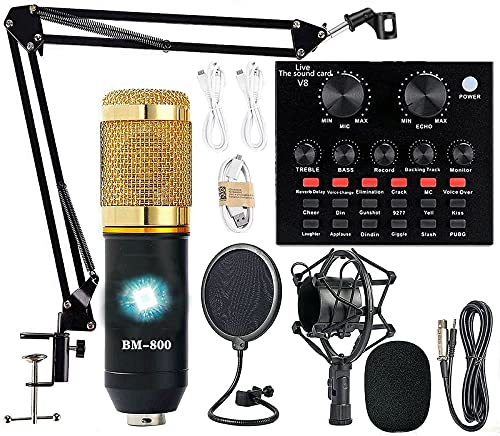
- Podcast Equipment Bundle, BM-800 Recording Studio Package – Best for Beginners
MAONO Podcast Bundle with Audio Mixer & 3.5mm Mic

- ✓ All-in-one compact design
- ✓ Easy setup and controls
- ✓ Versatile sound effects
- ✕ No phantom power support
- ✕ Needs additional adapters for instruments
| Microphone Type | Condenser microphone |
| Microphone Connectivity | 3.5mm TRRS input, compatible with smartphones and PCs |
| Audio Mixer Dimensions | 24 x 14 x 4.2 cm (9.45 x 5.51 x 1.65 inches) |
| Supported Platforms | iOS, Android, Windows, macOS |
| Audio Effects | 8 built-in effects, 4 user-recordable effects, 10-step reverb, 12-step electronic music effects |
| Input/Output Capabilities | 2 microphone inputs, 1 accompaniment input, supports up to 4 devices and 4 platforms simultaneously |
When I first unboxed the MAONO Podcast Bundle, I was surprised by how compact and sturdy the entire setup felt. The mixer itself is just over 9 inches long, but it packs a punch with all its controls easily accessible.
I expected something bulky, but it’s surprisingly sleek and lightweight for a full-featured audio station.
The microphone is solidly built, with a nice metal body that feels premium. Plugging it into my smartphone and PC was straightforward—just a few quick setups, and I was ready to go.
The included windscreen muff and tripod make positioning simple, and I appreciated the clarity I got almost instantly.
Using the mixer, I was impressed by how intuitive the controls are. The 10-step reverb and 12-step electronic music effects add a fun layer of creativity.
I tested changing voices to robot, female, and male, and it worked smoothly in real-time. The ability to stream on multiple platforms simultaneously is a huge plus, especially for live sessions or podcasts with guests.
The special effects like applause and laughter are great for spicing up live streams. Noise reduction worked well, and the DENOISE button made a noticeable difference.
The only hiccup was needing a separate adapter for guitar inputs, but that’s common with many devices.
Overall, this bundle feels like a one-stop shop for anyone looking to start streaming, podcasting, or DJing without fuss. It’s versatile, easy to use, and offers plenty of options to customize your sound.
Just make sure your setup has enough space and the right connections—you’re all set for a professional-sounding broadcast or recording.
136GB Voice Recorder with Playback, USB, Password Protection

- ✓ Excellent sound quality
- ✓ Massive storage capacity
- ✓ Easy to operate
- ✕ Slightly bulky design
- ✕ No Bluetooth connectivity
| Storage Capacity | 136GB total (8GB built-in + 128GB TF card) |
| Recording Quality | Up to 1536kbps high-quality sound |
| Battery Life | Supports up to 33 hours of continuous recording and 24 hours of playback |
| Microphone Type | Omnidirectional stereo microphone with noise reduction technology |
| Connectivity | Type-C USB port for charging and file transfer |
| Additional Features | Voice activated recording, password protection, MP3 playback, variable speed playback |
As soon as I turned on this voice recorder, I was impressed by how effortlessly it captured crystal-clear sound. The HD recording quality with automatic noise reduction really makes it feel like you’re right there with the speaker, even from a distance.
The built-in omnidirectional stereo microphone picks up sounds from all directions, which is perfect for meetings or lectures. I tested it in a noisy room, and it still managed to isolate voices clearly, thanks to the PCM ten-core triple digital noise reduction tech.
The 136GB capacity is a game-changer. I loaded it up with hours of recordings and still had plenty of space left.
The 8GB internal memory plus a 128GB TF card (included) means you rarely need to worry about running out of storage.
Battery life is solid—over 33 hours of continuous recording on a single charge. I used it for a long class and then listened to the playback, which was smooth and straightforward.
The voice activation feature worked well—saving storage by only recording when sounds were detected.
Using the device is super simple with just three buttons. I could quickly start, stop, or replay recordings without fiddling with complicated menus.
The intuitive interface, including features like A-B repeat and variable speed playback, makes it versatile for studying or meetings.
File management is a breeze, with timestamps making it easy to identify recordings. Connecting it to my phone or PC via Type-C was quick, and charging was hassle-free.
Overall, this little device packs a punch for anyone needing reliable, high-quality recordings on the go.
TASCAM Mixcast 4 Podcast Mixer & Recorder with Touch Screen

- ✓ Intuitive touch interface
- ✓ Versatile audio inputs
- ✓ Professional-grade recording
- ✕ Pricey for some
- ✕ Slight learning curve
| Number of Microphone Inputs | 4 XLR/TRS combo jacks |
| Recording Capacity | 14 tracks directly to SD card |
| Display | Touchscreen interface for control and operation |
| Connectivity Options | Bluetooth, USB, Aux input, external sound sources |
| Sound Pad Banks | 8 banks of customizable illuminated sound pads |
| Supported Audio Formats | Likely WAV and MP3 (common for recording devices) |
I’ve been eyeing the TASCAM Mixcast 4 for a while, mainly because I wanted a streamlined way to produce high-quality podcasts without fumbling through complicated setups. When I finally got my hands on it, I was immediately impressed by its solid build and the sleek touch screen interface.
The tactile feel of the buttons and the intuitive layout made me feel confident from the start.
The touch panel is surprisingly responsive, and controlling multiple mics and sound effects feels effortless. I loved how easy it was to assign sounds to the illuminated pads—perfect for live effects or quick jingles.
The 14-track recording straight onto an SD card means I can record entire sessions without worrying about missing anything. Connecting my phone and PC via Bluetooth or USB was a breeze, and the mix-minus function on the aux input handled phone calls smoothly.
Using the internal sound pads during a live stream felt natural, and the customizable options let me tweak my soundscape on the fly. The Tascam Podcast Editor software made editing post-recording straightforward, with simple track management and sound effect assignment.
Overall, it feels like a complete, professional setup that fits comfortably in a small studio or on the go.
For anyone serious about content creation, the Mixcast 4 offers a versatile, all-in-one solution. It’s reliable, easy to use, and packed with features that elevate your audio game—whether you’re podcasting, streaming, or doing voice-overs.
Podcast Equipment Bundle, BM-800 Recording Studio Package
- ✓ Excellent sound clarity
- ✓ Very versatile and compatible
- ✓ Easy to set up
- ✕ Needs charging before use
- ✕ Basic accessories included
| Microphone Type | Condenser microphone with cardioid pickup pattern |
| Microphone Frequency Response | Not explicitly stated, but designed for high detail voice capture, typically 20Hz-20kHz |
| Sound Chipset | 2021 professional sound chipset |
| Connectivity Options | USB and 3.5mm audio jack (implied for compatibility with various devices) |
| Included Accessories | Mic suspension scissor arm stand, shock mount, pop filter, anti-wind foam cap, power cable, live sound card |
| Compatibility | Windows, Mac OS, Android, iOS, PS4, Xbox, Switch, mobile phones, tablets, and other game platforms |
Ever try recording a quick podcast or voiceover and end up frustrated because your voice sounds flat or distant? I definitely have, and that’s where this BM-800 Recording Studio Package stepped in to save the day.
When I first unpacked it, I was impressed by how sturdy and professional the mic looks, with its sleek design and solid build quality.
The microphone itself captures sound with impressive clarity, thanks to the 2021 professional sound chipset. I tested it with vocals and podcasts, and the rich, mellow tone really makes a difference.
The cardioid pattern helps focus on your voice, cutting out background noise, which is perfect for home studios or streaming.
Setting it up was straightforward—just attach the shock mount and suspension arm, and connect everything using the included power cable and sound card. Once powered, the sound quality stayed consistent, and I appreciated how compatible it is with Windows, Mac, and even smartphones.
I tried it on my PC and phone, and both worked seamlessly.
The bundle also includes a pop filter and anti-wind foam cap, which really help reduce unwanted noise and plosives. I loved how easy it was to switch between different devices and use the voice changer features for fun effects during calls or recordings.
The sound effects added a playful touch to my streams and videos.
The only downside I noticed was that you need to charge the microphone before use, which could be inconvenient if you’re in a rush. Still, for the price, this kit offers a solid, all-in-one solution for anyone looking to level up their streaming or podcast game without breaking the bank.
What Features Make a Streaming Sound Recorder Stand Out?
The features that make a streaming sound recorder stand out include:
- High-Quality Audio Capture: A good streaming sound recorder should offer high-resolution audio capture, ideally supporting formats like WAV or FLAC. This ensures that the sound quality is preserved during recording, providing clear and professional-sounding output.
- Real-Time Monitoring: The ability to monitor audio in real-time through headphones is crucial for making immediate adjustments to levels and ensuring there are no unwanted sounds. This feature allows users to hear exactly what is being recorded, facilitating better control over the sound quality.
- Multi-Channel Recording: A standout recorder will often support multi-channel recording, allowing users to capture multiple audio sources simultaneously. This is particularly beneficial for streamers who want to mix different audio inputs, such as voice and background music, in real-time.
- User-Friendly Interface: A simple and intuitive interface is essential for quick setup and easy operation during live sessions. Streamers can benefit from a device that includes clear buttons and menus, making it easier to navigate settings and start recording without delays.
- Low Latency: Low latency is critical for live streaming applications, as it ensures that audio is captured and transmitted without noticeable delays. This feature is vital for maintaining synchronization between audio and video, providing a seamless experience for the audience.
- Built-In Effects and Processing: Some advanced streaming sound recorders come with built-in effects, such as EQ and compression, which can enhance audio quality on-the-fly. This feature allows streamers to create polished audio without needing extensive post-production work.
- Portability and Battery Life: For streamers who need to record on the go, a lightweight design and long battery life are significant advantages. A portable sound recorder enables flexibility in recording locations, while a robust battery ensures uninterrupted sessions.
- Compatibility with Software and Platforms: The best streaming sound recorders should seamlessly integrate with popular streaming software and platforms, enhancing usability. This compatibility allows streamers to use their preferred tools without technical difficulties, streamlining the recording process.
What Are the Top Benefits of Using a Streaming Sound Recorder?
The top benefits of using a streaming sound recorder include enhanced audio quality, convenience, flexibility, and advanced features.
- Enhanced Audio Quality: Streaming sound recorders typically offer superior audio fidelity, capturing sound with greater clarity and accuracy. This is particularly beneficial for musicians, podcasters, and content creators who require high-quality recordings for professional use.
- Convenience: These recorders often allow for real-time audio capture directly from streaming sources, eliminating the need for additional equipment or complex setups. Users can easily start recording with just a few clicks, making it ideal for on-the-go recording situations.
- Flexibility: Many streaming sound recorders support various input sources, including microphones, instruments, and online streaming services, providing users with the flexibility to create diverse audio content. This versatility makes them suitable for a wide range of applications, from live performances to podcasting.
- Advanced Features: Modern streaming sound recorders come equipped with features such as multi-track recording, audio editing tools, and effects processing, giving users more control over their recordings. These features enable users to refine their audio and achieve professional-sounding results without needing external software.
How Can You Assess Audio Quality in Streaming Sound Recorders?
To assess audio quality in streaming sound recorders, consider the following factors:
- Bitrate: The bitrate of the audio stream is crucial as it determines the amount of data processed per second. Higher bitrates typically equate to better audio quality, as they retain more detail and nuances in the sound, making it essential for high-fidelity recordings.
- Sample Rate: The sample rate indicates how many samples of audio are taken per second during recording. Common sample rates include 44.1 kHz and 48 kHz, with higher rates offering more accurate sound reproduction, especially for complex audio signals.
- Dynamic Range: This refers to the difference between the quietest and loudest sounds a recorder can capture without distortion. A wider dynamic range allows for a more nuanced audio experience, enabling listeners to hear subtle details in both quiet and loud sections of recordings.
- Frequency Response: Frequency response measures how well a recorder can reproduce different frequencies of sound. A broader frequency response range ensures that both low bass and high treble sounds are captured accurately, providing a more natural listening experience.
- Noise Floor: The noise floor indicates the level of background noise in the recording. A lower noise floor means that the device can capture quieter sounds without interference from unwanted noise, enhancing the overall clarity and quality of the audio.
- Codec Support: Different audio codecs compress and decompress audio files in various ways, affecting the quality and size of the recordings. High-quality codecs like FLAC or AAC can provide better audio fidelity while maintaining smaller file sizes, making them ideal for streaming applications.
- Microphone Quality: The type and quality of the microphone used with the recorder significantly impact audio quality. High-quality condenser microphones, for example, have greater sensitivity and can capture a wider range of frequencies than lower-quality dynamic microphones.
- Latency: Latency refers to the delay between audio input and output, which can affect real-time streaming performance. Lower latency is crucial for applications like live performances or broadcasts, where timing is critical for audience engagement.
What User-Friendly Options Should You Consider for Streaming Sound Recording?
When looking for the best streaming sound recorder, there are several user-friendly options to consider:
- Audacity: This is a free, open-source audio recording software that is ideal for both beginners and experienced users. It offers a straightforward interface and a variety of features such as multi-track editing, effects, and support for various audio formats, making it versatile for streaming sound recording.
- OBS Studio: Primarily known for video streaming, OBS Studio also provides robust audio recording capabilities. Its user-friendly interface allows for easy setup of audio sources, and it supports the recording of multiple audio tracks, making it a great choice for live streaming sessions.
- GarageBand: For Mac users, GarageBand is an intuitive option that combines recording, editing, and mixing in one platform. It provides a range of virtual instruments, loops, and audio effects, making it suitable for creating high-quality audio recordings effortlessly.
- Adobe Audition: This professional-grade audio software offers a comprehensive set of tools for sound recording and editing. While it may have a steeper learning curve, its powerful features such as noise reduction and spectral analysis make it a favorite among serious content creators in streaming.
- Zoom H1n Handy Recorder: This portable audio recorder is perfect for on-the-go recording with excellent sound quality. It is simple to operate, features built-in stereo microphones, and is ideal for capturing live streams, interviews, or podcasts without the need for complex setups.
- Descript: This innovative software combines audio recording with transcription capabilities, allowing users to edit audio by editing text. Its user-friendly interface and collaborative features make it a great choice for those looking to produce audio content quickly and easily.
- Voice Memos (iOS) / Voice Recorder (Android): These built-in applications on smartphones offer a quick and easy way to record audio without the need for additional software. They are ideal for casual users or for capturing spontaneous sound bites on the go.
How Do Pricing Models Vary for Streaming Sound Recorders?
Pricing models for streaming sound recorders can vary significantly based on features, subscription plans, and additional services offered.
- One-time Purchase: Many sound recorders are available for a single upfront payment, allowing users to own the product without ongoing costs.
- Subscription-Based: Some streaming sound recorders operate on a subscription model, charging users monthly or annually for access to advanced features or cloud storage.
- Freemium Model: Certain platforms offer basic functionality for free, while charging for premium features, making it accessible for casual users and enticing for those who may later upgrade.
- Tiered Pricing: This model provides different levels of service at varying price points, allowing users to choose a plan that best fits their needs and budget.
- Pay-Per-Use: Some sound recorders may charge based on the amount of recording time or the number of features used, appealing to users with sporadic recording needs.
One-time Purchase: With a one-time purchase model, users pay a fixed price for the sound recorder and gain full access to its features without any recurring fees. This model is often preferred by users who wish to avoid ongoing costs and is common for hardware products.
Subscription-Based: Subscription-based pricing typically includes regular updates, cloud storage, and access to new features as they are released. This model ensures that users have the latest technology and support but can lead to higher long-term costs if users do not cancel their subscriptions.
Freemium Model: The freemium model allows users to try the product without any initial investment, which can lead to a wider user base. By offering additional features for a fee, companies can attract users who may eventually convert to paying customers once they see the value in premium offerings.
Tiered Pricing: Tiered pricing offers flexibility and caters to different user needs, from casual users who may only need basic features to professionals seeking advanced capabilities. This model allows users to scale their expenses according to their usage and requirements.
Pay-Per-Use: Pay-per-use pricing is advantageous for users who may not need to record frequently, as they only pay for what they use. This model can be cost-effective for users with irregular recording needs, but it may not be ideal for those who record regularly, as costs can add up quickly.
What Common Challenges Do Users Face with Streaming Sound Recorders?
Users often encounter several common challenges when using streaming sound recorders:
- Audio Quality Issues: Many users struggle with achieving optimal audio quality, often due to low bitrate settings or poor microphone quality. This can lead to recordings that are distorted, muffled, or contain background noise, which diminishes the overall listening experience.
- Latency Problems: Latency refers to the delay between the input and output of audio signals, which can be particularly problematic during live streaming or recording sessions. Users may find it difficult to sync audio with video or to monitor their performance in real-time, leading to frustration and potential errors.
- Compatibility with Software: Compatibility issues can arise when users attempt to integrate their sound recorder with various streaming platforms or software. This can result in limited functionality, such as the inability to use certain features or complications during the setup process.
- File Management Challenges: Managing recorded files can become cumbersome, especially if users do not have an organized system for categorizing and storing their recordings. This may lead to difficulties in locating specific files, version control issues, or the risk of overwriting important recordings.
- Learning Curve: Many streaming sound recorders come with a range of features and settings that can be overwhelming for new users. This steep learning curve may deter individuals from utilizing the recorder to its fullest potential, leading to underwhelming results in their recordings.
- Internet Connectivity Issues: For cloud-based streaming sound recorders, a stable internet connection is crucial. Users may face interruptions or poor performance during live recordings if their internet connection is unstable, which can disrupt the flow of their stream and affect audio reliability.
- Resource Consumption: Some streaming sound recorders can be resource-intensive, leading to high CPU and memory usage on users’ devices. This can result in lagging, crashes, or other performance issues, especially if users are multitasking with other resource-heavy applications.
How Can You Optimize Your Streaming Sound Recording Experience?
To optimize your streaming sound recording experience, consider the following key elements:
- Quality Microphone: Investing in a high-quality microphone is essential for capturing clear and professional sound. Look for condenser microphones that offer a wide frequency response and low self-noise, as they can significantly enhance the audio quality during recordings.
- Audio Interface: An audio interface allows you to connect your microphone to your computer and convert the analog signal into digital format. A good audio interface will provide better sound quality and often includes features like phantom power for condenser mics, low-latency monitoring, and multiple input options.
- Soundproofing: Reducing background noise and echoes is crucial for high-quality recordings. Consider soundproofing your recording space with acoustic panels, carpets, and curtains to minimize sound reflections and external noise interference.
- Streaming Software: Choose reliable streaming software that suits your needs, such as OBS Studio or Streamlabs. These platforms offer features like scene transitions, audio mixing, and integrations with various streaming services, which can enhance both your recording and broadcasting capabilities.
- Monitoring Headphones: Use closed-back monitoring headphones to accurately hear what you are recording without causing sound bleed. High-fidelity headphones enable you to monitor audio levels and make real-time adjustments, ensuring a polished final product.
- Proper Gain Staging: Setting the correct gain levels is vital to avoid clipping and distortion in your recordings. Aim for a balanced input level that keeps the peaks within the optimal range, allowing for clear audio without introducing unwanted noise.
- Recording Environment: A well-organized and comfortable recording environment can greatly influence your performance and the quality of your recordings. Make sure your space is free from distractions, has proper lighting, and is ergonomically set up to support long recording sessions.