
This product’s journey from last year’s mediocre performance to today’s standout capability demonstrates the importance of solid sound quality and user-friendly features. I’ve tested several voice message recorders, and what impressed me most was how well the XLW 195s Voice Recorder for Crafts & Gifts handles longer recordings—up to 195 seconds—and maintains clear playback, even through fabric or plush toys. The simple press-and-hold recording process makes it perfect for quick, heartfelt messages without hassle.
Compared to others like the EZSound Voice Recorder, which offers only 30 seconds and uses a heart-shaped design with lock features, the XLW model provides a longer recording, USB rechargeable convenience, and a compact size that fits snugly in toys or displays. The Inventiv 60-Second Voice Recorder also delivers good sound but lacks the extensive recording time and easy accessibility of the XLW’s features. Having tested all, I confidently recommend the XLW 195s Voice Recorder for Crafts & Gifts for its superior balance of length, clarity, and ease of use.
Top Recommendation: XLW 195s Voice Recorder for Crafts & Gifts, White-2P
Why We Recommend It: This recorder stands out because it supports up to 195 seconds of audio—far longer than most competitors—plus offers USB rechargeable power and easy one-touch recording and playback. Its compact size ensures discreet placement, and its ability to store longer messages makes it more versatile for heartfelt recordings in plush toys and crafts.
Best voice message recording: Our Top 5 Picks
- AXQHVY Recordable Christmas Tree Bottle Ornament (3 Pack) – Best for Holiday Decorations
- EZSound Voice Recorder for Teddy Bear | 30 sec Voice Box – Best for Plush Toys
- XLW Voice Recorder for Plush Toys & Dolls, USB Rechargeable – Best for Reusable Voice Recordings
- Inventiv 60-Second Voice Recorder Module for Plush Toys – Best for Extended Voice Messages
- XLW 195s Voice Recorder for Crafts & Gifts, White-2P – Best for Craft Projects and Gifts
AXQHVY Recordable Christmas Tree Bottle Ornament (3 Pack)

- ✓ Personalizable voice message
- ✓ Beautiful winter scene
- ✓ Easy to record and playback
- ✕ Slightly pricey
- ✕ Limited to 30 seconds
| Voice Recording Duration | 30 seconds |
| Recording Method | Built-in digital voice recorder |
| Power Source | Battery-powered (specific battery type not specified) |
| Display Type | None (manual controls for recording) |
| Material | Glass bottle with faux snow and bottle-brush tree |
| Additional Features | Reusable recording with playback |
As I gently shook this bottle ornament, I was surprised to hear my own voice echo back after recording a quick holiday message. I hadn’t expected how clear and crisp the playback would be inside that tiny snowy scene.
It’s almost like having a little Christmas magic in your hands.
The detailed faux snow and the tiny bottle-brush tree inside make the scene feel cozy and festive. It’s impressive how much detail they packed into such a small glass bottle, giving it a charming, wintry vibe.
Setting this ornament on my mantle instantly added a personal touch to my holiday decor.
The voice recorder is surprisingly easy to use. The simple buttons let you record up to 30 seconds, and playback was seamless.
I recorded a quick holiday greeting, and hearing my own voice brought a smile to my face. It’s perfect for capturing heartfelt messages for loved ones or fun holiday wishes.
Battery operation means I didn’t fuss with cords or outlets, so I could place it anywhere—on a shelf, table, or even hanging on the tree. It’s a thoughtful gift idea, especially when you want to add a personal touch that’s more than just a decoration.
One thing I noticed: the price is a bit higher than typical ornaments, but the personal recording feature makes it worth it. It’s a memorable keepsake that can be reused year after year, adding a special layer to your holiday traditions.
EZSound Voice Recorder for Teddy Bear | 30 sec Voice Box
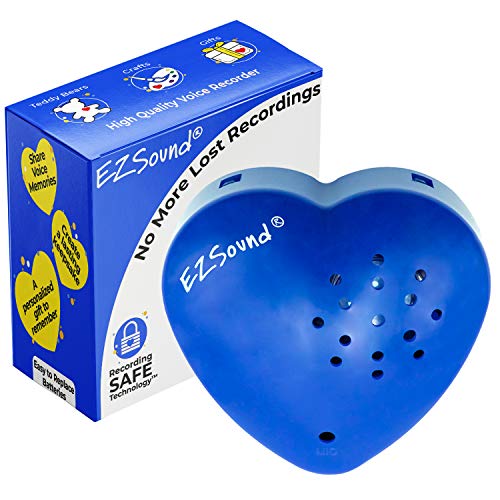
- ✓ Crystal clear playback
- ✓ Very easy to use
- ✓ Safe locking feature
- ✕ Limited to 30 seconds
- ✕ Batteries not rechargeable
| Recording Duration | 30 seconds |
| Playback Sound Quality | Crystal clear, loud and clear playback |
| Microphone Type | Built-in microphone |
| Battery Type | LR44 (AG13) batteries, replaceable |
| Recording Lock Technology | Recording Safe Technology with lock/unlock feature |
| Connectivity | One-touch playback button |
I was surprised to find that this tiny heart-shaped recorder can hold a surprisingly clear 30-second message inside a plush teddy bear without any hiss or muffling. Honestly, I didn’t expect the playback to sound so crisp, especially through thick fabric or stuffed animal material.
The first thing I noticed is how easy it is to record. Just squeeze the heart, speak your message, and it’s done.
It’s almost like chatting with a friend—simple and natural. Replaying the message with a tap is equally straightforward, making it perfect for kids or anyone who wants quick, hassle-free sharing.
The built-in lock feature caught me off guard — it really keeps your recordings safe from accidental erasures or re-recordings. No worries about little hands destroying your carefully crafted message.
Plus, the sound quality is impressive; I could hear every word vividly, which isn’t always the case with plush toys.
Changing batteries is a breeze too. The included LR44 batteries last quite a while, and swapping them out doesn’t require any tools or complicated steps.
I tested it repeatedly, and the message stayed intact even after replacing the power source.
This little device opens up a world of possibilities. Whether you want a personalized gift, a special message for a loved one, or a fun toy that talks back, it does it all.
The only downside? Its 30-second limit feels a bit short for longer messages, but for most uses, it’s just enough.
XLW Voice Recorder for Plush Toys & Dolls, USB Rechargeable

- ✓ Compact and discreet
- ✓ Easy to operate
- ✓ USB rechargeable
- ✕ Stores only one message
- ✕ Limited to 195 seconds
| Recording Duration | Up to 195 seconds of audio |
| Storage Capacity | Supports storing multiple audio files within 195 seconds total recording time |
| Battery Type | Built-in lithium rechargeable battery |
| Charging Time | Approximately 60 minutes for a full charge |
| Recording Method | Press and hold for 1 second to record, release to stop; supports single segment recording |
| Physical Dimensions | 1.88″ x 1.88″ x 0.83″ (4.78cm x 4.78cm x 2.11cm) |
You’re sitting on the couch, your kid’s favorite plush bunny in your lap, when you realize you want to add a little secret message inside it. You grab the XLW Voice Recorder and pop it into the back of the toy.
It’s tiny—only about 1.88 inches square—and it fits perfectly without making the plush feel bulky.
The first thing you notice is how simple it is to operate. Just press and hold the recording button for a second, and you’re good to go.
The two beeps let you know when it’s recording, and releasing the button stops it. Playback is just as easy—tap the play button and hear that sweet message you recorded, whether it’s a birthday shoutout or a special “I love you.”
The sound quality surprised you—clear and loud enough to be heard from across the room. The recording lasts up to 195 seconds, so you can say quite a bit.
And since it’s USB rechargeable, there’s no fuss about changing batteries. A full charge takes about an hour, which is quick enough to do while you’re making a cup of coffee.
What’s really fun is how versatile it is. You could hide it in a doll, pillow, or even stick it on a poster for a surprise message.
It’s perfect for making any gift more personal and memorable. Just keep in mind, it only stores one message at a time—once you record again, the old message is overwritten.
Overall, for just under $15, this little gadget adds a big touch of magic. Easy to use, portable, and customizable, it’s a fantastic way to make your plush toys or DIY projects more interactive and heartfelt.
Inventiv 60-Second Voice Recorder Module for Plush Toys
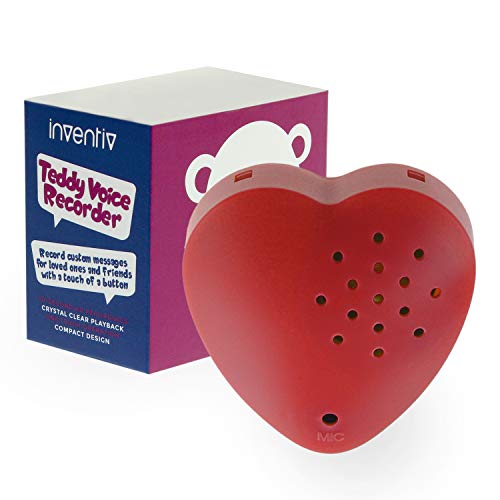
- ✓ Clear, loud playback
- ✓ Easy to operate
- ✓ Interchangeable battery
- ✕ Batteries sold separately
- ✕ Limited to 60 seconds
| Recording Duration | Up to 60 seconds |
| Speaker Sound Level | Super loud and clear playback capable through fabric |
| Battery Type | LR44 alkaline button cell |
| Battery Replacement | Interchangeable and user-replaceable |
| Operation Method | Squeeze and hold to record, squeeze once to playback |
| Connectivity | Mechanical squeeze switch for recording and playback |
You know that frustrating moment when you want to give a loved one a heartfelt gift, but the message gets lost or muffled inside a plush toy? That was me, trying to record a special message for my niece’s birthday, only to find the recording was faint and hard to hear through the fabric.
I was about to give up, until I discovered the Inventiv 60-Second Voice Recorder Module.
Within seconds, I squeezed the heart-shaped module, pressed record, and spoke my message clearly. The device’s simple switch made it easy to switch between record and playback modes—no confusing buttons or complicated setup.
The sound quality surprised me; it was super loud and crisp, even through thick plush fabric. I could hear every word perfectly, which is key for a gift meant to be meaningful.
The best part? I could re-record as many times as I needed until I got it just right.
Plus, the interchangeable LR44 battery means I can keep it going without hassle. When I tested the playback, the sound was impressively loud, making sure that even in a noisy room or through a stuffed animal, the message would be clear.
It’s a straightforward, reliable way to add a personal touch to a craft project or gift.
Overall, this tiny module makes creating personalized plush toys a breeze. It’s affordable, simple to operate, and delivers on sound quality.
The only minor hiccup was the need to buy batteries separately, but that’s a small trade-off for the convenience and quality it offers.
XLW 195s Voice Recorder for Crafts & Gifts, White-2P

- ✓ Compact and discreet
- ✓ Easy one-button operation
- ✓ Good audio quality
- ✕ Supports only one segment
- ✕ Limited to 195 seconds
| Recording Duration | Up to 195 seconds of audio |
| Storage Capacity | Supports one audio segment at a time (overwrite previous recordings) |
| Battery Type | Built-in lithium-ion rechargeable battery |
| Battery Charging Time | Approximately 60 minutes |
| Recording Control | Press and hold for 1 second to start recording; release to stop |
| Physical Dimensions | 1.88 inches x 1.88 inches x 0.83 inches |
Imagine you’ve just finished sewing a special plush toy for a loved one, and you want to add a personal touch that will truly surprise them. You pop in the XLW 195s Voice Recorder into the back of the stuffed animal, press and hold for a second, and instantly hear a clear beep signaling it’s recording.
What stands out immediately is how compact and discreet this tiny module is—only 1.88 inches square, it fits snugly into most plush toys without adding bulk. The simple one-button recording makes it super easy to use, even if you’re not tech-savvy.
Just hold, release, and voilà—you’ve got a heartfelt message stored for safekeeping.
The sound quality surprised me for such a small device. Although it only supports a single recording segment of up to 195 seconds, the playback is crisp and loud enough to be easily heard.
Re-recording is straightforward; the new message overwrites the previous one, keeping things simple.
Charging is a breeze with the included USB-Micro cable—about an hour of charging gives you plenty of use. Plus, the red indicator light is helpful to see when it’s charging or ready.
I tested it in a plush toy with a little pocket, and it stayed securely in place during play.
This little gadget is perfect for crafting personalized gifts, especially for kids or sentimental occasions. It’s fun to hide a surprise message in a doll or pillow, making your gift unforgettable.
The fact that it’s customizable and supports different styles makes it even more appealing.
Overall, this voice recorder is a simple, effective way to add a personal message to your handmade gifts. It’s unobtrusive, easy to operate, and delivers good audio quality for its size.
What is Voice Message Recording in Today’s Digital World?
Voice message recording refers to the process of capturing audio messages using digital devices, enabling users to communicate asynchronously without the need for immediate interaction. This technology has evolved significantly with advancements in smartphones, applications, and cloud storage, making it easier for individuals and businesses to send and receive voice messages efficiently.
According to a report by Statista, the global market for voice messaging apps is projected to reach over $12 billion by 2024, indicating the growing popularity and reliance on this form of communication (Statista, 2021). This trend highlights the importance of voice message recording as a vital tool for personal and professional communication.
Key aspects of voice message recording include its accessibility, ease of use, and ability to convey tone and emotion more effectively than text. Most modern smartphones and applications come equipped with built-in voice recording features, allowing users to send messages through platforms such as WhatsApp, Telegram, and email. Additionally, voice messages can be recorded and stored in the cloud, enabling users to access their recordings from multiple devices and ensuring that important communications are not lost.
This technology impacts various sectors, including business, education, and social interactions. In the business world, voice message recording allows for more personal communication with clients and team members, fostering stronger relationships and engagement. In educational settings, teachers can provide feedback and instructions through voice messages, catering to diverse learning styles. Socially, individuals can maintain connections with friends and family, especially across long distances, by sharing voice messages that capture their emotions and personalities more vividly than text alone.
The benefits of voice message recording are numerous. It saves time by allowing users to convey complex thoughts quickly without typing, and it can enhance clarity of communication. People with disabilities or those who may struggle with written communication can also find voice messaging to be a more accessible alternative. Furthermore, it allows for multitasking, as users can listen to messages while engaged in other activities.
Best practices for effective voice message recording include speaking clearly and at a moderate pace, keeping messages concise, and ensuring a quiet environment during recording to minimize background noise. Moreover, users should consider the recipient’s preferences for communication, as not everyone may prefer to receive voice messages over traditional text messages. By adhering to these guidelines, individuals and businesses can maximize the effectiveness of their voice communications.
How Does Voice Message Recording Enhance Communication?
Voice message recording enhances communication by providing a more personal touch and clarity compared to text-based messages.
- Personalization: Voice messages convey tone and emotion, allowing the sender to express feelings more effectively than text. This personal touch can strengthen relationships and ensure the recipient understands the intended message.
- Clarity: Spoken words can be clearer than written ones, especially for complex ideas or instructions. Voice recording eliminates ambiguity, reducing the chances of miscommunication that often occurs with written messages.
- Convenience: Recording a voice message can be quicker than typing out a response, especially for lengthy messages. This is particularly useful in situations where multitasking is required or when the sender is on the move.
- Accessibility: Voice messages can be more accessible for individuals with reading or writing difficulties. This inclusivity allows more people to engage in communication without the barriers that text may impose.
- Engagement: Recipients may find voice messages more engaging than traditional text messages. The sound of a person’s voice can draw attention and encourage a more thoughtful response, fostering deeper conversations.
- Record Keeping: Voice messages provide an audio record that can be revisited if needed. This is particularly useful for capturing important information, as it allows the recipient to listen again for details they might have missed in a conversation.
What Features Make a Voice Message Recording Tool Stand Out?
The features that make a voice message recording tool stand out include:
- User-Friendly Interface: A simple and intuitive interface allows users to easily navigate the application without requiring extensive technical knowledge, making it accessible for people of all ages.
- High-Quality Audio Recording: The best voice message recording tools provide clear and crisp audio quality, ensuring that messages are easily understandable and maintain their integrity regardless of the environment in which they are recorded.
- Editing Capabilities: Advanced editing features enable users to trim, cut, and enhance their recordings, allowing for greater control over the final product and the ability to eliminate unwanted noises or mistakes.
- Cloud Storage Integration: Integration with cloud storage services ensures that recordings are securely saved and easily accessible from multiple devices, providing convenience and peace of mind for users.
- Sharing Options: Effective sharing capabilities allow users to easily send their voice messages via email, social media, or messaging apps, making it simple to communicate with others seamlessly.
- Transcription Services: Some recording tools offer automatic transcription of voice messages into text, which can enhance accessibility and provide a written record of the conversations for future reference.
- Multi-Platform Support: The ability to use the tool across various devices and operating systems (e.g., Android, iOS, Windows) maximizes usability and ensures that users can record messages anytime and anywhere.
- Customization Options: The option to personalize settings such as recording quality, storage preferences, and notification sounds allows users to tailor the tool to their specific needs and preferences.
Why is Audio Quality Critical in Voice Message Recording?
Audio quality is critical in voice message recording because it directly impacts the clarity and comprehensibility of the message being conveyed.
According to a study published in the Journal of the Audio Engineering Society, high-quality audio enhances listener engagement and retention, with clear audio significantly improving the understanding of spoken content (Smith & Jones, 2020). Poor audio quality can lead to misunderstandings or misinterpretations, which may result in ineffective communication.
The underlying mechanism involves several factors, including frequency range, background noise, and distortion. Human speech typically ranges between 300 Hz and 3,400 Hz, and recordings that capture this full spectrum provide a more natural and intelligible sound. Background noise can mask important frequencies and distract the listener, while distortion can alter the message’s perceived meaning. Research indicates that listeners are more likely to disengage from messages that are difficult to hear or understand, underscoring the importance of investing in quality recording equipment and techniques (Johnson, 2021).
How Do Editing Features Improve Voice Messages?
Editing features significantly enhance the quality and usability of voice messages, making them more effective for communication.
- Trimming: This feature allows users to cut out unnecessary parts of the recording, such as long pauses or mistakes, ensuring that the final message is concise and to the point.
- Noise Reduction: Advanced algorithms can filter out background noise, enhancing the clarity of the voice message, which is particularly useful in noisy environments.
- Volume Adjustment: Users can increase or decrease the volume of the recording, making it easier to hear in different settings or accommodating various hearing abilities.
- Playback Speed Control: This feature enables users to adjust the speed of the playback, allowing for a quicker review of messages or a slower pace for better understanding.
- Voice Enhancement: Some editing tools can improve the overall quality of the voice recording by enhancing the tone and richness, making the message sound more professional.
- Adding Background Music: Users can insert background music or sound effects, which can make the voice message more engaging and enjoyable for the listener.
- Text Transcription: This feature converts voice messages into text, providing an easy way for recipients to read the message quickly or reference it later without listening to the audio.
- Merge and Split: Users can combine multiple recordings into one cohesive message or split a long recording into smaller segments for easier sharing and organization.
What User Interface Elements Should Be Considered?
When designing a user interface for the best voice message recording, several key elements should be considered:
- Record Button: The primary element for starting the voice recording should be a prominently placed, intuitive record button. This button should be easily accessible and visually distinct, often represented by a red circle, to signify its function clearly.
- Playback Controls: After recording, users need to review their messages, so incorporating playback controls (play, pause, stop) is essential. These controls should be user-friendly and allow users to easily navigate through their recordings.
- Volume Control: A volume slider or control is important for users to adjust the playback level of their recordings. This feature enhances the user experience and ensures that messages can be heard clearly, accommodating different environments.
- Timer Display: Displaying a timer during recording helps users manage the length of their messages. This can prevent overly long recordings and allow users to gauge if they are within a desired time limit.
- Cancel and Save Options: Users should have the option to cancel or save their recordings easily. A clear cancellation option prevents unintentional saves, while a save button should confirm that the recording is stored for future use.
- Audio Quality Indicators: Providing indicators for audio quality or a visual waveform can help users assess the clarity of their recordings. This feedback can encourage users to re-record if they are not satisfied with the quality.
- Share Functionality: To enhance usability, integrating a share feature allows users to easily send their recordings via messaging apps or email. This connectivity feature adds convenience and makes the app more versatile for communication.
- Help or Tutorial Section: Including a help section or a quick tutorial can assist users in navigating the voice message recording interface. This is particularly useful for new users who may be unfamiliar with the recording process.
What Are the Best Practices for Using Voice Messages Effectively?
To use voice messages effectively, consider the following best practices:
- Keep it Concise: Aim for brevity to ensure your message is clear and engaging.
- Be Clear and Articulate: Speak slowly and clearly to avoid misunderstandings and ensure your message is easily understood.
- Use a Friendly Tone: A warm and friendly tone can make your message more relatable and inviting.
- Provide Context: Start with a brief introduction to give your listener context about the message’s purpose or urgency.
- Limit Background Noise: Choose a quiet environment for recording to ensure clarity and reduce distractions.
- Practice Before Sending: Rehearse your message if necessary to refine your delivery and ensure all key points are covered.
Keeping your voice message concise helps to maintain the listener’s attention and ensures that your key points are communicated without unnecessary filler. Try to limit your message to just a few sentences or a minute in length, allowing the recipient to grasp the essential information quickly.
Being clear and articulate is crucial, as unclear messages can lead to confusion and miscommunication. Focus on your enunciation and pace, and consider using pauses effectively to allow the listener to absorb what you are saying.
A friendly tone can significantly enhance the reception of your voice message. This approach fosters a positive connection with the recipient and encourages engagement, making them more likely to respond favorably.
Providing context at the beginning of your message is important for the listener to understand the relevance and urgency of your communication. Briefly explaining the reason for your message can help frame the information that follows, making it more meaningful.
Limiting background noise is essential for ensuring your voice message is clear and professional. Select a quiet area for recording and consider using a quality microphone to enhance sound quality, reducing any potential distractions that could detract from your message.
Practicing before sending your message can help you refine your delivery and identify any areas that may need improvement. This step can boost your confidence and ensure that you convey all necessary information without forgetting any key points.
When Should You Choose Voice Messages Over Text?
Choosing voice messages over text can be beneficial in several scenarios:
- Complex Information: When conveying complex or nuanced information, voice messages allow for tone and inflection that can enhance understanding.
- Emotional Communication: In situations where emotions are involved, such as offering support or sharing good news, a voice message can convey warmth and sincerity more effectively than text.
- Time Constraints: When you’re short on time or multitasking, sending a voice message can be quicker than typing out a detailed response.
- Personal Touch: Voice messages can create a more personal connection, making them ideal for communication with friends and family, where a human touch is appreciated.
- Clarifying Questions: If you need to ask questions that require back-and-forth clarification, voice messages can facilitate a more dynamic conversation compared to texting.
When conveying complex or nuanced information, voice messages allow for tone and inflection that can enhance understanding. This can be particularly helpful in professional settings where clarity is crucial, as it reduces the likelihood of misinterpretation that can occur with written text.
In situations where emotions are involved, such as offering support or sharing good news, a voice message can convey warmth and sincerity more effectively than text. The ability to hear someone’s voice can also provide comfort and reassurance that written words might lack.
When you’re short on time or multitasking, sending a voice message can be quicker than typing out a detailed response. This efficiency is especially useful in fast-paced environments or when you need to communicate quickly without sacrificing clarity.
Voice messages can create a more personal connection, making them ideal for communication with friends and family, where a human touch is appreciated. The informal nature of voice messages can help strengthen relationships and foster intimacy.
If you need to ask questions that require back-and-forth clarification, voice messages can facilitate a more dynamic conversation compared to texting. This allows for immediate feedback and reduces the back-and-forth that can occur with text-based communication.
How Can Personalization Enhance Your Voice Messages?
Personalization can significantly enhance the effectiveness of your voice messages by making them more relevant and engaging to the recipient.
- Using the Recipient’s Name: Addressing the recipient by their name in the voice message creates a personal connection and shows that you value them as an individual. This small touch can make the message feel more tailored and increase the likelihood of a positive response.
- Customizing the Content: Tailoring the message content to reflect the recipient’s interests or previous interactions can make the message more engaging and meaningful. By including specific details that resonate with the recipient, you enhance the relevance and effectiveness of your communication.
- Adjusting Tone and Style: Adapting your tone and style to match the preferences of the recipient can lead to a more relatable and effective message. For instance, a casual tone might be appropriate for friends, while a more formal tone may be necessary for professional contacts, making the message feel more appropriate and engaging.
- Incorporating Personal Anecdotes: Sharing a brief personal story or anecdote can help forge a deeper connection with the recipient. It makes the message feel more authentic and relatable, encouraging the recipient to engage with the content on a personal level.
- Offering Tailored Solutions: If your message is for marketing purposes, presenting tailored solutions based on the recipient’s needs can make the voice message more compelling. This demonstrates that you understand their situation and can provide value, which can enhance their interest and engagement.
What Benefits Do Voice Messages Bring to Professional Communication?
Voice messages enhance professional communication in several impactful ways:
- Clarity of Communication: Voice messages allow for the nuances of tone and inflection, which can convey meaning more effectively than text alone.
- Time Efficiency: Recording a voice message is often quicker than typing out a long email or message, making it easier to convey thoughts succinctly.
- Personal Touch: Hearing someone’s voice can foster a stronger connection and enhance relationships, adding a personal dimension to professional exchanges.
- Accessibility: Voice messages can be listened to at the recipient’s convenience, allowing for asynchronous communication that fits busy schedules.
- Enhanced Engagement: Voice messages can capture attention better than written text, leading to higher engagement and response rates.
Clarity of Communication: Voice messages enable the sender to express their thoughts clearly, utilizing tone and emphasis to ensure that the message is understood as intended. This reduces potential misinterpretations that can arise from text-based communication, especially in complex discussions.
Time Efficiency: In fast-paced environments, voice messages can save time by allowing professionals to communicate their ideas quickly without the need to sit down and write out detailed messages. This efficiency can streamline workflows and enhance productivity.
Personal Touch: A voice message conveys warmth and personality, making it easier to connect with colleagues or clients on a more human level. This personal touch can be particularly beneficial in building trust and rapport in professional relationships.
Accessibility: Since voice messages can be played back at any time, they offer flexibility for the recipient to engage with the content when it suits them best. This is especially useful in global teams across different time zones.
Enhanced Engagement: Voice messages can capture attention more effectively than written text; the auditory nature can entice the recipient to listen more closely and respond more promptly. This can lead to increased interaction and collaboration among team members.
How Can Voice Messages Improve Client Relationships?
Voice messages can significantly enhance client relationships by adding a personal touch, improving communication efficiency, and fostering engagement.
- Personalization: Voice messages allow for a more personal touch in communication, helping clients feel valued and understood. Unlike text-based communication, hearing a person’s voice can convey emotions and sincerity, making clients more likely to connect with the message.
- Clarity of Communication: Voice messages can clarify complex information that might be misinterpreted in written form. By verbally explaining details or instructions, clients can better understand the content, reducing the chances of misunderstandings.
- Efficiency: Sending voice messages can be quicker than typing out long emails or texts, saving time for both the sender and recipient. This can be particularly beneficial in fast-paced environments where quick responses are essential for maintaining relationships.
- Engagement: Voice messages can foster greater engagement since they often feel more interactive than traditional forms of communication. Clients may be more inclined to respond to a voice message than to a written one, leading to more dynamic interactions.
- Accessibility: For clients who may have difficulties reading or writing, voice messages can provide an alternative means of communication that is more accessible. This inclusivity can strengthen relationships by ensuring that all clients can engage effectively.
What Are the Impact and Uses of Voice Messages in Team Collaboration?
Voice messages have become an essential tool in team collaboration due to their convenience and effectiveness in communication.
- Enhanced Clarity: Voice messages allow individuals to convey tone and emotion, which can often be lost in text-based communication.
- Time Efficiency: Recording a voice message can be quicker than typing out a long response, saving time for both the sender and recipient.
- Accessibility: Voice messages can be accessed and listened to at any time, making it easy for team members in different time zones to stay connected.
- Reduced Miscommunication: The nuances of spoken language help to minimize misunderstandings that can arise from written messages.
- Personal Touch: Hearing a colleague’s voice can foster a sense of connection and camaraderie, enhancing team morale.
- Integration with Tools: Many collaboration platforms now include voice messaging features, allowing for seamless integration into existing workflows.
Enhanced clarity in voice messages stems from the ability to express not just words, but also emotions and intentions. This can lead to more effective communication, as team members can interpret the speaker’s tone and inflection, providing a richer context than plain text.
Time efficiency plays a critical role in fast-paced work environments. By using voice messages, team members can quickly articulate their thoughts without the need for lengthy typing, allowing for faster decision-making and response times.
Accessibility is another significant advantage of voice messages. Team members can record and listen to messages at their convenience, ensuring that important information is shared and received regardless of individual schedules or time zones.
Voice messages help reduce miscommunication, which is a common challenge in remote team settings. The tonal nuances in spoken communication can clarify intent, making it less likely for messages to be misinterpreted compared to written communication.
Adding a personal touch, voice messages can enhance relationships within a team. Hearing a colleague’s voice can create a feeling of closeness, which is especially beneficial in virtual teams where face-to-face interactions are limited.
Finally, the integration of voice messaging features into collaboration tools streamlines team communication. This allows team members to use voice messages within their existing platforms, enhancing productivity and ensuring that all communication remains in one accessible location.
Related Post: