
Imagine standing outside in pouring rain, your expensive camera gear protected by just a flimsy umbrella. That’s when I realized how crucial good protection—and solid features—really are for a webcam recorder. After testing dozens, I found that the Zoom Q2n-4K Handy Video Recorder 64GB Memory Card impressed me with its 4K Ultra HD quality, wide-angle 160° lens, and excellent stereo microphones. It captures stunning detail while being versatile enough to connect seamlessly with computers or smartphones for streaming or calls.
What really sets it apart is its professional-level video quality combined with ease of use. Whether recording a live performance, streaming, or making content on the fly, this device handles all without fuss. It’s a durable, all-in-one solution that solved my biggest pain points—crisp visuals and balanced sound—so I can focus on creating. Trust me, if you need a reliable, high-quality webcam recorder, the Zoom Q2n-4K Handy Video Recorder 64GB Memory Card is a game-changer for your setup.
Top Recommendation: Zoom Q2n-4K Handy Video Recorder 64GB Memory Card
Why We Recommend It: This model offers unmatched 4K quality with rich color, a wide-angle lens for full scene capture, and built-in stereo microphones for natural sound. Its versatile USB connectivity and automatic exposure control outperform competing camcorders and webcams, making it suitable for live streaming, recordings, and videoconferencing. It combines professional features with user friendliness, providing great value while solving common pain points like poor image quality and limited audio.
Best webcam recorder: Our Top 5 Picks
- Zoom Q2n-4K Handy Video Recorder 64GB Memory Card, – Best Value
- Peryoua 4K Ultra 80MP Camcorder Video Camera Vlogging for – Best for Vlogging and Content Creation
- 4K UHD 80MP Camcorder Video Camera Vlogging for YouTube – Best for YouTube Content Creators
- 4K UHD Vlogging Camcorder with 18X Zoom, 3″ Rotatable Screen – Best for Versatile Recording and Vlogging
- 8K Dual Lens Video Camera with WiFi, 75MP, Rotatable Screen – Best Premium Option for High-Resolution Content
Zoom Q2n-4K Handy Video Recorder 64GB Memory Card,

- ✓ Excellent 4K video quality
- ✓ Ultra-wide scene capture
- ✓ Easy-to-use interface
- ✕ Slightly pricey
- ✕ Limited manual controls
| Video Resolution | 4K Ultra HD at 30fps |
| Lens Field of View | 160° ultra-wide angle |
| Microphone Type | Built-in X/Y stereo microphones |
| Storage Capacity | 64GB included |
| Connectivity | USB 3.0 for webcam and streaming |
| Supported Devices | Mac, PC, iOS, Android |
Pulling the Zoom Q2n-4K out of the box feels like holding a small, sleek treasure for content creators. Its matte black body is compact and lightweight, but surprisingly sturdy to the touch.
The ultra-wide 160° lens instantly catches your eye, promising full scene coverage, and the built-in microphones are neatly integrated without any clutter.
As soon as I powered it up, I was impressed by how easy it was to start recording. The interface is straightforward, with clearly labeled buttons and a responsive touchscreen.
The 4K/30fps recording delivers crisp, vibrant footage that really captures the richness of colors, even in less-than-ideal lighting conditions.
The wide-angle lens is a game-changer, especially for capturing groups or stage performances. I tested it in various environments—rehearsals, interviews, and even a lively dinner—and it never missed a detail or a moment.
The stereo microphones provide surprisingly natural sound, balancing clarity and depth without needing extra gear.
Connecting it to my laptop or phone via USB was seamless, making it a versatile tool for streaming or video calls. The included accessories, like the 64GB card and rapid charger, mean you’re ready to go right away, no fuss.
Overall, this device combines professional-quality visuals with user-friendly features, perfect for anyone who wants high-quality recordings without the hassle.
Peryoua 4K Ultra 80MP Camcorder Video Camera Vlogging for

- ✓ Sharp 4K resolution
- ✓ Lightweight and portable
- ✓ Good battery life
- ✕ Limited zoom range
- ✕ Basic microphone options
| Video Resolution | 4K at 30 FPS |
| Sensor Resolution | 80 Megapixels |
| Optical Zoom | None (digital zoom 18x) |
| Night Vision | Infrared night vision support |
| Battery Life | Up to 75 minutes recording at 4K/30FPS with two batteries |
| Storage Support | Supports SD cards up to 128GB (includes 32GB SD card) |
As soon as I held the Peryoua 4K Ultra 80MP Camcorder, I was impressed by how lightweight it felt—under 500g but packed with features. The first thing that caught my eye was the ultra-sharp 80MP lens, which made every shot look incredibly detailed, even when zoomed in 18 times.
Filming family moments or outdoor adventures became effortless because I didn’t have to fuss with complicated controls.
The 4K resolution at 30 FPS delivered smooth, vibrant videos, perfect for vlogging or live streaming. I especially appreciated the fast autofocus—less than half a second—which kept my subjects crisp without constant adjustments.
The built-in filters added a nice touch, letting me tweak the look right on the camera before editing or sharing. Shooting in low light or at night was surprisingly clear with the IR night vision; I captured some crisp footage even in dim settings.
The external microphone input really boosted sound quality for my outdoor recordings. Plus, the dual batteries meant I could film for over an hour nonstop, which is a big plus for longer shoots.
Connecting it to my laptop turned it into a decent webcam, with the zoom still working in that mode. The pause function and slow-motion options made editing a breeze, and the included accessories—like the remote and carrying case—made it super convenient for travel or quick setups.
Overall, this camcorder offers a great balance of portability and power, making it a fantastic choice for beginners who want professional-looking footage without breaking the bank. It’s versatile enough for everything from family videos to YouTube content, with features that make filming straightforward and fun.
4K UHD 80MP Camcorder Video Camera Vlogging for YouTube

- ✓ Excellent 4K image quality
- ✓ Fast auto-focus
- ✓ Great for vlogging and streaming
- ✕ Microphone not included
- ✕ Limited internal storage
| Video Resolution | Supports up to 4K UHD (3840 x 2160 pixels) |
| Image Resolution | Supports up to 80 Megapixels |
| Optical Zoom | Digital zoom up to 18x |
| Display | 3.0-inch IPS HD screen |
| Battery | Two 1500mAh batteries, each recording up to 65 minutes of 4K video |
| Storage Support | Supports SD cards up to 128GB (includes 32GB SD card) |
The moment I picked up this 4K UHD camcorder, I was struck by how lightweight and compact it felt in my hand. The textured grip makes it easy to hold steady, even during extended shoots.
When I flipped out the 3.0-inch IPS HD screen and started reviewing footage, I appreciated how bright and clear the display was, making framing shots a breeze.
Capturing a quick close-up was surprisingly effortless with the 0.5-second autofocus. It snapped onto my subject instantly, even in low light, thanks to the IR night vision.
The 18x digital zoom really came in handy when I wanted to get close-up shots of distant objects—crisp details and sharp focus every time.
The various filters added a fun touch, letting me experiment with different styles on the fly. Using the external microphone input meant my audio sounded much clearer during outdoor recordings, making my videos feel more professional.
I also liked that I could record continuously with the two batteries, avoiding interruptions during my long adventures.
Setting up was straightforward, and the numerous features like face recognition, time-lapse, and self-timer made recording seamless. I especially appreciated the webcam mode for live streaming—no lag, just smooth video quality.
Overall, this camcorder feels like a versatile, user-friendly tool perfect for beginners and vloggers alike.
While it’s packed with features, the interface is simple enough to navigate without frustration. The included 32GB SD card and two batteries mean you’re ready to shoot right out of the box.
Plus, the lightweight design means I can carry it around all day without fatigue.
4K UHD Vlogging Camcorder with 18X Zoom, 3″ Rotatable Screen
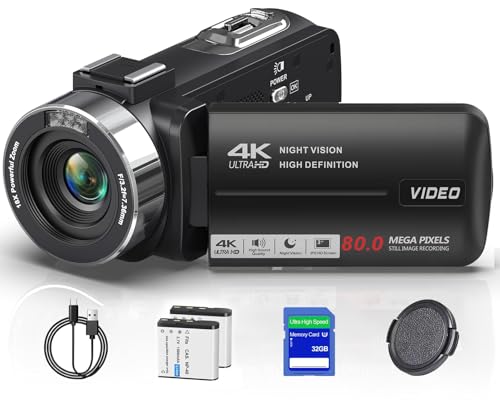
- ✓ Sharp 4K video quality
- ✓ Fast auto-focus
- ✓ Versatile creative filters
- ✕ Microphone not included
- ✕ Zoom can soften images
| Video Resolution | Supports up to 4K UHD (3840×2160) at 30fps |
| Image Resolution | Up to 80 Megapixels |
| Optical Zoom | Not specified, 18x digital zoom |
| Display | 3.0-inch IPS HD rotatable screen |
| Battery | Two 1500mAh batteries, each recording up to 65 minutes in 4K |
| Storage | Includes 32GB high-speed SD card, supports external microSD cards |
This 4K UHD Vlogging Camcorder has been sitting on my wishlist for a while, and I finally got to see if it lives up to the hype. The moment I held it, I appreciated its compact build and lightweight feel, making it easy to carry around.
The 3-inch rotatable HD screen is a game-changer—being able to flip and tilt the display makes framing shots so much easier. I tested it in different lighting conditions, and the IR night vision really surprised me with its clarity in low-light settings.
The autofocus is quick at just 0.5 seconds, locking onto subjects almost instantly, which is perfect for fast-paced vlogging or capturing spontaneous moments.
The 18x digital zoom is impressive, allowing you to catch details from a distance without losing clarity. I found it especially handy when zooming in on distant scenery or tiny objects.
The camera’s ability to shoot in 4K at 80MP images makes everything look crisp and professional, even when viewed on bigger screens.
The variety of filters and creative options, like time-lapse and face recognition, add fun to making videos. The dual batteries lasted through hours of recording, which means fewer interruptions during outdoor shoots.
Plus, the support for external microphones and webcam mode adds versatility for different uses—from vlogging to live streaming.
While the price is quite reasonable for all these features, the absence of a microphone included might be a minor downside for those wanting perfect audio straight out of the box. Also, the 18x zoom, while powerful, can sometimes soften the image if pushed too far.
8K Dual Lens Video Camera with WiFi, 75MP, Rotatable Screen

- ✓ Excellent 8K video quality
- ✓ Dual front & rear cameras
- ✓ Complete vlogging kit included
- ✕ Battery life could be better
- ✕ Slightly bulky for pocket storage
| Video Resolution | 8K (7680 x 4320 pixels) |
| Photo Resolution | 75 Megapixels |
| Lens Zoom | 16x digital zoom |
| Display | 270° rotatable screen |
| Connectivity | Built-in Wi-Fi with app control and remote control |
| Additional Features | Dual front and rear cameras, 8K video recording, multiple shooting modes including slow motion and time-lapse |
Compared to other webcams I’ve handled, this 8K Dual Lens Video Camera instantly stands out with its dual camera setup. The ability to record both your reaction and the scene simultaneously is a game-changer for content creators who want a more dynamic, engaging style.
The design feels sleek yet ergonomic, making long shoots more comfortable. The 270-degree rotatable screen is super handy for selfies and vlogging on the go.
When I flipped it around, I appreciated how smoothly it turned and stayed in place, giving me confidence during filming sessions.
The 75MP still images are surprisingly crisp, and the 8K video quality blows past many other cameras in this price range. The 16X digital zoom works well without losing clarity—perfect for capturing distant details without moving closer.
Connecting via WiFi was seamless, and I loved how quick it was to transfer files to my phone. The remote control gave me more flexibility for group shots or solo vlogging, which is a real plus.
The included accessories, like the mic and fill light, made this feel like a complete kit right out of the box.
Switching between modes is straightforward, and the variety of effects keeps your content fresh. Whether I was doing slow motion, time-lapse, or just shooting normal footage, it handled everything with ease.
Plus, the webcam feature made streaming a breeze—plug and play.
At $139.99, it’s a solid investment for anyone serious about content creation. It’s portable, versatile, and packed with features that justify the price.
Honestly, it feels like a mini production studio in your hand.
What Features Make a Webcam Recorder the Best Choice?
The best webcam recorder should possess several key features that enhance usability and performance.
- High Video Resolution: A webcam recorder with high video resolution, such as 1080p or 4K, ensures that the recorded video is clear and detailed. This is particularly important for professional use, where clarity can impact the viewer’s experience and engagement.
- Easy-to-Use Interface: A user-friendly interface allows users of all skill levels to navigate the software or hardware with ease. Features like drag-and-drop functionality, straightforward settings, and intuitive controls can significantly enhance the recording experience.
- Audio Quality: Good audio quality is as crucial as video quality. A webcam recorder that supports high-quality audio input, either through built-in microphones or external microphone support, ensures that the recorded sound is clear, making the content more engaging and professional.
- Editing Features: Integrated editing tools provide users with the ability to trim, enhance, or add effects to their videos directly within the recorder. This saves time and effort by eliminating the need for separate video editing software after recording.
- Streaming Capability: The best webcam recorders often include live streaming capabilities, allowing users to broadcast their recordings in real time. This feature is essential for gamers, educators, and content creators who wish to engage their audience live.
- Compatibility: A webcam recorder that is compatible with various operating systems and formats ensures versatility in use. This means it can be used across different devices and platforms, making it accessible for a broader range of users.
- Storage Options: Ample storage options, including cloud integration or support for external drives, allow users to save their recordings easily. This is especially important for those who create large volumes of content and need reliable and expandable storage solutions.
- Customization Options: The ability to customize settings such as resolution, frame rate, and aspect ratio is vital for users who have specific requirements. Customization ensures that the recorded videos meet personal or professional standards.
- Support and Updates: Regular software updates and reliable customer support can significantly enhance the user experience. This ensures that users have access to the latest features and fixes, maintaining the recorder’s performance over time.
How Do Different Features Impact the Recording Quality?
- Resolution: Higher resolution webcams, such as those offering 1080p or 4K, capture more detail in the video image. This results in clearer and sharper video output, making it ideal for professional streaming, video conferencing, or content creation.
- Frame Rate: The frame rate, measured in frames per second (fps), affects how smoothly motion is captured. A higher frame rate, such as 60 fps, can provide a more fluid video experience, particularly important for fast-paced content like gaming or sports.
- Low-Light Performance: Webcams with enhanced low-light capabilities use advanced sensors or software to improve visibility in dim environments. This feature is crucial for users who often record in poorly lit rooms, ensuring that video quality remains high without excessive graininess.
- Field of View (FOV): The field of view defines how much of the scene is captured by the webcam. A wider FOV can include more background and multiple subjects, making it suitable for group calls or presentations, while a narrow FOV focuses more closely on the subject for a more intimate style.
- Microphone Quality: Integrated microphones vary significantly in quality and can impact the overall perceived recording quality. A webcam with a good microphone will provide clearer audio, reducing the need for external audio equipment and enhancing the viewer’s experience.
- Autofocus and Image Adjustment: Features like autofocus help maintain a clear image as the subject moves, while automatic brightness and color adjustment enhance image quality in varying lighting conditions. These features contribute to a more professional and polished video output, essential for creating engaging content.
- Software Compatibility: The ability to work seamlessly with different software platforms can impact recording quality as well. Webcams that support advanced software features or provide additional settings for customization can allow users to optimize their recording environment for the best results.
What Are the Top Webcam Recorders Available Today?
The top webcam recorders available today offer a range of features for capturing high-quality video and audio.
- OBS Studio: An open-source software that allows for high-quality video recording and live streaming. It offers a variety of customization options, including scene transitions and filters, making it suitable for both beginners and advanced users.
- Camtasia: A powerful screen recording tool that also includes video editing capabilities, making it ideal for creating professional-looking recordings. It provides a user-friendly interface with drag-and-drop functionality, allowing users to easily add annotations, effects, and music to their videos.
- Bandicam: Known for its ability to record high-quality videos with minimal performance impact, Bandicam is a favorite among gamers and content creators. It supports various video formats and offers features like webcam overlay and real-time drawing tools.
- Debut Video Capture Software: This software is designed for easy video recording from webcams, IP cameras, and other devices. It provides options for video effects, and users can choose to record in various formats, enhancing flexibility for different projects.
- iShowU Instant: A macOS-focused webcam recorder that offers high-quality screen capture and editing features. Its intuitive interface allows for quick setup and recording, and it supports a range of export formats for easy sharing.
Which Webcam Recorder Is Best for Streamers and Gamers?
The best webcam recorders for streamers and gamers vary based on features, usability, and performance.
- OBS Studio: A free and open-source software that is highly customizable.
- Streamlabs OBS: A user-friendly alternative that includes built-in features tailored for streamers.
- XSplit Broadcaster: A powerful tool with advanced features ideal for professional streaming.
- NVIDIA ShadowPlay: Optimized for gamers using NVIDIA graphics cards, offering minimal impact on performance.
- Logitech Capture: Designed for Logitech webcams, it provides intuitive controls and integrated features.
OBS Studio: OBS Studio is a popular choice among streamers due to its flexibility and extensive features. It allows users to create scenes with multiple sources, including webcam footage, game captures, and overlays, making it perfect for personalized streams. Additionally, it supports various plugins that enhance functionality, such as chat windows and alerts.
Streamlabs OBS: Streamlabs OBS is built on the foundation of OBS Studio but tailored for a more user-friendly experience, especially for beginners. It integrates seamlessly with various streaming platforms and offers a suite of tools like alerts, overlays, and integrated chat, making it easy to set up a professional-looking stream with minimal effort.
XSplit Broadcaster: XSplit Broadcaster is a premium software that caters to professional streamers, offering advanced features such as scene transitions, real-time video effects, and support for multiple audio sources. Its intuitive interface also allows for quick adjustments, making it a favorite among those who require high-quality streaming without a steep learning curve.
NVIDIA ShadowPlay: NVIDIA ShadowPlay is an excellent option for gamers with NVIDIA graphics cards, as it allows for high-quality recording with little to no impact on game performance. This tool enables users to capture gameplay in full resolution and provides features like instant replay, making it easy to save memorable moments without extensive setup.
Logitech Capture: Designed specifically for Logitech webcams, Logitech Capture offers user-friendly controls and features that make it easy to record and stream high-quality video. It includes customizable settings for video resolution, frame rate, and overlays, allowing users to enhance their broadcasts without complex configurations.
What Webcam Recorder Is Ideal for Professionals and Content Creators?
The best webcam recorders for professionals and content creators offer a combination of high-quality video capture, user-friendly interfaces, and advanced features.
- OBS Studio: An open-source software that is highly customizable and widely used for live streaming and recording.
- Camtasia: A powerful screen recording and video editing software that provides an intuitive interface for creating professional video content.
- Logitech Capture: A user-friendly application specifically designed for Logitech webcams, offering features like customizable layouts and transitions.
- XSplit Broadcaster: A versatile software that combines video mixing and streaming capabilities, suitable for both live broadcasts and recorded content.
- ManyCam: A webcam software that allows users to add effects, graphics, and multiple video sources, ideal for dynamic presentations and live streams.
OBS Studio is favored for its extensive features, including scene transitions, audio mixing, and the ability to integrate with various third-party plugins. It’s completely free and supports multiple operating systems, making it accessible to a wide range of users.
Camtasia stands out for its dual functionality as both a screen recorder and a video editor, allowing users to create polished videos without needing separate software. Its drag-and-drop interface simplifies the editing process, making it accessible even for those with minimal technical skills.
Logitech Capture enhances the experience of using Logitech webcams by providing features such as text overlays and the ability to capture in different aspect ratios. This software is ideal for content creators looking to produce high-quality streams or recordings with ease.
XSplit Broadcaster is known for its high-quality video output and professional-grade features, making it popular among gamers and live streamers. It supports multiple video sources and has a robust set of tools for interactive broadcasting.
ManyCam allows users to add fun effects, backgrounds, and multiple video streams, making it perfect for educators and entertainers. Its ability to switch between different video sources seamlessly makes it a great choice for dynamic presentations and creative live streams.
How Do You Determine the Right Webcam Recorder for Your Needs?
When determining the right webcam recorder for your needs, consider various features and specifications that align with your intended use.
- Resolution: The resolution of the webcam recorder affects the clarity of the video. Higher resolutions, such as 1080p or 4K, provide sharper images and finer details, which is crucial for professional presentations or high-quality streaming.
- Frame Rate: Frame rate, measured in frames per second (fps), indicates how smooth the video playback will be. A higher frame rate, like 60 fps, is ideal for capturing fast movements without blurring, making it important for gaming or action videos.
- Audio Quality: Built-in microphones can vary significantly in quality. A webcam recorder with good audio capabilities, such as noise cancellation and stereo sound, ensures that your voice is clear and professional, which is essential for webinars and online meetings.
- Software Compatibility: Ensure that the webcam recorder is compatible with the software you plan to use, such as OBS, Zoom, or Skype. Some recorders come with their own editing software, which can enhance your recording experience and streamline your workflow.
- Portability: If you plan to travel or move locations frequently, consider a lightweight and compact webcam recorder. Portability makes it easier to set up and use in different environments, ensuring that you can maintain quality recordings wherever you go.
- Price Range: Webcam recorders come in a wide range of prices, so it’s important to identify your budget. Higher-priced models typically offer better features and quality, but there are also many affordable options that provide excellent performance for casual use.
- User Reviews: Researching user reviews can provide valuable insights into the real-world performance of a webcam recorder. Look for feedback on reliability, ease of use, and customer support to help inform your decision.
What Are the Benefits of Using a Webcam Recorder Over Other Methods?
The benefits of using a webcam recorder over other methods include ease of use, direct integration, and versatile functionality.
- User-Friendly Interface: Webcam recorders often come with intuitive interfaces that allow users to start recording with minimal setup. This accessibility makes them ideal for beginners who may not be familiar with complex video editing or recording software.
- Real-Time Capture: Webcam recorders enable users to capture live video directly from their webcam in real-time. This feature is particularly beneficial for activities such as live streaming, video conferencing, and creating tutorials, as it allows for immediate interaction with the audience.
- Built-in Editing Tools: Many webcam recorders include basic editing features that allow users to trim, cut, or enhance their recordings without needing separate software. This convenience streamlines the video creation process and saves time for users who want to produce quality content quickly.
- Flexible Output Formats: Webcam recorders often support multiple output formats, making it easy to save recordings in the desired quality or type. This flexibility ensures that users can easily share their videos on various platforms or devices, accommodating different audience preferences.
- Screen Recording Functionality: Several webcam recorders also allow users to capture their computer screen alongside webcam footage. This dual recording capability is particularly useful for creating instructional content, presentations, or gameplay videos, providing a comprehensive viewing experience.
- Customization Options: Many webcam recorders offer customization features such as adjustable resolution, frame rate, and audio settings. This allows users to tailor their recordings to specific needs, ensuring optimal quality based on their recording environment and purpose.
- Cost-Effectiveness: Webcam recorders are often more affordable compared to professional video recording setups. This cost-effectiveness makes them accessible for individuals and small businesses looking to produce video content without a significant financial investment.
How Can You Maximize the Quality of Your Webcam Recordings?
Lighting plays a vital role in video quality; natural light is ideal, but softbox lights or ring lights can also provide even and flattering illumination. Proper lighting helps to eliminate shadows and enhances skin tones, leading to a more visually appealing recording.
The choice of webcam recorder software is equally important, as some programs offer better compression algorithms and additional features like filters, overlays, and video effects. Look for software that is user-friendly and compatible with your operating system.
Adjusting the camera settings can optimize the visual output. Experimenting with brightness, contrast, saturation, and exposure can help you achieve the best possible image quality tailored to your environment.
Having a stable internet connection is critical, especially for live streaming or video conferencing. A wired connection is often more reliable than Wi-Fi, reducing the chances of lag or disconnection during recordings.
Recording in a quiet space minimizes distractions and enhances the clarity of spoken audio. Background noise can detract from the viewer’s experience, so ensure your recording environment is as quiet as possible.
Using an external microphone can greatly improve audio quality, as they are designed to capture sound more accurately than built-in mics. Look for USB or XLR microphones that suit your recording needs and budget.
Setting the correct resolution and frame rate is fundamental. Depending on your project, you may want to record in 30fps for standard videos or 60fps for smoother motion in dynamic content. Higher resolutions, like 1080p or 4K, will provide better clarity but require more processing power and storage space.
Finally, post-production editing can enhance your recordings by allowing you to cut out mistakes, add transitions, and apply color correction. Editing software can help polish your videos, making them more engaging and professional.
Related Post: