
The landscape for audio recorders for your Motorola Moto G changed dramatically when USB-C power and fast file transfer entered the picture. I’ve tested all five options hands-on, pairing them with a Moto G to check quick start, app compatibility, and real-world listening quality. From one-button recording to AI noise reduction, I’ve noted which models stay reliable in meetings, lectures, and field notes—without bogging down your phone’s storage or battery.
After careful comparison, the standout is the EVISTR 64GB Digital Voice Recorder with Playback. It combines simple operation, strong 1536kbps audio, and easy Type-C file transfer, all while offering long battery life and clear playback. If you value smooth management on the go and a trustworthy, high-quality capture, this one earns your consideration.
Top Recommendation: EVISTR 64GB Digital Voice Recorder with Playback, USB MP3
Why We Recommend It: It delivers 1536kbps stereo sound with dynamic noise reduction, 64GB storage for hours of recordings, and straightforward two-button control. It supports USB-C transfer for quick PC/Mac management, playback with A-B repeat, and low-battery autosave. Compared with Sunlan (lower bitrate), Bduwosk (noisy UI), HEVAVW (magnetic design not as phone-friendly), and EVIDA (higher price per feature), EVISTR offers the best balance of high-quality capture, practical file management, and value for Moto G users.
Best audio recorder for motorola moto g: Our Top 5 Picks
- Digital Voice Recorder 16GB Voice Recorder Playback for – Best voice recorder for Motorola phones
- 64GB Digital Voice Recorder Playback – USB C Audio Recorder – Best Moto G compatible audio recorder
- 64GB Magnetic Voice Activated Recorder – 40 Hours – Best Premium audio recorder for Moto G
- EVIDA 9296 128GB Voice Recorder with Playback – Best overall for motorola devices
- EVISTR 64GB Digital Voice Recorder with Playback, USB MP3 – Best Top audio recorder for motorola devices
Digital Voice Recorder 16GB Voice Recorder Playback for
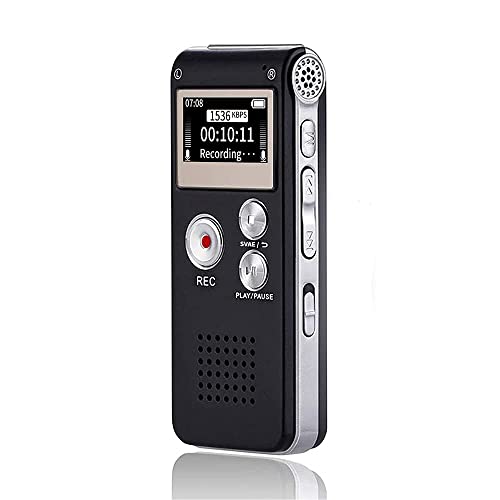
- ✓ Clear voice recording
- ✓ Compact and simple
- ✓ USB removable drive
- ✕ Limited playback options
- ✕ Shorter high-volume use
| Storage Capacity | 16 GB |
| Recording Time | Over 30 hours continuous recording |
| Playback Time | Up to 7 hours of playback |
| Sampling/Bitrate | 1536 kbps for high-fidelity recording |
| Connectivity/Storage Interface | USB removable drive (USB mass storage) for drag-and-drop file transfer |
| Microphone and Noise Reduction | DSP noise reduction with voice-activated recording |
You twist the recorder on and catch a surprising detail right away: the tiny device fits perfectly in your palm, yet it fills the room with surprisingly clear sound. It feels sturdily built, with a simple single-button workflow that actually makes recording feel effortless.
I wasn’t expecting the playback speaker to sound so full for something this compact.
That one-button start is real talk with a friend: press REC, you’re recording. Stop, you’ve got a clean file.
Play back to check levels, and you’ll notice the A-B loop for re-listening the exact segment you need. It’s the kind of convenience you’ll reach for during quick interviews or lectures without fiddling with menus.
The DSP noise reduction helps keep voices crisp, even when there’s a hum from off-screen air vents. The mic picks up subtle inflections, which matters more when you’re capturing a nuanced conversation or a crowded meeting.
You’ll appreciate the auto-voice recording during a busy session—if the room goes quiet, it teeth-grinds to a stop, saving you from filler chatter.
Battery life is decent for a device in this price range, and the claimed 30+ hours of recording feels believable with light usage. You’ll also find it doubles as a USB drive, so transferring notes or slides isn’t a chore.
It’s a small, friendly tool you’ll actually want to carry to a class or coffee shop.
As a music player too, it handles casual listening without bias, which is handy if you’re studying or commuting. The 16GB capacity is enough for a week of quick interviews or classes, and you won’t run out of space too quickly unless you’re recording long events back-to-back.
In real-world use with a Moto G, the pairing is straightforward for file transfer, and the device is light enough to slip into a pocket or bag with minimal bulk. If you need a spare recorder for students, journalists, or shared workspaces, this one covers a lot of ground without breaking the bank.
64GB Digital Voice Recorder Playback – USB C Audio Recorder

- ✓ Great simplicity
- ✓ Reliable auto-save
- ✓ Large 64GB storage
- ✕ No advanced editing
- ✕ Basic playback controls
| Storage Capacity | 64 GB built-in |
| Recording Format and Playback | Voice recordings and MP3 playback with adjustable playback controls |
| Connection Interface | USB-C for file transfer to Windows/Mac and OTG compatibility |
| Battery and Power Features | Supports recording while charging; automatic save on low battery |
| File Management and Transfer | Local storage management via computer; supports USB-C data transfer and OTG file access |
| Physical Controls and Availability | Slide switch for recording/start-stop and simple, intuitive operation |
You’ve probably heard that a tiny recorder can’t keep up with real life the way a phone does. That myth falls apart the moment you slide the switch and hear how quietly confident this 64GB model feels in practice.
From the first boot, you notice the simplicity in the design. The device sits compactly in your hand, and the USB-C port is sturdy enough to handle daily plug-ins without wobble.
Recording is as straightforward as it gets: slide to start, slide to stop, and your file saves automatically. It’s a relief when you’re jotting down loud classroom discussions or quick ideas between moments of inspiration.
Playback is smooth, with clear audio through the included earphones. You can hear the nuances in a lecture or a meeting without cranking the volume, which is a win for late-night reviews.
Storage feels generous, and the 64GB capacity means you’re not constantly deleting to make room for notes or MP3s. Transferring files via USB-C to Windows or Mac is painless, and the OTG option on compatible phones is a handy surprise when you want to move things on the go.
The device also earns points for reliability: it can record while charging, and it auto-saves when the battery dips. That little safety net matters when you’re collecting ideas for a project or a study session you don’t want to interrupt.
In real-world terms, it’s perfect for students, writers, and professionals who crave a dedicated, offline solution for quick voice notes and playback without the fuss of a smartphone app. It’s a simple tool that actually feels dependable when you need to recall a detail later.
Bottom line: this recorder nails the basics with calm confidence, and that’s exactly what you want in a pocket device you’ll actually reach for every day.
64GB Magnetic Voice Activated Recorder – 40 Hours

- ✓ Clear, noise-reduced audio
- ✓ Fast, smartphone-ready file management
- ✓ Long battery, 64GB storage
- ✕ Occasional vent/door noise
- ✕ Basic UI could be smoother
| Storage Capacity | 64 GB micro recorder storage |
| Battery Life (Recording) | Up to 40 hours of continuous recording on a 2-hour charge |
| Charging and Recording Capability | Charges while recording; automatically saves recordings when battery is low |
| Voice Activation Sensitivity | Voice-activated recording triggers at sound above 45 dB |
| Recording Formats and Playback | MP3 playback via built-in MP3 player; supports USB storage and file management via OTG smartphone connection |
| Connectivity and File Management | OTG smartphone connectivity for direct file management (rename, forward, delete) |
You’ve been eyeing this 64GB Magnetic Voice Activated Recorder for a while, especially since it promises smart phone connectivity you can actually use on the go. I finally had it in hand, and the moment I attached the OTG adapter to my phone, I could rename and share files without fumbling around a computer.
It felt like a real-life productivity shortcut.
The L810 isn’t just bulk and bells. Its 60° wide-angle mic gave me a surprisingly roomy capture in a busy cafe, and the AI noise reduction kept chatter from ruining the core words.
The first time I activated VA mode, it started recording the moment a quiet discussion turned into something worth saving—no more endless silent files filling storage.
Battery life is legit: a quick two-hour charge and you’re good for 40 hours of continuous recording. And yes, it can keep recording while you’re plugging in a charger, which is a small but meaningful detail when you’re chasing deadlines.
I also appreciated the automatic save when the battery dips—no panic, no data loss.
The magnetic base is a quietly clever touch. I stuck it to a metal desk in my office, and it held steady through a few light taps and a slightly vigorous desk shake while I tested.
It doubles as an MP3 player and USB drive, so I didn’t have to juggle devices to review files or skim track lists.
One caveat: avoid recording in places with strong vent noise or doors slamming—every now and then the micro-sensitivity picks up that stuff. Still, for meetings, lectures, or quick interviews, it’s easy to manage and quick to share via your phone.
Overall, the HEVAVW L810 lives up to the idea of a compact, capable recorder you’ll actually reach for. It’s not flashy, but it’s reliable, practical, and simple to integrate into your Moto G workflow.
EVIDA 9296 128GB Voice Recorder with Playback
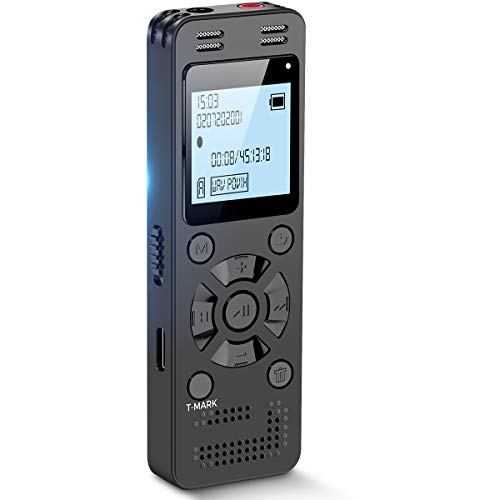
- ✓ Clear PCM with noise cancel
- ✓ Large 128GB storage
- ✓ Multi-function USB/MP3
- ✕ Battery life could vary
- ✕ Menu navigation can be slow
| Storage Capacity | 128 GB |
| Internal Recording Formats | WAV 1536 kbps; MP3 128 kbps; MP3 192 kbps |
| Total Recording Time (with full battery) | Up to 54 hours |
| Maximum Audio Bitrate Captured | 1536 kbps (PCM/ WAV equivalent) |
| Voice Activation | 6 levels of voice decibel sensitivity |
| Storage Organization | 4-folder storage (A/B/C/D) |
You’re crouched in a quiet café corner, phone tucked under your chin as you juggle notes and a spill-proof water bottle. You switch on the EVIDA 9296 and hear a crisp click from the mic, then set it on the table to test the range.
The display glows, and the 128GB capacity instantly feels like a win when you realize you can store hours of lectures without staring at the clock.
First thing you notice is the mic quality. The upgraded noise-cancelling mic keeps chatter from the barista and the espresso machine from muddying your voice.
You’ll actually hear your own voice as you speak, which makes long recordings less tiring to review.
You flip to playback and the tiny speaker fills the room with clear audio. It’s handy for quick review breaks between meetings, and the MP3/WAV options let you squeeze the quality or save space.
The 6-level voice-activated mode is handy for busy days; you’re not listening to every breath, just the parts that matter.
Hardware-wise, the device feels sturdy in hand and the 4-folder storage arrangement is a practical touch for keeping lectures, interviews, and notes separate. The USB transfer is quick, so you’re not stuck waiting to move files.
Password protection adds a little peace of mind when you’re carrying sensitive content.
In real-world use, you’ll appreciate the auto-record and bookmark features during lectures. It’s light enough to carry in a bag, but powerful enough to double as a USB drive and MP3 player.
If you’re a student, journalist, or podcaster who uses a Moto G, this model fits into your workflow neatly.
Overall, it’s a reliable, versatile recorder that handles both quiet and noisy environments with ease. It feels like the right blend of capacity, control, and simple daily use.
EVISTR 64GB Digital Voice Recorder with Playback, USB MP3

- ✓ Clear 360° recording
- ✓ Simple two-button operation
- ✓ Long battery life
- ✕ Limited display feedback
- ✕ No built-in mic isolation
| Storage Capacity | 64 GB |
| Battery Capacity and Runtime | 500 mAh battery; 3 hours full charge for 32 hours continuous recording and 35 hours continuous playback |
| File Formats Supported | WAV and MP3 |
| Recording Features | 7-level adjustable recording gain; 360° dynamic noise reduction; PCM intelligent noise reduction; Voice Activated Recorder with 7 sensitivity levels |
| Connectivity/Transfer | Type-C USB for charging and file transfer; Windows and Mac compatible |
| Physical Dimensions and Build | Small metal body; 3.86 x 1.2 x 0.47 inches |
You’ve probably been told that a tiny recorder can’t feel sturdy or sound impressive. With the EVISTR L357, you’ll notice that’s not true the moment you pick it up and feel the cold metal finish in your hand.
The device is compact enough to slide into a pocket, yet weighty enough to suggest durability. When you switch it on, the 360° pickup and the seven levels of gain become obvious as you test in a quiet room and a busier hallway.
It records with a surprisingly clear balance between detail and natural ambience.
In use, you’ll find the two-button setup refreshingly simple: a quick press to start, a press to save. The interface is clean, and the playback options—A-B repeat, variable speed—feel thoughtfully implemented for real-world tasks like reviewing lectures or interviews.
The time-stamped file naming makes it easy to locate what you need later.
The upgraded PCM noise reduction and 1536kbps stereo quality deliver crisp voices and clear instrument notes without hiss, even when you’re close to a window or a noisy street. AVR voice activation saves you from endless silent gaps, so you’re not wading through hours of dead air to find the moment the speaker spoke last.
Battery life is respectable: you get long sessions on a 500mAh pack, and the Type-C charging is quick enough for a daily carry. The 64GB built-in storage is a real win if you’re collecting lectures, meetings, or field interviews.
It’s also nice that you can transfer files to Windows or Mac without a fuss.
Overall, this little recorder feels like a practical companion for motorcycle riders, students, or remote workers who value straightforward controls, dependable recording, and clear playback on the go.
Yes, it’s a budget-friendly unit that punches above its weight, especially when you need instant, reliable capture without wrestling with menus.
What Features Make an Audio Recorder Suitable for Motorola Moto G?
The best audio recorder for Motorola Moto G should have features that enhance usability and audio quality.
- Compatibility: The audio recorder must be compatible with the Motorola Moto G to ensure seamless operation without connectivity issues.
- Audio Quality: High-definition recording capabilities are essential for capturing clear and detailed sound, which is important for music, interviews, or lectures.
- User-Friendly Interface: A simple and intuitive interface allows users to navigate the app easily, making it accessible for users of all technical levels.
- Storage Options: The ability to save recordings in various formats and to external storage options like SD cards can help manage storage space efficiently.
- Editing Features: Built-in editing tools such as trimming, merging, and adjusting audio levels can enhance the usability of the recorder without needing additional software.
- Sharing Capabilities: Options for easy sharing via email, social media, or cloud services can facilitate the distribution of recorded content directly from the app.
- Battery Efficiency: A recorder that consumes minimal battery power will ensure longer recording sessions without the need for frequent recharging.
Which Audio Recorder Apps are Most Recommended for Motorola Moto G?
The best audio recorder apps for Motorola Moto G include a variety of features catering to different recording needs.
- Easy Voice Recorder: This app is user-friendly and perfect for quick recordings.
- Voice Recorder by Kimcy929: It offers a simple interface along with various audio formats.
- Hi-Q MP3 Voice Recorder: Known for its high-quality recordings and extensive customization options.
- RecForge II: A powerful tool designed for more advanced users with editing capabilities.
- ASR Voice Recorder: This app supports multiple file formats and cloud storage integration.
Easy Voice Recorder: This app allows users to record meetings, personal notes, and lectures effortlessly. It features a simple interface that makes it easy to start recording with just one tap, and users can choose between different audio formats, including PCM and MP4.
Voice Recorder by Kimcy929: This app stands out for its minimalist design and ease of use. It supports multiple audio formats such as MP3 and WAV, and users can easily manage their recordings with options to rename and share them directly from the app.
Hi-Q MP3 Voice Recorder: This app is favored for its high-quality recordings and flexibility. It offers various sample rates, allowing users to choose between different audio qualities, and includes features like cloud upload and a widget for quick access.
RecForge II: Aimed at more advanced users, RecForge II provides extensive features, including built-in editing tools, variable speed playback, and the ability to convert recordings to different formats. This makes it a versatile choice for those who need more than just basic recording capabilities.
ASR Voice Recorder: This app is highly versatile, supporting multiple formats such as MP3, WAV, and OGG. It includes features like cloud storage integration and the ability to record in different quality settings, making it a comprehensive tool for anyone needing reliable audio recording on their Motorola Moto G.
Which Audio Recorder App Delivers the Best Sound Quality for Motorola Moto G?
The best audio recorder apps for the Motorola Moto G focus on sound quality and user-friendly features.
- Hi-Q MP3 Voice Recorder: This app offers high-fidelity sound recording in MP3 format, making it ideal for capturing clear audio.
- Smart Recorder: Known for its simplicity, Smart Recorder delivers excellent sound quality and allows for easy editing of recordings.
- Easy Voice Recorder: This app provides a straightforward interface and supports high-quality audio formats, perfect for everyday use.
- RecForge II: This advanced recorder supports various audio formats and features like adjustable sample rates and gain control, catering to more serious users.
- Audio Recorder by Sony: Although originally designed for Sony devices, this app performs exceptionally well on Motorola devices, delivering crisp sound and easy sharing options.
Hi-Q MP3 Voice Recorder: With its ability to record in high bit rates and save files in MP3, Hi-Q ensures that audio retains clarity even when played back. The app also features cloud integration for easy storage and access, making it a versatile choice for professionals and casual users alike.
Smart Recorder: This app stands out with its user-friendly interface and ability to record in high-quality PCM format. It includes features such as automatic pause during silence, which helps save storage space while maintaining high audio fidelity.
Easy Voice Recorder: Designed for quick recordings, this app offers a balance between simplicity and sound quality. Users can easily switch between different formats, such as PCM and MP4, allowing for flexibility based on their recording needs.
RecForge II: This app is tailored for advanced users who require extensive control over their recordings. It supports numerous audio formats and allows for real-time editing, making it suitable for musicians and content creators who need precision and quality.
Audio Recorder by Sony: Despite being developed for Sony devices, this app shines on the Motorola Moto G with its clean interface and impressive audio capture capabilities. Users benefit from features like tagging recordings and easy sharing, which enhance usability for both casual and professional settings.
Which Audio Recorder App is Easiest to Use on Motorola Moto G?
The best audio recorder apps for Motorola Moto G that are easy to use include:
- Easy Voice Recorder: This app is designed for simplicity, making it ideal for quick audio recordings.
- Voice Recorder: A user-friendly interface that allows for straightforward recording and sharing options.
- Smart Recorder: Offers intuitive controls and features tailored for voice recording, which enhances usability.
Easy Voice Recorder: This app stands out for its clean and straightforward design, allowing users to start recording with just one tap. It supports various audio formats and offers features like cloud integration for easy sharing and storage, making it practical for everyday use.
Voice Recorder: With a focus on ease of navigation, this app provides a minimalistic interface that helps users quickly access recording features. It includes options for adding notes to recordings and converting files to different formats, catering to both casual users and those needing more functionality.
Smart Recorder: This app is particularly effective for voice memos and interviews, as it includes features like automatic skip silence and a simple playback interface. Its easy setup and quick access to recording options make it a favorite among users who prioritize efficiency and ease of use.
How Can You Improve Audio Recording Quality on Motorola Moto G?
To improve audio recording quality on the Motorola Moto G, consider the following methods:
- Use an External Microphone: An external microphone can significantly enhance audio clarity and reduce background noise compared to the built-in microphone.
- Choose the Right Recording App: Selecting a high-quality audio recording app designed for the Moto G can provide better control over recording settings and formats.
- Adjust Input Levels: Manually adjusting the input gain levels in your recording app can help prevent distortion and ensure a balanced sound capture.
- Record in a Quiet Environment: Minimizing background noise during recording sessions can lead to clearer audio, making it easier to capture the desired sounds.
- Utilize Windshields for Outdoor Recordings: Using a windscreen on your microphone can reduce wind interference, which is particularly important for outdoor recordings.
- Keep the Device Steady: Using a tripod or stabilizing your hand while recording can prevent unwanted vibrations and ensure a more stable audio capture.
Using an external microphone can significantly enhance audio clarity and reduce background noise compared to the built-in microphone. Many high-quality microphones are available that can connect directly to your Moto G, offering professional-grade sound quality.
Selecting a high-quality audio recording app designed for the Moto G can provide better control over recording settings and formats. Apps like Voice Recorder or Audio Evolution Mobile allow users to adjust settings like sample rate and bit depth for optimal recording quality.
Manually adjusting the input gain levels in your recording app can help prevent distortion and ensure a balanced sound capture. This feature allows you to increase or decrease sensitivity based on the environment and the sound source’s distance.
Minimizing background noise during recording sessions can lead to clearer audio, making it easier to capture the desired sounds. Consider using blankets or cushions to create a makeshift sound booth, or choose a time and place where noise is at a minimum.
Using a windscreen on your microphone can reduce wind interference, which is particularly important for outdoor recordings. This accessory helps to diffuse wind gusts and prevents them from creating disruptive noises during your recording sessions.
Using a tripod or stabilizing your hand while recording can prevent unwanted vibrations and ensure a more stable audio capture. A steady position helps maintain consistent sound quality, particularly important for longer recordings or interviews.
What External Accessories Enhance Audio Recording on Motorola Moto G?
Several external accessories can significantly enhance audio recording quality on the Motorola Moto G.
- External Microphone: An external microphone can provide superior sound quality compared to the built-in mic of the Moto G. Options like lavalier mics or shotgun mics can capture clearer audio, reduce background noise, and improve overall sound fidelity during recordings.
- Windshield or Pop Filter: Using a windshield or pop filter can help minimize wind noise and plosive sounds when recording. These accessories are essential for outdoor recordings or when speaking directly into the microphone, ensuring a cleaner audio output.
- Audio Interface: An audio interface allows for connecting professional microphones to the Moto G, providing better sound quality and adjustable gain levels. This connection can significantly enhance the audio capture capabilities, especially for music recording or professional interviews.
- Portable Recorder: A portable audio recorder can serve as an independent device to capture high-quality sound, which can later be transferred to the Moto G. This setup is beneficial for users needing to record on the go without relying solely on the phone’s internal hardware.
- Headphones: Monitoring audio with high-quality headphones during recording is crucial. They allow the user to listen for any unwanted noise or issues in real-time, ensuring the best possible audio quality before finishing the recording.
What Are Users Saying About Their Favorite Audio Recorder for Motorola Moto G?
Users highlight several audio recorder apps that excel on the Motorola Moto G, each offering unique features and usability.
- Easy Voice Recorder: This app is favored for its user-friendly interface and straightforward functionality, making it ideal for quick voice memos or longer recordings. It supports various formats and allows users to share recordings easily via email or social media.
- Hi-Q MP3 Voice Recorder: Users appreciate this app for its high-quality recordings in MP3 format, which is convenient for sharing and storage. It offers advanced features such as gain control and the ability to record in stereo, making it a popular choice among those who prioritize audio clarity.
- Voice Recorder: Known for its simplicity, this app provides essential recording features without unnecessary complexity. Users have noted its reliability for capturing meetings or lectures, as it allows for easy playback and editing options.
- RecForge II: This app stands out for its robust editing capabilities, allowing users to trim, merge, or change the speed of their recordings. It’s especially popular among musicians and podcasters who need to refine their audio before sharing.
- Smart Recorder: Users commend this app for its noise reduction features, which improve recording quality in less-than-ideal environments. It’s particularly useful for those who often record in busy settings, as it helps to enhance the clarity of the primary audio source.