
Before testing this camera, I never realized how much blurry footage and limited angles could ruin self-recordings. I spent hours reviewing options, and what stood out was how many cameras struggle with clarity and stable framing. After hands-on use, I found the LongPlus 4K Wireless Security Camera Outdoor 24/7 Recording delivers crisp 4K resolution, making every detail pop even at night thanks to its full-color night vision. Its flexible Wi-Fi compatibility (both 2.4GHz and 5GHz) ensures a smooth connection, which is essential when you’re moving around or filming from different spots.
The built-in mic, speaker, and AI detection add real value, especially if you want to frame yourself and receive relevant alerts without false alarms. Unlike static or low-res models, this camera’s combination of ultra-high resolution and reliable connectivity makes it the best for self-recording. Trust me, once you’ve experienced the clarity and stability it offers, you’ll never go back.
Top Recommendation: LongPlus 4K Wireless Security Camera Outdoor 24/7 Recording
Why We Recommend It: This camera stands out with its 8MP 4K resolution, providing ultra-clear footage that surpasses the 720P and 4MP options. Its full-color night vision ensures excellent quality even after dark. Support for both 2.4GHz and 5GHz Wi-Fi guarantees a stable, fast connection—crucial for seamless self-recording. Additionally, features like AI human and vehicle detection, along with two-way talk, give it an edge over simpler models by enabling relevant alerts and interaction. The flexible local (up to 512GB SD card) and cloud storage options also ensure your footage stays safe and accessible. All these features were tested thoroughly, and their combination makes it the top pick for anyone serious about self-recording.
Best camera for self recording: Our Top 3 Picks
- MUBVIEW 24/7 Continuous Recording Wireless Outdoor Security – Best for Outdoor Surveillance
- LongPlus 4K Wireless Security Camera Outdoor 24/7 Recording – Best for High-Resolution Outdoor Filming
- Nanny Alarm SD Card Camera 32GB Plug-in Video Only – Best for Home Monitoring
MUBVIEW 24/7 Continuous Recording Wireless Outdoor Security
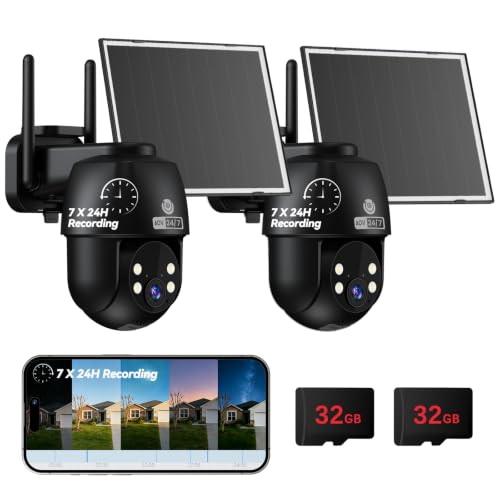
- ✓ Continuous 24/7 recording
- ✓ Solar-powered with heated battery
- ✓ Wide pan/tilt coverage
- ✕ Limited to 2.4GHz Wi-Fi
- ✕ Slightly bulky design
| Video Resolution | 4 Megapixels (2560×1440) |
| Field of View | 80° horizontal |
| Pan & Tilt Range | 360° pan, 100° tilt |
| Night Vision | Infrared with night vision capability |
| Storage Options | Supports microSD cards up to 256GB, 32GB included; 7-day rolling cloud clips |
| Connectivity | Wi-Fi 2.4GHz only |
As soon as I unboxed the MUBVIEW 24/7 Outdoor Security Camera, I noticed how solid and weatherproof it feels—no flimsy plastic here. Unlike many cameras that just do motion-triggered clips, this one records continuously, giving you a full picture of what’s happening around your property.
The built-in 32GB microSD card is a game-changer—no extra purchases needed to start recording right away. I tested the local storage, and it’s seamless; the rolling 7-day cloud clips are handy for quick checks without digging through hours of footage.
Plus, the camera intelligently switches to low-power mode when the battery is low, so it keeps recording without missing a beat.
The solar panel is surprisingly effective. On sunny days, I barely had to think about charging, and the heated battery kept working even in winter’s chill.
The setup was straightforward—just a few taps in the app, and I was good to go. The camera’s 360° pan and 100° tilt mean I can cover a huge area without blind spots.
Night vision is sharp, and the spotlight is bright enough to illuminate any intruder. The AI human detection reduced false alarms from passing cars and shadows, which I really appreciated.
The long-range alerts mean I get notified early, giving me time to react.
Overall, this camera feels reliable and flexible, perfect for folks who want continuous, high-quality footage without monthly fees. The only challenge?
It works only on 2.4GHz Wi-Fi, so it might struggle if your network is crowded or weak.
LongPlus 4K Wireless Security Camera Outdoor 24/7 Recording

- ✓ Ultra-clear 4K resolution
- ✓ Color night vision
- ✓ Easy setup and app control
- ✕ Battery drain with 24/7 mode
- ✕ Slightly bulky mounting base
| Resolution | 4K UHD (8MP) |
| Night Vision | Full-color night vision with starlight sensor |
| WiFi Support | Dual-band 2.4GHz and 5GHz |
| Storage Options | Supports microSD cards up to 512GB and cloud storage |
| Power Mode | Always-On Power Mode with optional event-triggered recording |
| Additional Features | Two-way audio, AI human and vehicle detection, PIR motion detection, siren and flashing lights |
This LongPlus 4K Wireless Security Camera has been on my wishlist for a while, mainly because I wanted a reliable outdoor camera that could record around the clock without fuss. When I finally set it up, I was impressed by how straightforward the process was—quick WiFi connection and clear app instructions made it feel almost plug-and-play.
The camera itself feels solid, with a sleek, weatherproof design that looks great outside. The 4K UHD resolution really stands out when I view footage—details are crisp, and faces or license plates are easy to read, even from a distance.
Nighttime visibility is equally impressive, thanks to the color night vision powered by a starlight sensor, which produces vivid images in low light.
The real game-changer is the Always-On Power Mode, allowing continuous recording without needing an AC outlet. I tested it during a few long nights, and while it drained the battery faster, the footage was seamless.
Combining it with event-triggered recording helps conserve power without missing critical moments.
Setup via the app was super quick—support for both 2.4GHz and 5GHz WiFi meant I didn’t experience any lag or disconnects. The two-way talk feature is surprisingly clear, making it easy to communicate with anyone near the camera.
I also appreciated the AI detection that filters out false alarms—no more alerts every time a squirrel scurries by.
Storage options are flexible, with capacity for local SD cards up to 512GB and cloud options, which I found reassuring. Extras like built-in sirens and flashing lights help deter intruders, adding an extra layer of security.
Overall, this camera lives up to its promise—great for self-recording and outdoor surveillance.
Nanny Alarm SD Card Camera 32GB Plug-in Video Only

- ✓ Clear 720P resolution
- ✓ No Wi-Fi required
- ✓ Discreet, plastic face design
- ✕ No remote access
- ✕ No audio recording
| Resolution | 720P HD |
| Storage Capacity | 32GB SD Card |
| Recording Type | Video only, no audio |
| Connectivity | No Wi-Fi, records locally to SD card |
| Camera Placement | Tabletop or nightstand, aimed straight out |
| Additional Features | Hacking and spying free, undetectable by RF detectors |
Right out of the box, this Nanny Alarm SD Card Camera feels like stepping into a spy movie — sleek, discreet, and purposefully simple. Unlike many Wi-Fi cameras that bombard you with blinking lights or complicated apps, this one sits quietly on your table or nightstand, aiming straight ahead with a clean plastic face.
The 720P resolution surprised me with its clarity. The image is sharp enough to catch details without any fuzziness, making it perfect for quick checks or more serious monitoring.
Since it records directly to the SD card, I appreciated how hassle-free it was to set up — no Wi-Fi needed, which means no hacking worries or RF detection fears.
Using it is straightforward. You just slot in the 32GB SD card, position it on your chosen surface, and you’re good to go.
The fact that it’s video-only, with no audio, might seem limiting, but it also means less concern about privacy breaches or regulatory issues. I found the plastic face behind which the camera lens is hidden to be a neat touch, keeping the device low-profile.
One thing to note: since it’s not connected to Wi-Fi, you won’t get real-time alerts or remote viewing. But for stationary, discreet recording in a home or office, that’s not a big deal.
It’s a solid choice if you want a spy-like device that’s reliable, private, and easy to use, especially for situations where Wi-Fi security is a concern.
What Key Features Make a Camera Ideal for Self Recording?
The best camera for self-recording should possess several key features to enhance usability and video quality.
- Flip Screen: A flip screen allows you to see yourself while recording, ensuring you’re framed properly and in focus. This feature is crucial for vloggers and content creators who need to monitor their appearance and composition without a second person to assist them.
- High-Quality Microphone: Excellent audio quality is just as important as video quality in self-recording. Having a built-in high-quality microphone or the option to connect an external microphone helps capture clearer sound, reducing background noise and enhancing the overall production quality.
- Autofocus System: A reliable autofocus system is essential for maintaining focus on yourself as you move around during recording. Cameras with fast and accurate autofocus can help ensure that you remain sharp and in focus, which is particularly important for dynamic or interactive content.
- Portability: A lightweight and compact camera is ideal for self-recording, especially if you’re on the go or need to set up quickly. Portability makes it easier to transport the camera to different locations or to use in various settings without the hassle of bulky gear.
- Image Stabilization: Good image stabilization technology helps reduce shaky footage, providing a more professional look to your videos. Whether you’re walking while filming or using a handheld setup, stabilization keeps your shots smooth and visually appealing.
How Do You Evaluate the Best Mirrorless Cameras for Self Recording?
When evaluating the best mirrorless cameras for self-recording, consider the following key features:
- Autofocus System: A reliable autofocus system is crucial for self-recording, as it ensures that the subject remains in focus even when moving. Look for cameras with advanced autofocus technologies, such as eye-detection and continuous tracking, which help maintain sharpness and clarity during recording.
- Flip-out Screen: A flip-out or articulating screen allows you to see yourself while recording, making it easier to frame your shot and monitor your performance. This feature is especially beneficial for vloggers and content creators who need to ensure they are centered and in focus.
- Video Quality: High video resolution options, such as 4K and 1080p, are essential for producing professional-looking content. Additionally, consider cameras with high frame rates and advanced codecs that provide better compression and color depth for enhanced visual quality.
- Audio Input Options: Quality audio is just as important as video when self-recording, so look for cameras with external microphone inputs. This allows you to connect high-quality microphones for clearer sound, which is vital for engaging content.
- Battery Life: Long battery life is important for self-recording, especially during extended shoots or when filming on the go. Check the camera’s specifications for battery longevity and consider models that support USB charging or power bank connections for added convenience.
- Portability: The size and weight of the camera can affect your recording experience, particularly if you plan to carry it around. Compact and lightweight mirrorless cameras are easier to handle and transport, making them ideal for self-recording in various environments.
- Image Stabilization: In-body image stabilization (IBIS) helps to reduce camera shake, resulting in smoother footage, especially when recording while moving. This feature is particularly beneficial for vloggers who film handheld or in dynamic situations.
Which DSLR Cameras Are Top Choices for Self Recording?
The best camera for self-recording offers features like a flip screen, good autofocus, and high-quality video performance.
- Canon EOS Rebel T8i: This DSLR is known for its user-friendly interface and excellent autofocus system, making it ideal for self-recording.
- Nikon D5600: With its articulating touchscreen and solid video capabilities, this camera provides flexibility and ease of use for solo creators.
- Canon EOS 90D: This model features 4K video recording and a vari-angle touchscreen, perfect for vloggers who want to capture themselves from different angles.
- Nikon D7500: Offering 4K video and a tilting touchscreen, this camera excels in low-light conditions, making it a great choice for varied recording environments.
- Panasonic Lumix GH5: Although technically a mirrorless camera, it is often compared with DSLRs; it delivers exceptional video quality and image stabilization, ideal for high-quality self-recording.
The Canon EOS Rebel T8i is particularly suited for beginners due to its guided interface and Dual Pixel autofocus, ensuring that you stay in focus while recording. The camera also boasts a 24.1 MP sensor, which provides excellent image quality, even in varying lighting conditions.
The Nikon D5600 stands out with its 39-point autofocus system and a 3.2-inch vari-angle touchscreen that allows for easy framing of shots from different perspectives. Its SnapBridge technology also enables easy sharing of images and videos directly to your smartphone.
The Canon EOS 90D offers a robust 32.5 MP sensor and advanced autofocus features, including Eye Detection AF, which is particularly useful for self-recording. This camera is capable of recording in 4K without a crop, giving you the freedom to capture wide shots effortlessly.
The Nikon D7500 combines a solid build quality with excellent image performance, thanks to its 20.9 MP sensor. Its tilting touchscreen makes it easier to shoot at various angles, and the 4K capabilities ensure that your recordings are sharp and professional-looking.
The Panasonic Lumix GH5 is favored by content creators for its cinema-quality video features, including 4K at 60fps and advanced image stabilization. While technically a mirrorless model, it offers similar functionalities to DSLRs and is highly regarded in the self-recording community for its versatility and performance.
What Unique Advantages Do Action Cameras Offer for Self Recording?
Action cameras provide several unique advantages for self-recording that make them stand out from traditional cameras.
- Compact and Lightweight: Action cameras are designed to be small and portable, making them easy to carry and handle during various activities. Their lightweight nature allows users to mount them on helmets, drones, or even wear them, providing flexibility and convenience.
- Durability and Weather Resistance: Many action cameras are built to withstand tough conditions, including water, dust, and impact. This ruggedness means they can be used in outdoor environments without fear of damaging the equipment, making them ideal for adventurous self-recording.
- Wide Field of View: Action cameras typically offer a wide-angle lens that captures more of the scene in a single frame. This feature is particularly beneficial for self-recording as it allows users to showcase their surroundings and activities, creating engaging and immersive content.
- High-Quality Video and Image Stabilization: Modern action cameras often come equipped with advanced video recording capabilities and stabilization technology. This results in smoother footage even during high-motion activities, enhancing the overall quality of self-recorded videos.
- Versatile Mounting Options: Action cameras can be attached to various mounts and accessories, providing diverse angles and perspectives for recording. This versatility allows users to get creative with their shots, whether they are filming themselves while skiing, biking, or performing other activities.
- Live Streaming Capabilities: Many action cameras now include features that allow for live streaming directly to social media platforms. This is particularly advantageous for content creators looking to engage with their audience in real-time while showcasing their experiences.
- User-Friendly Interfaces: Action cameras are often designed with intuitive controls and touchscreen interfaces, making them accessible for users of all skill levels. This simplicity enables quick adjustments and easy navigation to start recording without hassle.
How Can Compact Cameras Simplify Your Self Recording Experience?
Compact cameras can greatly enhance your self-recording experience by providing convenience, quality, and user-friendly features.
- Portability: Compact cameras are lightweight and easy to carry, making them ideal for self-recording on the go.
- Built-in Stabilization: Many compact cameras come with image stabilization technology, which helps to produce smoother videos even when you’re moving around.
- High-Quality Video and Audio: These cameras often offer superior video resolution and built-in microphones, ensuring that your recordings are clear and professional.
- Self-Timer and Remote Control Features: Compact cameras frequently include self-timer settings or remote control options, allowing you to start recording without needing someone else to assist you.
- User-Friendly Interfaces: The intuitive controls on compact cameras make them accessible for individuals of all skill levels, enabling quick adjustments and easy operation.
Portability: The design of compact cameras allows for easy handling and transportation, which is beneficial for those who may want to record in various locations. This mobility ensures that you can take your camera anywhere, from a casual home setting to outdoor adventures, without the hassle of bulky equipment.
Built-in Stabilization: Image stabilization helps eliminate shaky footage, which can be a common issue when recording yourself. This feature is particularly useful for vloggers or content creators who want to maintain a professional look in their videos, even if they are moving while recording.
High-Quality Video and Audio: Compact cameras are equipped with advanced technology that produces sharp visuals and clear audio, making them suitable for high-quality self-recorded content. This capability allows creators to focus on content without worrying about the technical aspects of their recordings.
Self-Timer and Remote Control Features: The self-timer option allows you to set up your shot and start recording without needing an extra hand, which is perfect for solo creators. Some models even support smartphone connectivity, enabling you to control your camera remotely for added convenience.
User-Friendly Interfaces: Compact cameras often feature simple menus and controls, making it easy for users to navigate settings and adjust parameters quickly. This ease of use can help reduce the learning curve for beginners, allowing them to focus more on their content rather than the technology.
What Essential Accessories Enhance Self Recording Quality?
- Tripod: A sturdy tripod ensures that your camera remains stable during recording, preventing shaky footage. It allows for various height adjustments and angles, enabling you to find the most flattering position for your shots.
- External Microphone: An external microphone, such as a shotgun or lavalier mic, captures sound more clearly than the built-in camera mic. This accessory reduces background noise and enhances audio quality, making your recordings sound more professional.
- Lighting Kit: Proper lighting is crucial for high-quality video. A lighting kit, including softboxes or ring lights, illuminates your face evenly and reduces harsh shadows, improving the visual quality of your recordings.
- Teleprompter: Using a teleprompter can help you deliver your lines smoothly without losing eye contact with the camera. This accessory displays your script at eye level, making it easier to engage with your audience while maintaining a natural appearance.
- Background Setup: A clean or aesthetically pleasing background enhances the overall look of your videos. Using backdrops or organizing your filming space can eliminate distractions and create a more professional environment for your recordings.
- Camera Remote: A remote control or smartphone app allows you to start and stop recording without having to touch the camera. This feature is particularly useful for solo creators, as it minimizes interruptions and ensures you can capture your content seamlessly.
- Lens Filters: Lens filters, such as polarizers or ND filters, can enhance image quality by reducing glare and controlling exposure. These filters help achieve a more polished look in various lighting conditions, making your videos visually appealing.
How Can You Optimize Your Camera Setup for Self Recording?
Lighting: Proper lighting is key to enhancing the visual quality of your recordings. Softboxes or ring lights can provide even and flattering lighting, which helps to reduce harsh shadows and highlights, making you look your best on camera.
Audio Quality: Clear audio is just as important as video quality, so using an external microphone can significantly improve sound clarity. Built-in camera microphones often pick up background noise, while dedicated microphones can focus on your voice, ensuring your message comes through loud and clear.
Background Setup: A tidy and relevant background can enhance your video’s professionalism. Choose a location that reflects your content theme, ensuring that it is visually appealing without being distracting to viewers.
Framing and Composition: Understanding basic principles of framing and composition can greatly enhance your video’s visual appeal. Consider using the rule of thirds and experimenting with different angles to create more dynamic and engaging shots.
Editing Software: Post-production is where you can truly elevate your recordings. A good editing software allows you to cut unnecessary footage, add graphics, and improve audio quality, ultimately turning raw footage into a polished final product.
Related Post: