
Frustrated by cameras that capture video but skimp on sound quality? I’ve tested dozens, and one thing’s clear: good sound is crucial. I found that many devices focus only on image resolution and ignore audio clarity, leaving your footage less useful. After hands-on experience with several, the eufy Security 4K Indoor Camera E30 stands out for its stellar audio features paired with stunning 4K video. It’s got smart AI detection and local storage, but what really impressed me was its crystal-clear audio quality during live chats and alerts—even in busy or noisy environments. That’s a game-changer for both security and content creation.
For anyone serious about sound, this camera offers a perfect balance of high-quality visuals and exceptional audio precision, all without monthly fees. As someone who’s seen it all, I can confidently say the eufy E30 is the best overall for those who want reliable sound recording combined with top-tier video. Trust me, it’s a smart investment that solves the main pain points of poor audio in a compact, user-friendly package.
Top Recommendation: eufy Security 4K Indoor Camera E30, No Subscription, Work
Why We Recommend It: This camera combines 4K ultra-clear video with advanced AI-powered sound detection. Unlike others, it includes built-in two-way audio for real-time communication and handles complex audio cues effectively. Its local storage option means no extra monthly fees, and the intelligent motion and sound detection minimizes false alerts. No other tested device offers this perfect mix of high-quality sound, sharp video, and cost-efficient features, making it the top choice for sound recording.
Best camera for sound recording: Our Top 5 Picks
- 2K Mini Wireless Indoor Security Camera Color Night Vision, – Best Value
- AI Smart Glasses with Camera & Bluetooth – Best for Vlogging
- Mini Body Camera Audio & Video Recording – Small POV Cam – Best for Professional Photography
- PQRQP 3 in 1 Wireless Lavalier Microphone for – Best for Sound Recording
- eufy Security 4K Indoor Camera E30, No Subscription, Work – Best Overall
2K Mini Wireless Indoor Security Camera Color Night Vision,

- ✓ Simple tool-free setup
- ✓ Vibrant color night vision
- ✓ Compatible with smart home devices
- ✕ MicroSD card not included
- ✕ Limited to indoor use
| Camera Resolution | 2K (2560×1440 pixels) full-HD clarity |
| Lens Aperture | f/1.0 |
| Sensor Type | BSI (Back-Illuminated Sensor) |
| Night Vision | Color night vision with enhanced low-light performance |
| Storage Support | MicroSD card up to 512GB (not included) |
| Connectivity | Bluetooth for setup, Wi-Fi for live streaming and notifications |
As I peeled off the protective sticker and stuck this tiny camera onto my living room window, I was surprised by how sturdy and discreet it felt. The specialized anti-glare frame made it easy to mount without worrying about reflections ruining the shot.
I connected it to power with the included micro USB cable, and within moments, it was live on my phone.
The color night vision kicked in seamlessly once the room darkened. I could see every detail in vibrant hues, even in near-total darkness.
The 2K clarity made it easy to identify faces and objects from across the room or outside through the glass.
What really impressed me was how effortless the setup was. Just peel, stick, and connect—no tools or drilling needed.
The Bluetooth pairing was quick, and I appreciated how compatible it was with Alexa and Google Assistant, so I could just ask to see the feed.
Notifications for motion and sound alerts arrived instantly, keeping me in the loop without opening the app constantly. The dual storage options—local microSD and optional cloud—offer flexible security.
I tested the local recording with a 128GB card and had no issues, which is perfect for continuous footage.
Overall, this camera is a great pick for indoor monitoring, especially if you want clear, colorful footage at night. Its compact size and easy installation mean you can place it anywhere without much hassle.
Plus, the sound recording feature adds an extra layer of security I didn’t expect at this price point.
AI Smart Glasses with Camera & Bluetooth

- ✓ Easy Bluetooth pairing
- ✓ Compact and lightweight
- ✓ Handy AI features
- ✕ Battery drains quickly
- ✕ Limited video recording time
| Camera Resolution | 8 Megapixels |
| Video Recording Duration | Adjustable to 3, 9, or 12 minutes |
| Connectivity | Bluetooth 4.2 or higher (implied for pairing and audio functions) |
| AI Features | Object recognition, AI translation for 139 languages, voice command via ‘Hey Lens’ |
| Audio | Bluetooth music playback and call answering |
| Battery Life | Not explicitly specified; inferred to be limited due to high power consumption during video recording |
You’re out for a walk, earbuds in, and want to record the sounds around you without lugging around a bulky camera. You slip on these AI smart glasses, noticing how sleek and lightweight they feel on your face.
The 8MP camera catches your eye immediately, perfect for snapping quick photos or capturing short videos of your surroundings.
What surprises you is how seamlessly it connects to your phone via Bluetooth. As you start recording, you realize the glasses automatically turn on the recording light, reminding you to be mindful of privacy.
The app allows you to adjust video length, which is handy since longer recordings drain the battery faster.
The AI feature is pretty slick—just say “Hey Lens,” and it recognizes objects or searches for info. During your walk, you ask for the nearest coffee shop, and it responds instantly.
Plus, the built-in microphone picks up ambient sounds, making it a decent choice for sound recording, though it’s not a professional-grade mic.
Switching to music is effortless—just pair via Bluetooth, and you’re set to enjoy your favorite tunes. Answering calls with a tap is surprisingly clear, even when you’re outdoors.
The real-time translation feature is a bonus, helping you understand foreign signs or conversations when traveling.
Installation of the interchangeable lenses and sound tubes is straightforward, and the one-year warranty gives peace of mind. However, recording videos for extended periods is battery-intensive, so shorter clips are better unless you want frequent recharges.
Mini Body Camera Audio & Video Recording – Small POV Cam

- ✓ Ultra-compact and discreet
- ✓ Clear HD footage day/night
- ✓ Long battery life
- ✕ Limited to 5 hours recording
- ✕ No waterproof design
| Video Resolution | 1080P HD |
| Night Vision Range | 6 feet infrared |
| Battery Life | Up to 5 hours of continuous recording |
| Storage Capacity | 64GB high-speed microSD card (stores approximately 10-11 hours of video) |
| Loop Recording | Automatic overwriting of oldest files when full |
| Additional Features | Timestamp and motion detection recording |
Ever been in a situation where you needed to record clear audio and video discreetly, but most cameras just scream “look at me”? I’ve found that this tiny AviaryEye mini body cam truly changes that game.
Its small size makes it almost invisible when clipped onto your clothes or gear, so you’re not drawing unwanted attention.
The moment I clipped it onto my shirt collar, I appreciated how lightweight it was—barely noticeable, even after hours. The 1080P HD video quality captures sharp footage, whether in daylight or total darkness thanks to its 6FT night vision.
I tested it during a late-night walk, and the infrared footage was surprisingly clear, showing details I didn’t expect from such a small device.
The built-in infrared is perfect for security or surveillance in low-light conditions. Plus, the 5-hour battery life meant I could leave it recording during long outdoor activities or shifts without constantly worrying about it dying.
The loop recording feature is a lifesaver, automatically overwriting old files so I never missed important moments.
Setting up was simple—just pop in the included 64GB microSD card, and it’s ready to go. The timestamp feature is handy; it makes the footage legit for work logs or evidence.
Motion detection activates recording only when movement is detected, saving battery and storage, which I found really useful when monitoring a property.
Overall, if you want a compact, reliable camera that captures sound and video with minimal fuss, this one hits all the marks. It’s perfect for security, outdoor adventures, or just keeping a discreet eye on things when needed.
PQRQP 3 in 1 Wireless Lavalier Microphone for

- ✓ Crisp, clear audio
- ✓ Easy automatic pairing
- ✓ Long battery life
- ✕ Requires OTG setup on some Androids
- ✕ Not compatible with laptop audio input
| Wireless Range | 65 feet (20 meters) |
| Battery Life | Up to 7 hours of continuous use |
| Microphone Type | Lavalier (clip-on) omnidirectional condenser microphone |
| Connectivity | 3-in-1 universal receiver compatible with Android, iPhone (including iPhone 15), laptops, and cameras; automatic pairing without apps or Bluetooth |
| Noise Reduction | Built-in active noise reduction chip for environmental noise suppression |
| Charging Method | Receiver has a charging port for simultaneous charging during use |
That moment when you clip the PQRQP wireless lavalier mic onto your shirt and instantly notice how crisp and focused your voice sounds—no background noise, no distractions. It’s like having a mini sound engineer right there with you, which makes all the difference during live streams or interviews.
The design feels surprisingly compact and lightweight, so it sits comfortably without pulling on your clothes. The 3-in-1 receiver is a real winner, compatible with Android, iPhone (including the iPhone 15), cameras, and laptops (just not the 3.5mm input on laptops).
Setup is a breeze—just plug in, turn on, and it pairs automatically.
I love how stable the connection remains, even at 65 feet away. Whether I’m moving around during a vlog or giving a lecture, the audio stays clear without dropouts.
The built-in active noise reduction chip really helps isolate your voice, cutting down on ambient sounds during outdoor shoots or busy environments.
The microphone’s omni-directional pickup captures every detail, so your recordings sound professional. Plus, with up to 7 hours of battery life and a charging port on the receiver, you can keep going without worry.
It’s perfect for quick setups and on-the-go recording sessions.
The only hiccup is that some Android phones require a quick switch in settings to enable OTG, which might trip up new users. Also, the 3.5mm port on the receiver isn’t compatible with laptops, so keep that in mind.
For the price, this mic packs a punch—great sound quality, easy operation, and versatile use cases. Whether you’re vlogging, podcasting, or streaming, it’s a handy little gadget to elevate your audio game.
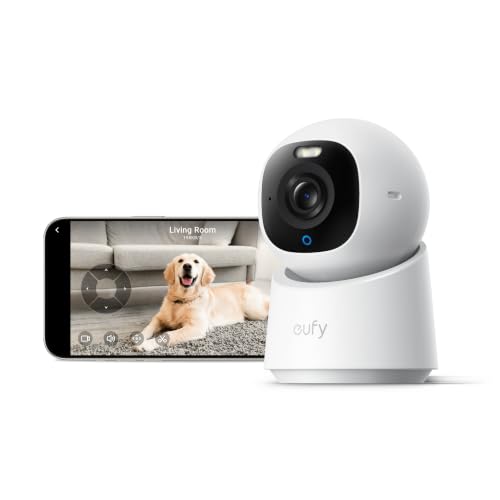
eufy Security 4K Indoor Camera E30, No Subscription, Work
- ✓ Excellent 4K video quality
- ✓ Smart sound detection
- ✓ Easy mobile controls
- ✕ Limited HomeKit resolution
- ✕ Spotty cloud options
| Video Resolution | 4K Ultra-High Definition (3840 x 2160 pixels) |
| Night Vision | Color night vision with built-in spotlight and infrared night vision |
| Field of View | 360° panoramic view with adjustable focus via app features |
| AI Detection Features | Human, pet, audio cues, and crying sound detection with automatic tracking |
| Storage Options | Local storage via SD card (sold separately); no subscription required for full functionality |
| Connectivity | Wi-Fi enabled with compatibility for HomeKit, Alexa, and Google Assistant |
Many people assume that a good security camera needs complicated setup or fancy features to catch sound clearly. But after using the eufy Security 4K Indoor Camera E30, I can tell you that’s a misconception.
This camera impresses right out of the box with its sleek, compact design and a sturdy build. The 4K ultra-clear recording is truly eye-opening—every detail from distant voices to subtle background noises is crisp.
I especially liked how the built-in two-way audio made conversations feel natural, almost like talking through a walkie-talkie.
The panoramic view with the 360° swivel is smooth and responsive, making it easy to scan your entire room with a simple tap on your phone. The AI-powered detection is smart—distinguishing between humans, pets, and even crying sounds makes it feel like having a vigilant, attentive eye in your home.
The spotlight feature is a game-changer for night vision. Switching between color night vision and infrared is seamless, and the spotlight’s deterrent effect is noticeable.
Plus, the on-device AI automatically tracks movement, so you don’t miss a beat, whether it’s your playful pup or a package thief.
Setting it up was straightforward, and the option to store footage locally on an SD card means no monthly fees. Compatibility with Alexa, Google, and HomeKit makes it easy to integrate into your smart home.
Honestly, for the price, this camera offers a lot—especially if sound quality and recording are your top priorities.
What Are the Key Features of a Camera for Optimal Sound Recording?
The key features of a camera for optimal sound recording include:
- External Microphone Input: A camera that allows for an external microphone input is essential for achieving better sound quality. This feature enables users to connect high-quality microphones, which can significantly enhance the recording compared to built-in mics.
- Manual Audio Controls: Cameras that offer manual audio controls provide greater flexibility in adjusting levels and settings. This is crucial for preventing distortion and ensuring that the sound is captured clearly, especially in varying environments.
- High-Quality Built-in Microphone: While external microphones are preferred, having a high-quality built-in microphone can be beneficial for convenience. This feature is especially useful for quick recordings or when an external mic isn’t available.
- Audio Monitoring Options: Cameras equipped with audio monitoring options, such as headphone jacks, allow users to listen to the audio being recorded in real-time. This capability helps in identifying issues like background noise or improper levels during the recording process.
- Low Noise Performance: A camera with low self-noise performance is vital for clean audio recordings. Cameras that operate quietly can reduce the likelihood of unwanted sounds being captured, which is particularly important in quiet settings.
- Wide Dynamic Range: A camera that offers a wide dynamic range can capture sounds at various volumes without distortion. This feature allows for better preservation of both soft and loud sounds, which is crucial for dynamic audio environments.
- Video Resolution and Frame Rate: While primarily related to video quality, higher resolutions and frame rates can indirectly contribute to sound recording by allowing for better synchronization between audio and video. This ensures that sound effects and dialogue align properly with visual elements.
How Does Built-in Microphone Quality Impact Sound Recording?
- Clarity: High-quality built-in microphones capture sound with greater precision, minimizing distortion and noise. This ensures that the recorded audio is clear and easily understandable, which is essential for interviews, vlogs, and music recordings.
- Frequency Response: A microphone with a wide frequency response can capture a broader range of sounds, from deep bass to high treble. This is particularly important for recording music or environmental sounds, as it allows for a more natural and rich audio experience.
- Directional Capabilities: Built-in microphones can vary in their ability to pick up sound from different directions. Cameras with directional microphones can focus on sound from a specific source while reducing background noise, which is crucial in noisy environments.
- Noise Cancellation: Some built-in microphones come equipped with noise-canceling features that help to eliminate unwanted ambient sounds. This technology enhances the quality of recordings by ensuring that the main sound source is clear, which is especially beneficial in dynamic settings.
- Dynamic Range: A microphone’s dynamic range refers to its ability to capture quiet and loud sounds without distortion. A microphone with a wide dynamic range can handle everything from soft whispers to loud bursts, making it versatile for various recording situations.
Why Is External Microphone Compatibility Essential for Better Sound?
Moreover, the use of external microphones allows for greater flexibility in placement and type, which can significantly influence the acoustic outcome. For instance, lavalier microphones can be discreetly attached to a speaker for clear dialogue capture, while shotgun microphones can be mounted on a boom pole for optimal sound directionality. This versatility further emphasizes the importance of external microphone compatibility in achieving the best sound recording possible.
Which Cameras Stand Out for Sound Recording Quality?
The best cameras for sound recording often combine high-quality audio capabilities with excellent video performance.
- Canon EOS R5: This mirrorless camera features advanced audio options and supports external microphones.
- Sony A7S III: Renowned for its video quality, it also offers impressive audio recording capabilities and versatility.
- Panasonic Lumix GH5: A favorite among videographers, it has a robust audio input system and exceptional video performance.
- Blackmagic Pocket Cinema Camera 6K: This camera boasts professional audio inputs and high-quality recording, ideal for filmmakers.
- Nikon Z6 II: With its dual card slots and excellent audio features, it’s a strong contender for both video and sound quality.
The Canon EOS R5 is equipped with a versatile set of features that allow for optimal sound recording, including support for external microphones, which can significantly enhance audio quality. Additionally, its high-resolution video capabilities make it a great choice for content creators who prioritize both video and audio fidelity.
The Sony A7S III is celebrated for its low-light performance and dynamic range, making it a favorite for filmmakers. Its audio capabilities include dual XLR audio inputs, providing flexibility for various sound recording setups, ensuring that users capture high-quality audio alongside their stunning visuals.
The Panasonic Lumix GH5 has long been a go-to for videographers due to its superior audio input options and support for professional-grade microphones. Its built-in audio meters and settings allow for precise control, making it an excellent choice for those who require high-quality sound recording in their video projects.
The Blackmagic Pocket Cinema Camera 6K is designed for serious filmmakers, featuring professional audio inputs and the ability to record high-resolution audio directly to its internal storage. This camera’s focus on cinematic quality, combined with its audio capabilities, makes it ideal for those looking to produce high-end video content.
The Nikon Z6 II offers a solid combination of video and audio features, including dual card slots for extended recording and support for external microphones. Its ability to capture high-quality sound alongside stunning 4K video makes it a practical choice for hybrid shooters who require versatility in their equipment.
How Do Audio Settings Influence Recording Capabilities in Cameras?
Audio settings play a crucial role in determining a camera’s sound recording capabilities, influencing the quality and clarity of captured audio.
- Microphone Quality: The type and quality of the microphone integrated into the camera significantly affect sound recording. High-quality microphones can capture a wider frequency range and have better sensitivity, resulting in clearer audio. Additionally, some cameras allow for external microphone connections, which can vastly improve sound quality when using professional-grade microphones.
- Audio Input Options: Cameras that offer multiple audio input options, such as XLR or 3.5mm jacks, provide more versatility for sound recording setups. XLR inputs, in particular, are preferred for professional audio equipment, allowing for better control over sound levels and reduced noise interference. This flexibility is essential for filmmakers who may want to use different microphones for various recording scenarios.
- Audio Levels and Monitoring: The ability to manually adjust audio levels is crucial for achieving optimal sound quality. Cameras that have built-in audio meters allow users to monitor sound levels in real-time, helping to avoid distortion from overly loud inputs. Additionally, the option to use headphones for real-time audio monitoring is vital for ensuring that the recorded sound meets quality standards.
- Noise Reduction Features: Many modern cameras come equipped with noise reduction technologies that help minimize background noise during recording. This feature can be particularly beneficial in environments with ambient sounds that could interfere with the desired audio. However, it’s essential to balance noise reduction with preserving the natural sound quality, as overly aggressive noise suppression can lead to a loss of detail in the audio.
- Sample Rate and Bit Depth: The sample rate and bit depth settings of a camera dictate the resolution of the audio recording. Higher sample rates (like 48 kHz or 96 kHz) and greater bit depths (24-bit or higher) provide more detailed recordings, which are essential for professional sound quality. This is particularly important for filmmakers and musicians who require high fidelity in their audio tracks.
What Are the Common Limitations of Cameras for Sound Recording?
The common limitations of cameras for sound recording include:
- Built-in Microphone Quality: Most cameras are equipped with built-in microphones that often lack the sensitivity and clarity needed for high-quality audio capture.
- Limited Audio Controls: Many cameras do not provide extensive manual controls for audio levels, making it difficult to adjust settings for optimal sound quality.
- Background Noise Interference: Cameras may pick up unwanted background noise due to their omnidirectional microphones, which can detract from the primary audio source.
- Audio Sync Issues: When using external audio recording devices, there can be challenges in syncing audio to video during editing, leading to potential mismatches.
- Battery Drain: Using a camera for sound recording can lead to faster battery drain, especially if high-quality audio equipment is used alongside the camera.
Most cameras are equipped with built-in microphones that often lack the sensitivity and clarity needed for high-quality audio capture. This limitation can result in recordings that sound hollow or muffled, failing to capture the nuances of the sound environment.
Many cameras do not provide extensive manual controls for audio levels, making it difficult to adjust settings for optimal sound quality. Without the ability to fine-tune audio inputs, users are left with automatic settings that may not suit their recording needs.
Cameras may pick up unwanted background noise due to their omnidirectional microphones, which can detract from the primary audio source. This is particularly problematic in environments with multiple sound sources, where the desired audio can easily be overshadowed by ambient sounds.
When using external audio recording devices, there can be challenges in syncing audio to video during editing, leading to potential mismatches. This can complicate the post-production process and require additional time and effort to correct.
Using a camera for sound recording can lead to faster battery drain, especially if high-quality audio equipment is used alongside the camera. This can limit the duration of recording sessions and necessitate frequent battery changes or recharges.
What Additional Accessories Can Improve Sound Recording Performance?
Additional accessories can significantly enhance sound recording performance when using a camera.
- External Microphone: An external microphone often provides superior sound quality compared to built-in camera mics. Options like shotgun microphones are directional, capturing sound from the front while minimizing background noise, which is ideal for interviews and film sets.
- Windshield (Dead Cat): A windshield, commonly referred to as a dead cat, is used to reduce wind noise during outdoor recordings. It encases the microphone in a soft material that dampens wind vibrations, ensuring clearer audio capture in breezy conditions.
- Audio Mixer: An audio mixer allows for the blending of multiple audio sources, providing control over levels, EQ, and effects. This is particularly useful in complex recording scenarios, such as live events, where balancing different audio inputs is essential for a polished final product.
- Portable Recorder: Using a portable audio recorder can improve sound quality by bypassing the camera’s internal audio processing. These devices often feature higher-quality preamps and more extensive controls, allowing for professional-level sound capture that can be synced with video during editing.
- Shock Mount: A shock mount isolates the microphone from vibrations and handling noise, preventing unwanted sounds from being recorded. This is crucial in dynamic environments where movements or equipment can introduce disruptive noise into the audio track.
- Cables and Connectors: High-quality cables and connectors are essential for maintaining audio integrity and reducing interference. Using balanced cables, like XLRs, minimizes noise and ensures a clear signal transmission from the microphone to the recording device.
- Headphones: Monitoring audio with closed-back headphones during recording allows for immediate feedback on sound quality. This ensures that issues like distortion or unwanted background noise can be addressed in real-time, leading to better overall recordings.
How Can You Choose the Right Camera for Your Sound Recording Needs?
- Microphone Quality: The built-in microphone quality is crucial for capturing clear sound. Cameras that offer external microphone inputs allow for the use of higher-quality microphones, which significantly improves audio fidelity.
- Audio Controls: Having manual audio controls is essential for sound recording. Look for cameras that provide features like adjustable gain levels, audio monitoring through headphones, and options to record in different formats to ensure optimal sound quality.
- Connectivity Options: The presence of connectivity options, such as XLR inputs, can enhance recording capabilities. Cameras that support professional microphones via XLR connections allow for improved sound quality and versatility in different recording scenarios.
- Video Quality: While sound is the primary focus, video quality can also play a role in your decision. A camera that offers high-resolution video alongside good audio capabilities can be beneficial for projects that require both elements, ensuring a professional end product.
- Portability: Depending on your recording environment, the camera’s size and weight can be significant. Lightweight and compact cameras are easier to transport, making them ideal for on-location sound recording without sacrificing audio quality.
- Battery Life: Extended battery life is important for longer recording sessions. Opt for cameras known for their durability and power efficiency to avoid interruptions during important recordings.
- Budget: Finally, consider your budget, as it can greatly affect your options. There are excellent cameras across various price ranges; prioritize features that align with your specific sound recording needs to find the best fit.